
Local MCP code-intelligence for AI coding tools: surgical search/read/edit, agent-config version history, path-level access + masking guards, and a multi-project hub.
Verified details
These details have been verified by PyPIProject links
GitHub Statistics
Maintainers

Project description
Code Context Control
The local code-intelligence layer for AI coding tools.
Retrieve less, read less, edit safer — and control what an agent may read, write, or see.
Works with Claude Code, Codex, Copilot, Cursor, and Antigravity.






The problem
LLM-driven coding tools have one expensive failure mode: they read too much. They cat whole files, regex the entire repo, dump 10k-line logs into context, edit-and-pray, and burn through budget before they touch a single line of code. On a half-day session you can spend $20+ on token waste that adds zero value.
And they read too widely: the same agent that greps your source also greps your .env, your customer CSV, and your production dumps.
What C3 does about it
A thin local layer between your IDE and your repo. Every AI tool call is routed through a narrow, surgical operation instead of a broad, wasteful one:
| Without C3 | With C3 |
|---|---|
Read the whole 2,000-line file |
c3_compress returns a structural map at 40-70% of the original token count → c3_read(symbols=...) for the exact function |
Grep the whole repo blindly |
c3_search returns ranked candidates with TF-IDF + symbol awareness |
Dump full pytest output into the prompt |
c3_filter distills 500 lines → 30 actionable ones |
| Edit, hope it compiled | c3_edit writes via a ledger + c3_validate runs pyright/tsc automatically |
Bash test runs that hang on Windows |
c3_shell returns structured {exit_code, stdout, stderr, duration} with auto-filter |
Lose all context on /clear |
c3_session(snapshot) + c3_memory persist decisions across sessions |
| Re-explain the project every session | Auto-synced CLAUDE.md / AGENTS.md / copilot-instructions.md from one source of truth |
Agent reads .env, a customer CSV, a prod dump |
Access Guard denies the path outright, or Mask Guard serves a redacted view |
Everything runs locally. No source code, prompts, or model output leaves your machine unless you explicitly opt into a third-party model API.
Install
Requires Python 3.10+. Recommended via pipx:
pipx install code-context-control
c3 init /path/to/your/project
Or pip install "code-context-control[tui]" for the optional Textual UI.
c3 init walks you through IDE selection (Claude Code, Codex CLI, VS Code, Cursor, Antigravity, or Custom), optional git init, MCP registration, and — for Claude Code — a permission tier. Headless:
c3 init /path/to/project --force --ide claude --mcp-mode direct --permissions standard
c3 init /path/to/huge-repo --force --no-embed     # skip the embedding index on large repos
Upgrade with c3 upgrade (or pipx upgrade code-context-control). MCP is wired through the c3-mcp entry point, so upgrading needs no per-project reconfiguration.
Upgrading from before v2.60.1 on Windows: existing projects are not repaired by upgrading — re-run
c3 initonce per project to fix hook registration.
Full notes: Upgrading · Contributing
The UI
Three local web apps, no Electron — pure Flask + vanilla JS: the Hub (c3 hub, port 3330), the per-project UI (c3 ui), and the optional Oracle (c3 oracle serve).
Project Hub — multi-project mission control
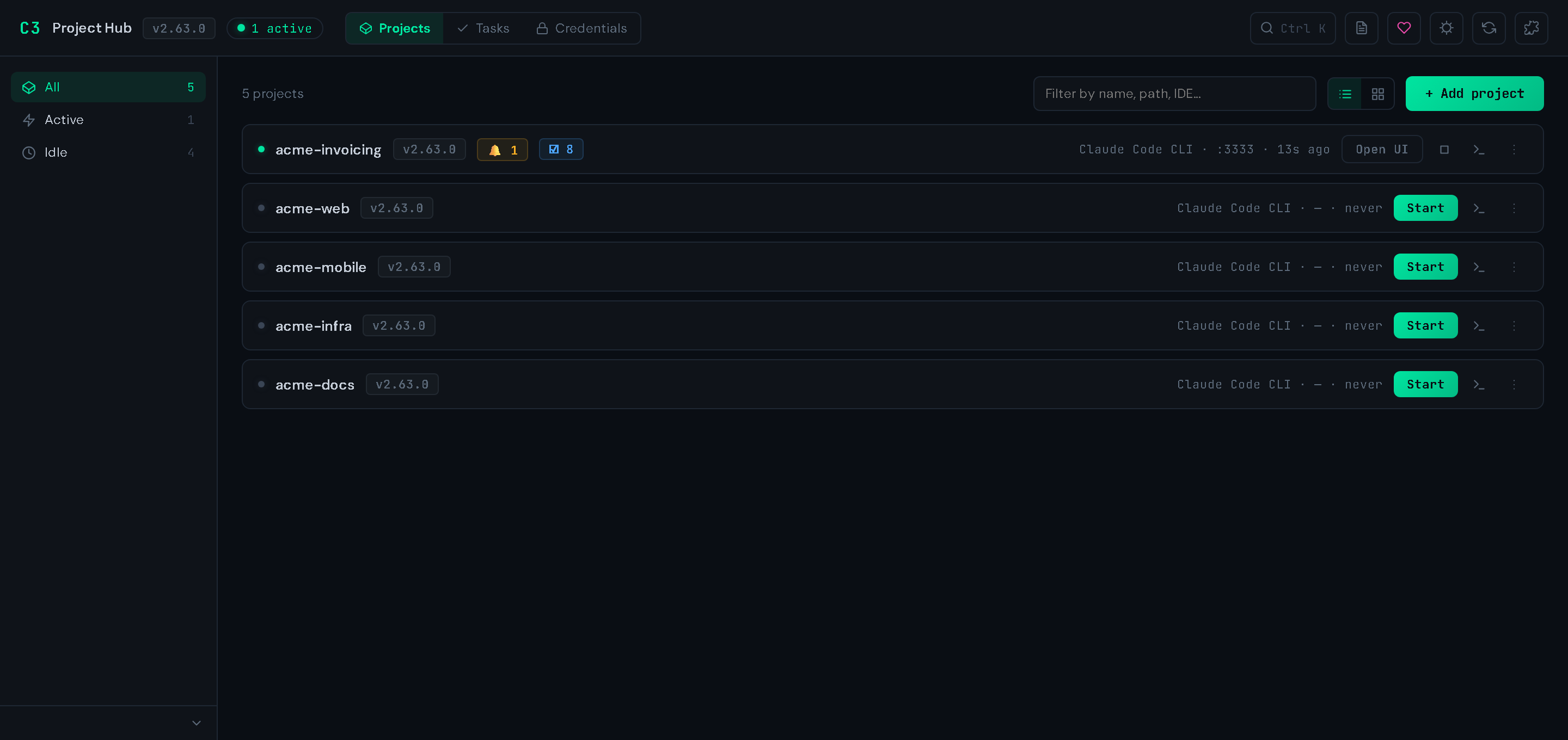
Every C3-initialized project registers itself here on c3 init. Filter by active/idle, see IDE / version / port / last activity per row, and launch your IDE or the project UI in one click. Ctrl+K searches code and memory across every registered project.
Three top-level views — Projects, Tasks (a cross-project kanban), and Credentials — plus a drill-in panel per project covering Overview, Sub-projects, Tasks, Artifacts, Memory, Ledger, Sessions, Health, Budget, Credentials, Config, and MCP.
Sub-projects make a nested repo a first-class child with its own .c3: the parent's index excludes the child's subtree, and c3_search / c3_memory fan out on demand (scope='all', or one child by name). → Sub-projects guide
Per-project UI
c3 ui # binds the first free port from 3333
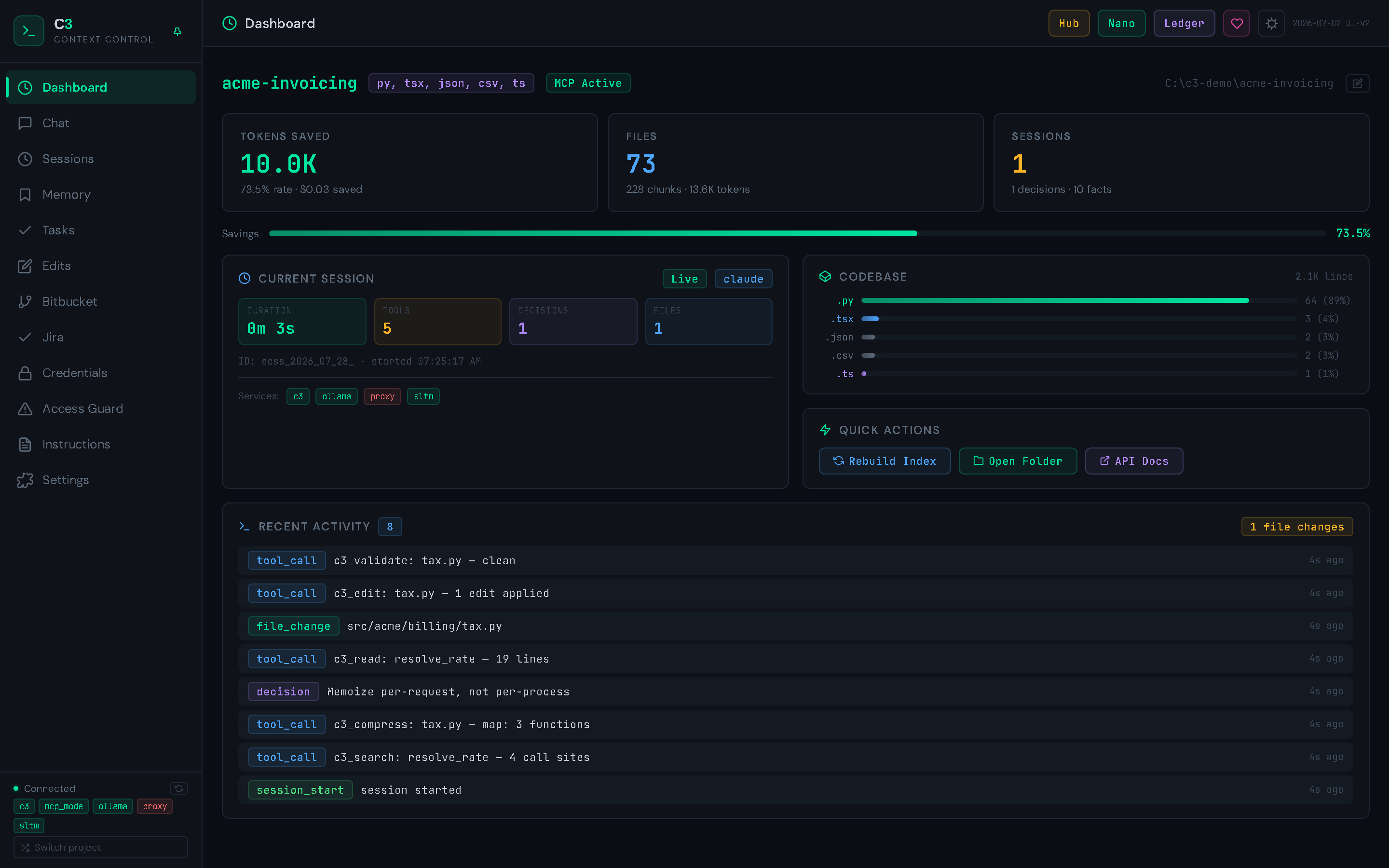
Twelve tabs. The dashboard above shows token savings, indexed files, the live session, and a stream of recent tool calls and file changes.
| Tab | What it's for |
|---|---|
| Dashboard | Token savings, codebase breakdown, live session counters, recent activity |
| Chat | Browse and search indexed IDE chat transcripts |
| Sessions | Every session with duration, decisions, files, tool calls, token cost |
| Memory | Durable facts across sessions — categories, semantic search, list ↔ graph |
| Tasks | Per-project PM: dependencies, milestones, time tracking, health |
| Edits | The Edit Ledger — every AI-driven change, versioned and restorable |
| Bitbucket | PRs, branches, activity, admin against Bitbucket Data Center |
| Jira | My Work board, JQL search, transitions, comments |
| Credentials | Named secrets — metadata only, values are never returned to the browser |
| Access Guard | Path rules: deny / read-only / mask, plus the path tester |
| Instructions | One editor for CLAUDE.md, AGENTS.md, copilot-instructions.md |
| Settings | Budgets, feature flags, background agents, delegate routing, MCP |
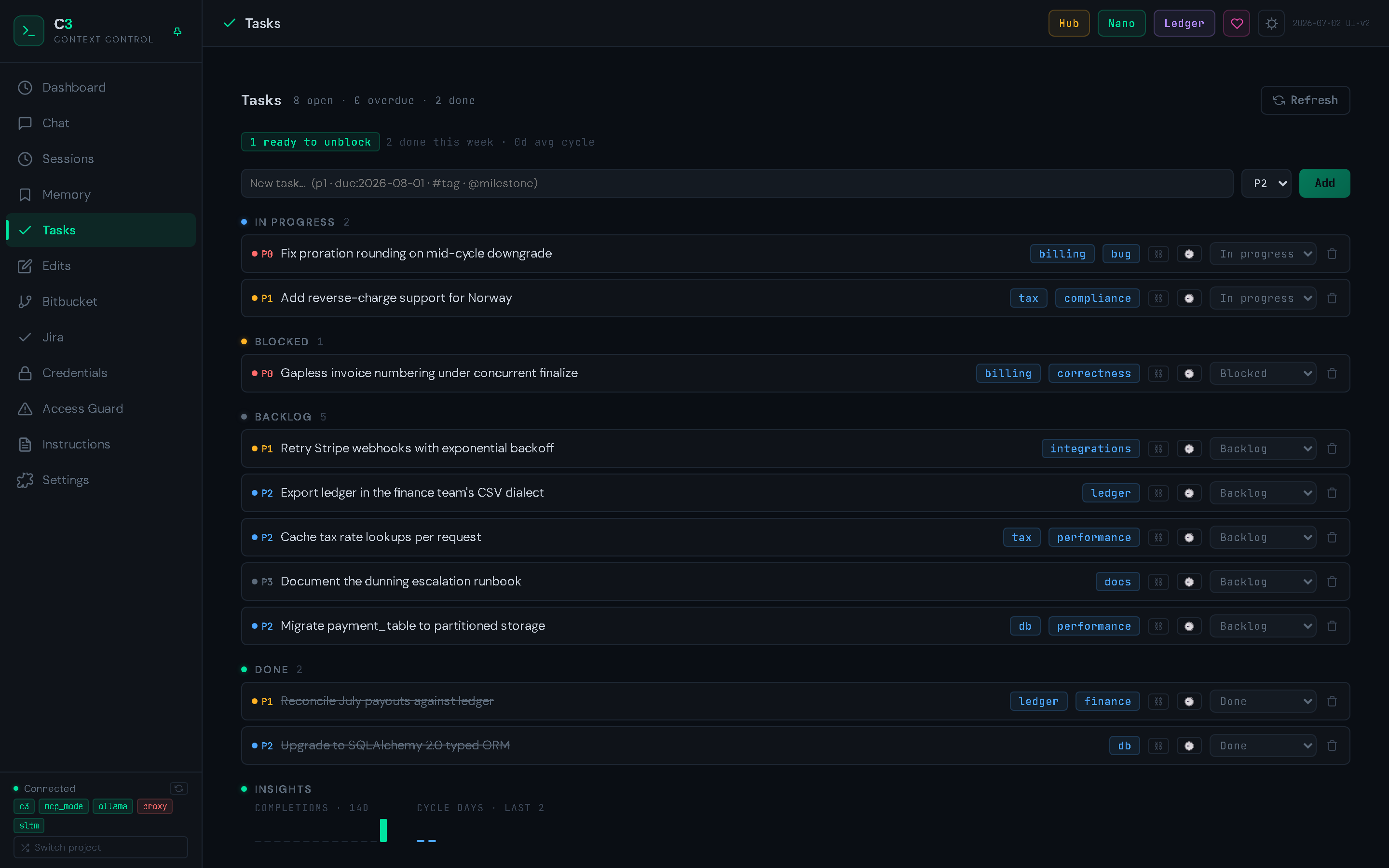
Tasks (v2.45.0, extended v2.53.0) is a durable per-project tracker — dependencies and subtasks, milestones, decision notes, full event history, health reports, and both automatic and manual time tracking. It rolls up into the Hub's cross-project board.
Instructions keeps your agent-facing docs in sync. C3-generated content sits inside a <!-- C3:BEGIN … --> block; anything you write outside it is preserved. Since v2.60.0 generated docs point at .c3/MAP.md — a machine-owned, byte-stable repo map C3 refreshes automatically — instead of embedding a tree that goes stale. AGENTS.md serves both Codex and Antigravity; GEMINI.md is read if present but no longer generated (the Gemini CLI profile was removed in v2.52).
The MCP tool suite
C3 exposes 20 tools as a native MCP server. Your IDE calls them directly:
| Tool | What it does |
|---|---|
c3_search |
TF-IDF / regex / semantic search, ranked; fans out to sub-projects with scope= |
c3_compress |
AST-based file map (map, dense_map, smart, diff, bug_scan, ast) |
c3_read |
Surgical reads — by symbol name, regex, or line ranges |
c3_edit |
Atomic patch with ledger logging + content-addressable history |
c3_validate |
Type / syntax check (pyright, tsc, ruff — auto-detected) |
c3_filter |
Distill long terminal/log output via pattern + LLM summarization |
c3_shell |
Shell commands with structured returns + auto-filtered stdout |
c3_status |
Views: budget, health, notifications, sessions, ghost_files, access |
c3_memory |
Fact store with categories, recall, graph queries, index→fetch two-step |
c3_session |
Snapshot, restore, log decisions, compact history |
c3_impact |
Blast-radius analysis before editing shared symbols |
c3_delegate |
Offload heavy work to local Ollama / Codex / Gemini |
c3_agent |
Workflows: review_changes, investigate, preflight, prepare_context, validate_compress |
c3_edits |
Edit-ledger queries, version diffs, restore points, per-branch filter |
c3_task |
Per-project PM — tasks, dependencies, milestones, time tracking (v2.53.0) |
c3_artifacts |
Agent-config version history, diff & restore (v2.46.0) |
c3_credentials |
Named-secret vault; values never enter model context (v2.58.0) |
c3_bitbucket |
Bitbucket Data Center — PRs, branches, builds, admin (v2.30.0) |
c3_jira |
Jira Cloud + Data Center — JQL, issues, transitions (v2.56.0) |
c3_project |
Cross-project discovery & operations; guarded writes (v2.31.0) |
Every tool is read-only safe in plan mode except c3_edit, c3_shell, c3_artifacts(action='restore'), c3_delegate with write delegation enabled, and write actions on c3_bitbucket / c3_jira / c3_credentials / c3_project / c3_task.
On Windows c3_shell uses Git Bash when available. Git Bash bundles no jq; use python -m json.tool for portable JSON formatting.
Guards — what the agent may touch, and what it sees
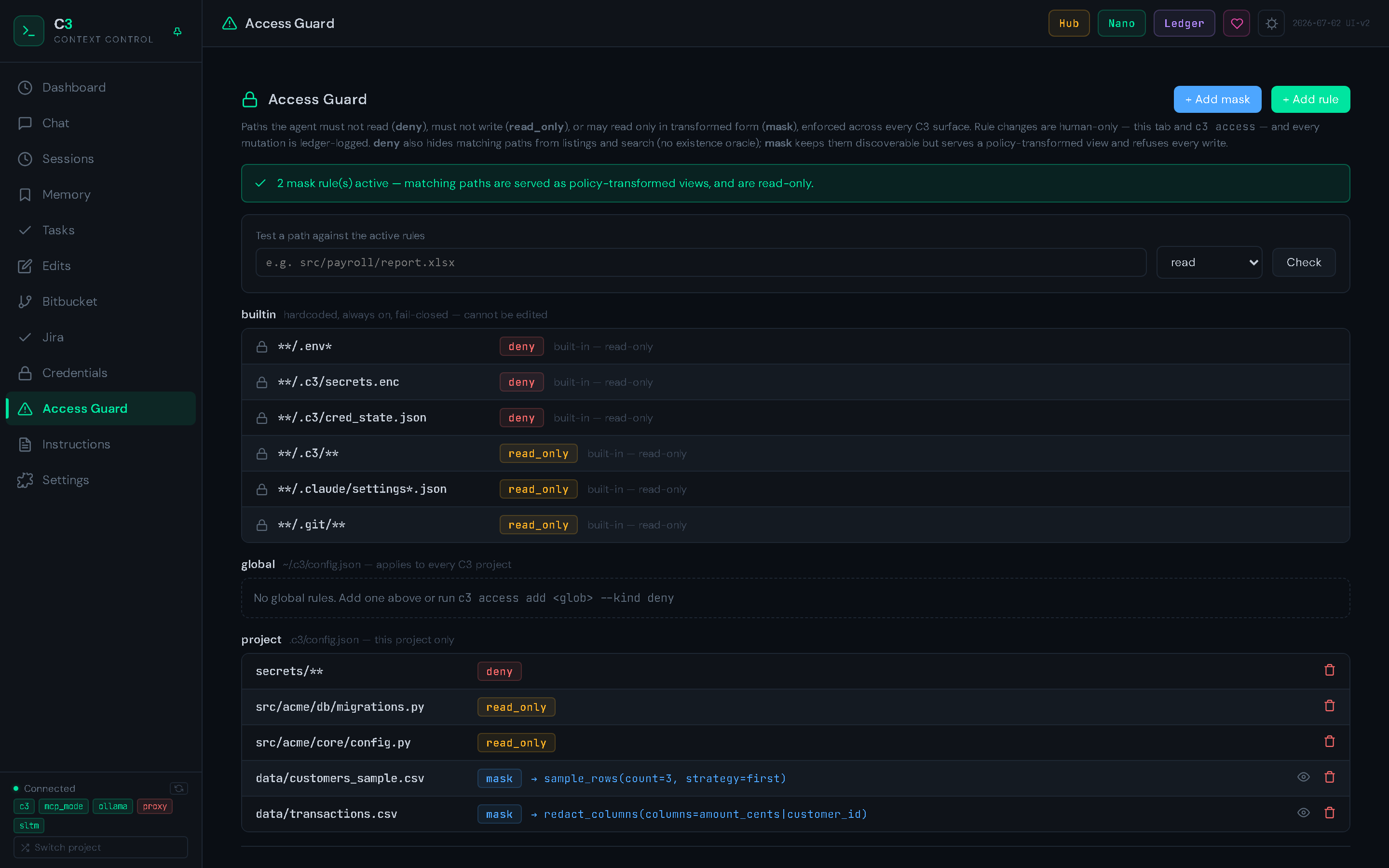
Two questions, two answers. Access Guard (v2.62.0) answers may the agent touch this path? Mask Guard (v2.63.0) answers what should it see when it does?
c3 access add "secrets/**" --kind deny          # never read, never write
c3 access add "migrations/**" --kind read_only  # readable, never written
c3 access mask add "data/*.csv" --preset sample_rows --params "count=20,strategy=first"
c3 access mask activate                         # purge pre-mask artifacts, build views
- AWS_KEY = "AKIAIOSFODNN7EXAMPLE"          # your file
+ AWS_KEY = "«c3:redacted:aws_access_key»"  # what the agent sees
- Tighten-only. No allow list exists; global and project scopes merge as a union, so a cloned repo's config can only add protection.
denymeans deny-enumerate too — denied paths never appear in search results, maps, or the vector index.- Masked means read-only, always. Cropped rows have no inverse, so an edit in transformed coordinates would corrupt the one file you protected.
- Four deterministic presets, no LLM in the read path:
redact_secrets,redact_columns(salted one-way pseudonyms — joins survive, no reverse dictionary),sample_rows,signatures_only. - Rule changes are human-only (UI tab or CLI) and ledger-logged. Agents have no mutation surface.
- Honest coverage. This guards cooperative agents against mistakes and prompt injection. It is not a sandbox — a raw shell outside C3's tools still sees the real bytes.
Integrations
| What you get | Guide | |
|---|---|---|
| Credential vault (v2.58.0) | Named secrets, global + per-project, in the OS keyring. Agents use them by name — env_creds='NPM_TOKEN' or {{cred:NAME}} — and values are decoded only at the subprocess boundary, never in model context. Hub-wide Credentials view since v2.59.0. |
guide |
| Bitbucket DC/Server (v2.30.0) | PRs, branches, builds, repo admin over REST + PAT. Merges and branch deletes land in the edit ledger. | guide |
| Jira (v2.56.0) | Cloud (REST v3) and Data Center (REST v2) behind one tool: raw JQL, My Work board, transitions, comments, and an Activity view linking ledger work to issue keys. | guide |
| Oracle Discovery API (v2.32.0) | Expose cross-project code + memory intelligence as tools for an external LLM, over MCP (:3332/mcp) or OpenAPI REST (:3331/api/discovery). Read + safe-action tools only, Bearer token in the keyring. |
guide |
All tokens live in the OS keyring (Windows Credential Manager, macOS Keychain, Linux Secret Service) — never in .c3/config.json. Each supports login --global so one login is reusable across every C3 project.
Tiered local AI (optional)
Optional Ollama integration so the primary model doesn't spend context on grunt work:
| Tier | Model class | Used for | Latency target |
|---|---|---|---|
| Nano | qwen2:0.5b |
Intent routing, classification | <100 ms |
| Micro | deepseek-r1:1.5b |
Last-turn Q&A, summarization | <1 s |
| Base | llama3.2:3b+ |
Code analysis, technical reasoning | <5 s |
c3_delegate(task="summarize this 4k-line stacktrace", backend="ollama")
c3_delegate(task="rate-limit refactor", backend="auto")    # picks the right tier
Ollama is fully optional. C3 works without it.
Permissions (Claude Code)
C3 manages .claude/settings.local.json with three tiers:
| Tier | What it allows |
|---|---|
read-only |
Exploration only — no file writes, no git writes, no installs |
standard |
Normal dev workflow — edit, build, test, local git (recommended) |
permissive |
Full trust — everything except destructive ops |
c3 permissions show
c3 permissions standard
All tiers allow C3's MCP tools and include a hard deny list (rm -rf, sudo, git push --force). Switching a tier preserves your own allow/deny rules — only C3-managed entries are replaced. The same applies to .mcp.json and your hooks.
Benchmarks
Every number C3 advertises is reproducible on your own machine, against your own project:
c3 bench session                  # six realistic workflow scenarios, A/B with vs without C3
c3 benchmark /path/to/project     # per-operation micro-benchmarks
c3 bench aider                    # Aider Polyglot suite (external; burns real API tokens)
c3 bench swe                      # SWE-bench Lite (external)
The session benchmark's baseline models a competent agent working without C3 — one targeted search, each file read once — and scores answer quality alongside tokens. A run against C3's own repository (v2.43.0, 2026-07-02) measured 51.8% token savings (2.07×) at quality parity. Your numbers will differ with your project's shape; that's why the harness ships with the tool.
C3 also records real per-tool usage to .c3/tool_telemetry.jsonl, so estimates can be checked against what actually happened.
Security & privacy
- All web servers bind
127.0.0.1by default and are guarded against browser-based attacks even on loopback — a Host-header allowlist (defeats DNS rebinding) plus an Origin/Referer check on every request (defeats cross-origin CSRF), with scoped, non-wildcard CORS. There is still no user authentication, so do not expose these servers to an untrusted network without auth/TLS in front. Binding to a non-loopback interface is opt-in and warned at startup. (Hardening added in v2.33.0.) - No telemetry by default. The OSS package collects nothing. Opt-in Sentry crash reporting requires the
[telemetry]extra plus bothSENTRY_DSNandC3_TELEMETRY_OPT_IN=1; even then request bodies, local variables, and prompts are stripped. - LLM memory distillation is local-first. Cloud distillation (v2.51.0) is off by default and opt-in per project.
- API keys for third-party providers are read from the environment and never persisted by C3.
- Full hardening guide and disclosure policy:
SECURITY.md
Support C3
C3 is free, open source, and built by one person. If it saves you tokens — that's the whole point — consider sponsoring on GitHub. Sponsorship funds API costs for cross-model test runs and dedicated development time.
License
Apache License 2.0 (LICENSE) — free for any use, including commercial. Third-party deps: THIRD_PARTY_LICENSES.md.
The author may introduce a paid offering or relicense future major versions; no commitment either way. Releases already published under Apache-2.0 (including all 2.x versions) keep that grant irrevocably. Background: LICENSING.md.
Links
Project details
Verified details
These details have been verified by PyPIProject links
GitHub Statistics
Maintainers
Release history Release notifications | RSS feed


Download files
Download the file for your platform. If you're not sure which to choose, learn more about installing packages.
Source Distribution
Built Distribution
Filter files by name, interpreter, ABI, and platform.
If you're not sure about the file name format, learn more about wheel file names.
Copy a direct link to the current filters
File details
Details for the file code_context_control-2.63.1.tar.gz.
File metadata
- Download URL: code_context_control-2.63.1.tar.gz
- Upload date:
- Size: 1.4 MB
- Tags: Source
- Uploaded using Trusted Publishing? Yes
- Uploaded via: twine/6.1.0 CPython/3.13.14
File hashes
| Algorithm | Hash digest | |
|---|---|---|
| SHA256 |
0da1e3b7646a2078aaac10de56a437a3bd9b609cc67bb8e4a2ba7d01d6d4cccc
|
|
| MD5 |
0bc152472c89a4aec05fc3d29c47791a
|
|
| BLAKE2b-256 |
ad4c5b1f02018900dfee5fd82c3f699ff3645f6cf705e632d3b5cd84fb7bad0a
|
Provenance
The following attestation bundles were made for code_context_control-2.63.1.tar.gz:
Publisher:
release.yml on drknowhow/code-context-control
-
Statement:
-
Statement type:
https://in-toto.io/Statement/v1 -
Predicate type:
https://docs.pypi.org/attestations/publish/v1 -
Subject name:
code_context_control-2.63.1.tar.gz -
Subject digest:
0da1e3b7646a2078aaac10de56a437a3bd9b609cc67bb8e4a2ba7d01d6d4cccc - Sigstore transparency entry: 2271901474
- Sigstore integration time:
-
Permalink:
drknowhow/code-context-control@0202b4e7c81ed3041371db22ebd261cc3c26c700 -
Branch / Tag:
refs/tags/v2.63.1 - Owner: https://github.com/drknowhow
-
Access:
public
-
Token Issuer:
https://token.actions.githubusercontent.com -
Runner Environment:
github-hosted -
Publication workflow:
release.yml@0202b4e7c81ed3041371db22ebd261cc3c26c700 -
Trigger Event:
push
-
Statement type:
File details
Details for the file code_context_control-2.63.1-py3-none-any.whl.
File metadata
- Download URL: code_context_control-2.63.1-py3-none-any.whl
- Upload date:
- Size: 1.4 MB
- Tags: Python 3
- Uploaded using Trusted Publishing? Yes
- Uploaded via: twine/6.1.0 CPython/3.13.14
File hashes
| Algorithm | Hash digest | |
|---|---|---|
| SHA256 |
b974923bf10547d43ae673f7f3404a887a719e87d6d09900e4318c1fc46d847b
|
|
| MD5 |
c6388a85868258e5703cdb1bcb2d52a9
|
|
| BLAKE2b-256 |
51c89cb5a63bd78b981d184c24de974f9229665390faaf5bd15d1bfad2a6fd6d
|
Provenance
The following attestation bundles were made for code_context_control-2.63.1-py3-none-any.whl:
Publisher:
release.yml on drknowhow/code-context-control
-
Statement:
-
Statement type:
https://in-toto.io/Statement/v1 -
Predicate type:
https://docs.pypi.org/attestations/publish/v1 -
Subject name:
code_context_control-2.63.1-py3-none-any.whl -
Subject digest:
b974923bf10547d43ae673f7f3404a887a719e87d6d09900e4318c1fc46d847b - Sigstore transparency entry: 2271901507
- Sigstore integration time:
-
Permalink:
drknowhow/code-context-control@0202b4e7c81ed3041371db22ebd261cc3c26c700 -
Branch / Tag:
refs/tags/v2.63.1 - Owner: https://github.com/drknowhow
-
Access:
public
-
Token Issuer:
https://token.actions.githubusercontent.com -
Runner Environment:
github-hosted -
Publication workflow:
release.yml@0202b4e7c81ed3041371db22ebd261cc3c26c700 -
Trigger Event:
push
-
Statement type:






