


daio
Speed-optimized, frame-accurate video and data IO tools for Python.
Links: API documentation, GitHub repository
Features
Video IO
- Efficient Video Reading: Use
VideoReaderfor fast frame-accurate video reading with support for array-like indexing and iteration. - Video Writing: Write video files easily with
VideoWriter, supporting multiple codecs and pixel formats.
HDF5 File IO
- Lazy Loading: Access HDF5 files with a dictionary-like interface using
lazyh5, loading data only when accessed. - Nested Data Support: Save and load nested dictionaries, including arrays, strings, and JSON-serializable objects.
- Interactive Exploration: Explore HDF5 file structures interactively in Jupyter notebooks.
Installation
- via conda or mamba:
conda install conda-forge::daio - if you prefer pip:
pip install daio - optional: pandas, to save and load DataFrames (
pip install "daio[pandas]")
Use
Video IO
Write video:
from daio.video import VideoReader, VideoWriter
writer = VideoWriter('/path/to/video.mp4', fps=25)
for i in range(20):
    frame = np.random.randint(0,255,size=(720,1280), dtype='uint8')
    writer.write(frame)
writer.close()
Read video using speed-optimized array-like indexing or iteration:
reader = VideoReader('/path/to/video.mp4')
frame_7 = reader[7]
first10_frames = reader[:10]
for frame in reader:
    process_frame(frame)
reader.close()
Indexing is frame-accurate: reader[i] returns the same frame as the i-th frame read sequentially. Frames are located using the container index (mp4/mov/avi without B-frames), or the nominal frame rate (constant frame rate mp4/mov with B-frames). In other cases (e.g. variable frame rate with B-frames, dropped frames, edit lists, or mkv/ts containers), VideoReader first scans all packet time stamps (no decoding, but reads the whole file) to build an exact frame index. You can force this with VideoReader(path, index='scan'); reader.index_source tells you which method is used. Per-frame presentation times (in seconds) are available as reader.frame_times.
Every seek is verified (the frame must come from the expected position in the file, decoded time stamps must increase, and decoding must start at a real key frame). Some files cannot be seeked reliably, e.g. avi files with B-frames, files with duplicate time stamps, or intra-refresh streams. For those, VideoReader warns and switches to sequential decoding (reader.seekable becomes False): frames are still returned correctly, but jumping backwards decodes from the start of the file, which can be slow. Transcoding such files (e.g. ffmpeg -i input.avi -c:v libx264 -pix_fmt yuv420p output.mp4) makes them fast to seek again.
Note on precision: video encoding is lossy by default (crf=23). Grayscale frames are stored in the luma channel of yuv420p video, which uses the limited range 16-235, so even lossless settings (crf=0) can change gray values by ±1. If you need exact values, store the data in HDF5 instead, or encode RGB frames losslessly with e.g. VideoWriter(path, codec='libx264rgb', pix_fmt='rgb24', crf=0).
You can also use with statements to handle file closure:
with VideoWriter('/path/to/video.mp4', fps=25) as writer:
    for i in range(20):
        frame = np.random.randint(0,255,size=(720,1280), dtype='uint8')
        writer.write(frame)
#or
with VideoReader('/path/to/video.mp4') as reader:
    frame_7 = reader[7]
HDF5 file IO
Lazily load HDF5 with a dict-like interface (contents are only loaded when accessed):
from daio.h5 import lazyh5
h5 = lazyh5('/path/to/datafile.h5')
b_loaded = h5['b']
e_loaded = h5['c']['e']
h5.keys()
Create a new HDF5 file (or add items to existing file by setting argument readonly=False):
h5 = lazyh5('test.h5')
h5['a'] = 1
h5['b'] = 'hello'
h5['c'] = {} # create subgroup
h5['c']['e'] = [2,3,4]
Load entire HDF5-file to dict, or save dict to HDF5-file:
# save dict to HDF5 file:
some_dict = dict(a = 1, b = np.random.randn(3,4,5), c = dict(g='nested'), d = 'some_string')
lazyh5('/path/to/datafile.h5').from_dict(some_dict)
# load dict from HDF5 file:
loaded = lazyh5('/path/to/datafile.h5').to_dict()
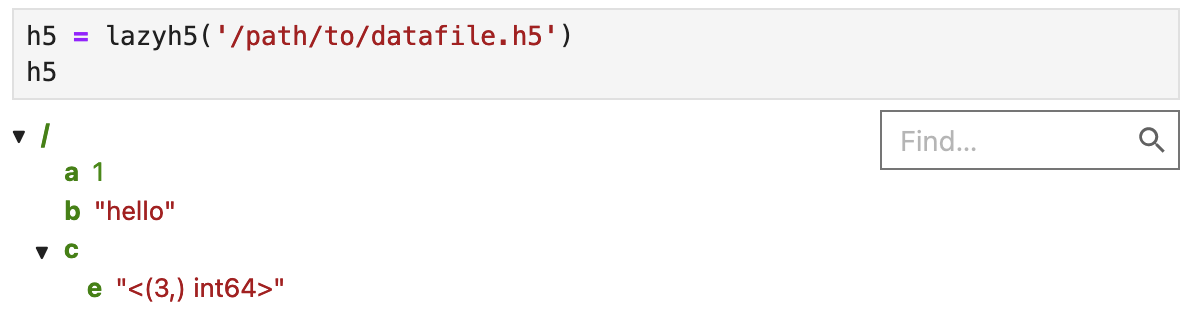
In Jupyter, you can interactively explore the file structure:
Old interface (expand this)
from daio.h5 import save_to_h5, load_from_h5
# save dict to HDF5 file:
some_dict = dict(a = 1, b = np.random.randn(3,4,5), c = dict(g='nested'), d = 'some_string')
save_to_h5('/path/to/datafile.h5', some_dict)
# load dict from HDF5 file:
dict_loaded = load_from_h5('/path/to/datafile.h5')
1 maintainer

Metadata
1 maintainer
Release files for daio 1.2.0
For a detailed explanation of source distributions (sdists) and built distributions (wheels), please see the package formats documentation.
Source distribution (sdist)
| File | Size | Uploaded | Provenance | Actions |
|---|---|---|---|---|
| daio-1.2.0.tar.gz | 33.2 kB | Without provenance | Details for daio-1.2.0.tar.gz |
Built distribution (wheel)
| File | Interpreter | ABI | Platform | Actions Reset |
|---|---|---|---|---|
| daio-1.2.0-py3-none-any.whl | Python 3 | none | any | Details for daio-1.2.0-py3-none-any.whl |
Total release size: 54.6 kB
Release files / daio-1.2.0.tar.gz
| Download URL | daio-1.2.0.tar.gz |
|---|---|
| Size | 33.2 kB |
| Tags | Source |
|
SHA-256 checksum How to use checksums |
77acb576f32612f7a97b4a571eaec81c29b8671f5ecc2ee2c0564467d81c21e5
|
|
BLAKE2b-256 checksum How to use checksums |
04ae5d4650e2c1878ff6604d0acb504368e9e92fc82ba5987e6bb7f33c6cc93f
|
| Upload date | |
|
Uploaded using Trusted Publishing? What is trusted publishing? |
No |
| Uploaded via |
twine/6.2.0 CPython/3.9.25
|
Release files / daio-1.2.0-py3-none-any.whl
| Download URL | daio-1.2.0-py3-none-any.whl |
|---|---|
| Size | 21.4 kB |
| Tags | Python 3 |
|
SHA-256 checksum How to use checksums |
e5704fbd0e0d639a67807daf767b79447d35d7a52424f4f6f7992ae469842798
|
|
BLAKE2b-256 checksum How to use checksums |
264e9ccf12c8b44c25954563381c9e5d7c9af8db6d40421310da8c516d0bc0a5
|
| Upload date | |
|
Uploaded using Trusted Publishing? What is trusted publishing? |
No |
| Uploaded via |
twine/6.2.0 CPython/3.9.25
|
Security for daio 1.2.0
Provenance
Provenance describes where a file came from. On PyPI, provenance is shared via attestations, which provide a verifiable record of the build or publishing details. View details, limitations and caveats.
No provenance found
None of the files in this release were uploaded with provenance metadata.
A note on package security
PyPI is a repository for distributing packages, not a service for auditing them. While third-party security researchers and our staff do their best to detect and remove malicious packages, PyPI cannot guarantee the quality, security or suitability of any given package.
To learn more about protecting yourself from malicious actors, visit our package security documentation.














