
DeckTalk
Every picture lands on its word, and you edit the video like a doc.
DeckTalk turns a Markdown script and plain HTML slides into one narrated mp4, voiced by ElevenLabs in a stock voice or a clone of your own. It is for people who make technical tutorials, product demos and lessons, and for the coding agents that help them.




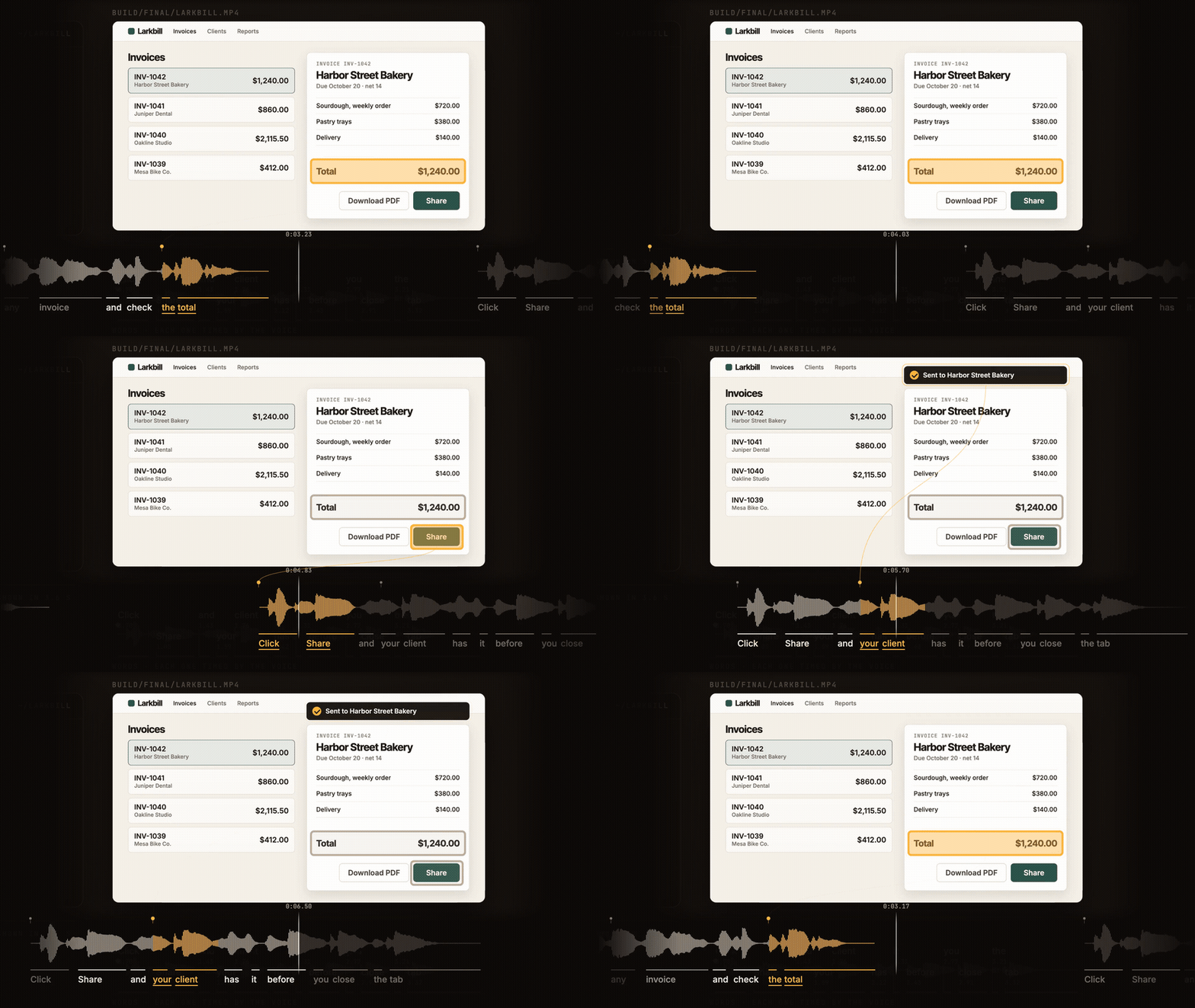
DeckTalk built the film Follows from text files: two voices in conversation, a demo that clicks on the word it hears, and a rebuild that voices only the one word that changed. Watch it with the sound on, then build your own below.
Make your first video
uv tool install decktalk==0.6.0
decktalk init my-lesson && cd my-lesson
decktalk build --no-spend
The first line pins 0.6.0, the release this page describes.
The same block runs on Windows in PowerShell 7 or cmd, and pipx install decktalk==0.6.0 works in place of uv.
On Linux and macOS without uv, curl -LsSf https://decktalk.ai/install.sh | DECKTALK_VERSION=0.6.0 sh puts uv on the machine first, and uv brings its own Python. Read the script before you run it.
decktalk init writes a starter of three sections that already builds. The build with --no-spend needs no account and spends nothing. It makes the whole film, captions and chapters included, with a click on every word where the voice would be, so the cues, the cuts and the pacing all run as they will when voiced. It prints this line, and one TAKE_MISSING per turn that has no voiced take yet, which in the starter is one per section, with the command that buys it.
Built build/final/my-lesson.mp4, $0.00, 3 findings
The first build downloads Chromium and ffmpeg, one time per machine: about 347 MB on macOS on Apple silicon, and roughly 445 MB on Linux x86-64 and 495 MB on Windows. It prints a line as each download starts, a line now and then as it arrives, and a line as it ends. Each part of Chromium states its size on its first progress line. In CI or from an agent, run decktalk install first, or pass --events to read each tool.fetch line, so a command timeout never cuts the first build off mid-download. On Linux, run decktalk install first in any case, because it adds the system libraries Chromium needs. Recording steps each section one frame at a time, split into chunks that record several at once, so a longer film takes longer to record. What is measured has the times.
To hear your own voice, copy .env.example to .env, fill in your ElevenLabs API key, set [voices.narrator] id in decktalk.toml to your voice id, and run decktalk build --spend --max-cost 1. decktalk check prices the narration before anything is bought, and decktalk storyboard puts every slide at every cue on one page for a look first. The quickstart walks each step with its output.
A short tour
The four files in a project
script.md holds what the voice says, decktalk.toml ties each section to a page, to a clip of your own or to a program that draws it, cues.json names the spoken phrase each moment on the page waits for, and a page in deck/ holds the slides as plain HTML. Your first deck has the table of all four.
One cue id ties them together. In the starter, the slide 1.1 declares a moment called title, and cues.json says that moment waits for the words "This is DeckTalk".
<template data-slide="1.1" data-preview-seconds="10" data-describe="the opening title and the count of files">
  <div class="title" data-in="title" data-describe="the title, This is DeckTalk">This is DeckTalk</div>
</template>
{ "id": "1.1:title", "phrase": "This is DeckTalk" }
data-describe names the picture for the transcript. No attribute on the page says when a cue fires. Your first deck writes one section across all four files, and the page contract lists every attribute.
What a section can be
- A page of slides, where every reveal lands on its word: Your first deck.
- A conversation between voices, each turn its own take: Write a dialogue.
- Something that moves between two words, or a picture a program draws: Things that move.
- A video of your own, playing with its own sound: Play a clip.
- Any frame shape, wide, square or vertical: Design a slide.
decktalk init my-interview --example interview writes a finished dialogue between two voices, and --example motion a deck that moves. Examples lists every project init writes.
Using DeckTalk with an agent
The command line is the instruction set, settings and page attributes are what it changes, and the agent is the implementer.
decktalk init writes an AGENTS.md and six skills into the project. The skills live in .agents/skills/, which Codex, Cursor, Gemini CLI and most other agents read, and .claude/skills links to that folder for Claude Code. Install the skills lists every agent and the folders it reads.
Open your agent in the project and paste this.
Read AGENTS.md, then make a three-section lesson on binary search.
Rehearse with decktalk build --no-spend, show me the storyboard,
and ask me before any run that spends money.
The agent reads decktalk --help for the commands, decktalk schema build for one command's flags and result, and decktalk config explain KEY for one setting. Every command prints one JSON object under --json, and --events streams progress as JSON lines. Exit 0 means nothing was found at or above the --fail-on threshold, 1 a finding at it, 2 a refused command line, 3 that DeckTalk could not run, and 130 that it was interrupted. The reference card puts the whole contract on one page.
Without a terminal, a build with something to buy refuses unless --spend or --no-spend is passed, so an agent left alone cannot buy speech by accident. A build whose takes are all on disk buys nothing and needs neither flag nor key. This is the whole answer from decktalk --json build in the starter with a voice named, which exits 2.
{
  "schema": 1,
  "ok": false,
  "findings": [],
  "error": {
    "code": "APPROVAL",
    "message": "This run costs $0.15 for 476 characters at $0.30 per 1,000 characters. No terminal is here to approve it.",
    "hint": "Run decktalk build --spend to approve that cost, or decktalk build --no-spend to play a placeholder wherever a take is missing and silence where a sound is unbought.",
    "location": null,
    "docs": "https://docs.decktalk.ai/reference/errors/APPROVAL"
  }
}
Drive it from Python
The command line is the first client of a library. decktalk.open returns a Project with a method for each of the six stages and for build, check, status, words, storyboard, clip and serve. Each method returns the same object its command prints, and nothing in the library prints.
import decktalk

project = decktalk.open("my-lesson")
project.events.subscribe(lambda event: print(event.event, event.run))

result = project.build()
print(result.ok, result.film)
for finding in result.findings:
    print(finding.code.name, finding.message, finding.location.where)
A call that buys takes spend=True and max_cost. The library refuses before the first paid request when the most the run can cost is above the cap. Without spend=True a call plays every take on disk and buys nothing, so it reads no key. A free provider such as dtsp still makes each missing take once a voice is named. The Python API documents every call.
What a build writes
A build writes everything under build/, and decktalk status reads it back. The film lands in build/final/ with what goes with it.
my-lesson.mp4              the film
my-lesson.srt              captions, as SubRip
my-lesson.vtt              captions, as WebVTT
my-lesson.chapters.txt     one chapter per section
my-lesson-transcript.html  a transcript page
my-lesson-poster.png       a poster frame
my-lesson.words.json       every word the film says, on the film's clock
my-lesson-captioned.mp4    the film with its captions drawn in, when [output] captioned asks
placements.json            where every section sits in the film
The voiced takes are kept in takes/, named by their digest, which is the folder to commit. Every run's events are kept under build/events/. Build artifacts lists every path.
How it is built
DeckTalk is a pipeline of six stages: narrate, cue, record, score, assemble and verify. Each stage is one command and one package, and reads only what the stages before it wrote. decktalk build runs them in order, or any span of them.
- The words. The voice returns a start and an end for every word, and every other time in the film is derived from those. A cue in
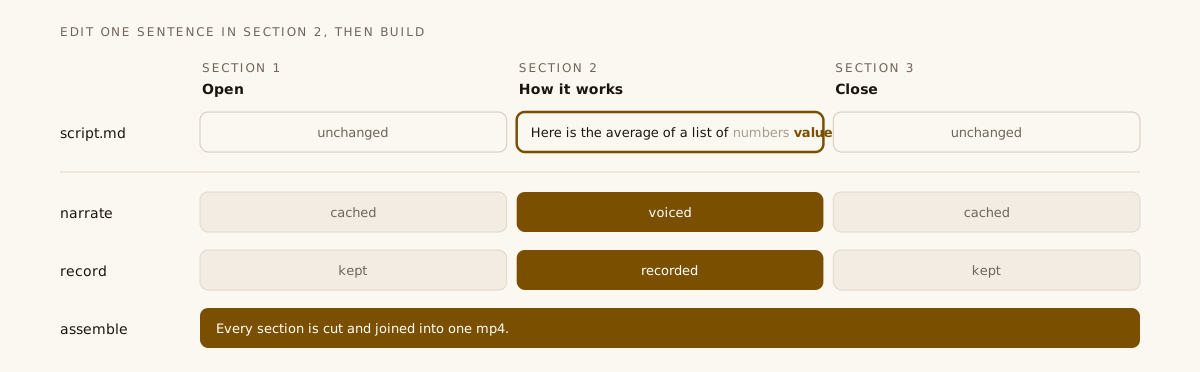
cues.jsonnames a spoken phrase rather than a second, so a rewritten sentence moves every picture after it with no timeline to edit. - A content-addressed build over takes. A take is named by a digest of its text, its voice, its model and its settings. A recording, a section video and a frozen frame are each kept under a digest of everything they read. Edit one sentence and only its turn is voiced again and its section recorded again, so a fix costs a few cents of speech and not the whole film.
- Recording. Headless Chromium records each page section against its word times, several sections at once, and ffmpeg cuts one mp4 with captions and chapters beside it.
- Verify.
decktalk verifydecodes the finished film and measures it: every section opens on a real picture, no cut lands on a word, a section marked seamless opens on the picture the one before it ended on, and every reveal changes the picture within a set limit of its word. - One contract. The command line is the first client of a Python library, every command prints one JSON object under
--json, and a test enforces the import graph from the vocabulary layer up to the command line.
ARCHITECTURE.md explains each decision.
What is measured
- Landing. Every reveal of the starter landed within 49 ms of its word, against a limit of 80 ms plus half a frame, with a median of 25 ms over 36 reveals in 3 builds.
- Builds. A cold build of its 50.4 second film took 7.5 s, the same build with nothing changed 0.56 s, and the build after one changed word 4.3 s, recording 1 of 3 sections again.
- Coverage. The suites reach 98.3 percent of the package's statements.
Measured on macOS 26.6.2 arm64 (Apple M5 Pro) with DeckTalk 0.6.0rc1 and placeholder takes. Every number and how it was measured.
Requirements and costs
- Software. The one-line installer runs on Linux and macOS and brings its own Python. On Windows, install with uv or pipx, which needs Python 3.12 or later. The first build downloads Chromium and ffmpeg, and
decktalk installfetches them up front for a Docker layer, a CI cache or an offline machine. On Linux,decktalk installis also the one command that installs Chromium's system libraries. - Accounts. A build that does not spend needs no account. A build voiced by ElevenLabs needs an ElevenLabs API key and a voice id, and DeckTalk never prints the key. The local
dtspvoice needs a voice id and a server on this machine, and no key. - Cost. Only a voiced build spends money, at your own ElevenLabs rate per character. A turn whose text and voice have not changed is not voiced again.
Requirements and costs lists every download and every command that costs money.
Learn more
The docs are at docs.decktalk.ai, and agents can read them whole at llms.txt.
- How it works walks the six stages and why they run in that order.
- Cues explains how a phrase becomes a second.
- Sound adds music, an ambience bed and effects on a cue.
- The CLI reference lists every command and flag.
- Configuration lists every setting with its range and default.
- Verify defines every measurement the finished film is judged by.
- The FAQ compares DeckTalk with Remotion, Manim, Descript and Synthesia.
- ARCHITECTURE.md explains how the code is built.
Status and support
DeckTalk is alpha, a minor release can still break things, and one person maintains it. CI runs every check on Linux. The browser, media, end-to-end, platform and wheel checks run on macOS and Windows too. Every release is published from CI by trusted publishing, and every file on PyPI carries a provenance attestation.
- Report bugs and ask questions in Issues.
- Report a vulnerability privately, as SECURITY.md explains.
- Read what changed in the changelog.
- Work on DeckTalk itself by starting with CONTRIBUTING.md.
DeckTalk is licensed under Apache-2.0 and made by Jacob Beaudin.
1 maintainer

Metadata
1 maintainer
Release files for decktalk 0.6.0
For a detailed explanation of source distributions (sdists) and built distributions (wheels), please see the package formats documentation.
Source distribution (sdist)
| File | Size | Uploaded | |
|---|---|---|---|
| decktalk-0.6.0.tar.gz | 1.3 MB | Details |
Built distribution (wheel)
| File | Interpreter | ABI | Platform | Reset |
|---|---|---|---|---|
| decktalk-0.6.0-py3-none-any.whl | Python 3 | none | any | Details |
Total release size: 2.5 MB
Release files / decktalk-0.6.0.tar.gz
| Download URL | decktalk-0.6.0.tar.gz |
|---|---|
| Size | 1.3 MB |
| Tags | Source |
|
SHA-256 checksum How to use checksums |
75461d04630849b13bd49085c2ce0b3d25d14a4ff200700a165b2c1f9a10c70a
|
|
BLAKE2b-256 checksum How to use checksums |
84bd98747add072bebda33349676d2773ebdc86473cf56165a3b199f3648d638
|
| Upload date | |
|
Uploaded using Trusted Publishing? What is trusted publishing? |
Yes |
| Uploaded via |
twine/7.0.0 CPython/3.13.14
|
Provenance
Provenance describes where a file came from. On PyPI, provenance is shared via attestations, which provide a verifiable record of the build or publishing details. View details, limitations and caveats.


PyPI Publish Attestation
PyPI verified that this artifact, at this checksum, originated from the publisher listed below.
Signed by GitHub Actions, verified by PyPI on Oct 14, 2026.
Transparency logRelease files / decktalk-0.6.0-py3-none-any.whl
| Download URL | decktalk-0.6.0-py3-none-any.whl |
|---|---|
| Size | 1.3 MB |
| Tags | Python 3 |
|
SHA-256 checksum How to use checksums |
a5e3785377e0f54d82267bcb54b67f8b020d3ac87e9ba31c6ab1d279ff4d35a3
|
|
BLAKE2b-256 checksum How to use checksums |
938a0b88a8e5ea78b154277b25f730e1d30a788c7a1e3eb870f153d843a17455
|
| Upload date | |
|
Uploaded using Trusted Publishing? What is trusted publishing? |
Yes |
| Uploaded via |
twine/7.0.0 CPython/3.13.14
|
Provenance
Provenance describes where a file came from. On PyPI, provenance is shared via attestations, which provide a verifiable record of the build or publishing details. View details, limitations and caveats.
PyPI Publish Attestation
PyPI verified that this artifact, at this checksum, originated from the publisher listed below.
Signed by GitHub Actions, verified by PyPI on Oct 14, 2026.
Transparency log













