
df2tables - Pandas & Polars DataFrames to Interactive HTML Tables

df2tables's main job is to present and make DataFrames easy to explore: hand it a Pandas or Polars DataFrame and get back an interactive table you can browse locally - as a self-contained HTML file that opens straight in your browser, no server needed - or inline in a notebook (Jupyter, VS Code notebooks, marimo). It's also built to embed seamlessly into Flask, Django, FastAPI, or any web framework for the cases where you do want one, and is powered by DataTables, a mature JavaScript table library, under the hood.
By rendering tables directly from JavaScript arrays, this tool delivers fast performance and compact file sizes, enabling smooth browsing of large datasets while maintaining full responsiveness. For datasets where you'd rather not embed the rows at all, render_ajax() lets the same table fetch its data from an API endpoint at runtime instead - see Main Functions.
Minimal dependencies: only pandas or polars (you don’t need pandas installed if using polars).
Converting a DataFrame to an interactive table takes just one function call:
render(df, **kwargs)
# or for web frameworks:
render_inline(df, **kwargs)
# or, to fetch rows from an API endpoint at runtime instead of embedding them:
render_ajax(df, data_url, **kwargs)
Features
- Converts
pandasandpolarsDataFrames into interactive standalone HTML tables - Web Framework Ready: Specifically designed for easy embedding in Flask, Django, FastAPI, and other web frameworks
- On-demand / AJAX loading:
render_ajax()renders a table whose rows are fetched from an API endpoint at runtime (paired withto_js_array()on the server side) instead of being embedded in the page at generation time - Browse large datasets using filters and sorting
- Works independently of Jupyter or a running web server (though notebook rendering is supported)
- Useful for training dataset inspection and feature engineering: Quickly browse through large datasets, identify outliers, and catch data quality issues interactively
- Customization: Configuring DataTables from Python
Screenshots
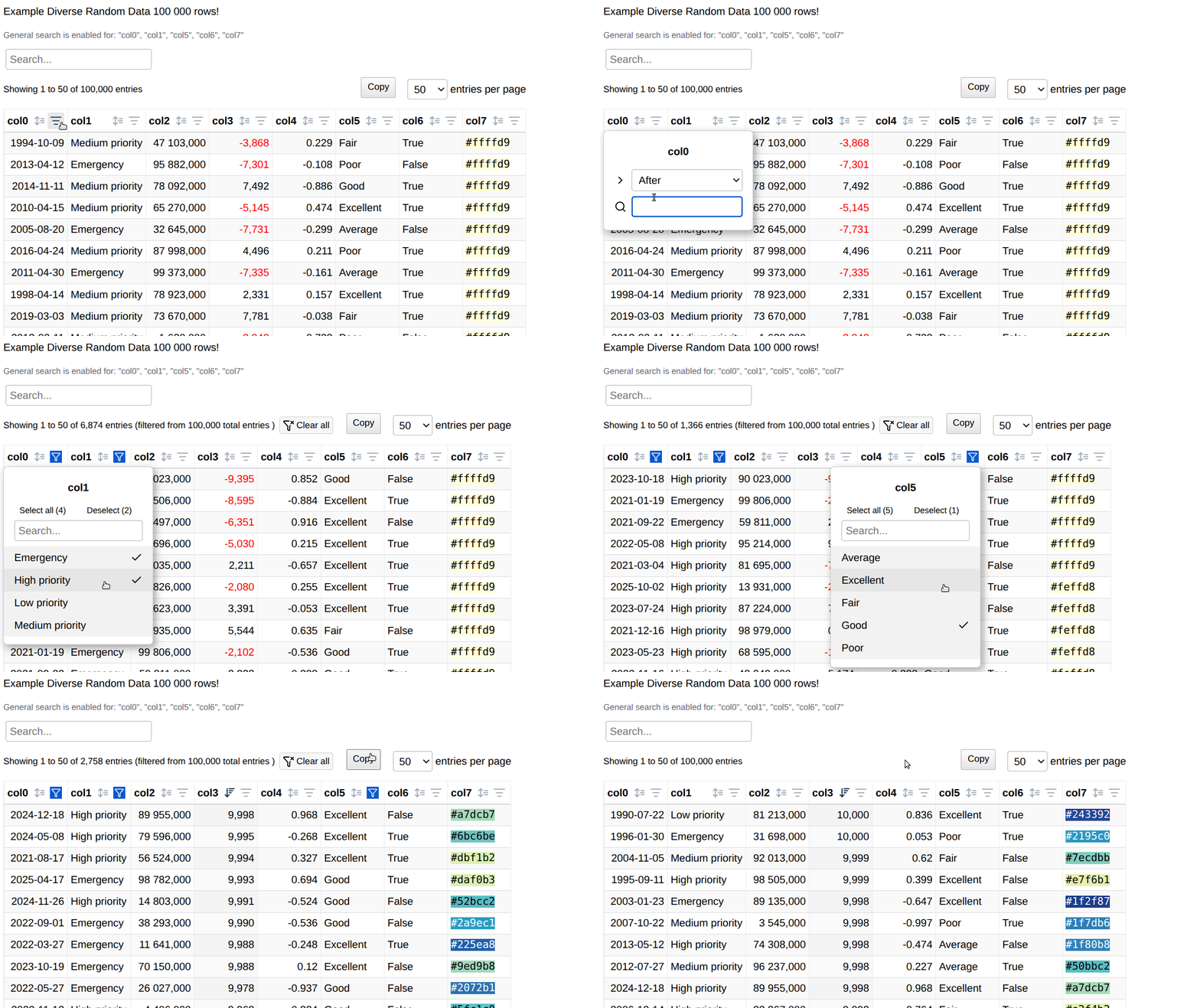
A standalone HTML file containing a JavaScript array as data source for DataTables has several advantages. For example, you can browse quite large datasets locally.
The column control feature provides dropdown filters for categorical data and search functionality for text columns, enhancing data exploration capabilities through the excellent DataTables Column Control extension.
Note: By default, filtering is enabled for all non-numeric columns.
Quick Start
The simplest function call with default arguments is:
import df2tables as df2t

df2t.render(df, to_file='df.html')
Installation
pip install df2tables
Sample DataFrame
# Render a sample DataFrame; returns the output file path (and opens it in the browser)
output_path = df2t.render_sample_df(to_file="sample_table.html")

# Polars sample instead of the pandas default
output_path = df2t.render_sample_df(df_type="polars", to_file="sample_table_pl.html")
The underlying generator, get_sample_df(df_type="pandas", size=50), is also available directly if you just want the sample DataFrame without rendering it.
Rendering in notebook
from df2tables import render_nb

render_nb(df)                 # interactive table inside an iframe
render_nb(df, height=800)     # taller iframe
render_nb(df, iframe=False)   # render inline, without the iframe wrapper
df2t.show is an alias for render_nb. Notebook rendering is currently supported in Jupyter, VS Code notebooks and marimo.
Main Functions
render
df2t.render(
    df: pd.DataFrame | pl.DataFrame,
    to_file: str = "datatable.html",
    title: str = "",
    startfile: bool = True,
    precision: int = 2,
    format_negatives: Union[bool, List[str], Tuple[str], Set[str]] = False,
    buttons: Union[bool, List[str]] = False,
    render_opts: Optional[dict] = None,
    js_opts: Optional[dict] = None,
    templ_path: str = TEMPLATE_PATH,
    **kwargs
) -> Union[str, None]
Parameters:
df: Input pandas or polars DataFrameto_file: Output HTML file path (default: "datatable.html"). IfNone, returns HTML string instead of writing filetitle: Title for the HTML table (default: "")startfile: IfTrue, automatically opens the generated HTML file in default browser (default: True)precision: Number of decimal places for floating-point numbers. Must be a non-negative integer (default: 2)format_negatives: Configure negative number formatting with color-coded HTML (negative values in red):False: No special formatting (default)True: Auto-detect and format all numeric columns containing negative valuesList/Tuple/Set[str]: Format only specified column names (spaces in column names should be replaced with underscores)
buttons: List of DataTables button types to add to the toolbar (e.g.,['copy', 'csv', 'excel', 'pdf']). Requires DataTables Buttons extension (default: False)render_opts: Dictionary of additional rendering configuration options (see below for available options)js_opts: Dictionary of DataTables configuration options to customize table behavior (e.g., pagination, scrolling, layout, language) (default: None)templ_path: Path to custom HTML template (uses default if not specified)**kwargs: Deprecated - Passingload_column_control,display_logo, or the oldnum_htmlname directly is deprecated and will be removed in a future version. Userender_opts={'load_column_control': ...}andformat_negatives=...instead - see Deprecated Arguments
Available render_opts options:
locale_fmt(bool): Enable locale-based number formatting (default: False)load_column_control(bool): Enable the DataTables ColumnControl extension, which adds the per-column order/search icons and dropdown filters described above. WhenFalse, that per-column UI is omitted (default: True)reorder(bool): Enable column reordering functionality. Requiresload_column_control=True(default: False)dropdown_select_threshold(int): Maximum number of unique values for a column to get a dropdown filter instead of a text filter. Applies to integer and non-numeric (string/categorical) columns; floating-point columns always get a text filter regardless of this threshold (default: 9)table_id(str): HTML ID for the table element in the generated page (default: "pd_datatab")unique_id(bool): Generate unique UUID-based table ID for multiple tables on one page (default: False; takes precedence overtable_id)default_table_class(str): CSS classes for the table element in the generated page (default: "display compact hover order-column")add_expand_btn(bool): Add expand/collapse button for row details (default: True)display_logo(bool): Display DataTables logo (default: False)scroll_x(bool): Enable horizontal scrolling (default: True)scroll_y(str | None): Vertical scrolling height, e.g."70vh"; set toNoneto disable (default: "70vh")scroll_collapse(bool): Collapse the container height when there are fewer rows thanscroll_y(default: True)
Returns:
- File path (str) if
to_fileis specified and the file is successfully written - HTML string if
to_file=None
Raises:
ValueError: Ifprecisionis not a non-negative integer, the DataFrame type is unsupported, or the DataFrame cannot be processedTypeError: Ifrender_opts,js_opts,buttons, orformat_negativeshave the wrong typeUserWarning: For unknown keyword arguments passed to the function (a warning, not fatal)FileNotFoundError: Iftempl_pathdoes not existRuntimeError: If the template cannot be read or renderedOSError: If the output file atto_filecannot be written
All of the above now raise unconditionally - see Error Handling for what changed.
render_inline
df2t.render_inline(
    df: pd.DataFrame | pl.DataFrame,
    table_attrs: Optional[Dict] = None,
    add_scripts: bool = False,
    **kwargs
) -> str
Parameters:
This function is designed for integration with web applications and has the following characteristics:
- Returns only the
<table>markup and the associated JavaScript - Excludes
<html>,<head>, and<body>tags - Useful for pages with multiple tables, as you can assign unique IDs via the
table_attrsdictionary (e.g.,{'id': 'my-unique-table'}) - By default (
add_scripts=False), the snippet does not include jQuery or DataTables library dependencies. You must include them manually in your host HTML page for the table to function correctly. Setadd_scripts=Trueto prepend the CDN<link>/<script>assets to the returned snippet.
The table_attrs argument accepts a dictionary of HTML table attributes, such as an ID or CSS class. This is especially useful for multiple tables on a single page (each must have a different ID). For render_inline, use table_attrs instead of the render_opts['table_id'] option. If you don't pass an id, each call generates its own unique one automatically.
Note: Some arguments from render() are not applicable here, such as title, display_logo, or startfile, because the returned HTML contains only the table element and its initialization script.
Example:
See an example of multiple tables with different configuration options placed in separate tabs (jQuery UI Tabs): flask_multiple_tables_tabs.py
Note: Pandas DataFrame indexes are not rendered by default. If you want to enable indexes in an HTML table, simply call df2tables.render(df.reset_index(), args...)
render_ajax
df2t.render_ajax(
    df: pd.DataFrame | pl.DataFrame,
    data_url: str,
    to_file: Optional[str] = None,
    title: str = "",
    startfile: bool = True,
    precision: int = 2,
    format_negatives: Union[bool, List[str], Tuple[str], Set[str]] = False,
    buttons: Union[bool, List[str]] = False,
    button_label: str = "Load data",
    autoload: bool = False,
    fetch_opts: Optional[dict] = None,
    render_opts: Optional[dict] = None,
    js_opts: Optional[dict] = None,
    templ_path: str = TEMPLATE_PATH,
    full_page: bool = False,
    add_scripts: bool = False,
    table_attrs: Optional[dict] = None,
    **kwargs
) -> str
Renders a table whose rows are fetched at runtime from data_url via the browser's Fetch API, instead of being embedded in the HTML. df is only used to derive the column definitions and options - the actual data is served separately, typically with to_js_array().
It's generated from the exact same template as render(): the AJAX loader lives in dedicated regions that render() strips out and render_ajax() fills in, so there's no second template file to maintain.
By default it returns an inline fragment, the same shape as render_inline() - unlike render(), whose default is a full standalone page. Pass full_page=True for a complete HTML document instead.
Parameters:
df: pandas or polars DataFrame (used to derive columns and options only - rows are never embedded)data_url: URL of the endpoint returning the row data as JSONto_file: output file path; ifNone(the default), the HTML fragment/document is returned as a string instead of written to disktitle: page title, used only whenfull_page=True(ignored for the inline fragment)startfile: open the generated file in the browser after writing (default: True)precision,format_negatives,buttons,render_opts,js_opts: same meaning as inrender()button_label: label of the "load data" button, used only whenautoload=False(default: "Load data")autoload: ifTrue, rows are fetched immediately with no button - a pulsing "Loading data…" indicator is shown, with a Retry button shown only on failure. IfFalse(default), the rows are fetched on click of thebutton_labelbuttonfetch_opts: dict merged into thefetch()call's options (defaults to{"credentials": "same-origin"})templ_path: path to the HTML template - a custom template must contain the same comnt tags as the bundleddatatable_templ.html, including the AJAX loader regions and thedata_url/button_label/autoload/fetch_optstags (see Custom Templates)full_page: return a complete standalone HTML document instead of the default inline fragmentadd_scripts: prepend the DataTables CDN<link>/<script>block (inline mode only; default: False)table_attrs: extra HTML attributes for the<table>element (inline mode only). If you don't pin anidhere (or viarender_opts['table_id']), each call generates its own unique one automatically
Returns:
str: file path ifto_fileis set, otherwise the HTML fragment (or full document, iffull_page=True)
Raises:
TypeError: Ifdata_urlis not a string/path, orrender_opts/js_opts/buttons/format_negativeshave the wrong typeValueError: Ifprecisionis invalid or the DataFrame type is unsupportedFileNotFoundError/RuntimeError: template problems - including a customtempl_pathmissing one of the required AJAX tagsOSError: Ifto_fileis set and the output file cannot be writtenUserWarning: Ifto_fileis set withoutfull_page=True- in that case the fragment (not a full page) gets written to that path, which is rarely what you want for a standalone file
Example (Flask):
from flask import Flask, Response
import df2tables as df2t

app = Flask(__name__)

@app.route("/")
def index():
    frag = df2t.render_ajax(df, "/api/table")   # inline fragment, click-to-load button
    return f"<html><body>{frag}</body></html>"

@app.route("/api/table")
def api_table():
    return Response(df2t.to_js_array(df), mimetype="application/json")
The endpoint at data_url should return JSON in one of two shapes: a bare array of rows ([[1, "a", 3.5], [2, "b", 4.1]]) or an object with data ({"data": [...]}). to_js_array(df) produces this payload with the same column ordering, rounding, and NaN/inf handling as render().
to_js_array
df2t.to_js_array(
    df: pd.DataFrame | pl.DataFrame,
    precision: int = 2,
    raw: bool = False
) -> Union[str, list]
Converts a pandas/polars DataFrame to a JavaScript array-of-arrays (strict JSON), in exactly the shape consumed by pages rendered with render_ajax(). Intended for Flask/FastAPI/Django endpoints serving data to those pages.
Parameters:
df: pandas or polars DataFrameprecision: rounding precision for float columns, same meaning as inrender()(default: 2)raw: ifTrue, returns the plain (already NaN/inf-cleaned) Python list of lists instead of a JSON string - convenient for frameworks that JSON-encode the response themselves, e.g. Flask'sjsonify()(default: False)
Returns:
str: JSON string like'[[1,"a",3.5],[2,"b",4.1]]'(default)list: the underlying list of lists, whenraw=True
NaN/inf float values are always converted to null/None, so the result always round-trips through JSON.parse() / jsonify() without error.
Example (Flask):
@app.route("/api/table")
def api_table():
    return Response(df2t.to_js_array(df), mimetype="application/json")

# or, letting Flask do the JSON encoding:
@app.route("/api/table")
def api_table():
    return jsonify(df2t.to_js_array(df, raw=True))
Error Handling
Exceptions from render() and render_ajax()
render() and render_ajax() always raise on problems - bad arguments, an unreadable or incompatible template, or (when to_file is set) an output path that can't be written. This applies regardless of whether to_file is set. Wrap calls in try/except if you want to handle failures instead of letting them propagate:
try:
    df2t.render(df, to_file="out/report.html")
except (ValueError, TypeError, FileNotFoundError, RuntimeError, OSError) as e:
    print(f"Could not render table: {e}")
Only genuinely unknown keyword arguments are non-fatal - they emit a UserWarning and are ignored rather than raising.
Deprecated Arguments
The following are kept for backward compatibility but will be removed in a future version, and each emits a DeprecationWarning:
load_column_controlanddisplay_logoas direct keyword arguments torender()/render_ajax()- pass them insiderender_opts={...}insteadnum_html- renamed toformat_negatives; passformat_negatives=...insteadload_datatables()- a no-op kept for old imports; it hasn't been needed since v0.1.8
Configure DataTables directly from Python using js_opts
Customize DataTables behavior directly from Python using the js_opts parameter. This allows you to control DataTables options and features without modifying the HTML template.
Basic Usage
Simply pass a dictionary of DataTables options to the js_opts parameter in the render or render_inline function.
Examples
1. Customize Layout and Language
Rearrange control elements (such as the search bar and info display) using the layout option, or localize text:
custom_cfg = {
    "language": {
        "searchPlaceholder": "Search in all text columns"
    },
    "pageLength": 25, # number of table rows showing
    "layout": {
        "topStart": "info",
        "top1Start": "pageLength",
        "topEnd": "search",
        "bottomEnd": "paging"
    }
}
df2t.render(df, js_opts=custom_cfg, to_file="localized_table.html")
2. Replace Paging with Scrolling
Disable pagination and enable vertical and horizontal scrolling for easier navigation of large datasets.
Note: Using scrollY with disabled paging can be slow for large DataFrames. Rendering more than 500 rows with paging: False also triggers a performance-warning banner in the browser (that threshold isn't currently configurable from Python).
scroll_cfg = {
    "paging": False, # slow for large tables
    "scrollCollapse": False,
    "scrollY": '50vh',
    "scrollX": "70vw"
}
df2t.render(df, js_opts=scroll_cfg, to_file="scrolling_table.html")
3. Freeze Columns with FixedColumns
For wide datasets, it can be useful to keep one or more columns visible while horizontally scrolling through the table. DataTables provides this functionality through the FixedColumns extension.
fixed_col_cfg = {
    "fixedColumns": {
        "left": 1  # Pins the leftmost column in place
    },
    "scrollCollapse": True,  # Collapses the container height if there are fewer rows than scrollY
    "scrollY": "60vh",       # Restricts vertical height to 60% of the viewport height
    "scrollX": "50vw",       # Restricts horizontal width to 50% of the viewport width
    "responsive": False      # Must be False; responsive mode prevents horizontal scrolling fields
}
df2t.render(df, js_opts=fixed_col_cfg, to_file="fixed_columns_table.html")
Note on Dependencies: The FixedColumns feature requires the DataTables FixedColumns extension assets to be loaded. If you are using render_inline(), make sure you explicitly include the appropriate CSS and JS extension scripts in your base HTML template.
Invalid or Unsupported Options
Invalid keys are ignored by DataTables, so malformed or non-existent options usually will not break table rendering.
Note: While invalid keys should be ignored, using a valid key with an incorrect value type may still cause an error in the browser's JavaScript console.
Available Configuration Options
Important Notes
Some DataTables options require additional extensions (e.g., FixedColumns or FixedHeader). When using render(), availability depends on the extensions loaded by the default template. When using render_inline(), you must ensure the required DataTables extensions are loaded by your application. Otherwise, the related options will be ignored or may generate JavaScript console warnings.
For best results, start with core features such as layout or language options before exploring more advanced configurations.
For a complete list of available settings, refer to the official DataTables documentation and: https://datatables.net/examples/
It’s best to start with the core DataTables Features before adding advanced configurations.
Additional Notes
Column Name Formatting
For better readability in table headers, df2tables automatically converts underscores to spaces in column names. This improves word wrapping and prevents excessively wide columns.
To disable this automatic word wrapping behavior, add the following CSS to your custom template:
span.dt-column-title {
    white-space: nowrap;
}
Bulk Dataset Processing
For exploratory data analysis across multiple datasets, you can generate tables programmatically. The example below uses the vega_datasets package, which provides easy access to a variety of sample datasets commonly used in data visualization and analysis.
Note: Install vega_datasets with pip install vega_datasets to run this example.
Quick Browse First 10 Vega Datasets
Data Type Handling
The module includes handling for:
- JSON serialization: Custom encoder handles complex pandas or Python data types
- Column compatibility: Automatically converts problematic column types to string representation
Offline Usage
Note: "Offline" viewing assumes internet connectivity for CDN resources - DataTables core, the DataTables extensions in use (Buttons, ColReorder, ColumnControl, FixedColumns), and jQuery. For truly offline usage, modify the template to reference local copies of these libraries instead of CDN links.
Appendix: Template Customization
Templates use comnt, a minimal markup system based on HTML/JS comments.
Custom Templates
Copy and modify datatable_templ.html to apply custom styling or libraries, then pass the new template path to templ_path.
render() and render_ajax() are both generated from that single template. The AJAX loader lives in its own comnt regions (ajax_js / ajax_css) plus the data_url / button_label / autoload / fetch_opts tags - render() strips these out, while render_ajax() fills them in. If you maintain a custom template and plan to use it with render_ajax(), keep those regions and tags intact; a template missing them will raise when render_ajax() tries to fill them in.
Handle Pandas MultiIndex Columns (Experimental)
MultiIndex columns are automatically flattened with underscore separation.
License
MIT License
© Tomasz Sługocki
1 maintainer

Release files for df2tables 0.3.0
For a detailed explanation of source distributions (sdists) and built distributions (wheels), please see the package formats documentation.
Source distribution (sdist)
| File | Size | Uploaded | |
|---|---|---|---|
| df2tables-0.3.0.tar.gz | 33.6 kB | Details |
Built distribution (wheel)
| File | Interpreter | ABI | Platform | Reset |
|---|---|---|---|---|
| df2tables-0.3.0-py2.py3-none-any.whl | Python 2, Python 3 | none | any | Details |
Total release size: 70.5 kB
Release files / df2tables-0.3.0.tar.gz
| Download URL | df2tables-0.3.0.tar.gz |
|---|---|
| Size | 33.6 kB |
| Tags | Source |
|
SHA-256 checksum How to use checksums |
635226f603514ed01ff60d372a30c8315b7baa3a429205c1b29493e0447f5e74
|
|
BLAKE2b-256 checksum How to use checksums |
340a8a5f4c68ca725216d452859179c07bb668e61e9c12e0a6722b749173d834
|
| Upload date | |
|
Uploaded using Trusted Publishing? What is trusted publishing? |
No |
| Uploaded via |
twine/7.0.0 CPython/3.12.3
|
Release files / df2tables-0.3.0-py2.py3-none-any.whl
| Download URL | df2tables-0.3.0-py2.py3-none-any.whl |
|---|---|
| Size | 36.9 kB |
| Tags | Python 2 Python 3 |
|
SHA-256 checksum How to use checksums |
c626cc6ac329388e35661437bd4646dacb093c25d9f454452d6dd32333103f22
|
|
BLAKE2b-256 checksum How to use checksums |
ddddbc68c5ba5dba4d099f1249100c63647fdd99f110225dac5a7f7a9c94d858
|
| Upload date | |
|
Uploaded using Trusted Publishing? What is trusted publishing? |
No |
| Uploaded via |
twine/7.0.0 CPython/3.12.3
|














