
Diamond Square
Implementation of the Diamond–Square Algorithm. This package can draw terrain on pgzero and pygame, and can also set up interactive mode.
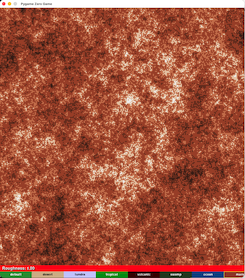
Sample Generations
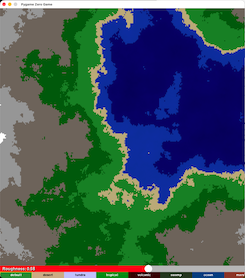
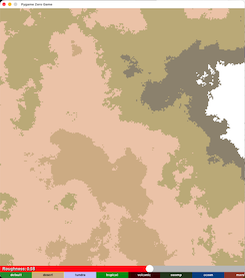
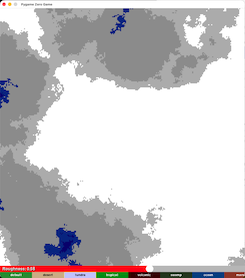
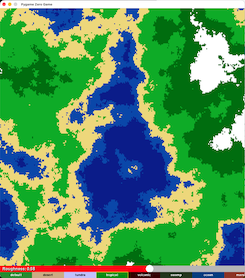
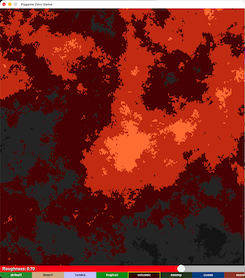
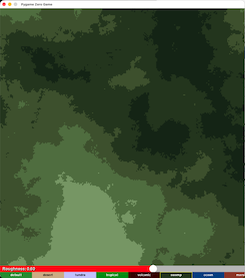
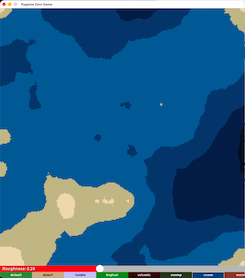
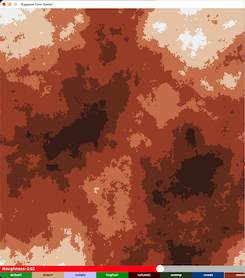
⚠️ You MUST include all four interactive functions for pgzero interactive
Missing even one will cause failures or unpredictable behavior.
⚠️ You must pass the pgzero screen into draw functions
Use
terrain.draw(screen)orterrain.for_draw(screen)— the yellow underline is expected.
Table of Contents
- Quick Start
- Installation
- Why Use Diamond Square?
- Usage
- Drawing Terrain
- Pgzero Example
- Pygame Example
- Interactive Mode
- Pgzero Example
- Pygame Example
- Drawing Terrain
- Requirements for Pgzero Interactive
- Versions
- Coming Soon
Quick Start
Installation
pip install diamond-square
Why Use diamond-square?
This package provides a complete implementation of the Diamond–Square algorithm with:
- Fast rendering of the Diamond-Square algorithm written in C
- Multiple built‑in biomes
- Adjustable roughness and scale
- Support for pgzero and pygame
- Optional interactive mode
- The ability to save generated terrain as an image
- Functions to add or remove biomes dynamically
It is designed for both experimentation and game development, making terrain generation simple and customizable.
Usage
Drawing Terrain
Pgzero Example
Look at sample_code_pgzero_drawing_terrain.py for pgzero examples.
Pygame Example
Look at sample_code_pygame_drawing_terrain.py for pygame examples.
The screen parameter must be the pygame display surface.
Interactive Mode
This creates an interactive scene where the user can change the biome and roughness in real time.
Pgzero example
Look at sample_code_pgzero_drawing_terrain.py for pgzero examples.
Pygame example
Look at sample_code_pygame_drawing_terrain.py for pygame examples.
Requirements for Pgzero Interactive
For Pgzero Interative Mode, it requires all four of the following functions to be placed in their corresponding pgzero event handlers:
terrain.for_draw(screen)
terrain.for_on_mouse_down(pos)
terrain.for_on_mouse_up()
terrain.for_on_mouse_move(pos)
If any one of these is missing, the interactive mode will:
- fail to update correctly
- behave unpredictably
- or stop working entirely
These must be placed in:
draw()→terrain.for_draw(screen)on_mouse_down(pos)→terrain.for_on_mouse_down(pos)on_mouse_up()→terrain.for_on_mouse_up()on_mouse_move(pos)→terrain.for_on_mouse_move(pos)
Versions
Version 0.0.1: Main code for diamond-square added.
Version 0.0.2: Updated README file and added documentation.
Version 0.0.3: Fixed bugs and errors.
Version 0.0.4: Added sample terrain.
Version 0.0.5: Added sample terrains.
Version 0.0.6: Added functions to add/remove biomes and added external documentation website.
Version 0.0.7: Added pos parameter to determine where to place the terrain and added function to save terrain as an image. Also made interative mode avaliable to pgzero.
Version 0.0.8: Added C file for fast rendering of the Diamond–Square Algorithm
Version 0.0.9: Made pgzero and pygame interactive mode into one function and added documentation
Version 0.1.0: Fix bugs in C file and save_terrain function
(Latest) Version 0.1.1: Refactor Code for more OOP
Coming Soon
Version 0.1.2: Complete documentation
1 maintainer

Metadata
1 maintainer
Release files for diamond-square 0.1.1
For a detailed explanation of source distributions (sdists) and built distributions (wheels), please see the package formats documentation.
Source distribution (sdist)
| File | Size | Uploaded | |
|---|---|---|---|
| diamond_square-0.1.1.tar.gz | 22.9 MB | Details |
Release files / diamond_square-0.1.1.tar.gz
| Download URL | diamond_square-0.1.1.tar.gz |
|---|---|
| Size | 22.9 MB |
| Tags | Source |
|
SHA-256 checksum How to use checksums |
dd9e6780682ee740b0c770578e91588b4ed5675dbba82fc28454c5a988119356
|
|
BLAKE2b-256 checksum How to use checksums |
a36f3fb071a294a58d09a5af6694d84bf707c230ecbbdbb71c2041d85555cf3b
|
| Upload date | |
|
Uploaded using Trusted Publishing? What is trusted publishing? |
No |
| Uploaded via |
twine/7.0.0 CPython/3.14.7
|














