
Diamond Square
Implementation of the Diamond–Square Algorithm. This package can draw terrain on pgzero and pygame, and can also set up interactive mode.
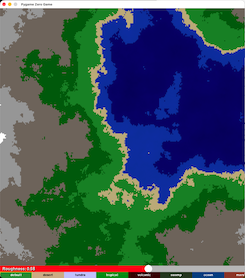
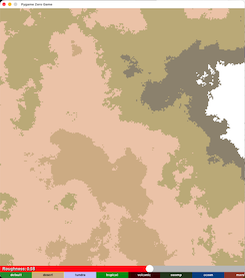
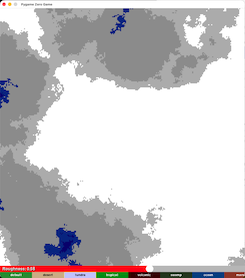
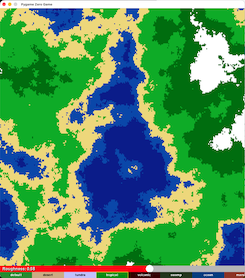
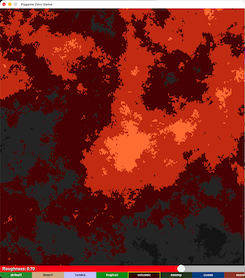
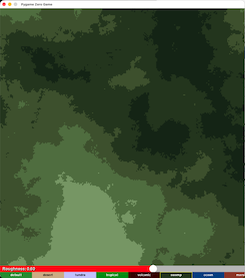
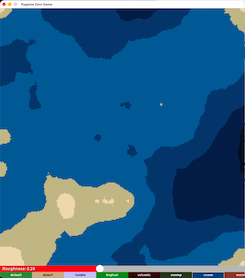
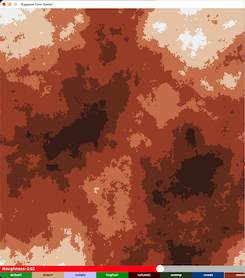
Sample Generations
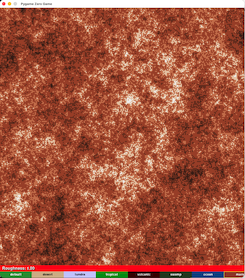
⚠️ You MUST include all four interactive functions for pgzero interactive
Missing even one will cause failures or unpredictable behavior.
Table of Contents
- Why Use Diamond Square?
- Usage
- Pgzero Terrain Example
- Pgzero Interactive Terrain Example
- Pygame Terrain Example
- Pygame Interactive Terrain Example
- Image Saving Examples
- Custom Biome Examples
- Requirements for Pgzero Interactive
- Versions
- Coming Soon
Why Use diamond-square?
This package provides a complete implementation of the Diamond–Square algorithm with:
-
Fast rendering of the Diamond-Square algorithm written in C.
-
Multiple built‑in biomes.
-
Adjustable roughness and scale.
-
Support for pgzero and pygame.
-
Optional interactive mode.
-
The ability to save generated terrain as an image.
-
Functions to add or remove biomes dynamically.
It is designed for both experimentation and game development, making terrain generation simple and customizable.
Usage
Pgzero Terrain Example
Go to /sample_codes/pgzero_terrain.py
Pgzero Interactive Terrain Example
Go to /sample_codes/pgzero_interactive_terrain.py
Pygame Terrain Example
Go to /sample_codes/pygame_terrain.py
Pygame Interactive Terrain Example
Go to /sample_codes/pygame_interactive_terrain.py
Image Saving Examples
Go to /sample_codes/save_terrain.py
Custom Biome Examples
Go to /sample_code/custom_biome.py
Requirements for Pgzero Interactive
For Pgzero Interative Mode, it requires all four of the following functions to be placed in their corresponding pgzero event handlers:
terrain.draw_func(screen)
terrain.on_mouse_down_func(pos)
terrain.on_mouse_up_func()
terrain.on_mouse_move_func(pos)
If any one of these is missing, the interactive mode will:
-
fail to update correctly
-
behave unpredictably
-
or stop working entirely
These must be placed in these functions in pgzero:
-
def draw():→terrain.draw_func(screen) -
on_mouse_down(pos):→terrain.on_mouse_down_func(pos) -
on_mouse_up():→terrain.on_mouse_up_func() -
on_mouse_move(pos):→terrain.on_mouse_move_func(pos)
Versions
(Latest) Version 0.1.7: Fix terrain generation and README updates.
Version 0.1.6: Added custom_biome.py in sample_codes.
Version 0.1.5: Bug fixes, documentation changes, added utils.py, and updated sample code files.
To view previous versions, go to versions.txt
Coming Soon
Version 0.1.8: Add re-generate button for interactive mode pgzero and pygame.
1 maintainer

Metadata
1 maintainer
Release files for diamond-square 0.1.7
For a detailed explanation of source distributions (sdists) and built distributions (wheels), please see the package formats documentation.
Source distribution (sdist)
| File | Size | Uploaded | |
|---|---|---|---|
| diamond_square-0.1.7.tar.gz | 14.4 kB | Details |
Built distribution (wheel)
| File | Interpreter | ABI | Platform | Reset |
|---|---|---|---|---|
| diamond_square-0.1.7-py3-none-any.whl | Python 3 | none | any | Details |
Total release size: 29.2 kB
Release files / diamond_square-0.1.7.tar.gz
| Download URL | diamond_square-0.1.7.tar.gz |
|---|---|
| Size | 14.4 kB |
| Tags | Source |
|
SHA-256 checksum How to use checksums |
8ccbea1f8c5c016e15a52ca9823c5b6cb0f521155e67a6810e8ca1c469726c64
|
|
BLAKE2b-256 checksum How to use checksums |
40d29d60c9b8f8dd03c51570916810dd5ffd7bacc59fa6aa209bcce48843ffa4
|
| Upload date | |
|
Uploaded using Trusted Publishing? What is trusted publishing? |
No |
| Uploaded via |
twine/7.0.0 CPython/3.14.7
|
Release files / diamond_square-0.1.7-py3-none-any.whl
| Download URL | diamond_square-0.1.7-py3-none-any.whl |
|---|---|
| Size | 14.8 kB |
| Tags | Python 3 |
|
SHA-256 checksum How to use checksums |
114b3184ea262b006687ab7d4e0e8c215b8b14b2432849c04db27dd1b2622508
|
|
BLAKE2b-256 checksum How to use checksums |
738687974d830c5c4e294c4ca99e3721f62ac63a91e35e171b1e5963359910e6
|
| Upload date | |
|
Uploaded using Trusted Publishing? What is trusted publishing? |
No |
| Uploaded via |
twine/7.0.0 CPython/3.14.7
|














