
Extension for django_tables2 can dynamically show or hide columns

Project description
django-tables2-column-shifter



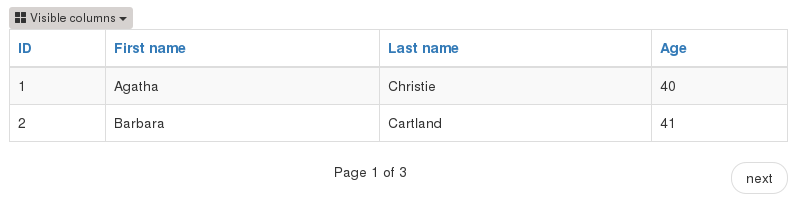
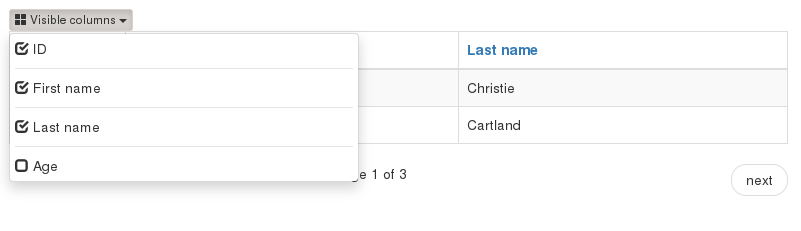
About the app: Simple extension for django-tables2 to dynamically show or hide columns using jQuery. Application uses web storage to store information whih columns are visible or not. Using JQuery, Bootstrap3 or Bootstrap4 and Django >=1.9.
Tested by tox with:
Python :2.7, 3.6
Django : 1.9, 1.10, 1.11, 2.0
django-tables2 : 1.5, 1.6, …, 1.19, master
Require:
Django >= 1.9
django-tables2 >= 1.5.0 (earlier version probably will be work but wasn’t tested)
bootstrap3 or bootstrap4
JQuery
Supported locale:
EN - (English)
PL - (Polish)
More information about django-tables in here: https://django-tables2.readthedocs.io/
Screens:
How Install:
Install django-tables2-column-shifter using:
    pip install django-tables2-column-shifter

or

    pip install git+https://github.com/djk2/django-tables2-column-shifter

or

    pip install django-tables2-column-shifter.zip

or

    pip install django-tables2-column-shifter.tar.gz
Add django_tables2_column_shifter to your INSTALLED_APPS setting (after django_tables2) like this
INSTALLED_APPS = [
    ...,
    'django_tables2',
    'django_tables2_column_shifter',
    ...,
]
Add path to js script: django_tables2_column_shifter.min.js in your base django template. Script must be add after jquery.js and before </body> tag.
base.html:
{% load static %}

<body>
    ...
    ...
    <script src="{% static "jquery.min.js" %}"></script> {# require #}
    <script
        type="text/javascript"
        src="{% static "django_tables2_column_shifter/js/django_tables2_column_shifter.min.js" %}">
    </script>
</body>
Usage:
To use app, you must inherit your table class from django_tables2_column_shifter.tables.ColumnShiftTable
models.py - create normal model:
from django.db import models

class MyModel(models.Model):
    first_name = models.CharField("First name", max_length=50)
    last_name = models.CharField("Last name", max_length=50)
tables.py - change inherit to ColumnShiftTable:
from django_tables2_column_shifter.tables import ColumnShiftTable
from app.models import MyModel

# By default you probably inherit from django_table2.Table
# Change inherit to ColumnShiftTable
class MyModelTable(ColumnShiftTable):
    class Meta:
        model = MyModel
views.py - In your view, nothing changes:
from .tables import MyModelTable
from .models import MyModel

def simple_list(request):
    queryset = MyModel.objects.all()
    table = MyModelTable(queryset)
    return render(request, 'template.html', {'table': table})
template.html - use default render_table tag to display table object (using bootstrap3 / bootstrap4):
{% extends "base.html" %}
{% load django_tables2 %}
{% render_table table %}
Warnings:
Warning : - If you use {% render_table %} tag with queryset (not table class instance), django-tables2-column-shifter will not be work. Queryset does not have template attribute:
{% load django_tables2 %}
{% render_table queryset %} {# not work #}
Warning : - If you use a different template than django_tables2_column_shifter/table.html to render your table, probably django-tables2-column-shifter will not be work. Your custom template should inherit from django_tables2_column_shifter/bootstrap3.html
Customizing:
If you use more then one instance of the same Table class, you should use a different prefix for each instance:
tab1 = MyModelTable(queryset, prefix='tab1')
tab2 = MyModelTable(queryset, prefix='tab2')
tab3 = MyModelTable(queryset, prefix='tab3')
To disable shifter mechanism - set False to shift_table_column in your table class (default value is True):
class MyModelTable(ColumnShiftTable):
   shift_table_column = False
   ...
By default, all columns from sequence are visible, if you want limit visible columns, override method get_column_default_show(self) like that:
class MyModelTable(ColumnShiftTable):
    def get_column_default_show(self):
        self.column_default_show = ['column1', 'column2']
        return super(MyModelTable, self).get_column_default_show()
Run demo:
Download or clone project from https://github.com/djk2/django-tables2-column-shifter:
git clone https://github.com/djk2/django-tables2-column-shifter.git
Go to testproject directory:
cd django-tables2-column-shifter/testproject
Install requirements:
pip install -r requirements.txt
Run django developing server:
python manage.py runserver
Links:
Release history Release notifications | RSS feed


Download files
Download the file for your platform. If you're not sure which to choose, learn more about installing packages.
Source Distribution
Built Distribution
Filter files by name, interpreter, ABI, and platform.
If you're not sure about the file name format, learn more about wheel file names.
Copy a direct link to the current filters
File details
Details for the file django-tables2-column-shifter-0.4.0.tar.gz.
File metadata
- Download URL: django-tables2-column-shifter-0.4.0.tar.gz
- Upload date:
- Size: 14.2 kB
- Tags: Source
- Uploaded using Trusted Publishing? No
File hashes
| Algorithm | Hash digest | |
|---|---|---|
| SHA256 |
15a7e4fa974314140389755a0f8a68152c65893650fa9b07e71283fbc85b4645
|
|
| MD5 |
e9f07c9156ca95863e91b0a362fa5d4e
|
|
| BLAKE2b-256 |
1dfe1398d3dd15f35376ead52aa4b3854eec784562b00c5a87ea80f67910769f
|
File details
Details for the file django_tables2_column_shifter-0.4.0-py2.py3-none-any.whl.
File metadata
- Download URL: django_tables2_column_shifter-0.4.0-py2.py3-none-any.whl
- Upload date:
- Size: 21.3 kB
- Tags: Python 2, Python 3
- Uploaded using Trusted Publishing? No
File hashes
| Algorithm | Hash digest | |
|---|---|---|
| SHA256 |
df37ab2ed27cf7a9b6984259988a5424b0b437dacbd0dd3639365c23926b8ccc
|
|
| MD5 |
e6cb216e7b7436e0e111c12023c9d610
|
|
| BLAKE2b-256 |
ffbd1a81d316a1992e60a36c4e96c33a37e13f07263883a85218947c5b6bfb65
|






