
docket — Python library for invoice, receipt and contract OCR extraction with LLMs
Turn scanned invoices, receipts and contracts into validated JSON with source citations, then export EU e-invoices checked against the official rules.
pip install docket-idp
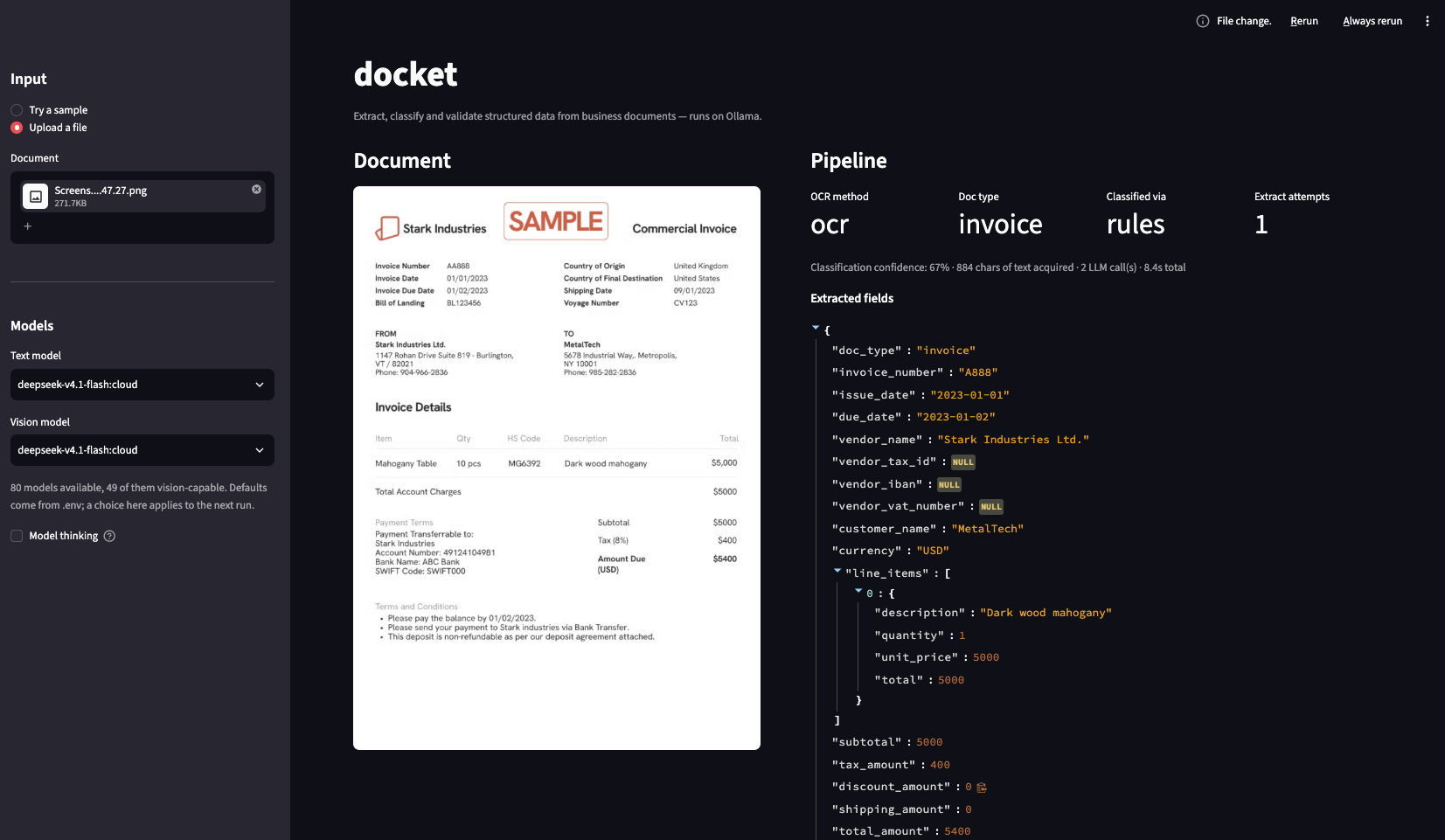
Python library + CLI · Ollama or any OpenAI-compatible API · Every value cited to its source line · Apache-2.0
Quick start
Needs Python 3.10+, Tesseract on PATH (brew install tesseract / apt install tesseract-ocr), and an LLM: Ollama with a text and a vision model pulled, or an OpenAI-compatible API key (see Configuration).
pip install docket-idp
docket process invoice.pdf        # JSON on stdout; exit 2 if validation fails
{
  "status": "succeeded",
  "document_type": "invoice",
  "extracted": {"invoice_number": "FAC-2026-0042", "issue_date": "2026-03-15", "total_amount": 1493.82, "currency": "EUR"},
  "field_sources": {"total_amount": {"page": 1, "quote": "Total factura: 1.493,82 €", "bbox": {"x0": 0.62, "y0": 0.71, "x1": 0.89, "y1": 0.73}}}
}
Extract invoice data in your Python application
from docket import ExportError, OcrOptions, ProcessOptions, export_document, process_document

options = ProcessOptions(document_type="invoice", ocr=OcrOptions(backend="tesseract", fallbacks=["vlm"]))
result = process_document("invoice.pdf", options)
try:
    xml = export_document(result, "xrechnung-ubl").content   # refuses invalid or unreviewed results
except ExportError:
    print(result.status, result.review_reasons)
result.document is the typed schema (Invoice, Receipt, Contract, …), result.status is succeeded, needs_review or failed, and result.field_sources gives the page, quote and box of every value. Nothing is written to disk unless you ask for it. For directories use process_batch("scans/", options, BatchOptions(workers=4, checkpoint="run.jsonl")) or docket batch scans/ --format csv --output results.csv: input order is kept, one failure never stops the rest, and a rerun skips checkpointed documents.
Export and validate XRechnung, Factur-X and Peppol e-invoices
| Format | Name | Checked against |
|---|---|---|
| UBL 2.1 / Peppol BIS 3.0 | ubl, peppol |
EN 16931 (+ Peppol BIS 3.0.20) |
| XRechnung 3.0, UBL / CII | xrechnung-ubl, xrechnung-cii |
EN 16931 + XRechnung 3.0.2 |
| Factur-X / ZUGFeRD CII | factur-x-en16931, factur-x-basic |
Factur-X 1.09 profile rules |
| Facturae 3.2.2, SAP, Xero, QuickBooks | facturae, sap-idoc, sap-csv, xero-csv, xero-json, quickbooks-iif, quickbooks-json |
— |
pip install "docket-idp[einvoice]"
docket einvoice fetch                              # once: Peppol, CII and Factur-X rules are not shipped
docket process invoice.pdf --export xrechnung-ubl --validate-export
docket validate-einvoice invoice.xml               # XSD + Schematron; exit 0 valid, 2 invalid, 3 not set up
docket factur-x create invoice.pdf factur-x.xml -o hybrid.pdf
Exporters refuse what they can't represent faithfully (no line items, tax that doesn't match the lines) instead of guessing. Validation runs offline with the official artifacts, pinned by SHA-256 in the manifest. Artifacts without verified redistribution terms are downloaded on request, not shipped; see the third-party licence inventory. In Python: validate_einvoice("invoice.xml"), and generate_facturx_pdf() / verify_facturx_round_trip() for PDF/A-3 with veraPDF.
Add custom document types and vendor templates
The catalog has 14 versioned schemas (docket schemas list). Eight are stable: invoice, purchase order, receipt, contract, bank statement, acceptance act, waybill and boarding pass. Six are experimental: credit note, tax invoice, utility bill, delivery note, certificate of origin and ID document. Add your own as a Pydantic model:
from datetime import date
from docket import CitedDocument, Party, SchemaSpec, keywords, register_schema

class ParkingTicket(CitedDocument):      # CitedDocument adds page/quote citations
    ticket_number: str
    issuing_authority: Party
    issue_date: date
    fine: float

register_schema(SchemaSpec(
    schema_id="parking_ticket", version="1.0", model=ParkingTicket,
    description="Parking ticket / Strafzettel",
    keywords=keywords("parking ticket", "strafzettel"),
    cited_fields=("ticket_number", "issuing_authority.name", "fine"),
))
Registered schemas are classified, extracted, citation-checked and exported like built-in ones. register_vendor_template(VendorTemplate(...)) reads a known vendor layout with explicit rules and no LLM, accepted only when validation passes. register_exporter() adds output formats. Schemas, exporters and OCR backends can also ship as separate packages via entry points; see examples/.
How it works
Text comes from the cheapest source that works, page by page: PDF text layer, then OCR (Tesseract, PaddleOCR, Docling or a plugin), then a vision model only when OCR is unusable. Classification tries keyword rules, TF-IDF, then an LLM. Extraction fills a Pydantic schema and cites the verbatim line for every value; schema errors go back to the model. Validation never calls a model: arithmetic to the cent, dates, IBAN, VAT and tax-ID check digits, and that every cited line contains the value. Anything uncertain goes to review instead of being silently fixed.
document → text layer / OCR / VLM → classify → extract + cite → validate → JSON or review
Configuration
Priority, lowest to highest: defaults, a TOML file (--config, DOCKET_CONFIG or ./docket.toml), environment or .env, explicit arguments. Every setting is in docket.example.toml; docket config show prints effective values and their source.
| Variable | Default | What it does |
|---|---|---|
DOCKET_LLM_PROVIDER |
ollama |
ollama, or openai for any OpenAI-compatible API |
DOCKET_LLM_BASE_URL / DOCKET_LLM_API_KEY |
OpenAI / unset | Endpoint and key for openai, e.g. https://api.mistral.ai/v1 |
DOCKET_TEXT_MODEL / DOCKET_VISION_MODEL |
deepseek-v4.1-flash:cloud |
Models for extraction and for reading scans |
OLLAMA_HOST |
http://localhost:11434 |
Where Ollama is listening |
DOCKET_OCR_BACKEND |
auto |
tesseract, paddle, docling, auto or a plugin name |
DOCKET_OCR_FALLBACKS |
vlm |
Backends tried when a page's reading is rejected |
DOCKET_OCR_LANGUAGES |
en |
ISO 639-1 codes, e.g. en,de,fr |
DOCKET_MIN_CONFIDENCE |
0.55 |
Classification confidence below which a document goes to review |
DOCKET_REVIEW_QUEUE_ENABLED |
false |
Persist flagged documents in the review queue |
DOCKET_REVIEW_DATABASE_URL |
sqlite:///data/review.db |
Review store; PostgreSQL with the [postgres] extra |
DOCKET_BATCH_WORKERS |
4 |
Documents in flight per batch |
DOCKET_EINVOICE_DOWNLOADS |
~/.cache/docket/einvoice |
Where docket einvoice fetch stores artifacts |
Requirements
- Python 3.10+
- Tesseract on PATH (or the
[paddle]/[docling]extra) - Ollama, or any OpenAI-compatible API (Mistral, OpenAI, Azure, vLLM)
- macOS or Linux; CI runs on Ubuntu
Limitations
- A silent wrong answer is possible: on a 198-scan real-world corpus, 35% of "succeeded, no review" documents had at least one wrong field, mostly degraded thermal receipts. See benchmarks.
- Classification is the weak tier on unusual documents; field accuracy is 0.84–0.97 where the type is right.
- The vision model has been seen changing digits so that a page reconciles.
docket forensicsis a pixel heuristic: it finds coloured stamps and handwriting but not black stamps, and its scores are not calibrated.- Windows is untested. A document takes a median of 6.4–22.7 s depending on the OCR backend, longer with the vision model.
Extras, HTTP service, Docker, development
Extras
pip install "docket-idp[api]"       # HTTP service (docket-api)
pip install "docket-idp[einvoice]"  # official e-invoice validation
pip install "docket-idp[paddle]"    # PaddleOCR backend
pip install "docket-idp[docling]"   # Docling/TableFormer backend
pip install "docket-idp[all]"       # + Langfuse tracing and e-invoice validation
HTTP service and Docker
Reference applications on the same library contract, for other languages:
docker run -p 8000:8000 -e DOCKET_API_KEY=secret ghcr.io/kazkozdev/docket
curl -H "Authorization: Bearer secret" -F file=@invoice.pdf localhost:8000/process
POST /jobs handles multi-file jobs with CSV/JSONL downloads; the typed contract is docs/openapi.json, with interactive docs at /docs.
Development
git clone https://github.com/KazKozDev/docket.git && cd docket
python3 -m venv .venv && source .venv/bin/activate && pip install -e ".[dev]"
pytest                                   # no test needs a running LLM
streamlit run examples/streamlit_demo.py # demo UI






1 maintainer

Metadata
1 maintainer
Release files for docket-idp 0.4.0
For a detailed explanation of source distributions (sdists) and built distributions (wheels), please see the package formats documentation.
Source distribution (sdist)
| File | Size | Uploaded | |
|---|---|---|---|
| docket_idp-0.4.0.tar.gz | 517.6 kB | Details |
Built distribution (wheel)
| File | Interpreter | ABI | Platform | Reset |
|---|---|---|---|---|
| docket_idp-0.4.0-py3-none-any.whl | Python 3 | none | any | Details |
Total release size: 981.0 kB
Release files / docket_idp-0.4.0.tar.gz
| Download URL | docket_idp-0.4.0.tar.gz |
|---|---|
| Size | 517.6 kB |
| Tags | Source |
|
SHA-256 checksum How to use checksums |
45c067e72413b215b0c56844e5cfc781b0cd4fa6934e1b5658875b4fabfe7269
|
|
BLAKE2b-256 checksum How to use checksums |
951a75264a889557b8bb4e3051c12bea399e8bc7ef7630c5353848b35d0ce654
|
| Upload date | |
|
Uploaded using Trusted Publishing? What is trusted publishing? |
Yes |
| Uploaded via |
twine/7.0.0 CPython/3.13.14
|
Provenance
Provenance describes where a file came from. On PyPI, provenance is shared via attestations, which provide a verifiable record of the build or publishing details. View details, limitations and caveats.


PyPI Publish Attestation
PyPI verified that this artifact, at this checksum, originated from the publisher listed below.
Signed by GitHub Actions, verified by PyPI on Sep 23, 2026.
Transparency logRelease files / docket_idp-0.4.0-py3-none-any.whl
| Download URL | docket_idp-0.4.0-py3-none-any.whl |
|---|---|
| Size | 463.4 kB |
| Tags | Python 3 |
|
SHA-256 checksum How to use checksums |
6b476d7ef8a9cc48b61ee81a7411bdd5c8790c64c52f809a30dcc71081564a26
|
|
BLAKE2b-256 checksum How to use checksums |
a48e6e4868ee2441601f7dc029b7210122a412c3780375f8996885ce36a43b73
|
| Upload date | |
|
Uploaded using Trusted Publishing? What is trusted publishing? |
Yes |
| Uploaded via |
twine/7.0.0 CPython/3.13.14
|
Provenance
Provenance describes where a file came from. On PyPI, provenance is shared via attestations, which provide a verifiable record of the build or publishing details. View details, limitations and caveats.
PyPI Publish Attestation
PyPI verified that this artifact, at this checksum, originated from the publisher listed below.
Signed by GitHub Actions, verified by PyPI on Sep 23, 2026.
Transparency log













