
DRF Audit Trail
A reusable Django DRF application for auditing requests, logins, and custom processes.
Features
- HTTP request auditing (
RequestAuditEvent) - Login and logout auditing (
LoginAuditEvent) - PostgreSQL trigger-based object/field audit log (
pg_audit_models) - Custom process auditing (
ProcessAuditEvent,StepAuditEvent,RegistrationAuditEvent) - Integration with SimpleJWT
- Django Async support
- Thread safe
- Error and stacktrace tracking
- PDF report generation
Installation
pip install drf-audit-trail
Configuration
In your settings.py:
INSTALLED_APPS = [
    ...
    "drf_audit_trail",
]

MIDDLEWARE = [
    ...
    "drf_audit_trail.middleware.RequestLoginAuditEventMiddleware",
]
Database
You can use a separate database for audit data:
DATABASES = {
    "default":  {
        "ENGINE": "django.db.backends.sqlite3",
        "NAME": BASE_DIR / "db.sqlite3",
    },
    "audit_trail": {
        "ENGINE": "django.db.backends.sqlite3",
        "NAME": BASE_DIR / "audit_trail.sqlite3",
    },
}

DRF_AUDIT_TRAIL_DATABASE_ALIAS = "audit_trail"  # Audit database alias
DJANGO_DEFAULT_DATABASE_ALIAS = "default"  # Default database alias

DATABASE_ROUTERS = ["drf_audit_trail.database_router.DRFAuditTrail"]
Available Settings
Add to your settings.py as needed:
DRF_AUDIT_TRAIL_REQUEST_AUDIT_URLS = [r"^(?!/admin/jsi18n/).*$"]  # Monitored URLs (regex)
DRF_AUDIT_TRAIL_AUTH_URL = [
    "/api/token/",
    "/admin/login/",
    "/api/logout/",
    "/admin/logout/",
]  # Authentication endpoints
DRF_AUDIT_TRAIL_AUTH_STATUS_CODE_FAILED = 401  # Auth failure status code
DRF_AUDIT_TRAIL_NOTSAVE_REQUEST_BODY_URLS = ['/api/token']  # Endpoints that do not save request body
DRF_AUDIT_TRAIL_DEFAULT_SYSTEM_ACTOR_ROLE = "System"  # Default role for system audit events
DRF_AUDIT_TRAIL_USER_PK_NAME = "pk"  # User PK field name
All settings are optional and have sensible defaults.
Audit Models
- RequestAuditEvent: HTTP request auditing.
- LoginAuditEvent: Login/logout auditing.
- ProcessAuditEvent: Represents the entire process execution.
- StepAuditEvent: Represents each step that belongs to the process.
- RegistrationAuditEvent: Represents each execution record created during the process flow.
How Process Auditing Works
Process auditing is organized as a hierarchy:
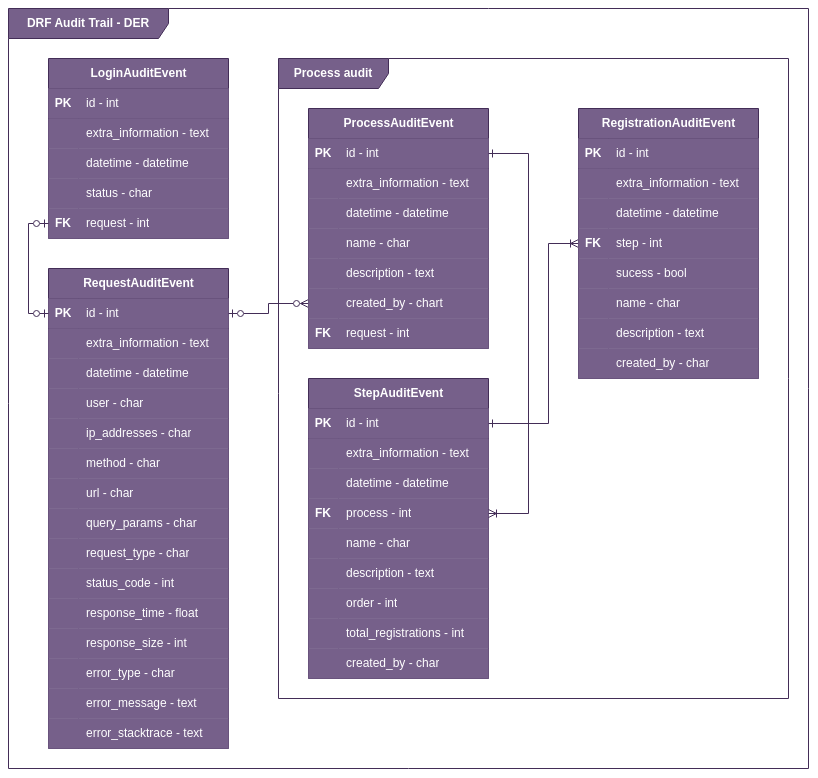
ProcessAuditEventis the process as a whole.StepAuditEventcontains all steps that belong to that process.RegistrationAuditEventstores each record executed inside the process flow.
This means:
- one process can have many steps
- one step can have many registrations
- each registration tells what happened during the execution of that step
Typical examples of registrations are:
- validation succeeded
- validation failed
- database save completed
- external integration returned an error
The structure below illustrates this relationship:

Example Usage in a View
from rest_framework.views import APIView
from rest_framework.response import Response

class TestAPIView(APIView):
    def get(self, request, *args, **kwargs):
        drf_request_audit_event = request.META.get("drf_request_audit_event")
        drf_request_audit_event["extra_informations"] = {
            "data": "Example of extra information"
        }
        return Response("ok")
PostgreSQL Trigger Audit Models
drf_audit_trail.pg_audit_models is the PostgreSQL-trigger based audit API. It
captures database changes in PostgreSQL and stores one ActionLog row for the
action context plus one DiffLog row per changed column.
The change capture happens in the database, through triggers. Python is mainly responsible for setting the action context, such as user, URL, actor type, reason for change, and optional filter metadata.
Use it in production when:
- the primary database is PostgreSQL;
- audited tables have a simple primary key.
id,BigAutoField, UUID, and custom primary-key column names are supported; - migrations and triggers have been validated in staging with a realistic schema;
- reports and filters can read from
ActionLogandDiffLog.
It is a good fit for centralized PostgreSQL-level change capture, including changes that do not pass through the ORM (raw SQL, bulk operations, external tools).
Install it as a Django app:
INSTALLED_APPS = [
    # ...
    "drf_audit_trail.pg_audit_models",
]

MIDDLEWARE = [
    # ...
    "drf_audit_trail.pg_audit_models.middleware.PGAuditModelsMiddleware",
]
Run migrations normally:
python manage.py migrate
The migrations create the audit tables and the PostgreSQL function used by the
triggers. After migrations, the post_migrate hook creates triggers for the
configured audited tables and removes old managed triggers that no longer match
the current settings.
On project runtime startup, the app also synchronizes triggers automatically on
the first request or first database connection after Django apps are ready, when
the PostgreSQL audit schema already exists. This avoids database access inside
AppConfig.ready() while still covering changes to DRF_AUDIT_TRAIL_PG_AUDIT,
including audit_all_models=True, after the project is restarted.
Automatic sync is skipped for migration/test/utility commands and when the audit
tables or fn_log_update() function do not exist yet. First installation still
uses migrate/post_migrate.
The automatic sync uses django.core.signals.request_started and
django.db.backends.signals.connection_created, which are available in Django
4.2 LTS and Django 5.x.
If you want to force synchronization manually, run:
python manage.py sync_pg_audit_triggers
To verify the current database without changing it:
python manage.py sync_pg_audit_triggers --check
Use --database <alias> when the audited PostgreSQL database is not default.
There is no schema setting. The implementation keeps the original behavior and
targets tables in public.
Configure audited models in settings.py:
DRF_AUDIT_TRAIL_PG_AUDIT = {
    "models": ("auth.User", "core.Category", "core.Product"),
}
Or audit all models except selected apps/models:
DRF_AUDIT_TRAIL_PG_AUDIT = {
    "audit_all_models": True,
    "excluded_apps": ["sessions", "admin"],
    "excluded_models": ["auth.Permission"],
}
pg_audit_models is always excluded internally, even with
audit_all_models=True or excluded_apps=[].
models accepts:
- Django labels, such as
"core.Product"; - lower-case Django labels, such as
"core.product"; - database table names, such as
"core_product"; - model classes, such as
Product; "__all__"to audit all models, respecting exclusions.
Supported settings:
DRF_AUDIT_TRAIL_PG_AUDIT = {
    "audit_all_models": False,
    "models": None,
    "excluded_apps": [],
    "excluded_models": [],

    "api_views_modules": [],
    "api_views_module_suffixes": ["views", "api.views"],
    "api_views_actions": [
        "list",
        "create",
        "retrieve",
        "update",
        "partial_update",
        "destroy",
    ],
    "api_views_methods": ["get", "post", "put", "patch", "delete"],

    "django_views_modules": [],
    "django_views_module_suffixes": ["views"],
    "django_views_methods": ["get", "post", "put", "patch", "delete"],

    "reason_for_change_key": "reason_for_change",
    "default_extra_informations_getter": None,
}
When the app is installed, patching is always enabled for Django Admin, DRF
viewsets, DRF APIViews, DRF generic views, and Django class-based views.
@action methods on DRF viewsets are always patched.
By default, the patcher imports app.views and app.api.views for DRF/API
views, and app.views for Django views. If a view module path is a package, its
children are imported recursively, so layouts like app/api/views/products.py
are supported.
For custom layouts:
DRF_AUDIT_TRAIL_PG_AUDIT = {
    "models": ("core.Product",),
    "api_views_modules": [
        "core.api.views.products",
        "billing.api.views.invoices",
    ],
    "api_views_module_suffixes": ["views", "api.views", "api.viewsets"],
    "django_views_modules": [
        "public.web.views.products",
    ],
    "django_views_module_suffixes": ["views", "web.views"],
}
Supported view types:
from rest_framework import mixins
from rest_framework.viewsets import GenericViewSet


class ProductViewSet(mixins.CreateModelMixin, mixins.UpdateModelMixin, GenericViewSet):
    queryset = Product.objects.all()
    serializer_class = ProductSerializer
from rest_framework.views import APIView


class SendProductReviewAPIView(APIView):
    audit_model = Product

    def post(self, request, product_id):
        product = Product.objects.get(pk=product_id)
        product.status = "review"
        product.save()
from django.views import View


class ProductArchiveView(View):
    model = Product

    def post(self, request, product_id):
        product = Product.objects.get(pk=product_id)
        product.archived = True
        product.save(update_fields=["archived"])
The audited model is resolved in this order:
audit_modelmodelqueryset.modelserializer_class.Meta.model
ActionLog.extra_informations is a nullable JSONField with a GIN index. It is
not populated by default. Use it only for application-specific filter metadata,
such as organization_id, study_id, site_id, or tenant_id. Do not duplicate
technical request context there; ActionLog already has first-class fields for
source, username, actor_type, and url.
Optional global getter:
def get_pg_audit_extra_informations(
    *,
    request=None,
    model=None,
    ref_name=None,
    ref_id=None,
    **kwargs,
):
    user = getattr(request, "user", None)
    organization_id = getattr(user, "organization_id", None)
    if organization_id is None:
        return None
    return {"organization_id": organization_id}
DRF_AUDIT_TRAIL_PG_AUDIT = {
    "models": ("core.Product",),
    "default_extra_informations_getter": "core.audit.get_pg_audit_extra_informations",
}
You can also provide metadata for a specific operation:
from drf_audit_trail.pg_audit_models import audit


with audit(
    source="products.import",
    extra_informations={"import_id": import_job.pk},
):
    Product.objects.create(name="Imported product")
Querying by metadata:
from drf_audit_trail.pg_audit_models.models import ActionLog


ActionLog.objects.filter(extra_informations__study_id=10)
ActionLog.objects.filter(extra_informations__tenant_id="acme")
DiffLog.reason_for_change stores the reason per changed column. It can be set
explicitly in the audit context or read from the request body. The default request
key is reason_for_change.
{
  "name": "New name",
  "reason_for_change": "Correction requested by support"
}
For field-specific reasons:
{
  "name": "New name",
  "category": 10,
  "reason_for_change": {
    "name": "Spelling correction",
    "category": "Moved to the correct category"
  }
}
When the reason is a dictionary, Django field names are normalized to database
column names. For example, category also fills category_id.
For async jobs, management commands, consumers, and other non-user flows, use
system_audit:
from drf_audit_trail.pg_audit_models import system_audit


with system_audit(
    source="emails.send_welcome",
    reason_for_change="Welcome email sent",
):
    user.last_welcome_email_sent_at = timezone.now()
    user.save(update_fields=["last_welcome_email_sent_at"])
This creates ActionLog.actor_type = "System" and
ActionLog.username = "system".
Querying logs:
from drf_audit_trail.pg_audit_models.models import ActionLog, DiffLog


actions = ActionLog.objects.filter(
    actor_type=ActionLog.USER,
    ref_name="core_product",
).order_by("-executed_at")

diffs = DiffLog.objects.filter(
    action_log__in=actions,
    column_name="status",
).select_related("action_log")
ActionLog stores the action context. DiffLog stores each changed column.
Changes outside a request, audit(), or system_audit() are still captured by
the trigger, but they may not have username, explicit actor_type, url,
reason_for_change, or extra_informations. Wrap background jobs and raw SQL
flows with system_audit() or audit() when context matters.
If no ActionLog rows are created after inserting/updating/deleting an audited
model, check trigger installation first:
python manage.py sync_pg_audit_triggers --check
If the command reports missing triggers, run:
python manage.py sync_pg_audit_triggers
The patcher only sets request/action context around Django Admin, DRF views, and
Django views. It is not responsible for inserting audit rows. The PostgreSQL
trigger inserts ActionLog and DiffLog; therefore, no rows usually means the
table is not configured as audited, the database is not PostgreSQL, migrations
were not run, or startup/manual trigger sync could not run.
Audit Log Admin Exports
The Django admin changelist for pg_audit_models.ActionLog includes CSV, XLS,
and PDF export buttons. Exports use the currently filtered admin queryset and
include who pulled the report, when it was pulled, and the filters applied.
ActionLogAdmin resolves report fields from ActionLog plus its related
DiffLog rows. Each changed column is exported as one report row.
ActionLogAdmin exports these columns:
Timestamp (UTC)fromActionLog.executed_atUsernamefromActionLog.usernameUser Roleas blank, becauseActionLogdoes not store a role fieldEvent TypefromDiffLog.event_typeAction SourcefromActionLog.sourceObjectfrom the audited table/model name plusref_idField Namefrom the resolvedDiffLog.column_nameOld ValueandNew ValuefromDiffLog.old_valueandDiffLog.new_valueReason for ChangefromDiffLog.reason_for_changeSystem/User ActionfromActionLog.actor_typeURLfromActionLog.url
The exported ActionLog filename prefix is pg_action_log_report. CSV exports
include a UTF-8 BOM for Excel compatibility. XLS exports render the shared HTML
table template as .xls, and PDF exports render the shared PDF template through
WeasyPrint.
Reusable Report Export Classes
Projects that need report exports outside the Django admin can reuse
AuditLogReportExporter and AuditLogReportExportActionMixin. The exporter
contains the shared CSV, XLS, and PDF rendering flow. The mixin can be added to
a DRF viewset by setting report_exporter_class; it applies the viewset's
filter_queryset() pipeline before generating the report.
The package does not register an API route for this integration. The consuming project is responsible for adding the mixin to its viewset and defining its URL, queryset, filters, authentication, and permissions.
Filters that depend on the consuming application's domain, such as Sponsor, Study, Site, Subject, or Investigator, should be implemented by that application. DRF Audit Trail keeps the reusable model generic and does not add project-specific fields such as sponsor, study, or site.
Diagrams
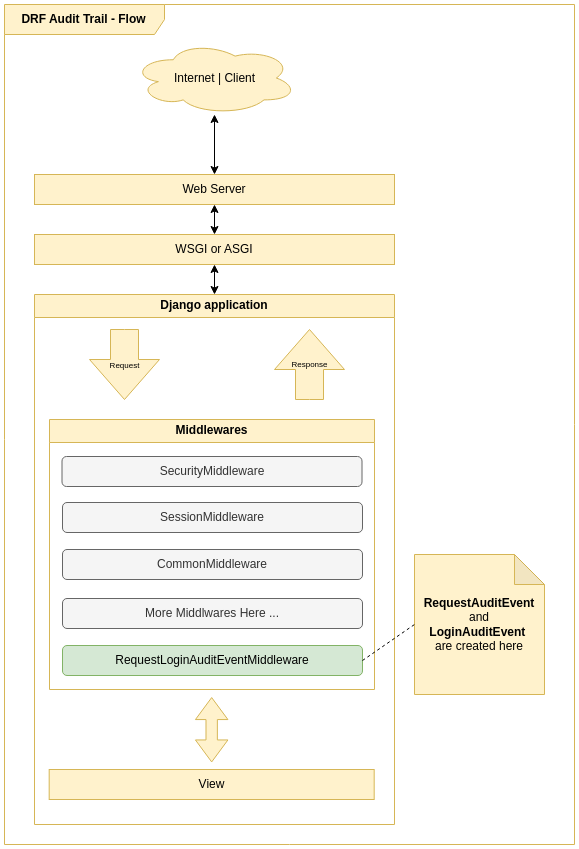
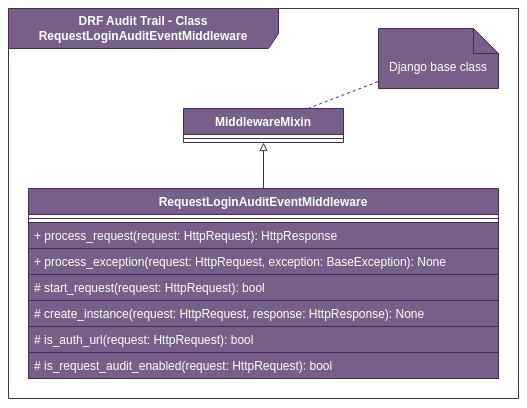
Note: These diagrams were created before the latest structured audit log changes. They may not be 100% accurate for the current implementation. Until the diagrams are updated, use the textual documentation in this README as the source of truth.
Audit Flow
ERD
Middleware Class Diagram
Example: Process Auditing
To audit custom business processes, use the process audit utilities:
from drf_audit_trail.models import (
    ProcessAuditEvent,
    RegistrationAuditEvent,
    StepAuditEvent,
)
from drf_audit_trail.process_audit import ProcessAudit


class CreateProductProcessAudit(ProcessAudit):
    def create_process(self) -> ProcessAuditEvent:
        return self.save_model(ProcessAuditEvent(name="Criar produto"))

    def create_steps(self, process: ProcessAuditEvent):
        self.step_validation = self.save_model(
            StepAuditEvent(
                name="Validação dos Dados",
                order=1,
                process=process,
                total_registrations=2,
            )
        )

        self.step_save_db = self.save_model(
            StepAuditEvent(
                name="Salvar no banco de dados",
                order=2,
                process=process,
            )
        )

    def create_registration_step_validation_code(
        self, success, name=None, **extra_fields
    ):
        name = name or "Codigo do produto validados com sucesso"
        return self.save_model(
            RegistrationAuditEvent(
                name=name, step=self.step_validation, success=success, **extra_fields
            )
        )

    def create_registration_step_validation(self, success, name=None, **extra_fields):
        name = name or "Dados de criação validados com sucesso"
        return self.save_model(
            RegistrationAuditEvent(
                name=name, step=self.step_validation, success=success, **extra_fields
            )
        )

    def create_registration_save_db(self, success, name=None, **extra_fields):
        name = name or "Salvar no banco de dados"
        return self.save_model(
            RegistrationAuditEvent(
                step=self.step_save_db, success=success, name=name, **extra_fields
            )
        )


class ProductViewSet(ModelViewSet):
    serializer_class = ProductSerializer
    queryset = Product.objects.all()

    def create(self, request, *args, **kwargs):
        process_audit = CreateProductProcessAudit(request)

        serializer = self.get_serializer(data=request.data)
        if serializer.is_valid():
            process_audit.create_registration_step_validation_code(True)
            process_audit.create_registration_step_validation(True)
        else:
            if serializer.errors.get("code") is not None:
                process_audit.create_registration_step_validation_code(
                    False,
                    "Error de validação de codigo",
                    description=json.dumps(serializer.errors.get("code")),
                )
            validation_errors = json.dumps(serializer.errors)
            process_audit.create_registration_step_validation(
                False, "Erros de validação", description=validation_errors
            )
            raise ValidationError(serializer.errors)

        try:
            self.perform_create(serializer)
            process_audit.create_registration_save_db(True)
        except BaseException as e:
            process_audit.create_registration_save_db(False, e.__str__())
            raise

        headers = self.get_success_headers(serializer.data)
        return Response(serializer.data, status=201, headers=headers)
Handling Long Data and Preventing Database Errors
Starting from version X.X.X, DRF Audit Trail automatically prevents DataError (e.g., StringDataRightTruncation) when saving audit events, even when request parameters (like URLs or query strings) exceed the database limit.
How does it work?
- Fields sensitive to length, such as
urlandquery_paramsin theRequestAuditEventmodel, use a custom field that automatically truncates values exceeding the database limit (e.g., 2048 characters). - When truncation occurs, a warning is logged via Python (
drf_audit_trail.truncation), enabling traceability. - This ensures the audit middleware never causes a request to fail due to oversized data, making the solution robust for public APIs or endpoints with extensive parameters.
Example of truncation log
WARNING drf_audit_trail.truncation: Truncating value for field 'url' to 2048 characters. Original length: 3010.
Notes
- Truncation is transparent to the library user.
- To audit this behavior, set the log level to
WARNINGin thedrf_audit_trail.truncationlogger. - This behavior applies to all fields of type
TruncatingCharField.
License
MIT License
Notes
- All settings are optional and have default values.
- For advanced customization, see the code and docstrings.
- For questions, check the docstrings or open an issue.
1 maintainer

Metadata
1 maintainer
Release files for drf-audit-trail 0.6.1
For a detailed explanation of source distributions (sdists) and built distributions (wheels), please see the package formats documentation.
Source distribution (sdist)
| File | Size | Uploaded | Provenance | Actions |
|---|---|---|---|---|
| drf_audit_trail-0.6.1.tar.gz | 55.7 kB | Without provenance | Details for drf_audit_trail-0.6.1.tar.gz |
Built distribution (wheel)
| File | Interpreter | ABI | Platform | Actions Reset |
|---|---|---|---|---|
| drf_audit_trail-0.6.1-py3-none-any.whl | Python 3 | none | any | Details for drf_audit_trail-0.6.1-py3-none-any.whl |
Total release size: 128.6 kB
Release files / drf_audit_trail-0.6.1.tar.gz
| Download URL | drf_audit_trail-0.6.1.tar.gz |
|---|---|
| Size | 55.7 kB |
| Tags | Source |
|
SHA-256 checksum How to use checksums |
4ae12d45bb38b553fd264714ce603207a3c4f54617d95733b564425f4fda6c35
|
|
BLAKE2b-256 checksum How to use checksums |
a444983586b43d0c2778ca29491a9efb6fc1cb2a7c4370dd1cf48ed9bd0b49a5
|
| Upload date | |
|
Uploaded using Trusted Publishing? What is trusted publishing? |
No |
| Uploaded via |
poetry/2.4.1 CPython/3.14.7 Darwin/25.6.0
|
Release files / drf_audit_trail-0.6.1-py3-none-any.whl
| Download URL | drf_audit_trail-0.6.1-py3-none-any.whl |
|---|---|
| Size | 72.9 kB |
| Tags | Python 3 |
|
SHA-256 checksum How to use checksums |
de612e711fcb200860347dca8837dda79f576e6de23f88ca93c8a5b9c67d38d0
|
|
BLAKE2b-256 checksum How to use checksums |
ce59f8f4332ca5a85db1db0e615b096deedfe2e6ae5fb36d205814d85b2c020e
|
| Upload date | |
|
Uploaded using Trusted Publishing? What is trusted publishing? |
No |
| Uploaded via |
poetry/2.4.1 CPython/3.14.7 Darwin/25.6.0
|
Security for drf-audit-trail 0.6.1
Provenance
Provenance describes where a file came from. On PyPI, provenance is shared via attestations, which provide a verifiable record of the build or publishing details. View details, limitations and caveats.
No provenance found
None of the files in this release were uploaded with provenance metadata.
A note on package security
PyPI is a repository for distributing packages, not a service for auditing them. While third-party security researchers and our staff do their best to detect and remove malicious packages, PyPI cannot guarantee the quality, security or suitability of any given package.
To learn more about protecting yourself from malicious actors, visit our package security documentation.














