

Turn any Python function into a web app with a single decorator ⚡






- Documentation: docs.fastdash.app
- Source: github.com/dkedar7/fast_dash
- Install:
pip install fast-dash - Claude Code users:
/plugin marketplace add dkedar7/fast_dashthen/plugin install fast-dash@fast-dashto load the Fast Dash skill — agents will pick it up automatically when you ask them to "turn this function into a web app".
What is Fast Dash?
Fast Dash inspects your Python function's signature, picks UI components from the type hints and default values, and serves the result as a Plotly Dash app — usually in under five lines of code. No frontend, no callbacks, no boilerplate.
It exists for one job: collapse the gap between a working Python function and a shareable interactive web app.
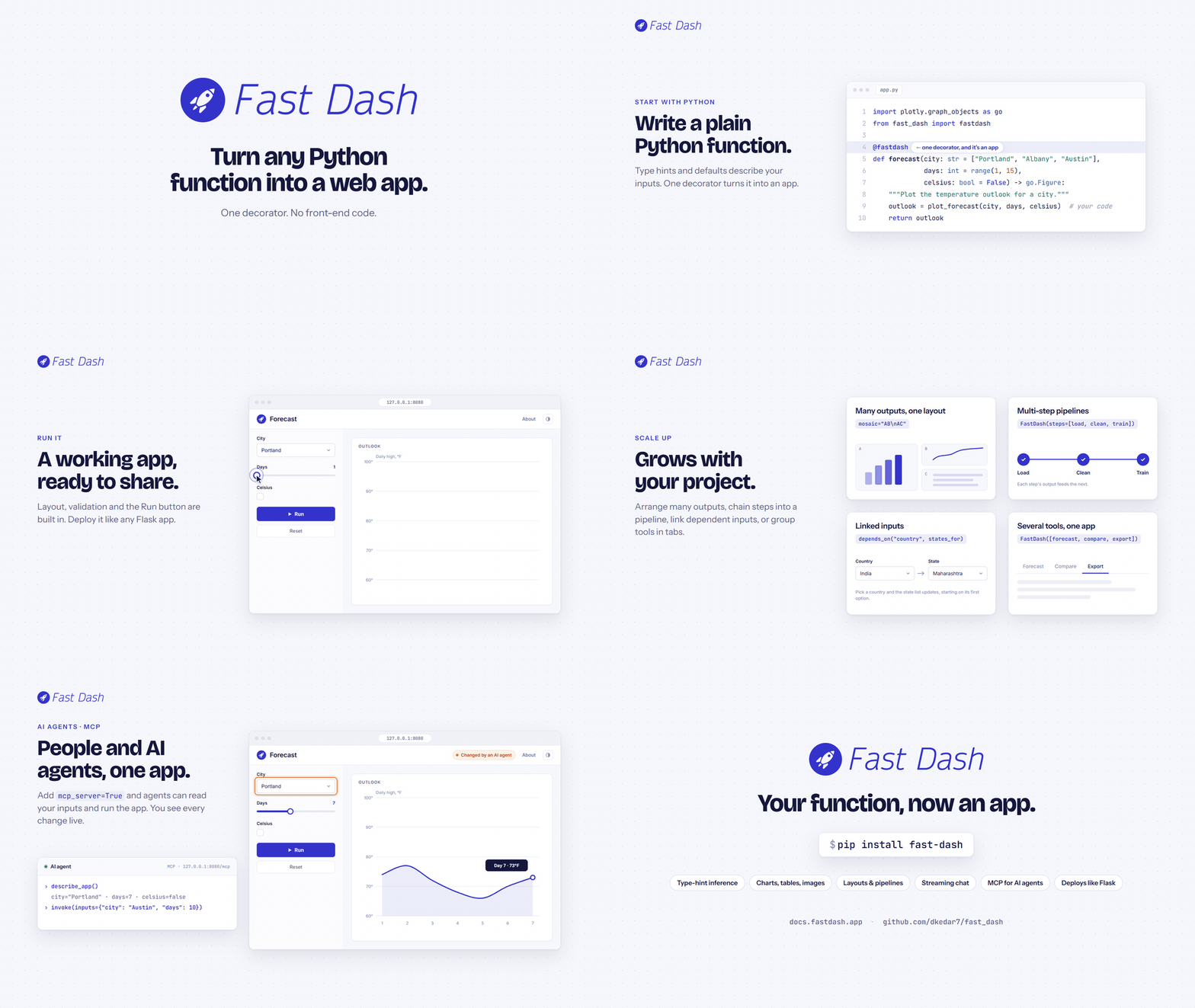
Fast Dash in one minute. Watch it in 1080p on docs.fastdash.app.
30-second example
pip install fast-dash
from fast_dash import fastdash

@fastdash
def greet(name: str = "world") -> str:
    return f"Hello, {name}!"

# Serving on http://127.0.0.1:8080
That's the entire app. Open the URL, type a name, click Run, see the response.
Chat apps
Pass chat=True and your callback becomes a streaming chat app — a composer, a
scrolling transcript, and per-session history — with no LLM provider baked in:
from fast_dash import fastdash

@fastdash(chat=True)
def assistant(query: str):
    for token in my_llm.stream(query):     # any provider — you choose
        yield token
yield strings to stream the reply as markdown; add a history parameter for
multi-turn memory, and any other parameter becomes a sidebar setting (tucked
into a collapsible accordion when there are many). chat= also accepts a
LangGraph graph, a (query, ctx) callable, or a chat-model instance.
Or keep a normal app and add an assistant beside it — pass your agent as
chat=: the agent reads your app's live inputs (ctx.inputs) and can drive it
(set_input / run_app) — anything a user can do, the agent can do.
from fast_dash import FastDash

def dashboard(revenue: int = 100, region: str = "West") -> str:
    return f"{region}: ${revenue}"

def assistant(query, ctx):        # ctx.inputs holds the app's live values
    yield {"type": "set_input", "name": "revenue", "value": 250}
    yield {"type": "run_app"}
    yield "Bumped revenue to 250 and re-ran."

FastDash(callback_fn=dashboard, chat=assistant, chat_title="Helper").run()
Give the agent tools
Pass a chat model (or chat=True with chat_model=) and Fast Dash auto-builds
a LangChain assistant wired to your app. Its tools — read the app, set inputs,
run it, set individual outputs, rearrange the layout, run Python — come from
agent_toolkit(app), trimmed to the chat_tools allowlist you choose:
from fast_dash import FastDash

def dashboard(revenue: int = 100, region: str = "West") -> str:
    return f"{region}: ${revenue}"

# The default toolkit lets the agent drive inputs, set outputs, re-mosaic the
# layout, and run Python (with approval). Narrow it with chat_tools=.
FastDash(
    callback_fn=dashboard,
    chat=True,
    chat_model="openai:gpt-4o-mini",            # or a model instance / FASTDASH_MODEL
    chat_tools=("read_app", "set_input", "run_app"),   # read-only + drive, no code exec
).run()
Install the extra with pip install "fast-dash[agent]". See the
chat guide.
How it works
The @fastdash decorator does three things at import time:
- Inspects the function signature — each parameter becomes an input component, the return becomes an output component.
- Picks components from type hints and defaults —
int→ number input,bool→ checkbox,pd.DataFrame→ table, etc. (full table below). - Builds a Dash app and starts the server — the function body is wired as the callback that runs when the user clicks Run.
You can override any of this by passing components explicitly via inputs= and outputs=, or by skipping the decorator and using the FastDash(...) class directly.
Type hint → component reference
Inputs (parameter type → UI component):
| Type hint | Component |
|---|---|
str |
Single-line text input |
str with a multi-line / long default |
Text area |
str with a hex-color default (e.g. "#1c7ed6") |
Color picker |
str with default=[...] |
Single-select dropdown |
int, float |
Number input |
int/float with range(...) default |
Slider |
bool |
Checkbox |
list |
Multi-select dropdown |
dict (with default) |
Multi-select dropdown (keys) |
datetime.date |
Date picker |
PIL.Image.Image |
Image upload |
Literal["a", "b"] |
Single-select dropdown |
enum.Enum subclass |
Single-select dropdown |
Annotated[int, range(0, 100)] |
Slider |
Annotated[str, ["a", "b"]] |
Single-select dropdown |
Optional[T] |
As T, but nullable |
| Any Dash component instance | Used directly |
Any Fast Dash component (Text, Slider, ...) |
Used directly |
Outputs (return type → UI component):
| Return type | Component |
|---|---|
str, int, float, etc. |
Text (rendered as <h1>) |
pd.DataFrame |
Table |
PIL.Image.Image, matplotlib.figure.Figure |
Image |
plotly.graph_objects.Figure (or string-form "go.Figure", "Figure") |
Plotly chart |
| Tuple of types | Multiple outputs (one component each) |
Any Fast Dash component (Graph, Image, ...) |
Used directly |
from fast_dash import fastdash, Graph

@fastdash
def chart(rows: int = 100) -> Graph:
    import plotly.express as px
    return px.scatter(px.data.iris().head(rows), x="sepal_width", y="sepal_length")
Unknown hints fall back to text. Source-introspection failures (REPL, exec) fall back to generic OUTPUT_1, OUTPUT_2 labels — the app still works.
Built-in components
The package exports ready-to-use Fast Dash components you can pass directly as inputs= or outputs=:
| Component | Use as | Notes |
|---|---|---|
Text, TextArea, PasswordInput |
input or output | Single-line, multi-line, masked text |
NumberInput, Slider |
input | Numeric with optional bounds |
Switch |
input | Toggle (True / False) |
MultiSelect |
input | Multi-select dropdown |
DateInput, DateRange |
input | Single date / date range picker |
ColorInput |
input | Color picker, returns hex |
Upload, UploadImage |
input | File / image upload |
Graph, Image, Table, Markdown |
output | Plotly chart, image, DataFrame table, rendered Markdown |
Chat |
output | Streaming chat history (with stream=True) |
Download |
output | Triggers a browser download |
Common patterns
Multiple inputs and outputs
from fast_dash import fastdash

@fastdash
def describe(text: str, count: int = 3) -> str:
    """Repeat text `count` times."""
    return " · ".join([text] * count)
Mosaic layout for arranging multiple outputs:
from fast_dash import fastdash, Graph
import plotly.express as px
import pandas as pd

@fastdash(mosaic="AB\nAC")
def dashboard(rows: int = 100) -> (Graph, Graph, Graph):
    df = px.data.iris().head(rows)
    return (
        px.scatter(df, x="sepal_width", y="sepal_length", color="species"),
        px.histogram(df, x="petal_width"),
        px.box(df, y="petal_length", color="species"),
    )
The mosaic string is ASCII art (inspired by Matplotlib's subplot_mosaic). Each letter corresponds to one output, in order.
Wrapping arbitrary Dash components with Fastify:
from fast_dash import fastdash, Fastify
from dash import dcc

custom_slider = Fastify(dcc.Slider(min=0, max=100, value=50), "value")

@fastdash
def my_app(x: custom_slider) -> str:
    return f"You picked {x}"
Cascading inputs with depends_on — wire one input's options to another input's value:
from fast_dash import fastdash, depends_on

countries = {
    "USA": ["California", "Texas", "New York"],
    "India": ["Maharashtra", "Karnataka", "Delhi"],
}

@fastdash
def pick_state(
    country: str = list(countries),
    state: str = depends_on("country", lambda c: countries[c]),
) -> str:
    return f"{state}, {country}"
The resolver receives the parent input's current value. Return:
- a list to set the dependent dropdown's options (and select the first one),
- a dict like
{"data": [...], "value": ...}to set both, or - a scalar to set just the value.
Skip the decorator when you want more control over the lifecycle:
from fast_dash import FastDash

def my_fn(x: int) -> int: return x * 2

app = FastDash(callback_fn=my_fn, title="Doubler", port=8050)
app.run()
Multiple functions in a single tabbed app — pass a list of callbacks:
from fast_dash import FastDash

def greet(name: str) -> str:
    return f"Hello, {name}!"

def add(a: int, b: int) -> int:
    return a + b

app = FastDash([greet, add], tab_titles=["Greeter", "Adder"])
app.run()
Each function gets its own tab with independent inputs, outputs, and callbacks. tab_titles is optional — without it, tabs are named after the functions.
Multi-step pipelines with steps= — chain functions into a wizard, threading outputs forward via from_step:
from fast_dash import FastDash, from_step
import pandas as pd

def load_data(rows: int = 100) -> pd.DataFrame:
    """Load a sample dataset."""
    return pd.DataFrame({"x": range(rows), "y": [i * 2 for i in range(rows)]})

def double(data=from_step(load_data)) -> pd.DataFrame:
    """Double every value."""
    return data * 2

def summarise(data=from_step(double), prefix: str = "Result:") -> str:
    """One-line summary."""
    return f"{prefix} {len(data)} rows, sum={data.values.sum()}"

FastDash(steps=[load_data, double, summarise], title="Pipeline Demo").run()
Each step is shown one at a time with a stepper progress indicator. Click Run to execute the active step, then Next to advance. Use from_step(prev_fn) as a parameter default to wire an upstream output into a downstream input. Steps without from_step parameters can mix in regular UI inputs (like prefix above).
Drive your app from an AI agent (MCP)
Pass mcp_server=True and your app serves a web UI and an MCP server — built on Dash's native MCP (Dash ≥ 4.3) and mounted on the same port — so any MCP-capable agent (Claude Code, Cursor, Cline, …) can inspect and drive it.
from fast_dash import fastdash
import plotly.graph_objects as go

@fastdash(mcp_server=True)            # web UI AND MCP on :8080/mcp
def plot_bars(n: int = 6, color: str = "#1c7ed6") -> go.Figure:
    bars = go.Figure(go.Bar(y=list(range(1, n + 1)), marker_color=color))
    return bars
Point an agent at http://localhost:8080/mcp. In Claude Code that's
claude mcp add --transport http my-app http://localhost:8080/mcp; for an
.mcp.json (Claude Code, Cursor):
{"mcpServers": {"my-app": {"type": "http", "url": "http://localhost:8080/mcp"}}}
VS Code uses "servers" in place of "mcpServers". The AI agents guide has each client's config and a Python client example.
The agent calls describe_app() to discover the input contract (each input's id, type, default, options, and current value), then drives the app with set_input / set_inputs / invoke / set_form / get_invocation / list_component_types. Dash's native dash://layout / dash://components / get_dash_component expose the static component tree. Agent mutations apply to the live browser within ~500 ms (no reload).
# From the agent's side, in one call:
invoke(inputs={"n": 12, "color": "#2f9e44"})   # set inputs and run, one round-trip
Agent-generated UI with DynamicDash — the form materializes when an agent calls the set_form tool:
from fast_dash import DynamicDash, Graph, Markdown

app = DynamicDash(
    callback_fn=score,
    placeholder="Ask the agent to call set_form() to build the form.",
    output_components=[Graph, Markdown],
    mcp_server=True,
)
app.run(port=8052)                    # MCP is served at :8052/mcp
Real-time push (opt-in). On the default Flask backend, agent mutations reach the browser via a ~500 ms polling drain. Install fast-dash[fastapi] and pass backend="fastapi" to switch to Dash's ASGI backend, where updates stream over a WebSocket via set_props (sub-100 ms, no polling):
@fastdash(mcp_server=True, backend="fastapi")   # real-time WebSocket push
def plot_bars(n: int = 6) -> go.Figure:
    ...
Notes: the MCP route shares the web app's host/port and has no authentication — keep it loopback in development. Multi-function and steps modes skip the MCP surface.
Decorator options
Most apps need none of these — defaults are sensible. Pass any of them as kwargs to @fastdash(...) or FastDash(...).
| Option | Default | Effect |
|---|---|---|
title |
function name | App title shown in the header |
inputs, outputs |
inferred | Override component selection |
mosaic |
None |
ASCII layout for multiple outputs |
theme |
"JOURNAL" |
Any Bootswatch theme name |
port |
8080 |
Port to serve on (also settable as run_kwargs={"port": ...} or app.run(port=...)) |
mode |
None |
Set to "jupyterlab", "inline", or "external" for notebook use |
update_live |
False |
Re-run on every input change instead of waiting for the Run button |
about |
True |
Show the docstring as an "About" modal; pass a string to override |
minimal |
False |
Hide chrome (header, footer, nav) for embedding |
branding |
False |
Show the Fast Dash rocket footer |
stream |
False |
Stream partial results: yield them, or call update(name, value) |
mcp_server |
False |
Also serve an MCP server (Dash-native, on the web app's port at /mcp) so AI agents can drive the app (see above) |
backend |
None |
"fastapi" (needs fast-dash[fastapi]) for the ASGI backend + real-time WebSocket push; default is Flask |
The full list lives in the docs.
Limits and gotchas
- Output labels are inferred from the
returnline of your source. If the source can't be retrieved (REPL,exec, frozen environments), Fast Dash falls back to genericOUTPUT_1,OUTPUT_2labels rather than crashing. Passoutput_labels=[...]explicitly to control them. - Reusing component instances across inputs and outputs can mutate shared attributes. Construct fresh components per slot (or use
inputs=Textrather thaninputs=text_instance). - The
themearg expects a Bootswatch name, not a CSS URL. It sets light/dark mode (dark forCYBORG,DARKLY,QUARTZ,SLATE,SOLAR,SUPERHERO,VAPOR); Bootswatch CSS still loads and stylesdbc-rendered bits (e.g. data tables). To set the accent colour of the Mantine chrome (buttons, links, focus rings, chat bubbles), passaccent="indigo"— a Mantine colour name (dark,gray,red,pink,grape,violet,indigo,blue,cyan,teal,green,lime,yellow,orange) — rather than expectingthemeto carry it. Anything else (a hex code, a typo) falls back to blue with a warning.
Development
git clone https://github.com/dkedar7/fast_dash.git
cd fast_dash
uv pip install -e ".[test]"   # or: pip install -e ".[test]"
uv pip install "dash[testing]"
uv run --no-sync pytest tests/
Selenium tests need a chromedriver matching your installed Chrome version (brew install --cask chromedriver on macOS).
The tests/ directory is the canonical example collection — tests/examples.py and tests/test_typing_hints.py cover most patterns the library supports.
Project structure
fast_dash/
  fast_dash.py     # FastDash class + @fastdash decorator + callback wiring
  Components.py    # Layout (AppLayout) + type-hint inference + built-in components
  utils.py         # Source introspection, theme mapping, docstring parsing
  assets/          # Static CSS served by Dash
tests/             # pytest suite (also serves as runnable examples)
docs/              # MkDocs site source
License
MIT. Built on top of Plotly Dash.
1 maintainer

Metadata
1 maintainer
Release files for fast-dash 0.7.4
For a detailed explanation of source distributions (sdists) and built distributions (wheels), please see the package formats documentation.
Source distribution (sdist)
| File | Size | Uploaded | Provenance | |
|---|---|---|---|---|
| fast_dash-0.7.4.tar.gz | 202.5 kB | Without provenance | Details |
Built distribution (wheel)
| File | Interpreter | ABI | Platform | Reset |
|---|---|---|---|---|
| fast_dash-0.7.4-py3-none-any.whl | Python 3 | none | any | Details |
Total release size: 406.1 kB
Release files / fast_dash-0.7.4.tar.gz
| Download URL | fast_dash-0.7.4.tar.gz |
|---|---|
| Size | 202.5 kB |
| Tags | Source |
|
SHA-256 checksum How to use checksums |
f00fc1eaa78b7694e2e441af07a1a6e94aa246e33ec50bb4c7b96847e4ce2cdc
|
|
BLAKE2b-256 checksum How to use checksums |
cc938a75dafb990292bb5a5d79d0d4337d4c028a7d45440db1ade065a1624ea8
|
| Upload date | |
|
Uploaded using Trusted Publishing? What is trusted publishing? |
No |
| Uploaded via |
twine/7.0.0 CPython/3.13.16
|
Release files / fast_dash-0.7.4-py3-none-any.whl
| Download URL | fast_dash-0.7.4-py3-none-any.whl |
|---|---|
| Size | 203.6 kB |
| Tags | Python 3 |
|
SHA-256 checksum How to use checksums |
da3b55df0ed1aa76ded3a1b88025317761fa35292d1e47af94433094fbe53935
|
|
BLAKE2b-256 checksum How to use checksums |
45a01ed5f5d890b919e4f30258171c6960507a1a322efdeb88d1041611e39c56
|
| Upload date | |
|
Uploaded using Trusted Publishing? What is trusted publishing? |
No |
| Uploaded via |
twine/7.0.0 CPython/3.13.16
|
Security for fast-dash 0.7.4
Provenance
Provenance describes where a file came from. On PyPI, provenance is shared via attestations, which provide a verifiable record of the build or publishing details. View details, limitations and caveats.
No provenance found
None of the files in this release were uploaded with provenance metadata.
A note on package security
PyPI is a repository for distributing packages, not a service for auditing them. While third-party security researchers and our staff do their best to detect and remove malicious packages, PyPI cannot guarantee the quality, security or suitability of any given package.
To learn more about protecting yourself from malicious actors, visit our package security documentation.














