



FastAPI Voyager
Visualize your API endpoints and explore them interactively.
Its vision is to make code easier to read and understand, serving as an ideal documentation tool.
Now supports multiple frameworks: FastAPI, Django Ninja, and Litestar.
This repo is still in early stage, it supports Pydantic v2 only.
Breaking Change: Since v0.19,
fastapi-voyagerdepends onpydantic-resolve>=4.0. If you usepydantic-resolvev3, please pinfastapi-voyager<=0.18.
- Live Demo: https://www.newsyeah.fun/voyager/
- Example Source: composition-oriented-development-pattern
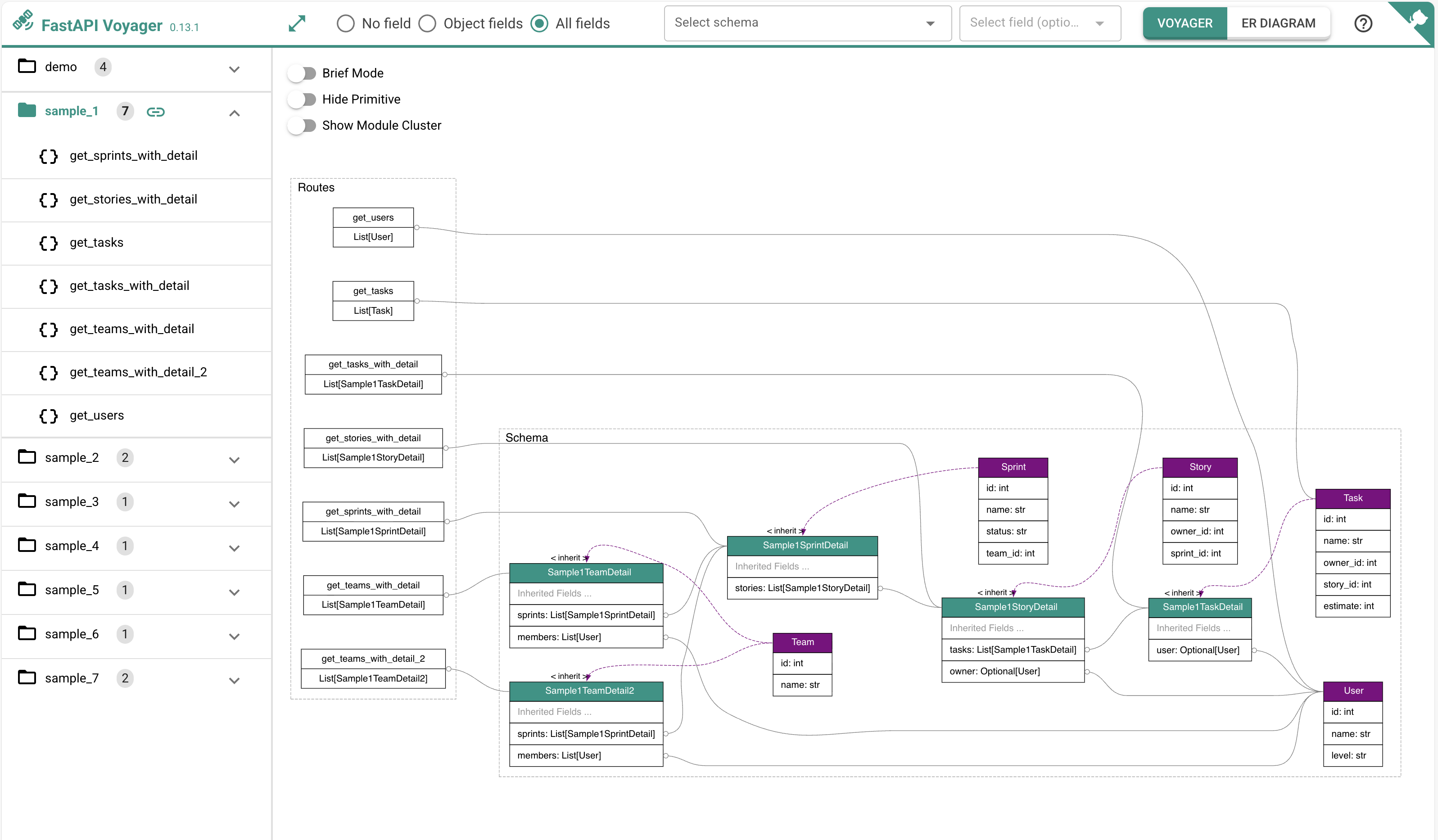
Table of Contents
- Quick Start
- Installation
- Supported Frameworks
- Features
- Command Line Usage
- About pydantic-resolve
- Development
- Dependencies
- Credits
Quick Start
With simple configuration, fastapi-voyager can be embedded into your web application:
from fastapi import FastAPI
from fastapi_voyager import create_voyager

app = FastAPI()

# ... define your routes ...

app.mount('/voyager',
          create_voyager(
            app,
            module_color={'src.services': 'tomato'},
            module_prefix='src.services',
            swagger_url="/docs",
            ga_id="G-XXXXXXXXVL",
            initial_page_policy='first',
            online_repo_url='https://github.com/your-org/your-repo/blob/master',
            enable_pydantic_resolve_meta=True))
Visit http://localhost:8000/voyager to explore your API visually.
For framework-specific examples (Django Ninja, Litestar), see Supported Frameworks.
Installation
Install via pip
pip install fastapi-voyager
Install via uv
uv add fastapi-voyager
Run with CLI
voyager -m path.to.your.app.module --server
For sub-application scenarios (e.g., app.mount("/api", api)), specify the app name:
voyager -m path.to.your.app.module --server --app api
Note: Sub-Application mounts are not supported yet, but you can specify the name of the FastAPI application with
--app. Only a single application (default:app) can be selected.
Supported Frameworks
fastapi-voyager automatically detects your framework and provides the appropriate integration. Currently supported frameworks:
FastAPI
from fastapi import FastAPI
from fastapi_voyager import create_voyager

app = FastAPI()

@app.get("/hello")
def hello():
    return {"message": "Hello World"}

# Mount voyager
app.mount("/voyager", create_voyager(app))
Start with:
uvicorn your_app:app --reload
# Visit http://localhost:8000/voyager
Django Ninja
import os
import django
from django.core.asgi import get_asgi_application
from ninja import NinjaAPI
from fastapi_voyager import create_voyager

# Configure Django
os.environ.setdefault("DJANGO_SETTINGS_MODULE", "myapp.settings")
django.setup()

# Create Django Ninja API
api = NinjaAPI()

@api.get("/hello")
def hello(request):
    return {"message": "Hello World"}

# Create voyager ASGI app
voyager_app = create_voyager(api)

# Create ASGI application that routes between Django and voyager
async def application(scope, receive, send):
    if scope["type"] == "http" and scope["path"].startswith("/voyager"):
        await voyager_app(scope, receive, send)
    else:
        django_app = get_asgi_application()
        await django_app(scope, receive, send)
Start with:
uvicorn your_app:application --reload
# Visit http://localhost:8000/voyager
Litestar
Litestar doesn't support mounting to an existing app like FastAPI. The recommended pattern is to export ROUTE_HANDLERS from your main app:
# In your main app file (e.g., app.py)
from litestar import Litestar, Controller

class MyController(Controller):
    # ... your routes ...

ROUTE_HANDLERS = [MyController]  # Export for extension
app = Litestar(route_handlers=ROUTE_HANDLERS)
Then create voyager by reusing ROUTE_HANDLERS:
# In your voyager embedding file
from typing import Any, Awaitable, Callable
from litestar import Litestar, asgi
from fastapi_voyager import create_voyager
from your_app import ROUTE_HANDLERS, app as your_app

voyager_app = create_voyager(your_app)

@asgi("/voyager", is_mount=True, copy_scope=True)
async def voyager_mount(
    scope: dict[str, Any],
    receive: Callable[[], Awaitable[dict[str, Any]]],
    send: Callable[[dict[str, Any]], Awaitable[None]]
) -> None:
    await voyager_app(scope, receive, send)

app = Litestar(route_handlers=ROUTE_HANDLERS + [voyager_mount])
Start with:
uvicorn your_app:app --reload
# Visit http://localhost:8000/voyager
Features
fastapi-voyager is designed for scenarios using web frameworks with Pydantic models (FastAPI, Django Ninja, Litestar). It helps visualize dependencies and serves as an architecture tool to identify implementation issues such as wrong relationships, overfetching, and more.
Best Practice: When building view models following the ER model pattern, fastapi-voyager can fully realize its potential - quickly identifying which APIs use specific entities and vice versa.
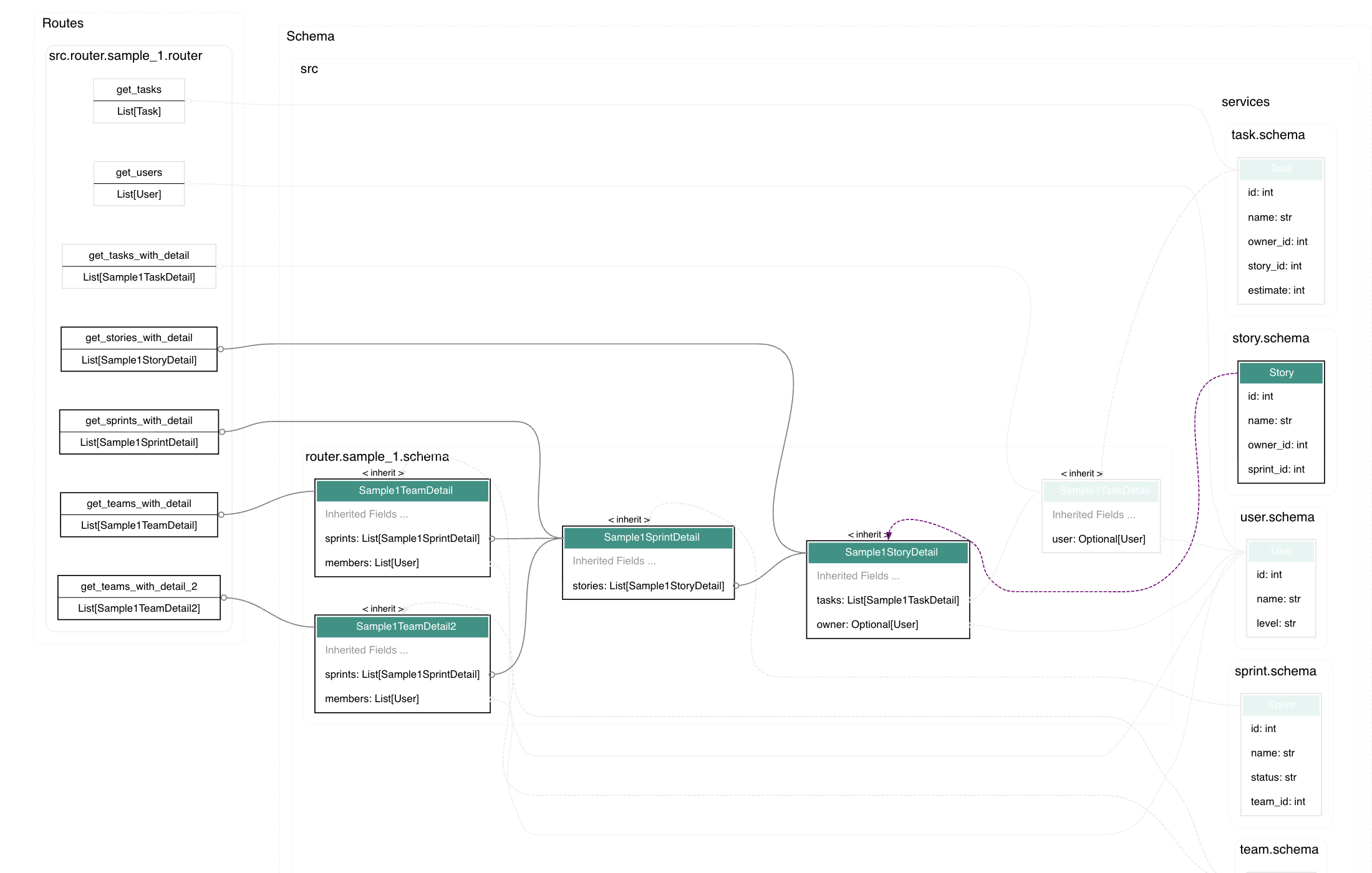
Highlight Nodes and Links
Click a node to highlight its upstream and downstream nodes. Figure out the related models of one page, or how many pages are related with one model.
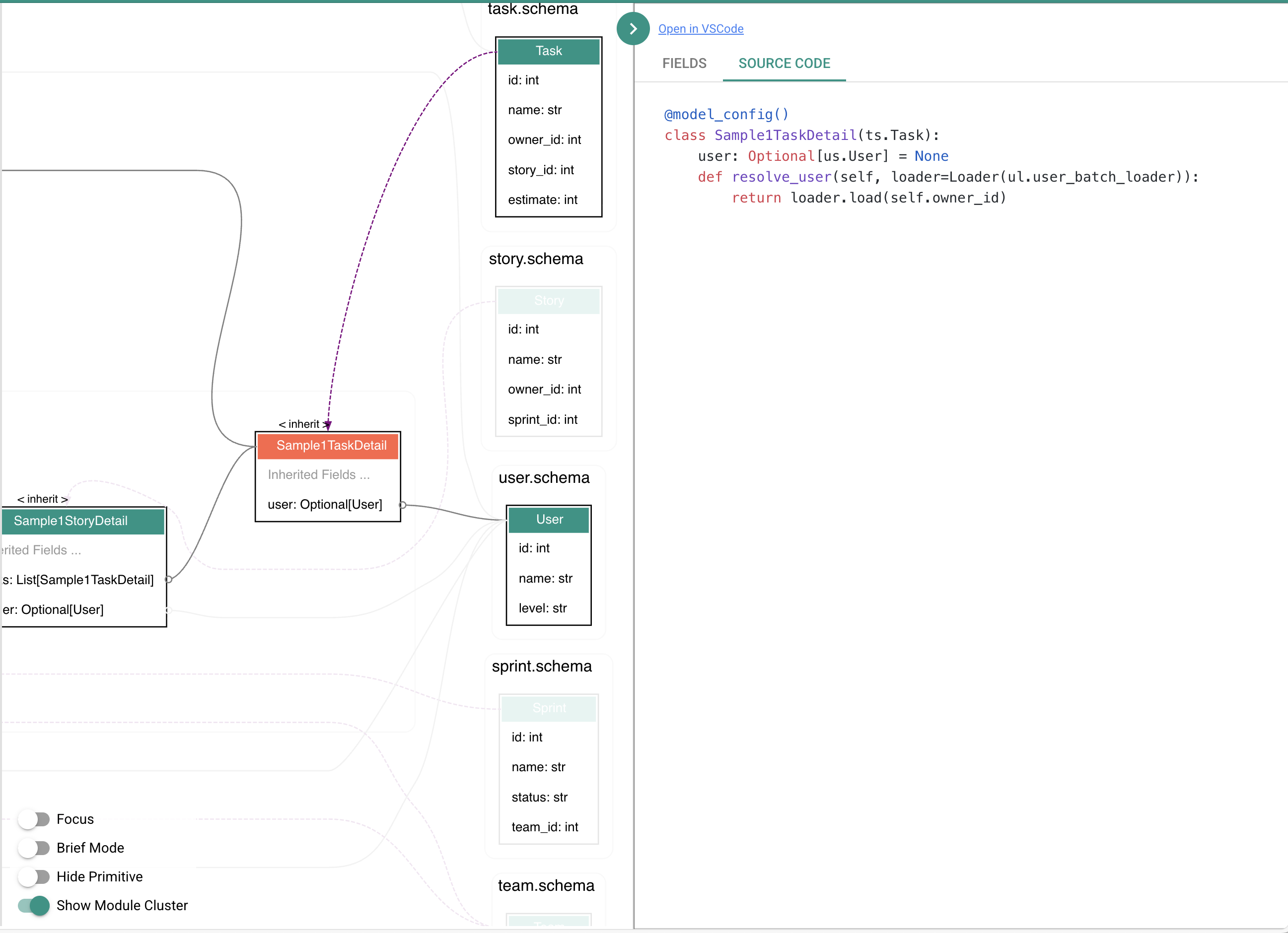
View Source Code
Double-click a node or route to show source code or open the file in VSCode.
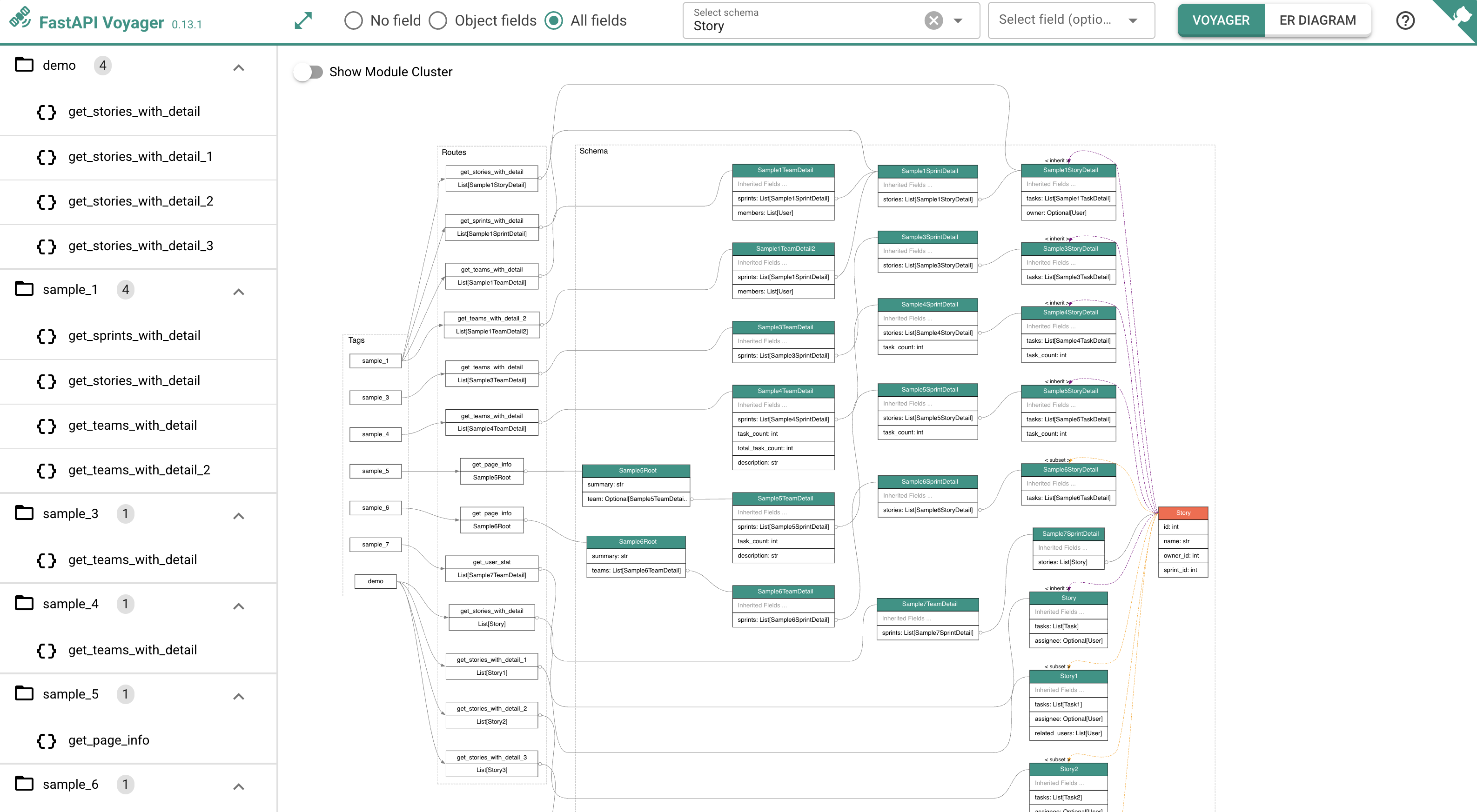
Quick Search
Search schemas by name and display their upstream and downstream dependencies. Use Shift + Click on any node to quickly search for it.
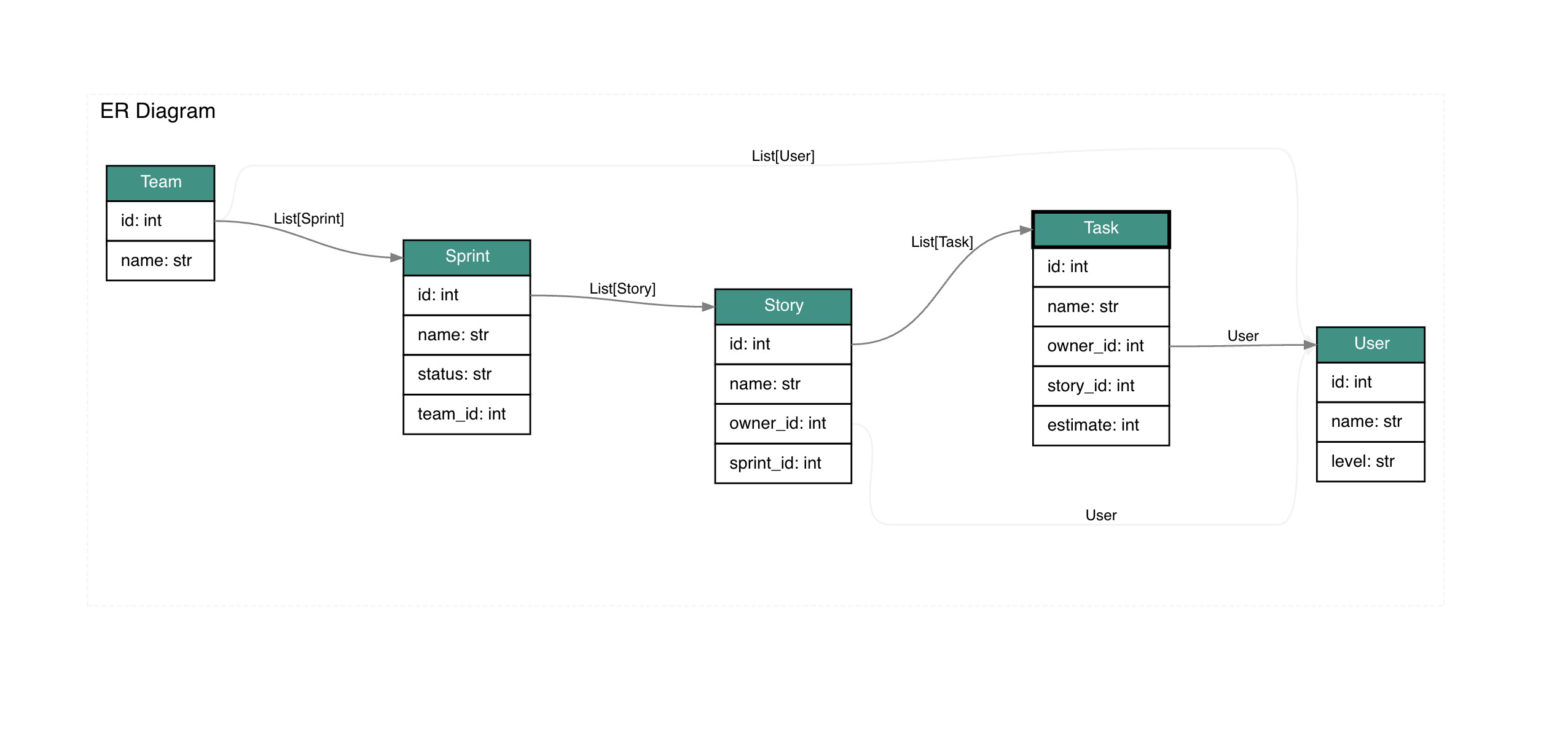
Display ER Diagram
ER diagram is a feature from pydantic-resolve which provides a solid expression for business descriptions. You can visualize application-level entity relationship diagrams.
from pydantic_resolve import ErDiagram, Entity, Relationship

diagram = ErDiagram(
    entities=[
        Entity(
            kls=Team,
            relationships=[
                Relationship(fk='id', name='sprints', target=list[Sprint], loader=sprint_loader.team_to_sprint_loader),
                Relationship(fk='id', name='users', target=list[User], loader=user_loader.team_to_user_loader)
            ]
        ),
        Entity(
            kls=Sprint,
            relationships=[
                Relationship(fk='id', name='stories', target=list[Story], loader=story_loader.sprint_to_story_loader)
            ]
        ),
        Entity(
            kls=Story,
            relationships=[
                Relationship(fk='id', name='tasks', target=list[Task], loader=task_loader.story_to_task_loader),
                Relationship(fk='owner_id', name='owner', target=User, loader=user_loader.user_batch_loader)
            ]
        ),
        Entity(
            kls=Task,
            relationships=[
                Relationship(fk='owner_id', name='owner', target=User, loader=user_loader.user_batch_loader)
            ]
        )
    ]
)

# Display in voyager
app.mount('/voyager', create_voyager(app, er_diagram=diagram))
Show Pydantic Resolve Meta Info
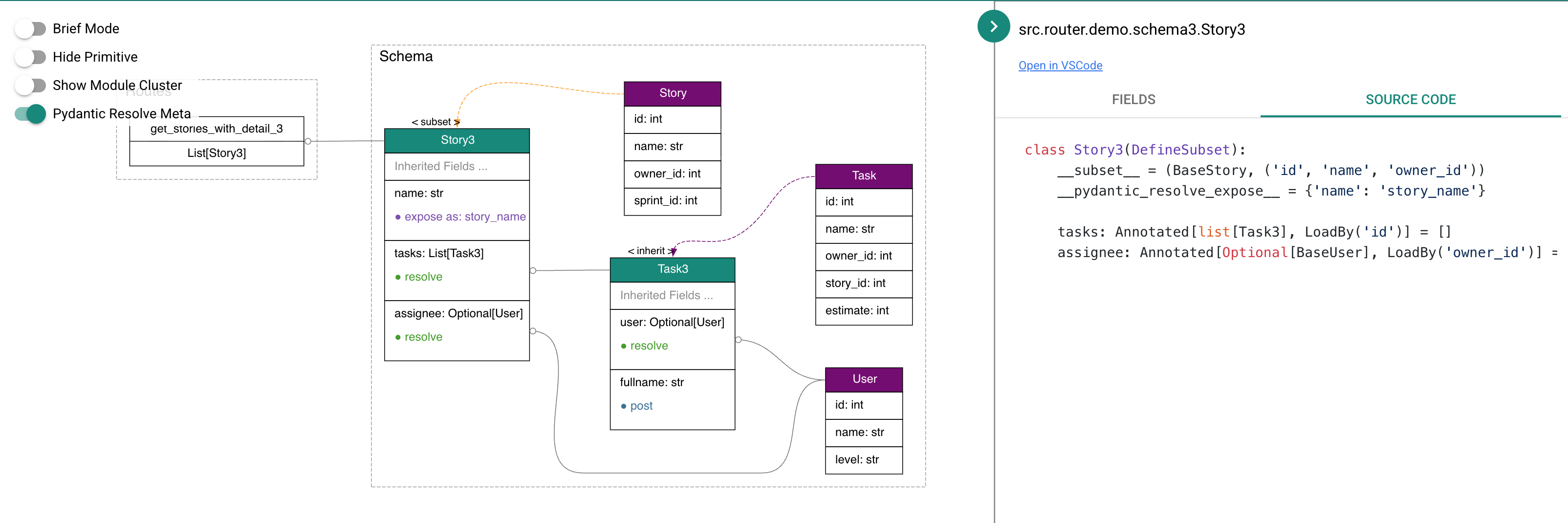
Set enable_pydantic_resolve_meta=True in create_voyager, then toggle the "pydantic resolve meta" button to visualize resolve/post/expose/collect operations.
Command Line Usage
Start Server
# FastAPI
voyager -m tests.demo --server --web fastapi

# Django Ninja
voyager -m tests.demo --server --web django-ninja

# Litestar
voyager -m tests.demo --server --web litestar

# Custom port
voyager -m tests.demo --server --port=8002

# Specify app name
voyager -m tests.demo --server --app my_app
Note: Server mode does not support ER diagram or pydantic-resolve metadata configuration. Use
create_voyager()in your code wither_diagramandenable_pydantic_resolve_metaparameters to enable these features.
Generate DOT File
# Generate .dot file
voyager -m tests.demo

# Specify app
voyager -m tests.demo --app my_app

# Filter by schema
voyager -m tests.demo --schema Task

# Show all fields
voyager -m tests.demo --show_fields all

# Custom module colors
voyager -m tests.demo --module_color=tests.demo:red --module_color=tests.service:tomato

# Output to file
voyager -m tests.demo -o my_visualization.dot

# Version and help
voyager --version
voyager --help
About pydantic-resolve
pydantic-resolve is a lightweight tool designed to build complex, nested data in a simple, declarative way. It provides resolve_* for loading associated data and post_* for computing derived fields, with automatic batch loading to eliminate N+1 queries.
When relationship definitions start repeating across multiple models, use ER Diagram with base_entity() and __relationships__ to centralize relationship declarations. DefineSubset helps safely pick fields from entity classes while preserving ER diagram references.
Developers can use fastapi-voyager without needing to know anything about pydantic-resolve, but I still highly recommend everyone to give it a try.
Development
Setup Development Environment
# Fork and clone the repository
git clone https://github.com/your-username/fastapi-voyager.git
cd fastapi-voyager

# Install uv
curl -LsSf https://astral.sh/uv/install.sh | sh

# Create virtual environment and install dependencies
uv venv
source .venv/bin/activate
uv pip install ".[dev]"

# Run development server
uvicorn tests.programatic:app --reload
Test Different Frameworks
You can test the framework-specific examples:
# FastAPI example
uvicorn tests.fastapi.embedding:app --reload

# Django Ninja example
uvicorn tests.django_ninja.embedding:app --reload

# Litestar example
uvicorn tests.litestar.embedding:asgi_app --reload
Visit http://localhost:8000/voyager to see changes.
Setup Git Hooks (Optional)
Enable automatic code formatting before commits:
./setup-hooks.sh
# or manually:
git config core.hooksPath .githooks
This will run Prettier automatically before each commit. See .githooks/README.md for details.
Project Structure
Frontend:
src/fastapi_voyager/web/vue-main.js- Main JavaScript entry
Backend:
voyager.py- Main entry pointrender.py- Generate DOT filesserver.py- Server mode
Roadmap
Dependencies
Dev dependencies
Credits
- graphql-voyager - Thanks for inspiration
- vscode-interactive-graphviz - Thanks for web visualization
License
MIT License
1 maintainer

Metadata
1 maintainer
Release files for fastapi-voyager 0.27.0
For a detailed explanation of source distributions (sdists) and built distributions (wheels), please see the package formats documentation.
Source distribution (sdist)
| File | Size | Uploaded | |
|---|---|---|---|
| fastapi_voyager-0.27.0.tar.gz | 700.5 kB | Details |
Built distribution (wheel)
| File | Interpreter | ABI | Platform | Reset |
|---|---|---|---|---|
| fastapi_voyager-0.27.0-py3-none-any.whl | Python 3 | none | any | Details |
Total release size: 1.3 MB
Release files / fastapi_voyager-0.27.0.tar.gz
| Download URL | fastapi_voyager-0.27.0.tar.gz |
|---|---|
| Size | 700.5 kB |
| Tags | Source |
|
SHA-256 checksum How to use checksums |
7fec5a6e6fef08d7a19ad3eeca4d3b9c44b5216a9841d6855caba3a933250675
|
|
BLAKE2b-256 checksum How to use checksums |
f0c2372ac64b52417312e5f39af0b0edc7db8f637dff3945c4e6408020fbb21a
|
| Upload date | |
|
Uploaded using Trusted Publishing? What is trusted publishing? |
No |
| Uploaded via |
uv/0.11.13 {"installer":{"name":"uv","version":"0.11.13","subcommand":["publish"]},"python":null,"implementation":{"name":null,"version":null},"distro":{"name":"Ubuntu","version":"24.04","id":"noble","libc":null},"system":{"name":null,"release":null},"cpu":null,"openssl_version":null,"setuptools_version":null,"rustc_version":null,"ci":true}
|
Release files / fastapi_voyager-0.27.0-py3-none-any.whl
| Download URL | fastapi_voyager-0.27.0-py3-none-any.whl |
|---|---|
| Size | 579.4 kB |
| Tags | Python 3 |
|
SHA-256 checksum How to use checksums |
707e615a60377748467f512714f091c73df43acef943f2eb24518b4a347c2ebe
|
|
BLAKE2b-256 checksum How to use checksums |
75f1adc7184543bd0422776fd48f17d0defd88c5233f48fc255ecc6bd84f0310
|
| Upload date | |
|
Uploaded using Trusted Publishing? What is trusted publishing? |
No |
| Uploaded via |
uv/0.11.13 {"installer":{"name":"uv","version":"0.11.13","subcommand":["publish"]},"python":null,"implementation":{"name":null,"version":null},"distro":{"name":"Ubuntu","version":"24.04","id":"noble","libc":null},"system":{"name":null,"release":null},"cpu":null,"openssl_version":null,"setuptools_version":null,"rustc_version":null,"ci":true}
|














