
Visualize FastAPI application's routing tree and dependencies

Project description



Visualize your FastAPI endpoints, and explore them interactively.
This repo is still in early stage, it supports pydantic v2 only
live demo of project: composition oriented development pattern
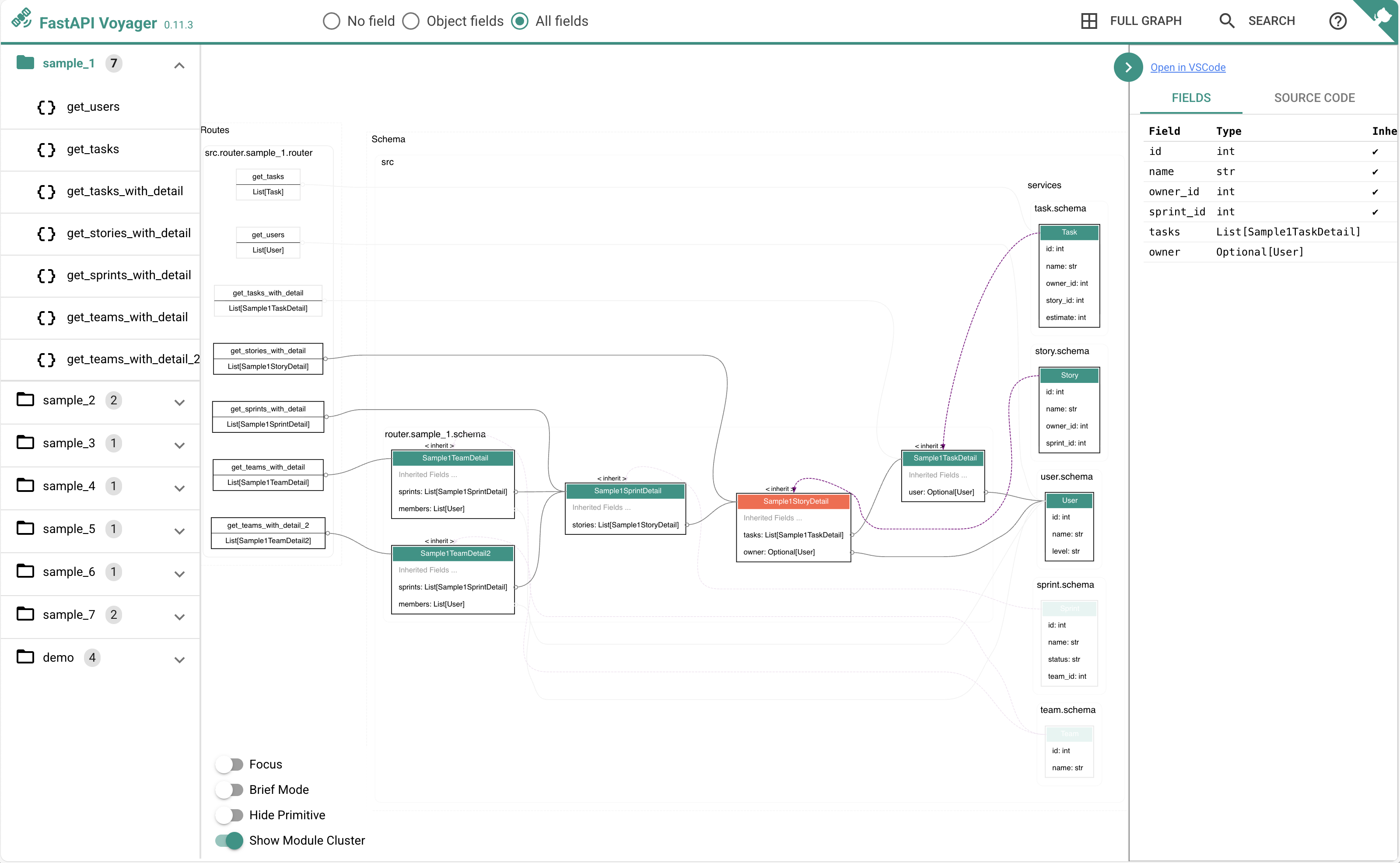
with configuration:
app.mount('/voyager',
          create_voyager(
            app,
            module_color={'src.services': 'tomato'},
            module_prefix='src.services',
            swagger_url="/docs",
            ga_id="G-XXXXXXXXVL",
            initial_page_policy='first',
            online_repo_url='https://github.com/allmonday/composition-oriented-development-pattern/blob/master'))
https://github.com/allmonday/composition-oriented-development-pattern/blob/master/src/main.py#L48
Plan & Raodmap
Installation
pip install fastapi-voyager
# or
uv add fastapi-voyager
voyager -m path.to.your.app.module --server
Sub-Application mounts are not supported yet, but you can specify the name of the FastAPI application used with
--app. Only a single application (default: 'app') can be selected, but in a scenario whereapiis attached throughapp.mount("/api", api), you can selectapilike this:
voyager -m path.to.your.app.module --server --app api
Mount into project
from fastapi import FastAPI
from fastapi_voyager import create_voyager
from tests.demo import app

app.mount('/voyager', create_voyager(
    app,
    module_color={"tests.service": "red"},
    module_prefix="tests.service"),
    swagger_url="/docs")
Features
For scenarios of using FastAPI as internal API integration endpoints, fastapi-voyager helps to visualize the dependencies.
It is also an architecture inspection tool that can identify issues in data relationships during design phase before turly implemtatioin.
If the process of building the view model follows the ER model, the full potential of fastapi-voyager can be realized. It allows for quick identification of APIs that use entities, as well as which entities are used by a specific API
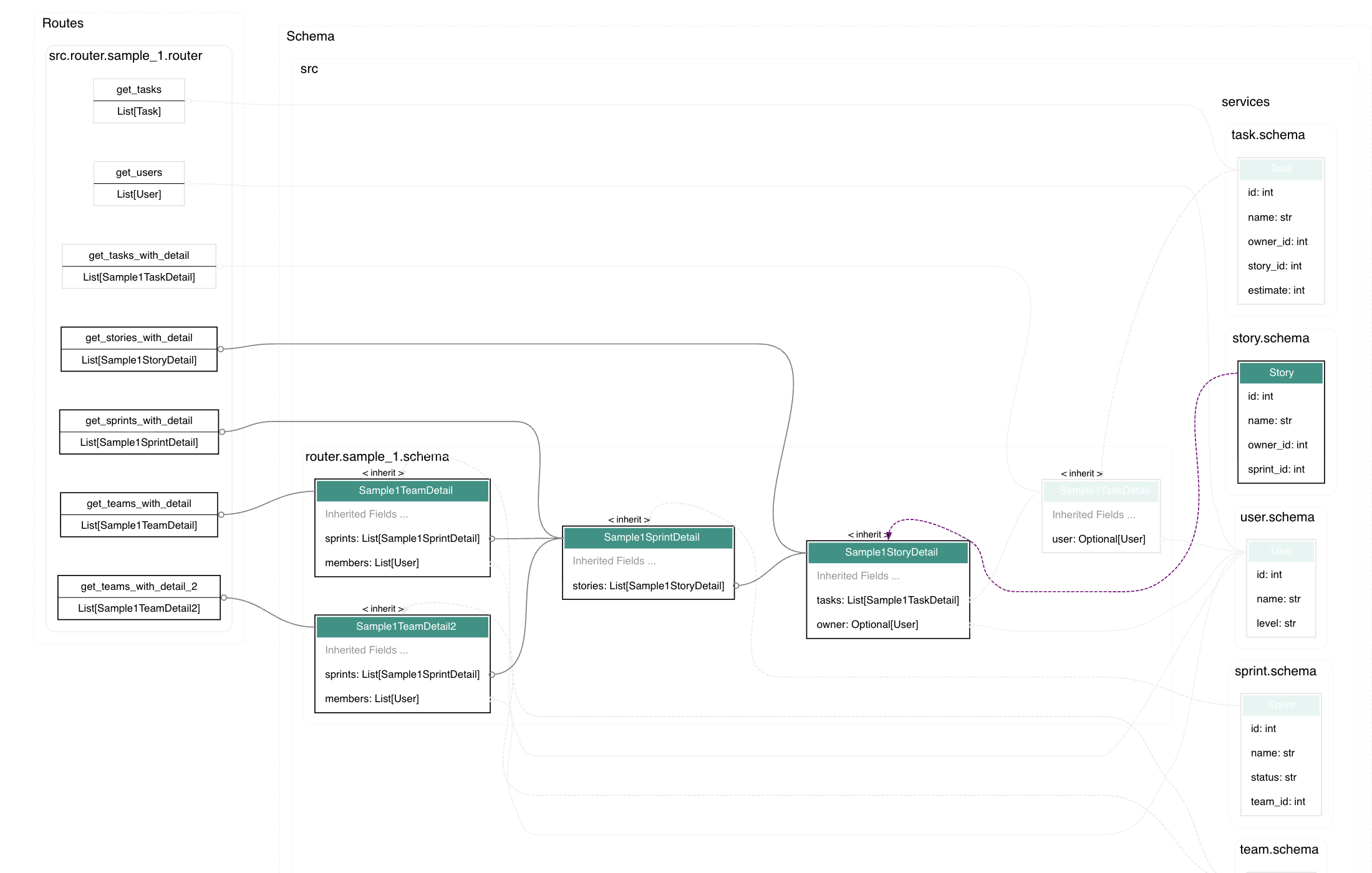
highlight nodes and links
click a node to highlight it's upperstream and downstream nodes. figure out the related models of one page, or homw many pages are related with one model.
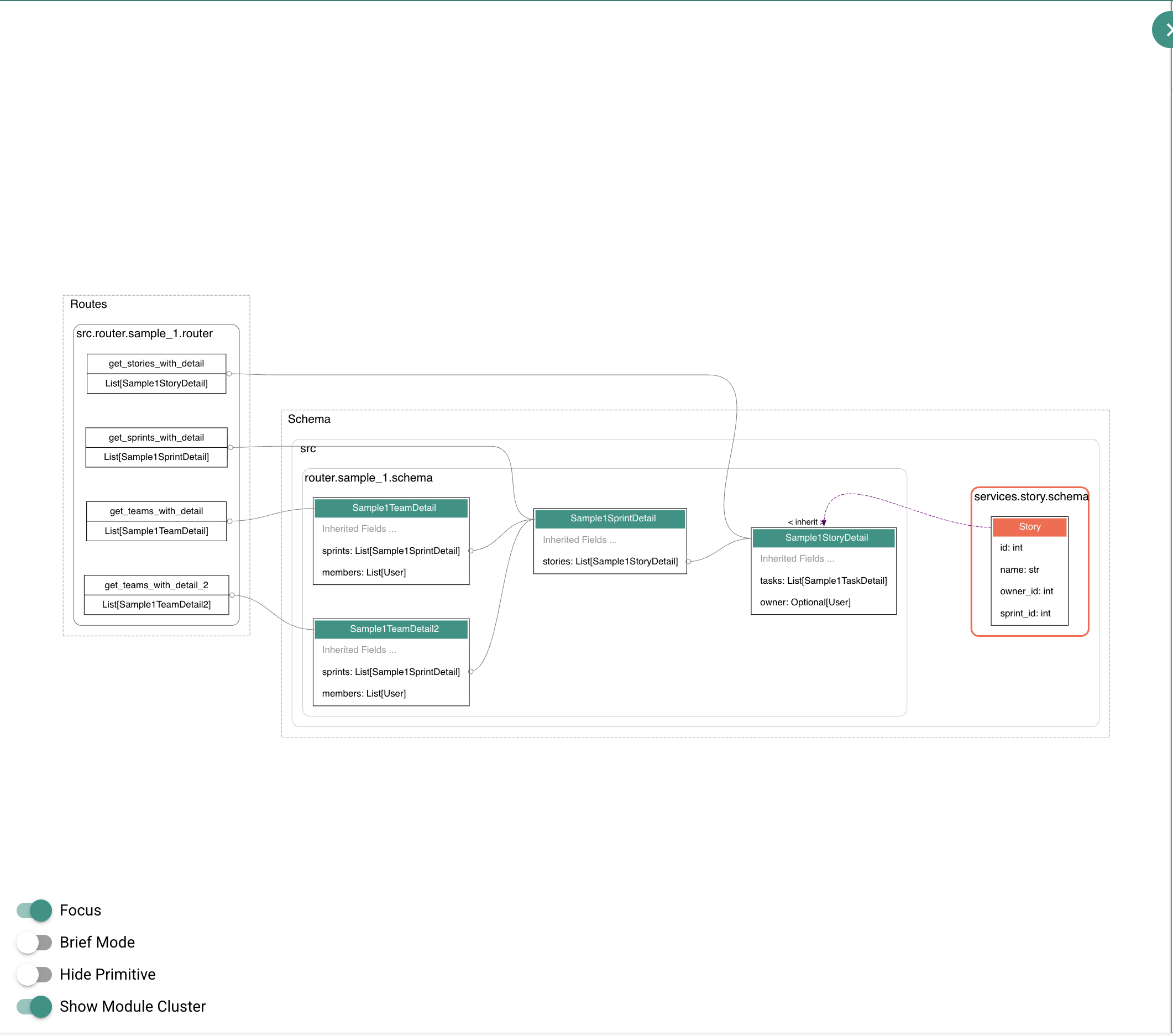
focus on nodes
Double click a node, and then toggle focus to hide irrelevant nodes.
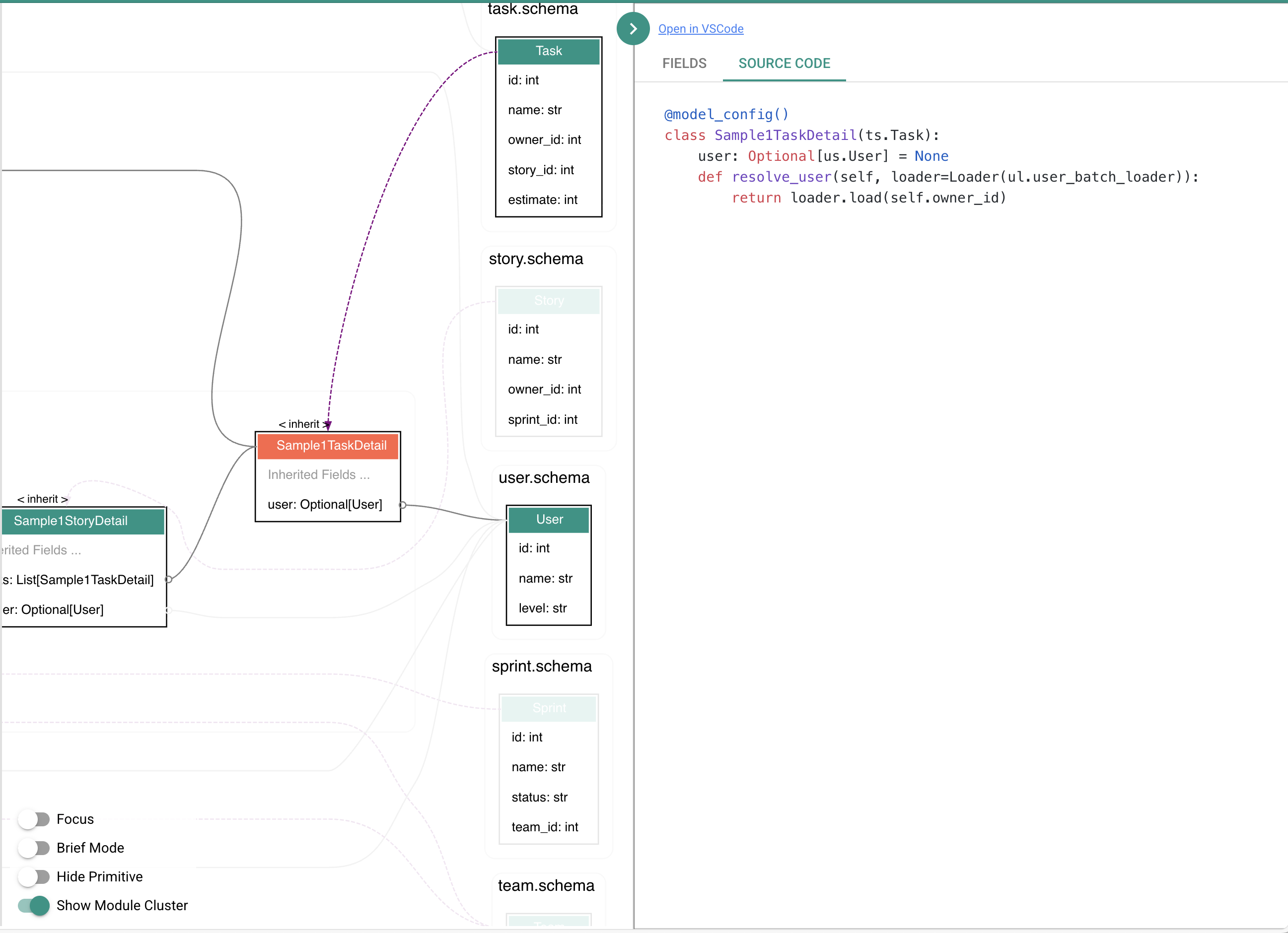
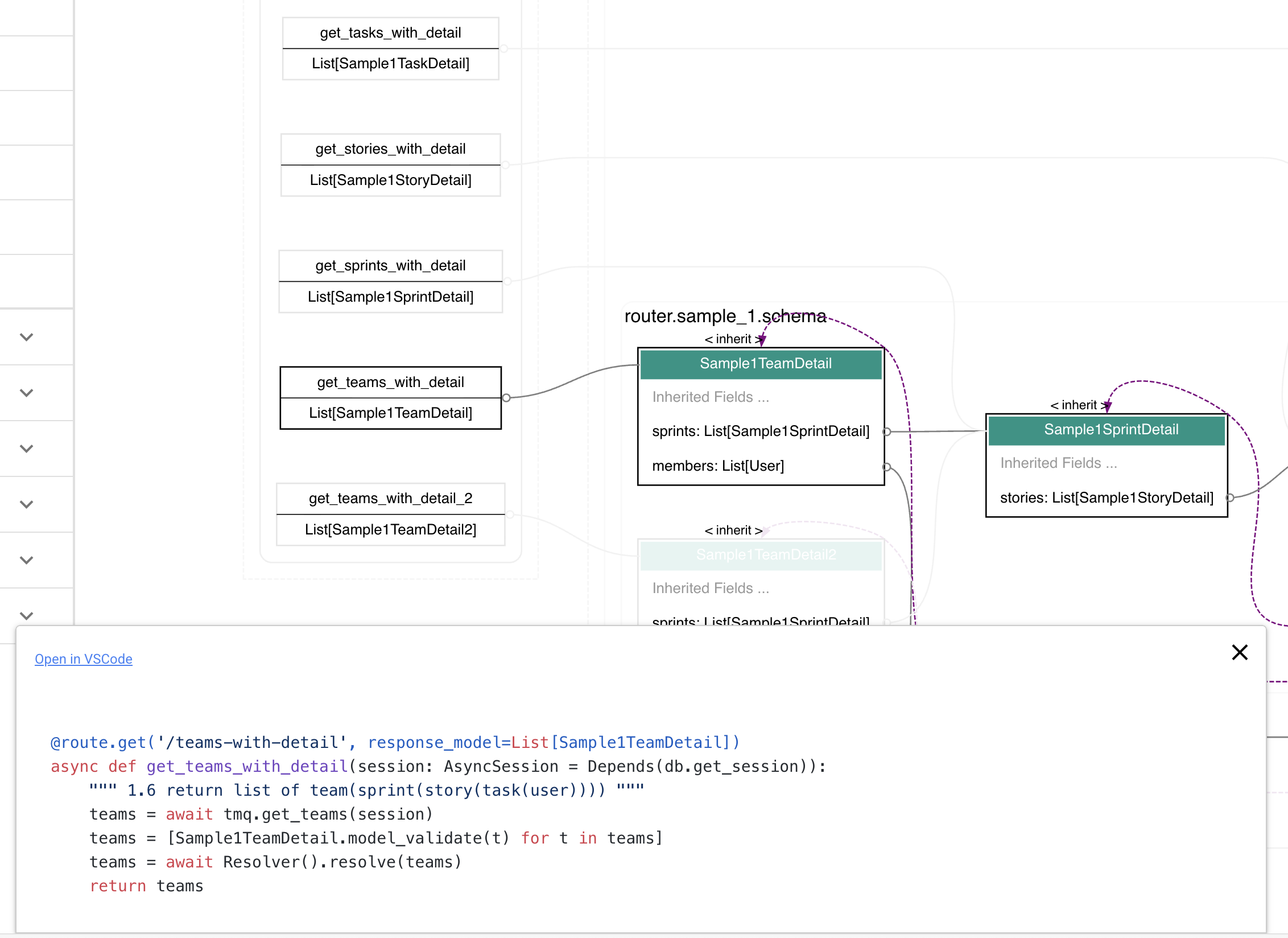
view source code
double click a node or route to show source code or open file in vscode.
Command Line Usage
open in browser
# open in browser
voyager -m tests.demo --server

voyager -m tests.demo --server --port=8002
generate the dot file
# generate .dot file
voyager -m tests.demo

voyager -m tests.demo --app my_app

voyager -m tests.demo --schema Task

voyager -m tests.demo --show_fields all

voyager -m tests.demo --module_color=tests.demo:red --module_color=tests.service:tomato

voyager -m tests.demo -o my_visualization.dot

voyager --version

voyager --help
About pydantic-resolve
pydantic-resolve's @ensure_subset decorator helps safely pick fields from the 'source class' while indicating the reference from the current class to the base class.
pydantic-resolve is a lightweight tool designed to build complex, nested data in a simple, declarative way. In version 2.0.0alpha, it will introduce an important feature: ER Diagram, and fastapi-voyager will support this feature, allowing for a clearer understanding of the business relationships between the data.
Developers can use fastapi-voyager without needing to know anything about pydantic-resolve, but I still highly recommend everyone to give it a try.
Dependencies
- FastAPI
- pydantic-resolve
- Quasar
Credits
- https://apis.guru/graphql-voyager/, thanks for inspiration.
- https://github.com/tintinweb/vscode-interactive-graphviz, thanks for web visualization.
How to develop & contribute?
fork, clone.
install uv.
uv venv
source .venv/bin/activate
uv pip install ".[dev]"
uvicorn tests.programatic:app  --reload
open localhost:8000/voyager
frontend:
src/web/vue-main.js: main js
backend:
voyager.py: main entryrender.py: generate dot fileserver.py: serve mode
Release history Release notifications | RSS feed


Download files
Download the file for your platform. If you're not sure which to choose, learn more about installing packages.
Source Distribution
Built Distribution
Filter files by name, interpreter, ABI, and platform.
If you're not sure about the file name format, learn more about wheel file names.
Copy a direct link to the current filters
File details
Details for the file fastapi_voyager-0.12.12.tar.gz.
File metadata
- Download URL: fastapi_voyager-0.12.12.tar.gz
- Upload date:
- Size: 584.2 kB
- Tags: Source
- Uploaded using Trusted Publishing? No
- Uploaded via: uv/0.9.15 {"installer":{"name":"uv","version":"0.9.15","subcommand":["publish"]},"python":null,"implementation":{"name":null,"version":null},"distro":{"name":"Ubuntu","version":"24.04","id":"noble","libc":null},"system":{"name":null,"release":null},"cpu":null,"openssl_version":null,"setuptools_version":null,"rustc_version":null,"ci":true}
File hashes
| Algorithm | Hash digest | |
|---|---|---|
| SHA256 |
948e7b823052094de39584b888120ba9409448140c9732457b9d086017586a9d
|
|
| MD5 |
0eba62cf63b7b9ed341e46aa86ed2b8f
|
|
| BLAKE2b-256 |
eb1ab82211e9a8eb38f7f4a81895f99944d8b7c8292bccd35ce1deebe8f4130e
|
File details
Details for the file fastapi_voyager-0.12.12-py3-none-any.whl.
File metadata
- Download URL: fastapi_voyager-0.12.12-py3-none-any.whl
- Upload date:
- Size: 528.9 kB
- Tags: Python 3
- Uploaded using Trusted Publishing? No
- Uploaded via: uv/0.9.15 {"installer":{"name":"uv","version":"0.9.15","subcommand":["publish"]},"python":null,"implementation":{"name":null,"version":null},"distro":{"name":"Ubuntu","version":"24.04","id":"noble","libc":null},"system":{"name":null,"release":null},"cpu":null,"openssl_version":null,"setuptools_version":null,"rustc_version":null,"ci":true}
File hashes
| Algorithm | Hash digest | |
|---|---|---|
| SHA256 |
4ad2e8640f0c7aa92a56263bd0003bb8cb6c3139cca23a1c1e752189ad18e61e
|
|
| MD5 |
57362dbd8c4293a3266cdf62345d19cd
|
|
| BLAKE2b-256 |
9e6dcf1288dc077d4ba3b1cf3b9b7b8653bd5ce23be3165ba65073f28c792618
|






