
figma2lvgl — Figma to LVGL C Code Generator
A code-generation tool that converts Figma UI layouts into LVGL C source files ready to drop into any embedded project.
- Works with any LVGL v9 project (ESP-IDF, Zephyr, bare-metal, etc.)
- Installable via pip — no manual script setup
- Fully cross-platform — Windows, Linux, macOS
✨ Key Features
- 📐 Figma XML → Deterministic, reproducible C code
- 🎨 Figma styles (color, font, radius, border) → LVGL style calls, baked into the generated struct
- 🔤 Figma label text → baked into generated struct as design-time default
- 🧱 Per-screen typed C struct — firmware accesses
home.panel_top.time, notchildren[2] - 📦 Generates self-contained
ui_src/folder - 🧩 Buttons, sliders, bars, images, labels, panels, dynamic containers
- 🎯 Zero dynamic layout parsing at runtime
- 🔁 Named event callbacks — implement
ui_home_on_btn_ok_clicked()and it just works
🚀 Installation
pip install figma2lvgl
Prerequisites
- Figma with the FigML — Figma XML Exporter plugin installed
- Python 3.10+
- LVGL 9.3 in your firmware project: the free, open-source library (MIT).
LVGL Pro, LVGL's paid editor, is not needed; figma2lvgl doesn't use it.
Image files are converted with LVGL's own
LVGLImage.pyfrom LVGL v9.3.0, which ships inside the package (MIT licence, provenance in its header). Nothing is downloaded. For a different LVGL version, pass that version'sLVGLImage.pywith--lvgl-tool.
Upgrading from 0.4.x
0.5.0 changes what some Figma layers become and what some generated names are. A design that compiled with 0.4.6 keeps its names unless it uses one of the cases below; every case is listed with old and new names in CHANGELOG.md under 0.5.0 → Breaking. In short:
- Containers without a fill or stroke are no longer panels, even when
renamed (
Content): they are dropped and their children move up a level, so their names lose that level (ui_home_content_btn_ok_set_label→ui_home_btn_ok_set_label). Name a containerpanel_…to keep it. - Keywords are whole words:
toolbar_bgis no longer a bar,silicone_padno longer an image. They can now use any separator:Btn OKandvolume-sliderwork. - Repeated names are numbered
_2,_3, … per parent, and the same name in two different panels is no longer renamed. - Widgets inside Groups and dropped frames are placed where Figma shows them. 0.4.6 drew many of them at the wrong position or not at all.
- Panels look like the Figma layer: no LVGL theme background, border or padding.
- Hidden layers are no longer generated.
figma2lvgl prints a warning, naming the Figma layer, for every name it changes or fixes. Run it on your design and read the warnings.
📖 Usage
figma2lvgl -x layout.xml
All Arguments
| Argument | Description | Default |
|---|---|---|
-x / --xml |
Path to Figma XML file | Required |
-i / --images |
Folder containing PNG images | Same directory as XML |
-d / --dest |
Destination for generated output | Same directory as XML |
-y / --yes |
Skip the overwrite prompt | off |
--lvgl-tool PATH |
Use a different LVGLImage.py (for example a newer LVGL's) |
bundled (LVGL v9.3.0) |
-f / --color-format |
PNG pixel encoding: RGB565, RGB888, ARGB8888, L8 |
RGB565 |
--patch-esp-includes |
Deprecated — ESP-IDF include patching is now applied automatically to all generated image files. Flag kept for backward compatibility, has no effect. | — |
-v / --verbose |
Enable debug-level logging | off |
--verify-compile |
Syntax-check the generated C with gcc against real LVGL headers before replacing the output; a failed check keeps the previous output |
off |
--lvgl-include PATH |
Include folder for --verify-compile: the LVGL folder with lvgl.h, and the one with lv_conf.h if separate. Repeat as needed |
— |
Outside ESP-IDF, define
LV_LVGL_H_INCLUDE_SIMPLEin your build (for exampletarget_compile_definitions(... PUBLIC LV_LVGL_H_INCLUDE_SIMPLE=1)), so the converted image files include"lvgl.h"like the rest ofui_src/.
Examples
# Minimal — everything next to the XML
figma2lvgl -x layout.xml

# Full control
figma2lvgl -x layout.xml -i assets/images -d build/output

# CI pipeline (no prompts, 32-bit display)
figma2lvgl -x layout.xml --yes -f ARGB8888

# Check the generated C against your LVGL before replacing the output
figma2lvgl -x layout.xml --yes --verify-compile --lvgl-include ../lvgl --lvgl-include ./config

# ESP-IDF — no special flags needed, include patching is automatic
figma2lvgl -x layout.xml
📁 Output Layout
ui_src/
  src/              ← Generated screen .c files (one per Figma frame)
  include/          ← Generated screen .h files
  priv_src/         ← Converted image .c files + ui_style.c
  priv_include/     ← assets.h, ui_config.h, ui_defs.h, ui_style.h
Drop ui_src/ into your project and add the source files to your build system.
Regenerating is safe. The new output is generated and checked next to
ui_src/ (in ui_src.staging/) and only then swapped in, so a failed run
leaves the previous ui_src/ exactly as it was. Files you add to ui_src/
yourself (for example a CMakeLists.txt) are kept across runs. A
ui_src.lock file next to it stops two runs from writing at once. If a run
was killed, the next run tidies up and tells you what it did.
Build system note: ensure
priv_include/is on the include path for all source files inui_src/. ESP-IDF and Zephyr handle this automatically. For bare-metal Makefiles, add-Iui_src/priv_includeto your CFLAGS.
Using a generated screen
#include "ui_home.h"

// Implement event callbacks in your application .c
// (linker error if missing — see Event Callbacks section below)
void ui_home_on_btn_ok_clicked(lv_event_t *e)    { /* navigate, update state */ }
void ui_home_on_btn_ok_long_pressed(lv_event_t *e) { /* hold action */ }

// In your app init:
ui_home_init();   // creates LVGL objects, applies styles, shows Figma text
ui_home_load();   // makes this screen active

// At runtime — update widgets:
ui_home_time_set_text("16:30");
ui_home_battery_bar_set_value(85, 300);   // animated over 300 ms
ui_home_icon_wifi_display();
ui_home_btn_ok_set_label("Confirm");
🎨 Designing in Figma
figma2lvgl reads the Figma node name to identify each UI element type and Figma styles to generate matching LVGL style calls.
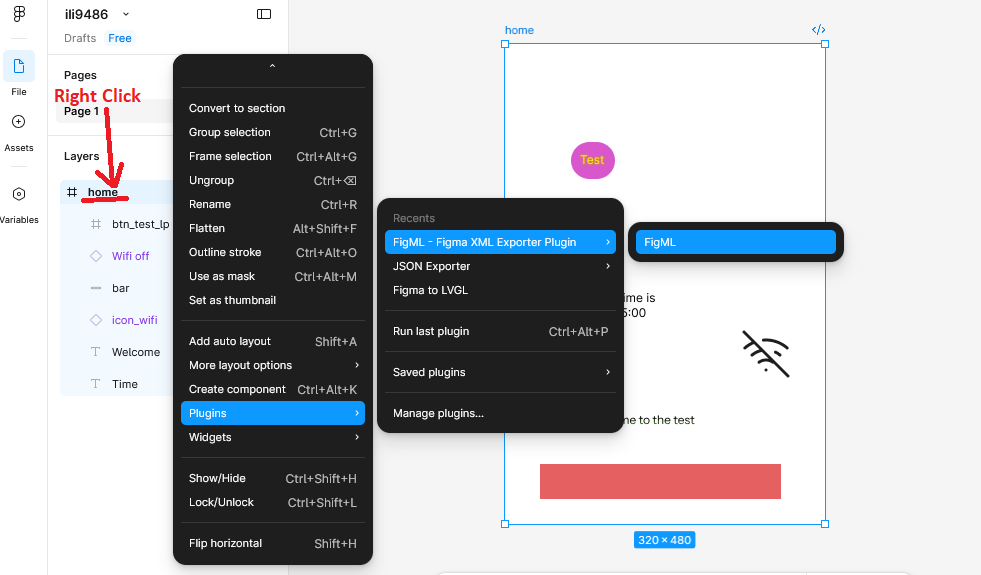
Exporting XML from Figma
figma2lvgl reads XML exported via the FigML — Figma XML Exporter Plugin.
- Right-click your frame in Figma
- Go to Plugins → FigML - Figma XML Exporter Plugin → FigML
- Export and save the
.xmlfile - Pass it to figma2lvgl with
-x
Supported Widgets
figma2lvgl splits each layer name into words (separated by _, spaces,
hyphens or camelCase: Btn OK, btn-ok, BtnOk and btn_ok all give the
words btn and ok) and looks for type keywords among them. Keywords are
whole words: toolbar doesn't contain the keyword bar.
Text / Label
Any Text layer becomes an LVGL label. The text typed in Figma is the
initial value.
Figma layer:  Text (any name, e.g. "time", "welcome_label")
Maps to:      lv_label_create()
Button
First word btn or button. The button's text is its first Text child.
Figma name:   "btn_ok", "button_cancel", "Btn OK", "BtnSave"
Maps to:      lv_button_create()
Event suffixes: a last word that registers one more event.
LV_EVENT_CLICKED is always registered:
| Figma name | Events registered |
|---|---|
btn_ok |
click |
btn_ok_lp |
click + LV_EVENT_LONG_PRESSED |
btn_ok_lpr |
click + LV_EVENT_LONG_PRESSED_REPEAT |
btn_ok_press |
click + LV_EVENT_PRESSED |
btn_ok_release |
click + LV_EVENT_RELEASED |
The suffix isn't part of the name: btn_ok_lp gives the field btn_ok.
Suffixes only apply to buttons, and only when something remains after the
keyword: btn_press is a button named btn_press (a label named
time_click keeps its full name too).
Image / Icon
A word icon or image anywhere in the name, or a component instance that
contains vector shapes.
Figma name:   "icon_wifi", "image_logo", "WifiIcon"
Maps to:      lv_image_create()
Asset:        icon_wifi.png in your images folder (named after the layer)
The PNG is named after the layer, so several layers named icon_wifi all
show icon_wifi.png. If they are instances of different components,
figma2lvgl stops with an error naming both; if it can't tell (plain layers),
it warns.
Bar
A word bar anywhere in the name. Put the range in the last two words:
Figma name:   battery_bar          → range 0–100 (default)
              battery_bar_0_100    → range 0–100, field "battery_bar"
              temp_bar_n20_50      → range −20–50 (n = negative)
Maps to:      lv_bar_create()
Slider
First or last word slider (before the range):
Figma name:   slider_volume, volume-slider
              brightness_slider_0_255  → range 0–255
              slider_rev_100_0         → reversed (LVGL supports min > max)
Maps to:      lv_slider_create()
Panel (Container)
A Frame with a visible fill or stroke, or any layer whose first word is
panel. Its children become nested struct fields. A leaf Rectangle or Frame
with a fill or stroke becomes an empty panel (a coloured box). A panel draws
only what the Figma layer has (no LVGL theme background, border or padding)
and clips its children only if the Frame has "Clip content" on.
Figma layer:  Frame with a visible fill or stroke, or "panel_…"
Maps to:      lv_obj_create()
Containers without a visible fill or stroke (Groups, plain Frames) are
dropped: their children are placed directly in the parent, at the
position Figma shows. Name a container panel_… to keep it as an
(invisible) panel, for example as a slot your firmware fills at run time.
Dynamic Container
First word list or grid: a scrollable container whose children are not
generated; firmware fills it at run time.
Figma name:   "list_devices", "grid_apps"
Maps to:      lv_obj_create() with LV_SCROLLBAR_MODE_AUTO
Accessor:     ui_home_get_list_devices() → returns lv_obj_t*
Naming Rules Summary
| Widget | Name |
|---|---|
| Label | Any Text layer |
| Button | First word btn or button |
| Slider | First or last word slider |
| Dynamic | First word list or grid |
| Bar | Word bar anywhere |
| Image | Word icon or image anywhere |
| Panel | First word panel, or a visible fill/stroke |
When two keywords meet, the earlier row wins:
btn_slideris a button,bar_icona bar,panel_btna panel. figma2lvgl warns which keyword it ignored.
Skipped layers: hidden layers (with everything inside them), vectors, component instances without vector shapes, and leaf shapes with no keyword and nothing visible. Each skip is logged with the layer name and how to fix it.
Rotation is not supported: a rotated layer is drawn unrotated, with a warning.
Generated names
Each layer's name becomes a struct field: lowercased, with anything other
than letters and digits turned into _ (Brightness Slider →
brightness_slider; camelCase is kept together, so BatteryBar →
batterybar). Functions are built from the screen name and the path of
fields: ui_home_panel_top_time_set_text().
figma2lvgl fixes names that can't be used in C, and warns for each one:
| Layer name | Becomes | Why |
|---|---|---|
2nd row |
label_2nd_row |
starts with a digit |
default, class |
label_default, label_class |
C or C++ keyword |
style, text |
label_style, label_text |
used by the generated struct |
lv_logo |
image_lv_logo |
LVGL's own prefix |
★ |
label_1 |
no usable characters |
title, title (same parent) |
title, title_2 |
repeated name |
The same name in two different panels is fine (panel_a.title,
panel_b.title). If two buttons share a name, their callbacks include the
parent: ui_home_on_panel_a_btn_ok_clicked(). Two frames that give the same
screen name (Home and home) are an error; a screen named style, defs
or config is renamed (style_2) because figma2lvgl's own files use those
names.
Nesting depth limits — depth > 5 emits a warning; depth > 7 skips the subtree with an error. Aim for 2–3 levels in practice.
Supported Styles
Styles applied in Figma are extracted and baked into the generated C struct.
ui_apply_style() is called at init time — no manual style code needed.
| Figma Property | Applies To | LVGL Call |
|---|---|---|
| Fill color | All widgets | lv_obj_set_style_bg_color |
| Fill opacity | All widgets | lv_obj_set_style_bg_opa |
| Text color | Labels, button labels | lv_obj_set_style_text_color |
| Font size | Labels, button labels | lv_obj_set_style_text_font |
| Text alignment (left, center, right) | Labels, button labels | lv_obj_set_style_text_align |
| Corner radius | All widgets | lv_obj_set_style_radius |
| Stroke color | All widgets | lv_obj_set_style_border_color |
| Stroke weight | All widgets | lv_obj_set_style_border_width |
| Opacity | All widgets | lv_obj_set_style_opa |
Button text takes the colour, size and alignment of the button's first Text layer in Figma, applied to LVGL's label inside the button. The button's own fill, stroke, radius and opacity stay on the button.
Line breaks and wrapping: line breaks in Figma text are kept. Text with a fixed width in Figma ("Auto height" or "Fixed size") wraps at that width; "Auto width" text doesn't. Label text is limited to 29 bytes (
UI_MAX_STRING_LENGTH30); longer text is cut, with a whole character and escape at the end.
Multiple fills — only the first visible fill is used. If you layer fills in Figma, set a single solid fill for the widget color.
Font Sizes
Figma font sizes are mapped to LVGL Montserrat fonts.
Supported: every even size from 8 to 48. Any other size, or a size not
enabled in lv_conf.h, falls back to LV_FONT_DEFAULT.
Enable only what your design uses in lv_conf.h:
#define LV_FONT_MONTSERRAT_12  1
#define LV_FONT_MONTSERRAT_14  1
🔔 Event Callbacks
Every button and slider gets named event callback functions declared in its .h:
// Declared in ui_home.h — you must implement these
void ui_home_on_btn_ok_clicked(lv_event_t *e);
void ui_home_on_btn_ok_long_pressed(lv_event_t *e);   // only if btn_ok_lp in Figma
void ui_home_on_brightness_slider(lv_event_t *e);
The generated _init() registers them with lv_obj_add_event_cb() automatically.
You just implement the functions — no registration needed.
void ui_home_on_btn_ok_clicked(lv_event_t *e)
{
    lv_obj_t *btn = lv_event_get_target(e);
    ui_home_welcome_set_text("Button clicked!");
}
Linker error if not implemented. If a callback is declared but you haven't defined it, the linker will report an undefined reference. This is intentional — it makes missing handlers explicit rather than silently doing nothing. Implement a no-op body if you don't need the callback yet:
void ui_home_on_btn_ok_clicked(lv_event_t *e) { (void)e; }
MSVC / Visual Studio:
__attribute__((weak))is not supported on MSVC. figma2lvgl does not use weak linking — callbacks are plainexterndeclarations, so the same linker-error model applies on all compilers including MSVC.
🧠 Architecture Overview
Figma XML + PNG assets
        │
        ▼
    figma_parser.py     reads XML → ParsedScreen / ParsedNode tree
        │
        ▼
    node_emitter.py     emits per-screen typed C struct + initializer
    init_emitter.py     emits flat BFS _init() body
    setter_emitter.py   emits setters + callback declarations
        │
        ▼
    generator.py        assembles .c and .h per screen
        │
        ▼
  ui_src/
    src/            ← ui_home.c, ui_settings.c, ...
    include/        ← ui_home.h, ui_settings.h, ...
    priv_src/       ← image .c files + ui_style.c
    priv_include/   ← assets.h, ui_config.h, ui_defs.h, ui_style.h
The generated struct mirrors the Figma hierarchy exactly:
// Firmware accesses named fields — not generic arrays
s_home.panel_top.time.lv_obj
s_home.panel_top.icon_wifi.lv_obj
s_home.btn_ok.lv_obj
💡 Example Integrations
See the examples/ folder for ready-to-use project setups:
examples/
  espidf/
    ili9486/        ← ESP32 + ILI9486 320×480 display (build steps in its README.md)
More platform examples (STM32, Zephyr, bare-metal) coming soon.
🧪 Development and Tests
The test sessions mirror CI. With nox installed:
nox                  # tests, compile, wheel
nox -s tests         # parser and generator tests
nox -s compile       # generated output compiled as C and C++ against LVGL 9.3
nox -s wheel         # build the wheel, install it offline, run it with no network
nox -s runtime       # generated designs run under LVGL with sanitizers (gcc, Linux)
nox -s compile_msvc  # the compile check with MSVC (Visual Studio Developer prompt)
nox -s espidf        # build the ESP-IDF example (ESP-IDF terminal)
The compile session fetches LVGL v9.3.0 once into .nox/. To run the
compile tests directly, set LVGL_DIR to an LVGL checkout and run
pytest tests/compile.
The run-time tests (tests/runtime/) build each test design into a C
program with LVGL, compiled with AddressSanitizer and UndefinedBehavior-
Sanitizer, and check every setter's result. The sanitizer build of LVGL is
cached in ~/.cache/figma2lvgl/runtime. To debug one design or screen:
LVGL_DIR=... python -m tests.runtime.harness example --screen home, which
keeps the C program and its output in the folder it prints.
They also render every screen and compare it, pixel for pixel, with its
reviewed reference image in tests/snapshots/<design>/<screen>.png. After
an intended change to how screens look, regenerate the references with
LVGL_DIR=... python tests/regen_snapshots.py (narrow it with --case and
--screen); it lists added, changed and removed screens and writes old, new
and difference images to snapshot_review/ to check before committing.
When a reference doesn't match on CI, the failure names the screen and the
number of changed pixels, and the job's runtime-artifacts-<runner>
artifact holds three images per screen under <design>/snapshots/:
<screen>.new.png (what the code draws now), <screen>.ref.png (the
committed reference) and <screen>.diff.png (changed pixels in red over a
faded reference). If the change is intended, regenerate and commit the
references; if not, the red pixels show where to look.
tests/fixtures/features/ holds one small Figma frame per feature (built by
tools/figma_fixture_plugin/round3/) with Figma's own PNG of each frame,
and tests/fixtures/showcase/ a screen with everything, including features
not supported yet. CI prints, per frame, how many layers were generated and
how close LVGL's render is to Figma's PNG (tests/runtime/test_showcase.py;
information only, never a failure).
The naming property tests use Hypothesis profiles: ci (50 examples, the
default), full (200, compiled) and nightly (200, random seed). Pick one
with HYPOTHESIS_PROFILE=full. After an intended change to the generated
output, regenerate the reference files with python tests/regen_golden.py
and review the diff.
🏁 Design Philosophy
| Principle | What it means |
|---|---|
| Figma = layout + style | All geometry, colors, fonts come from Figma — nothing hardcoded in C |
| Naming = semantics | Layer names (and visible fills) determine widget types; rename in Figma to change the generated widget |
| Struct mirrors hierarchy | Generated struct matches Figma's layer tree exactly — named fields, no generic arrays |
| Output = portable C | No dependencies beyond LVGL v9 |
| Initial state = Figma | Generated structs carry Figma text and styles as the design-time default; firmware updates from there |
1 maintainer

Metadata
1 maintainer
Release files for figma2lvgl 0.6.0
For a detailed explanation of source distributions (sdists) and built distributions (wheels), please see the package formats documentation.
Source distribution (sdist)
| File | Size | Uploaded | Provenance | Actions |
|---|---|---|---|---|
| figma2lvgl-0.6.0.tar.gz | 450.8 kB | With provenance | Details for figma2lvgl-0.6.0.tar.gz |
Built distribution (wheel)
| File | Interpreter | ABI | Platform | Actions Reset |
|---|---|---|---|---|
| figma2lvgl-0.6.0-py3-none-any.whl | Python 3 | none | any | Details for figma2lvgl-0.6.0-py3-none-any.whl |
Total release size: 518.8 kB
Release files / figma2lvgl-0.6.0.tar.gz
| Download URL | figma2lvgl-0.6.0.tar.gz |
|---|---|
| Size | 450.8 kB |
| Tags | Source |
|
SHA-256 checksum How to use checksums |
c549c1795ff46596f2a644330679c6689a5aa5ea16905c62147c778cc114787a
|
|
BLAKE2b-256 checksum How to use checksums |
ff5f2018ad93804dcd559fca153714c6136161b8896f754c163767cf834ffe5a
|
| Upload date | |
|
Uploaded using Trusted Publishing? What is trusted publishing? |
Yes |
| Uploaded via |
twine/7.0.0 CPython/3.13.16
|
Provenance
Provenance describes where a file came from. On PyPI, provenance is shared via attestations, which provide a verifiable record of the build or publishing details. View details, limitations and caveats.


PyPI Publish Attestation
PyPI verified that this artifact, at this checksum, originated from the publisher listed below.
Signed by GitHub Actions, verified by PyPI on Nov 27, 2026.
Transparency logRelease files / figma2lvgl-0.6.0-py3-none-any.whl
| Download URL | figma2lvgl-0.6.0-py3-none-any.whl |
|---|---|
| Size | 68.1 kB |
| Tags | Python 3 |
|
SHA-256 checksum How to use checksums |
d2d30aca7a300edd02c116135436e0fb53e04166d5524f20eaf0f0eea7888345
|
|
BLAKE2b-256 checksum How to use checksums |
6340c0ec5a5eb8e4a847eda82da10d36f00e605dfe1da57c9127add0c4327133
|
| Upload date | |
|
Uploaded using Trusted Publishing? What is trusted publishing? |
Yes |
| Uploaded via |
twine/7.0.0 CPython/3.13.16
|
Provenance
Provenance describes where a file came from. On PyPI, provenance is shared via attestations, which provide a verifiable record of the build or publishing details. View details, limitations and caveats.
PyPI Publish Attestation
PyPI verified that this artifact, at this checksum, originated from the publisher listed below.
Signed by GitHub Actions, verified by PyPI on Nov 27, 2026.
Transparency logSecurity for figma2lvgl 0.6.0
Provenance
Provenance describes where a file came from. On PyPI, provenance is shared via attestations, which provide a verifiable record of the build or publishing details. View details, limitations and caveats.
Full provenance
Both files in this release have been uploaded with provenance metadata.
Attestation for figma2lvgl-0.6.0.tar.gz
PyPI Publish Attestation
PyPI verified that this artifact, at this checksum, originated from the publisher listed below.
Signed by GitHub Actions, verified by PyPI on Nov 27, 2026.
Transparency logA note on package security
PyPI is a repository for distributing packages, not a service for auditing them. While third-party security researchers and our staff do their best to detect and remove malicious packages, PyPI cannot guarantee the quality, security or suitability of any given package.
To learn more about protecting yourself from malicious actors, visit our package security documentation.














