

Gitlytics
Next-Gen GitHub Traffic Intelligence, Dynamic SVG Widgets & Automation







The complete developer analytics suite for GitHub.
Bypass GitHub's 14-day traffic cliff, track stargazer trajectories, and launch a local or self-hosted analytics dashboard in seconds.
What ships in the
pip install gitlyticswheel: the CLI, the Python SDK, and the local/self-hosted React dashboard. The SVG profile cards and tech-badge renderer is a separate hosted service atapi.gitlytics.dev- the package does not contain a card generator. See Ecosystem & Links.
Explore Live Dashboard • Read the Docs • Engineering Blog • GitHub Action
⚡ Highlights at a Glance
| Feature | Description |
|---|---|
| 🚨 14-Day Limit Defeated | Automatically snapshot & merge repository views, clones, referrers, and paths indefinitely. |
| 📈 Stargazer Trajectories | Real-time cumulative star growth tracking and milestone timeline projections. |
| 🤖 AI Health Scorecards | Cloud AI diagnostics analyzing commit velocity, issue health, PR turnaround, and traffic surges. |
| 💻 CLI, Python SDK & Web UI | Use it as a terminal command, import it into Python pipelines, or self-host the full React studio. |
| 🎨 Hosted SVG Cards & Logos | The hosted service at api.gitlytics.dev renders 31 profile-card slugs in 33 high-contrast themes, plus 181 tech-logo capsules. Not part of the pip package. |
🎨 Hosted Profile Cards & Widgets
Hosted service, not the pip package. The card and logo renderer below is served by the Gitlytics cloud API at
api.gitlytics.dev. Thegitlyticswheel you install from PyPI contains the traffic CLI, the Python SDK and the local dashboard - it does not contain an SVG card generator. Install the package for traffic analytics; embed the hosted URLs for cards.
Elevate your GitHub profile README with the Gitlytics hosted native, dynamic vector SVG rendering engine. All cards feature crisp typography, custom vector squircle icons, subtle gradient accents, and real-time GitHub GraphQL data.
🖼️ Featured Card Previews
|
👤 Flagship Developer Profile Card (Obsidian Slate) Avatar, bio, verified status, 4 metric squircles & top languages bar 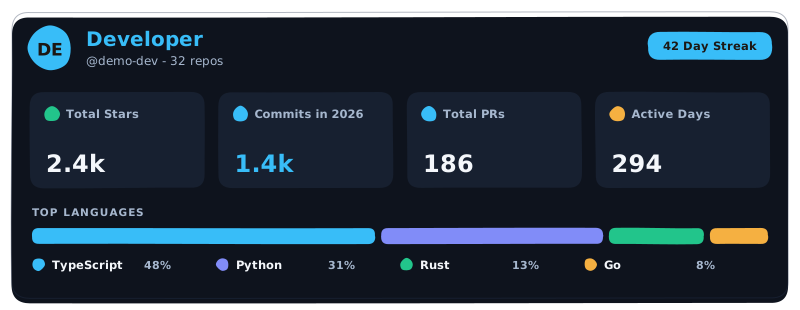
|
⭐ Account Highlights 2A-2 (Tokyo Night) Top repository, primary language share, peak year & longevity badge 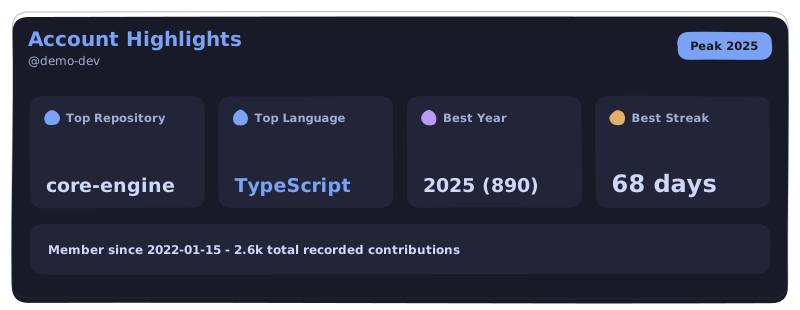
|
|
📊 Language Diversity Index (Dracula) Radial diversity score gauge, repo share, byte volume & stack capsules 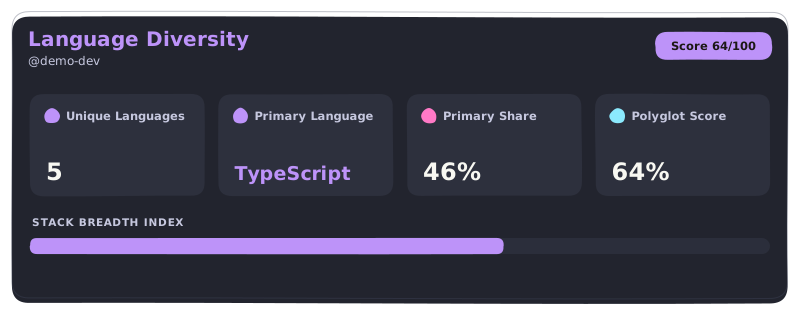
|
📈 Yearly Activity Matrix (Nord) Commit velocity, issue resolutions, code reviews & contribution cadence 
|
🚀 Instant Markdown Embed
Add any card to your GitHub README.md with a single line of Markdown:
<!-- Replace 'yourusername' and choose your preferred theme -->

🔍 View All 31 Card Slugs (hosted service)
| Category | Card Slug | Focus & Visual Hierarchy |
|---|---|---|
| Flagship | profile-card |
Complete overview: Avatar, bio, followers, contributions, languages. |
| Highlights | account-highlights |
Most active repo, primary language, account longevity milestones. |
| Languages | language-diversity |
Radial language entropy score gauge + byte volume breakdowns. |
| Cadence | weekly-cadence |
7-day cyclical radar heatmap of commit & review activity. |
| Productivity | productive-hours |
Circadian clock visualization showing peak coding hours. |
| Velocity | commit-velocity |
High-frequency commit trendlines, averages, and momentum. |
| Trajectory | star-journey |
Milestone progression towards star milestones. |
| Reviews | review-stats |
PR reviews conducted, turnaround latency, and acceptance rate. |
| Matrix | yearly-activity |
Comprehensive yearly breakdown of contributions by category. |
| Impact | open-source-impact |
Ecosystem reach, community forks, and public issue closure rate. |
...and 21 more specialized cards available in the Interactive Embed Studio.
🎨 Explore 33 Color Themes
Supported theme values via ?theme=<name>:
default • dracula • tokyonight • nord • obsidian-gold • synthwave84 • cyberpunk • catppuccin-mocha • gruvbox-dark • monokai • one-dark • solarized-dark • matrix • rose-pine • github-dark • github-light • material-ocean • emerald-dark • amber-minimal • slate-pro • ayu-dark • horizon • shades-of-purple • cobalt2 • night-owl • palenight • laserwave • oceanic-next • dimmed • high-contrast
🏷️ Hosted Multi-Source Tech Badges & Concept Capsules
Served by the hosted service at
api.gitlytics.dev- 181 tech logos plus custom text-only capsules. Not part of the pip package.
Generate clean capsule badges for your tech stack. Supports official brand logos plus custom text-only capsules for advanced concepts:
<!-- Official brand logo capsule -->

<!-- Custom text-only concept capsule -->






🔄 How the Traffic Engine Works
GitHub only preserves 14 days of historical traffic data. Gitlytics automates historical aggregation into an append-only archive:
flowchart LR
    A["GitHub Traffic API\n(14-Day Rolling Window)"] -->|Automated Snapshot| B["Gitlytics Sync Engine"]
    B -->|Deduplicate & Merge| C[("Persistent CSV / Cloud DB\n(Indefinite Retention)")]
    C --> D["Interactive Dashboard"]
    C --> E["Hosted SVG Profile Cards\n(api.gitlytics.dev)"]
    C --> F["AI Health Reports"]
⚡ Setup in Under 2 Minutes:
Use our pre-configured companion GitHub Action that runs automatically every 13 days to snapshot and backup your data:
👉 Deploy the Gitlytics GitHub Traffic Automation Action
📦 Installation
# Core CLI and Python Analytics Engine
pip install gitlytics

# Full Package (Includes React Dashboard Web Server)
pip install "gitlytics[dashboard]"
💻 CLI Quick Reference
# 1. Fetch live 14-day traffic and display formatted ASCII tables
gitlytics fetch --token "ghp_your_token" --print-table

# 2. Filter specific metrics (e.g., views, clones, referrers)
gitlytics fetch --token "ghp_your_token" --metrics views clones

# 3. Synchronize snapshots into local database
gitlytics sync --token "ghp_your_token" --data-dir "./data"

# 4. Schedule automatic sync as a background cron job (e.g. daily at 11 PM)
gitlytics sync --token "ghp_your_token" --data-dir "./data" --schedule-cron "0 23 * * *"

# 5. Launch the React + FastAPI web analytics studio
gitlytics dashboard

# 6. Retrieve cumulative stargazer trajectory for a repository
gitlytics stars owner/repo --token "ghp_your_token"
CLI output contract: the traffic table and the success summary go to stdout; every error and warning goes to stderr. Exit codes are meaningful -
0success,1runtime/upstream failure,2bad input - sogitlytics fetch ... > out.csvnever mixes diagnostics into your data.
🐍 Native Python SDK
Incorporate Gitlytics directly into custom pipelines, Jupyter notebooks, or scheduled scripts:
import gitlytics

# 1. Fetch traffic data as a pandas DataFrame or timeseries dict
df = gitlytics.fetch_traffic(
    token="ghp_your_token",
    return_format="dataframe"  # Options: "dataframe", "timeseries", "summary"
)

# 2. Sync snapshots and export consolidated dashboard JSON
gitlytics.sync(
    token="ghp_your_token",
    data_dir="./data",
    export_json="./data/export.json"
)

# 3. Query historical cumulative star trajectory
star_points = gitlytics.fetch_star_history(
    owner="ameyachopade",
    repo="gitlytics",
    token="ghp_your_token"
)

# 4. Programmatically serve the web studio on loopback with a pre-loaded token
gitlytics.serve_dashboard(
    host="127.0.0.1",
    port=8080,
    token="ghp_your_token",
    data_dir="./data"
)
📊 Database Schema (24 Daily Metrics)
Gitlytics stores normalized daily records in local CSV files or cloud storage:
| Column | Type | Description |
|---|---|---|
date |
str |
ISO 8601 date string (YYYY-MM-DD). |
repository |
str |
Full GitHub repository name (owner/repo). |
is_private |
bool |
Privacy state of the repository. |
views |
int |
Total page views recorded on this day. |
unique_visitors |
int |
Unique visitors browsing the repository. |
clones |
int |
Total git clone operations on this day. |
unique_cloners |
int |
Distinct IP / client clone operations. |
stars |
int |
Total cumulative stargazer snapshot count. |
forks |
int |
Total cumulative fork count. |
releases |
int |
Total repository release count snapshot. |
language |
str |
Primary programming language. |
topics |
str |
JSON array of repository tags and topics. |
watchers_count |
int |
Total watcher count. |
pushed_at |
str |
Last code push timestamp. |
created_at |
str |
Repository creation timestamp. |
open_issues_count |
int |
Total open issues snapshot. |
top_referrer |
str |
Highest-volume external referral domain. |
top_referrer_views |
int |
Total views attributed to top referrer. |
top_referrer_uniques |
int |
Unique visitors attributed to top referrer. |
_raw_referrers |
str |
Complete JSON breakdown of all referral channels. |
top_path |
str |
Most frequently visited repository file/path. |
top_path_views |
int |
Views attributed to the top path. |
top_path_uniques |
int |
Unique visitors attributed to the top path. |
_raw_paths |
str |
Complete JSON breakdown of all popular paths. |
🔗 Ecosystem & Links
- 📦 PyPI Package: Official Python package distribution - the traffic CLI, the Python SDK and the local/self-hosted dashboard.
- 🌐 Live Dashboard: Production Web UI to explore widgets and inspect traffic.
- 🖼️ Hosted Card & Logo API: Serves the 31 SVG profile-card slugs (33 themes) and 181 tech-logo capsules. This is a separate hosted service - it is not bundled in the
gitlyticswheel. - 📚 Documentation: Full API guides, card parameters, and self-hosting documentation.
- 📝 Engineering Blog: Architecture breakdowns, caching strategies, and performance benchmarks.
- ⚙️ Traffic Automation Action: Official GitHub Action companion.
⭐ Show Your Support
If Gitlytics has saved your repository data or elevated your profile, please consider giving the repository a ⭐ Star on GitHub - it helps the project grow!
📄 License
Distributed under Apache License 2.0 + Commons Clause v1.0. See LICENSE for full details.
1 maintainer

Metadata
1 maintainer
Release files for gitlytics 0.7.2
For a detailed explanation of source distributions (sdists) and built distributions (wheels), please see the package formats documentation.
Source distribution (sdist)
| File | Size | Uploaded | Provenance | Actions |
|---|---|---|---|---|
| gitlytics-0.7.2.tar.gz | 1.2 MB | With provenance | Details for gitlytics-0.7.2.tar.gz |
Built distribution (wheel)
| File | Interpreter | ABI | Platform | Actions Reset |
|---|---|---|---|---|
| gitlytics-0.7.2-py3-none-any.whl | Python 3 | none | any | Details for gitlytics-0.7.2-py3-none-any.whl |
Total release size: 2.4 MB
Release files / gitlytics-0.7.2.tar.gz
| Download URL | gitlytics-0.7.2.tar.gz |
|---|---|
| Size | 1.2 MB |
| Tags | Source |
|
SHA-256 checksum How to use checksums |
892eb90f59420248585a76ef96893dd6b0749af51b6969bc3ba83e57b3f87347
|
|
BLAKE2b-256 checksum How to use checksums |
fde62f491eaaac2825291cd625eefcfd1d11a77e029733f1f75f4424699097e6
|
| Upload date | |
|
Uploaded using Trusted Publishing? What is trusted publishing? |
Yes |
| Uploaded via |
twine/7.0.0 CPython/3.13.16
|
Provenance
Provenance describes where a file came from. On PyPI, provenance is shared via attestations, which provide a verifiable record of the build or publishing details. View details, limitations and caveats.


PyPI Publish Attestation
PyPI verified that this artifact, at this checksum, originated from the publisher listed below.
Signed by GitHub Actions, verified by PyPI on Nov 13, 2026.
Transparency logRelease files / gitlytics-0.7.2-py3-none-any.whl
| Download URL | gitlytics-0.7.2-py3-none-any.whl |
|---|---|
| Size | 1.2 MB |
| Tags | Python 3 |
|
SHA-256 checksum How to use checksums |
f0f2b4c7d5fbe0fdab8dbd6e2d93ab0d78925d3eb243f002016fe335cbaa599f
|
|
BLAKE2b-256 checksum How to use checksums |
74705a09b11659f09eeb18f80cdf0537412fb62925df30857e43e005544979d3
|
| Upload date | |
|
Uploaded using Trusted Publishing? What is trusted publishing? |
Yes |
| Uploaded via |
twine/7.0.0 CPython/3.13.16
|
Provenance
Provenance describes where a file came from. On PyPI, provenance is shared via attestations, which provide a verifiable record of the build or publishing details. View details, limitations and caveats.
PyPI Publish Attestation
PyPI verified that this artifact, at this checksum, originated from the publisher listed below.
Signed by GitHub Actions, verified by PyPI on Nov 13, 2026.
Transparency logSecurity for gitlytics 0.7.2
Provenance
Provenance describes where a file came from. On PyPI, provenance is shared via attestations, which provide a verifiable record of the build or publishing details. View details, limitations and caveats.
Full provenance
Both files in this release have been uploaded with provenance metadata.
Attestation for gitlytics-0.7.2.tar.gz
PyPI Publish Attestation
PyPI verified that this artifact, at this checksum, originated from the publisher listed below.
Signed by GitHub Actions, verified by PyPI on Nov 13, 2026.
Transparency logA note on package security
PyPI is a repository for distributing packages, not a service for auditing them. While third-party security researchers and our staff do their best to detect and remove malicious packages, PyPI cannot guarantee the quality, security or suitability of any given package.
To learn more about protecting yourself from malicious actors, visit our package security documentation.














