
gridcalc



A programmable spreadsheet for developers and technical users, with Excel-ish formulas, Python escape hatches, XLSX interop, goal seek, and LP/MIP solving. It ships two frontends over one engine: a curses terminal app, and a desktop window that renders the same workbook in a webview.
Inspired by Serge Zaitsev's kalk.
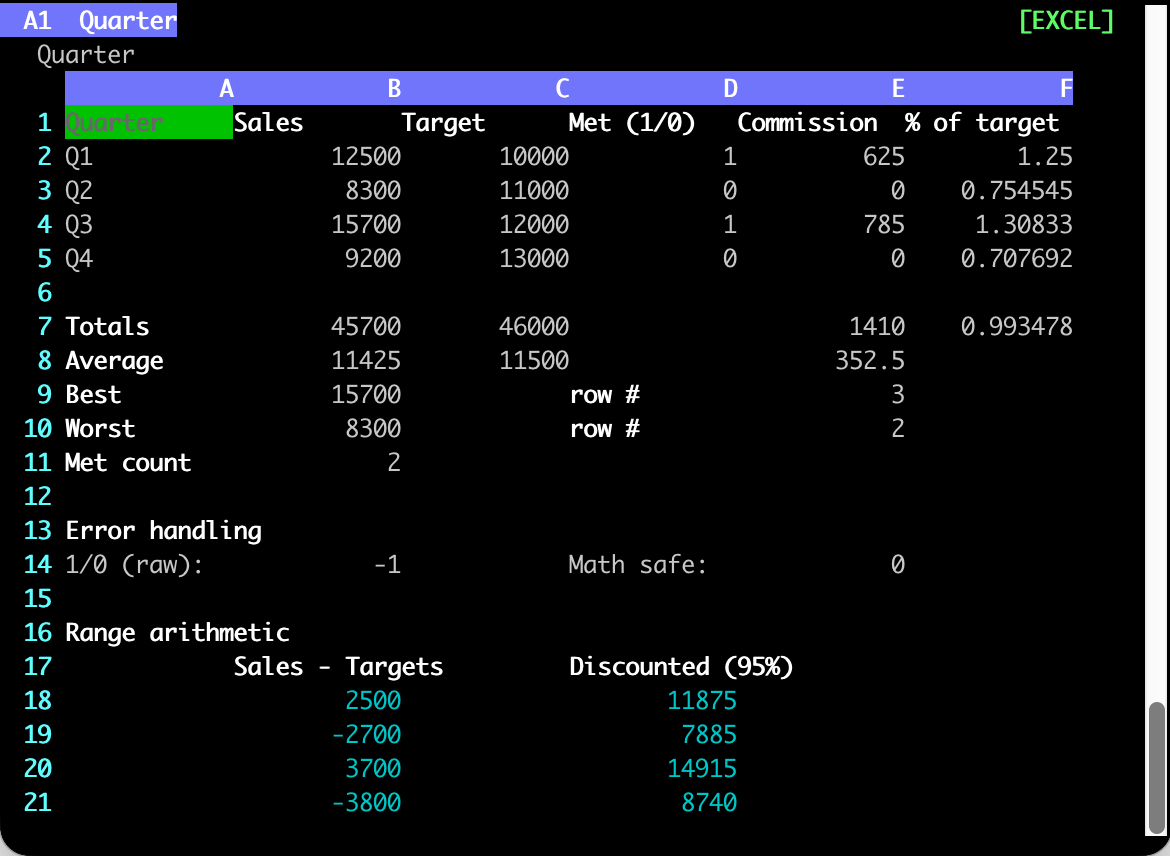
The terminal app over example_excel.json.
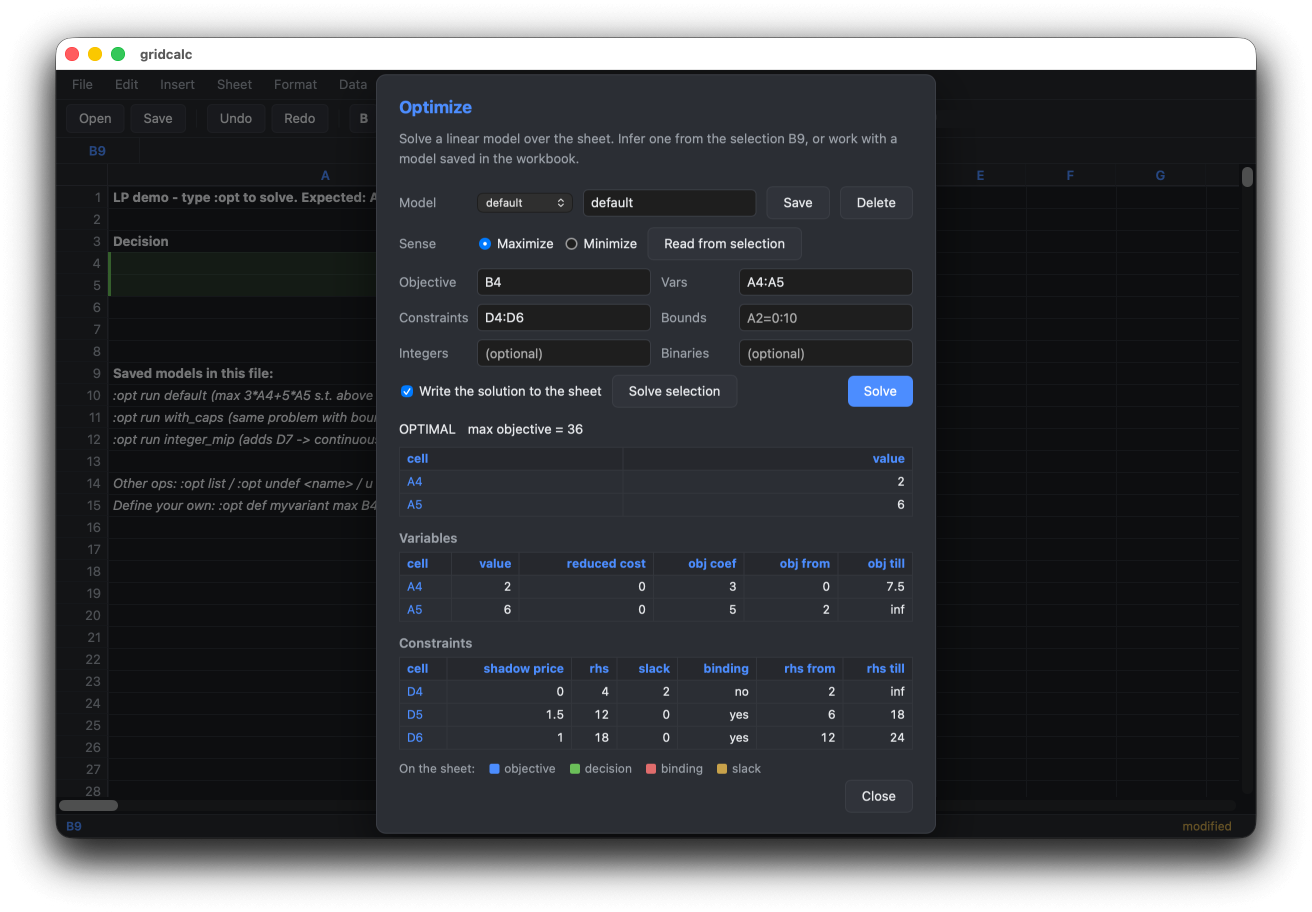
The desktop app solving example_lp.json -- the solution is written to the sheet behind the dialog.
pip install gridcalc
gridcalc budget.json        # terminal
gridcalc-web budget.json    # desktop window  (needs the [web] extra)
Documentation: https://shakfu.github.io/gridcalc/ -- install, tour, formula reference, optimization guide, file format, Python API, and the design notes.
What it gives you
-
Excel-compatible formulas (
=IF(A1>=B1, A1*0.05, 0)) and arrays (=SUM(A1:A10 * B1:B10)) without leaving the terminal. -
Multi-sheet workbooks with cross-sheet refs (
=Sheet2!A1) and a proper dep graph. -
Three formula modes per file: strict Excel, Excel-plus-
py.*, or full Pythonevalwith numpy/pandas. -
xlsx interop via OpenXLSX C++ -- read every sheet's formulas + values; export with cached values.
-
Linear, mixed-integer & quadratic programming built in via HiGHS --
:opt max B4 vars A4:A5 st D4:D6solves from cells in the sheet, with shadow prices, infeasibility diagnosis, and RHS sweeps. Models persist in the workbook. -
Goal-seek --
:goal B10 = 100 by A1adjusts a variable so a formula hits a target value. -
Vim-style command line (
:w,:e,:q,/search,y/p, visual selection, undo), with system-clipboard copy/paste -- yank pushes values as TSV, paste pulls TSV in from other apps. -
A desktop app as well as a terminal one -- the same engine behind a mouse-driven grid with menus, a Ctrl-K command palette, and solver results painted onto the sheet. Most
:commands are a shared registry both frontends dispatch, so they behave identically in each.
Install
pip install gridcalc            # core: zero third-party runtime deps
pip install 'gridcalc[extras]'  # adds numpy, pandas, pygments
pip install 'gridcalc[web]'     # adds the desktop window (gridcalc-web)
Or with uv: uv tool install 'gridcalc[extras]'.
The core install has zero third-party runtime dependencies on Linux and macOS -- the full 300+ Excel function library (statistical distributions, financial functions, LINEST/TREND regression, ...) works on stdlib alone. Details in the install guide.
A taste
Cells hold a number, a label (any non-=-prefixed string), or a formula (prefixed with =):
        A          B          C
1  Revenue   Cost       Margin
2  1000      600        =(A2-B2)/A2*100      <- formula
3  1200      700        =(A3-B3)/A3*100
4  Total     =SUM(B2:B3) =AVG(C2:C3)
Press : for the command line -- :w saves, :o opens, :q quits, v selects, u undoes, / searches. The quick tour covers the rest, and the command reference lists every command.
Try the shipped examples:
gridcalc example_excel.json          # sales report, named ranges, IF/MATCH
gridcalc example_excel.xlsx          # the same workbook saved as xlsx
gridcalc example_hybrid.json         # progressive tax via py.* + aggregations
gridcalc example.json                # PYTHON: numpy/pandas, list-comprehensions
gridcalc example_multisheet.json     # 3-sheet budget, cross-sheet formulas
gridcalc example_lp.json             # LP/MIP demo -- type :opt to solve
gridcalc example_goal.json           # goal-seek demo -- :goal B1 = 11 by A1
Scripting it
Any operation flag turns the same command line into a batch run that never opens a window -- so the solver is reachable from cron, a Makefile, or CI:
gridcalc plan.json --solve                       # run the workbook's saved model
gridcalc plan.json --solve --sens                # ... with shadow prices
gridcalc plan.json --sweep 'D5 6:24 9'           # parametric right-hand side
gridcalc book.json --goal 'B10 = 100 by A1'      # goal seek
gridcalc book.json --eval '=SUM(A1:A10)'         # evaluate a formula
gridcalc book.xlsx --convert book.json           # format conversion
Results go to stdout as JSON with a documented schema, and the exit code separates "the answer is no" (2 -- infeasible, unbounded, did not converge) from "the job is broken" (1). Nothing is written back unless you pass --apply. Full reference: https://shakfu.github.io/gridcalc/reference/cli/
Documentation
| Topic | |
|---|---|
| Install, extras, source builds | https://shakfu.github.io/gridcalc/install/ |
| Quick tour | https://shakfu.github.io/gridcalc/tour/ |
| Desktop app (web frontend) | https://shakfu.github.io/gridcalc/desktop/ |
| Formulas, functions, named ranges | https://shakfu.github.io/gridcalc/guide/formulas/ |
| Optimization (LP/MIP/QP, sensitivity, sweeps) | https://shakfu.github.io/gridcalc/guide/optimization/ |
| Headless CLI (solve/goal/sweep/eval/convert) | https://shakfu.github.io/gridcalc/reference/cli/ |
| File format | https://shakfu.github.io/gridcalc/reference/file-format/ |
| Python API | https://shakfu.github.io/gridcalc/reference/api/ |
| Design notes (recalc, security, web frontend) | https://shakfu.github.io/gridcalc/topological/ |
The pages are built from docs/ with MkDocs; make docs-serve previews them locally.
Development
make build      # rebuild the C++ extensions (_core, _opt)
make test       # unit tests
make qa         # lint + typecheck + test + format (Python and TypeScript)
make web-build  # compile the desktop app's React client
make docs       # build the documentation site
make wheel      # cpXX-cpXX wheel for current Python
The full target list is in the development guide, and make help prints it.
Prior Art
-
sc-im: A ncurses spreadsheet program for terminal
-
sheets: A terminal based spreadsheet tool
-
rustxl: A fast, keyboard-driven spreadsheet with vim-style navigation and Excel-compatible formulas.
License
MIT
1 maintainer

Metadata
1 maintainer
Release files for gridcalc 0.11.0
For a detailed explanation of source distributions (sdists) and built distributions (wheels), please see the package formats documentation.
Built distributions (wheels)
| File | Actions Reset | |||
|---|---|---|---|---|
| gridcalc-0.11.0-cp312-abi3-win_amd64.whl | CPython 3.12 | abi3 | Windows x86-64 | Details for gridcalc-0.11.0-cp312-abi3-win_amd64.whl |
| gridcalc-0.11.0-cp312-abi3-manylinux_2_27_x86_64.manylinux_2_28_x86_64.whl | CPython 3.12 | abi3 | Linux glibc 2.28+ x86-64, Linux glibc 2.27+ x86-64 | Details for gridcalc-0.11.0-cp312-abi3-manylinux_2_27_x86_64.manylinux_2_28_x86_64.whl |
| gridcalc-0.11.0-cp312-abi3-manylinux_2_26_aarch64.manylinux_2_28_aarch64.whl | CPython 3.12 | abi3 | Linux glibc 2.28+ ARM64, Linux glibc 2.26+ ARM64 | Details for gridcalc-0.11.0-cp312-abi3-manylinux_2_26_aarch64.manylinux_2_28_aarch64.whl |
| gridcalc-0.11.0-cp312-abi3-macosx_11_0_arm64.whl | CPython 3.12 | abi3 | macOS 11.0+ ARM64 | Details for gridcalc-0.11.0-cp312-abi3-macosx_11_0_arm64.whl |
| gridcalc-0.11.0-cp312-abi3-macosx_10_15_x86_64.whl | CPython 3.12 | abi3 | macOS 10.15+ x86-64 | Details for gridcalc-0.11.0-cp312-abi3-macosx_10_15_x86_64.whl |
Total release size: 16.0 MB
Release files / gridcalc-0.11.0-cp312-abi3-win_amd64.whl
| Download URL | gridcalc-0.11.0-cp312-abi3-win_amd64.whl |
|---|---|
| Size | 3.0 MB |
| Tags | CPython 3.12 Windows x86-64 abi3 |
|
SHA-256 checksum How to use checksums |
4d61bf8c08d492c27a2d63928334ea0fef7b621d2f8cb59ae8eb92af632bd3cf
|
|
BLAKE2b-256 checksum How to use checksums |
44de2f97115971e76f403e4d631ceb0da0c007986043b405e6a1092947cb2ea1
|
| Upload date | |
|
Uploaded using Trusted Publishing? What is trusted publishing? |
No |
| Uploaded via |
twine/6.2.0 CPython/3.14.7
|
Release files / gridcalc-0.11.0-cp312-abi3-manylinux_2_27_x86_64.manylinux_2_28_x86_64.whl
| Download URL | gridcalc-0.11.0-cp312-abi3-manylinux_2_27_x86_64.manylinux_2_28_x86_64.whl |
|---|---|
| Size | 3.8 MB |
| Tags | CPython 3.12 Linux glibc 2.27+ x86-64 Linux glibc 2.28+ x86-64 abi3 |
|
SHA-256 checksum How to use checksums |
d25a212fc62419305df03be81ec02d1a26969f95e69b3b7c158a6b1e39291081
|
|
BLAKE2b-256 checksum How to use checksums |
579d66bce8a8d801221f2639a81df5fec9c06e583d769698493fa51c13f230ca
|
| Upload date | |
|
Uploaded using Trusted Publishing? What is trusted publishing? |
No |
| Uploaded via |
twine/6.2.0 CPython/3.14.7
|
Release files / gridcalc-0.11.0-cp312-abi3-manylinux_2_26_aarch64.manylinux_2_28_aarch64.whl
| Download URL | gridcalc-0.11.0-cp312-abi3-manylinux_2_26_aarch64.manylinux_2_28_aarch64.whl |
|---|---|
| Size | 3.5 MB |
| Tags | CPython 3.12 Linux glibc 2.26+ ARM64 Linux glibc 2.28+ ARM64 abi3 |
|
SHA-256 checksum How to use checksums |
a7b239d7e7ec776fd1136d6d971a6b2ef72ecd85d776d7c9f16a6fe3358884b3
|
|
BLAKE2b-256 checksum How to use checksums |
f8c0618c75791fad8f7b240cbe9141b10f4af0490219145764b33a571e686abb
|
| Upload date | |
|
Uploaded using Trusted Publishing? What is trusted publishing? |
No |
| Uploaded via |
twine/6.2.0 CPython/3.14.7
|
Release files / gridcalc-0.11.0-cp312-abi3-macosx_11_0_arm64.whl
| Download URL | gridcalc-0.11.0-cp312-abi3-macosx_11_0_arm64.whl |
|---|---|
| Size | 2.7 MB |
| Tags | CPython 3.12 abi3 macOS 11.0+ ARM64 |
|
SHA-256 checksum How to use checksums |
4cffa74b259e09a2ede424e923b3cd30f1ce54eab720778f744e26a0114b90b0
|
|
BLAKE2b-256 checksum How to use checksums |
133ffb704d5c33cd6dd50b39692ad965571cf95cefc24c743e08d0d5be87a63b
|
| Upload date | |
|
Uploaded using Trusted Publishing? What is trusted publishing? |
No |
| Uploaded via |
twine/6.2.0 CPython/3.14.7
|
Release files / gridcalc-0.11.0-cp312-abi3-macosx_10_15_x86_64.whl
| Download URL | gridcalc-0.11.0-cp312-abi3-macosx_10_15_x86_64.whl |
|---|---|
| Size | 3.0 MB |
| Tags | CPython 3.12 abi3 macOS 10.15+ x86-64 |
|
SHA-256 checksum How to use checksums |
cd6a5e1d65bba0e3cd0a2b65a6df20a446e78c3e16c45edca5c62cd201fcd86e
|
|
BLAKE2b-256 checksum How to use checksums |
6c8b26a0c7de3526e5fb99fe22bce6ec44055d7228590aa6dd92882fa8dbbe96
|
| Upload date | |
|
Uploaded using Trusted Publishing? What is trusted publishing? |
No |
| Uploaded via |
twine/6.2.0 CPython/3.14.7
|
Security for gridcalc 0.11.0
Provenance
Provenance describes where a file came from. On PyPI, provenance is shared via attestations, which provide a verifiable record of the build or publishing details. View details, limitations and caveats.
No provenance found
None of the files in this release were uploaded with provenance metadata.
A note on package security
PyPI is a repository for distributing packages, not a service for auditing them. While third-party security researchers and our staff do their best to detect and remove malicious packages, PyPI cannot guarantee the quality, security or suitability of any given package.
To learn more about protecting yourself from malicious actors, visit our package security documentation.














