



Isovar
- Overview
- Installation
- Python API
- Command line
- Internal design
- Documentation
- Sequencing recommendations
Overview
Isovar finds the mutant protein sequence that tumor RNA actually encodes around each somatic mutation. Given variant calls (VCF) and aligned tumor RNA-seq reads (BAM), it:
- collects the RNA reads that overlap each variant,
- keeps the reads that carry the mutant allele,
- assembles overlapping mutant reads into longer cDNA sequences,
- places those sequences in the reading frames of annotated transcripts, and
- translates them into mutant protein sequences.
The protein comes from the reads, not from the reference plus one edit, so it can include nearby variants and splice junctions that the reads show. Where coverage runs out or no reading frame can be established, the result is shorter or empty: Isovar never fills gaps with reference sequence.
Varcode generates transcript hypotheses and predicts coding consequences; Isovar reconstructs RNA-supported sequences and reconciles the evidence; Vaxrank evaluates protein/peptide candidates. See library responsibilities for the shared contract.
Installation
pip install isovar
# Optional figure rendering for `isovar plot` and `isovar fusion --plot-dir`:
pip install 'isovar[plot]'
Isovar requires Python 3.9 or later. Reference annotation comes from PyEnsembl; install the release matching your alignments before the first run, for example:
pyensembl install --release 75 --species human
On the command line, --genome names an assembly such as GRCh38 or hg19,
and the most recent Ensembl release installed for it is used. From Python, choose
the annotation yourself by loading the variants with a PyEnsembl genome:
import pyensembl
import varcode
from isovar import run_isovar

variants = varcode.load_vcf(
    "cancer-mutations.vcf", genome=pyensembl.EnsemblRelease(93))
isovar_results = run_isovar(variants=variants, alignment_file="tumor-rna.bam")
A pyensembl.Genome built from your own GTF and transcript FASTA files works the
same way, and gene and transcript names then come from that annotation. Align
the RNA to the same assembly as the annotation.
Python API
isovar.run_isovar returns one isovar.IsovarResult per input variant, in input
order. Each result holds the RNA evidence at that variant's locus and any mutant
protein sequences assembled for it.
from isovar import run_isovar

isovar_results = run_isovar(
    variants="cancer-mutations.vcf",
    alignment_file="tumor-rna.bam")

for isovar_result in isovar_results:
    # The protein preferred by the context/support policy, or None.
    if isovar_result.top_protein_sequence is not None:
        # Number of distinct fragments supporting the variant allele.
        print(isovar_result.variant, isovar_result.num_alt_fragments)
A collection of IsovarResult objects can also be flattened into a Pandas DataFrame:
from isovar import run_isovar, isovar_results_to_dataframe

df = isovar_results_to_dataframe(
    run_isovar(
        variants="cancer-mutations.vcf",
        alignment_file="tumor-rna.bam"))
Isovar logs through the standard logging module under the isovar logger and
never configures logging itself; configure it in your application to see progress.
Collecting RNA reads
Create a ReadCollector to change how reads are selected. The defaults are shown:
from isovar import run_isovar, ReadCollector

read_collector = ReadCollector(
    min_mapping_quality=1,
    use_duplicate_reads=False,
    use_secondary_alignments=True,
    use_soft_clipped_bases=False,
    # Merge overlapping mates of one fragment into a single observation.
    merge_overlapping_fragments=True,
    # Keep reads without QUAL; their base qualities stay unknown.
    use_reads_without_base_qualities=True,
    # Optional predicate on each original pysam record.
    read_filter=None)

isovar_results = run_isovar(
    variants="cancer-mutations.vcf",
    alignment_file="tumor-rna.bam",
    read_collector=read_collector)
Unmapped reads, reads that failed vendor QC and records without a sequence are always skipped. MAPQ is compared as a number, so STAR's 255 for a unique alignment passes the default minimum of 1. See read eligibility for how quality tags from each platform are treated.
How reads are counted:
- A read is one sequenced segment: one mate of a pair, or one long read. Its secondary and supplementary alignment records are not extra reads.
- A fragment is one sequenced template, so both mates of a pair count once.
Fragment counts such as
num_alt_fragmentsare usually the ones to filter on. Names are scoped by read group, and only complementary primary mates in the same read group are merged. - A read whose alternative alignments support different alleles counts as other, not ref or alt, and cannot extend an assembly.
- None of these is a molecule count: Isovar does no UMI deduplication. The
*_read_namesproperties are plain names for display.
Where overlapping mates disagree at a base, the higher-quality base wins, which
can change allele support as well as the assembled sequence. Mates stay separate
when their alignments conflict, or when a disagreement has equal or missing
qualities. A read that ends at an insertion supports the
reference allele only if both flanking reference bases are aligned.
use_soft_clipped_bases keeps unaligned read ends; it does not realign them.
Adapter/poly-A inference and optional end trimming are opt-in ReadCollector
settings (infer_read_ends, read_end_profile, trim_adapters, trim_poly_a);
original BAM records and aligned/inserted bases are never modified. See the
read-end inference guide.
Assembly and translation
Create a ProteinSequenceCreator to change how reads are assembled into coding
sequences, placed in a reading frame and grouped into proteins. The defaults are shown:
from isovar import run_isovar, ProteinSequenceCreator

protein_sequence_creator = ProteinSequenceCreator(
    # Peptide size K used to score context; the default target length is 2*K-1.
    protein_context_peptide_length=25,
    # None derives the target from the peptide size (49 aa for K=25).
    protein_sequence_length=None,
    # "balanced", "support" or "context"; see protein context selection below.
    protein_sequence_preference="balanced",
    # Balanced mode keeps candidates with at least this fraction of the best
    # candidate's compatible read support.
    min_protein_sequence_support_fraction=0.85,
    # Minimum number of reads covering each base of the coding sequence.
    min_variant_sequence_coverage=2,
    # Bases of reference transcript the cDNA must match before the variant
    # to establish a reading frame.
    min_transcript_prefix_length=10,
    # Mismatches allowed between the cDNA and the reference transcript.
    max_transcript_mismatches=2,
    # Also count mismatches after the variant toward max_transcript_mismatches.
    count_mismatches_after_variant=False,
    # Ranked protein sequences kept per variant; 0 keeps all.
    max_protein_sequences_per_variant=1,
    # Assemble overlapping reads; if False each sequence comes from one read.
    variant_sequence_assembly=True,
    # Minimum overlap, in nucleotides, before two reads are combined.
    min_assembly_overlap_size=30)

isovar_results = run_isovar(
    variants="cancer-mutations.vcf",
    alignment_file="tumor-rna.bam",
    protein_sequence_creator=protein_sequence_creator)
How reads become a translated sequence:
- Each read keeps its aligned exon blocks and splice junctions, so it is compatible with a particular set of annotated transcripts.
- Overlapping reads are assembled only along transcripts they share, and the cDNA is translated only in those transcripts' frames.
- A read that ends before an isoform-distinguishing junction stays ambiguous: it supports every compatible isoform without being counted twice.
- The frame is carried through each read's own alignment, so an upstream indel in the RNA shifts it (details).
Protein context selection
For peptide size K, Isovar targets 2*K-1 residues (15mers → 29 aa, 25mers → 49 aa),
enough for every K-mer overlapping a centered single-residue change. The default
balanced preference maximizes mutation-overlapping peptide windows among
candidates with at least 85% of the best candidate's compatible read support.
support ranks by read support first; context ignores the support budget.
Actual context depends on RNA coverage, and no reference sequence fills missing
RNA. See protein context selection
for the exact rules and the tumor-RNA audit.
Filtering results
run_isovar evaluates filters on each result; a failing result is kept, with
False in its filter_values dictionary and in passes_all_filters. When the
results are flattened into a DataFrame each filter becomes a filter:<name> column.
filter_thresholds maps names like 'min_num_alt_reads' or
'max_fraction_other_fragments' to numbers. The text after min_ or max_ names
a numeric property of IsovarResult, and most read-evidence properties follow
the pattern {num|fraction}_{ref|alt|other}_{reads|fragments}. For example, this
requires at least 10 alt reads and at most 25% of fragments supporting other alleles:
from isovar import run_isovar

isovar_results = run_isovar(
    variants="cancer-mutations.vcf",
    alignment_file="tumor-rna.bam",
    filter_thresholds={"min_num_alt_reads": 10, "max_fraction_other_fragments": 0.25})

for isovar_result in isovar_results:
    print(isovar_result.variant, isovar_result.passes_all_filters)
filter_flags names boolean properties of IsovarResult; prefix one with not_
to negate it, as in not_protein_sequence_matches_predicted_mutation_effect.
Omitting either argument applies the defaults in
default_parameters.py
(DEFAULT_FILTER_THRESHOLDS and DEFAULT_FILTER_FLAGS, the latter being
predicted_effect_modifies_protein_sequence, has_mutant_protein_sequence_from_rna
and protein_sequence_contains_mutation). Passing a value replaces the
corresponding defaults; to change one threshold, copy DEFAULT_FILTER_THRESHOLDS
and update it.
Phasing
Two variants are phased when their alt reads share at least
min_shared_fragments_for_phasing (default 2) fragments with compatible
alignments.
IsovarResult property |
Reads used |
|---|---|
phased_variants_in_supporting_reads |
All alt reads |
phased_variants_in_protein_sequence |
The reads behind the top protein sequence |
phase_group_from_supporting_reads, phase_group_from_protein_sequence |
As above, returning the connected PhaseGroup, which can include variants linked only through others |
Complementary mates, variants on one spliced alignment, and supplementary pieces
whose reciprocal SA tags declare the same chimeric path can phase. Matching
read names in different read groups cannot. A phase group is connected pairwise
evidence, not one resolved haplotype. IsovarReadPhasing and
IsovarMutantTranscript expose these results through Varcode's phasing and
mutant-transcript interfaces.
Structural variants and fusions
The small-variant pipeline accepts literal nucleotide alleles, including
sequence-resolved indels. Symbolic structural variants (<DEL>, <DUP>, etc.),
breakends and varcode.StructuralVariant objects are rejected rather than
interpreted as small variants. Two separate workflows handle them:
isovar sv-rna/reconstruct_sv_rnareconstructs exploratory RNA paths around one nominated SV from a BAM and annotated models, keeping sequence, frame and event-linkage evidence separate (guide).--predictionscompares supplied protein predictions with the reconstructed paths; full reconciliation with Varcode hypotheses is #305.isovar fusion/reconstruct_fusionvalidates a supplied fusion transcript's junction evidence and annotated coding frames (guide).
Command line
isovar run \
    --vcf somatic-variants.vcf \
    --bam rnaseq.bam \
    --output isovar-results.csv
isovar --help lists the subcommands; each subcommand's --help lists its options
and defaults, which match the Python API. isovar --vcf ... --bam ... (without a
subcommand) also runs the pipeline, and python -m isovar works too.
| Command | Output |
|---|---|
isovar run |
One row per variant: read evidence, top protein sequence, predicted effect and filters |
isovar protein-sequences |
Ranked candidate protein sequences (--max-protein-sequences-per-variant 0 keeps all) |
isovar translations |
Every translation of each assembled cDNA in each compatible reading frame, before grouping |
isovar variant-sequences |
Assembled cDNA sequences supporting each variant |
isovar reference-contexts |
Reference sequence and reading frame around each variant (no BAM needed) |
isovar allele-counts |
Read and fragment counts for the ref, alt and other alleles |
isovar allele-reads |
All reads overlapping each variant |
isovar variant-reads |
Reads supporting each variant's alt allele |
isovar plot |
Protein, coverage, read-overlap and transcript figures for one mutation (guide) |
isovar sv-rna |
Exploratory RNA paths around one nominated SV, as JSON |
isovar fusion |
Validated junction evidence and frames for a supplied fusion, as JSON |
Except isovar run, the table and plot commands also install as hyphenated
scripts such as isovar-protein-sequences and isovar-plot.
Every CSV starts with the same variant key: variant (as in chr9 g.82927102G>T)
and chr, pos, ref and alt as given in the input, so tables from different
commands can be joined. Counts are num_* columns, lists are ;-separated, and
numbers are written with six significant digits. An empty result still has its header.
For example, use only primary alignments, include soft-clipped bases, and require at least three reads at every retained cDNA base:
isovar run --vcf somatic-variants.vcf --bam rnaseq.bam \
    --drop-secondary-alignments --use-soft-clipped-bases \
    --min-variant-sequence-coverage 3 --num-rna-decompression-threads 4 \
    --output isovar-results.csv
Progress messages go to stderr. --log-level DEBUG adds per-candidate detail,
and --log-level WARNING keeps runs quiet. Unusable inputs and out-of-range
options stop with a one-line error and exit status 2. Examples are a missing file,
an unindexed BAM, SAM instead of BAM, a missing output directory and malformed JSON.
The CLI applies the same default filters as run_isovar. Filters only set the
filter:* columns and passes_all_filters; they never remove rows.
--reference-context-size applies only to isovar reference-contexts. The
protein commands size their reference context from the requested cDNA length and
minimum transcript prefix.
Internal design
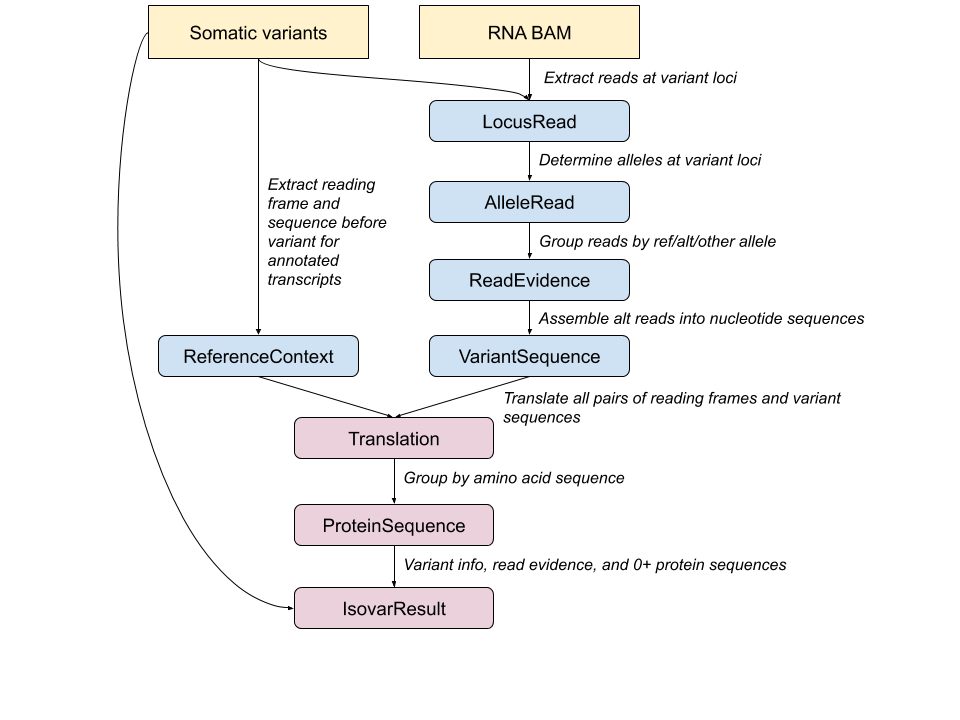
The inputs to Isovar are one or more somatic variant call (VCF) files, along with a BAM file containing aligned tumor RNA reads. The following objects are used to aggregate information within Isovar:
-
LocusRead: Isovar examines each variant locus and extracts reads overlapping that locus, represented by
LocusRead. TheLocusReadrepresentation allows filtering based on quality and alignment criteria (e.g. MAPQ > 0) which are thrown away in later stages of Isovar. -
AlleleRead: Once
LocusReadobjects have been filtered, they are converted into a simplified representation calledAlleleRead. EachAlleleReadcontains only the cDNA sequences before, at, and after the variant locus. -
ReadEvidence: The set of
AlleleReadobjects overlapping a mutation's location may support many different distinct alleles. TheReadEvidencetype represents the grouping of these reads into ref, alt and otherAlleleReadsets, where ref reads agree with the reference sequence, alt reads agree with the given mutation, and other reads contain all non-ref/non-alt alleles. The alt reads will be used later to determine a mutant coding sequence, but the ref and other groups are also kept in case they are useful for filtering. -
VariantSequence: Overlapping
AlleleReads containing the same mutation are assembled into a longer sequence byVariantSequenceCreator. TheVariantSequenceobject represents this candidate coding sequence, as well as all theAlleleReadobjects which were used to create it. -
ReferenceContext: To determine the reading frame in which to translate a
VariantSequence, Isovar looks at all Ensembl annotated transcripts overlapping the locus and collapses them into one or moreReferenceContextobjects. EachReferenceContextrepresents the cDNA sequence upstream of the variant locus and in which of the {0, +1, +2} reading frames it is translated. -
VariantORF and Translation: A
VariantORFplaces aVariantSequencein the reading frame of aReferenceContext, and its translation into a protein fragment is represented byTranslation. -
ProteinSequence: Multiple distinct variant sequences and reference contexts can generate the same translations, so
ProteinSequenceCreatoraggregates those equivalentTranslationobjects into aProteinSequence.TranscriptAssemblyEditrecords the transcript-relative edits observed in its assemblies. -
IsovarResult: Since a single variant locus might have reads which assemble into multiple incompatible coding sequences, an
IsovarResultrepresents a variant and one or moreProteinSequenceobjects which are associated with it. Protein sequences are ranked by the configured context/support preference and the top sequence is made easy to access. Allele-support properties such asnum_alt_fragmentsandfraction_ref_readsremain separate from the selected protein's compatible support.
Documentation
Small variants
| Guide | What it covers |
|---|---|
| Protein context selection | How much protein context is reported and which candidate comes first |
| Reading frames from aligned reads | How an indel upstream of the variant carries into the reading frame |
| Adapter and poly-A trimming | Opt-in annotation and trimming of technical read ends |
| Mutation-evidence figures | isovar plot, how to read its figures, and the osteosarc gallery |
| Read eligibility across platforms | Which alignments are used, and what Illumina, ONT and PacBio quality tags mean |
Structural variants and fusions
| Guide | What it covers |
|---|---|
| SV RNA reconstruction | isovar sv-rna: RNA paths around an SV call, their frames and ORFs, export and comparison |
| Supplied fusion RNA | isovar fusion: checking a fusion transcript assembled by another tool |
| ORF start evidence | Where an SV ORF's start codon comes from, in four tiers |
| Cell/UMI evidence | Cell barcode and UMI labels in SV support counts |
| ONT read lineage | Split and duplex nanopore reads in SV support counts |
Project
| Guide | What it covers |
|---|---|
| Library responsibilities | How Varcode, Isovar and Vaxrank divide the work |
| Minimal Sid test reads | The offline test-read bundle shipped in the package, and how to regenerate it |
| Shared osteosarc data | The pinned 49-case BAM regression set that Vaxrank also uses |
| Changelog | Behavior changes by release |
Sequencing recommendations
Isovar works best with high-quality, high-coverage poly-A-selected mRNA sequencing, for example >100M paired-end reads on a current Illumina short-read platform. The depth needed depends on RNA degradation and tumor purity. With short reads, read length bounds the recoverable protein: assembly only uses reads overlapping the variant, so 100 bp reads give at most 199 bp of sequence around a somatic SNV, about 66 amino acids. Without assembly, one 100 bp read determines at most 33.
Overlap assembly requires exact sequence matches, which suits short reads with low
error rates. Long reads (PacBio, Oxford Nanopore) often span the whole context
without assembly, but noisy reads may not join by exact overlap; SV reconstruction
(isovar sv-rna) uses noise-tolerant extension. Coverage trimming assumes that read
coverage falls off away from the variant, which reads spanning splice junctions can violate.


Release files for isovar 1.31.2
For a detailed explanation of source distributions (sdists) and built distributions (wheels), please see the package formats documentation.
Source distribution (sdist)
| File | Size | Uploaded | |
|---|---|---|---|
| isovar-1.31.2.tar.gz | 8.4 MB | Details |
Built distribution (wheel)
| File | Interpreter | ABI | Platform | Reset |
|---|---|---|---|---|
| isovar-1.31.2-py3-none-any.whl | Python 3 | none | any | Details |
Total release size: 16.0 MB
Release files / isovar-1.31.2.tar.gz
| Download URL | isovar-1.31.2.tar.gz |
|---|---|
| Size | 8.4 MB |
| Tags | Source |
|
SHA-256 checksum How to use checksums |
5f85ba92cd2a9b313a5fedbe0beeaaf6e75ac30a6a4b555f4312eba0fb7ac4d5
|
|
BLAKE2b-256 checksum How to use checksums |
b5a2fbd3f07df85299945afe7be5685a0fc1068d19dc253e454a26c18304333f
|
| Upload date | |
|
Uploaded using Trusted Publishing? What is trusted publishing? |
No |
| Uploaded via |
twine/7.0.0 CPython/3.12.6
|
Release files / isovar-1.31.2-py3-none-any.whl
| Download URL | isovar-1.31.2-py3-none-any.whl |
|---|---|
| Size | 7.6 MB |
| Tags | Python 3 |
|
SHA-256 checksum How to use checksums |
034dcee4c12464179c6c6f1f54e0b9132e4b15930ccccdb30ae06d09cb941a95
|
|
BLAKE2b-256 checksum How to use checksums |
1162a070608cec3c66d3a48ebdb8baf856f849b1483a1aef2ed0d7f7061478bf
|
| Upload date | |
|
Uploaded using Trusted Publishing? What is trusted publishing? |
No |
| Uploaded via |
twine/7.0.0 CPython/3.12.6
|














