

🦊 Kitsune MCP
The agent harness for MCP.
One config entry. Borrow any of 130,000+ servers mid-session — develop live, reach the long tail, try community code contained — then shift back.
Session survives.










Kitsune is a runtime MCP proxy: one always-on gateway your agent uses to reach the rest of the ecosystem. search finds a server across 7 registries. shapeshift(id) mounts its tools in the current turn. shapeshift() drops them. No config edit. No client restart.
search → shapeshift → call → shapeshift()       # reach, use, release
connect → shapeshift → edit → reload → call     # MCP REPL (default install)
Install for reach and live execution — not for token savings. Native Tool Search already defers schemas for servers you've configured. Kitsune covers what Tool Search cannot: servers you've never set up, servers you're writing right now, and community packages you want to try without wiring them into mcp.json forever.
| Loop | Why it wins | |
|---|---|---|
| MCP REPL | edit → reload → call |
Iterate on your own server without killing the session |
| Long-tail reach | search → shapeshift → call |
One-offs and obscure APIs with no pre-install |
| Try-before-you-trust | confirm=True + Docker cage on by default + TOFU pins |
Community catalog without blind always-on installs |
| Use Kitsune when… | Skip it when… |
|---|---|
| You're building an MCP and need an edit/reload loop | You only need 1–3 trusted servers (configure them natively) |
| A task needs a server that isn't in your config | Every turn hits the same server (keep it always-on) |
| CLI flag-guessing on a long-tail API is too risky | You want cheaper tokens — floor is ~1,685 tokens/turn, additive on modern clients |
| You want to evaluate community MCP code safely | Unattended prod admin/billing/security keys (Safety) |
| You're consolidating a crowded MCP config (GATEWAY) | You need sub-second first call (cold mount ~1–15s — prewarm or always-on) |
Worked high-stakes flows (IAM, IR, audits): examples/scenarios/. CLI vs MCP accuracy argument lives there too — short version: models nail common CLI commands and fail on the long tail; Kitsune mounts schemas only while you need them.
Contents
- Installation
- Quick start
- Developing an MCP server live
- How it works
- Tool reference
- Server sources
- Safety model
- GATEWAY: consolidate always-on servers
- Performance
- Configuration
- Mount patterns
- For MCP developers
- Why Kitsune?
- Contributing
Installation
pip install kitsune-mcp      # recommended
# or
uvx kitsune-mcp              # isolated env via uv, no venv setup
# or
npx kitsune-mcp              # npm (delegates to uvx internally)
Requirements: Python 3.12+ · node/npx for npm-based servers · uvx from uv for PyPI-based servers · Docker optional (sandbox)
Add once to your MCP client config:
{
  "mcpServers": {
    "kitsune": { "command": "kitsune-mcp" }
  }
}
| Client | Config file |
|---|---|
| Claude Desktop (macOS) | ~/Library/Application Support/Claude/claude_desktop_config.json |
| Claude Desktop (Windows) | %APPDATA%\Claude\claude_desktop_config.json |
| Claude Code | ~/.claude/mcp.json |
| Cursor / Windsurf | ~/.cursor/mcp.json |
| Cline / Continue.dev | VS Code settings / ~/.continue/config.json |
Also works with OpenClaw, Zed, and any MCP-compatible client.
Lean profile at rest: 9 tools · ~1,685 tokens/turn (status, search, auth, shapeshift, call, auto, plus the connect / release / reload REPL trio) — measured via python examples/benchmark.py.
Quick start
Borrow a server you never configured:
search("web scraping")
shapeshift("firecrawl", tools=["scrape_url"])   # surgical: one tool, not the whole surface
call("scrape_url", arguments={"url": "https://example.com"})
shapeshift()                                    # drop form — session stays up
Community / long-tail (confirm; caged by default):
search("pdf", registry="glama")
shapeshift("mcp-pdf-tools", confirm=True)  # npm/PyPI caged in Docker by default (when available)
call("extract_text", arguments={"path": "report.pdf"})
shapeshift("mcp-pdf-tools", confirm=True, sandbox=False)  # opt out of the cage
shapeshift()
Hosted (Smithery HTTP — needs a free SMITHERY_API_KEY):
search("exa", registry="smithery")
shapeshift("exa")
call("web_search_exa", arguments={"query": "MCP registry growth 2026"})
shapeshift()
Credentials mid-session:
auth("BRAVE_API_KEY", "sk-...")
shapeshift("brave", tools=["brave_web_search"])
call("brave_web_search", arguments={"query": "MCP protocol 2026"})
shapeshift()
One-shot — pass server_hint when you know the id (auto without it is best-effort and can misfire):
auto("current time in Tokyo", server_hint="mcp-server-time")
Full live walkthrough: docs/demo-realtime.md.
Developing an MCP server live
Building an MCP normally means: edit → restart client → lose session → re-test. Kitsune turns that into an MCP REPL in one session — and connect / release / reload are in the default lean profile, so this works on a plain pip install with no KITSUNE_TOOLS=all.
connect("uvx --from . my-mcp-server", name="dev")       # start child process
shapeshift("dev")                                       # mount tools → client sees them
call("summarize", arguments={"url": "https://example.com"})

# … edit the tool in your editor …

reload("dev")                                           # release → restart fresh code → remount, one call
call("summarize", arguments={"url": "https://example.com"})
reload("dev") folds the whole cycle — kill the stale process, start your edited code, remount so the client sees the new schemas — into a single call. It also removes the classic footgun: calling connect() again after an edit without releasing first hands you back the old process; reload always releases first.
Local connect() targets are untrusted (confirm / KITSUNE_TRUST apply). Process isolation ≠ security sandbox — see Safety model. Companion skill: kitsune-dev.
How it works
shapeshift(server_id) picks a transport (stdio / HTTP+SSE / WebSocket / Docker), connects, fetches tools/list, and registers each tool as a native FastMCP tool with the server's real schema. The client gets notifications/tools/list_changed and sees first-class tools — no wrapper indirection.
shapeshift() with no args deregisters proxies, closes the connection, and returns to the lean baseline.
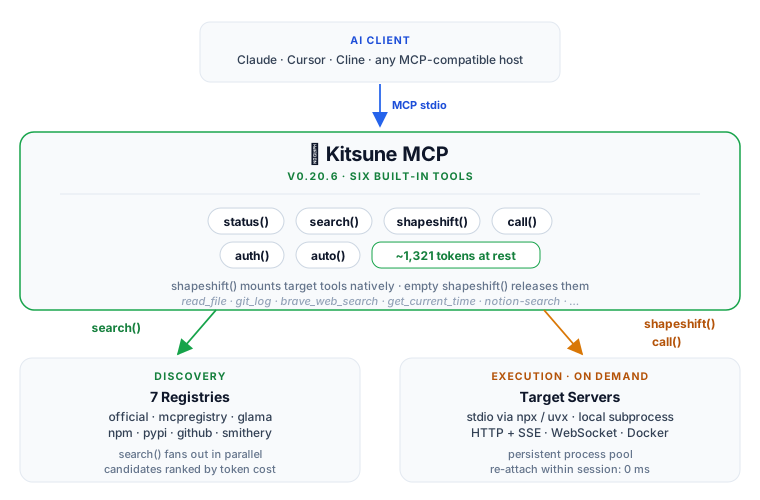
Mental model — tool-schema RAG: index the ecosystem → search retrieves candidates → shapeshift(..., tools=[…]) injects only what's needed → agent calls natively → shapeshift() evicts.
| Source | Transport |
|---|---|
| npm | npx <package> (local; optional Docker sandbox) |
| PyPI | uvx <package> (local; optional Docker sandbox) |
| GitHub | npx github:user/repo or uvx --from git+… |
| Smithery hosted | HTTP + SSE (SMITHERY_API_KEY) |
| WebSocket | ws:// / wss:// |
| Docker image | docker run … hardened profile |
Tool reference
Lean (default)
| Tool | Signature | Role |
|---|---|---|
status() |
— | Current form, pool, GATEWAY scan, session stats |
search() |
query, registry?, compare? |
Fan-out across 7 registries |
auth() |
server_or_var, value? |
Env keys + OAuth 2.1 browser flow / logout |
shapeshift() |
server_id?, tools=[], … |
Mount / unmount; tools=[…] surgical; confirm=True; caged by default (sandbox=False opts out) |
call() |
tool_name, arguments |
Invoke; server inferred when mounted |
auto() |
task, server_hint=, arguments= |
search → mount → call (prefer server_hint) |
Forge (KITSUNE_TOOLS=all or kitsune-forge): connect, release, prewarm, inspect, test, bench, compare, craft, run, fetch, setup, skill, shiftback, … — see For MCP developers.
Server sources
| Registry | Auth | registry= |
|---|---|---|
| modelcontextprotocol/servers | — | official |
| registry.modelcontextprotocol.io | — | mcpregistry |
| Glama | — | glama |
| npm | — | npm |
| PyPI | — | pypi |
| GitHub | — | github:owner/repo |
| Smithery | Free API key | smithery |
search() fans out across no-auth registries by default. Add SMITHERY_API_KEY for hosted HTTP servers (no local install).
Safety model
Reach into 130k community servers only works if unknown code can be contained. Consent, sandbox, and pins are product features — not footnotes.
Headline controls
confirm=True(orKITSUNE_TRUST) before community / local mounts- Community npm/PyPI mounts cage in hardened Docker by default (when Docker is present);
sandbox=FalseorKITSUNE_SANDBOX=offopts out,sandbox=Trueforces it,KITSUNE_SANDBOX=allcages every local mount - TOFU pins in
~/.kitsune/pins.json— later malicious publishes don't silently replace what you already ran
What it protects against
1. Unverified code without consent
| Tier | Sources | On mount |
|---|---|---|
| High | official |
runs directly |
| Medium | mcpregistry, glama, smithery |
runs directly |
| Community | npm, pypi, github, local connect() |
requires confirm=True |
KITSUNE_TRUST=community waives the gate; status() warns when that override is active.
confirm=Trueis not a human-approval boundary. The model can set it. Real approval belongs in your client's tool-approval UI.
2. Shell injection at spawn. Install commands are validated (no & ; | $ \ \n / ../) and launched with create_subprocess_exec — no shell. Vets the launch line, not what the package does once running.
3. SSRF. fetch() and registry HTTP are HTTPS-only; private/loopback/non-global hosts blocked; every redirect hop re-validated (KITSUNE_ALLOW_LOCAL_FETCH=1 to opt out).
4. Credential exposure. ~/.kitsune/.env and oauth/ at mode 0600; OAuth 2.1 + PKCE S256 + DCR (RFC 7591); missing-cred warnings before calls; auth(id, "logout") clears tokens (RFC 7009 where available).
5. Docker sandbox for untrusted local servers — on by default. Community npm/pypi/github mounts (and the auto()/call()/run() exec paths) cage automatically when Docker is on PATH; no host FS, --cap-drop ALL, read-only rootfs, RAM/PID caps. Cred env vars forwarded by name only (docker -e KEY) — never in argv, ps, or the pool key. First sandboxed mount pulls node:22-slim / uv:python3.13-bookworm-slim. Best-effort: no Docker → runs uncaged with a nudge (an explicit sandbox=True hard-fails instead). Opt out per-call with sandbox=False or session-wide with KITSUNE_SANDBOX=off. Filesystem-style servers need host paths and don't fit the sandbox.
What it does NOT do
- Cage needs Docker + opt-in-trusted sources. Community mounts cage by default only when Docker is present; without it (or with
sandbox=False/KITSUNE_SANDBOX=off, or for medium/high-trust sources) local stdio runs as your user — full FS, network, inherited env. Process isolation ≠ a security boundary. - Docker ≠ kernel boundary. Hardened flags blunt escalation / fork bombs / FS tampering; not a guarantee against container escape. No default non-root /
--network none(most servers need egress). - TOFU ≠ digest pin. Pins a version, not a content hash.
github:/git+/ hand-writtenconnect()commands aren't pinned. High assurance: pin by digest or vendor. - Tools first. Resource/prompt proxying is narrower (URI templates skipped; HTTP path differs). "Any server" means tool execution.
Bottom line: strong for supervised developer and personal use. Do not run unattended with production admin, billing, or security credentials in default local mode. Keep Docker installed so the default cage engages, and prefer client approval for untrusted packages.
See guards live: docs/demo-realtime.md.
GATEWAY: consolidate always-on servers
Optional. Keep daily drivers (GitHub, filesystem, …) native if you prefer. When a config is crowded, status() flags other always-on servers so you can collapse to one Kitsune entry and reach them via shapeshift:
GATEWAY
  ⚠  1 other server(s) active in claude-desktop (~8 extra tools in context)
     Run setup() to harvest their credentials and reduce bloat
setup()                    # preview
setup(action="harvest")    # keys → ~/.kitsune/.env (non-destructive)
setup(action="absorb")     # register for shapeshift()
setup(project=True)        # project mcp.json with only Kitsune
Never modifies existing configs without explicit confirmation. (setup is forge-profile.)
Performance
Connection latency (what you feel)
Warm pool re-attach within a session: 0 ms.
| Transport | Cold start | Warm |
|---|---|---|
| HTTP / Smithery | 0–1.4 s | 0.0 s |
Local npx |
1.7–6.3 s | 0.0 s |
Local uvx |
1.0–5.2 s | 0.0 s |
Use prewarm (forge) when you know you'll need a server soon.
Token overhead (secondary)
Real vs fully-mounted always-on or clients without Tool Search. On Claude Code 2.1.7+ with native deferral, this is mostly not a Kitsune-specific win. Product pitch is reach + REPL above — not this table.
Every Kitsune figure includes the ~1,685 floor. Reproduce: python examples/benchmark.py. Methodology: docs/benchmarks.md.
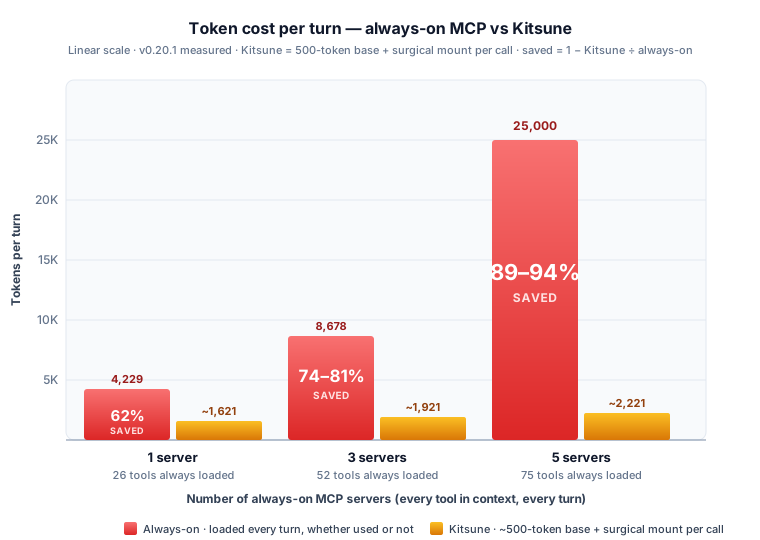
| Server | Always-on | Surgical + floor | vs always-on |
|---|---|---|---|
mcp-server-time |
261 | ~1,946 | always-on cheaper ¹ |
mcp-server-git |
1,242 | ~1,995 | always-on cheaper ¹ |
server-memory |
2,615 | ~2,265 | 13% |
server-filesystem |
3,207 | ~2,375 | 26% |
brave |
3,612 | ~2,135 | 41% |
server-github |
4,229 | ~1,985 | 53% |
notion-hosted |
13,707 | ~3,635 | 73% |
¹ Break-even: Kitsune pays off past one medium server, or two-plus small ones sharing the single floor. Multi-server stack (GitHub+fs+git → Notion suite): ~77–85% vs fully-mounted always-on — same caveat as above.
Fewer visible tools also helps selection reliability (Gorilla / ToolBench); on modern clients Tool Search delivers much of that focus for configured servers. Kitsune-specific accuracy bench: not yet — contributions welcome.
Configuration
Env and .env
Re-read on every shapeshift / call — add keys mid-session, no restart.
Search order: CWD/.env → ~/.env → ~/.kitsune/.env (last wins).
auth("BRAVE_API_KEY", "sk-...") # → ~/.kitsune/.env
Tool surface
{ "env": { "KITSUNE_TOOLS": "shapeshift,call,auth" } }   # subset
{ "env": { "KITSUNE_TOOLS": "all" } }                    # forge
State directory
Default ~/.kitsune/ (credentials, pins, OAuth, session). Relocate with KITSUNE_HOME=/tmp/kitsune-iso.
Sandbox / trust policy
KITSUNE_SANDBOX=community   # Docker-cage community npm/PyPI mounts
KITSUNE_SANDBOX=all         # cage every local mount
KITSUNE_TRUST=community     # waive confirm gate (status warns)
KITSUNE_REPIN=1             # adopt newer pinned version
Smithery
{ "env": { "SMITHERY_API_KEY": "your-key" } }
Free key: smithery.ai/account/api-keys. Without it, npm / PyPI / official / GitHub still work.
Mount patterns
Switch forms mid-session — take only the slice you need:
# Research
shapeshift("brave", tools=["brave_web_search"])
shapeshift("mcp-server-fetch")
shapeshift("@modelcontextprotocol/server-memory", tools=["read_graph", "search_nodes"])

# Code
shapeshift("@modelcontextprotocol/server-filesystem",
           tools=["read_file", "write_file", "edit_file"],
           server_args=["/path/to/project"])
shapeshift("mcp-server-git", tools=["git_status", "git_diff", "git_log"])

# Notes
shapeshift("notion-hosted", tools=["notion-search", "notion-append-block-children"])
shapeshift("@modelcontextprotocol/server-memory", tools=["add_memory", "search_nodes"])

shapeshift()   # always drop when the task is done
For MCP developers
{ "command": "kitsune-mcp", "env": { "KITSUNE_TOOLS": "all" } }
| Tool | Role |
|---|---|
connect / release / prewarm |
MCP REPL + warm pool |
inspect(server_id) |
Schemas, live cred check, measured cost |
test(server_id) |
Quality score 0–100 |
bench(server_id, tool, args) |
Latency p50 / p95 / min / max |
compare(query) |
Side-by-side cost, tools, trust, creds |
craft(name, description, params, url) |
Register a live HTTP-backed tool |
Test inside real Claude / Cursor sessions — not only an inspector UI. Companion skills: kitsune-dev, kitsune-improve.
Why Kitsune?
In Japanese folklore the Kitsune (狐) is known for what it can become: borrow a form, use that power, cast it off, return to itself.
That is the product loop — reach, use, release; or edit, reload, re-test. One config entry. Long tail one call away. Session intact.
shapeshift() is a literal mid-session mount, not a metaphor. Durable advantages: reach, live development, contained try-before-trust — not a smaller token bill on clients that already defer schemas.
I am not Japanese, and I use this name with the highest respect for the mythology and culture it comes from. The parallel felt too precise to ignore.
Contributing
make dev     # install with dev dependencies
make test    # pytest
make lint    # ruff
Issues and PRs: github.com/kaiser-data/kitsune-mcp · CHANGELOG.md
MIT License · Python 3.12+ · Built on FastMCP
1 maintainer

Download files
Download the file for your platform. If you're not sure which to choose, learn more about installing packages.
Source Distribution
Built Distribution
Filter files by name, interpreter, ABI, and platform.
If you're not sure about the file name format, learn more about wheel file names.
Copy a direct link to the current filters
File details
Details for the file kitsune_mcp-0.21.0.tar.gz.
File metadata
- Download URL: kitsune_mcp-0.21.0.tar.gz
- Upload date:
- Size: 366.2 kB
- Tags: Source
- Uploaded using Trusted Publishing? Yes
- Uploaded via:
twine/6.1.0 CPython/3.13.14
File hashes
| Algorithm | Hash digest | |
|---|---|---|
| SHA256 |
c5955e24911280bb51fea6493fd1dd5beab533069b960208c4b76695e5ee659e
|
|
| MD5 |
9111a77b8378574e0604bf9072ec6550
|
|
| BLAKE2b-256 |
57780baafcd47ae77e7ba941edc5e8332d424d246ef76eef7f84475caeabb86b
|
Provenance
The following attestation bundles were made for kitsune_mcp-0.21.0.tar.gz:
Publisher:
publish.yml on kaiser-data/kitsune-mcp
-
Statement:
-
Statement type:
https://in-toto.io/Statement/v1 -
Predicate type:
https://docs.pypi.org/attestations/publish/v1 -
Subject name:
kitsune_mcp-0.21.0.tar.gz -
Subject digest:
c5955e24911280bb51fea6493fd1dd5beab533069b960208c4b76695e5ee659e - Sigstore transparency entry: 2228512708
- Sigstore integration time:
-
Permalink:
kaiser-data/kitsune-mcp@20a311c1def904187d3a83b15071ba4511041cd8 -
Branch / Tag:
refs/tags/v0.21.0 - Owner: https://github.com/kaiser-data
-
Access:
public
-
Token Issuer:
https://token.actions.githubusercontent.com -
Runner Environment:
github-hosted -
Publication workflow:
publish.yml@20a311c1def904187d3a83b15071ba4511041cd8 -
Trigger Event:
push
-
Statement type:
File details
Details for the file kitsune_mcp-0.21.0-py3-none-any.whl.
File metadata
- Download URL: kitsune_mcp-0.21.0-py3-none-any.whl
- Upload date:
- Size: 488.5 kB
- Tags: Python 3
- Uploaded using Trusted Publishing? Yes
- Uploaded via:
twine/6.1.0 CPython/3.13.14
File hashes
| Algorithm | Hash digest | |
|---|---|---|
| SHA256 |
143b4b9c6ac9e0a40de55a2a204eace3c0a5b0841a6bf7d17c5b60eadc623e76
|
|
| MD5 |
560fb741fb5a2d77d477e6b672ee2be6
|
|
| BLAKE2b-256 |
e1cfbd2f1abda909af7388fb98ce37a79cfa7bf5bb50d3a1898f36c64a360feb
|
Provenance
The following attestation bundles were made for kitsune_mcp-0.21.0-py3-none-any.whl:
Publisher:
publish.yml on kaiser-data/kitsune-mcp
-
Statement:
-
Statement type:
https://in-toto.io/Statement/v1 -
Predicate type:
https://docs.pypi.org/attestations/publish/v1 -
Subject name:
kitsune_mcp-0.21.0-py3-none-any.whl -
Subject digest:
143b4b9c6ac9e0a40de55a2a204eace3c0a5b0841a6bf7d17c5b60eadc623e76 - Sigstore transparency entry: 2228512747
- Sigstore integration time:
-
Permalink:
kaiser-data/kitsune-mcp@20a311c1def904187d3a83b15071ba4511041cd8 -
Branch / Tag:
refs/tags/v0.21.0 - Owner: https://github.com/kaiser-data
-
Access:
public
-
Token Issuer:
https://token.actions.githubusercontent.com -
Runner Environment:
github-hosted -
Publication workflow:
publish.yml@20a311c1def904187d3a83b15071ba4511041cd8 -
Trigger Event:
push
-
Statement type:














