
linexcel





Data lineage analysis for Excel workbooks.
Extracts every formula, groups stretched patterns (R1C1 canonicalization), builds a dependency graph (cells, ranges, defined names, VBA), decomposes composite functions with step-by-step evaluation, and optionally documents calculations via the AI provider of your choice.
Install
uv add linexcel               # pip install linexcel
uv add linexcel[ai]           # + AI documentation (optional)
Note:
linexceldepends on formualizer, a Rust-based spreadsheet engine. Prebuilt wheels are available for Linux, macOS, and Windows. If no wheel matches your platform, a Rust toolchain is required to build from source.
Usage
Command line
No install needed — uvx fetches and runs it in one step:
uvx linexcel analyze workbook.xlsx           # -> workbook_lineage.html
uvx linexcel analyze workbook.xlsx --json graph.json --no-html
uvx linexcel analyze workbook.xlsx --refs-dir ./linked   # workbooks it reads
A workbook that reads '[Budget FY26.xlsx]Annual'!B4 depends on a file
linexcel does not have. It always names that file and the path the workbook
declares; --refs-dir points at a folder holding them, and the reference is
then read for real — the same folder is searched for the .xlam/.xla
add-ins whose VBA the workbook calls.
The default is deterministic: lineage only, no network, no key. --ai-docs
opts in, and needs the ai extra plus an OpenAI-compatible endpoint:
uvx --from "linexcel[ai]" linexcel analyze workbook.xlsx --ai-docs \
    --base-url http://localhost:11434/v1 --model qwen3.8 --language fr
--base-url, --model and --api-key also read LINEXCEL_AI_BASE_URL,
LINEXCEL_AI_MODEL and LINEXCEL_AI_API_KEY. Run linexcel analyze --help
for the full list, including --token-budget to cap what a run may cost.
Sheets can also be rendered and, separately, read by a multimodal model:
uvx linexcel analyze workbook.xlsx --screenshots shots/    # LibreOffice, local
uvx --from "linexcel[ai]" linexcel analyze workbook.xlsx \
    --screenshots shots/ --vision-docs --base-url ... --vision-model ...
--vision-docs is the only option that puts a picture of a sheet in a request,
so it is opt-in and independent of --ai-docs.
Python
from linexcel import analyze

result = analyze("workbook.xlsx")
result                        # interactive graph in marimo / Jupyter
result.save_html("out.html")  # standalone offline HTML viewer
result.stats                  # {totalFormulas, totalNodes, ...}
result.warnings               # list[str]
Everything above is local and needs no key. AI documentation is optional, and you choose the provider — nothing is sent anywhere until you name one:
# A local runtime keeps the workbook on your machine and costs nothing
docs = result.document(base_url="http://localhost:11434/v1", model="qwen3.8")
overview = result.document_workbook(base_url="http://localhost:11434/v1", model="qwen3.8")
result.save_html("out.html", docs=docs, workbook_doc=overview, language="en")
Any OpenAI-compatible endpoint works the same way — a local Ollama or vLLM
runtime, a gateway such as OpenRouter, a vendor's own API — and provider=
takes any callable for anything else. See
Choosing an AI provider.
Features
- Formula extraction via formualizer (Rust engine)
- Stretched pattern grouping — 1000 identical formulas → 1 node
- Dependency graph — cells, ranges, defined names, VBA procedures, Power Query queries
- Power Query lineage — each query with its M source, what it reads and the range it fills, so data from Get & Transform is not a dead end
- Step-by-step evaluation — each operator/function evaluated individually
- Standalone HTML viewer — Cytoscape.js embedded, fully offline, keyboard-navigable, light by default with a dark toggle
- Values you can check — what the file stores and what linexcel recomputed, always side by side, each named and each stated when it is missing; a stretched formula is compared cell by cell over a sample spanning the whole group
- Honest about what it cannot compute — volatile formulas (
TODAY,NOW,RAND) are shown as not recalculated rather than compared against the clock, and a cell reading another workbook names that file, its path, and whether it was read - Dependencies you can supply —
--refs-dirresolves linked workbooks and reads the VBA of the add-ins a file calls into - Workbook context — sheet previews, comments, merged ranges, frozen panes and hidden columns, plus optional LibreOffice-rendered screenshots
- AI documentation — vendor-neutral, grounded in deterministic lineage, with token accounting and a spend ceiling
- Screenshots a model can read — optional, opt-in: a multimodal model describes each rendered sheet, for the colour conventions and layout no extraction reaches
- Nine interface languages — for both the report and the AI prompts
- Command line —
uvx linexcel analyze workbook.xlsx, no install required
Roadmap
Shipped:
- Deterministic lineage — formula extraction, stretched-pattern grouping, dependency graph, VBA
- Step-by-step evaluation, with every value checked against the one stored in the file
- Standalone offline HTML viewer, in nine languages
- Workbook context and LibreOffice-rendered sheet screenshots
- AI documentation — any OpenAI-compatible endpoint, token accounting, spend ceiling
- Command-line interface, installable-free through
uvx - Power Query lineage (#34) — queries as nodes, with their M source, their sources and the range they fill
- Vision (#46) — an optional multimodal description of each sheet screenshot, for what a text dossier cannot carry
Planned:
-
formulasas a fallback (#37) — a second parser for the workbooks formualizer cannot read, so an unsupported construct degrades the graph instead of failing the analysis.
Documentation
| Guide | |
|---|---|
| Quick start | Analyse a workbook, explore it, export it |
| Lineage coverage | What is in the graph, and what is not |
| HTML export | The standalone offline report |
| Workbook context & screenshots | What a reader sees, not only what the file computes |
| Choosing an AI provider | Ollama, OpenRouter, any OpenAI-compatible endpoint, or your own callable |
| AI documentation | Provable cards, token usage, token_budget= |
| Languages | The nine supported locales |
| Data handling | What leaves the machine, and when |
| API reference | LineageResult, analyzer, aidoc, powerquery, external, … |
Sample output
Every image below is captured from a real report by
scripts/capture_viewer.py, so they cannot drift from the viewer without the
readme-shots commit hook noticing.
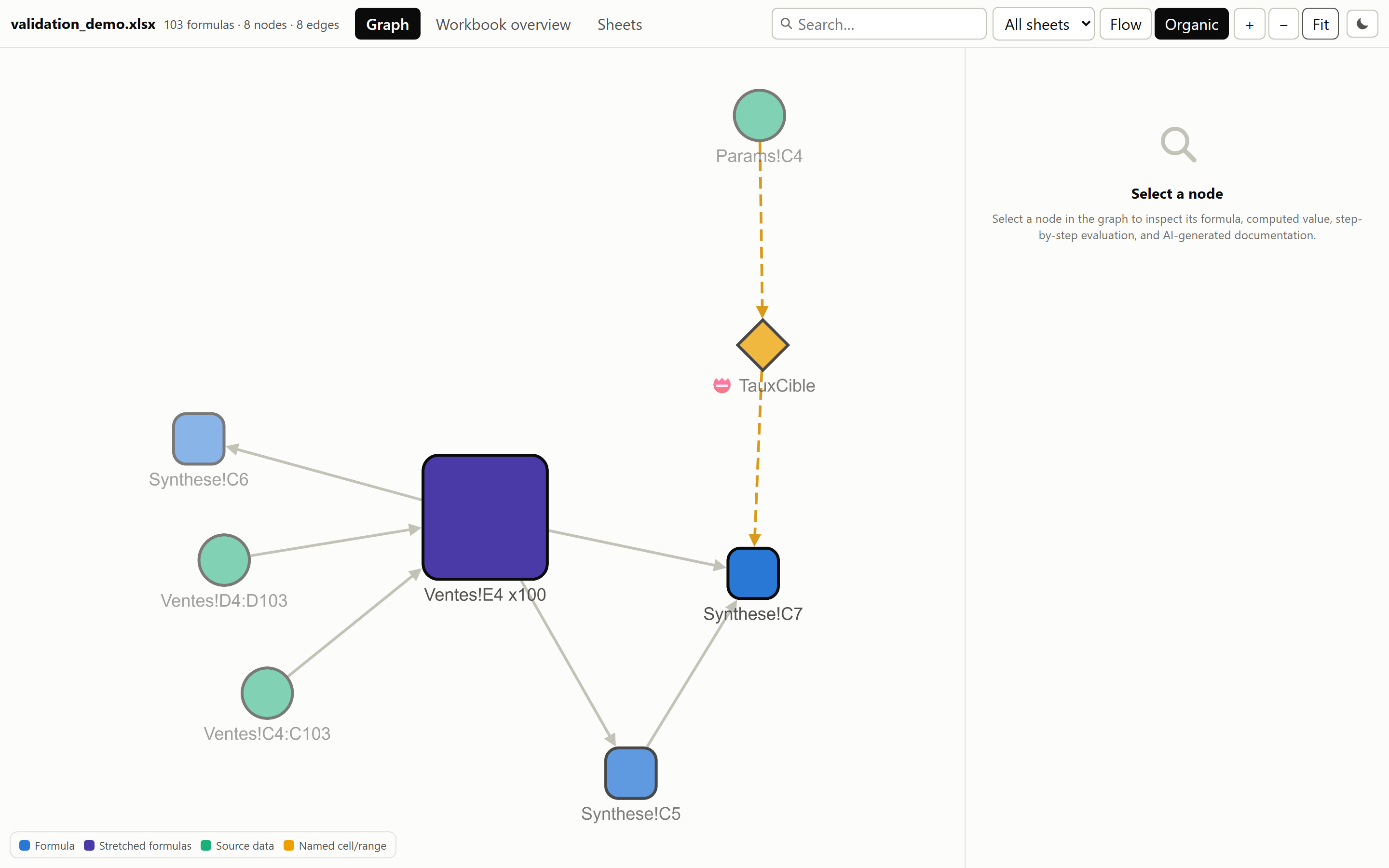
A node, documented
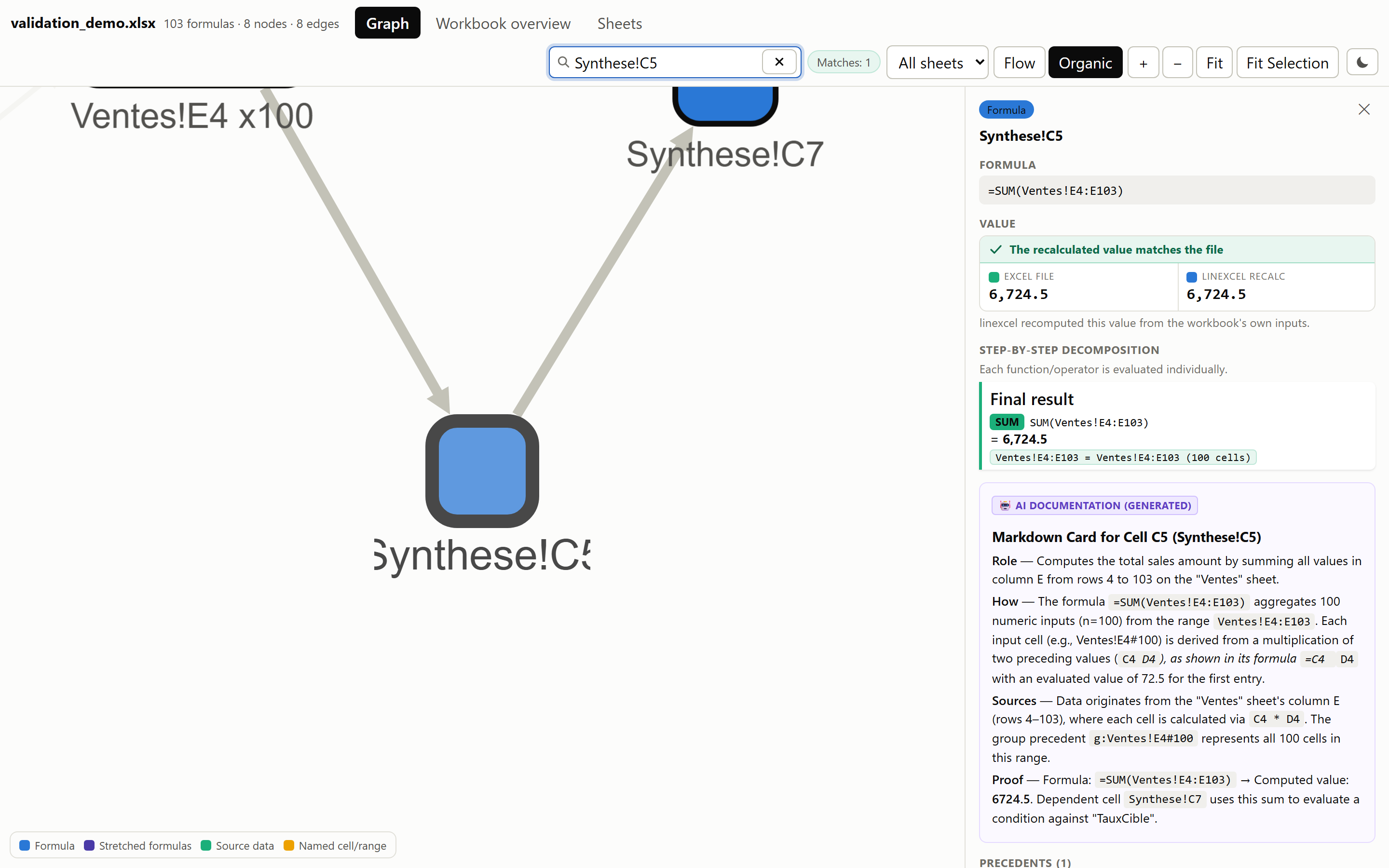
Formula, step-by-step evaluation, precedents and dependents, and the AI card written from that same deterministic dossier.
Workbook overview
Sheet context
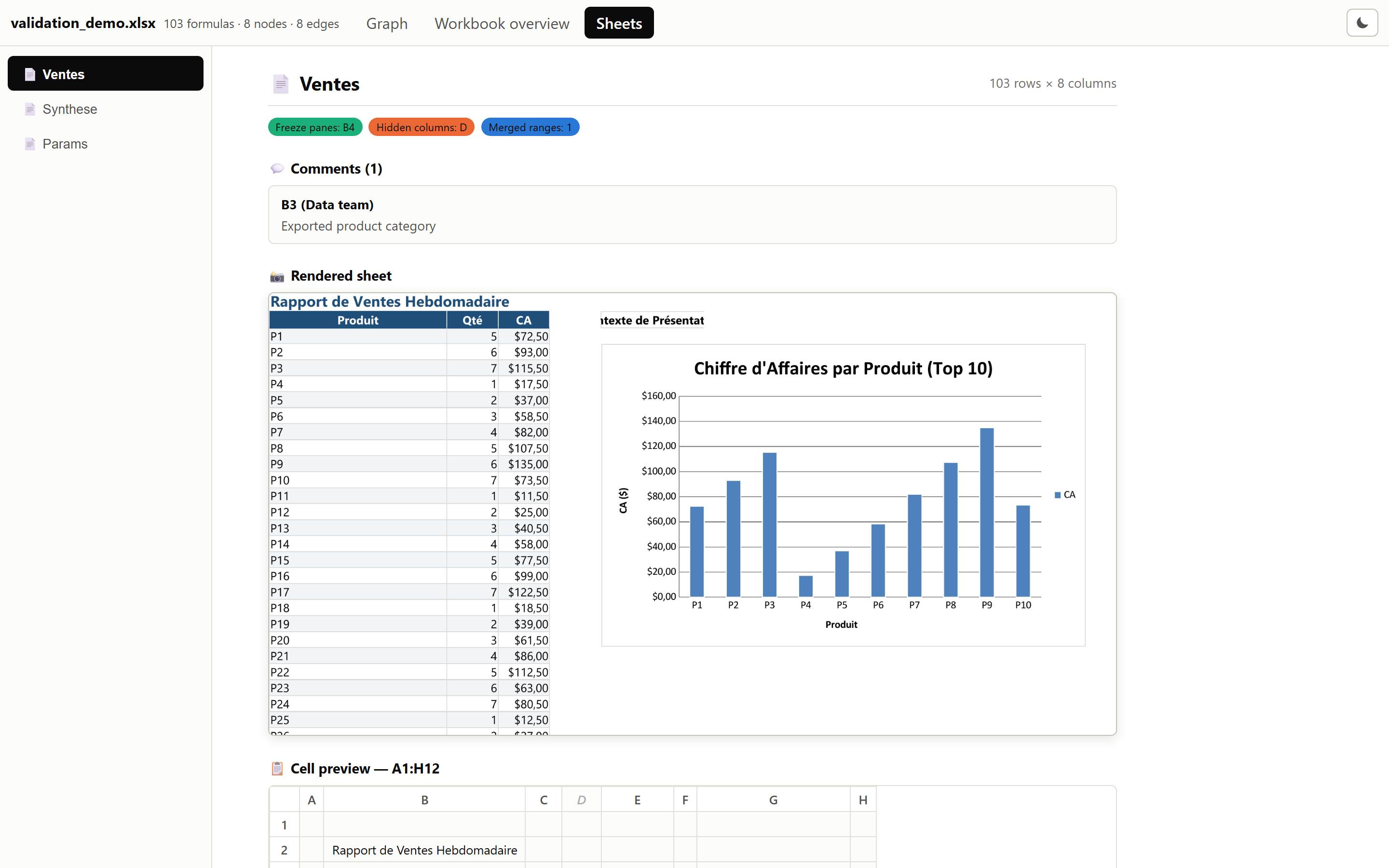
Each sheet rendered whole, over a grid of its first cells, alongside its comments, frozen panes, merged ranges and hidden columns.
Contributing
Run the local acceptance workflow before delivering changes: both fixtures, local Ollama documentation and image analysis, followed by inspection of dashboard tabs and sampled nodes. The script preserves each run and reports incomplete coverage as a failure. See AGENTS.md for the repository's validation requirements.
Security
Analysis is entirely local. AI documentation sends dossiers only to the provider you configure — see Data handling.
Please report vulnerabilities privately according to SECURITY.md. Do not include sensitive workbooks or credentials in public issues.
Changelog
See CHANGELOG.md.
License
MIT — see LICENSE.
1 maintainer

Release files for linexcel 1.9.0
For a detailed explanation of source distributions (sdists) and built distributions (wheels), please see the package formats documentation.
Source distribution (sdist)
| File | Size | Uploaded | |
|---|---|---|---|
| linexcel-1.9.0.tar.gz | 2.0 MB | Details |
Built distribution (wheel)
| File | Interpreter | ABI | Platform | Reset |
|---|---|---|---|---|
| linexcel-1.9.0-py3-none-any.whl | Python 3 | none | any | Details |
Total release size: 2.5 MB
Release files / linexcel-1.9.0.tar.gz
| Download URL | linexcel-1.9.0.tar.gz |
|---|---|
| Size | 2.0 MB |
| Tags | Source |
|
SHA-256 checksum How to use checksums |
54191cb742e1e418aef862b0cb92b0699a42440a61fc22f8100886a07b3faa77
|
|
BLAKE2b-256 checksum How to use checksums |
37de5a7ff0c3678b920ff8f57d3416bfa6716d742a1dff041396cc613de598e3
|
| Upload date | |
|
Uploaded using Trusted Publishing? What is trusted publishing? |
Yes |
| Uploaded via |
uv/0.12.13 {"installer":{"name":"uv","version":"0.12.13","subcommand":["publish"]},"python":null,"implementation":{"name":null,"version":null},"distro":{"name":"Ubuntu","version":"24.04","id":"noble","libc":null},"system":{"name":null,"release":null},"cpu":null,"openssl_version":null,"setuptools_version":null,"rustc_version":null,"ci":true}
|
Release files / linexcel-1.9.0-py3-none-any.whl
| Download URL | linexcel-1.9.0-py3-none-any.whl |
|---|---|
| Size | 450.0 kB |
| Tags | Python 3 |
|
SHA-256 checksum How to use checksums |
4bbd00fb869f328ae51e84fe6ae45c627de1d40355b1acffd1ad80d7bc609762
|
|
BLAKE2b-256 checksum How to use checksums |
d8dce8045560c7a085eecbb165a1b079329ffc096968a2221cc9d1f67560c87c
|
| Upload date | |
|
Uploaded using Trusted Publishing? What is trusted publishing? |
Yes |
| Uploaded via |
uv/0.12.13 {"installer":{"name":"uv","version":"0.12.13","subcommand":["publish"]},"python":null,"implementation":{"name":null,"version":null},"distro":{"name":"Ubuntu","version":"24.04","id":"noble","libc":null},"system":{"name":null,"release":null},"cpu":null,"openssl_version":null,"setuptools_version":null,"rustc_version":null,"ci":true}
|














