
Library to easily interface with LLM API providers

Project description
🚅 LiteLLM
Call all LLM APIs using the OpenAI format [Bedrock, Huggingface, VertexAI, TogetherAI, Azure, OpenAI, etc.]
OpenAI Proxy Server





LiteLLM manages:
- Translate inputs to provider's
completion,embedding, andimage_generationendpoints - Consistent output, text responses will always be available at
['choices'][0]['message']['content'] - Retry/fallback logic across multiple deployments (e.g. Azure/OpenAI) - Router
Jump to OpenAI Proxy Docs
Jump to Supported LLM Providers
Usage (Docs)
[!IMPORTANT] LiteLLM v1.0.0 now requires
openai>=1.0.0. Migration guide here

pip install litellm
from litellm import completion
import os

## set ENV variables
os.environ["OPENAI_API_KEY"] = "your-openai-key"
os.environ["COHERE_API_KEY"] = "your-cohere-key"

messages = [{ "content": "Hello, how are you?","role": "user"}]

# openai call
response = completion(model="gpt-3.5-turbo", messages=messages)

# cohere call
response = completion(model="command-nightly", messages=messages)
print(response)
Async (Docs)
from litellm import acompletion
import asyncio

async def test_get_response():
    user_message = "Hello, how are you?"
    messages = [{"content": user_message, "role": "user"}]
    response = await acompletion(model="gpt-3.5-turbo", messages=messages)
    return response

response = asyncio.run(test_get_response())
print(response)
Streaming (Docs)
liteLLM supports streaming the model response back, pass stream=True to get a streaming iterator in response.
Streaming is supported for all models (Bedrock, Huggingface, TogetherAI, Azure, OpenAI, etc.)
from litellm import completion
response = completion(model="gpt-3.5-turbo", messages=messages, stream=True)
for part in response:
    print(part.choices[0].delta.content or "")

# claude 2
response = completion('claude-2', messages, stream=True)
for part in response:
    print(part.choices[0].delta.content or "")
Logging Observability (Docs)
LiteLLM exposes pre defined callbacks to send data to Langfuse, DynamoDB, s3 Buckets, LLMonitor, Helicone, Promptlayer, Traceloop, Slack
from litellm import completion

## set env variables for logging tools
os.environ["LANGFUSE_PUBLIC_KEY"] = ""
os.environ["LANGFUSE_SECRET_KEY"] = ""
os.environ["LLMONITOR_APP_ID"] = "your-llmonitor-app-id"

os.environ["OPENAI_API_KEY"]

# set callbacks
litellm.success_callback = ["langfuse", "llmonitor"] # log input/output to langfuse, llmonitor, supabase

#openai call
response = completion(model="gpt-3.5-turbo", messages=[{"role": "user", "content": "Hi 👋 - i'm openai"}])
OpenAI Proxy - (Docs)
Track spend across multiple projects/people
The proxy provides:
📖 Proxy Endpoints - Swagger Docs
Quick Start Proxy - CLI
pip install 'litellm[proxy]'
Step 1: Start litellm proxy
$ litellm --model huggingface/bigcode/starcoder

#INFO: Proxy running on http://0.0.0.0:8000
Step 2: Make ChatCompletions Request to Proxy
import openai # openai v1.0.0+
client = openai.OpenAI(api_key="anything",base_url="http://0.0.0.0:8000") # set proxy to base_url
# request sent to model set on litellm proxy, `litellm --model`
response = client.chat.completions.create(model="gpt-3.5-turbo", messages = [
    {
        "role": "user",
        "content": "this is a test request, write a short poem"
    }
])

print(response)
Proxy Key Management (Docs)
Track Spend, Set budgets and create virtual keys for the proxy
POST /key/generate
Request
curl 'http://0.0.0.0:8000/key/generate' \
--header 'Authorization: Bearer sk-1234' \
--header 'Content-Type: application/json' \
--data-raw '{"models": ["gpt-3.5-turbo", "gpt-4", "claude-2"], "duration": "20m","metadata": {"user": "ishaan@berri.ai", "team": "core-infra"}}'
Expected Response
{
    "key": "sk-kdEXbIqZRwEeEiHwdg7sFA", # Bearer token
    "expires": "2023-11-19T01:38:25.838000+00:00" # datetime object
}
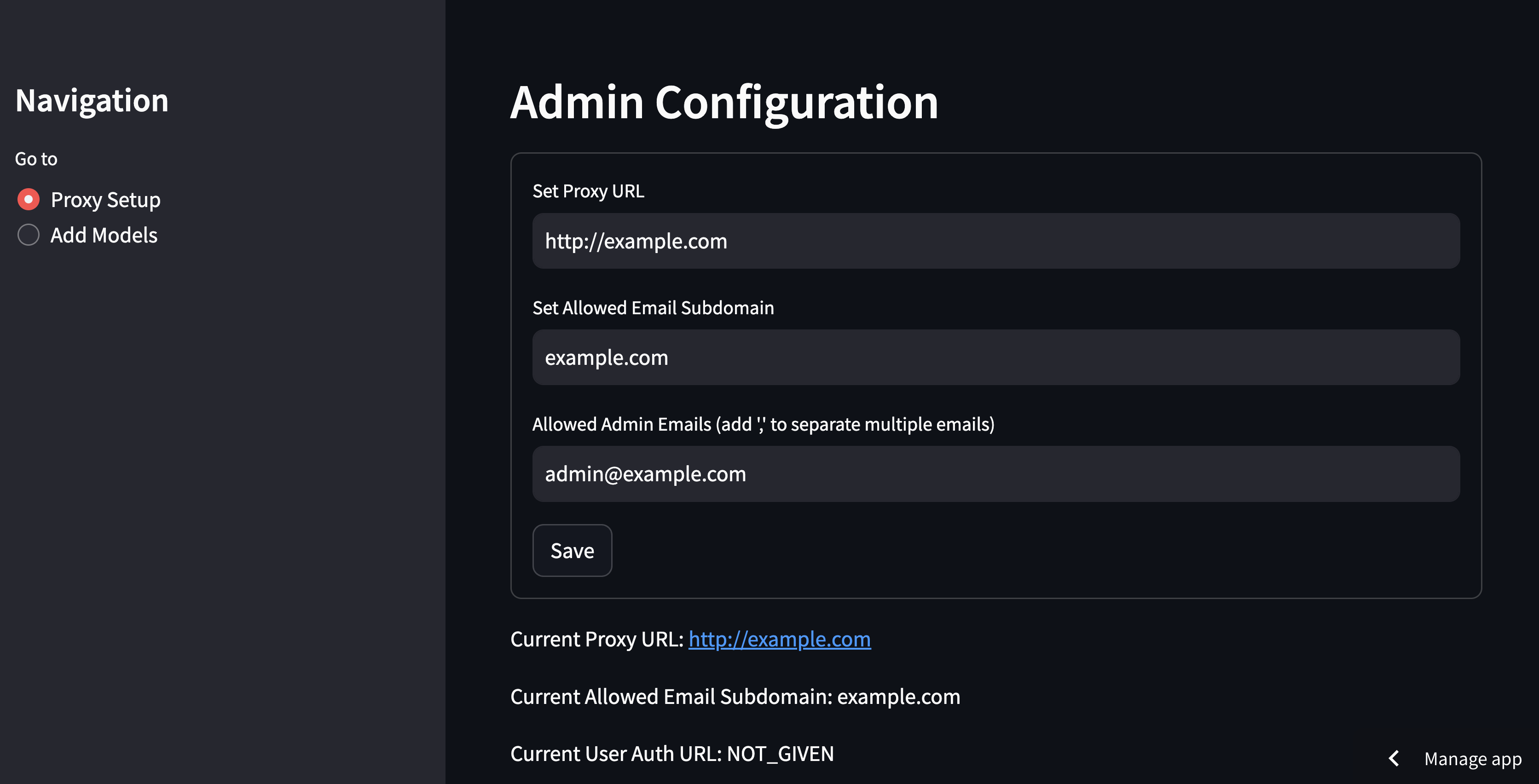
[Beta] Proxy UI
A simple UI to add new models and let your users create keys.
Live here: https://dashboard.litellm.ai/
Code: https://github.com/BerriAI/litellm/tree/main/ui
Supported Providers (Docs)
| Provider | Completion | Streaming | Async Completion | Async Streaming | Async Embedding | Async Image Generation |
|---|---|---|---|---|---|---|
| openai | ✅ | ✅ | ✅ | ✅ | ✅ | ✅ |
| azure | ✅ | ✅ | ✅ | ✅ | ✅ | ✅ |
| aws - sagemaker | ✅ | ✅ | ✅ | ✅ | ✅ | |
| aws - bedrock | ✅ | ✅ | ✅ | ✅ | ✅ | |
| google - vertex_ai [Gemini] | ✅ | ✅ | ✅ | ✅ | ||
| google - palm | ✅ | ✅ | ✅ | ✅ | ||
| google AI Studio - gemini | ✅ | ✅ | ||||
| mistral ai api | ✅ | ✅ | ✅ | ✅ | ✅ | |
| cloudflare AI Workers | ✅ | ✅ | ✅ | ✅ | ||
| cohere | ✅ | ✅ | ✅ | ✅ | ✅ | |
| anthropic | ✅ | ✅ | ✅ | ✅ | ||
| huggingface | ✅ | ✅ | ✅ | ✅ | ✅ | |
| replicate | ✅ | ✅ | ✅ | ✅ | ||
| together_ai | ✅ | ✅ | ✅ | ✅ | ||
| openrouter | ✅ | ✅ | ✅ | ✅ | ||
| ai21 | ✅ | ✅ | ✅ | ✅ | ||
| baseten | ✅ | ✅ | ✅ | ✅ | ||
| vllm | ✅ | ✅ | ✅ | ✅ | ||
| nlp_cloud | ✅ | ✅ | ✅ | ✅ | ||
| aleph alpha | ✅ | ✅ | ✅ | ✅ | ||
| petals | ✅ | ✅ | ✅ | ✅ | ||
| ollama | ✅ | ✅ | ✅ | ✅ | ||
| deepinfra | ✅ | ✅ | ✅ | ✅ | ||
| perplexity-ai | ✅ | ✅ | ✅ | ✅ | ||
| anyscale | ✅ | ✅ | ✅ | ✅ | ||
| voyage ai | ✅ | |||||
| xinference [Xorbits Inference] | ✅ |
Contributing
To contribute: Clone the repo locally -> Make a change -> Submit a PR with the change.
Here's how to modify the repo locally: Step 1: Clone the repo
git clone https://github.com/BerriAI/litellm.git
Step 2: Navigate into the project, and install dependencies:
cd litellm
poetry install
Step 3: Test your change:
cd litellm/tests # pwd: Documents/litellm/litellm/tests
poetry run flake8
poetry run pytest .
Step 4: Submit a PR with your changes! 🚀
- push your fork to your GitHub repo
- submit a PR from there
Support / talk with founders
- Schedule Demo 👋
- Community Discord 💭
- Our numbers 📞 +1 (770) 8783-106 / +1 (412) 618-6238
- Our emails ✉️ ishaan@berri.ai / krrish@berri.ai
Why did we build this
- Need for simplicity: Our code started to get extremely complicated managing & translating calls between Azure, OpenAI and Cohere.
Contributors
Release history Release notifications | RSS feed


Download files
Download the file for your platform. If you're not sure which to choose, learn more about installing packages.
Source Distribution
Built Distribution
Filter files by name, interpreter, ABI, and platform.
If you're not sure about the file name format, learn more about wheel file names.
Copy a direct link to the current filters
File details
Details for the file litellm-1.21.1.tar.gz.
File metadata
- Download URL: litellm-1.21.1.tar.gz
- Upload date:
- Size: 3.0 MB
- Tags: Source
- Uploaded using Trusted Publishing? No
- Uploaded via: twine/4.0.2 CPython/3.8.18
File hashes
| Algorithm | Hash digest | |
|---|---|---|
| SHA256 |
bb705a79c7632c2952dfea1878f55229ca400d3277ce886baa514d06e42aefc1
|
|
| MD5 |
f1e9c21eba1d730891da8221ed33f1f0
|
|
| BLAKE2b-256 |
b1ad3b5604e6edeff2e7794af856b85999427339fd3f1f702b2b9a8594875b43
|
File details
Details for the file litellm-1.21.1-py3-none-any.whl.
File metadata
- Download URL: litellm-1.21.1-py3-none-any.whl
- Upload date:
- Size: 3.1 MB
- Tags: Python 3
- Uploaded using Trusted Publishing? No
- Uploaded via: twine/4.0.2 CPython/3.8.18
File hashes
| Algorithm | Hash digest | |
|---|---|---|
| SHA256 |
63553b265d52ab686894e82679b091c2f23538a3f76bb0c4c7c9d144dd6a3942
|
|
| MD5 |
d0228606fff89cb2f74dfea3f69ba74d
|
|
| BLAKE2b-256 |
3a8179b34f7013fed69c55028ae3b702b0125580de4fdca63e51db5c27d707ec
|






