
Build custom inference servers in pure Python
Define exactly how inference works for models, agents, RAG, or pipelines.
Control batching, routing, streaming, and orchestration without MLOps glue or config files.

✅ Custom inference logic  ✅ 2× faster than FastAPI     ✅ Agents, RAG, pipelines, more
✅ Custom logic + control  ✅ Any PyTorch model          ✅ Self-host or managed
✅ Multi-GPU autoscaling   ✅ Batching + streaming       ✅ BYO model or vLLM
✅ No MLOps glue code      ✅ Easy setup in Python       ✅ Serverless support






Why LitServe?
Most serving tools (vLLM, etc..) are built for a single model type and enforce rigid abstractions. They work well until you need custom logic, multiple models, agents, or non standard pipelines. LitServe lets you write your own inference engine in Python. You define how requests are handled, how models are loaded, how batching and routing work, and how outputs are produced. LitServe handles performance, concurrency, scaling, and deployment. Use LitServe to build inference APIs, agents, chatbots, RAG systems, MCP servers, or multi model pipelines.
Run it locally, self host anywhere, or deploy with one click on Lightning AI.
Want the easiest way to host inference?
Over 380,000 developers use Lightning Cloud, the simplest way to run LitServe without managing infrastructure. Deploy with one command, get autoscaling GPUs, monitoring, and a free tier. No cloud setup required. Or self host anywhere.
Quick start
Install LitServe via pip (more options):
pip install litserve
Example 1: Toy inference pipeline with multiple models.
Example 2: Minimal agent to fetch the news (with OpenAI API).
(Advanced examples):
Inference engine example
import litserve as ls

# define the api to include any number of models, dbs, etc...
class InferenceEngine(ls.LitAPI):
    def setup(self, device):
        self.text_model = lambda x: x**2
        self.vision_model = lambda x: x**3

    def predict(self, request):
        x = request["input"]
        # perform calculations using both models
        a = self.text_model(x)
        b = self.vision_model(x)
        c = a + b
        return {"output": c}

if __name__ == "__main__":
    # 12+ features like batching, streaming, etc...
    server = ls.LitServer(InferenceEngine(max_batch_size=1), accelerator="auto")
    server.run(port=8000)
Deploy for free to Lightning cloud (or self host anywhere):
# Deploy for free with autoscaling, monitoring, etc...
lightning deploy server.py --cloud

# Or run locally (self host anywhere)
lightning deploy server.py
# python server.py
Test the server: Simulate an http request (run this on any terminal):
curl -X POST http://127.0.0.1:8000/predict -H "Content-Type: application/json" -d '{"input": 4.0}'
Agent example
import re, requests, openai
import litserve as ls

class NewsAgent(ls.LitAPI):
    def setup(self, device):
        self.openai_client = openai.OpenAI(api_key="OPENAI_API_KEY")

    def predict(self, request):
        website_url = request.get("website_url", "https://text.npr.org/")
        website_text = re.sub(r'<[^>]+>', ' ', requests.get(website_url).text)

        # ask the LLM to tell you about the news
        llm_response = self.openai_client.chat.completions.create(
           model="gpt-3.5-turbo",
           messages=[{"role": "user", "content": f"Based on this, what is the latest: {website_text}"}],
        )
        output = llm_response.choices[0].message.content.strip()
        return {"output": output}

if __name__ == "__main__":
    server = ls.LitServer(NewsAgent())
    server.run(port=8000)
Test it:
curl -X POST http://127.0.0.1:8000/predict -H "Content-Type: application/json" -d '{"website_url": "https://text.npr.org/"}'
Key benefits
A few key benefits:
- Deploy any pipeline or model: Agents, pipelines, RAG, chatbots, image models, video, speech, text, etc...
- No MLOps glue: LitAPI lets you build full AI systems (multi-model, agent, RAG) in one place (more).
- Instant setup: Connect models, DBs, and data in a few lines with
setup()(more). - Optimized: autoscaling, GPU support, and fast inference included (more).
- Deploy anywhere: self-host or one-click deploy with Lightning (more).
- FastAPI for AI: Built on FastAPI but optimized for AI - 2× faster with AI-specific multi-worker handling (more).
- Expert-friendly: Use vLLM, or build your own with full control over batching, caching, and logic (more).
⚠️ Not a vLLM or Ollama alternative out of the box. LitServe gives you lower-level flexibility to build what they do (and more) if you need it.
Featured examples
Here are examples of inference pipelines for common model types and use cases.
Toy model:      Hello world
LLMs:           Llama 3.2, LLM Proxy server, Agent with tool use
RAG:            vLLM RAG (Llama 3.2), RAG API (LlamaIndex)
NLP:            Hugging face, BERT, Text embedding API
Multimodal:     OpenAI Clip, MiniCPM, Phi-3.5 Vision Instruct, Qwen2-VL, Pixtral
Audio:          Whisper, AudioCraft, StableAudio, Noise cancellation (DeepFilterNet)
Vision:         Stable diffusion 2, AuraFlow, Flux, Image Super Resolution (Aura SR),
                Background Removal, Control Stable Diffusion (ControlNet)
Speech:         Text-speech (XTTS V2), Parler-TTS
Classical ML:   Random forest, XGBoost
Miscellaneous:  Media conversion API (ffmpeg), PyTorch + TensorFlow in one API, LLM proxy server
Browse 100+ community-built templates
Host anywhere
Self-host with full control, or deploy with Lightning AI in seconds with autoscaling, security, and 99.995% uptime.
Free tier included. No setup required. Run on your cloud
lightning deploy server.py --cloud
https://github.com/user-attachments/assets/ff83dab9-0c9f-4453-8dcb-fb9526726344
Features
| Feature | Self Managed | Fully Managed on Lightning |
|---|---|---|
| Docker-first deployment | ✅ DIY | ✅ One-click deploy |
| Cost | ✅ Free (DIY) | ✅ Generous free tier with pay as you go |
| Full control | ✅ | ✅ |
| Use any engine (vLLM, etc.) | ✅ | ✅ vLLM, Ollama, LitServe, etc. |
| Own VPC | ✅ (manual setup) | ✅ Connect your own VPC |
| (2x)+ faster than plain FastAPI | ✅ | ✅ |
| Bring your own model | ✅ | ✅ |
| Build compound systems (1+ models) | ✅ | ✅ |
| GPU autoscaling | ✅ | ✅ |
| Batching | ✅ | ✅ |
| Streaming | ✅ | ✅ |
| Worker autoscaling | ✅ | ✅ |
| Serve all models: (LLMs, vision, etc.) | ✅ | ✅ |
| Supports PyTorch, JAX, TF, etc... | ✅ | ✅ |
| OpenAPI compliant | ✅ | ✅ |
| Open AI compatibility | ✅ | ✅ |
| MCP server support | ✅ | ✅ |
| Asynchronous | ✅ | ✅ |
| Authentication | ❌ DIY | ✅ Token, password, custom |
| GPUs | ❌ DIY | ✅ 8+ GPU types, H100s from $1.75 |
| Load balancing | ❌ | ✅ Built-in |
| Scale to zero (serverless) | ❌ | ✅ No machine runs when idle |
| Autoscale up on demand | ❌ | ✅ Auto scale up/down |
| Multi-node inference | ❌ | ✅ Distribute across nodes |
| Use AWS/GCP credits | ❌ | ✅ Use existing cloud commits |
| Versioning | ❌ | ✅ Make and roll back releases |
| Enterprise-grade uptime (99.95%) | ❌ | ✅ SLA-backed |
| SOC2 / HIPAA compliance | ❌ | ✅ Certified & secure |
| Observability | ❌ | ✅ Built-in, connect 3rd party tools |
| CI/CD ready | ❌ | ✅ Lightning SDK |
| 24/7 enterprise support | ❌ | ✅ Dedicated support |
| Cost controls & audit logs | ❌ | ✅ Budgets, breakdowns, logs |
| Debug on GPUs | ❌ | ✅ Studio integration |
| 20+ features | - | - |
Performance
LitServe is designed for AI workloads. Specialized multi-worker handling delivers a minimum 2x speedup over FastAPI.
Additional features like batching and GPU autoscaling can drive performance well beyond 2x, scaling efficiently to handle more simultaneous requests than FastAPI and TorchServe.
Reproduce the full benchmarks here (higher is better).
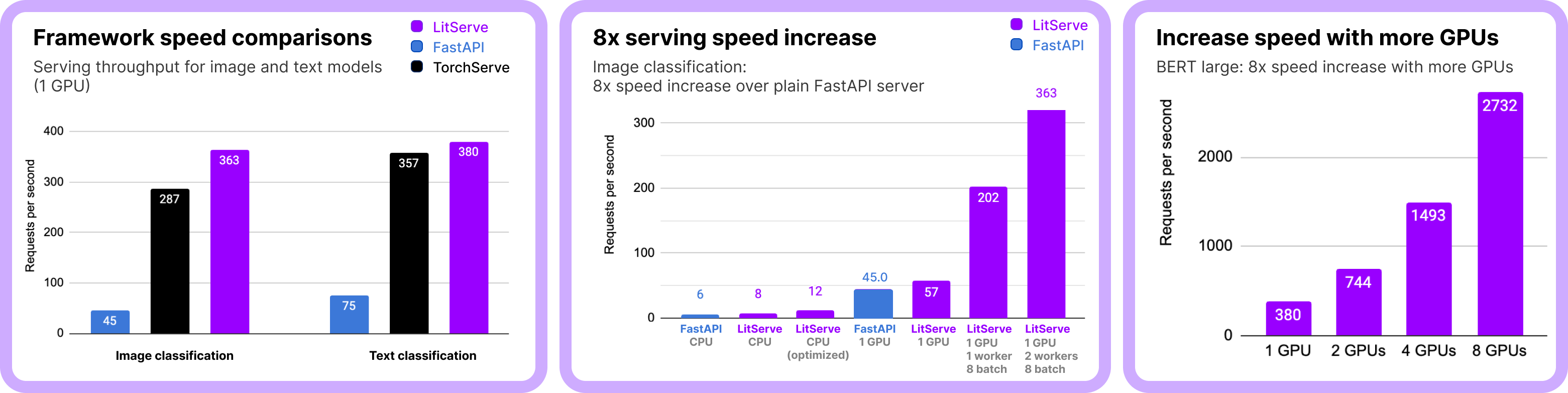
These results are for image and text classification ML tasks. The performance relationships hold for other ML tasks (embedding, LLM serving, audio, segmentation, object detection, summarization etc...).
💡 Note on LLM serving: For high-performance LLM serving (like Ollama/vLLM), integrate vLLM with LitServe, use LitGPT, or build your custom vLLM-like server with LitServe. Optimizations like kv-caching, which can be done with LitServe, are needed to maximize LLM performance.
Community
LitServe is a community project accepting contributions - Let's make the world's most advanced AI inference engine.
Metadata
Release files for litserve 0.2.19
For a detailed explanation of source distributions (sdists) and built distributions (wheels), please see the package formats documentation.
Source distribution (sdist)
| File | Size | Uploaded | |
|---|---|---|---|
| litserve-0.2.19.tar.gz | 141.1 kB | Details |
Built distribution (wheel)
| File | Interpreter | ABI | Platform | Reset |
|---|---|---|---|---|
| litserve-0.2.19-py3-none-any.whl | Python 3 | none | any | Details |
Total release size: 236.8 kB
Release files / litserve-0.2.19.tar.gz
| Download URL | litserve-0.2.19.tar.gz |
|---|---|
| Size | 141.1 kB |
| Tags | Source |
|
SHA-256 checksum How to use checksums |
951ee621b9f95888f9fc8d06707247ddf675227aa28d9407b6eb97c69551d3c5
|
|
BLAKE2b-256 checksum How to use checksums |
4cede3a4de40677c5ec4f9aa7875260982e365ac998a49159ea75b48bcc6a0f8
|
| Upload date | |
|
Uploaded using Trusted Publishing? What is trusted publishing? |
Yes |
| Uploaded via |
twine/7.0.0 CPython/3.13.14
|
Provenance
Provenance describes where a file came from. On PyPI, provenance is shared via attestations, which provide a verifiable record of the build or publishing details. View details, limitations and caveats.


PyPI Publish Attestation
PyPI verified that this artifact, at this checksum, originated from the publisher listed below.
Signed by GitHub Actions, verified by PyPI on Sep 9, 2026.
Transparency logRelease files / litserve-0.2.19-py3-none-any.whl
| Download URL | litserve-0.2.19-py3-none-any.whl |
|---|---|
| Size | 95.8 kB |
| Tags | Python 3 |
|
SHA-256 checksum How to use checksums |
61015d72da421181e46aa73c517e2bb87119848784314cb8abda008006586a10
|
|
BLAKE2b-256 checksum How to use checksums |
8de85a7a3e61a29cbc3337dc257615ea4aedbfc5fa8a5d2510ab33e0c6a67f32
|
| Upload date | |
|
Uploaded using Trusted Publishing? What is trusted publishing? |
Yes |
| Uploaded via |
twine/7.0.0 CPython/3.13.14
|
Provenance
Provenance describes where a file came from. On PyPI, provenance is shared via attestations, which provide a verifiable record of the build or publishing details. View details, limitations and caveats.
PyPI Publish Attestation
PyPI verified that this artifact, at this checksum, originated from the publisher listed below.
Signed by GitHub Actions, verified by PyPI on Sep 9, 2026.
Transparency log













