Lixity





Find the passages worth a second look.
Lixity brings close reading, manuscript analysis and documented research into one local workspace for authors, editors and manuscript reviewers. Find changes in rhythm or voice, inspect what a signal counted, and follow the sources and creative decisions behind a scene detail. The manuscript stays at the centre.
The reference is your own book. The editorial decision stays yours. Lixity helps explain where a draft changes; it does not grade literary quality or automatically rewrite prose. Built-in analysis runs on your computer. Manuscript input is Markdown or plain text; Word/DOCX and Scrivener need conversion.
Open the example manuscript · Take the short tour · Install Lixity
What changes in a revision session?
| The question | The useful next step |
|---|---|
| Why does this chapter feel different? | Compare its rhythm, vocabulary and dialogue with the manuscript's own patterns, then read the counted text. |
| Is this repetition doing useful work? | Locate nearby phrase echoes and inspect the surrounding passage before keeping or changing them. |
| Why is this detail in the scene? | Follow a linked quotation to its dossier, retained source passages and explicit author decision. Exact earlier versions remain available. |
| How can an editorial observation be explained? | Keep the manuscript in view while moving between the measurement explanation and linked research; prepare an editorial PDF or a fixed review copy for the discussion. |
| What belongs in a reader's copy? | Choose a manuscript with selected companion notes, a standalone companion, a review workspace or a PDF, and check what the copy includes. |
Since v0.7.6: one local app address now retains independent project views in multiple tabs. App and audio shows open views, actual local/Jetson model readiness and a shared bounded audio queue. View URLs expire when the app restarts; reopen projects from the app home.
Since v0.7.6: tense review cards show the original counted forms and their exact manuscript locations before optional counts and heuristic help. These cues explain a mark; they do not establish an author error.
Source evidence, authored claims and creative decisions stay distinct. A saved source records the evidence used; it does not guarantee that a claim is true. Reading copies are fixed exports, not a live co-editing service.
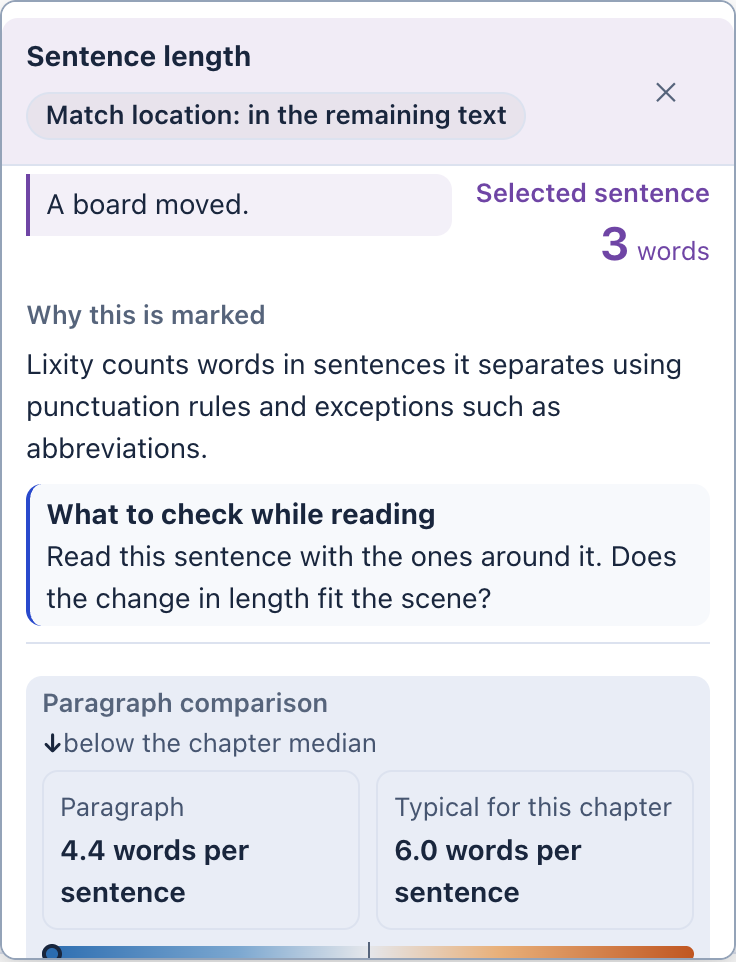
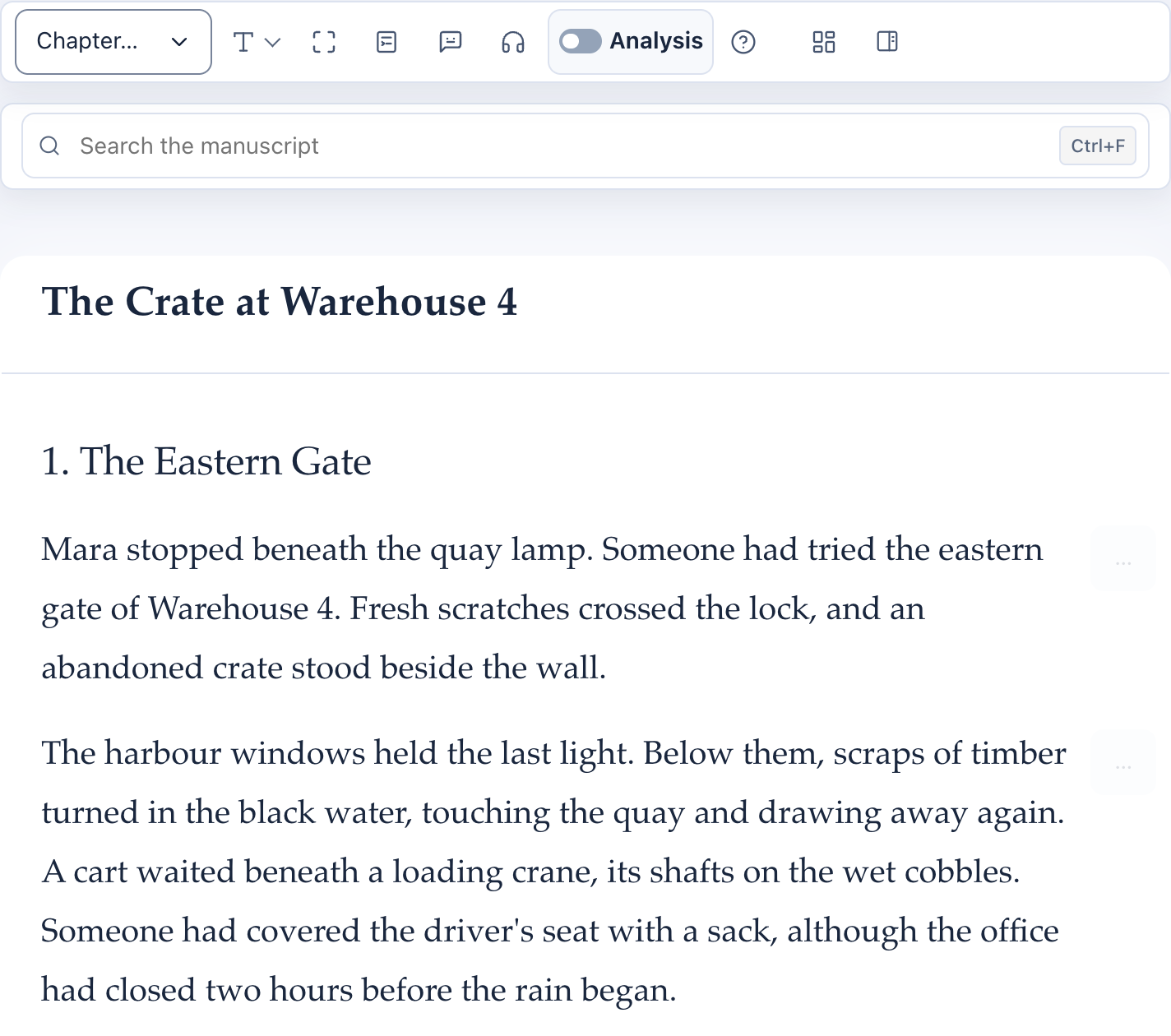
Why does chapter 2 feel faster? With analysis on, inspect one sentence and its paragraph's rhythm, then read the scene before deciding whether to revise. This current-main capture shows the actual explanation, not a writing target. See the reading view.
The read-only example follows a suspicious harbour delivery through six invented English chapters, linked case notes and credited research images. It needs no account or upload and cannot import, edit or save. Try one question first: does chapter 2's shorter rhythm fit its action? The demo's Inspect chapter 2 action opens the actual manuscript with the shared sentence-length controls, not a separate presentation.
One question, one dossier, back to the scene. A preliminary log puts a crate's opening on the quay; its correction moves it to the customs station. The fictional demo keeps both source passages beside an explicit author decision: leave the crate closed until dawn. Follow the research decision in German or take the English walkthrough.
Install and start
Install uv, then run on Windows, macOS or Linux:
uv tool install --python 3.12 --managed-python lixity
uv tool update-shell
Open a new terminal:
lixity --version
lixity service start --open
Choose Open Project or Analyze a manuscript, then confirm the language.
Manuscript input supports .md, .markdown and .txt; convert Word/DOCX or
Scrivener documents before import. Retaining a PDF as research is a separate action.
English is the default; automatic detection is explicit. Built-in analysis works
offline on your computer and does not grade or rewrite prose. Optional
integrations have separate
data boundaries.
Your first project explains the
workflow. Installation and updates
covers launchers, pinned wheels, service management and removal. After upgrading,
run lixity service restart --open and reload the browser; installing a package
does not update an already running service.
One project, from draft to reading copy
Read continuous prose with analysis available on demand. Keep a dossier beside the passage, follow a source or an earlier linked version, then return to the text. For an editor, that gives a concrete starting point for an observation; for an author, it keeps the question and its supporting material together.
Since v0.7.6: configured terms and props add another route into the manuscript. Declare a name, object or alternative term, inspect its occurrences and chapter scopes, and connect it to a dossier. Dossier manuscript evidence brings its linked quotations together; ordered collections organise related notes. These are declared lexical checks and explicit links, not automatic continuity checking or character understanding. See terms and props and the release notes.
Optional grammatical tense analysis covers all seven interface languages using explicitly installed local syntax models and shared language-specific verb-group rules. It distinguishes perfect, passive, subjunctive and future constructions and can exclude recognized quotations. Parser errors remain possible; lightweight pattern counts stay available without model dependencies. See grammatical tense setup.
The browser app, CLI and Python API share one analysis pipeline;
lixity --help and lixity about --json describe installed capabilities.
Try the same fictional project as a novel with companion notes or a standalone companion. These curated reading copies are different from the analysis/research workspace: they contain selected material, not the full archive.
Analysis controls, revision-aware research and other project tools
Version scope: these controls are included in v0.7.6. Verify the installed
package separately from the running app with lixity doctor; the public demo is a
read-only example, not your local installation.
Turn Analysis on beside the text and choose the visible metric. Switch
Counted text and Paragraph comparison independently. Violet underlines identify
counted spans; blue/orange value-and-arrow markers compare notable paragraphs
with their chapter. Both preferences persist in the browser. Hover, touch and the
paragraph menu explain the concrete text; the CLI exposes the same evidence with
lixity profile manuscript.md --layer asl --evidence.
Since v0.7.6: matrix cells and style-space loadings share chapter measurements: meaning, units, manuscript reference and the other metrics of the same chapter. Reading the text is an explicit next action; chapter-only measurements do not invent word-level highlights.
Current-main export-site --preflight and the native Check export action
measure the prepared package before writing/downloading, including media not
packaged and missing attribution fields. Reading website exports are beta and
can be large; the check does not promise a package size or mobile performance. Existing research projects require the
explicit manifest-storage migration
before using the current compressed layout.
Current main also shares versioned image, PDF and MP4/WebM attachments across dossiers and reading copies, with explicit retention and source-file export choices. Media workflow and compatibility.
A passage's research associations open its claims and dossier beside the
manuscript, with a return to the passage. Current entries and exact linked earlier
versions remain distinct. Dossier editing offers --body-only section drafts and
--compact update receipts. Current-main --preamble targets the opening text,
research media-context corrects retained-media attribution without copying bytes,
and dossier-images --missing-provenance finds absent attribution fields; see the
section-editing workflow.
The native Project overview and lixity project --project PATH also separate
sources, existing outputs and read-only structure findings. They neither move
files nor establish that an output matches the current manuscript; see
project inspection.
The development audio workflow shares saved project voice profiles between
lixity read-aloud and the native preview/export dialog. Optional Qwen3-TTS 1.7B
CustomVoice provides preset voices and explicit style instructions through a
local worker or a configured Jetson over SSH. Piper is removed; existing profiles
require an explicit backed-up audio-migrate replacement. Select the
execution target per render in the CLI or dialog. CPU generation can be slow;
completed Qwen segments can be reused when retrying long renders. Audio remains
a prototype requiring listening review. See the
read-aloud scope
before relying on an export. NDA generation produces a draft, not consent or
signatures. Dossier Markdown edits require explicit preview and apply.
CLI workflows can reuse the project's configured manuscript; default manuscript guidance explains explicit project selection and settings scope.
English and German have the broadest analysis resources. French, Spanish, Italian, Portuguese and Dutch offer localized interfaces with narrower heuristic coverage. Language support and interpretation explain coverage, short-sample limits and unavailable measurements.
Documentation map
Additional screenshots and image credits.
| Looking for | Start here |
|---|---|
| Everyday use | Usage and CLI reference · Interpret results |
| Research | Workflows and compatibility · Data model |
| Measurements | Methods · Checks and limits |
| Integrations | API contracts · Architecture · Agent index |
| Contributing | Contributor setup and checks · Security |
In the repository, src/lixity/
contains the shared engine, CLI and UI;
tests/ verifies behavior;
docs/ holds maintained product
documentation; and samples/
contains synthetic or public-domain examples. Book-specific adapters belong in
their own projects.
Release, citation and license
Version line: The documentation source version is v0.7.6, in the pre-1.0 0.x line. Historical 1.x and 3.x tags predate the numbering reset; use the current release rather than the numerically largest tag. Product, JSON response and archive schema versions are independent.
Release notes
cover archive compatibility and upgrades. See the
changelog for subsequent work.
The repository's generated demo follows the interface documented here, using a fictional project and read-only research. Importing
and saving require the local app. A push to main alone does not deploy Pages
or update a running local installation; see
update and deployment boundaries.
Cite Lixity on Zenodo, with metadata in
CITATION.cff.
The software paper draft
describes its research context.
AGPL-3.0-or-later. Use Lixity for private or commercial writing, research and teaching, including self-publishing your book. A separate written commercial license is available for integrations that cannot meet the AGPL. Licensing guide · Full terms · Legal notice and contact.
1 maintainer

Metadata
1 maintainer
Release files for lixity 0.7.6
For a detailed explanation of source distributions (sdists) and built distributions (wheels), please see the package formats documentation.
Source distribution (sdist)
| File | Size | Uploaded | Provenance | Actions |
|---|---|---|---|---|
| lixity-0.7.6.tar.gz | 2.4 MB | With provenance | Details for lixity-0.7.6.tar.gz |
Built distribution (wheel)
| File | Interpreter | ABI | Platform | Actions Reset |
|---|---|---|---|---|
| lixity-0.7.6-py3-none-any.whl | Python 3 | none | any | Details for lixity-0.7.6-py3-none-any.whl |
Total release size: 4.3 MB
Release files / lixity-0.7.6.tar.gz
| Download URL | lixity-0.7.6.tar.gz |
|---|---|
| Size | 2.4 MB |
| Tags | Source |
|
SHA-256 checksum How to use checksums |
8ca5864d09430bff3d91a0d979bc41f8094dbdd45f8cced9b6d7847da7c12c16
|
|
BLAKE2b-256 checksum How to use checksums |
caa060b6a54376a2c3251d1442efb14f2de5540ed29298c98cf9ad00aafee30a
|
| Upload date | |
|
Uploaded using Trusted Publishing? What is trusted publishing? |
Yes |
| Uploaded via |
twine/7.0.0 CPython/3.13.16
|
Provenance
Provenance describes where a file came from. On PyPI, provenance is shared via attestations, which provide a verifiable record of the build or publishing details. View details, limitations and caveats.


PyPI Publish Attestation
PyPI verified that this artifact, at this checksum, originated from the publisher listed below.
Signed by GitHub Actions, verified by PyPI on Oct 27, 2026.
Transparency logRelease files / lixity-0.7.6-py3-none-any.whl
| Download URL | lixity-0.7.6-py3-none-any.whl |
|---|---|
| Size | 1.9 MB |
| Tags | Python 3 |
|
SHA-256 checksum How to use checksums |
9c470a7edf3c261deffd2d28d452bfe838560886798f046e5769a30c3e7d6b80
|
|
BLAKE2b-256 checksum How to use checksums |
966f515b70a6a7e7a823e1f9709d6dae24a298cbd4de4abde6370ae5ac3bc9b0
|
| Upload date | |
|
Uploaded using Trusted Publishing? What is trusted publishing? |
Yes |
| Uploaded via |
twine/7.0.0 CPython/3.13.16
|
Provenance
Provenance describes where a file came from. On PyPI, provenance is shared via attestations, which provide a verifiable record of the build or publishing details. View details, limitations and caveats.
PyPI Publish Attestation
PyPI verified that this artifact, at this checksum, originated from the publisher listed below.
Signed by GitHub Actions, verified by PyPI on Oct 27, 2026.
Transparency logSecurity for lixity 0.7.6
Provenance
Provenance describes where a file came from. On PyPI, provenance is shared via attestations, which provide a verifiable record of the build or publishing details. View details, limitations and caveats.
Full provenance
Both files in this release have been uploaded with provenance metadata.
Attestation for lixity-0.7.6.tar.gz
PyPI Publish Attestation
PyPI verified that this artifact, at this checksum, originated from the publisher listed below.
Signed by GitHub Actions, verified by PyPI on Oct 27, 2026.
Transparency logA note on package security
PyPI is a repository for distributing packages, not a service for auditing them. While third-party security researchers and our staff do their best to detect and remove malicious packages, PyPI cannot guarantee the quality, security or suitability of any given package.
To learn more about protecting yourself from malicious actors, visit our package security documentation.