Lixity







Local manuscript analysis and research for authors and editors.
Lixity is a local workspace for authors, editors and manuscript reviewers. Read continuous prose, inspect changes in rhythm or vocabulary, follow a scene detail into its research dossier, and prepare a reading copy or spoken review from the same project. The browser app, CLI and Python API share one analysis engine.
Seven interface languages: Deutsch · English · Français · Español · Italiano · Português · Nederlands.
Product introductions: Deutsch · English · Français · Español · Italiano · Português · Nederlands. Technical documentation is maintained in English only. German and English have the broadest analysis resources; see the language coverage and limits.
The reference is your own book. The editorial decision stays yours. Measurements help locate and explain differences; they do not grade literary quality or rewrite prose. Built-in analysis works offline. Manuscript input is Markdown or plain text; convert Word/DOCX or Scrivener documents before import.
Explore the demo workspace · Read the example novel · English tour · Einstieg auf Deutsch · Install
Start without installing: open the demo, inspect one marked passage, then return to the scene and decide whether you would keep it.
The public demo follows six invented English harbour chapters and their linked case notes. It needs no account or manuscript upload. It is a fixed, read-only copy: importing, recording, changing settings and saving require the local app. The demo and these docs follow current development; features labelled unreleased may differ from your installed package.
What changes in a revision session?
| Your task | Work in Lixity | What stays under your control |
|---|---|---|
| Read and revise a chapter | Continuous prose, search, work markers and passage tools | Analysis marks can be switched off; nothing rewrites the manuscript for you. |
| Understand a change in voice or rhythm | Compare chapters, inspect counted words and sentences, open a measurement explanation | A statistical difference is a prompt for review, not an error or target score. |
| Explain a scene detail | Link a quotation to a claim, its source passages, a dossier and an author decision | Evidence, assertions and creative decisions remain separate; exact linked versions are retained. |
| Hear a passage | Prepare direction, pronunciation rules and pauses; review a short recording or synthesis preview | Speech planning needs no worker. Recording needs permission; synthesis uses the explicitly selected service. |
| Share a reading copy | Choose manuscript, curated companion notes, analysis or a printable PDF | Preview the contents before export; a fixed copy does not expose your live project. |
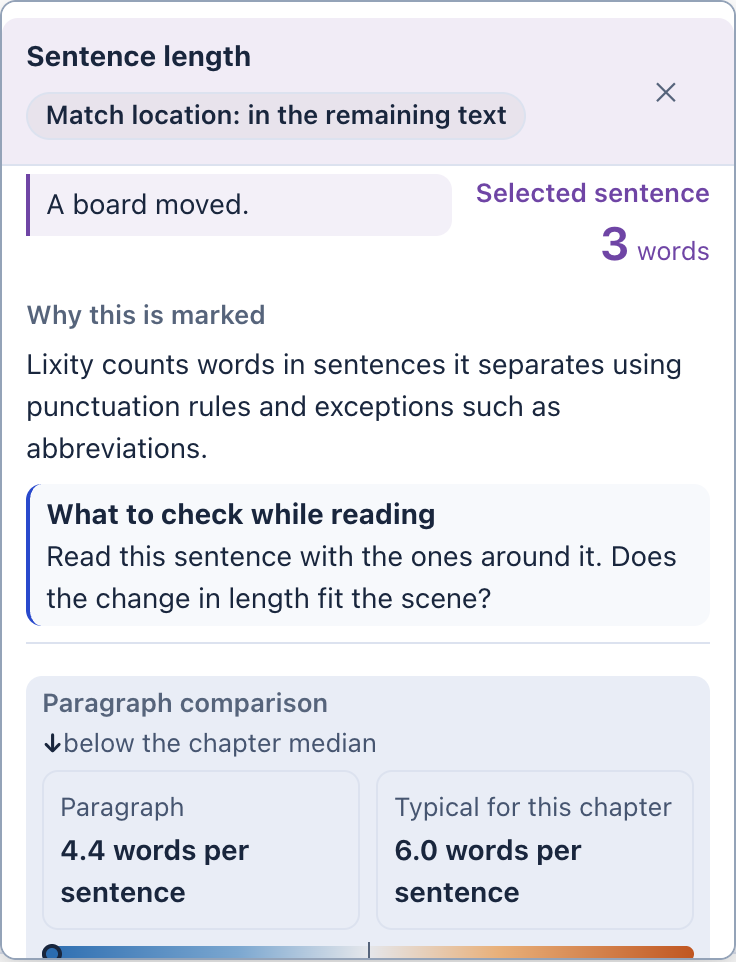
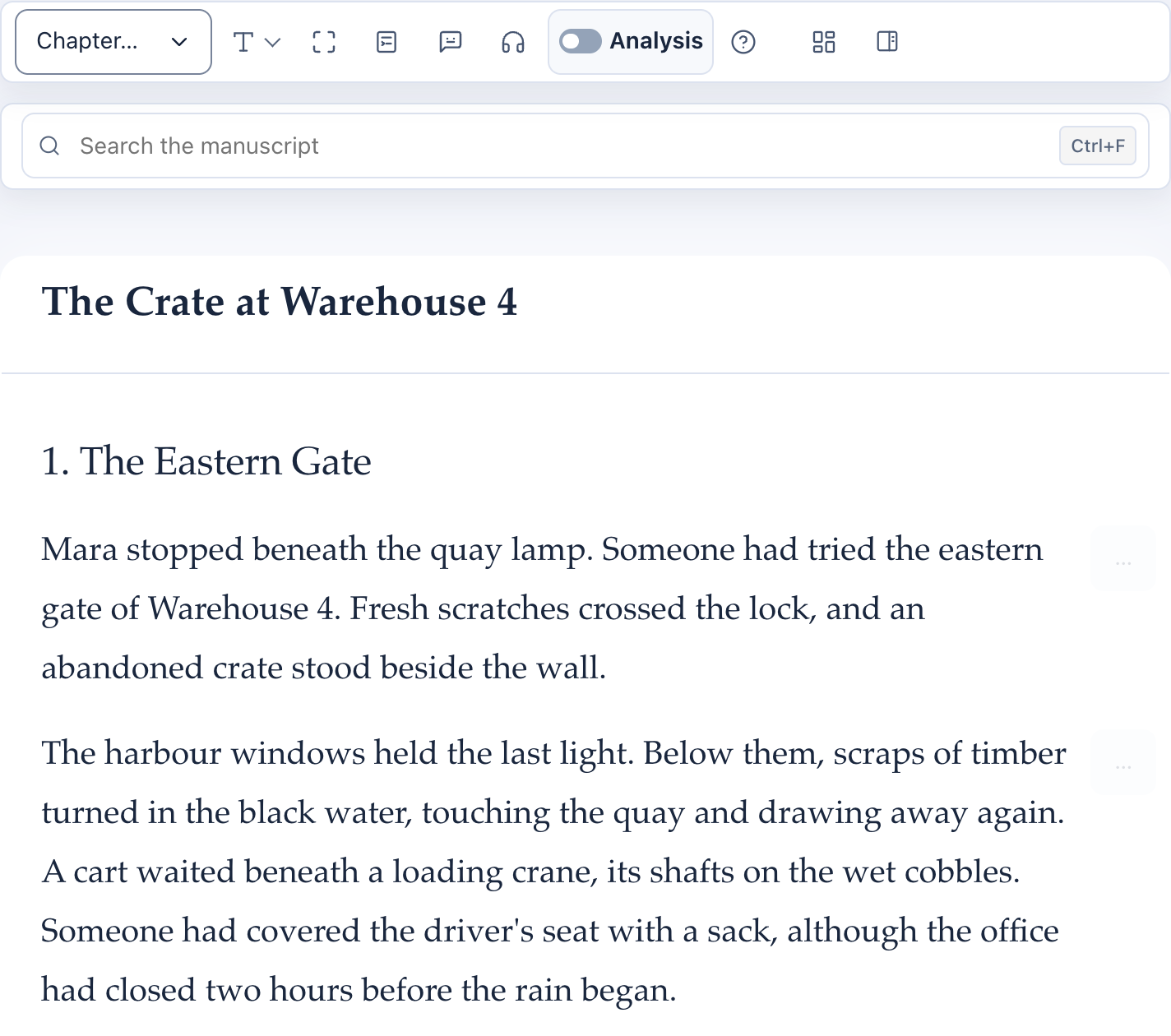
Try one question: does chapter 2's shorter rhythm fit the action? In the demo workspace, choose Inspect chapter 2, explain a paragraph's measurement, then return to the scene. Counted text shows the words or sentences behind a measurement; Paragraph comparison is a separate comparison with that chapter. See the reading view.
For the research route, open Research → Dossiers → Warehouse 4 case notes. A preliminary log puts the crate's opening on the quay; its correction moves it to the customs station. Follow the two source passages and the explicit decision to keep the crate closed until dawn. Lixity preserves the connection; it does not resolve the contradiction or establish the truth of a saved claim. Follow the decision.
Share one revision experience
What did you want to check? Did the explanation help? What got in the way? Send a short description or report a reproducible issue. You do not need to share manuscript text to give useful feedback.
Install and start
Install uv, then run on Windows, macOS or Linux:
uv tool install --python 3.12 --managed-python lixity
uv tool update-shell
In a new terminal:
lixity --version
lixity service start --open
Choose Open Project or Analyze a manuscript, then confirm the language.
Supported manuscript files are .md, .markdown and .txt; retaining a PDF as
research is a separate action. English is the default analysis language;
automatic detection is an explicit choice.
Your first project covers
opening, importing and settings. The
installation guide covers
updates, local launchers and removal. After upgrading, run
lixity service restart --open and reload the browser: installation alone does
not update a running service. lixity doctor identifies the installed package
and owned service.
One project, from draft to reading copy
Read, inspect and return to the scene
Keep the manuscript in view while opening counted-text explanations or a dossier alongside it. Tense cues show the original forms and manuscript locations before heuristic interpretation. Chapter tables and the 3D style space compare measured patterns; neither predicts literary quality. Flat projections and exact values help inspect overlaps in the 3D view.
English and German have the broadest analysis resources. French, Spanish, Italian, Portuguese and Dutch have localized interfaces with narrower heuristic coverage. Optional local syntax models add grammatical tense analysis with language-specific verb-group rules; parser errors remain possible. Interpretation · Language coverage · Grammatical tense setup.
Keep research connected and versioned
A dossier gathers authored notes, retained source passages, claims, decisions, images and maps. Passage associations return to their manuscript context. A linked earlier version remains distinct from the current entry. Configured terms and props locate declared wording and connect it to dossiers; they do not infer characters or automatically verify continuity.
Research is scoped to an explicit project. Retaining a source and redistributing it are separate choices. Original PDFs, images and videos have their own import and export controls. Existing archives require a reviewed migration before adopting a newer storage format. Research workflows · Data model.
Record, direct and listen
Current main, unreleased: open Project → Settings → Audio and services for author recordings, voice profiles, microphone settings, services and the audio queue. Listen & direct is also available from the manuscript toolbar. The four audio tabs separate recording, profile/service setup, passage direction and hardware levels. A shared player provides elapsed/total time, seeking, volume and a measured frequency spectrum.
Record a short author reference or import a WAV, review the actual words and confirm the transcript before saving. Browser microphone permission belongs to the current local address; changing hardware gain cannot grant it. Permission, recording and failure states appear beside the recording button. Recording and troubleshooting.
The manuscript Teleprompter (P) combines adjustable scrolling with the
canonical spoken text, direction cues, pauses and explicit IPA annotations.
Record a take, edit its transcript, download its WAV plus JSON metadata, or hand
it to the author-voice studio for review. A reading script is not an exact
transcript. The scrolling rate is approximate; it does not track live speech.
Teleprompter and take exchange.
Speech planning and synthesis are separate actions. Export a passage, chapter or manuscript as JSON or SSML without a running speech worker. JSON retains the supported authored controls; SSML reports portability limits. Optional local Qwen, Coqui/OpenVoice and IMS-Toucan setups have different voice, language and direction capabilities. IMS-Toucan's unreleased German/English path supports separate IPA overrides and structured passage-level duration/prosody controls; it does not interpret free acting prompts. Existing F5 profiles remain readable, but the bundled F5 runtime is unavailable. Choose and set up a speech engine.
An explicitly configured external speech provider receives selected text only when rendering is requested. Audio plans may include provider URLs, model names and credential-variable names, so review them before sharing. Audio inspection can measure a local recording; comparison with planned words requires a supplied, timestamped transcript. Lixity does not perform speech recognition. Listen to a short preview before committing to a long render. Audio workflow and limits.
Choose what leaves the project
| Copy | Contents and purpose |
|---|---|
| Review workspace | Manuscript and analysis, optionally internal research and history; for author/editor review. |
| Novel with companion notes | Manuscript with explicitly selected dossier notes, plus optional analysis of the exported chapters. |
| Standalone companion | Selected background material for someone reading the novel elsewhere. |
| Neutral/editorial manuscript, analysis report, A5 book or submission sheet. |
Reading websites are fixed exports, not live co-editing or project backups. A publication profile selects dossier bodies or sections and chapter reveal points. Reading progress is a convenience, not access control: use an export chapter cap to omit later content from the files. Optional reader analysis is recomputed on that exported text with default settings and can differ from the project analysis. Work-marker notes are omitted from curated reader copies.
Unreleased: reader exports can also include existing chapter recordings with
--include-audio. Only audio matching the current manuscript and chapter cap is
copied; missing chapters remain visibly text-only. Export does not run synthesis.
The reader gets a player and WAV download, without your private voice references,
speech-profile settings or service endpoints.
Include chapter audio.
Existing recordings enter through the explicit
audio-import --project ROOT --audio WAV --chapter N --source-sha256 HASH
command, with optional --manuscript manuscript.md. That binding records your selection;
it does not verify the spoken text or align the recording automatically.
Use Check export to inspect the prepared package, omitted media and missing attribution before downloading. Original source files need an explicit inclusion choice and redistribution rights. Website exports are beta; test the copy on the recipient's device. The local Project overview inspects sources and existing outputs without rebuilding analysis; filenames alone do not establish freshness. Export workflow · PDF options.
Use the same engine from scripts
lixity analyze manuscript.md --language en
lixity profile manuscript.md --layer asl --evidence
lixity project --project ./novel
lixity about --json
Start with lixity --help; lixity COMMAND --help explains each command
without running it. Current-main help groups tasks and links the corresponding manual.
The CLI works without a running browser service. Root-local project settings,
explicit language selection and the shared pipeline keep browser and automation
workflows aligned. Choose a command
or start with the API contracts.
Documentation map
Find a task in the complete documentation map.
Additional screenshots and image credits.
| Looking for | Start here |
|---|---|
| First session | Install and start · Walkthrough |
| Everyday use | Workspace manual · CLI and configuration reference |
| Audio and teleprompter | Recording, direction, generation and exchange |
| Interpret results | Reading measurements |
| Research | Workflows and compatibility · Data model |
| Measurements | Methods · Checks and limits |
| Integrations | API contracts · Architecture · Agent index |
| Contributing | Contributor setup and checks · Security |
In the repository, src/lixity/
contains the shared engine, CLI and UI;
tests/ verifies behavior;
docs/ holds maintained product
documentation; and samples/
contains synthetic or public-domain examples. Book-specific adapters belong in
their own projects.
Release, citation and license
Version line: The documentation source version is v0.8.0, in the pre-1.0 0.x line. Historical 1.x and 3.x tags predate the numbering reset; use the current release rather than the numerically largest tag. Product, JSON response and archive schema versions are independent.
Release notes
cover archive compatibility and upgrades. See the
changelog for subsequent work.
The repository's generated demo follows the interface documented here, using a fictional project and read-only research. Importing
and saving require the local app. A push to main alone does not deploy Pages
or update a running local installation; see
update and deployment boundaries.
Cite Lixity on Zenodo, with metadata in
CITATION.cff.
The software paper draft
describes its research context.
AGPL-3.0-or-later. Use Lixity for private or commercial writing, research and teaching, including self-publishing your book. A separate written commercial license is available for integrations that cannot meet the AGPL. Licensing guide · Full terms · Legal notice and contact.
1 maintainer

Metadata
1 maintainer
Release files for lixity 0.8.0
For a detailed explanation of source distributions (sdists) and built distributions (wheels), please see the package formats documentation.
Source distribution (sdist)
| File | Size | Uploaded | Provenance | Actions |
|---|---|---|---|---|
| lixity-0.8.0.tar.gz | 2.8 MB | With provenance | Details for lixity-0.8.0.tar.gz |
Built distribution (wheel)
| File | Interpreter | ABI | Platform | Actions Reset |
|---|---|---|---|---|
| lixity-0.8.0-py3-none-any.whl | Python 3 | none | any | Details for lixity-0.8.0-py3-none-any.whl |
Total release size: 5.0 MB
Release files / lixity-0.8.0.tar.gz
| Download URL | lixity-0.8.0.tar.gz |
|---|---|
| Size | 2.8 MB |
| Tags | Source |
|
SHA-256 checksum How to use checksums |
6d75198e99830c01ac6f7c5a743f80e88e5e488253604629bf9e4752dd2a8c5e
|
|
BLAKE2b-256 checksum How to use checksums |
6118e7815f55f184e85dd70517a481cdbbd08bb607d6aa700ca76cddeb2dc5b1
|
| Upload date | |
|
Uploaded using Trusted Publishing? What is trusted publishing? |
Yes |
| Uploaded via |
twine/7.0.0 CPython/3.13.16
|
Provenance
Provenance describes where a file came from. On PyPI, provenance is shared via attestations, which provide a verifiable record of the build or publishing details. View details, limitations and caveats.


PyPI Publish Attestation
PyPI verified that this artifact, at this checksum, originated from the publisher listed below.
Signed by GitHub Actions, verified by PyPI on Nov 10, 2026.
Transparency logRelease files / lixity-0.8.0-py3-none-any.whl
| Download URL | lixity-0.8.0-py3-none-any.whl |
|---|---|
| Size | 2.2 MB |
| Tags | Python 3 |
|
SHA-256 checksum How to use checksums |
9aff725d057ee41f81ee3449f94973210a2f354e991aa881b6cd98df28ced95f
|
|
BLAKE2b-256 checksum How to use checksums |
94c492f5f44a081b99d3d1f65c7c5a5e2ea1306076962bce7fb8747fe9f2b9bd
|
| Upload date | |
|
Uploaded using Trusted Publishing? What is trusted publishing? |
Yes |
| Uploaded via |
twine/7.0.0 CPython/3.13.16
|
Provenance
Provenance describes where a file came from. On PyPI, provenance is shared via attestations, which provide a verifiable record of the build or publishing details. View details, limitations and caveats.
PyPI Publish Attestation
PyPI verified that this artifact, at this checksum, originated from the publisher listed below.
Signed by GitHub Actions, verified by PyPI on Nov 10, 2026.
Transparency logSecurity for lixity 0.8.0
Provenance
Provenance describes where a file came from. On PyPI, provenance is shared via attestations, which provide a verifiable record of the build or publishing details. View details, limitations and caveats.
Full provenance
Both files in this release have been uploaded with provenance metadata.
Attestation for lixity-0.8.0.tar.gz
PyPI Publish Attestation
PyPI verified that this artifact, at this checksum, originated from the publisher listed below.
Signed by GitHub Actions, verified by PyPI on Nov 10, 2026.
Transparency logA note on package security
PyPI is a repository for distributing packages, not a service for auditing them. While third-party security researchers and our staff do their best to detect and remove malicious packages, PyPI cannot guarantee the quality, security or suitability of any given package.
To learn more about protecting yourself from malicious actors, visit our package security documentation.