
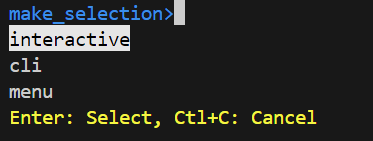
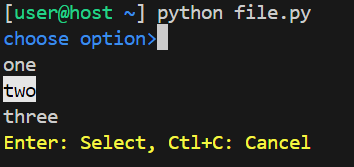
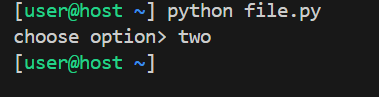
Package for interactive command line menu

Project description
Release history Release notifications | RSS feed


Download files
Download the file for your platform. If you're not sure which to choose, learn more about installing packages.
Source Distribution
make_selection-1.0.10.tar.gz
(7.8 kB
view details)
Built Distribution
Filter files by name, interpreter, ABI, and platform.
If you're not sure about the file name format, learn more about wheel file names.
Copy a direct link to the current filters
File details
Details for the file make_selection-1.0.10.tar.gz.
File metadata
- Download URL: make_selection-1.0.10.tar.gz
- Upload date:
- Size: 7.8 kB
- Tags: Source
- Uploaded using Trusted Publishing? No
- Uploaded via: twine/6.2.0 CPython/3.14.4
File hashes
| Algorithm | Hash digest | |
|---|---|---|
| SHA256 |
00741ace3116ec0b5f0402b39deb9ae67aec7eab585dd507ece4c12bc21a063d
|
|
| MD5 |
7cc958267371ce81e85045875f475b63
|
|
| BLAKE2b-256 |
3175d8b4f1500f4273c59f5c0ef51026515aeeae56b70e2611977376b264c4e7
|
File details
Details for the file make_selection-1.0.10-py3-none-any.whl.
File metadata
- Download URL: make_selection-1.0.10-py3-none-any.whl
- Upload date:
- Size: 8.1 kB
- Tags: Python 3
- Uploaded using Trusted Publishing? No
- Uploaded via: twine/6.2.0 CPython/3.14.4
File hashes
| Algorithm | Hash digest | |
|---|---|---|
| SHA256 |
1368b7916afe48d2a60696080bde25eedf7beaf946a7958acf469ae770ddaf4e
|
|
| MD5 |
4c9658bed9df5915ed41acfd243a35d8
|
|
| BLAKE2b-256 |
3a56e19baa41a8e0204bb28187a2dfffa6421b60c816bde9bef8ffaec992427a
|






