
Package for interactive command line menu

Project description
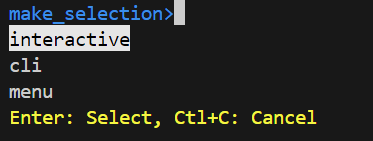
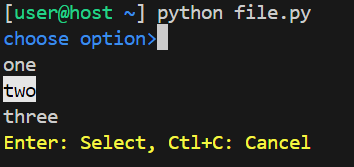
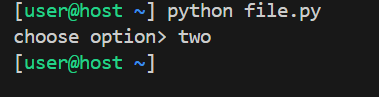
Release history Release notifications | RSS feed


Download files
Download the file for your platform. If you're not sure which to choose, learn more about installing packages.
Source Distribution
make_selection-1.0.13.tar.gz
(7.9 kB
view details)
Built Distribution
Filter files by name, interpreter, ABI, and platform.
If you're not sure about the file name format, learn more about wheel file names.
Copy a direct link to the current filters
File details
Details for the file make_selection-1.0.13.tar.gz.
File metadata
- Download URL: make_selection-1.0.13.tar.gz
- Upload date:
- Size: 7.9 kB
- Tags: Source
- Uploaded using Trusted Publishing? No
- Uploaded via: twine/6.2.0 CPython/3.14.4
File hashes
| Algorithm | Hash digest | |
|---|---|---|
| SHA256 |
842c6fbf079487b23c6fae8490449e9dc32bf43ce7511b1ff20fe619d551861c
|
|
| MD5 |
e65f0ac164d06d5e7da3d0c00532df4a
|
|
| BLAKE2b-256 |
af5afab3fee902c77087cde998233a8489b5ac92ac932f7f2dd1298fabba2373
|
File details
Details for the file make_selection-1.0.13-py3-none-any.whl.
File metadata
- Download URL: make_selection-1.0.13-py3-none-any.whl
- Upload date:
- Size: 8.5 kB
- Tags: Python 3
- Uploaded using Trusted Publishing? No
- Uploaded via: twine/6.2.0 CPython/3.14.4
File hashes
| Algorithm | Hash digest | |
|---|---|---|
| SHA256 |
b20eac7232875fb191894972be21392518ca303556a0de46b2d00b0983301e41
|
|
| MD5 |
4bac38dbbb8deac0a9450a7915e82780
|
|
| BLAKE2b-256 |
a8b8021209bda69db4f4bfacd47c2768025d2ab50f391146f0982df251d3f401
|






