
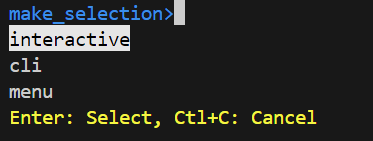
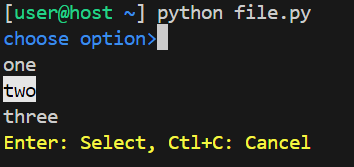
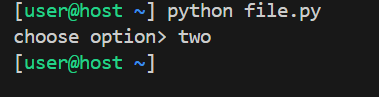
Package for interactive command line menu

Project description
Release history Release notifications | RSS feed


Download files
Download the file for your platform. If you're not sure which to choose, learn more about installing packages.
Source Distribution
make_selection-1.0.12.tar.gz
(7.9 kB
view details)
Built Distribution
Filter files by name, interpreter, ABI, and platform.
If you're not sure about the file name format, learn more about wheel file names.
Copy a direct link to the current filters
File details
Details for the file make_selection-1.0.12.tar.gz.
File metadata
- Download URL: make_selection-1.0.12.tar.gz
- Upload date:
- Size: 7.9 kB
- Tags: Source
- Uploaded using Trusted Publishing? No
- Uploaded via: twine/6.2.0 CPython/3.14.4
File hashes
| Algorithm | Hash digest | |
|---|---|---|
| SHA256 |
686dc9af52ce22e2a78899f86bad49919bcb2c17755bea4338940363928e7e93
|
|
| MD5 |
b4ea5254ea5dc49b2971820f47a83ef5
|
|
| BLAKE2b-256 |
79a72b16942787bc535d640ef96ba1c5501e1b7fa319f5d85ac24c5c4133cf7e
|
File details
Details for the file make_selection-1.0.12-py3-none-any.whl.
File metadata
- Download URL: make_selection-1.0.12-py3-none-any.whl
- Upload date:
- Size: 8.5 kB
- Tags: Python 3
- Uploaded using Trusted Publishing? No
- Uploaded via: twine/6.2.0 CPython/3.14.4
File hashes
| Algorithm | Hash digest | |
|---|---|---|
| SHA256 |
9098870adb80a56cb335540a4c6e7f5ed6422233ecd1c120fe05b76868ab9dec
|
|
| MD5 |
33301fa2b1ed91ed2ffdd46d541d2948
|
|
| BLAKE2b-256 |
77006fbaac47bcf3deaacecdbbd7a821f2555dda17ea53c5b158196c6d57a95f
|






