
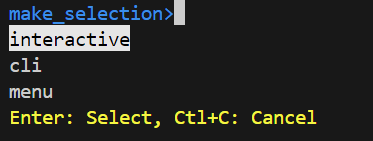
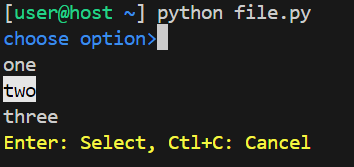
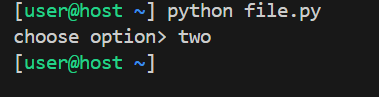
Package for interactive command line menu

Project description
Release history Release notifications | RSS feed


Download files
Download the file for your platform. If you're not sure which to choose, learn more about installing packages.
Source Distribution
make_selection-1.0.11.tar.gz
(7.8 kB
view details)
Built Distribution
Filter files by name, interpreter, ABI, and platform.
If you're not sure about the file name format, learn more about wheel file names.
Copy a direct link to the current filters
File details
Details for the file make_selection-1.0.11.tar.gz.
File metadata
- Download URL: make_selection-1.0.11.tar.gz
- Upload date:
- Size: 7.8 kB
- Tags: Source
- Uploaded using Trusted Publishing? No
- Uploaded via: twine/6.2.0 CPython/3.14.4
File hashes
| Algorithm | Hash digest | |
|---|---|---|
| SHA256 |
88a3aef4a950dc6996d64caed51780f7ad033a931d36a6ac5efd9cf38887542f
|
|
| MD5 |
f0dbcee083f46051e16dbe27c104267c
|
|
| BLAKE2b-256 |
6d1834e35b6cbba3e558a1cad505b6b22230ef9fbaf984c39bd40f5c4872dbae
|
File details
Details for the file make_selection-1.0.11-py3-none-any.whl.
File metadata
- Download URL: make_selection-1.0.11-py3-none-any.whl
- Upload date:
- Size: 8.1 kB
- Tags: Python 3
- Uploaded using Trusted Publishing? No
- Uploaded via: twine/6.2.0 CPython/3.14.4
File hashes
| Algorithm | Hash digest | |
|---|---|---|
| SHA256 |
400e4d0af32ffa11c591581b288018dec44458a904af43be68051c4c811658be
|
|
| MD5 |
b03c181bf9f0f033a600c6cc653d2276
|
|
| BLAKE2b-256 |
c42fb3b942978419ea1e408c2de24fd19ecb449d7427f22aa6250bbca15549c9
|






