
Full GUI control of Mathematica notebooks and kernel via Model Context Protocol

Project description
Mathematica MCP
A front-end / notebook automation layer for Mathematica, built for AI agents.
A local MCP server that lets an AI agent drive a live Mathematica session: run code, create and edit notebooks, capture screenshots, verify derivations, and read .nb files without a kernel. Works with Claude, Cursor, VS Code, Codex, and Gemini.
It is designed to run beside the official Wolfram Local MCP, not to replace it: Wolfram's server is the reference Wolfram-Language evaluator and documentation surface; this one is the notebook / front-end automation layer. See How it compares.






v1.0 is a breaking release. The default profile is now
lean(12 tools) instead offull(82 tools). SetMATHEMATICA_PROFILE=classic(orfull) to keep the old surface, and reinstall the Mathematica addon. See the Migration Guide.
Watch it in action
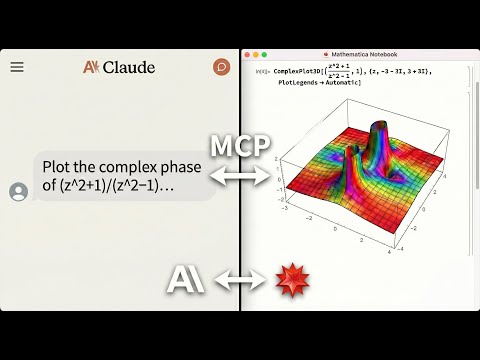
An AI agent solving math, generating plots, and controlling a live Mathematica notebook. Errors are returned directly to the agent, no copy-pasting notebook output back into chat.
Why This Exists
LLMs can write Mathematica code, but they can't run it, control a live notebook, or verify their own results. This MCP server bridges that gap:
- Live notebook control: create, edit, evaluate, and screenshot Mathematica notebooks directly from your AI agent.
- License-free notebook reading:
read_notebook_filereads.nbfiles even when no kernel or Mathematica license is available (Python-native fallback parser; a kernel is used for higher fidelity when present, and is required for.wlscripts). - Warm execution: computation runs on a persistent headless kernel session, so the agent's calls return in sub-second time instead of paying a cold
wolframscriptstart-up on every request. - Error-aware execution: Mathematica messages are fed back to the agent with a
suggested_fixand, where a correction can be derived, a concreteretry_withcall, so it can debug without you copying notebook output into chat. - Local and private: core execution runs on your machine. Optional tools like
wolfram_alphaand repository search contact Wolfram's cloud services only when invoked.
The lean default
v1.0 ships a consolidated 12-tool surface as the default profile: status, notebooks, cells, edit_cells, evaluate, screenshot, verify_derivation, kernel, vars, read_notebook_file, guide, and batch. It exposes ~11.5 KB of tool schema (~2.9k tokens) versus ~61 KB / ~15k tokens for the old 82-tool surface - roughly a 5x cut in the context the agent pays before it does any work. Each tool is a thin wrapper over the exact internals the classic surface uses.
Prefer the old surface? classic (alias full) keeps all 82 legacy tools byte-identical to pre-1.0, and MATHEMATICA_TOOLSETS adds opt-in extras (data I/O, cloud, graphics, ...) to lean without switching profiles.
- Full tool reference with parameters and action enums: Technical Reference - Lean Profile Tools
- All profiles and opt-in toolsets: Technical Reference - Tool Profiles
- How execution stays fast (warm persistent kernel, error guidance, Mathematica 15 notes): Technical Reference - Architecture
How it compares
This server runs alongside the official Wolfram Local MCP (tool names per the MCPServer paclet docs) - setup <client> --with-official writes the official server's config next to this one so they run side by side. Overlap is deliberate where it helps agents; the differentiator is notebook / front-end automation that runs without a license round trip.
| Capability | Official Wolfram Local MCP | This MCP |
|---|---|---|
| Wolfram-Language evaluation | WolframLanguageEvaluator |
evaluate (warm persistent kernel) |
| Wolfram Alpha | WolframAlpha |
wolfram_alpha (opt-in cloud) |
| Symbol docs / definitions | SymbolDefinition, CreateSymbolDoc |
kernel(action="inspect"), symbols extra |
| Read a notebook file | ReadNotebook (needs kernel) |
read_notebook_file - works with no kernel / license (Python fallback) |
| Write a notebook file | WriteNotebook |
notebooks, edit_cells (live front-end) |
| Live notebook control (create/edit/eval/screenshot) | No | Yes |
Interactive UIs (sliders, Manipulate) |
No | Yes, in the live front-end |
| Derivation verification | No | verify_derivation |
| Doc search / code inspection / test reports | CodeInspector, TestReport |
Deliberately not duplicated - use the official server |
ReadNotebook / WriteNotebook overlap the notebook tools here, but the official ReadNotebook runs through a kernel; read_notebook_file parses the .nb directly in Python, so an agent can read notebooks with no license consumed and no kernel start-up.
Quick Start
From install to first working notebook plot in under 2 minutes.
Prerequisites
-
Mathematica 14.0+ (15+ recommended) with
wolframscriptin your PATH- Download Mathematica
- macOS: add to
~/.zshrc:export PATH="/Applications/Mathematica.app/Contents/MacOS:$PATH"
-
uv package manager
curl -LsSf https://astral.sh/uv/install.sh | sh
One-Command Setup
The PyPI package and CLI are named
mathematica-mcp-full(unchanged in 1.0 - the name predates the lean default).
# For Claude Desktop
uvx mathematica-mcp-full setup claude-desktop

# For Cursor
uvx mathematica-mcp-full setup cursor

# For VS Code (requires GitHub Copilot Chat extension)
uvx mathematica-mcp-full setup vscode

# For OpenAI Codex CLI
uvx mathematica-mcp-full setup codex

# For Google Gemini CLI
uvx mathematica-mcp-full setup gemini

# For Claude Code CLI
uvx mathematica-mcp-full setup claude-code

# Optional: pick a profile (default is "lean")
uvx mathematica-mcp-full setup claude-desktop --profile classic
Then restart Mathematica and your editor. Done!
VS Code: Alternative setup via Command Palette
Prerequisite: GitHub Copilot Chat extension must be installed - MCP support is built into Copilot.
- Press
Cmd+Shift+P(Mac) /Ctrl+Shift+P(Windows) - Type "MCP" -> Select "MCP: Add Server"
- Choose "Command (stdio)": not "pip"
- Enter command:
uvx - Enter args:
mathematica-mcp-full - Name it:
mathematica - Choose scope: Workspace or User
Alternative: Interactive Installer
bash <(curl -sSL https://raw.githubusercontent.com/AbhiRawat4841/mathematica-mcp/main/install.sh)
Verify Installation
uvx mathematica-mcp-full doctor
Tip: If you encounter errors after updating, clear the cache:
uv cache clean mathematica-mcp-full && uvx mathematica-mcp-full setup <client>
What You Can Ask For
"Integrate x^2 sin(x) from 0 to pi, then verify the result."
evaluate("Integrate[x^2 Sin[x], {x, 0, Pi}]")   =>  -4 + Pi^2
verify_derivation(steps=["Integrate[x^2 Sin[x], {x, 0, Pi}]", "-4 + Pi^2"])
=> Step 1 → 2: ✓ VALID
   All steps are valid!
"Plot the sombrero function in a new notebook."
notebooks(action="create", title="Sombrero")
evaluate("Plot3D[Sinc[Sqrt[x^2+y^2]], {x,-4,4}, {y,-4,4}]", target="notebook")
=> [3D surface plot rendered in the live notebook]
"Read the derivation in this notebook without opening Mathematica."
read_notebook_file("paper/derivation.nb", mode="markdown")
=> [structured markdown; works even with no kernel or license available]
Who This Is For
| Audience | Use Case |
|---|---|
| Researchers using LLM coding assistants | Run Mathematica from Claude/Cursor/VS Code without leaving your editor |
| Data scientists | Import, transform, and visualize data through natural language |
| Educators | Create interactive Mathematica notebooks through AI conversation |
| Not for | Production web services, untrusted multi-tenant environments |
Manual Installation
For full details, troubleshooting, and advanced configuration, see the Installation Guide.
Click to expand quick manual setup
-
Clone & Install:
git clone https://github.com/AbhiRawat4841/mathematica-mcp.git
cd mathematica-mcp
uv sync
-
Install Mathematica Addon:
wolframscript -file addon/install.wl
Restart Mathematica after this step.
-
Configure your editor: add the MCP server to your client's config file. See the Installation Guide for Claude Desktop, Cursor, VS Code, and other client configs.
Documentation
- Migration Guide (0.9.x → 1.0): breaking default-profile change and old→new tool mapping
- Technical Reference: Architecture, tools, and configuration
- Security Model: Threat model, permissions, and vulnerability reporting
- Benchmarks: Performance data and reproduction steps
- Contributing: Development setup, testing, and PR process
- Changelog: Version history
- Examples: Polished agent session walkthroughs
License
MIT License
Release history Release notifications | RSS feed


Download files
Download the file for your platform. If you're not sure which to choose, learn more about installing packages.
Source Distribution
Built Distribution
Filter files by name, interpreter, ABI, and platform.
If you're not sure about the file name format, learn more about wheel file names.
Copy a direct link to the current filters
File details
Details for the file mathematica_mcp_full-1.0.1.tar.gz.
File metadata
- Download URL: mathematica_mcp_full-1.0.1.tar.gz
- Upload date:
- Size: 135.7 kB
- Tags: Source
- Uploaded using Trusted Publishing? No
- Uploaded via: uv/0.11.26 {"installer":{"name":"uv","version":"0.11.26","subcommand":["publish"]},"python":null,"implementation":{"name":null,"version":null},"distro":{"name":"Ubuntu","version":"24.04","id":"noble","libc":null},"system":{"name":null,"release":null},"cpu":null,"openssl_version":null,"setuptools_version":null,"rustc_version":null,"ci":true}
File hashes
| Algorithm | Hash digest | |
|---|---|---|
| SHA256 |
72ba927efb5219624d7b68f464d1889a41ab64a917553fcde74437faf6e256aa
|
|
| MD5 |
9efc7ba4b4083e04564c48c7f9a11bc0
|
|
| BLAKE2b-256 |
8e67c2a87867e7d3d8cededbeedb56d06026532729daee5a7689b1a4f9e3d93a
|
File details
Details for the file mathematica_mcp_full-1.0.1-py3-none-any.whl.
File metadata
- Download URL: mathematica_mcp_full-1.0.1-py3-none-any.whl
- Upload date:
- Size: 150.9 kB
- Tags: Python 3
- Uploaded using Trusted Publishing? No
- Uploaded via: uv/0.11.26 {"installer":{"name":"uv","version":"0.11.26","subcommand":["publish"]},"python":null,"implementation":{"name":null,"version":null},"distro":{"name":"Ubuntu","version":"24.04","id":"noble","libc":null},"system":{"name":null,"release":null},"cpu":null,"openssl_version":null,"setuptools_version":null,"rustc_version":null,"ci":true}
File hashes
| Algorithm | Hash digest | |
|---|---|---|
| SHA256 |
2b6e22bcc1bd5d9d72df76088533031f5f3f6d6546f7c23776b2c672b90c362f
|
|
| MD5 |
d51f6e0a62a15830a2c74d65285d3c64
|
|
| BLAKE2b-256 |
19590c3031380b495dbac5a1855fab92eec9fe2bc8a7b981ea22b682ac9712f2
|






