
mdllama




A CLI tool that lets you chat with Ollama and OpenAI models right from your terminal, with built-in Markdown rendering and websearch functionalities.
Features
- Chat with Ollama models from the terminal
- Built-in Markdown rendering
- Web-search functionality
- Extremely simple installation and removal (see below)
Screenshots
Chat Interface
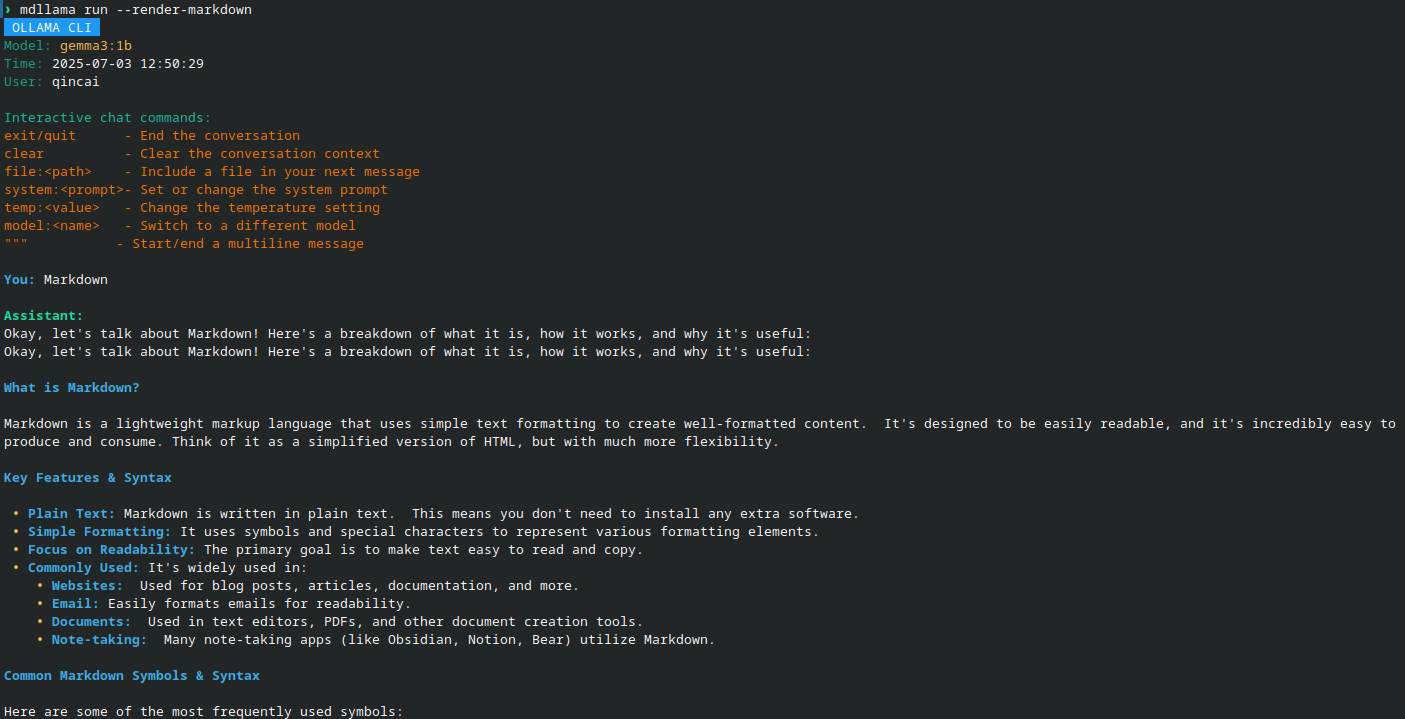
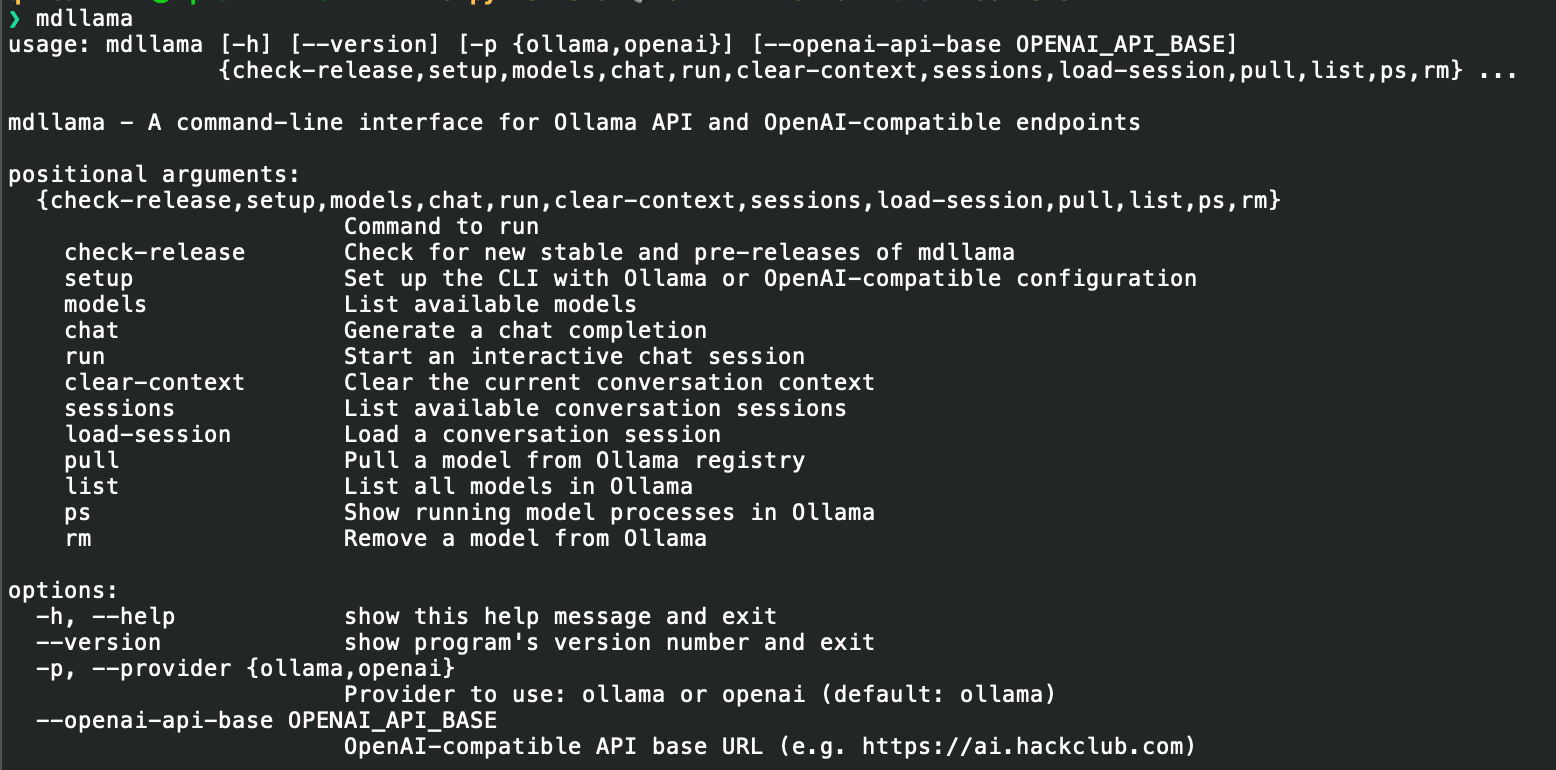
Help
Interactive Commands
When using mdllama run for interactive chat, you have access to special commands:
See man(1) mdllama for details.
man 1 mdllama
OpenAI and Provider Support
Supported Providers
- Ollama: Local models running on your machine
- OpenAI: Official OpenAI API (GPT-3.5, GPT-4, etc.)
- OpenAI-compatible: Any API that follows OpenAI's format (I like Groq, so use it! https://groq.com)
Setup Instructions
For Ollama (Default)
mdllama setup
# Or specify explicitly
mdllama setup --provider ollama
For OpenAI
mdllama setup --provider openai
# Will prompt for your OpenAI API key
For OpenAI-Compatible APIs
mdllama setup --provider openai --openai-api-base https://ai.hackclub.com
# Then provide your API key when prompted
Usage Examples
# Use with OpenAI
mdllama chat --provider openai "Explain quantum computing"

# Use with specific model and provider
mdllama run --provider openai --model gpt-4

# Interactive session with streaming
mdllama run --provider openai --stream=true --render-markdown
Live Demo
Configure the demo endpoint used by mdllama by running the setup flow and entering the API credentials below when prompted.
mdllama setup -p openai --openai-api-base https://ai.qincai.xyz
When prompted, provide the following values:
- API key:
sk-proxy-7b8c9d0e1f2a3b4c5d6e7f8a9b0c1d2e
After setup you can run the CLI as usual, for example:
mdllama run -p openai
So, try it out and see how it works!
Installation
Install using package manager (recommended, supported method)
Debian/Ubuntu Installation
-
Add the PPA to your sources list:
echo 'deb [trusted=yes] https://packages.qincai.xyz/debian stable main' | sudo tee /etc/apt/sources.list.d/qincai-ppa.list
sudo apt update
-
Install mdllama:
sudo apt install python3-mdllama
Fedora Installation
-
Download the latest RPM from: https://packages.qincai.xyz/fedora/
Or, to install directly:
sudo dnf install https://packages.qincai.xyz/fedora/mdllama-<version>.noarch.rpm
Replace
<version>with the latest version number. -
(Optional, highly recommended) To enable as a repository for updates, create
/etc/yum.repos.d/qincai-ppa.repo:[qincai-ppa] name=Raymont's Personal RPMs baseurl=https://packages.qincai.xyz/fedora/ enabled=1 metadata_expire=0 gpgcheck=0
Then install with:
sudo dnf install mdllama
3, Install the ollama library from pip:
pip install ollama
You can also install it globally with:
sudo pip install ollama
PyPI Installation (Cross-Platform)
Install via pip (recommended for Windows/macOS and Python virtual environments):
pip install mdllama
Traditional Bash Script Installation (Linux)
To install mdllama using the traditional bash script, run:
bash <(curl -fsSL https://raw.githubusercontent.com/QinCai-rui/mdllama/refs/heads/main/install.sh)
To uninstall mdllama, run:
bash <(curl -fsSL https://raw.githubusercontent.com/QinCai-rui/mdllama/refs/heads/main/uninstall.sh)
License
This project is licensed under the GNU General Public License v3.0. See the LICENSE file for details.
1 maintainer

Metadata
1 maintainer
Release files for mdllama 4.2.5
For a detailed explanation of source distributions (sdists) and built distributions (wheels), please see the package formats documentation.
Source distribution (sdist)
| File | Size | Uploaded | |
|---|---|---|---|
| mdllama-4.2.5.tar.gz | 47.5 kB | Details |
Built distribution (wheel)
| File | Interpreter | ABI | Platform | Reset |
|---|---|---|---|---|
| mdllama-4.2.5-py3-none-any.whl | Python 3 | none | any | Details |
Total release size: 98.7 kB
Release files / mdllama-4.2.5.tar.gz
| Download URL | mdllama-4.2.5.tar.gz |
|---|---|
| Size | 47.5 kB |
| Tags | Source |
|
SHA-256 checksum How to use checksums |
bbb08bf68de8f9dba3cab0cb274845638881141f71837437a14373a1674635c8
|
|
BLAKE2b-256 checksum How to use checksums |
d5de08389ced5bbd9fbc341e7f4333354cdc0e5878e3ea2a1d3976a4c0e8a519
|
| Upload date | |
|
Uploaded using Trusted Publishing? What is trusted publishing? |
Yes |
| Uploaded via |
twine/6.1.0 CPython/3.13.7
|
Provenance
Provenance describes where a file came from. On PyPI, provenance is shared via attestations, which provide a verifiable record of the build or publishing details. View details, limitations and caveats.


PyPI Publish Attestation
PyPI verified that this artifact, at this checksum, originated from the publisher listed below.
Signed by GitHub Actions, verified by PyPI on Sep 15, 2025.
Transparency logRelease files / mdllama-4.2.5-py3-none-any.whl
| Download URL | mdllama-4.2.5-py3-none-any.whl |
|---|---|
| Size | 51.2 kB |
| Tags | Python 3 |
|
SHA-256 checksum How to use checksums |
f7d651f9f8680075a0e90d1e3fbe9980eac56d02ae64e78e67288be62f819900
|
|
BLAKE2b-256 checksum How to use checksums |
0903e2a81a66becbfeb8b7e613db0cd524f70acbfc9eb99de43ae9b994cd94ed
|
| Upload date | |
|
Uploaded using Trusted Publishing? What is trusted publishing? |
Yes |
| Uploaded via |
twine/6.1.0 CPython/3.13.7
|
Provenance
Provenance describes where a file came from. On PyPI, provenance is shared via attestations, which provide a verifiable record of the build or publishing details. View details, limitations and caveats.
PyPI Publish Attestation
PyPI verified that this artifact, at this checksum, originated from the publisher listed below.
Signed by GitHub Actions, verified by PyPI on Sep 15, 2025.
Transparency log













