
A command-line interface for Ollama API

Project description
mdllama



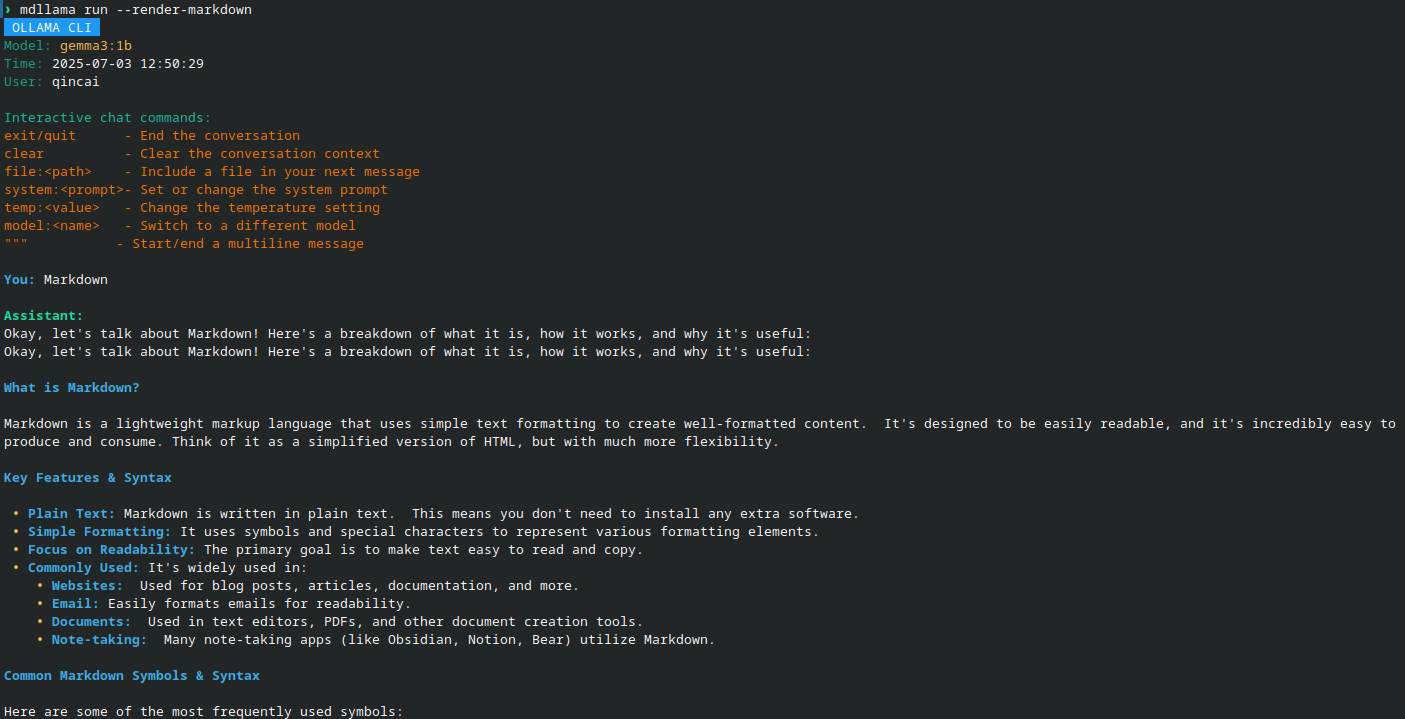
A CLI tool that lets you chat with Ollama models right from your terminal, with built-in Markdown rendering.
mdllama makes it easy to interact with Ollama's AI models directly from your command line, meanwhile providing you with real-time Markdown rendering
Features
- Chat with Ollama models from the terminal
- Built-in Markdown rendering
- Simple installation and removal (see below)
Screenshots
Chat Interface
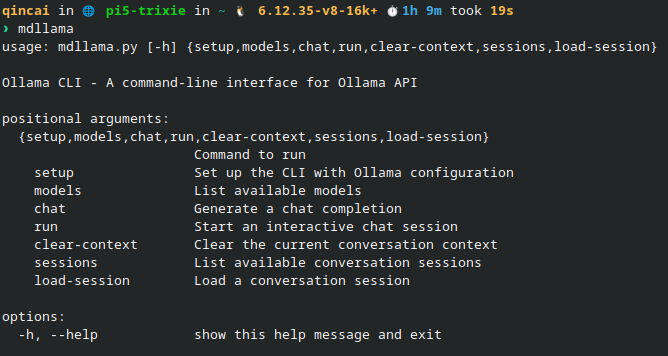
Help
Live Demo
Go to this mdllama demo to try it out live in your browser. The API key is 9c334d5a0863984b641b1375a850fb5d
[!NOTE] Try asking the model to give you some markdown-formatted text, like:
Give me a markdown-formatted text about the history of AI.
So try it out and see how it works!
Installation
Install using package manager (recommended)
Debian/Ubuntu Installation
-
Add the PPA to your sources list:
echo 'deb [trusted=yes] https://packages.qincai.xyz/debian stable main' | sudo tee /etc/apt/sources.list.d/qincai-ppa.list
sudo apt update
-
Install mdllama:
sudo apt install python3-mdllama
Fedora Installation
-
Download the latest RPM from: https://packages.qincai.xyz/fedora/
Or, to install directly:
sudo dnf install https://packages.qincai.xyz/fedora/mdllama-<version>.noarch.rpm
Replace
<version>with the latest version number. -
(Optional, highly recommended) To enable as a repository for updates, create
/etc/yum.repos.d/qincai-ppa.repo:[qincai-ppa] name=Raymont's Personal RPMs baseurl=https://packages.qincai.xyz/fedora/ enabled=1 metadata_expire=0 gpgcheck=0
Then install with:
sudo dnf install mdllama
3, Install the ollama library from pip:
pip install ollama
You can also install it globally with:
sudo pip install ollama
[!NOTE] The
ollamalibrary is not installed by default in the RPM package since there is no systemollamapackage avaliable (python3-ollama). You need to install it manually using pip in order to usemdllamawith Ollama models.
Traditional Bash Script Installation (Linux)
To install mdllama using the traditional bash script, run:
bash <(curl -fsSL https://raw.githubusercontent.com/QinCai-rui/mdllama/refs/heads/main/install.sh)
To uninstall mdllama, run:
bash <(curl -fsSL https://raw.githubusercontent.com/QinCai-rui/mdllama/refs/heads/main/uninstall.sh)
Windows & macOS Installation
Install via pip (recommended for Windows/macOS):
pip install mdllama
License
This project is licensed under the GNU General Public License v3.0. See the LICENSE file for details.
Release history Release notifications | RSS feed


Download files
Download the file for your platform. If you're not sure which to choose, learn more about installing packages.
Source Distribution
Built Distribution
Filter files by name, interpreter, ABI, and platform.
If you're not sure about the file name format, learn more about wheel file names.
Copy a direct link to the current filters
File details
Details for the file mdllama-3.0.6.tar.gz.
File metadata
- Download URL: mdllama-3.0.6.tar.gz
- Upload date:
- Size: 28.7 kB
- Tags: Source
- Uploaded using Trusted Publishing? Yes
- Uploaded via: twine/6.1.0 CPython/3.12.9
File hashes
| Algorithm | Hash digest | |
|---|---|---|
| SHA256 |
a88842d9b98bdb9a7f859d87097be044a4375326d0e36ae76b4fd239e3aa3ccb
|
|
| MD5 |
1dba8619d34a45c9b7c4e9b77e8d3957
|
|
| BLAKE2b-256 |
fa2471e5a3876e2de48b5404ebf63379500557600f46b3a4696d2ae112973520
|
Provenance
The following attestation bundles were made for mdllama-3.0.6.tar.gz:
Publisher:
publish-to-pypi.yml on QinCai-rui/mdllama
-
Statement:
-
Statement type:
https://in-toto.io/Statement/v1 -
Predicate type:
https://docs.pypi.org/attestations/publish/v1 -
Subject name:
mdllama-3.0.6.tar.gz -
Subject digest:
a88842d9b98bdb9a7f859d87097be044a4375326d0e36ae76b4fd239e3aa3ccb - Sigstore transparency entry: 274408632
- Sigstore integration time:
-
Permalink:
QinCai-rui/mdllama@a0df472960b91d6a34937b3084bfc5b3e7381356 -
Branch / Tag:
refs/heads/main - Owner: https://github.com/QinCai-rui
-
Access:
public
-
Token Issuer:
https://token.actions.githubusercontent.com -
Runner Environment:
github-hosted -
Publication workflow:
publish-to-pypi.yml@a0df472960b91d6a34937b3084bfc5b3e7381356 -
Trigger Event:
workflow_run
-
Statement type:
File details
Details for the file mdllama-3.0.6-py3-none-any.whl.
File metadata
- Download URL: mdllama-3.0.6-py3-none-any.whl
- Upload date:
- Size: 31.1 kB
- Tags: Python 3
- Uploaded using Trusted Publishing? Yes
- Uploaded via: twine/6.1.0 CPython/3.12.9
File hashes
| Algorithm | Hash digest | |
|---|---|---|
| SHA256 |
999bc8a423b46b3d6544869c1c66e2e854561210119fbaa5db40b23017eec981
|
|
| MD5 |
31de217f28b2848528bf2ab4cbe49743
|
|
| BLAKE2b-256 |
6176da3ad5dae1c40835713f5b8b2063bfe7098ba719c424004dc3ecc9353f4a
|
Provenance
The following attestation bundles were made for mdllama-3.0.6-py3-none-any.whl:
Publisher:
publish-to-pypi.yml on QinCai-rui/mdllama
-
Statement:
-
Statement type:
https://in-toto.io/Statement/v1 -
Predicate type:
https://docs.pypi.org/attestations/publish/v1 -
Subject name:
mdllama-3.0.6-py3-none-any.whl -
Subject digest:
999bc8a423b46b3d6544869c1c66e2e854561210119fbaa5db40b23017eec981 - Sigstore transparency entry: 274408637
- Sigstore integration time:
-
Permalink:
QinCai-rui/mdllama@a0df472960b91d6a34937b3084bfc5b3e7381356 -
Branch / Tag:
refs/heads/main - Owner: https://github.com/QinCai-rui
-
Access:
public
-
Token Issuer:
https://token.actions.githubusercontent.com -
Runner Environment:
github-hosted -
Publication workflow:
publish-to-pypi.yml@a0df472960b91d6a34937b3084bfc5b3e7381356 -
Trigger Event:
workflow_run
-
Statement type:






