
A command-line interface for Ollama API

Project description
mdllama




A CLI tool that lets you chat with Ollama and OpenAI models right from your terminal, with built-in Markdown rendering.
mdllama makes it easy to interact with AI models directly from your command line, meanwhile providing you with real-time Markdown rendering.
Features
Core Functionality
- Multi-provider support: Chat with both Ollama and OpenAI-compatible models from the terminal
- Built-in Markdown rendering: Rich text display with proper formatting
- Interactive chat sessions: Full conversation management with context
- Streaming responses: Real-time response generation
Web Integration/access
- Web search: Search the web using DuckDuckGo directly from chat
- Smart search queries: AI-powered search query optimization with spelling correction
- Website content fetching: Extract and include content from any website in your conversations
- Multiple search modes:
search:query- Basic web search with results added to contextsearchask:query|question- Search and ask a specific question about resultswebsearch:question- AI-generated search with automatic query optimizationsite:url- Fetch content from a specific website
Session Management
- Conversation history: Save and restore chat sessions with timestamps
- Sessions: Continue conversations across sessions
- Context: Clear context, load previous sessions, and manage conversation flow
- Multiple session support: Switch between different conversations
File Integration
- Local file support: Include files from your filesystem in conversations (up to 2MB per file)
- Multiple file formats: Support for text files, code, documentation, and more
- Context-aware processing: Files are integrated into conversation contexxt
TODO--------------------------------------------------------------|
Screenshots
Chat Interface
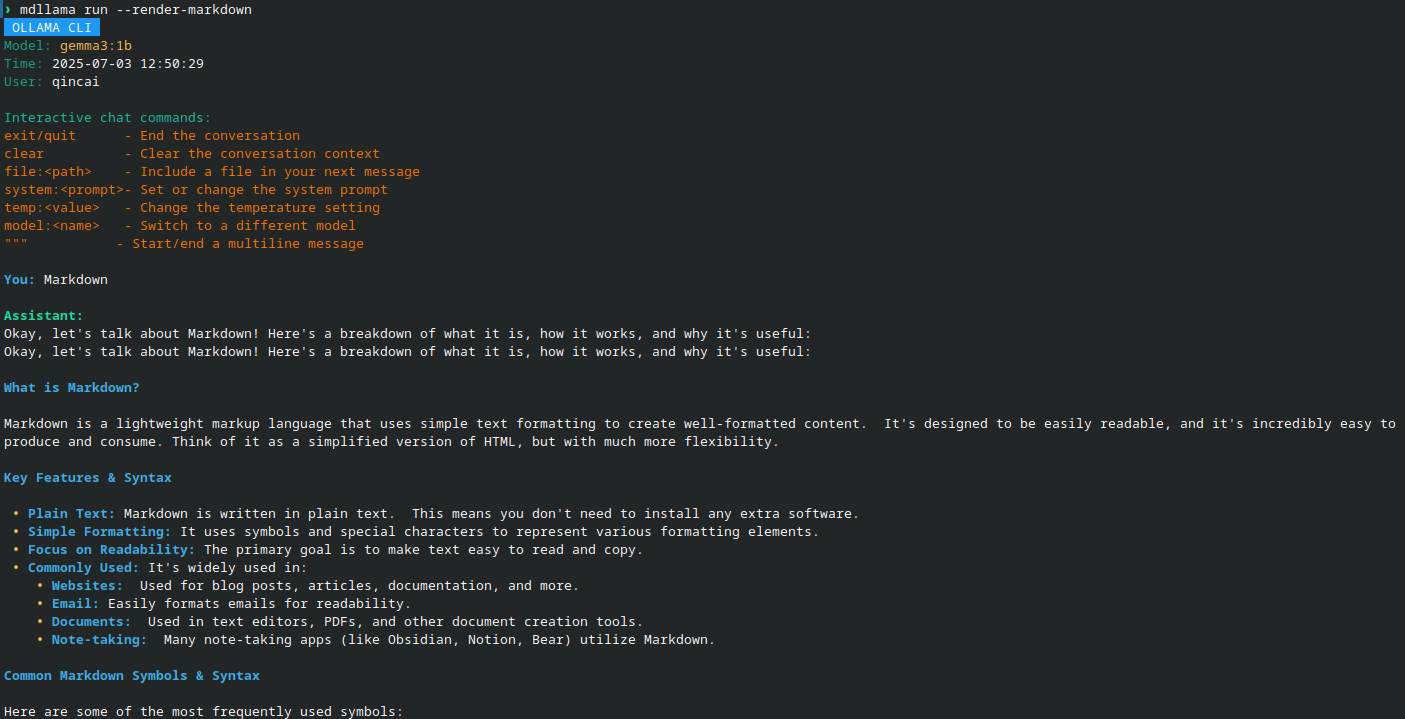
Help
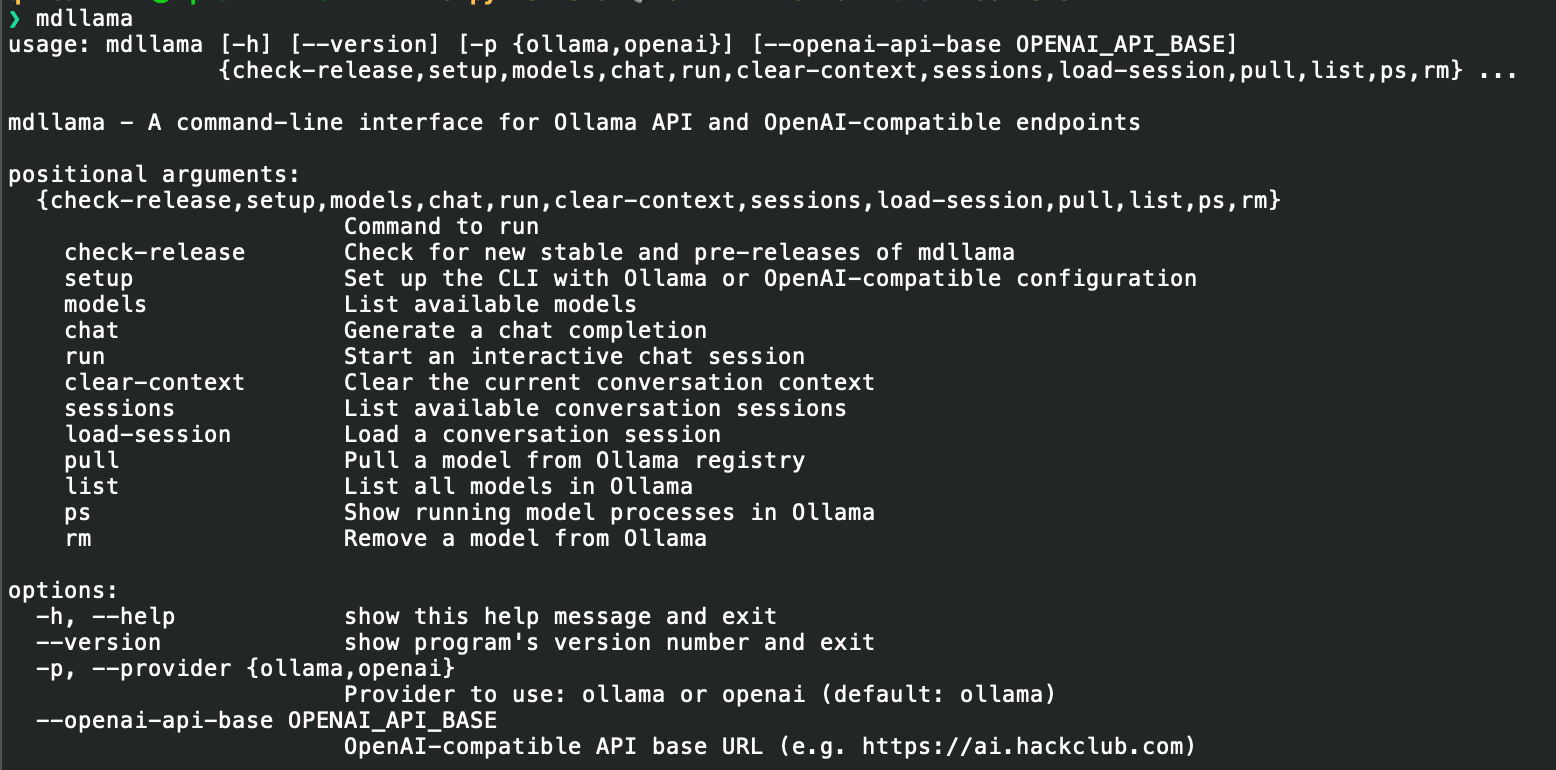
Interactive Commands
When using mdllama run for interactive chat, you have access to special commands:
Basic Commands
exitorquit- End the interactive sessionclear- Clear the current conversation contextmodels- Show numbered list of available models for selection"""- Start/end multiline input mode for longer messages
File and Content Integration
file:path/to/file- Include local file content in your next messagesite:url- Fetch and include website content in conversation contextsystem:prompt- Set or change the system prompt (use without prompt to clear)
Web Search Commands
search:query- Search the web and add results to conversation contextsearchask:query|question- Search for specific query and ask a question about resultswebsearch:question- Let AI generate optimized search query and get results
Runtime Controls
temp:value- Change temperature setting (0.0 to 1.0)model:name- Switch to different model (or show list if name omitted)
Command Line Options
mdllama search "query"- Standalone web search commandmdllama sessions- List all saved conversation sessionsmdllama load-session session_id- Load a previous conversationmdllama clear-context- Clear current conversation contextmdllama models- List available modelsmdllama pull model_name- Download a model from Ollama registry
OpenAI and Provider Support
Supported Providers
- Ollama: Local models running on your machine
- OpenAI: Official OpenAI API (GPT-3.5, GPT-4, etc.)
- OpenAI-compatible: Any API that follows OpenAI's format (Hackclub AI, LocalAI, etc.)
Setup Instructions
For Ollama (Default)
mdllama setup
# Or specify explicitly
mdllama setup --provider ollama
For OpenAI
mdllama setup --provider openai
# Will prompt for your OpenAI API key
For OpenAI-Compatible APIs
mdllama setup --provider openai --openai-api-base https://ai.hackclub.com
# Then provide your API key when prompted
Usage Examples
# Use with OpenAI
mdllama chat --provider openai "Explain quantum computing"

# Use with specific model and provider
mdllama run --provider openai --model gpt-4

# Interactive session with streaming
mdllama run --provider openai --stream --render-markdown
Live Demo
Go to this mdllama demo to try it out live in your browser. The API key is 9c334d5a0863984b641b1375a850fb5d
[!NOTE] Try asking the model to give you some markdown-formatted text, or test the web search features:
Give me a markdown-formatted text about the history of AI.search:Python 3.13(web search)site:python.org(fetch website content)websearch:What are the latest Python features?(AI-powered search)
So try it out and see how it works!
Installation
Install using package manager (recommended)
Debian/Ubuntu Installation
-
Add the PPA to your sources list:
echo 'deb [trusted=yes] https://packages.qincai.xyz/debian stable main' | sudo tee /etc/apt/sources.list.d/qincai-ppa.list
sudo apt update
-
Install mdllama:
sudo apt install python3-mdllama
Fedora Installation
-
Download the latest RPM from: https://packages.qincai.xyz/fedora/
Or, to install directly:
sudo dnf install https://packages.qincai.xyz/fedora/mdllama-<version>.noarch.rpm
Replace
<version>with the latest version number. -
(Optional, highly recommended) To enable as a repository for updates, create
/etc/yum.repos.d/qincai-ppa.repo:[qincai-ppa] name=Raymont's Personal RPMs baseurl=https://packages.qincai.xyz/fedora/ enabled=1 metadata_expire=0 gpgcheck=0
Then install with:
sudo dnf install mdllama
3, Install the ollama library from pip:
pip install ollama
You can also install it globally with:
sudo pip install ollama
[!NOTE]
TheThis issue has been resolved by including a post-installation script for RPM packages that automatically installs theollamalibrary is not installed by default in the RPM package since there is no systemollamapackage avaliable (python3-ollama). You need to install it manually using pip in order to usemdllamawith Ollama models.ollamalibrary using pip.
PyPI Installation (Cross-Platform)
Install via pip (recommended for Windows/macOS and Python virtual environments):
pip install mdllama
Traditional Bash Script Installation (Linux)
To install mdllama using the traditional bash script, run:
bash <(curl -fsSL https://raw.githubusercontent.com/QinCai-rui/mdllama/refs/heads/main/install.sh)
To uninstall mdllama, run:
bash <(curl -fsSL https://raw.githubusercontent.com/QinCai-rui/mdllama/refs/heads/main/uninstall.sh)
License
This project is licensed under the GNU General Public License v3.0. See the LICENSE file for details.
Release history Release notifications | RSS feed


Download files
Download the file for your platform. If you're not sure which to choose, learn more about installing packages.
Source Distribution
Built Distribution
Filter files by name, interpreter, ABI, and platform.
If you're not sure about the file name format, learn more about wheel file names.
Copy a direct link to the current filters
File details
Details for the file mdllama-4.2.3.tar.gz.
File metadata
- Download URL: mdllama-4.2.3.tar.gz
- Upload date:
- Size: 48.9 kB
- Tags: Source
- Uploaded using Trusted Publishing? Yes
- Uploaded via: twine/6.1.0 CPython/3.12.9
File hashes
| Algorithm | Hash digest | |
|---|---|---|
| SHA256 |
37ca0ffe77d7660718bc82f0583f9c5ca8ed1cde32c90eb1fbe7375fd2a7ff52
|
|
| MD5 |
8a47ae267d1ca332409e82ab1879d2c2
|
|
| BLAKE2b-256 |
2de2728faed556076a26f3cb291b7985978465456c96896e45ac4401f8adcea7
|
Provenance
The following attestation bundles were made for mdllama-4.2.3.tar.gz:
Publisher:
publish-to-pypi.yml on QinCai-rui/mdllama
-
Statement:
-
Statement type:
https://in-toto.io/Statement/v1 -
Predicate type:
https://docs.pypi.org/attestations/publish/v1 -
Subject name:
mdllama-4.2.3.tar.gz -
Subject digest:
37ca0ffe77d7660718bc82f0583f9c5ca8ed1cde32c90eb1fbe7375fd2a7ff52 - Sigstore transparency entry: 383691736
- Sigstore integration time:
-
Permalink:
QinCai-rui/mdllama@7195710eb52f990eb3d235c254eac784ca2e2598 -
Branch / Tag:
refs/heads/main - Owner: https://github.com/QinCai-rui
-
Access:
public
-
Token Issuer:
https://token.actions.githubusercontent.com -
Runner Environment:
github-hosted -
Publication workflow:
publish-to-pypi.yml@7195710eb52f990eb3d235c254eac784ca2e2598 -
Trigger Event:
workflow_run
-
Statement type:
File details
Details for the file mdllama-4.2.3-py3-none-any.whl.
File metadata
- Download URL: mdllama-4.2.3-py3-none-any.whl
- Upload date:
- Size: 51.9 kB
- Tags: Python 3
- Uploaded using Trusted Publishing? Yes
- Uploaded via: twine/6.1.0 CPython/3.12.9
File hashes
| Algorithm | Hash digest | |
|---|---|---|
| SHA256 |
eec8a1eac1415e96aa5f9a6f10162079238402f224602432891843de436fb106
|
|
| MD5 |
077a61c18fdcf7823f5c41a98c686558
|
|
| BLAKE2b-256 |
9e72131c68b2b919f40424ade7c5f4de2ebcea746ec09cb47825f56c1748753f
|
Provenance
The following attestation bundles were made for mdllama-4.2.3-py3-none-any.whl:
Publisher:
publish-to-pypi.yml on QinCai-rui/mdllama
-
Statement:
-
Statement type:
https://in-toto.io/Statement/v1 -
Predicate type:
https://docs.pypi.org/attestations/publish/v1 -
Subject name:
mdllama-4.2.3-py3-none-any.whl -
Subject digest:
eec8a1eac1415e96aa5f9a6f10162079238402f224602432891843de436fb106 - Sigstore transparency entry: 383691756
- Sigstore integration time:
-
Permalink:
QinCai-rui/mdllama@7195710eb52f990eb3d235c254eac784ca2e2598 -
Branch / Tag:
refs/heads/main - Owner: https://github.com/QinCai-rui
-
Access:
public
-
Token Issuer:
https://token.actions.githubusercontent.com -
Runner Environment:
github-hosted -
Publication workflow:
publish-to-pypi.yml@7195710eb52f990eb3d235c254eac784ca2e2598 -
Trigger Event:
workflow_run
-
Statement type:






