
This release is a pre-release and may not be stable for production use.

Meridian


Deploy it right. Share it easily.
One command turns a fresh VPS into a hardened self-hosted VPN server, with a built-in web panel and a connection page for each person.
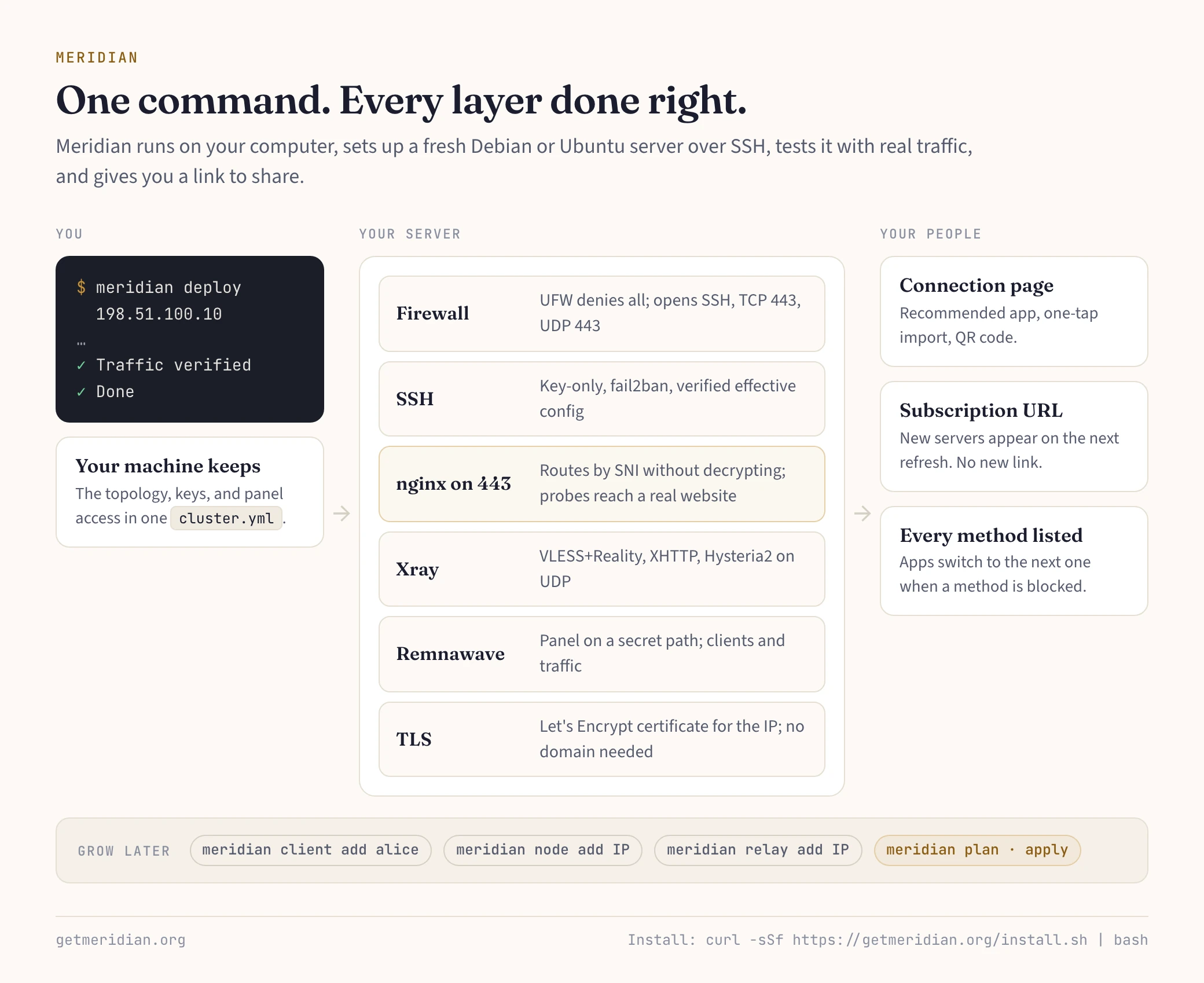
A VPN that connects can still give itself away: an open admin port, a self-signed certificate, a container that skips the firewall. Meridian sets up every layer on a fresh Debian or Ubuntu VPS, tests the server with real traffic, and gives you two interfaces: a connection page for each person who connects and a web panel to manage people and servers from any browser. When an address gets blocked, add a relay, turn on domain mode, or move an exit; apps pick up the change on their next refresh.

Watch a full meridian setup, start to finish (3½ min) · download the MP4 · по-русски
Web panel and connection pages
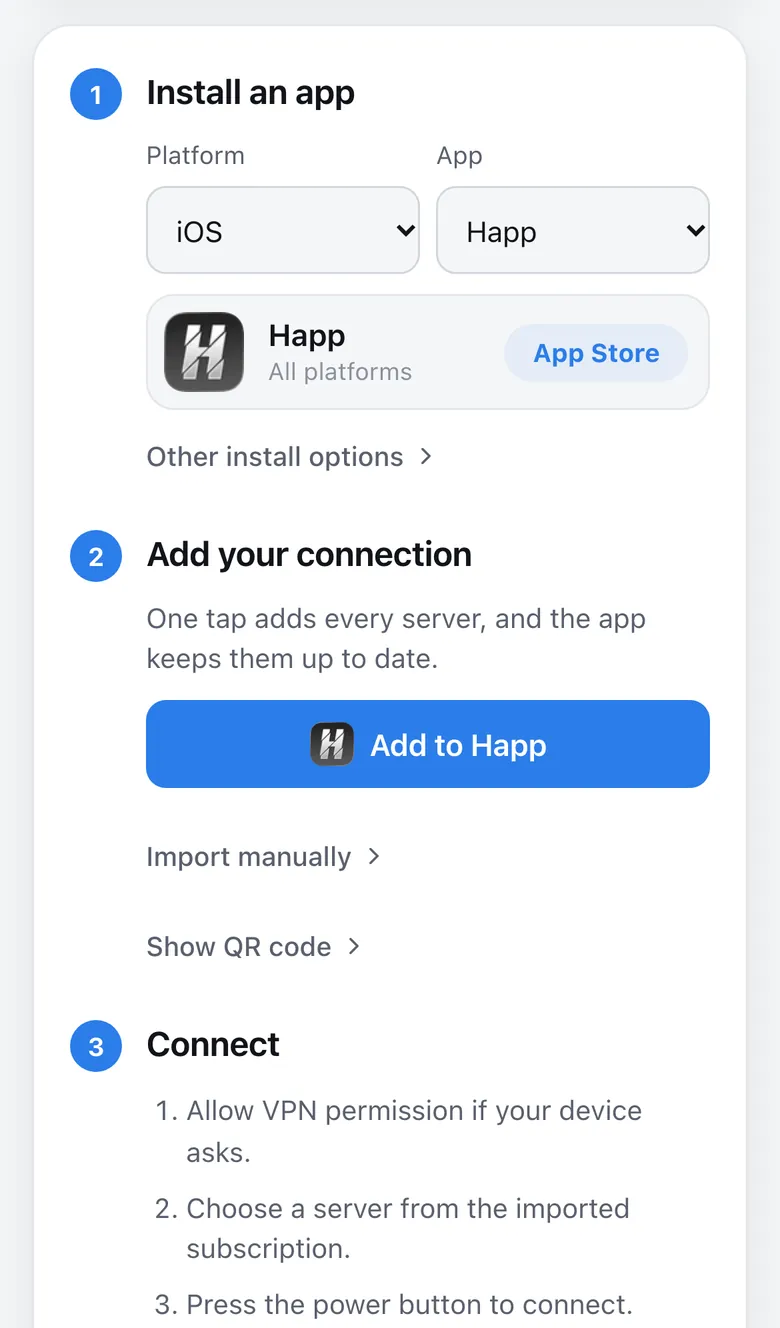
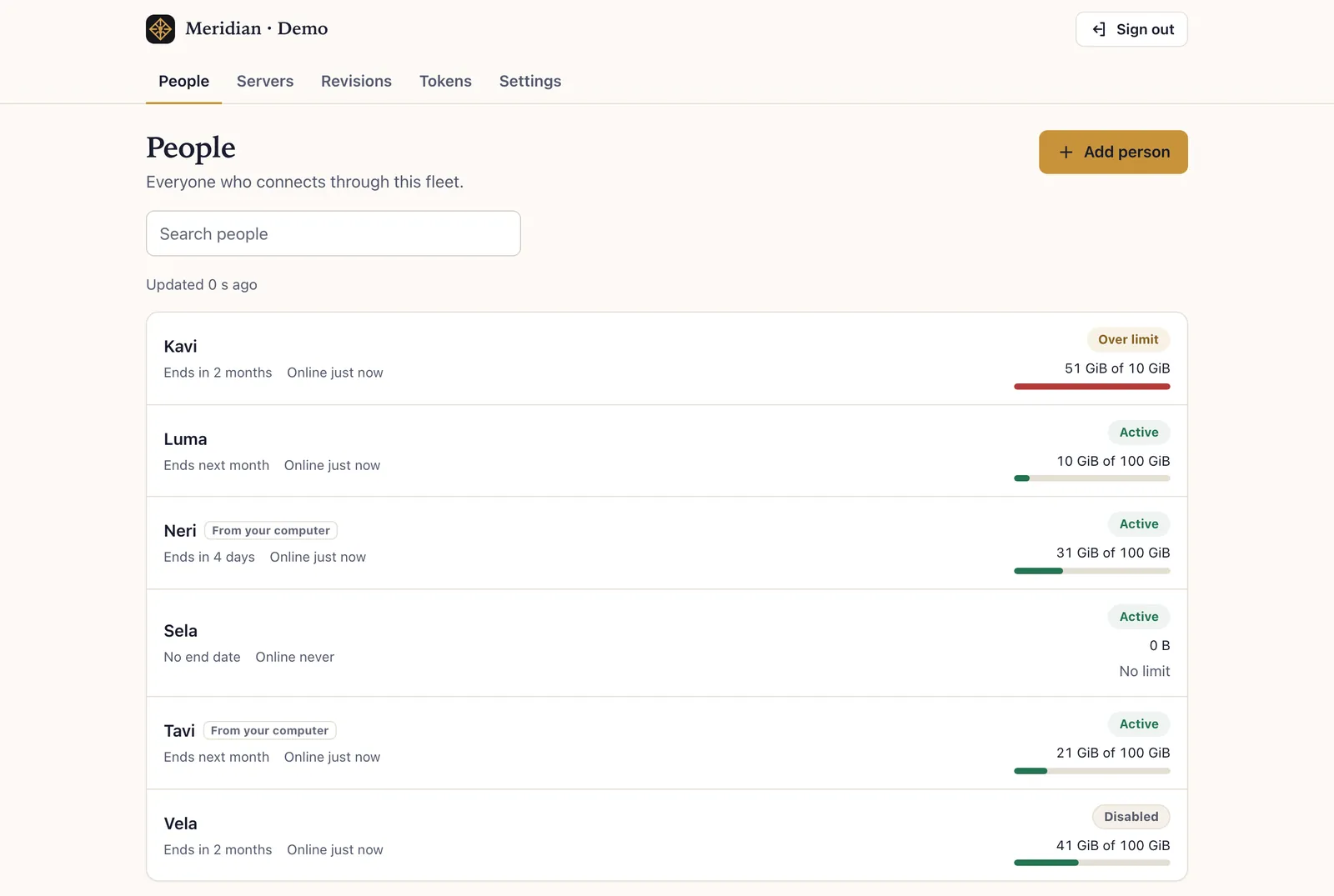
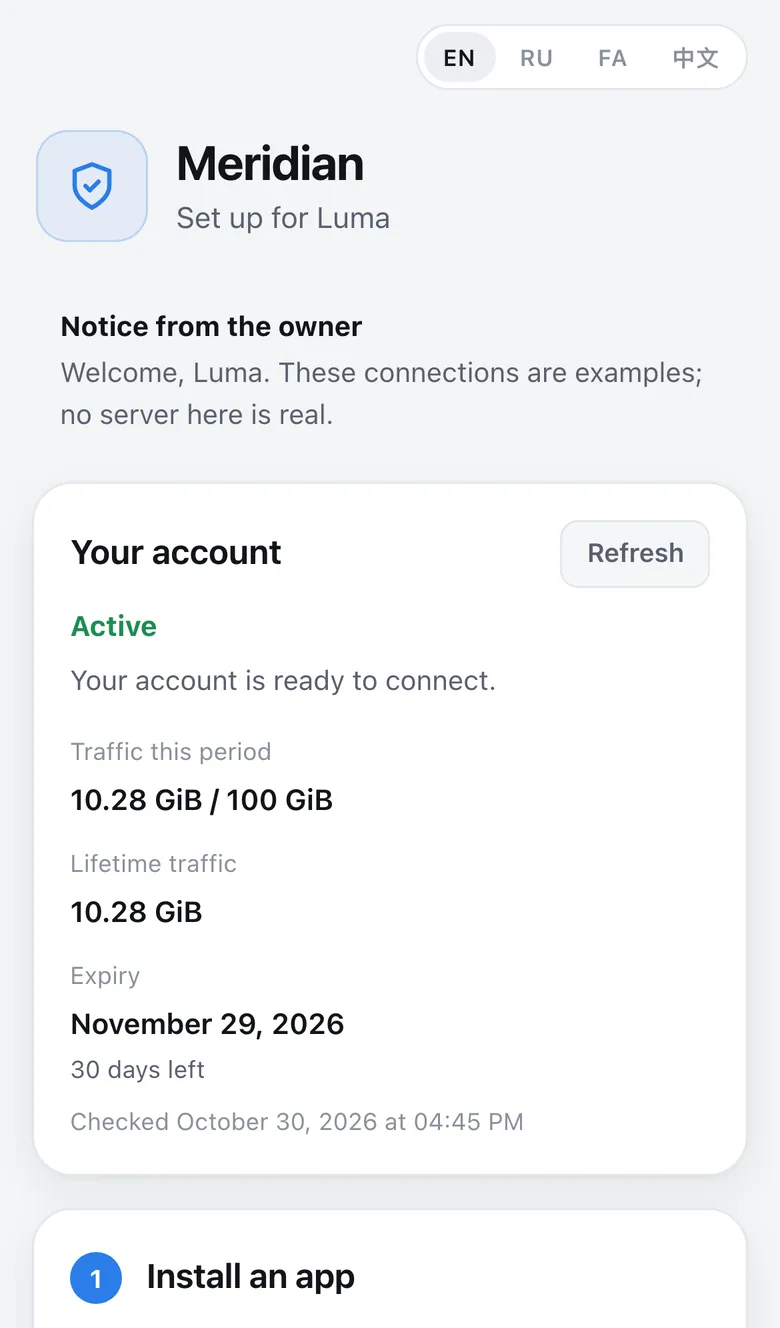
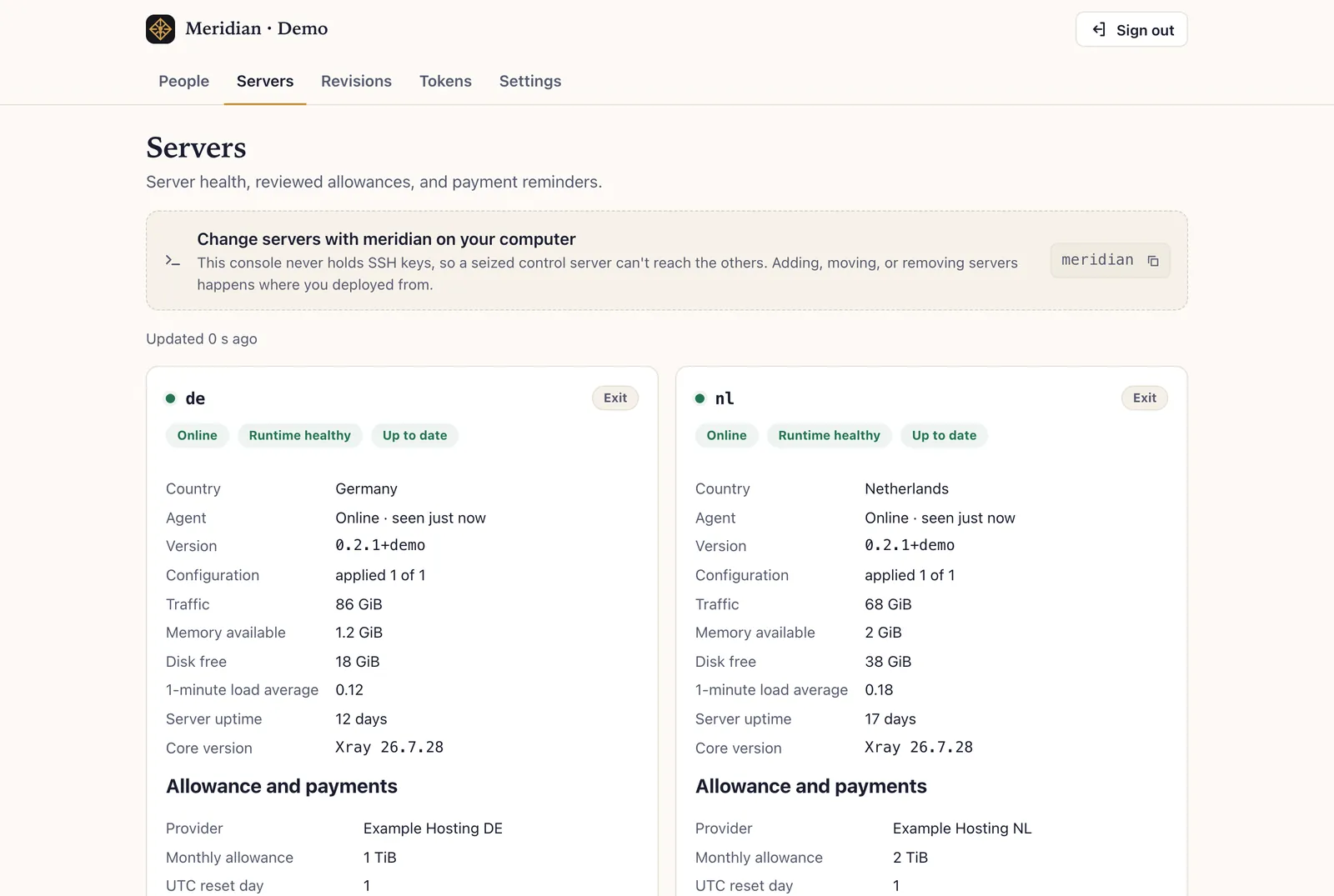
Each person gets a connection page at their subscription URL; you get a self-hosted web panel (owner console) on the control server. Both demos below run in your browser on invented data: click around, nothing is real and nothing is sent anywhere.
 |
 |
 |
 |
Try the connection page · Try the web panel
- Web panel (
meridian panel): runs on the control server behind a secret HTTPS path, protected by a password and optional authenticator code, with a strict CSP and no external requests. Add people, share links and QR codes, set expiry dates, traffic limits, and device caps, keep private notes and tags, reissue links, remove access, or cut off active sessions. Check server health, traffic, and monthly allowances, set the default page language and a notice for everyone, issue scoped API tokens, and choose privacy levels. Server and routing topology stays reviewed in the CLI. - Connection page: served at every person's subscription URL in English, Russian, Persian, and Chinese. In a browser it shows recommended apps for their device, one-tap import, a QR code, account status, traffic, and plain help; in a VPN app the same URL delivers native profiles (
Xray JSON,Mihomo,sing-box, orBase64).
Install
macOS or Linux (on Windows, use WSL):
curl -sSf https://getmeridian.org/install.sh | bash
To install Meridian 4 from PyPI, run uv tool install 'meridian-vpn>=4.0.0b0,<5' or pipx install 'meridian-vpn>=4.0.0b0,<5'. This range allows 4.x betas and stable releases. For the latest stable release regardless of major version, use uv tool install meridian-vpn or pipx install meridian-vpn. The commands below are for Meridian 4.
You need a fresh Debian or Ubuntu VPS you can reach over SSH with a key, as root or a user with passwordless sudo. Meridian runs on your computer, not on the server.
Quick start
meridian setup
The guided wizard asks for your server's address, a camouflage site (it suggests ones that answer from the server's network), an optional domain, and the people who will connect. It shows a review before it changes anything, and if it is interrupted, running it again resumes. For one server and no questions, meridian deploy 198.51.100.10 --client-name alice does the same in one line.
When it is ready, send each person their connection page link. They open it, install the recommended app, and tap once to connect. Then:
meridian panel                     # web panel URL and a one-time setup link
meridian client add bob carol      # or add people from the CLI
meridian client show bob           # print their link and status
meridian test                      # real traffic through the delivered subscription
Re-run deploy at any time: keys, paths, and clients are kept. An interrupted setup resumes where it stopped.
What each server gets
- Methods: VLESS+Reality and XHTTP on TCP 443, Hysteria2 on UDP 443 with salamander. Every subscription lists all of them (with Chrome and Firefox TLS fingerprints), and capable apps switch on their own.
- Camouflage: nginx routes TCP 443 by SNI without decrypting. A probe without the key reaches a real website and gets its genuine certificate. Meridian looks for the target on the server's own network:
deploypicks one,setupsuggests them. - Hardening: key-only SSH, fail2ban, BBR, UFW opening only SSH and 443, and a Let's Encrypt certificate for the IP. No domain needed.
- Control service and web panel: Meridian's own, on a secret HTTPS path: users, subscriptions, and the web panel. Shared links never reveal the path, and each server's agent dials out to it, so nodes open no extra ports. No Docker, no third-party panel.
- Privacy and backups: the control service stores no client IPs or connection logs, and Meridian disables request logging on its nginx listeners; device and daily history tracking are opt-in and off by default. The panel shows the last save confirmed by a managing computer. After a panel edit, save an encrypted copy outside the server from Overview or run
meridian backup pull. Keep the recovery key separately. If the control server is lost or seized,meridian restorerebuilds it on another server.
Options worth knowing:
meridian deploy 198.51.100.10 --domain vpn.example.com    # XHTTP + WSS through Cloudflare when the IP is blocked
meridian deploy 198.51.100.10 --display-name "Family VPN" # label on every connection page
meridian deploy 198.51.100.10 --no-geo-block              # allow Russian sites through the VPN (blocked by default)
meridian deploy local                                     # run on the server itself
Grow the fleet
meridian node add 198.51.100.20 --name germany        # another exit
meridian relay add 203.0.113.10 --exit 198.51.100.10  # domestic entry point (Realm TCP forwarder)
meridian route add germany --preset ai --via warp     # route chosen destinations through WARP
meridian node replace EXIT_ID 198.51.100.30           # move a blocked exit, keys and clients included
meridian setup                                        # any shape: relay chains, routing gateways
Every change edits one topology in ~/.config/meridian/cluster.yml. meridian plan shows what would change; meridian apply applies exactly that, with checkpoints, so an interrupted run resumes. Back up that folder and the recovery key (setup and deploy show it once; meridian backup recovery-key makes a new one): together they bring the fleet back on a new machine.
When something breaks
meridian test 198.51.100.10           # which step fails: network, TLS, subscription, or tunnel
meridian test 198.51.100.10 --probe   # the server as a censor sees it (run from inside the censored network)
meridian check                        # server health over SSH
meridian doctor --ai                  # redacted report, ready to paste into an AI chat
IP blocked? Follow the recovery guide. Users can run "Check my connection" on their own page.
Commands
deploy, setup |
Set up one server, or any fleet with the wizard |
panel |
Print the web panel address and a one-time owner setup or reset link |
client add|show|list|set|extend|reset-traffic|devices|reissue|enable|disable|remove |
The people who connect |
node add|list|restart|replace|sni|remove, relay add|list|sni|remove |
Exits and relays |
route add|list|remove, server add|list|set|remove |
Route chosen sites; save servers, allowances, and payment dates |
plan, apply, context list|use|rename|remove |
Review and apply the topology; switch between fleets |
test, probe, check, scan, doctor, logs |
Verify traffic, probe camouflage, inspect health, scan SNI targets, view redacted logs |
fleet status|inventory|history|events|usage|routing|contact|notice|language|upgrade|export|import |
Fleet overview, revisions, client routing, notices, language, upgrades |
privacy, backup, restore, migrate |
Choose what is stored, manage snapshots and the recovery key, rebuild a lost control server, move a Remnawave fleet |
teardown, update, api, help agents |
Remove Meridian from a server, update the CLI, inspect JSON contracts, explain Meridian to an AI agent |
Every command takes --help; most take --json. Full list: CLI reference.
Client apps
| App | Platforms |
|---|---|
| Happ | iOS, Android, Windows, macOS, Linux |
| FlClashX | Android, Windows, macOS, Linux |
| Clash Mi | iOS, Android, Windows, macOS, Linux |
| Throne | Windows, macOS, Linux |
The connection page recommends one for each device and links more.
AI agents
meridian help agents
prints a guide for Claude Code, Codex, Cursor, and other agents: how Meridian works and how to drive it safely (--yes, --json envelopes, exit codes, meridian api contracts). Every docs page is also served as Markdown, indexed at getmeridian.org/llms.txt.
More
- Docs: getmeridian.org · connection page demo · web panel demo · architecture
- Upgrading from 3.x: Meridian 4 replaces 3x-ui with its own control service and is not an in-place upgrade; every user gets a new link. How to move. A fleet on an earlier Meridian 4 release that runs Remnawave moves in place with
meridian migrate, keeping every link. - Security: SECURITY.md covers the threat model, including what Meridian does not protect against.
- Contributing: CONTRIBUTING.md · issues (attach
meridian doctoroutput) - License: MIT
1 maintainer

Metadata
1 maintainer
Release files for meridian-vpn 4.0.0b20
For a detailed explanation of source distributions (sdists) and built distributions (wheels), please see the package formats documentation.
Source distribution (sdist)
| File | Size | Uploaded | Provenance | Actions |
|---|---|---|---|---|
| meridian_vpn-4.0.0b20.tar.gz | 4.3 MB | With provenance | Details for meridian_vpn-4.0.0b20.tar.gz |
Built distribution (wheel)
| File | Interpreter | ABI | Platform | Actions Reset |
|---|---|---|---|---|
| meridian_vpn-4.0.0b20-py3-none-any.whl | Python 3 | none | any | Details for meridian_vpn-4.0.0b20-py3-none-any.whl |
Total release size: 8.8 MB
Release files / meridian_vpn-4.0.0b20.tar.gz
| Download URL | meridian_vpn-4.0.0b20.tar.gz |
|---|---|
| Size | 4.3 MB |
| Tags | Source |
|
SHA-256 checksum How to use checksums |
dde209b70a73cebda1f549c72907a86fd54384e9116a2af82b73806205871595
|
|
BLAKE2b-256 checksum How to use checksums |
be017e974edf4603bfe5d953c6db2c50343be83c87c28f051573a661fe9b99b4
|
| Upload date | |
|
Uploaded using Trusted Publishing? What is trusted publishing? |
Yes |
| Uploaded via |
twine/7.0.0 CPython/3.13.16
|
Provenance
Provenance describes where a file came from. On PyPI, provenance is shared via attestations, which provide a verifiable record of the build or publishing details. View details, limitations and caveats.


PyPI Publish Attestation
PyPI verified that this artifact, at this checksum, originated from the publisher listed below.
Signed by GitHub Actions, verified by PyPI on Nov 21, 2026.
Transparency logRelease files / meridian_vpn-4.0.0b20-py3-none-any.whl
| Download URL | meridian_vpn-4.0.0b20-py3-none-any.whl |
|---|---|
| Size | 4.5 MB |
| Tags | Python 3 |
|
SHA-256 checksum How to use checksums |
c6ff9ca9a749e49face10b10484a766653caf3082280bacdf8caf0844c955b7a
|
|
BLAKE2b-256 checksum How to use checksums |
06c53010a59ae354ec0a3defd694f2ee66f5f931cc821b976c0679d1acaead07
|
| Upload date | |
|
Uploaded using Trusted Publishing? What is trusted publishing? |
Yes |
| Uploaded via |
twine/7.0.0 CPython/3.13.16
|
Provenance
Provenance describes where a file came from. On PyPI, provenance is shared via attestations, which provide a verifiable record of the build or publishing details. View details, limitations and caveats.
PyPI Publish Attestation
PyPI verified that this artifact, at this checksum, originated from the publisher listed below.
Signed by GitHub Actions, verified by PyPI on Nov 21, 2026.
Transparency logSecurity for meridian-vpn 4.0.0b20
Provenance
Provenance describes where a file came from. On PyPI, provenance is shared via attestations, which provide a verifiable record of the build or publishing details. View details, limitations and caveats.
Full provenance
Both files in this release have been uploaded with provenance metadata.
Attestation for meridian_vpn-4.0.0b20.tar.gz
PyPI Publish Attestation
PyPI verified that this artifact, at this checksum, originated from the publisher listed below.
Signed by GitHub Actions, verified by PyPI on Nov 21, 2026.
Transparency logA note on package security
PyPI is a repository for distributing packages, not a service for auditing them. While third-party security researchers and our staff do their best to detect and remove malicious packages, PyPI cannot guarantee the quality, security or suitability of any given package.
To learn more about protecting yourself from malicious actors, visit our package security documentation.














