
MetaUmbra
Genome-level presence inference from metaproteomic peptides
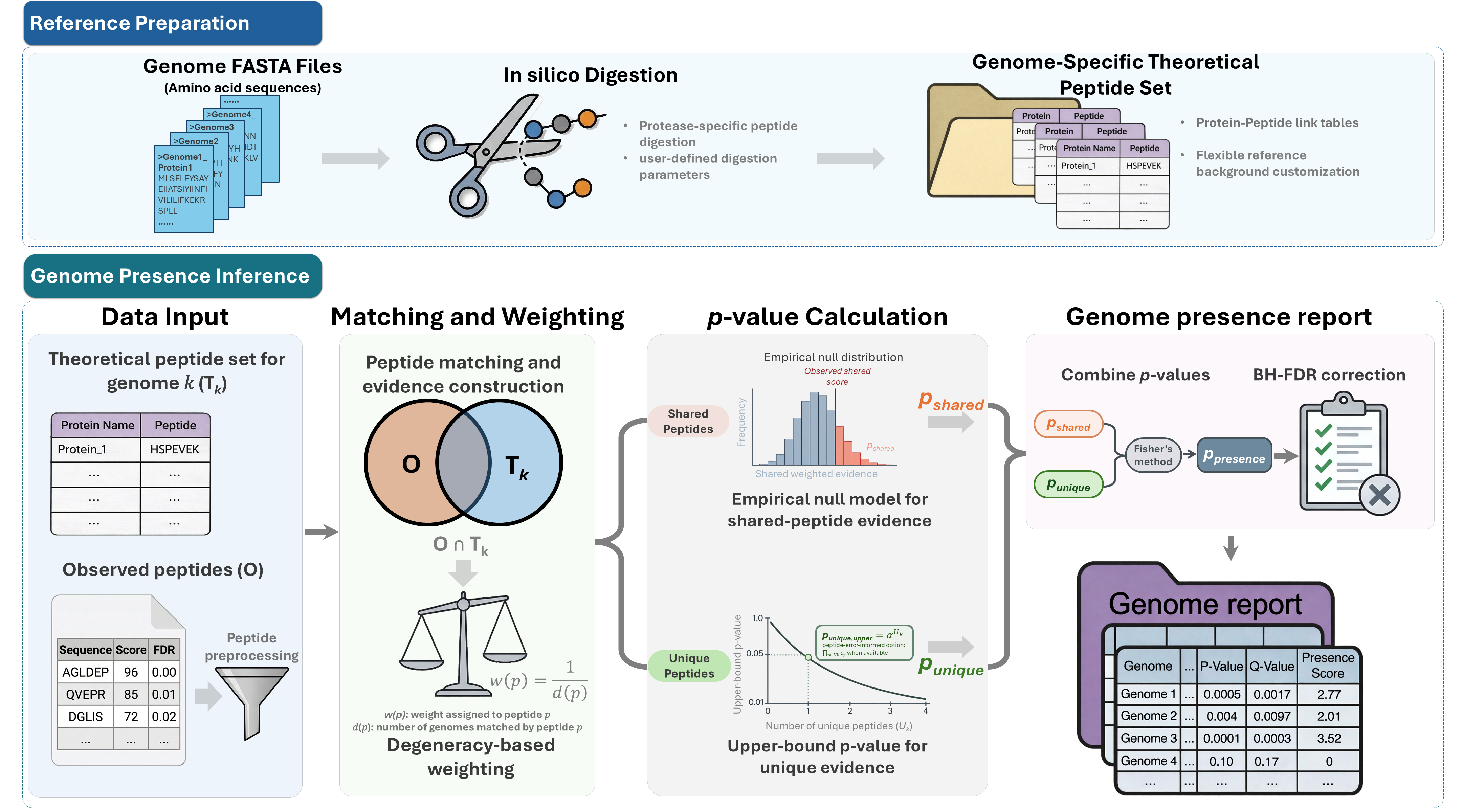
MetaUmbra performs genome-level presence inference from metaproteomic peptide lists. It combines sample-depth-aware genome-unique peptide support with weighted shared peptide evidence to identify statistically supported microbial genomes and generate interpretable presence rankings.
Main features
- Evaluate candidate genome support from metaproteomic peptide tables
- Build genome-specific theoretical peptide references from protein FASTA files
- Support user-defined genome collections, including isolate genomes, strain panels, and MAG catalogs
- Use both unique and shared peptide evidence for genome presence inference
- Calibrate genome-unique peptide counts against sample-specific weak-background genomes by default
- Score multi-sample inputs per sample or user-defined analysis unit without repeated genome digest scans
- Report genome-level p-values, BH-adjusted q-values, and presence scores
- Provide GUI, command-line, and Python workflow support
- Support peptide tables from common metaproteomics workflows such as DIA-NN and MaxQuant
Workflow overview
Installation
MetaUmbra requires Python 3.10 or newer. Installation is available via pip from PyPI.
# Install with all features (GUI, parquet support)
pip install metaumbra[all]
The default GUI extra uses PySide6. To run the GUI with PyQt5 instead, install metaumbra[gui-pyqt5].
or
# Install with core features only
pip install metaumbra
Usage
MetaUmbra can be used through either the graphical interface or the command line.
For a detailed walkthrough, including input formats, CLI examples, output interpretation, and troubleshooting, see the MetaUmbra Usage Guide.
Graphical interface
metaumbra-gui
The GUI supports FASTA digestion, peptide table loading, genome presence scoring, and result export.
Command line
MetaUmbra provides separate commands for the main workflow steps:
metaumbra digest --help
metaumbra score --help
metaumbra extract-parquet --help
A typical workflow is:
metaumbra digest ...
metaumbra score ...
Use metaumbra extract-parquet ... to convert DIA-NN parquet reports to peptide TSV files before scoring.
Input
MetaUmbra requires:
- Protein FASTA files, with one FASTA file per genome
- An observed peptide table containing peptide sequences
Optional inputs include peptide scores, peptide-level error values, decoy flags, and genome lineage annotations.
All scoring uses one analysis-unit workflow. Select --unit-mode all-samples, per-sample, or metadata; each option builds a sample-to-unit assignment and invokes the same per-unit p/q-value engine. The cohort-wide all-samples mode uses a moderately more permissive empirical-background calibration profile, recorded in the run summary, so pooled strong signals do not inflate their own null background.
Output
The requested --output is a unified results directory.
Default output files:
unit_genome_results.tsv: one row peranalysis_unit_idxgenome_id, including q-values and threshold flags.cohort_genome_summary.tsv: recurrence across analysis units.sample_unit_mapping.tsv: the validated sample assignment.genome_selection_manifest.json: the only downstream genome-selection interface.artifacts/: run metadata, logs, caches, and optional diagnostics.
genome_selection_manifest.json uses metaumbra.genome_selection_manifest.v1 and maps every unit to sample_ids, q<=0.05 genomes, and the stricter q<=0.01 subset. Detailed scores stay in unit_genome_results.tsv.
Each scoring run records artifacts/run_parameters.json, run.log, run_status.json, and run_summary.json. Use --export-diagnostics for heavier audit tables under artifacts/diagnostics/.
In the current implementation, peptide presence within an analysis unit is defined as the union of sample-level peptide presence across samples assigned to that unit. Unit-level p-values combine per-unit shared knockoff evidence (pvalue_shared) with the selected per-unit unique-evidence model (pvalue_unique) using Fisher's method, then apply BH correction separately within each analysis unit.
Key output columns include:
| Column | Description |
|---|---|
genome_id |
Candidate genome identifier |
num_peptides_matched |
Number of observed peptides matched to the genome |
num_peptides_unique |
Number of matched peptides unique to the genome |
theoretical_unique_peptides |
Theoretical peptides unique to this genome among the analyzed genome set, included for hypergeometric-opportunity output |
expected_unique_null |
Expected observed genome-unique peptides under the selected unique-evidence null |
unique_depth_fold |
Observed unique peptides divided by expected unique peptides under the null |
has_unique_evidence |
Whether the genome has at least one observed unique peptide |
pvalue_shared |
Shared-peptide knockoff p-value |
pvalue_unique |
Unique-evidence p-value |
pvalue |
Genome-level p-value |
qvalue |
BH-adjusted genome-level q-value |
presence_score |
Ranking score based on q-value |
Citation
If you use MetaUmbra, please cite:
Wu Q, Ning Z, Zhang A, Cheng K, Figeys D. MetaUmbra: Statistically Controlled Genome-Level Presence Inference from Metaproteomic Peptides.[J]. bioRxiv, 2026.04.29.721689.
A formal citation will be added after publication.
Contact
For questions or issues, please use the GitHub issue tracker or contact the corresponding author listed in the associated manuscript.
1 maintainer

Metadata
1 maintainer
Release files for metaumbra 1.4.0
For a detailed explanation of source distributions (sdists) and built distributions (wheels), please see the package formats documentation.
Source distribution (sdist)
| File | Size | Uploaded | |
|---|---|---|---|
| metaumbra-1.4.0.tar.gz | 3.3 MB | Details |
Built distribution (wheel)
| File | Interpreter | ABI | Platform | Reset |
|---|---|---|---|---|
| metaumbra-1.4.0-py3-none-any.whl | Python 3 | none | any | Details |
Total release size: 6.5 MB
Release files / metaumbra-1.4.0.tar.gz
| Download URL | metaumbra-1.4.0.tar.gz |
|---|---|
| Size | 3.3 MB |
| Tags | Source |
|
SHA-256 checksum How to use checksums |
222011b49678945d7a831ea68b61701748e8e71910940e211d9e9e2f938671a9
|
|
BLAKE2b-256 checksum How to use checksums |
97c256071acdb32bcb870ca4c34ab62a7c43fb8fdd04c540086a56204f78a6f1
|
| Upload date | |
|
Uploaded using Trusted Publishing? What is trusted publishing? |
No |
| Uploaded via |
twine/6.1.0 CPython/3.13.14
|
Release files / metaumbra-1.4.0-py3-none-any.whl
| Download URL | metaumbra-1.4.0-py3-none-any.whl |
|---|---|
| Size | 3.3 MB |
| Tags | Python 3 |
|
SHA-256 checksum How to use checksums |
ea1a3a138c8522dacb8188bcf26071353ac2420c3a79292680f6fb58963e7c6b
|
|
BLAKE2b-256 checksum How to use checksums |
e9fbc28b5eb4746f1c7dd86cf59c4428ffc356e82df59d6ead9e5a4178b777cd
|
| Upload date | |
|
Uploaded using Trusted Publishing? What is trusted publishing? |
No |
| Uploaded via |
twine/6.1.0 CPython/3.13.14
|














