
Pixel and label classification using OpenCL-based Random Forest Classifiers

Project description
napari-accelerated-pixel-and-object-classification (APOC)





clEsperanto meets scikit-learn
A yet experimental OpenCL-based Random Forest Classifier for pixel and labeled object classification in napari.
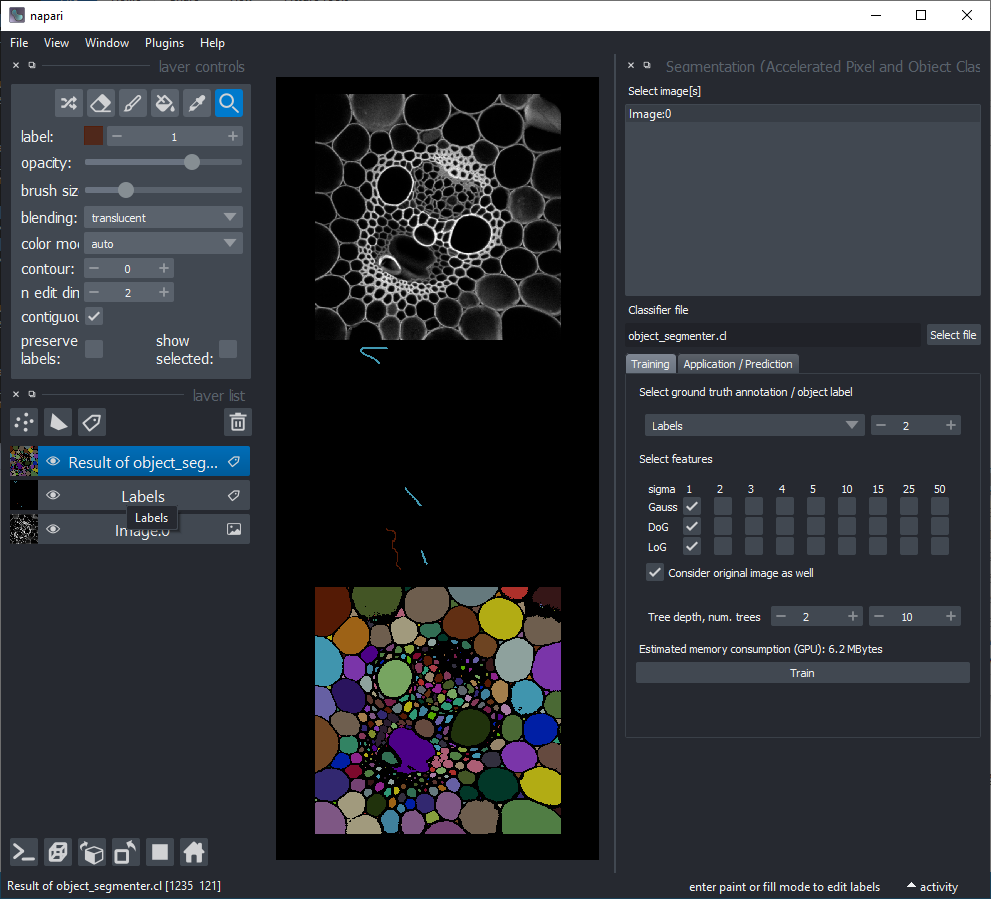
For using the accelerated pixel and object classifiers in python, check out apoc.
This napari plugin was generated with Cookiecutter using with @napari's cookiecutter-napari-plugin template.
Installation
You can install napari-accelerated-pixel-and-object-classification via pip. Note: you also need pyopencl.
conda install pyopencl
pip install napari-accelerated-pixel-and-object-classification
In case of issues in napari, make sure these dependencies are installed properly:
pip install pyclesperanto_prototype
pip install apoc
Usage
[documentation work in progress]
Open an image in napari and add a labels layer. Annotate foreground and background with two different label identifiers. You can also add a third, e.g. a membrane-like region in between to improve segmentation quality.
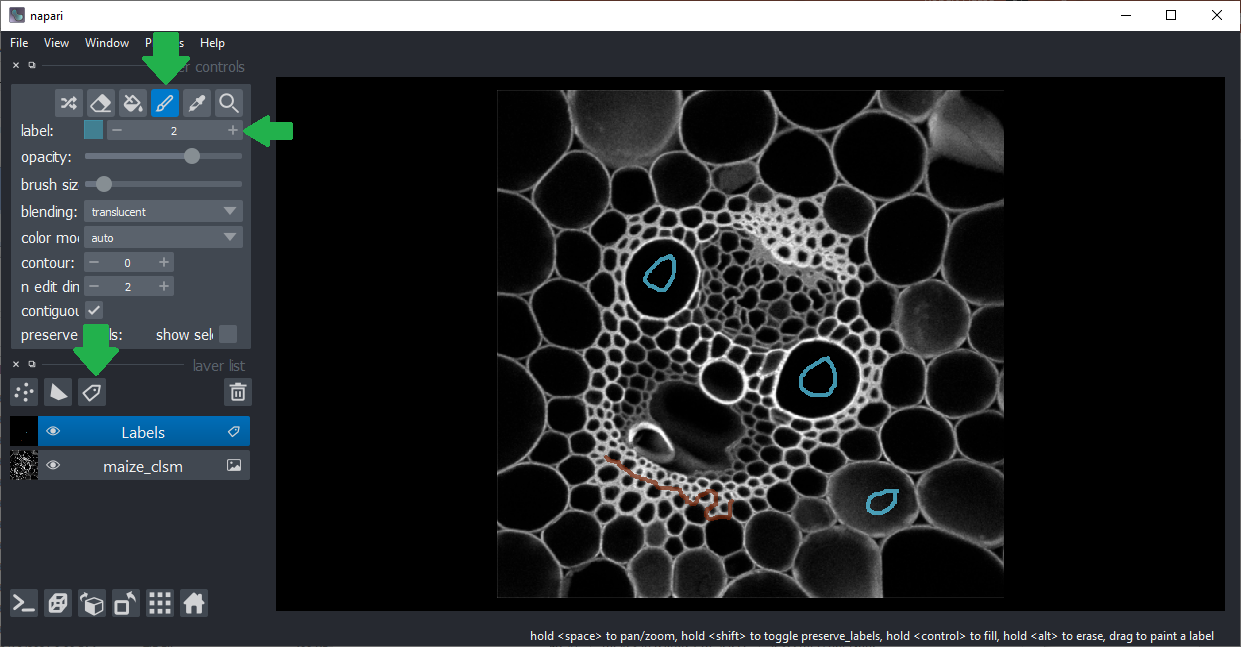
Click the menu Plugins > Segmentation (Accelerated Pixel and Object Classification) > Train pixel classifier.
Consider changing the featureset. There are three options for selecting
small (about 1 pixel sized) objects,
medium (about 5 pixel sized) object and
large (about 25 pixel sized) objects.
Make sure the right image and annotation layers are selected and click on Run.
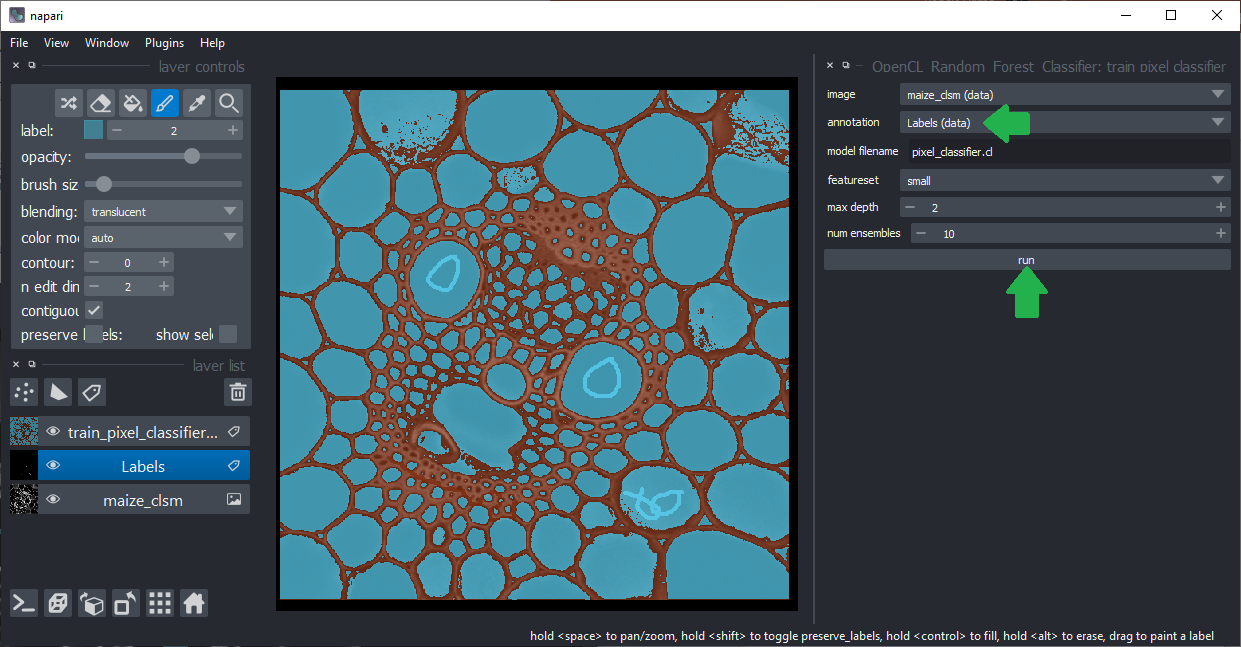
The classifier was saved as temp.cl to disc. You can later re-use it by clicking the menu Plugins > OpenCL Random Forest Classifiers > Predict pixel classifier
Optional: Hide the annotation layer.
Click the menu Plugins > Segmentation (Accelerated Pixel and Object Classification) > Connected Component Labeling.
Make sure the right labels layer is selected. It is supposed to be the result layer from the pixel classification.
Select the object class identifier you used for annotating objects, that's the intensity you drew on objects in the annotation layer.
Hint: If you want to analyse touching neigbors afterwards, activate the fill gaps between labels checkbox.
Click on the Run button.
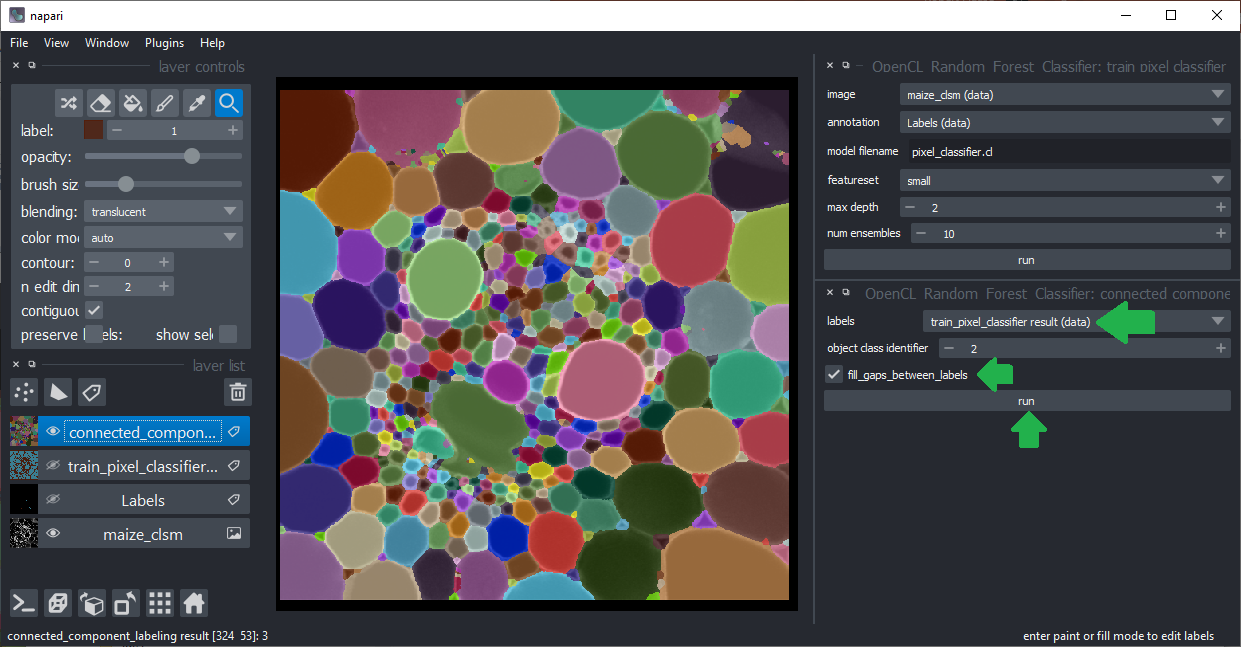
Optional: Hide the pixel classification result layer. Change the opacity of the connected component labels layer.
Add a new labels layer and annotate different object classes by drawing lines through them. In the following example objects with different size and shape were annotated in three classes:
- round, small
- round, large
- elongated
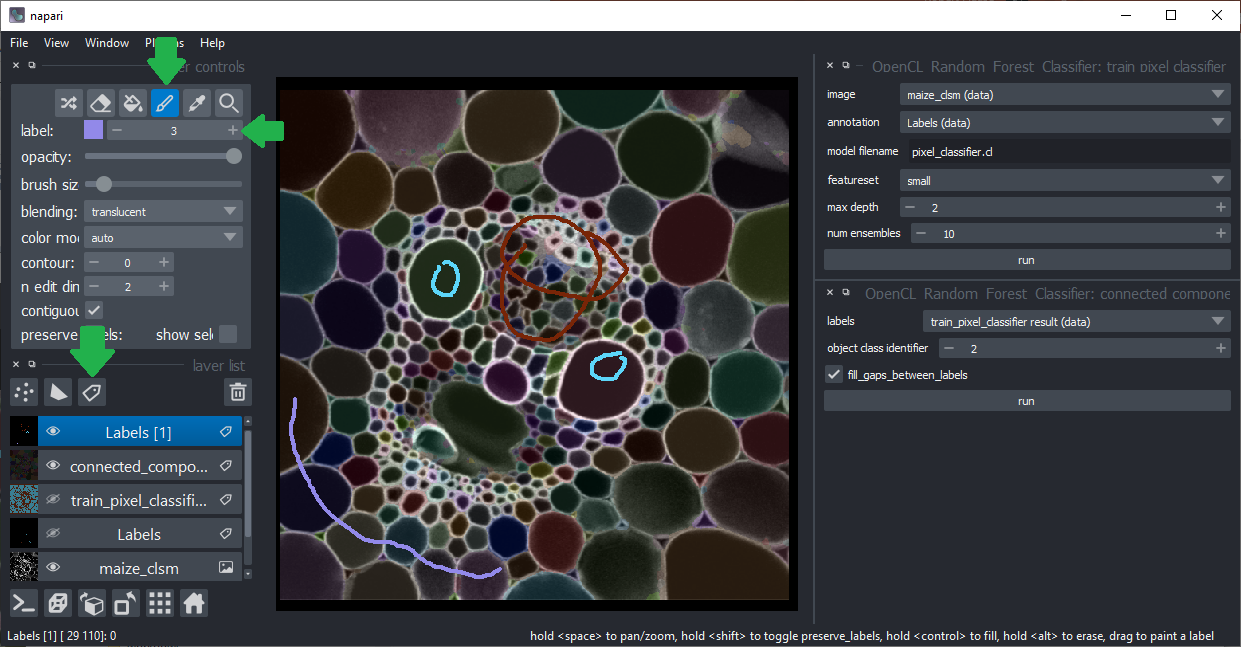
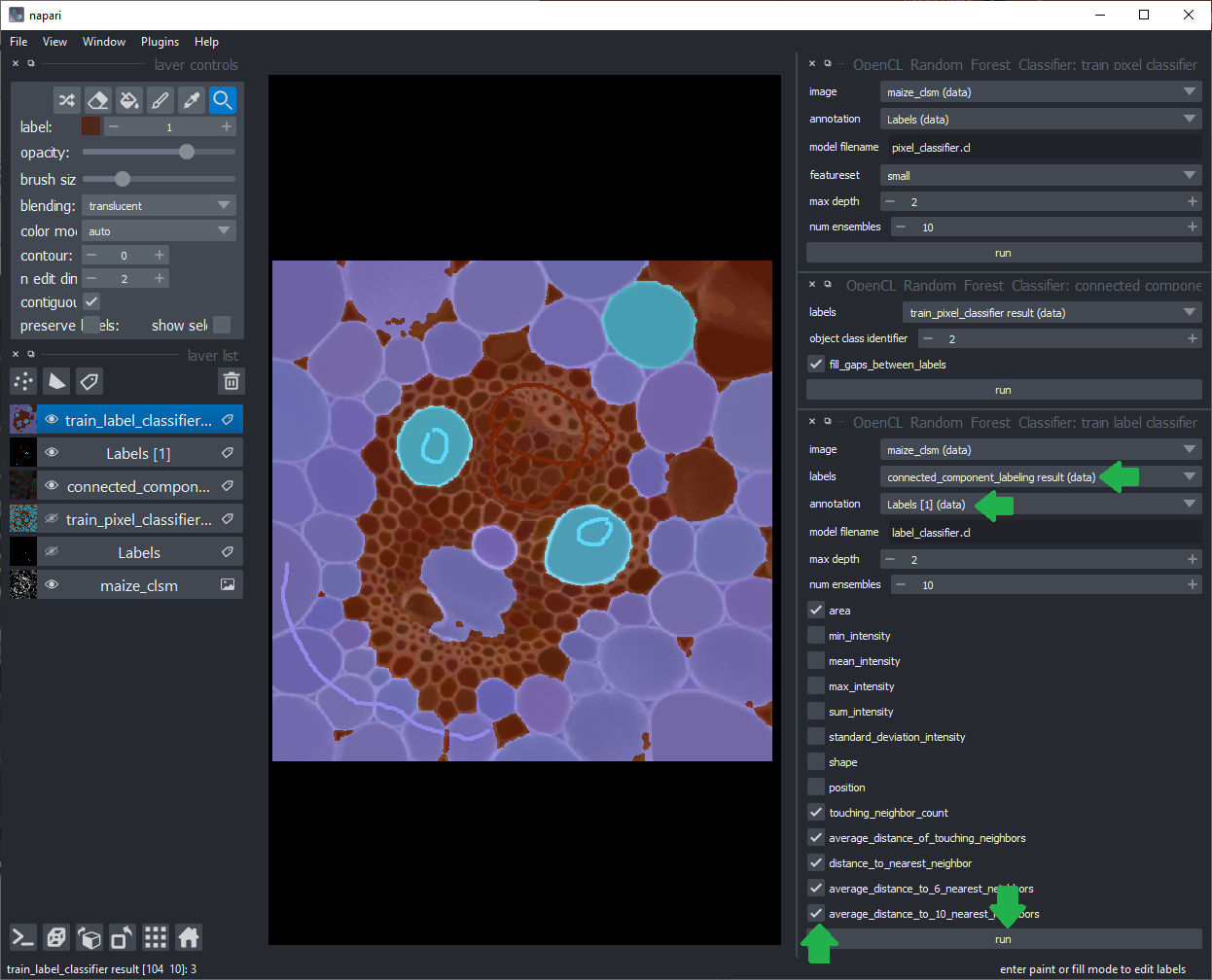
Click the menu Plugins > Segmentation (Accelerated Pixel and Object Classification) > Train object classifier. Select the right layers for training.
The labels layer should be the result from connected components labeling.
The annotation layer should be the just annotated object classes layer.
Select the right features for training. Click on the Run button.
After training, the classifier will be stored to disc in the file you specified.
You can later re-use it by clicking the menu Plugins > Segmentation (Accelerated Pixel and Object Classification) > Predict label classifier
This is an experimental napari plugin. Feedback is very welcome!
Contributing
Contributions are very welcome. Tests can be run with tox, please ensure the coverage at least stays the same before you submit a pull request.
License
Distributed under the terms of the BSD-3 license, "napari-accelerated-pixel-and-object-classification" is free and open source software
Issues
If you encounter any problems, please open a thread on image.sc along with a detailed description and tag @haesleinhuepf.
Release history Release notifications | RSS feed


Download files
Download the file for your platform. If you're not sure which to choose, learn more about installing packages.
Source Distribution
Built Distribution
Filter files by name, interpreter, ABI, and platform.
If you're not sure about the file name format, learn more about wheel file names.
Copy a direct link to the current filters
File details
Details for the file napari-accelerated-pixel-and-object-classification-0.5.2.tar.gz.
File metadata
- Download URL: napari-accelerated-pixel-and-object-classification-0.5.2.tar.gz
- Upload date:
- Size: 2.1 MB
- Tags: Source
- Uploaded using Trusted Publishing? No
- Uploaded via: twine/3.4.2 importlib_metadata/4.6.4 pkginfo/1.7.0 requests/2.26.0 requests-toolbelt/0.9.1 tqdm/4.62.1 CPython/3.9.6
File hashes
| Algorithm | Hash digest | |
|---|---|---|
| SHA256 |
cd3c811d08db7cb795163ba65dea4aad3317516d26e013ac3ef90fcc1629659f
|
|
| MD5 |
110844a1a3d85684dfbf01bbdf2ec57e
|
|
| BLAKE2b-256 |
beb0f543ad4f9e3de4e449cf19bb3b531dfb7181c2f2f87085444b1eff9ee3b2
|
File details
Details for the file napari_accelerated_pixel_and_object_classification-0.5.2-py3-none-any.whl.
File metadata
- Download URL: napari_accelerated_pixel_and_object_classification-0.5.2-py3-none-any.whl
- Upload date:
- Size: 11.5 kB
- Tags: Python 3
- Uploaded using Trusted Publishing? No
- Uploaded via: twine/3.4.2 importlib_metadata/4.6.4 pkginfo/1.7.0 requests/2.26.0 requests-toolbelt/0.9.1 tqdm/4.62.1 CPython/3.9.6
File hashes
| Algorithm | Hash digest | |
|---|---|---|
| SHA256 |
9f2f1873750fe28e0113fb0d31a76c58b7624fa8a9ad82e2240dc96907e72ce0
|
|
| MD5 |
e1fdc8a5ad6d5096e36e5b58932fbe01
|
|
| BLAKE2b-256 |
f8217a89fefda002c9ed0cef9ef26897f1830e2de50caae0398bc411dc8d9f73
|






