
A spatial omics interface for napari.
Verified details
These details have been verified by PyPIProject links
GitHub Statistics
Maintainers

Project description

napari-harpy: a spatial omics interface for napari.

Built around SpatialData and Harpy for interactive exploration, feature extraction, and object classification.
napari-harpy is a napari plugin for viewing, exploring, and analyzing
SpatialData datasets. It includes its own viewer for loading and
browsing data inside napari, alongside feature extraction and interactive
object classification workflows.
Installation
Install from PyPI:
pip install napari-harpy
Quickstart
The quickest way to try the plugin is to create a small example SpatialData
object, write it to a temporary zarr store, read it back as an on-disk dataset,
and launch the Harpy napari interface with Interactive.
import tempfile
from pathlib import Path

from spatialdata import read_zarr

from napari_harpy import Interactive
from napari_harpy.datasets import blobs_multi_region

zarr_path = Path(tempfile.mkdtemp()) / "blobs_multi_region.zarr"

sdata = blobs_multi_region()
sdata.write(zarr_path)

sdata = read_zarr(zarr_path)
Interactive(sdata)
This opens napari with the Harpy widgets docked and the
blobs_multi_region dataset available in the shared viewer state.
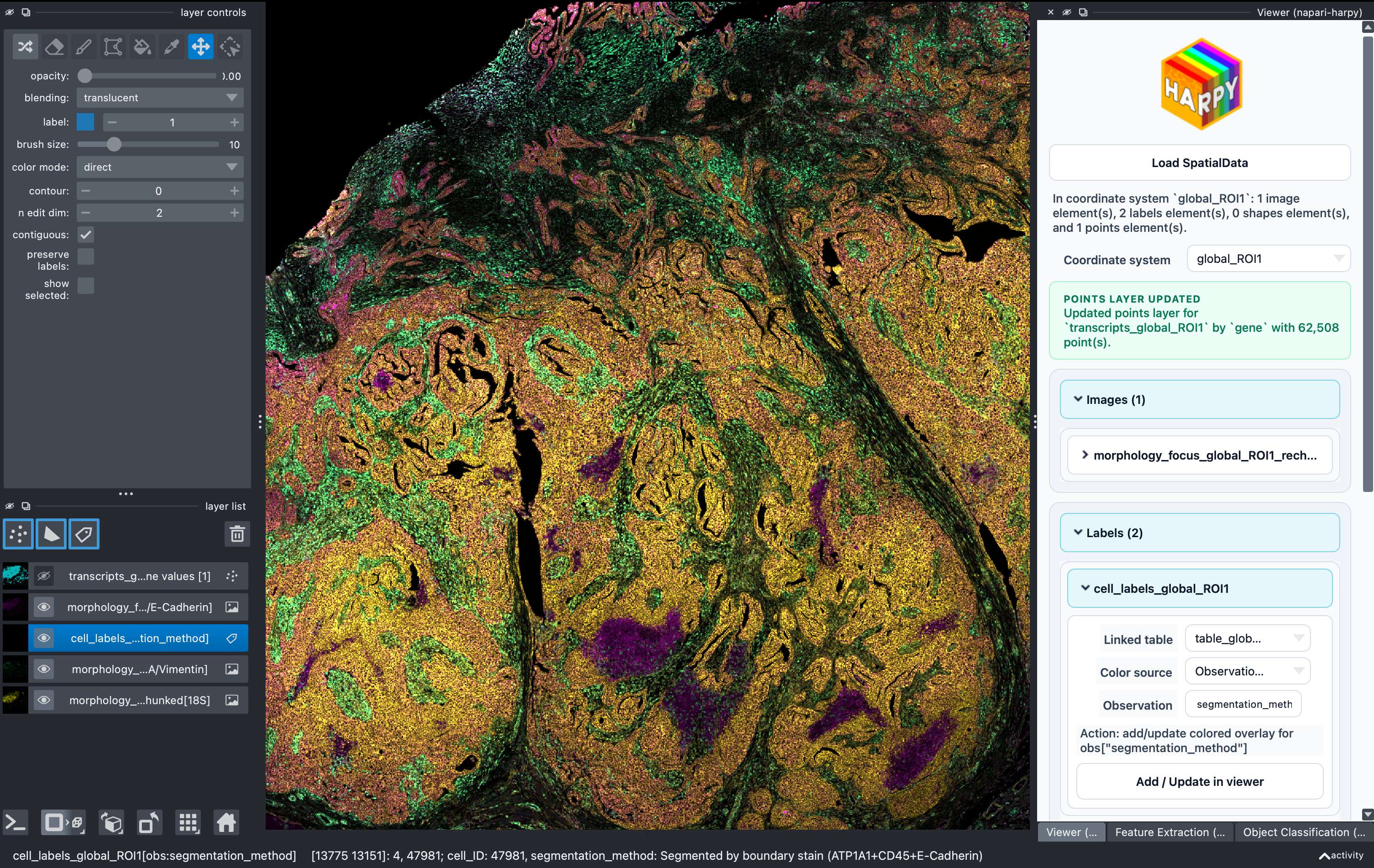
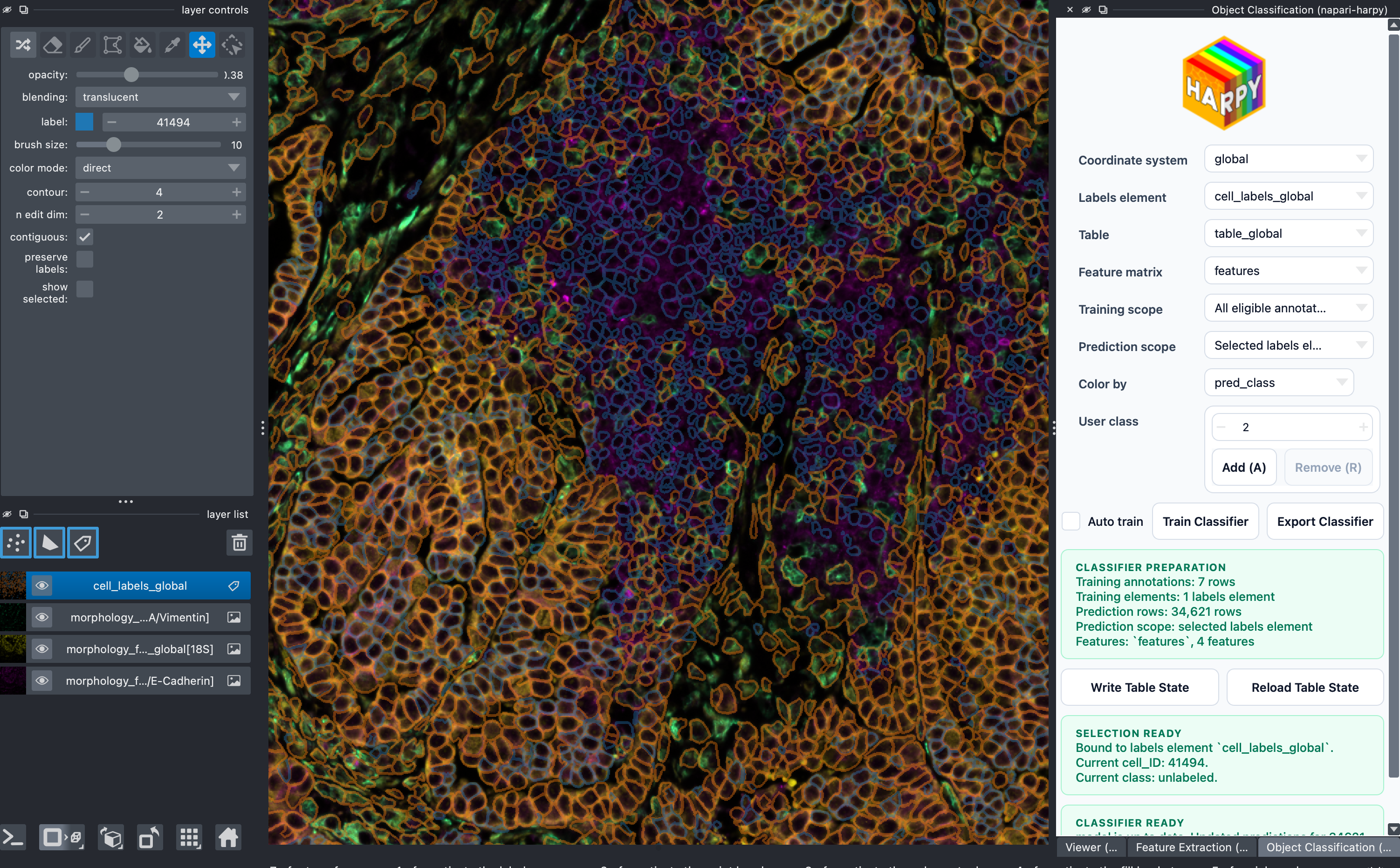
The current repository contains three working widgets:
ViewerFeature ExtractionObject Classification
Today the plugin supports:
- loading and viewing
SpatialDatathrough the Harpy viewer widget - selecting a labels element, optional image, compatible coordinate system, and
linked table from the shared loaded
SpatialData - calculating intensity and morphology features through Harpy
- writing feature matrices into the selected
AnnDatatable linked to the labels element, as.obsm[feature_key], with companion metadata in.uns["feature_matrices"][feature_key] - interactive manual annotation of instances in labels elements
- background
RandomForestClassifierretraining on the selected feature matrix stored in.obsm[feature_key]of theAnnDatatable linked to the labels element - live prediction updates and labels recoloring
- explicit write-back of in-memory table state to zarr
- explicit reload of on-disk table state back into memory
- multi-sample workflows through multi-region tables and explicit labels/image/coordinate-system matching
- headless feature extraction and classifier application for scripted or batch processing
Example napari-harpy session:
Headless and Multi-Sample Workflows
For scripted or batch processing, use the public napari_harpy.headless module.
It can apply an exported classifier to an existing feature matrix, or compute
the required features before applying the classifier.
The headless APIs accept one labels element or a sequence of labels elements. For multi-sample data, pass matching labels, image, and coordinate-system sequences so Harpy can build or apply a shared table-level feature matrix across the selected samples.
from spatialdata import read_zarr

from napari_harpy import headless

sdata = read_zarr("experiment.zarr")

result = headless.apply_classifier_with_feature_extraction_from_path(
    sdata,
    "classifier.harpy-classifier.joblib",
    table_name="table_multi",
    labels_name=["sample_1_labels", "sample_2_labels"],
    coordinate_system=["sample_1", "sample_2"],
    image_name=["sample_1_image", "sample_2_image"],
)
Local development
Create the development environment:
./create_env.sh
Then launch napari:
source .venv/bin/activate
napari
Open the widgets from the napari plugin menu:
Plugins -> napari-harpy -> ViewerPlugins -> napari-harpy -> Feature ExtractionPlugins -> napari-harpy -> Object Classification
Debug script
A small local debug script is available at
scripts/debug_widget.py.
It creates a temporary blobs_multi_region zarr store, loads it into napari,
and docks the Harpy widgets automatically.
This is useful for quickly reproducing widget behavior during development.
Run it with:
source .venv/bin/activate
python scripts/debug_widget.py
Project details
Verified details
These details have been verified by PyPIProject links
GitHub Statistics
Maintainers
Release history Release notifications | RSS feed


Download files
Download the file for your platform. If you're not sure which to choose, learn more about installing packages.
Source Distribution
Built Distribution
Filter files by name, interpreter, ABI, and platform.
If you're not sure about the file name format, learn more about wheel file names.
Copy a direct link to the current filters
File details
Details for the file napari_harpy-0.0.6.tar.gz.
File metadata
- Download URL: napari_harpy-0.0.6.tar.gz
- Upload date:
- Size: 11.4 MB
- Tags: Source
- Uploaded using Trusted Publishing? Yes
- Uploaded via: twine/6.1.0 CPython/3.13.12
File hashes
| Algorithm | Hash digest | |
|---|---|---|
| SHA256 |
3778fd2a92a0bc33985f7177ba04e940d1f4c157833e3f1cd153f64587adc620
|
|
| MD5 |
f90ef63c06cedab6ee2fed0ca7fda51b
|
|
| BLAKE2b-256 |
a980b2754d436b0c56a4f051cc03cb61d2fbd1fe0b06f9ab290c897324f5e046
|
Provenance
The following attestation bundles were made for napari_harpy-0.0.6.tar.gz:
Publisher:
release.yaml on vibspatial/napari-harpy
-
Statement:
-
Statement type:
https://in-toto.io/Statement/v1 -
Predicate type:
https://docs.pypi.org/attestations/publish/v1 -
Subject name:
napari_harpy-0.0.6.tar.gz -
Subject digest:
3778fd2a92a0bc33985f7177ba04e940d1f4c157833e3f1cd153f64587adc620 - Sigstore transparency entry: 1632775476
- Sigstore integration time:
-
Permalink:
vibspatial/napari-harpy@4f1b63bc7ddd03626db26500bf12138af19ef5ed -
Branch / Tag:
refs/tags/v0.0.6 - Owner: https://github.com/vibspatial
-
Access:
public
-
Token Issuer:
https://token.actions.githubusercontent.com -
Runner Environment:
github-hosted -
Publication workflow:
release.yaml@4f1b63bc7ddd03626db26500bf12138af19ef5ed -
Trigger Event:
release
-
Statement type:
File details
Details for the file napari_harpy-0.0.6-py3-none-any.whl.
File metadata
- Download URL: napari_harpy-0.0.6-py3-none-any.whl
- Upload date:
- Size: 492.0 kB
- Tags: Python 3
- Uploaded using Trusted Publishing? Yes
- Uploaded via: twine/6.1.0 CPython/3.13.12
File hashes
| Algorithm | Hash digest | |
|---|---|---|
| SHA256 |
9d25168e02ab8c966fab4cff18a92259eb667f3ea8d1f853a59e24b14ef83f4d
|
|
| MD5 |
e651709dd7712c76077d2f64c8f3a911
|
|
| BLAKE2b-256 |
73bf9615360b1fefd6f8f221d36b5dca66b8e49d8f767fb85e57d7f3b86f80bf
|
Provenance
The following attestation bundles were made for napari_harpy-0.0.6-py3-none-any.whl:
Publisher:
release.yaml on vibspatial/napari-harpy
-
Statement:
-
Statement type:
https://in-toto.io/Statement/v1 -
Predicate type:
https://docs.pypi.org/attestations/publish/v1 -
Subject name:
napari_harpy-0.0.6-py3-none-any.whl -
Subject digest:
9d25168e02ab8c966fab4cff18a92259eb667f3ea8d1f853a59e24b14ef83f4d - Sigstore transparency entry: 1632775496
- Sigstore integration time:
-
Permalink:
vibspatial/napari-harpy@4f1b63bc7ddd03626db26500bf12138af19ef5ed -
Branch / Tag:
refs/tags/v0.0.6 - Owner: https://github.com/vibspatial
-
Access:
public
-
Token Issuer:
https://token.actions.githubusercontent.com -
Runner Environment:
github-hosted -
Publication workflow:
release.yaml@4f1b63bc7ddd03626db26500bf12138af19ef5ed -
Trigger Event:
release
-
Statement type:






