
A plugin for batch processing of confocal and whole-slide microscopy images of biological tissues

Project description
napari-tmidas







Need fast batch processing for confocal & whole-slide microscopy images of biological cells and tissues?
This open-source napari plugin integrates state-of-the-art AI + analysis tools in an interactive GUI with side-by-side result comparison! Transform, analyze, and quantify microscopy data at scale including deep learning - from file conversion to segmentation, tracking, and analysis.
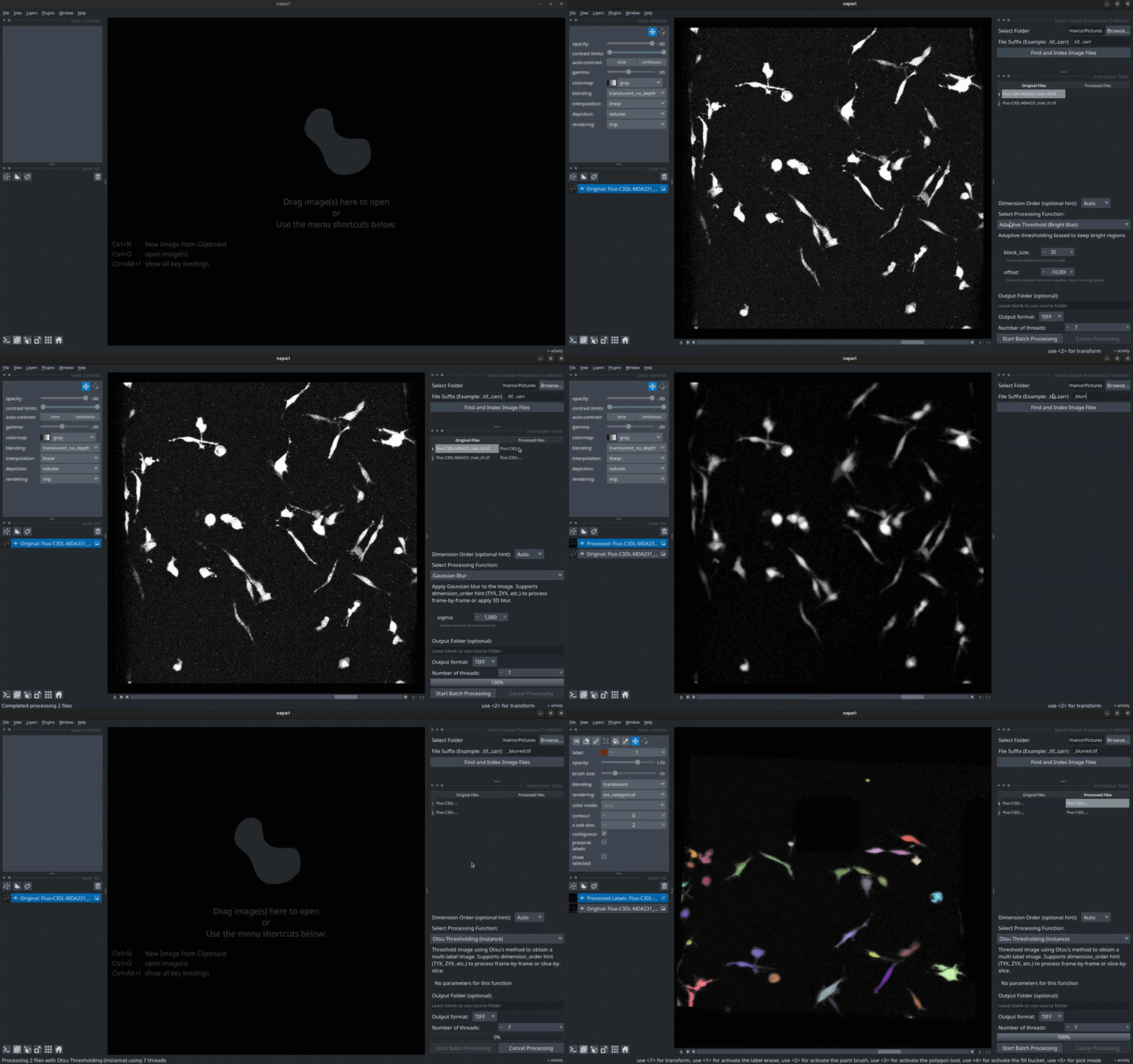
✨ Key Features
🤖 AI Methods Built-In
- Virtual staining (VisCy) • Denoising (CAREamics) • Spot detection (Spotiflow) • Segmentation (Cellpose, Convpaint) • Tracking (Trackastra, Ultrack)
- Auto-install in isolated environments • No dependency conflicts • GPU acceleration
🔄 Universal File Conversion
- Convert LIF, ND2, CZI, NDPI, Acquifer → TIFF or OME-Zarr
- Preserve spatial metadata automatically
⚡ Batch Processing
- Process entire folders with one click • 40+ processing functions • Progress tracking & quality control
� Interactive Workflow
- Side-by-side table view of original and processed images • Click to instantly compare results • Quickly iterate parameter values • Real-time visual feedback
�📊 Complete Analysis Pipeline
- Segmentation → Tracking → Quantification → Colocalization
🚀 Quick Start
Supports Python 3.11+; commands below use Python 3.12.
# Install napari and the plugin
mamba create -y -n napari-tmidas -c conda-forge python=3.12
mamba activate napari-tmidas
pip install "napari[all]"
pip install napari-tmidas

# Launch napari
napari
Then find napari-tmidas in the Plugins menu. Watch video tutorials →
💡 Tip: AI methods (SAM2, Cellpose, Spotiflow, etc.) auto-install into isolated environments on first use - no manual setup required!
📖 Documentation
AI-Powered Methods
| Method | Description | Documentation |
|---|---|---|
| 🎨 VisCy | Virtual staining from phase/DIC | Guide |
| 🔧 CAREamics | Noise2Void/CARE denoising | Guide |
| 🎯 Spotiflow | Spot/puncta detection | Guide |
| 🔬 Cellpose | Cell/nucleus segmentation | Guide |
| 🎨 Convpaint | Custom semantic/instance segmentation | Guide |
| 📈 Trackastra | Transformer-based cell tracking | Guide |
| 🔗 Ultrack | Cell tracking based on segmentation ensemble | Guide |
Core Workflows
- File Conversion - Multi-format microscopy file conversion (LIF, ND2, CZI, NDPI, Acquifer)
- Batch Processing - Label operations, filters, channel splitting
- Frame Removal - Interactive human-in-the-loop frame removal from time series
- Label-Based Cropping - Interactive ROI extraction with label expansion
- Quality Control - Visual QC with grid overlay
- Quantification - Extract measurements from labels
- Colocalization - Multi-channel ROI analysis
Advanced Features
- Batch Crop Anything - Interactive object cropping with SAM2
- Batch Label Inspection - Manual label verification and editing
- SciPy Filters - Gaussian, median, morphological operations
- Scikit-Image Filters - CLAHE, thresholding, edge detection
💻 Installation
Step 1: Install napari
mamba create -y -n napari-tmidas -c conda-forge python=3.12
mamba activate napari-tmidas
python -m pip install "napari[all]"
Step 2: Install napari-tmidas
| Your Needs | Command |
|---|---|
| Standard installation | pip install napari-tmidas |
| Want the latest dev features | pip install git+https://github.com/MercaderLabAnatomy/napari-tmidas.git |
🖼️ Screenshots
File Conversion Widget
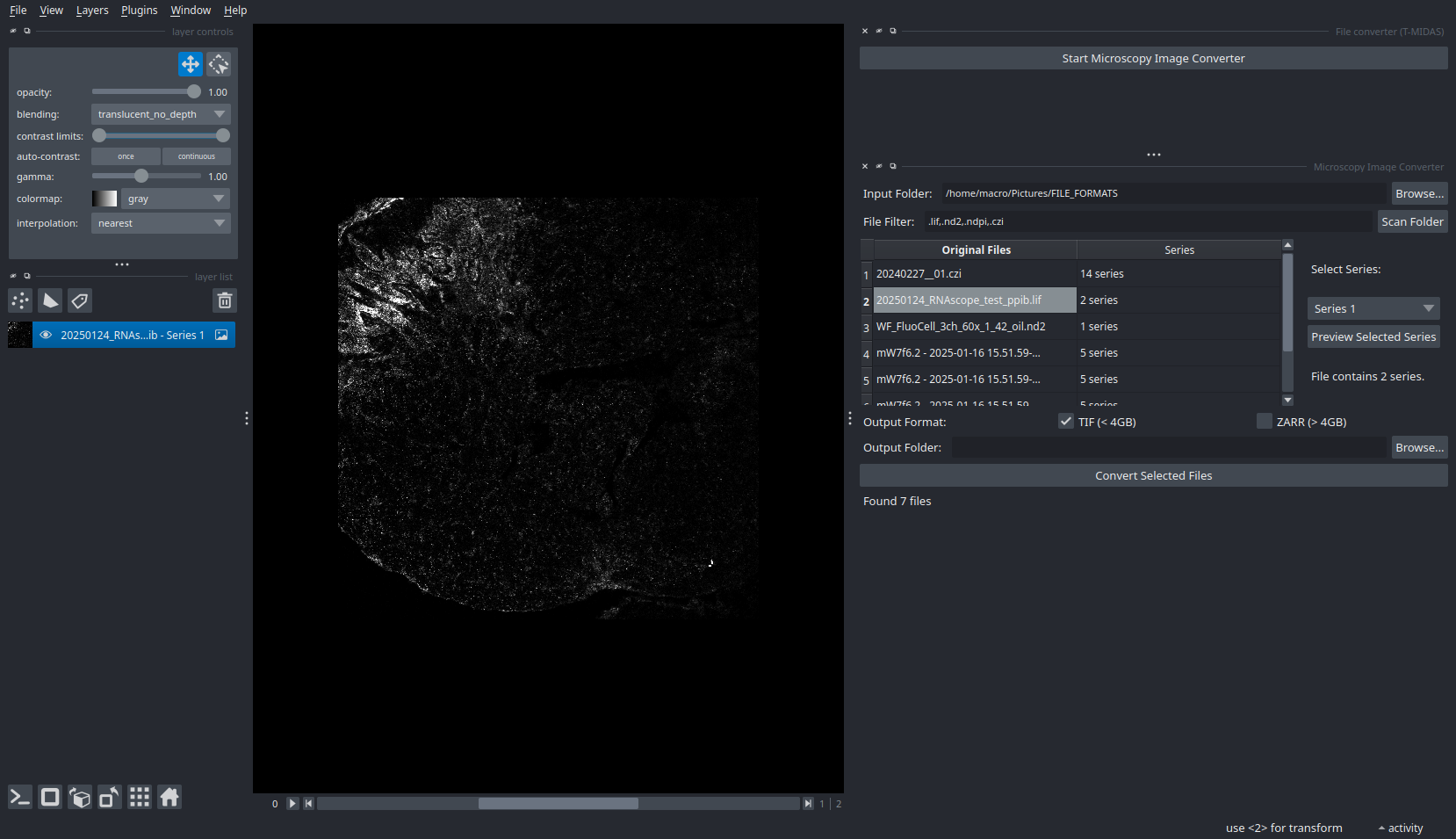
Convert proprietary formats to open standards with metadata preservation.
Batch Processing Interface
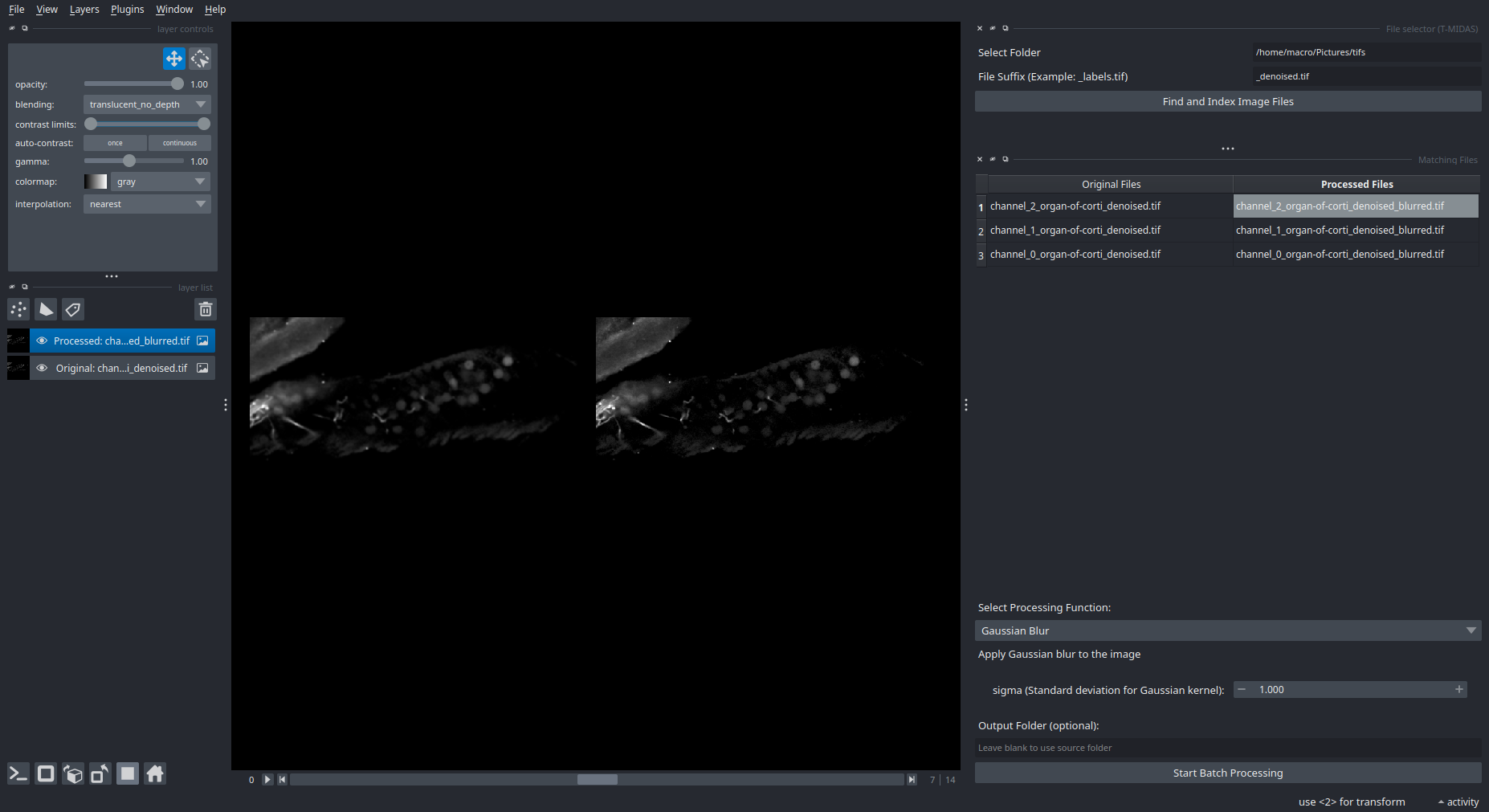
Select files → Choose processing function → Run on entire dataset.
Label Inspection
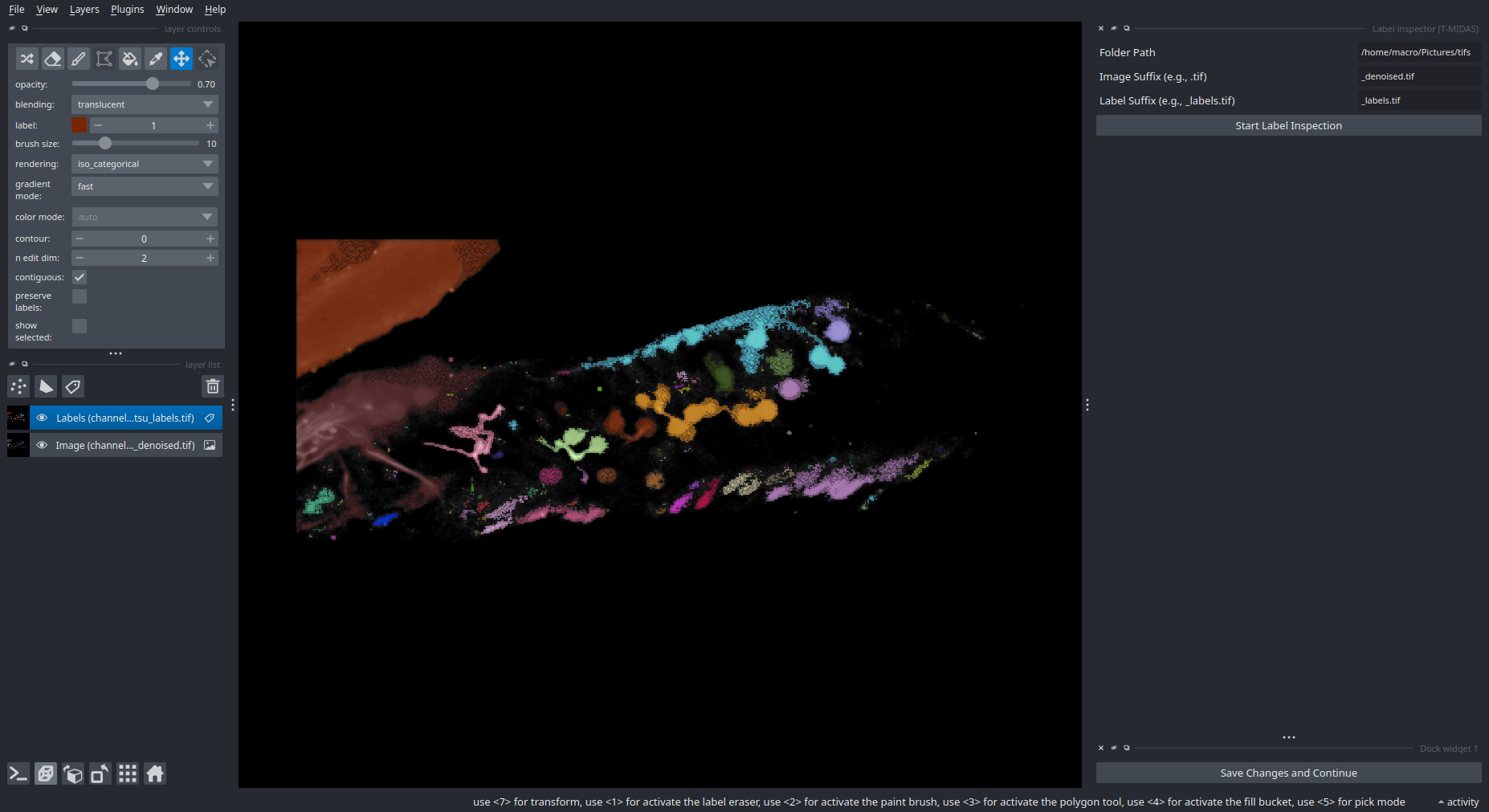
Inspect and manually correct segmentation results.
SAM2 Crop Anything
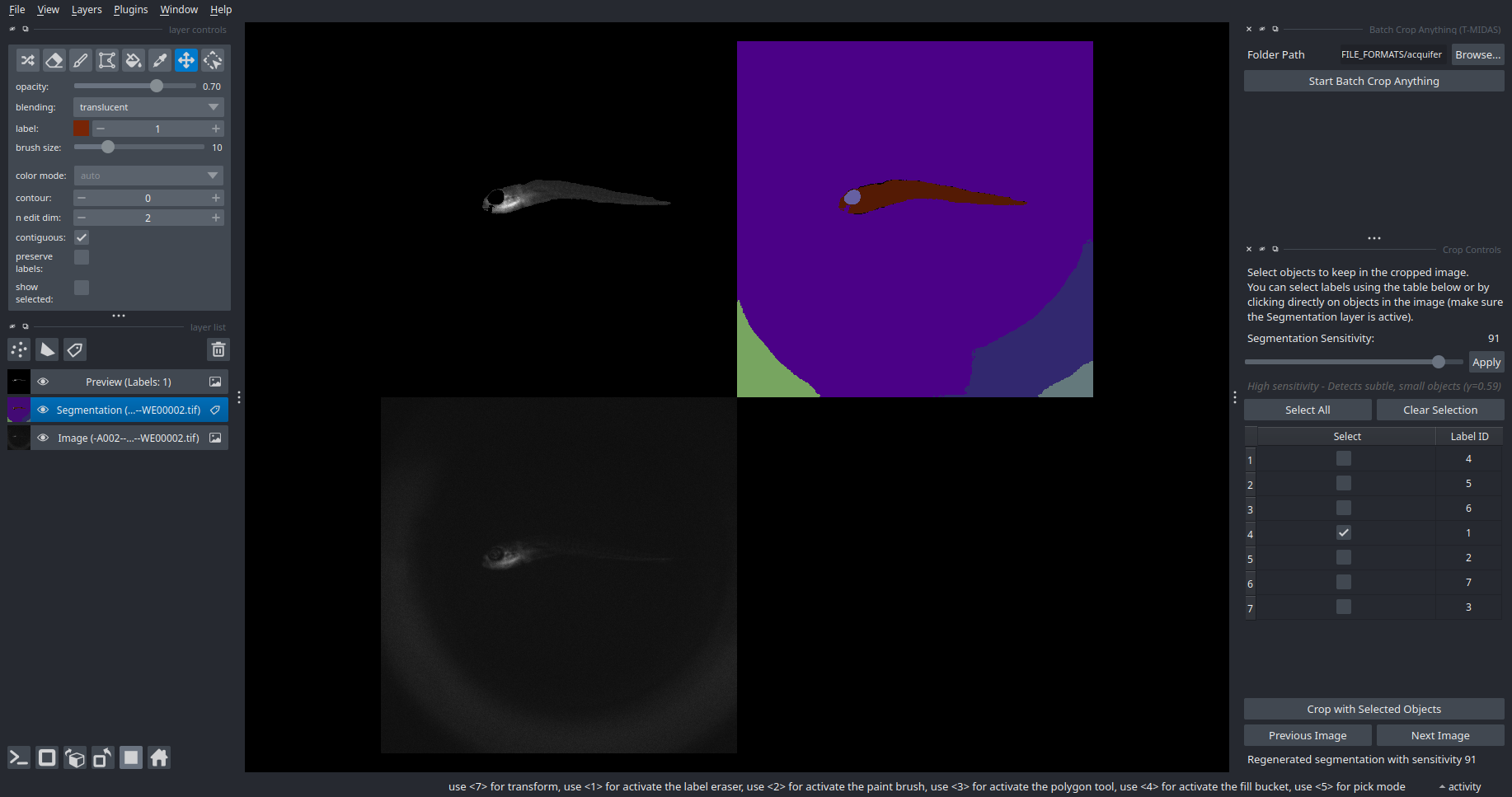
Interactive object selection and cropping with SAM2.
📋 TODO
Memory-Efficient Zarr Streaming
Current Limitation: Processing functions pre-allocate full output arrays in memory before writing to zarr. For large TZYX time series (e.g., 100 timepoints × 1024×1024×20), this requires ~8+ GB peak memory even when using zarr output.
Planned Enhancement: Implement incremental zarr writing across all processing functions:
- Process one timepoint at a time
- Write directly to zarr array on disk
- Keep only single timepoint in memory (~80 MB vs 8 GB)
- Maintain OME-Zarr metadata and chunking
Impact: Enable processing of arbitrarily large time series limited only by disk space, not RAM. Critical for high-throughput microscopy workflows.
Affected Functions: Convpaint prediction, Cellpose segmentation, CAREamics denoising, VisCy virtual staining, Trackastra tracking, and all batch processing operations with zarr output.
🤝 Contributing
Contributions are welcome! Please ensure tests pass before submitting PRs:
pip install tox
tox
📄 License
BSD-3 License - see LICENSE for details.
🐛 Issues
Found a bug or have a feature request? Open an issue
🙏 Acknowledgments
Built with napari and powered by:
AI/ML Methods:
Core Scientific Stack:
- NumPy • scikit-image • PyTorch
File Format Support:
- OME-Zarr • tifffile • nd2 • pylibCZIrw • readlif
Release history Release notifications | RSS feed


Download files
Download the file for your platform. If you're not sure which to choose, learn more about installing packages.
Source Distribution
Built Distribution
Filter files by name, interpreter, ABI, and platform.
If you're not sure about the file name format, learn more about wheel file names.
Copy a direct link to the current filters
File details
Details for the file napari_tmidas-0.5.6.tar.gz.
File metadata
- Download URL: napari_tmidas-0.5.6.tar.gz
- Upload date:
- Size: 403.3 kB
- Tags: Source
- Uploaded using Trusted Publishing? No
- Uploaded via: twine/6.2.0 CPython/3.14.5
File hashes
| Algorithm | Hash digest | |
|---|---|---|
| SHA256 |
8983eb4a01169c349e49be3fe683710480e17f479f9daa3d4a401d4ef6ec8a3f
|
|
| MD5 |
a00509afe5eeb622e6cc91ab545188fd
|
|
| BLAKE2b-256 |
0fc58b94e8e1f1bb51e9c7d9bb188a72429f57924e6992007f8194f6639095f3
|
File details
Details for the file napari_tmidas-0.5.6-py3-none-any.whl.
File metadata
- Download URL: napari_tmidas-0.5.6-py3-none-any.whl
- Upload date:
- Size: 364.0 kB
- Tags: Python 3
- Uploaded using Trusted Publishing? No
- Uploaded via: twine/6.2.0 CPython/3.14.5
File hashes
| Algorithm | Hash digest | |
|---|---|---|
| SHA256 |
af44553661b740da847ebb1207e384953d5032f3539734f0a9782e5401394641
|
|
| MD5 |
37eb66c06ab45975cfeb4743e8a68942
|
|
| BLAKE2b-256 |
160111d1e4d14de00a4a8ec1c59f885a32b63549c7dd84b955297efb7660ce88
|






