
Claude Code IoT Bridge — connect Claude to hardware via USB

Project description
nff — LLM bridge to hardware
nff is an MCP server that gives LLMs direct control over physical hardware — on the bench during development, and in the field for maintenance and diagnosis.
Connect your board over USB and Claude writes, compiles, flashes, and reads serial output autonomously. Deploy devices with the nff-sdk-c library and Claude can reach them remotely: capture crash state, diagnose failures, and push fixes — without physical access.
nff is the open-source bench CLI of the nff platform — an end-to-end, agent-driven system for developing, shipping, and operating ESP32-class firmware (bench → OTA → fleet diagnosis). This repo (
nff) and the device library (nff-sdk-c) are the two MIT-licensed pieces that run on the engineer's laptop and hardware; the hosted backend (fleet broker, OTA orchestration, crash-analysis engine) is proprietary. See the root README for the full picture.
you: "Run the sensor init sequence and assert the calibration values over serial"
LLM: [writes firmware] → [compiles] → [flashes ESP32] → [reads serial] → returns structured output

you: "Why did the unit in the field just hard-fault?"
LLM: [captures panic over OTA] → [reads registers + backtrace] → "Stack overflow in your sensor ISR at line 47"
Supported boards: ESP32 (CP210x / CH340) · ESP8266 (FTDI) · Arduino AVR (Uno, Mega, Nano, Leonardo)
STM32 and RP2040 support in progress — open a PR, adding a board is two lines of code.
Shipped as a single Rust binary. The release artifact is the compiled nff binary built from nff-rs/ — a self-contained executable with no Python runtime required. The Python package under nff/nff/ remains as the reference/prototyping implementation (features are often prototyped there first, then ported to Rust at parity); both are kept in sync, version for version. The Rust port is at full feature parity (CLI commands, MCP server + OAuth proxy, the bench-loop hardening, and the nff pi Raspberry-Pi probe).
What's new in v0.2.20 — the "reliable install" release
This release is about making the bench loop survive on its own: the previous version (0.2.19) worked when a human was watching, but transient toolchain hiccups would surface as hard failures — fatal for an agent driving the loop unattended. It also brings the Rust binary to full parity so it becomes the shipped artifact, and adds first-run onboarding so a fresh machine can actually compile.
Reliability — corrected
- Transient failures are now retried, not fatal. A new classifier tells a transient toolchain hiccup (arduino-cli
EINVAL/ "Invalid argument", a Windows build-dir file lock, a serial port re-enumerating after auto-reset, a slow build timing out) apart from a genuine compile error. Transient failures retry with backoff; real compile errors still fail fast. Previously any of these killedcompile/flashoutright. - Cold builds no longer time out. The compile timeout was a flat 120 s — a first-time ESP32 build routinely exceeds that and died with "Command timed out". Compile now gets 600 s, upload 180 s, and a timeout is treated as retryable rather than a hard error.
- Upload-failure misclassification fixed. arduino-cli prints
uploading error:on a transient port failure; the naive classifier mistook that for a compile error and refused to retry. A strong serial/upload signal (failed uploading,could not open port,the port is busy) now correctly wins over the bare worderror:. - Serial is resilient.
serial_read/serial_write/reset_deviceretry transient port faults, and the serial monitor no longer crashes with a raw traceback when a device is unplugged mid-stream — it reports the error cleanly. - Stale-library guard. "Flash to test my fix" could silently build the old library.
flashanddoctornow warn when a localnff-sdk-ccheckout is newer than the synced Arduino library, so you never ship stale firmware unknowingly.
Install / onboarding — added
nff initnow installs the full build toolchain (theesp32core,PubSubClient, and thenffArduino library) on first run, so a freshly-set-up machine can compile a sketch that does#include <nff.h>without manualarduino-clisteps.doctorgained annff libcheck reporting the synced library version and flagging staleness.
New capabilities
nff pi probe— detect a directly-connected Raspberry Pi and tell you exactly which link in the chain is missing (cable/power → IP → SSH), via ARP-OUI matching, mDNS, and a TCP/22 probe (with an optional--sweep). Groundwork for running nff-pentester on a Pi node.
Rust port → the shipped binary
- The Rust implementation in
nff-rs/reached full feature parity with the Python package (all of the above, plus the existing CLI/MCP/OAuth surface) and is now the release artifact. Version bumped to 0.2.20 across the Rust crate and the Python package, which stay in lockstep. The Rust port is no longer "paused".
Quality
- New automated tests across both implementations (retry classifier, serial retry, library sync/staleness, onboarding,
pi, init). Rust passescargo clippy -- -D warningsand the fullcargo testsuite, and the whole loop (compile → flash → monitor, plus the transient-retry path) was verified on real ESP32 hardware.
Upgrade note: the on-disk library marker (
.nff_sync_meta) gainsversion/synced_atfields; libraries synced by0.2.19will show?innff doctoruntil the nextnff install-deps/nff initre-syncs them. No action required.
Two modes, one tool
Bench development
nff closes the edit–compile–flash–debug loop. Instead of switching between your editor, terminal, and serial monitor, you stay in one conversation. The LLM iterates on firmware in response to serial output, catches exceptions, and reflashes — handling the logistics so you focus on the problem.
Field maintenance
Once a device is deployed, nff becomes your remote window into it. When a bare-metal MCU crashes in the field there is no shell, no SSH, no process table — just a panic on a chip you cannot physically touch. nff captures the crash state (registers, stack, memory, backtrace) and routes it to a cloud AI agent that explains the failure in plain language and drives the recovery. No truck roll. No JTAG probe on-site.
This is the gap Mender, balena, and similar OTA tools cannot fill: they require a living network client running inside the firmware. nff's field mode works precisely when the firmware is dead.
AI crash diagnosis — validated
Phase-0 validation on an ESP32 confirmed that Claude can produce specific, correct diagnoses from raw panic output alone — no ELF file, no source access:
| Crash type | Panic signature | What Claude identifies |
|---|---|---|
| Null pointer write | EXCCAUSE 0x1d + EXCVADDR 0x00000000 |
StoreProhibited in setup(), stack intact |
| Stack overflow | EXCCAUSE 0x01 + repeated PC in backtrace |
Unbounded recursion, FreeRTOS canary, depth 11 |
| Watchdog timeout | IDF task-WDT log, no Guru Meditation | loopTask on CPU 1 never yielded, liveness failure |
Each failure class produces a different panic format, exception code, backtrace depth, and task snapshot — rich enough signal to distinguish root causes without symbol resolution. With addr2line + the build ELF wired in (next milestone), diagnoses resolve to exact source lines.
MCP Tools
Bench — hardware & build
| Tool | What it does |
|---|---|
list_devices() |
List all connected USB boards |
compile(sketch?, code?, board?) |
Compile a sketch only (no board/port) to verify it builds; returns JSON {ok, fqbn, elf, image, artifacts, errors, output} |
flash(sketch?, code?, board?, port?) |
Compile and upload a sketch to the connected board |
serial_read(duration_ms?, port?, baud?) |
Capture serial output for N ms |
serial_write(data, port?, baud?) |
Send a string to the device |
reset_device(port?) |
Toggle DTR to hardware-reset the board |
get_device_info(port?) |
Return port, board name, FQBN, baud rate |
Simulation — Wokwi (CI without a bench)
| Tool | What it does |
|---|---|
wokwi_flash(code, board?, timeout_ms?) |
Compile and simulate a sketch via Wokwi |
wokwi_serial_read(code, board?, duration_ms?) |
Compile, simulate, return serial output |
wokwi_get_diagram(board) |
Return a minimal diagram.json stub to extend |
Field — diagnosis & auth
| Tool | What it does |
|---|---|
repair(serial_output, build_id?, board?) |
Send serial/crash output to the diagnosis server and return a structured diagnosis |
authenticate(email?, password?) |
Log in to the diagnosis server (direct, or omit both for browser OAuth) |
complete_authentication(timeout?) |
Wait for a browser login to finish and store the tokens |
auth_status() / auth_logout() / auth_clear() / auth_reconnect(email?, password?) |
Inspect, end, force-clear, or re-establish the authenticated MCP session |
All bench tools fall back to the default device in ~/.nff/config.json when port and board are omitted.
Prefer
sketch=(a path) overcode=. Write the.inofile to disk first and pass the sketch path, rather than raw source — it keeps the build artifact lookup deterministic. Usecompileto check a build with no board attached; useflashonly when a port is present.
Demo
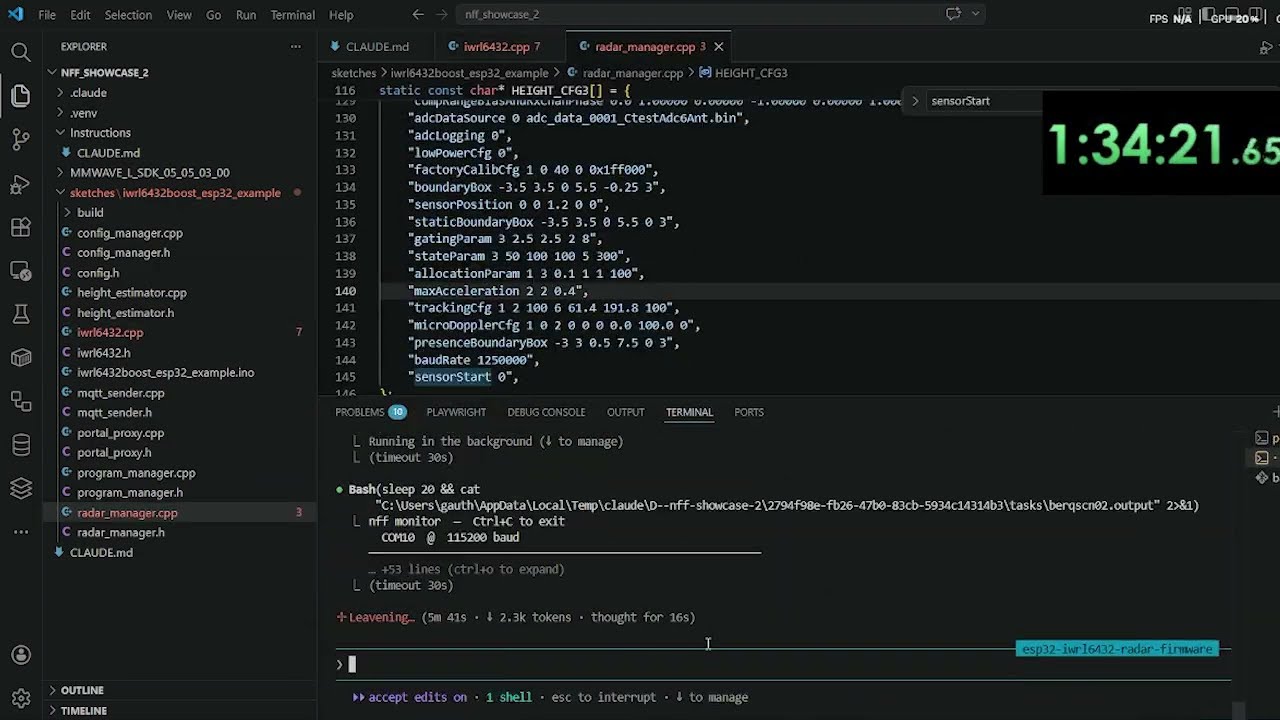
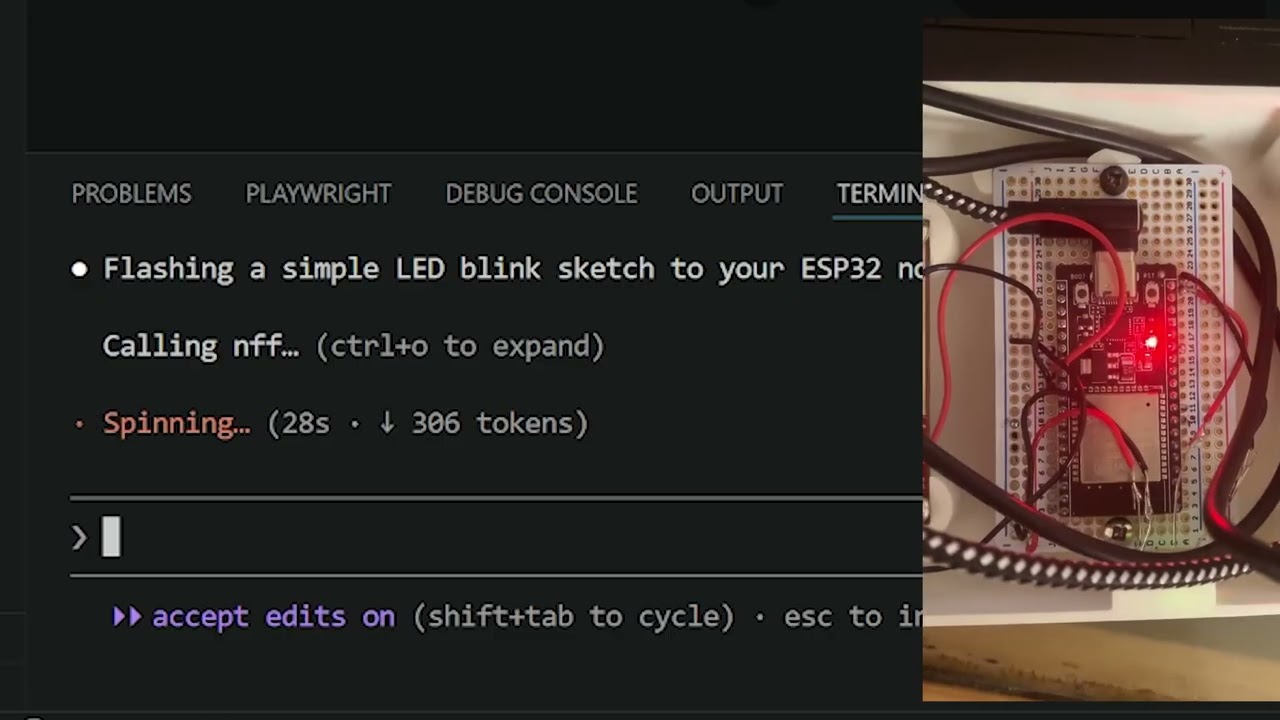
Real Hardware
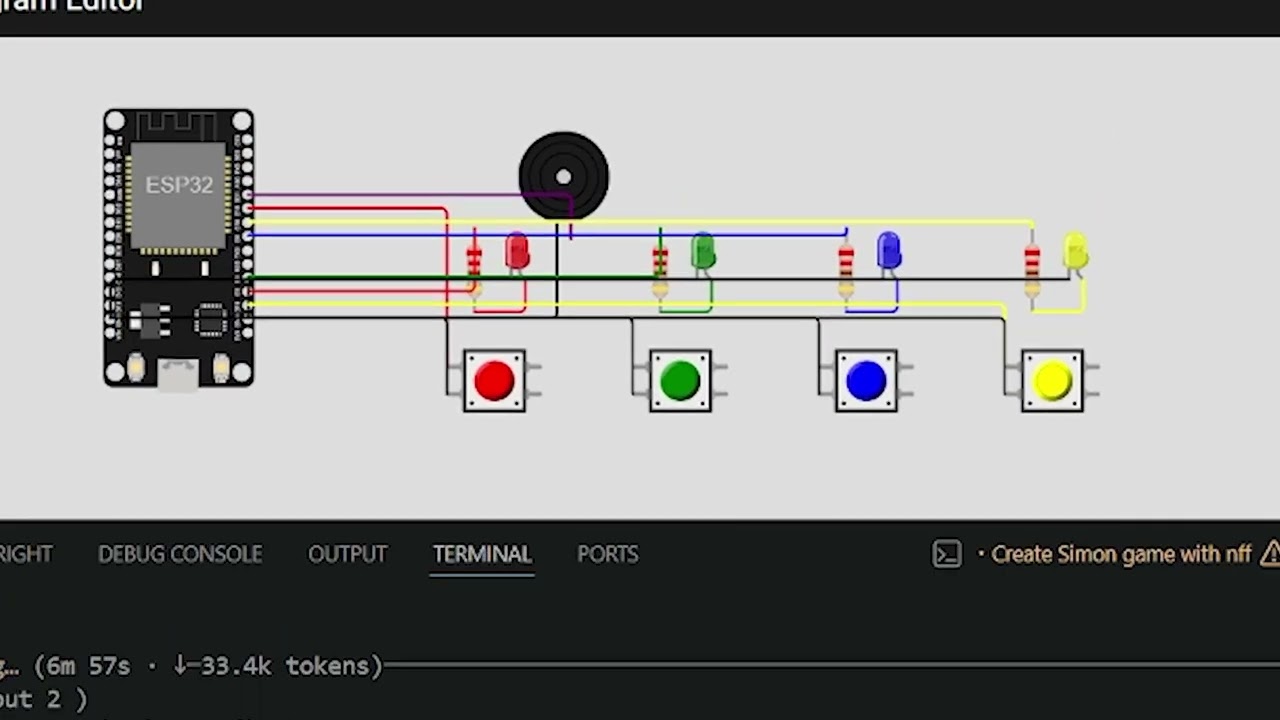
Wokwi Simulation
Quickstart
Get your hardware on the LLM loop in under five minutes.
1. Install
pip install nff
Pure-Python install (requires Python ≥ 3.10) — no compiler or Rust toolchain needed. esptool ships as a dependency, so no separate install is needed.
2. Install board cores
# Install the cores you need
arduino-cli core install esp32:esp32
arduino-cli core install arduino:avr
arduino-cli core install esp8266:esp8266
arduino-cli is auto-installed by
nff initif it is not already on your PATH.
3. Plug in your board and run init
nff init
This single command:
- Detects your board by USB vendor/product ID
- Writes
~/.nff/config.jsonand aCLAUDE.mdin the current directory - Registers the nff MCP server (
claude mcp add nff nff mcp) - Installs the
/nffand/wokwi-diagramClaude Code skills globally
  ✓ Found: ESP32 (CP210x) on COM10
  ✓ Config written to ~/.nff/config.json
  ✓ CLAUDE.md written to ./CLAUDE.md
  ✓ Claude skills installed: /nff, /wokwi-diagram
  ✓ Registered with Claude Code CLI (claude mcp add nff nff mcp)
  ✓ Claude Desktop config updated
4. Verify
nff doctor
CLI Reference
Real hardware
| Command | Description |
|---|---|
nff init |
Detect board, write config, register MCP server |
nff compile <path> |
Compile a sketch to verify it builds (no board/port needed) |
nff flash <path> |
Compile and upload a sketch directory |
nff monitor |
Stream serial output (Ctrl+C to exit) |
nff connect |
Attach to a device, continuously analyse its logs, autonomously repair detected issues |
nff repair |
Send captured serial/crash output to the diagnosis server for a structured root-cause |
nff auth login |
Authenticate with the diagnosis server (browser OAuth or email/password) |
nff doctor |
Check all dependencies and configuration |
nff mcp |
Start the MCP server (streamable HTTP on 127.0.0.1:3000; called automatically by Claude Code) |
nff flash sketches/sensor_init
nff flash sketches/sensor_init --board esp32:esp32:esp32 --port COM3
nff flash sketches/sensor_init --manual-reset    # for boards without auto-reset
nff monitor --port COM10 --baud 115200
nff monitor --port COM10 --baud 115200 --timeout 15
nff connect — Autonomous log analysis and repair
nff connect keeps a live serial connection to your device and routes each batch of output to Claude for analysis. When Claude detects an error, a hang, or a recoverable fault, it rewrites the sketch, recompiles, reflashes, and resumes monitoring — closing the repair loop without manual intervention.
nff connect
  ↓ streams serial from device
  ↓ Claude analyses each log window
  ↓ fault detected → sketch rewritten → nff flash → device reset
  ↓ monitoring resumes automatically
Useful flags:
| Flag | Default | Description |
|---|---|---|
--port PORT |
auto-detect | Serial port to attach to |
--baud BAUD |
115200 | Baud rate |
--sketch DIR |
last flashed | Sketch directory to rewrite and reflash on a fix |
--window MS |
2000 | Log window passed to Claude per analysis cycle |
--max-cycles N |
unlimited | Stop after N repair attempts |
Wokwi simulation (CI without a bench)
| Command | Description |
|---|---|
nff wokwi init |
Scaffold wokwi.toml + diagram.json in current directory |
nff flash --sim <path> |
Compile sketch and run headless Wokwi simulation |
nff wokwi run |
Run simulation, stream serial output to terminal |
nff wokwi run --gui |
Open diagram.json in VS Code and auto-start visual simulation |
nff wokwi run --serial-log FILE |
Save serial output to file |
nff wokwi run --timeout MS |
Set simulation timeout (default 5000 ms) |
Supported Boards
| Board | Vendor ID | Product ID | FQBN |
|---|---|---|---|
| ESP32 (CP210x) | 10c4 | ea60 | esp32:esp32:esp32 |
| ESP32 (CH340) | 1a86 | 7523 | esp32:esp32:esp32 |
| ESP8266 (FTDI) | 0403 | 6001 | esp8266:esp8266:generic |
| Arduino Uno | 2341 | 0043 | arduino:avr:uno |
| Arduino Mega 2560 | 2341 | 0010 | arduino:avr:mega |
| Arduino Leonardo | 2341 | 0036 | arduino:avr:leonardo |
| Arduino Nano | 2341 | 0058 | arduino:avr:nano |
Board not listed? Open a PR — adding one is two lines of code.
Config File
~/.nff/config.json, written by nff init and editable by hand:
{
  "version": "1",
  "default_device": {
    "port": "COM10",
    "board": "ESP32 (CP210x)",
    "fqbn": "esp32:esp32:esp32",
    "baud": 115200
  },
  "wokwi": {
    "api_token": "YOUR_TOKEN",
    "default_timeout_ms": 5000,
    "diagram_path": null
  }
}
The Wokwi token can also be set via WOKWI_CLI_TOKEN (takes precedence over config).
Claude Code Skills
nff ships two Claude Code skills automatically installed to ~/.claude/commands/ by nff init:
| Skill | When to use |
|---|---|
/nff |
Full pipeline reference — hardware and simulation workflows, sketch-first rules, debugging checklist |
/wokwi-diagram |
diagram.json authoring reference — component types, pin names, wiring patterns |
/nff
/wokwi-diagram
Skill files are bundled inside the package at nff/nff/skills/ (the source of truth — edit them there) so they ship with every pip install nff, and are also mirrored in .claude/commands/ for project-level use.
Repository Structure
nff/
├── nff/                         # Python package — the LIVE implementation
│   ├── cli.py                   # Click CLI — wires every subcommand
│   ├── config.py                # ~/.nff/config.json read/write
│   ├── mcp_server.py            # streamable-HTTP MCP server (Bearer-authed /mcp)
│   ├── commands/
│   │   ├── init.py
│   │   ├── compile_cmd.py       # port-free build check
│   │   ├── flash.py
│   │   ├── monitor.py
│   │   ├── connect.py           # autonomous log-analysis + repair loop
│   │   ├── repair.py            # route crash output to the diagnosis server
│   │   ├── auth_cmd.py          # nff auth login / status / logout
│   │   ├── ota.py
│   │   ├── provision.py
│   │   ├── doctor.py
│   │   ├── clean.py
│   │   ├── install_deps.py
│   │   ├── mcp_cmd.py
│   │   └── wokwi_cmd.py
│   ├── tools/
│   │   ├── boards.py            # USB vendor/product ID detection
│   │   ├── serial.py            # serial read/write/stream/reset
│   │   ├── toolchain.py         # arduino-cli + esptool subprocess wrappers
│   │   ├── installer.py         # arduino-cli auto-install
│   │   ├── auth.py              # diagnosis-server token handling
│   │   └── wokwi.py             # Wokwi runner + diagram generation
│   └── skills/                  # /nff + /wokwi-diagram skills (ship with the package)
├── nff-rs/                      # Rust port — the shipped binary (full parity)
├── sketches/
│   ├── blink_esp32/
│   └── servo_button/
├── diagram.json                 # Wokwi circuit schematic
├── wokwi.toml
└── .claude/
    └── commands/
        ├── nff.md               # /nff Claude Code skill
        └── wokwi-diagram.md     # /wokwi-diagram Claude Code skill
The Rust crate under nff-rs/nff/ is the shipped binary and is at full feature parity with the Python package — every CLI command and MCP tool runs natively (no Python runtime). Build it with cargo build --release (binary at nff-rs/target/release/nff). The Python package under nff/nff/ is the reference/prototyping implementation and is kept in sync version-for-version; when you add a feature, land it in both so the two never drift.
Linux: Serial Port Permissions
sudo usermod -aG dialout $USER
# then log out and back in
nff doctor detects this and prints the fix.
Wokwi Simulation
Get a free CI token at https://wokwi.com/dashboard/ci, then:
nff wokwi init --board esp32:esp32:esp32 --token YOUR_TOKEN
nff flash --sim sketches/my_sketch --board esp32:esp32:esp32
nff wokwi run              # headless
nff wokwi run --gui        # visual simulation in VS Code
Install the Wokwi VS Code extension for the animated circuit view.
Wokwi MCP Tools
| Tool | What it does |
|---|---|
wokwi_flash(code, board?, timeout_ms?) |
Compile and simulate a sketch via Wokwi |
wokwi_serial_read(code, board?, duration_ms?) |
Compile, simulate, return serial output |
wokwi_get_diagram(board) |
Return a minimal diagram.json stub to extend |
diagram.json — Circuit Schematic
Always include the serial monitor wires:
["esp:TX0", "$serialMonitor:RX", "", []],
["esp:RX0", "$serialMonitor:TX", "", []]
Common components:
{ "type": "wokwi-led",        "id": "led1", "attrs": { "color": "red" } }
{ "type": "wokwi-pushbutton", "id": "btn1", "attrs": { "color": "blue" } }
{ "type": "wokwi-servo",      "id": "srv1", "attrs": { "minAngle": "-90", "maxAngle": "90" } }
{ "type": "wokwi-resistor",   "id": "r1",   "attrs": { "value": "220" } }
ESP32 DevKit V1 pins: esp:D<gpio> · esp:GND.1 · esp:GND.2 · esp:3V3 · esp:VIN · esp:TX0 · esp:RX0
Pushbutton wiring: GPIO side → btn1:1.l, GND side → btn1:2.l. Use INPUT_PULLUP in the sketch.
ESP32 Servo — No Library Required
Use the built-in LEDC peripheral instead of ESP32Servo. Wokwi maps its full servo range to 500 µs – 2500 µs pulses.
With 50 Hz / 16-bit resolution (period = 20 000 µs):
| Angle | Pulse | Duty |
|---|---|---|
| −90° (min) | 500 µs | 1638 |
| 0° (center) | 1500 µs | 4915 |
| +90° (max) | 2500 µs | 8192 |
ledcAttach(SERVO_PIN, 50, 16);
ledcWrite(SERVO_PIN, 4915);
Set "minAngle": "-90", "maxAngle": "90" in diagram.json for correct visual mapping.
License
MIT — see LICENSE.
Copyright (c) 2026 Gauthier Lechevalier
Release history Release notifications | RSS feed


Download files
Download the file for your platform. If you're not sure which to choose, learn more about installing packages.
Source Distribution
Built Distribution
Filter files by name, interpreter, ABI, and platform.
If you're not sure about the file name format, learn more about wheel file names.
Copy a direct link to the current filters
File details
Details for the file nff-0.2.24.tar.gz.
File metadata
- Download URL: nff-0.2.24.tar.gz
- Upload date:
- Size: 71.8 MB
- Tags: Source
- Uploaded using Trusted Publishing? No
- Uploaded via: twine/6.2.0 CPython/3.12.13
File hashes
| Algorithm | Hash digest | |
|---|---|---|
| SHA256 |
b1814bffb8c7b9ab328d245b9b630ae9886609e93284ddaa7fe5e3e0dfb70a94
|
|
| MD5 |
a102c0bcd6ec249e2a4d64ae04df6c47
|
|
| BLAKE2b-256 |
b752513a0dc86b9f2a717fb4bad06602a50777e6f3efe290e5b8fac0326b2926
|
File details
Details for the file nff-0.2.24-py3-none-any.whl.
File metadata
- Download URL: nff-0.2.24-py3-none-any.whl
- Upload date:
- Size: 110.6 kB
- Tags: Python 3
- Uploaded using Trusted Publishing? No
- Uploaded via: twine/6.2.0 CPython/3.12.13
File hashes
| Algorithm | Hash digest | |
|---|---|---|
| SHA256 |
27e5d9f18b4e77bac2fcf736b7b553e62cde3e0c8f45895eae47cd9fdadb5c84
|
|
| MD5 |
17c919cfa6d26fb5dafd4455a32da08f
|
|
| BLAKE2b-256 |
3ce1687e2b0bc1f5eb1d9965e1cc2b8ec46e241437624a56682cf19c143bf44c
|






