
 3D Non-Maximum Suppression




Implementation of 3D non-maximum suppression (NMS-3D) for axis-aligned bounding boxes in PyTorch, with optional Plotly visualisation.
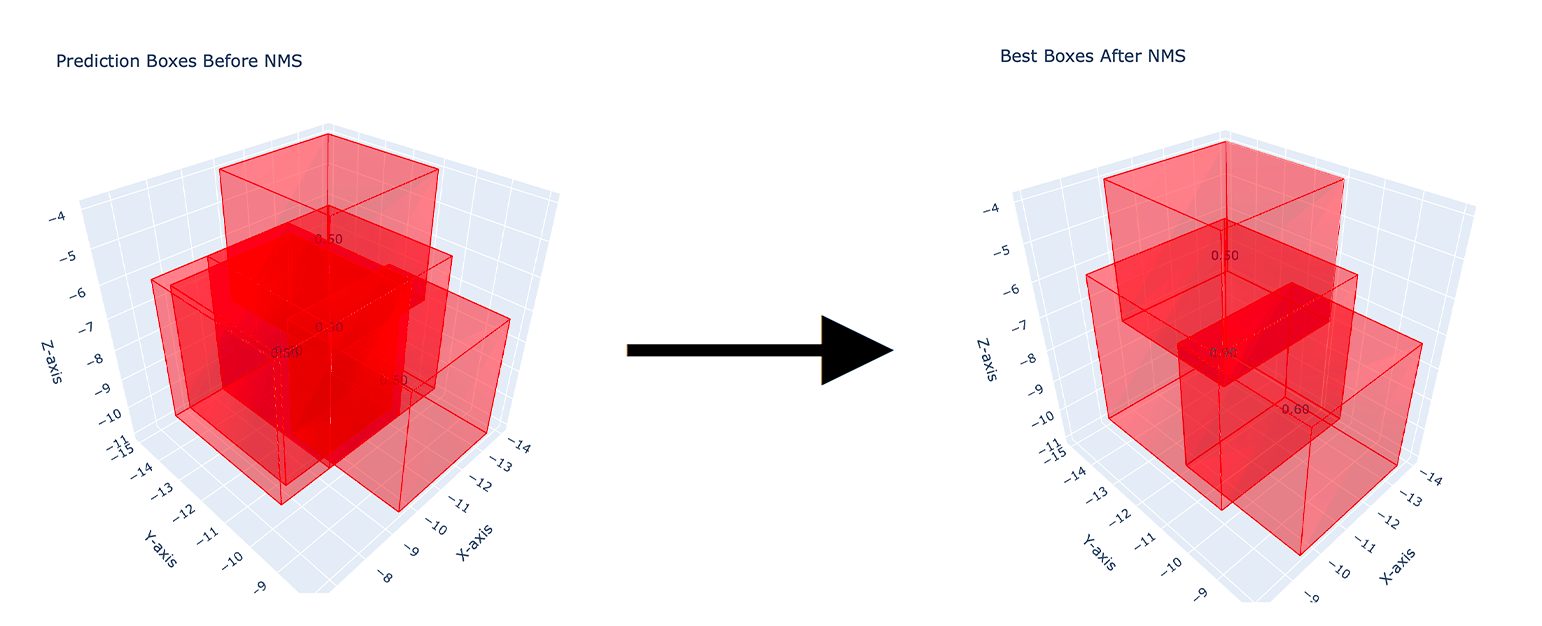
⬇️ Installation and Import
Now, this code is available with PyPI here. The package can be installed with:
pip install nms-3d          # NMS only, depends on torch
pip install "nms-3d[plot]"  # also plot_3d_boxes (plotly)
and can be imported as:
import nms_3d
Quick use:
from nms_3d import nms_3d

# boxes: (N, 7) tensor with columns SCORE, X MIN, Y MIN, Z MIN, X MAX, Y MAX, Z MAX
kept_boxes, kept_indices = nms_3d(boxes, iou_threshold=0.5, return_indices=True)
🤔 When to use this vs MONAI
MONAI already ships 3D box NMS (monai.data.box_utils.non_max_suppression) as part of a large
medical-imaging framework. If MONAI is already in your stack, use it. This package is for when it is not: a
~100-line, torch-only function with no other dependencies, that gives the same result as MONAI and as
torchvision.ops.nms on flat boxes (both are checked in the test suite).
📦 Package documentation
Package documentation is available here.
📂 Project Organization
The project consists of the following Python modules:
.
├── nms_3d/                # The NMS 3D package folder
│   ├── nms_3d.py          # Function that applies the NMS 3D algorithm.
│   └── plot_3d_boxes.py   # Function for creating 3D plots of bounding boxes using Plotly.
│
├── tests/                 # pytest suite (edge cases, torchvision and MONAI equivalence).
│
├── example.py             # The script that contains the 3D NMS application example.
│
├── bbox-coords/           # The folder that contains the bounding box .csv files before and after the 3D NMS.
│   ├── bbox-coords-before-nms-3d.csv  # Example file of bounding boxes to suppress.
│   └── bbox-coords-after-nms-3d.csv   # Output file after applying the 3D NMS on bbox-coords-before-nms-3d.csv.
│
└── output/                # The folder that contains the .html visualization of the boxes before and after the 3D NMS.
    ├── best_boxes_after_nms.html   # .html view of the boxes after the 3D NMS.
    ├── best_boxes_before_nms.html  # .html view of the boxes before the 3D NMS.
    └── NMS-image-example.png       # Example image used in this README.md file.
Run the application example with:
python3 example.py
This code will read the bounding box coordinates from bbox-coords-before-nms-3d.csv, perform 3D NMS, and save the result to bbox-coords-after-nms-3d.csv. Also, two 3D plots are saved as HTML files to show the boxes before and after NMS.
🚨 Requirements
Python>=3.9.5
torch>=2.2.2
plotly>=5.13.1  # optional, only for plot_3d_boxes
Install the requirements of example.py with:
pip3 install -r requirements.txt pandas
Run the tests with:
pip install -e ".[dev,plot]"
pytest
🤝 Contribution
👨💻 Ciro Russo, PhD
⚖️ License
MIT License
1 maintainer

Metadata
1 maintainer
Release files for nms-3d 0.2.0
For a detailed explanation of source distributions (sdists) and built distributions (wheels), please see the package formats documentation.
Source distribution (sdist)
| File | Size | Uploaded | |
|---|---|---|---|
| nms_3d-0.2.0.tar.gz | 379.4 kB | Details |
Built distribution (wheel)
| File | Interpreter | ABI | Platform | Reset |
|---|---|---|---|---|
| nms_3d-0.2.0-py3-none-any.whl | Python 3 | none | any | Details |
Total release size: 387.8 kB
Release files / nms_3d-0.2.0.tar.gz
| Download URL | nms_3d-0.2.0.tar.gz |
|---|---|
| Size | 379.4 kB |
| Tags | Source |
|
SHA-256 checksum How to use checksums |
92e597795ed881181fb3acf6c2d2a565c6dd74483800d3cbe423f02a0db93ac7
|
|
BLAKE2b-256 checksum How to use checksums |
96d87345186d1788306b879473a0de8ea2a3e73ea2ed295d7246a262b0033467
|
| Upload date | |
|
Uploaded using Trusted Publishing? What is trusted publishing? |
No |
| Uploaded via |
twine/6.2.0 CPython/3.13.12
|
Release files / nms_3d-0.2.0-py3-none-any.whl
| Download URL | nms_3d-0.2.0-py3-none-any.whl |
|---|---|
| Size | 8.4 kB |
| Tags | Python 3 |
|
SHA-256 checksum How to use checksums |
15dec6fe78936bb673067dd45b2c2b7a9edaaf0d0f276718ec550212725db13c
|
|
BLAKE2b-256 checksum How to use checksums |
c9eb3a82f3ad9b5e7d9bf044632759977cd9d52aece8a51c9049c16b49bb0a95
|
| Upload date | |
|
Uploaded using Trusted Publishing? What is trusted publishing? |
No |
| Uploaded via |
twine/6.2.0 CPython/3.13.12
|














