
Open Data Stack (odctl)




Run an open data stack on your machine, with its services already connected, from one command.
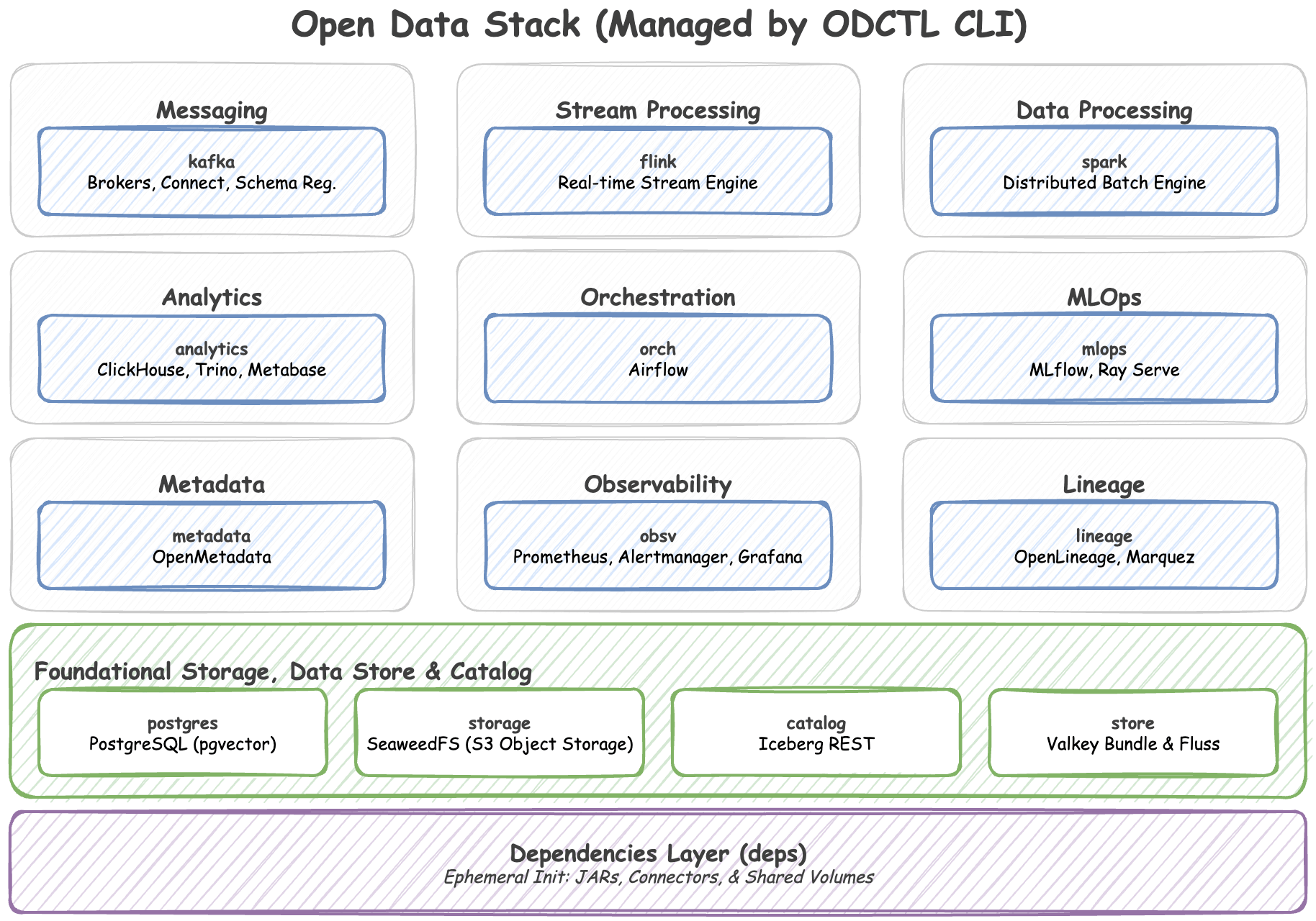
odctl is a command-line tool that runs an open data stack on your machine with Docker Compose: Kafka, Flink, Spark, Iceberg, Trino, ClickHouse, MLflow, Feast, Airflow and more. You name the profiles you want, such as kafka-lite or airflow, and odctl starts them together with the services they depend on.
To see why it exists and how it differs from a Compose file of your own, read Why odctl.
Documentation: jaehyeon.me/odctl. It covers every profile with its ports, images and memory limits, the CLI reference, guides and troubleshooting.
Installation
odctl needs Docker running and Python 3.10 or later. Requirements says how much memory to give Docker. Install odctl into its own environment:
uv tool install odctl
# or
pipx install odctl
Quick Start
These commands create a workspace, list the profiles, start three of them and stop everything:
odctl init                    # copy the compose files and settings into ./.odctl
odctl list                    # show the profiles
odctl up kafka-lite flink-lite spark-lite
odctl down --all
odctl up starts the profiles each one depends on first, here PostgreSQL, SeaweedFS (S3) and the Iceberg REST catalog. See Getting Started for more.

Commands
Each command has its own section in the CLI reference, with its options and examples. The Example column links to a page that runs the command and shows its output, and Getting Started runs them in order on one profile.
| Command | Use it to | Example |
|---|---|---|
odctl list |
See every profile and what it runs | Getting Started |
odctl explain |
See a profile's services, images, ports and the profiles it depends on | Getting Started |
odctl ps |
See the running containers, their health and their ports | Getting Started |
odctl info |
Check the installed odctl version and whether Docker is reachable | Getting Started |
odctl init |
Copy the compose files and settings into .odctl, so you can edit them |
Getting Started |
odctl pull |
Download a profile's images before you start it | How It Works |
odctl up |
Start profiles and the profiles they depend on | Getting Started |
odctl down |
Stop profiles and remove their containers | Getting Started |
odctl logs |
Read the logs of a profile's containers | Getting Started |
odctl restart |
Restart a profile's containers and keep them | Getting Started |
odctl recreate |
Replace a profile's containers, to apply an edit to a compose file or .env |
How It Works |
Roadmap
odctl follows semantic versioning from 1.0, so a later 1.x release does not break a project that pins odctl>=1.0,<2. The next releases add an MCP endpoint and streaming features for Feast, custom OpenMetadata connectors, a written list of what 1.x keeps stable with JSON output, an MCP server for AI agents, a Langfuse profile, and snapshot and restore of a profile's data. The roadmap page shows each step in order.
Related Reading
Blog posts about odctl and the projects built on it are tagged odctl on jaehyeon.me.
Projects that use odctl:
- benchtop: hands-on data engineering and machine learning demos that run locally, each on the odctl stack.
- desflow (docs): a SimPy library for simulations that stream to Kafka, PostgreSQL, Redis and Iceberg; its examples and integration tests run their infrastructure with odctl.
- agentic-analytics-system: conversational analytics over an Iceberg lakehouse, with Trino, Iceberg and object storage started by odctl.
Development
Pull requests are welcome. To work on the CLI:
- Clone the repository and install uv.
- Install the dependencies and the project in development mode:
uv sync - Install the pre-commit hooks, which run the formatting and type checks:
uvx pre-commit install
- Run the tests:
uv run pytest tests/
- Build the documentation site, then serve it while you edit. It is served at
http://127.0.0.1:8000/odctl/:uv run mkdocs build --strict uv run mkdocs serve
The profile pages and the CLI reference are generated by scripts/gen_pages.py during the build, so edit registry.yml, the compose files or the commands rather than those pages.
License
This project is licensed under the Apache License 2.0. See the LICENSE file for details.
1 maintainer

Metadata
1 maintainer
Release files for odctl 1.2.1
For a detailed explanation of source distributions (sdists) and built distributions (wheels), please see the package formats documentation.
Source distribution (sdist)
| File | Size | Uploaded | Provenance | |
|---|---|---|---|---|
| odctl-1.2.1.tar.gz | 997.9 kB | With provenance | Details |
Built distribution (wheel)
| File | Interpreter | ABI | Platform | Reset |
|---|---|---|---|---|
| odctl-1.2.1-py3-none-any.whl | Python 3 | none | any | Details |
Total release size: 1.2 MB
Release files / odctl-1.2.1.tar.gz
| Download URL | odctl-1.2.1.tar.gz |
|---|---|
| Size | 997.9 kB |
| Tags | Source |
|
SHA-256 checksum How to use checksums |
431101e9a5d561c8799013da7402ac21d9dc85a8d5ad06cd84da1986d7377635
|
|
BLAKE2b-256 checksum How to use checksums |
17daf0d518c2636f94cfe21a82278b4c7a1bac5d56216541084167436b9bdcb7
|
| Upload date | |
|
Uploaded using Trusted Publishing? What is trusted publishing? |
Yes |
| Uploaded via |
twine/7.0.0 CPython/3.13.16
|
Provenance
Provenance describes where a file came from. On PyPI, provenance is shared via attestations, which provide a verifiable record of the build or publishing details. View details, limitations and caveats.


PyPI Publish Attestation
PyPI verified that this artifact, at this checksum, originated from the publisher listed below.
Signed by GitHub Actions, verified by PyPI on Oct 24, 2026.
Transparency logRelease files / odctl-1.2.1-py3-none-any.whl
| Download URL | odctl-1.2.1-py3-none-any.whl |
|---|---|
| Size | 174.9 kB |
| Tags | Python 3 |
|
SHA-256 checksum How to use checksums |
47b046848de12e243d189a8bac392e7079b5c5ee26631ba8d33a2d1198083d22
|
|
BLAKE2b-256 checksum How to use checksums |
24c3091e1df3685d55762bb6a7ed8ecfbb642c6ef0ccf60353e1ccbd3fa09490
|
| Upload date | |
|
Uploaded using Trusted Publishing? What is trusted publishing? |
Yes |
| Uploaded via |
twine/7.0.0 CPython/3.13.16
|
Provenance
Provenance describes where a file came from. On PyPI, provenance is shared via attestations, which provide a verifiable record of the build or publishing details. View details, limitations and caveats.
PyPI Publish Attestation
PyPI verified that this artifact, at this checksum, originated from the publisher listed below.
Signed by GitHub Actions, verified by PyPI on Oct 24, 2026.
Transparency logSecurity for odctl 1.2.1
Provenance
Provenance describes where a file came from. On PyPI, provenance is shared via attestations, which provide a verifiable record of the build or publishing details. View details, limitations and caveats.
Full provenance
All 2 files in this release have been uploaded with provenance metadata.
Attestation for odctl-1.2.1.tar.gz
PyPI Publish Attestation
PyPI verified that this artifact, at this checksum, originated from the publisher listed below.
Signed by GitHub Actions, verified by PyPI on Oct 24, 2026.
Transparency logA note on package security
PyPI is a repository for distributing packages, not a service for auditing them. While third-party security researchers and our staff do their best to detect and remove malicious packages, PyPI cannot guarantee the quality, security or suitability of any given package.
To learn more about protecting yourself from malicious actors, visit our package security documentation.














