



Website · Quick start · Bug bounty · Verification · Documentation · Issues
Pentest-AI is an open-source AI penetration testing and bug-bounty tool that keeps proven findings apart from guesses. It connects an AI client or model to a real pentest workflow: investigating web applications, discovering and reproducing vulnerabilities, and using machine oracles to verify whether an exploit actually works. A finding no oracle can prove stays labelled a candidate, and a verified one carries the requests and responses that proved it.
Use it through MCP (Claude Code, Codex, Cursor, VS Code), from the CLI, or in CI/CD. The model drives the investigation; an independent oracle decides whether a finding earns a verified verdict, so the model's guesses never arrive dressed as results.
Built for authorized bug bounty: one profile per program carries its scope, its stated rate and your researcher handle, a dry run shows the plan before anything is sent, and report drafts come from verified findings only. Jump to the bug-bounty workflow →
Test only systems you own or have explicit authorization to assess. Read the acceptable-use policy and terms before running an engagement.
Quick start
Recommended: Codex or Claude Code
Use Python 3.10 to 3.14 and install pipx
first. Run pipx ensurepath and reopen your terminal if needed. pipx isolates
Pentest-AI's dependencies and makes its commands available across folders.
pipx install ptai
ptai setup --mcp
Install your AI client's CLI first. Setup asks before connecting all detected supported clients, including both Codex and Claude Code when installed. It preserves existing registrations. Restart your client afterward.
The wizard uses user-wide settings. It does not install clients, sign you in,
download models or configure Ollama. Your AI client supplies the model; no separate
model API key is required by the MCP server. Use ptai setup --mcp --dry-run to
preview changes. See single-client and per-repository setup
for Codex .codex/config.toml and Claude Code .mcp.json instructions.
For upgrades, use pipx upgrade ptai. In an existing activated virtual environment,
python -m pip install --upgrade ptai is also supported; keep that environment
available after registering it with your AI client.
Alternative: Ollama and local models
Install Pentest-AI as above, but skip MCP setup for this route.
Install and start Ollama, then pull a model
with tool-calling support. Use ollama list to find its exact installed name.
export PENTEST_AI_LLM_PROVIDER=ollama
export PENTEST_AI_MODEL="your-installed-model"
ptai start https://your-authorized-target.example --no-sync
In PowerShell:
$env:PENTEST_AI_LLM_PROVIDER = "ollama"
$env:PENTEST_AI_MODEL = "your-installed-model"
ptai start https://your-authorized-target.example --no-sync
Replace the placeholders before running. A local model needs no cloud API key. Model quality and available memory affect results. See the model guide for endpoint configuration.
Try the bundled demo
No API key or external target required.
pipx install ptai
ptai demo
The demo tests a bundled vulnerable application, replays a finding from its proof capsule, and checks the hardened routes. Inspect the evidence workflow before configuring a real engagement.
Other model providers
For standalone cloud models and optional scanner dependencies, see the installation guide and provider guide. Keep API keys out of source control.
Bug-bounty automation
Bug bounty mode is for programs that allow automated testing. You write one
profile per program with its scope, its stated rate and your researcher handle.
--program then applies all of it to every request, and --dry-run prints the
plan without sending anything.
# ~/.pentest-ai/programs/acme.toml
platform = "hackerone"
handle = "acme"
researcher = "your-h1-username"   # sent on every request in X-Bug-Bounty
rps = 5.0                         # the rate the program states
scope = ["*.acme.com", "api.acme.com"]
excluded = ["status.acme.com"]
scanners_allowed = true
allow_race = false
ptai start https://api.acme.com --program acme --dry-run    # sends nothing
ptai start https://api.acme.com --program acme --auto-auth
ptai bounty-report <engagement-id> --program acme --output-dir drafts/
Under --program:
- Every request is held to the program's rate, external tools included. A tool that cannot be held to its share of the rate is skipped and the scan says so.
- Scope comes from the profile and nowhere else. Requests outside it are refused, and exclusions win over wildcards.
- Each request carries your researcher handle in
X-Bug-Bounty, or in the header the program names (PTAI_BOUNTY_HEADER_NAME). - Wordlist tools such as gobuster and ffuf are declined. Two built-in discovery probes still try a list of likely paths, about 500 requests.
- Payloads built to exhaust or crash the target are not sent. Probes that change
other users' accounts or shared state do not run. Race-condition bursts only
run when the profile sets
allow_race = true. 429andRetry-Afterare honoured. A target that slows down gets a lower rate, and one that stays degraded stops the scan with the reason recorded.- A program that bans scanners needs a typed
yes, because scanning it can void safe harbour.
ptai bounty-report drafts reports from oracle-verified findings only, with
reproduction steps taken from the oracle's own requests. Reproduce each one by
hand and submit it yourself. ptai bounty import converts a program's exported
scope file into allow and exclude entries for the profile.
Wall time is requests divided by rate. On our test application a full pass at 3 rps is about 8,700 requests and takes 51 minutes, and finds every critical and high that a 10 rps pass finds. At 10 rps it was about 6,600 requests and 11 minutes, measured before slow probes got room to finish at low rates.
Counted at arrival, no second went over the declared rate at 3 or 10 rps, including the requests sent by external tools.
How verification works
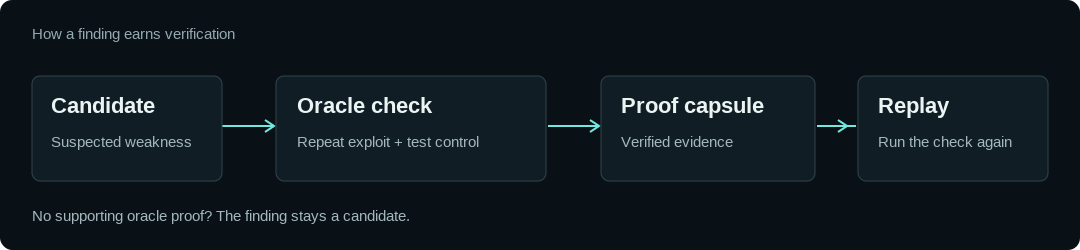
- Find a candidate. A probe or scanner identifies behaviour worth investigating.
- Reproduce it and check a control. A named oracle repeats the exploit and compares it with a control that should not demonstrate the weakness.
- Keep the evidence. A verified finding records the oracle, the requests it sent and the responses it judged.
ptai retestscans the target again andptai diffshows what changed.ptai demoshows a portable proof capsule thatptai replayre-checks.
For example, a trusted-header bypass must return privileged content with the attack header and deny access without it. A server that answers every request with HTTP 200 is not sufficient evidence.
The model cannot award a verified verdict. Third-party scanner output remains unverified until an oracle independently proves it. Findings without a supported verification recipe remain candidates.
A verified verdict applies to the tested conditions. It does not mean the entire application is secure. Proof capsules are unsigned. Rerunning the check is the trust mechanism.
What you can do
| Workflow | What Pentest-AI provides |
|---|---|
| Investigate web applications | Probes for injection, access control, request handling and other application weaknesses |
| Run a bug-bounty engagement | Hold a scan to a program's scope and rate, then draft reports from verified findings (guide) |
| Work through an AI client | MCP tools for engagements, investigation and verification |
| Reproduce a finding | Oracle results and replayable proof capsules |
| Check a fix | Rerun the recorded check against the updated target |
| Report to your team | Reports and SARIF output for existing engineering workflows |
| Keep engagement data local | Findings stored on your machine in SQLite |
Coverage varies by probe and oracle. Optional scanners need their own binaries, and some integrations provide raw output rather than structured findings. Consult the documentation and changelog for your version; main may contain unreleased work.
View the capability inventory checked by CI.
Put verified findings into CI
Configure your model provider, an authorized target and first-run consent in your CI environment. Keep secrets in the CI provider's secret store.
ptai start https://your-authorized-target.example --ci --fail-on verified --no-sync
Export verified findings using the engagement ID from the run:
ptai export YOUR_ENGAGEMENT_ID --sarif pentest.sarif
--sarif is an export option, not a ptai start option. Retain the engagement ID and run the export even when the finding gate fails if you want evidence for failed builds. Upload the resulting file through your CI provider's SARIF integration.
Evidence, benchmarks and limits
Benchmark findings, challenge completion and oracle-verified findings are different measurements. These reports record the versions, targets and methodology behind their results:
- Benchmark reports and artifacts
- Juice Shop methodology
- Vulnerable test harness
- Clean-application checks
Expect incomplete coverage. A scan with no verified findings is not a security assessment of everything an application does. Authentication, application state, unsupported bug classes and environmental changes affect what can be found and reproduced. Review results and keep a human involved in the engagement.
Data and network behaviour
Findings are stored locally. Anonymous usage counters are opt-in through ptai telemetry enable.
Local storage does not mean every operation stays on your machine: model-provider calls and installed scanners have their own network behaviour. Blind-vulnerability checks can use an external out-of-band collaborator; callback metadata is visible to that service.
Use your own collaborator where required, or disable callbacks:
ptai start https://your-authorized-target.example --oast-server https://your-collaborator.example
ptai start https://your-authorized-target.example --no-oast
Get involved
Use Issues for reproducible bugs and Discussions for questions and ideas. See the agent and contributor guide for build and test instructions.
The optional pentest-ai-agents repository contains Claude Code subagent files.
Pentest-AI is open source under the MIT license.
1 maintainer

Metadata
1 maintainer
Release files for ptai 1.6.1
For a detailed explanation of source distributions (sdists) and built distributions (wheels), please see the package formats documentation.
Source distribution (sdist)
| File | Size | Uploaded | Provenance | Actions |
|---|---|---|---|---|
| ptai-1.6.1.tar.gz | 1.1 MB | With provenance | Details for ptai-1.6.1.tar.gz |
Built distribution (wheel)
| File | Interpreter | ABI | Platform | Actions Reset |
|---|---|---|---|---|
| ptai-1.6.1-py3-none-any.whl | Python 3 | none | any | Details for ptai-1.6.1-py3-none-any.whl |
Total release size: 1.9 MB
Release files / ptai-1.6.1.tar.gz
| Download URL | ptai-1.6.1.tar.gz |
|---|---|
| Size | 1.1 MB |
| Tags | Source |
|
SHA-256 checksum How to use checksums |
214f0b0081ea0fd47ce22f015bc007ed6985659ab11054666a32ff93647a2b4e
|
|
BLAKE2b-256 checksum How to use checksums |
11ac856503e4bab6342a0c19de809bba2a987f78b8182cb89696c2d3c5d08cab
|
| Upload date | |
|
Uploaded using Trusted Publishing? What is trusted publishing? |
Yes |
| Uploaded via |
twine/6.1.0 CPython/3.13.13
|
Provenance
Provenance describes where a file came from. On PyPI, provenance is shared via attestations, which provide a verifiable record of the build or publishing details. View details, limitations and caveats.


PyPI Publish Attestation
PyPI verified that this artifact, at this checksum, originated from the publisher listed below.
Signed by GitHub Actions, verified by PyPI on Nov 3, 2026.
Transparency logRelease files / ptai-1.6.1-py3-none-any.whl
| Download URL | ptai-1.6.1-py3-none-any.whl |
|---|---|
| Size | 771.7 kB |
| Tags | Python 3 |
|
SHA-256 checksum How to use checksums |
810120d05975779d34dac177827184cab99e7b22e9f3ba5fb641562012919a10
|
|
BLAKE2b-256 checksum How to use checksums |
313810a00e61ff9b19927924679a5a68b6b1da9c1088911a111bd10df482d793
|
| Upload date | |
|
Uploaded using Trusted Publishing? What is trusted publishing? |
Yes |
| Uploaded via |
twine/6.1.0 CPython/3.13.13
|
Provenance
Provenance describes where a file came from. On PyPI, provenance is shared via attestations, which provide a verifiable record of the build or publishing details. View details, limitations and caveats.
PyPI Publish Attestation
PyPI verified that this artifact, at this checksum, originated from the publisher listed below.
Signed by GitHub Actions, verified by PyPI on Nov 3, 2026.
Transparency logSecurity for ptai 1.6.1
Provenance
Provenance describes where a file came from. On PyPI, provenance is shared via attestations, which provide a verifiable record of the build or publishing details. View details, limitations and caveats.
Full provenance
Both files in this release have been uploaded with provenance metadata.
Attestation for ptai-1.6.1.tar.gz
PyPI Publish Attestation
PyPI verified that this artifact, at this checksum, originated from the publisher listed below.
Signed by GitHub Actions, verified by PyPI on Nov 3, 2026.
Transparency logA note on package security
PyPI is a repository for distributing packages, not a service for auditing them. While third-party security researchers and our staff do their best to detect and remove malicious packages, PyPI cannot guarantee the quality, security or suitability of any given package.
To learn more about protecting yourself from malicious actors, visit our package security documentation.














