
Python frontend for Gmsh

Project description





Gmsh is a powerful mesh generation tool with a scripting language that is notoriously hard to write.
The goal of PyGmsh is to combine the power of Gmsh with the versatility of Python and to provide useful abstractions from the Gmsh scripting language so you can create complex geometries more easily.
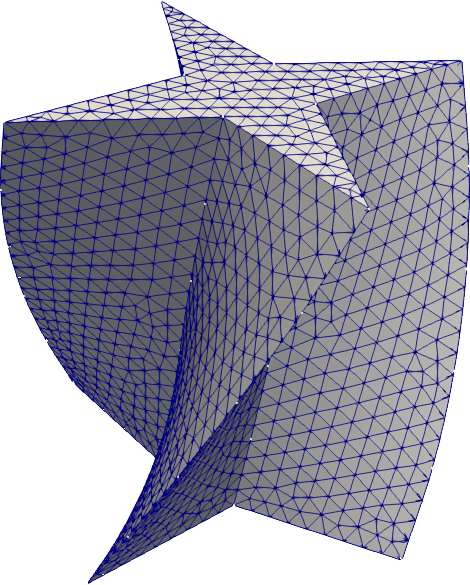
To create the above mesh, simply do
import pygmsh as pg
import numpy as np

geom = pg.Geometry()

# Draw a cross.
poly = geom.add_polygon([
    [0.0,   0.5, 0.0],
    [-0.1,  0.1, 0.0],
    [-0.5,  0.0, 0.0],
    [-0.1, -0.1, 0.0],
    [0.0,  -0.5, 0.0],
    [0.1,  -0.1, 0.0],
    [0.5,   0.0, 0.0],
    [0.1,   0.1, 0.0]
    ],
    lcar=0.05
    )

axis = [0, 0, 1]

geom.extrude(
    'Surface{%s}' % poly,
    translation_axis=axis,
    rotation_axis=axis,
    point_on_axis=[0, 0, 0],
    angle=2.0 / 6.0 * np.pi
    )

points, cells = pg.generate_mesh(geom)
to retrieve all points and cells of the mesh for the specified geometry. To store the mesh, you can use meshio; for example
import meshio
meshio.write('test.vtu', points, cells)
The output file can be visualized with various tools, e.g., ParaView.
You will find the above mesh in the directory test/examples/ along with other small examples.
Installation
Python Package Index
PyGmsh is available from the Python Package Index, so simply type
pip install pygmsh
to install or
pip install pygmsh -U
to upgrade.
Manual installation
Download PyGmsh from PyPi or GitHub and install it with
python setup.py install
Requirements
PyGmsh depends on
and, obviously, Gmsh.
Usage
Just
import pygmsh as pg
and make use of all the goodies the module provides. The documentation and the examples under test/examples/ might inspire you.
Testing
To run the PyGmsh unit tests, check out this repository and type
nosetests
or
nose2 -s test
Distribution
To create a new release
bump the __version__ number,
create a Git tag,
git tag v0.3.1
git push --tags
and
upload to PyPi:
make upload
License
PyGmsh is published under the MIT license.
Release history Release notifications | RSS feed


Download files
Download the file for your platform. If you're not sure which to choose, learn more about installing packages.
Source Distribution
File details
Details for the file pygmsh-2.3.0.tar.gz.
File metadata
- Download URL: pygmsh-2.3.0.tar.gz
- Upload date:
- Size: 8.9 kB
- Tags: Source
- Uploaded using Trusted Publishing? No
File hashes
| Algorithm | Hash digest | |
|---|---|---|
| SHA256 |
622d423eae6c95f8800a6649fd22fb32d4f859a5cb3843a1f959e92a5d9f6485
|
|
| MD5 |
c2232f8f6223d949ee9dbc227b5e570c
|
|
| BLAKE2b-256 |
07bb2733e247368af18f02187ec7343c0b07a5c6773feba58695b46c0d9517fd
|






