
pyrept: one HTML & JSON test report for every Python test framework






pyrept turns test runs into a single, self-contained HTML report (no CDN or internet needed, so it works as a CI artifact) plus a machine-readable JSON report for dashboards and pipelines.
| Framework | How |
|---|---|
| pytest | pytest --pyrept |
| unittest | python -m pyrept.unittest_runner discover -s tests |
| nose2 | nose2 --html-report |
| behave (Cucumber BDD) | behave -f pyrept.behave_formatter:PyreptFormatter -o /dev/null |
| Playwright (Python) | pytest --pyrept with pytest-playwright: failure screenshots are embedded automatically |
| Cucumber JSON (Java, JS, Ruby, Go …) | pyrept convert --from cucumber cucumber.json |
| Playwright Test (JS/TS) | pyrept convert --from playwright results.json |
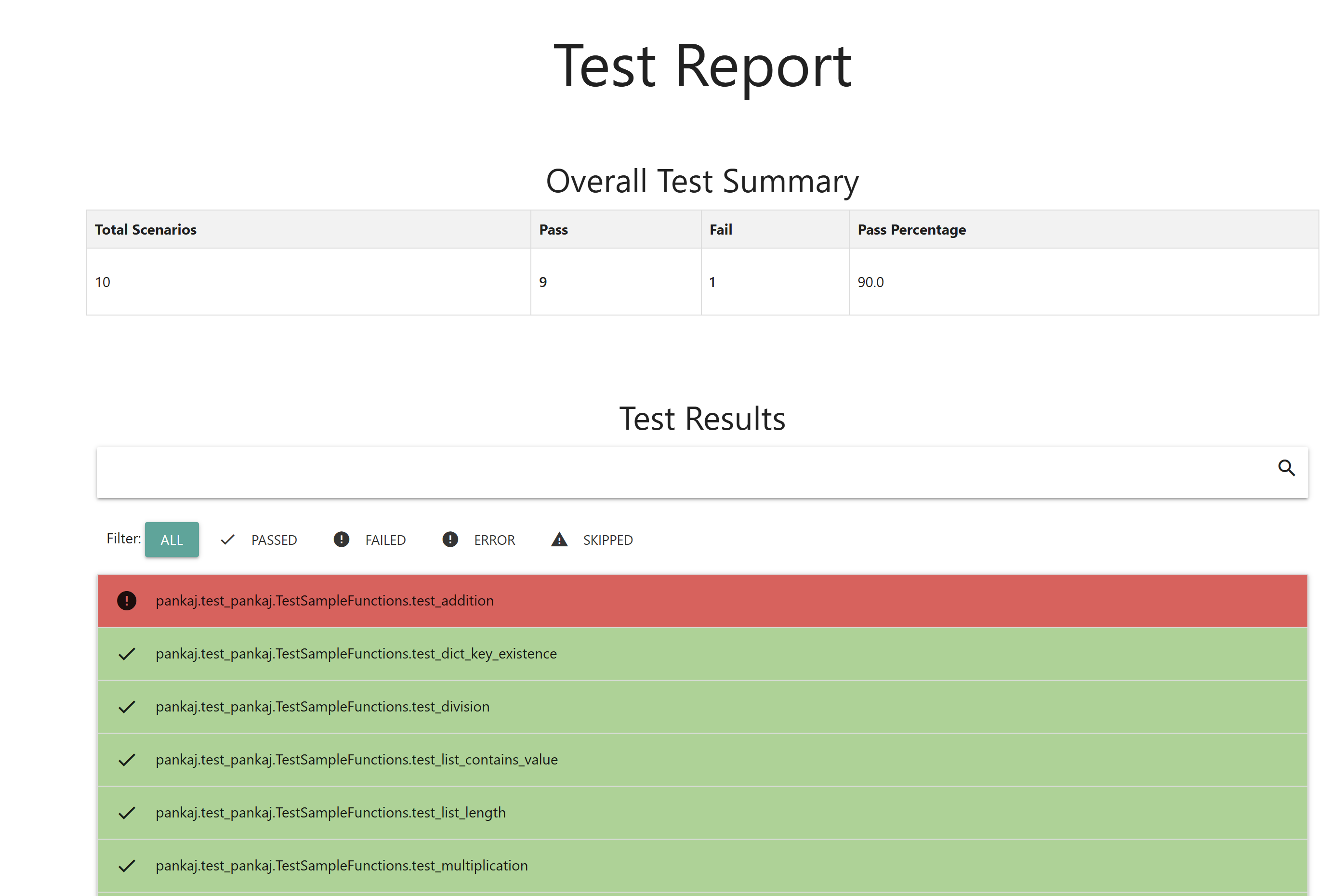
Report features
- Summary cards, pass-rate chart, total run time and the 5 slowest tests
- Failures and errors listed first; the first few open automatically
- Instant search across names, descriptions, tags and error messages (press
/), and filters for passed / failed / error / skipped / "problems" - Test docstrings or BDD steps as descriptions; tags/markers shown as chips
- Full tracebacks with a copy button
- Embedded screenshots (click to zoom), plus links to traces and other attachments
- Environment details (Python, platform, framework)
- Light and dark mode
- Everything is HTML-escaped and inlined, so the report is safe to open anywhere
Installation
pip install pyrept              # pytest, unittest, nose2, converters
pip install "pyrept[behave]"    # + behave formatter
pip install "pyrept[playwright]"  # + pytest-playwright
pytest
The plugin registers itself automatically and stays off until you ask for a report:
pytest --pyrept                                   # writes report.html and report.json
pytest --pyrept-html=reports/report.html --pyrept-json=reports/report.json --pyrept-title="Nightly"
To always generate reports, add to pytest.ini (or [tool.pytest.ini_options] in pyproject.toml):
[pytest]
pyrept = true
pyrept_html = reports/report.html
pyrept_json = reports/report.json
Setup errors, xfail (reported as skipped) and teardown errors are all captured.
Playwright and Selenium screenshots
When a test that uses the pytest-playwright page fixture (or a Selenium driver / selenium / browser fixture) fails, pyrept takes a full-page screenshot before the browser closes and embeds it in the report. Turn it off with --pyrept-no-screenshots.
unittest (no extra dependencies)
python -m pyrept.unittest_runner discover -s tests
python -m pyrept.unittest_runner tests.test_module --pyrept-html=reports/report.html --pyrept-json=reports/report.json
Accepts all the usual python -m unittest arguments. Or in code:
import unittest
from pyrept.unittest_runner import PyreptTestRunner

suite = unittest.defaultTestLoader.discover('tests')
PyreptTestRunner(html_path='reports/report.html', verbosity=2).run(suite)
Sub-test failures are reported individually; expected failures show as skipped, unexpected successes as failed.
nose2
Add the plugin to nose2.cfg:
[unittest]
plugins = pyrept.html_report

[html-report]
always-on = True
html-report-path = test_results/report.html
json-report-path = test_results/report.json
Then run nose2 (or nose2 --html-report without always-on). Command-line paths override the config file:
nose2 --html-report --html-report-path=test_results/report.html --json-report-path=test_results/report.json
behave (Cucumber BDD for Python)
behave -f pyrept.behave_formatter:PyreptFormatter -o /dev/null \
       -D pyrept_html=reports/report.html -D pyrept_json=reports/report.json
Or register it once in behave.ini and run behave -f pretty -f pyrept -o /dev/null:
[behave.formatters]
pyrept = pyrept.behave_formatter:PyreptFormatter

[behave.userdata]
pyrept_html = reports/report.html
pyrept_json = reports/report.json
Each scenario (and Scenario Outline example) is one test: its steps and tags form the description, and the failing step's error is the traceback.
Converting other reports
# Cucumber JSON from cucumber-jvm, cucumber-js, cucumber-ruby, godog, behave -f json ...
pyrept convert --from cucumber target/cucumber.json --html report.html --json report.json

# Playwright Test (JS/TS):  npx playwright test --reporter=json > results.json
pyrept convert --from playwright results.json --title "E2E" --fail-on-failure
Several input files are merged into one report. --fail-on-failure exits with status 1 when anything failed, which is handy as a CI gate. Playwright screenshots are embedded, traces and videos are linked, and flaky tests and retries are flagged.
Using pyrept from your own code
from pyrept import ReportCollector, make_attachment

report = ReportCollector(title='Smoke tests', environment={'Build': '1.4.2'})
report.add('login works', 'passed', metadata={'duration': 0.42, 'tags': ['smoke']})
report.add('checkout', 'failed', traceback='Timeout after 30s',
           attachments=[make_attachment('screenshot', path='shot.png')])
report.write('report.html', 'report.json')
Outcomes are passed, failed, error or skipped.
JSON report
report.json contains test_summary (total, passed, failed, error, skipped, percentage, where the pass rate excludes skipped tests), environment, duration, slowest_tests and test_results. Each result has name, description, result, traceback and metadata (duration, location, tags, attachments, ...).
License
MIT
1 maintainer

Metadata
1 maintainer
Release files for pyrept 1.1.0
For a detailed explanation of source distributions (sdists) and built distributions (wheels), please see the package formats documentation.
Source distribution (sdist)
| File | Size | Uploaded | |
|---|---|---|---|
| pyrept-1.1.0.tar.gz | 190.5 kB | Details |
Built distribution (wheel)
| File | Interpreter | ABI | Platform | Reset |
|---|---|---|---|---|
| pyrept-1.1.0-py2.py3-none-any.whl | Python 2, Python 3 | none | any | Details |
Total release size: 216.8 kB
Release files / pyrept-1.1.0.tar.gz
| Download URL | pyrept-1.1.0.tar.gz |
|---|---|
| Size | 190.5 kB |
| Tags | Source |
|
SHA-256 checksum How to use checksums |
059db06d3fe2e5f42006118f093c64202c7683460a58eccf5cf6e98a5c94f3b7
|
|
BLAKE2b-256 checksum How to use checksums |
7f6e8cd8e5a0fa3f67b751c8e46f87f0a00561c27658066452717765f7c93440
|
| Upload date | |
|
Uploaded using Trusted Publishing? What is trusted publishing? |
Yes |
| Uploaded via |
twine/7.0.0 CPython/3.11.17
|
Release files / pyrept-1.1.0-py2.py3-none-any.whl
| Download URL | pyrept-1.1.0-py2.py3-none-any.whl |
|---|---|
| Size | 26.2 kB |
| Tags | Python 2 Python 3 |
|
SHA-256 checksum How to use checksums |
a98694a2a3d33e8937cfc0b2f1e7cfaf11dae78438a1060e920688c3e6c46d53
|
|
BLAKE2b-256 checksum How to use checksums |
a629b216f03f21a3fc7fe7dbd861d91c49a0dada4156304f10f24e20219e47d9
|
| Upload date | |
|
Uploaded using Trusted Publishing? What is trusted publishing? |
Yes |
| Uploaded via |
twine/7.0.0 CPython/3.11.17
|














