
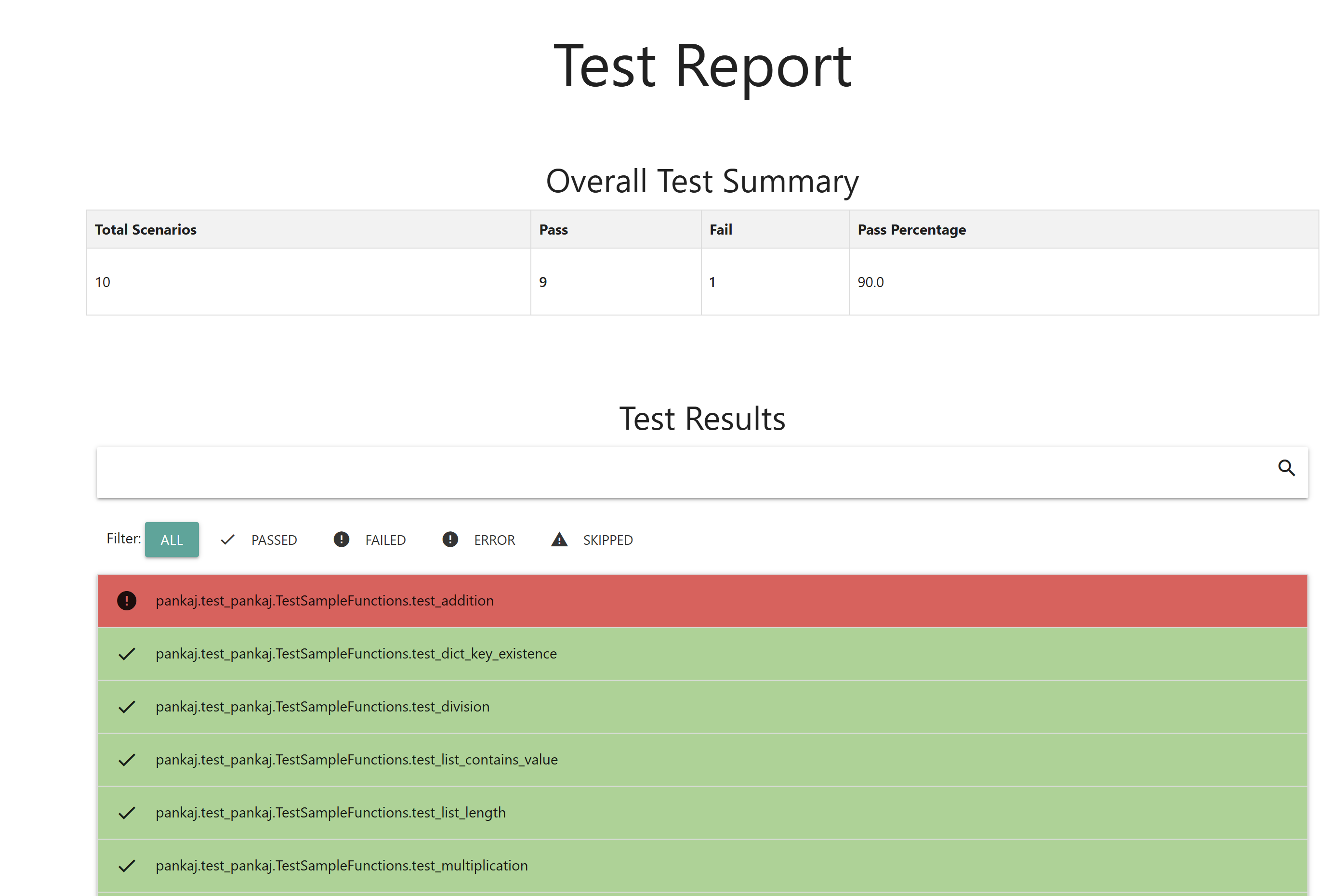
pyrept: one HTML, JSON and JUnit test report for every Python test framework















pyrept turns a test run into:
report.html: one self-contained page you can open offline, attach to a CI run or email. It has no CDN or external assets.report.json: the same data in machine-readable form, for dashboards, bots and pipelines.junit.xml(optional): JUnit XML, so GitLab, Jenkins, Azure DevOps and other CI servers can show results in their test tabs.
It works the same way with pytest, unittest, nose2, behave (Cucumber BDD) and browser tests run through pytest. It can also convert JUnit XML, Cucumber JSON and Playwright Test JSON reports, so teams using other languages get the same report.
Every runner and converter can also do two CI-friendly things: write JUnit XML next to the HTML/JSON report, and compare against the previous run's report.json to highlight new failures, fixed tests, still-failing tests and slowdowns.
Search-friendly summary: pyrept is a Python test report generator for pytest, unittest, nose2, behave/Cucumber, Playwright and Selenium. It creates offline HTML reports, JSON test results, JUnit XML for CI, test-result dashboards, failure screenshots, flaky-test metadata, baseline comparison and report conversion for GitHub Actions, GitLab CI, Jenkins and Azure DevOps.
Why pyrept?
- One report shape across frameworks: pytest, unittest, nose2, behave/Cucumber and browser tests can all produce the same HTML and JSON format.
- CI-native output: write JUnit XML for GitHub Actions, GitLab CI, Jenkins, Azure DevOps and other CI systems.
- Regression-focused reporting: compare with the previous
report.jsonto see new failures, fixed tests, still-failing tests, new tests, removed tests and slowdowns. - Works beyond Python: convert JUnit XML, Cucumber JSON and Playwright Test JSON from Java, JavaScript, TypeScript, Go, .NET, Ruby and other stacks.
- Useful failure context: captured stdout/stderr/logs, screenshots, tags, retries, flaky status, durations and file locations stay with the test result.
Contents
- Quick start
- Why pyrept?
- Installation
- Choose your framework
- pytest · unittest · nose2 · behave · Converting other reports
- Compare with the previous run
- JUnit XML output
- How outcomes are counted
- Using pyrept in CI
- Python API
- JSON report format
- Troubleshooting
- Development
Quick start
pip install pyrept
pytest --pyrept
Then open report.html in a browser. That is the whole setup for pytest. For other frameworks, see Choose your framework.
Installation
pip install pyrept                 # pytest, unittest, nose2 and the converters
pip install "pyrept[behave]"       # adds the behave formatter
pip install "pyrept[playwright]"   # adds pytest-playwright for browser screenshots
Requirements: Python 3.8 or newer. CI tests 3.8 through 3.14, plus the 3.15 pre-releases. Runtime dependencies are jinja2 and nose2.
Choose your framework
| You use | Run this | Details |
|---|---|---|
| pytest | pytest --pyrept |
pytest |
| unittest | python -m pyrept.unittest_runner discover -s tests |
unittest |
| nose2 | nose2 --html-report |
nose2 |
| behave (Cucumber BDD) | behave -f pyrept.behave_formatter:PyreptFormatter -o /dev/null |
behave |
| Playwright / Selenium (Python) | pytest --pyrept |
Screenshots |
| JUnit XML (Java, JS, Go, .NET, ... or any runner) | pyrept convert --from junit results.xml |
Converting |
| Cucumber JSON (Java, JS, Ruby, Go, ...) | pyrept convert --from cucumber cucumber.json |
Converting |
| Playwright Test (JS/TS) | pyrept convert --from playwright results.json |
Converting |
Every integration writes report.html and report.json to the current directory unless you choose other paths. Missing parent directories are created for you.
pytest
The plugin is installed with the package and stays off until you ask for a report, so it never changes a normal pytest run.
pytest --pyrept                                    # report.html + report.json
pytest --pyrept-html=reports/report.html --pyrept-json=reports/report.json
pytest --pyrept --pyrept-title="Nightly regression"
pytest --pyrept --pyrept-junit=junit.xml           # also write JUnit XML
pytest --pyrept --pyrept-baseline=report.json      # compare with the previous run
| Option | Meaning |
|---|---|
--pyrept |
Turn reporting on with the default paths. |
--pyrept-html=PATH |
HTML report path. Turns reporting on by itself. |
--pyrept-json=PATH |
JSON report path. Turns reporting on by itself. |
--pyrept-junit=PATH |
Also write a JUnit XML report. Turns reporting on by itself. |
--pyrept-baseline=PATH |
Compare with an earlier report.json. Turns reporting on by itself. |
--pyrept-title=TEXT |
Report title. The default is Test Report. |
--pyrept-no-screenshots |
Do not take browser screenshots of failing tests. |
To generate reports on every run, put the settings in your pytest configuration:
# pytest.ini (or [tool.pytest.ini_options] in pyproject.toml)
[pytest]
pyrept = true
pyrept_html = reports/report.html
pyrept_json = reports/report.json
pyrept_junit = reports/junit.xml          # optional
pyrept_baseline = reports/report.json     # optional
In the ini file, pyrept = true is what turns reporting on. The path settings on their own do not, so you can keep them in the file and still use pytest --pyrept only when you want a report.
Paths given on the command line are relative to the directory you run pytest from. Paths in the ini file are relative to the ini file, so the report always lands in the same place.
What gets recorded:
- Descriptions come from test docstrings, and markers (such as
@pytest.mark.smoke) are shown as tags. - Duration and file:line are recorded for every test.
- Collection errors, such as an import error in a test module, are reported as errors. A broken module never produces a report that looks clean.
- Setup and teardown errors are reported as errors. A teardown failure gets its own
...::teardownentry. - For failing tests, captured stdout, stderr and logs are attached.
- pytest-xdist (
-n auto) works. Workers send their results to the main process, which writes a single report. - pytest-rerunfailures works. Reruns are not counted as extra tests. The final attempt is recorded with
retries, and it is markedflakyif it passed after a retry. - Subtests (built into pytest 9+, or the
pytest-subtestsplugin) are supported. Each failing subtest is listed under its own name, such astest_x (i=1).
Playwright and Selenium screenshots
When a failing test uses a pytest-playwright page fixture, or a Selenium driver, selenium or browser fixture, pyrept takes a screenshot while the browser is still open and embeds it in the report. Click the screenshot to zoom. If the browser has already crashed, the test is still reported without a screenshot.
pip install "pyrept[playwright]" && playwright install chromium
pytest --pyrept            # use --pyrept-no-screenshots to turn this off
unittest
This integration needs no dependencies beyond the standard library. It accepts all the usual python -m unittest arguments, plus its own:
python -m pyrept.unittest_runner discover -s tests
python -m pyrept.unittest_runner tests.test_login -v \
    --pyrept-html=reports/report.html --pyrept-json=reports/report.json --pyrept-title="Unit tests"
python -m pyrept.unittest_runner discover -s tests \
    --pyrept-junit=reports/junit.xml --pyrept-baseline=reports/report.json
| Option | Meaning |
|---|---|
--pyrept-html PATH, --pyrept-json PATH |
Output paths. The defaults are report.html and report.json. |
--pyrept-junit PATH |
Also write JUnit XML. |
--pyrept-baseline PATH |
Compare with an earlier report.json. |
--pyrept-title TEXT |
Report title. |
Both --option=value and --option value work.
From your own code:
import unittest
from pyrept.unittest_runner import PyreptTestRunner

suite = unittest.defaultTestLoader.discover('tests')
result = PyreptTestRunner(html_path='reports/report.html', json_path='reports/report.json',
                          junit_path='reports/junit.xml',          # optional
                          baseline_path='reports/report.json',     # optional
                          title='Unit tests', verbosity=2).run(suite)
raise SystemExit(not result.wasSuccessful())
Durations, skip reasons, setUpClass and setUpModule errors, and failing subtests are all recorded. On Python 3.12+, unittest's own --durations N keeps working.
nose2
Enable the plugin in nose2.cfg (or unittest.cfg):
[unittest]
plugins = pyrept.html_report

[html-report]
always-on = True
html-report-path = test_results/report.html
json-report-path = test_results/report.json
junit-report-path = test_results/junit.xml          # optional
baseline-report-path = test_results/report.json     # optional
Then run nose2. Without always-on, run nose2 --html-report instead.
The same path names work as command-line flags. Command-line values override nose2.cfg, so this now works without putting paths in the config file:
nose2 --html-report --html-report-path=out/report.html --json-report-path=out/report.json \
      --junit-report-path=out/junit.xml --baseline-report-path=out/report.json
| Setting / option | Must end in | Meaning |
|---|---|---|
html-report-path / --html-report-path=PATH |
.html |
HTML report. The default is report.html. |
json-report-path / --json-report-path=PATH |
.json |
JSON report. The default is report.json. |
junit-report-path / --junit-report-path=PATH |
.xml |
Also write JUnit XML. |
baseline-report-path / --baseline-report-path=PATH |
.json |
Compare with an earlier report.json. |
template (config only) |
A custom Jinja2 template for the HTML report. |
These options appear in nose2 --help.
behave (Cucumber BDD)
pip install "pyrept[behave]"
behave -f pyrept.behave_formatter:PyreptFormatter -o /dev/null \
       -D pyrept_html=reports/report.html -D pyrept_json=reports/report.json -D pyrept_title="BDD"
The settings are behave "userdata" (-D name=value on the command line, or [behave.userdata] in behave.ini): pyrept_html, pyrept_json, pyrept_title, plus pyrept_junit for JUnit XML and pyrept_baseline to compare with an earlier report.json.
To set it up once, register the formatter in behave.ini:
[behave.formatters]
pyrept = pyrept.behave_formatter:PyreptFormatter

[behave.userdata]
pyrept_html = reports/report.html
pyrept_json = reports/report.json
behave -f pyrept -o /dev/null -f pretty # pyrept report + normal console output
behave pairs each
-owith the-fthat comes before it. Put-f pyrept -o /dev/nullfirst. If you write-f pretty -f pyrept -o /dev/null, the console output goes to/dev/nullinstead. On Windows, use-o NUL.
Each scenario, and each Scenario Outline example, is one test. Its tags and steps (including Background steps) form the description, and the first failing step's error becomes the traceback. Hook errors are reported as errors. Files you attach with context.attach(mime_type, data), such as screenshots, are embedded in the report.
Converting other reports
# JUnit XML: Maven Surefire / Gradle, Jest (jest-junit), Go (gotestsum), Cypress, .NET, pytest --junitxml, ...
pyrept convert --from junit target/surefire-reports/*.xml --title "Backend"

# Cucumber JSON: cucumber-jvm, cucumber-js, cucumber-ruby, godog, behave -f json, ...
pyrept convert --from cucumber target/cucumber.json --html report.html --json report.json

# Playwright Test (JS/TS)
npx playwright test --reporter=json > results.json
pyrept convert --from playwright results.json --title "E2E" --fail-on-failure
Convert common test reports into one searchable HTML report:
# Maven Surefire
pyrept convert --from junit target/surefire-reports/*.xml --title "Maven tests"

# Gradle JUnit XML
pyrept convert --from junit build/test-results/test/*.xml --title "Gradle tests"

# Jest with jest-junit configured to write reports/jest.xml
pyrept convert --from junit reports/jest.xml --title "Jest tests"

# Cypress with JUnit reporter output in reports/cypress-*.xml
pyrept convert --from junit reports/cypress-*.xml --title "Cypress tests"

# Playwright Test (JavaScript / TypeScript)
npx playwright test --reporter=json > results.json
pyrept convert --from playwright results.json --title "Playwright E2E"

# Go tests through gotestsum/go-junit-report
pyrept convert --from junit reports/go-junit.xml --title "Go tests"

# .NET test results converted to JUnit XML
pyrept convert --from junit TestResults/*.xml --title ".NET tests"

# Multiple CI shards merged into one report
pyrept convert --from junit shard-*/junit.xml --html reports/report.html --json reports/report.json
| Option | Meaning |
|---|---|
--from {cucumber,junit,playwright} |
Input format (required). |
--html PATH, --json PATH |
Output paths. The defaults are report.html and report.json. |
--junit PATH |
Also write JUnit XML. For example, turn Cucumber or Playwright results into JUnit for your CI server. |
--baseline PATH |
Compare with an earlier report.json. |
--title TEXT |
Report title. |
--fail-on-failure |
Exit with status 1 if any test failed or errored. Use this as a CI gate. |
- Several input files are merged into one report, for example
pyrept convert --from cucumber a.json b.json. This also combines the results of parallel or sharded CI jobs. - JUnit XML: tests are named
classname.name, and nested suites are shown assuite.<failure>maps to failed,<error>to error and<skipped>to skipped. Surefire'sflakyFailureandrerunFailurebecome retries.[[ATTACHMENT|path]]lines in the test output (the Jenkins convention) become attachments. - Playwright screenshots are embedded, traces and videos are linked, stdout and stderr are attached, and retries and flaky tests are flagged. Errors outside any test, such as a spec file that fails to load, are reported as errors.
- Exit codes:
0means OK,1means tests failed (only with--fail-on-failure), and2means an input file is missing or is not a valid report of the chosen format.
You can also run the converter as python -m pyrept convert ....
Compare with the previous run
Give pyrept an earlier report.json as the baseline. The new report then opens with a Compared with previous run panel and marks each changed test. Use the matching baseline option for your integration:
pytest --pyrept --pyrept-baseline=report.json
python -m pyrept.unittest_runner discover -s tests --pyrept-baseline=report.json
nose2 --html-report --baseline-report-path=report.json
behave -f pyrept.behave_formatter:PyreptFormatter -o /dev/null -D pyrept_baseline=report.json
pyrept convert --from junit target/surefire-reports/*.xml --baseline report.json
It also prints a one-line summary in the terminal:
pyrept: 2 new failures, 1 fixed, 3 still failing, 4 new, 1 removed, 1 slower (vs report.json)
| Label | Meaning |
|---|---|
| New failure | Failed or errored now, but passed or was skipped in the baseline (or did not exist yet). These are the ones to look at first. |
| Fixed | Failed or errored in the baseline, passes now. |
| Still failing | Failed or errored in both runs. |
| New | Not in the baseline (passing). A new test that fails is counted as a new failure. |
| Removed | In the baseline, but not in this run. |
| Slower | Takes at least 1.5× as long and at least 0.5 s more than in the baseline. The panel lists the 10 biggest slowdowns. |
The panel also shows how the pass rate moved, for example -3.20 pts. A New failures filter button lists only the new failures, and report.html#new-failures opens the report with that filter on.
Good to know:
- The baseline can be the file you are about to overwrite. pyrept reads it before writing, so
--pyrept-json=report.json --pyrept-baseline=report.jsonalways compares with the previous run. - A missing or unreadable baseline never fails the run. pyrept logs a warning and writes the report without a comparison, which is what happens on the very first CI run.
- Tests are matched by name. Compare reports from the same source. A pytest run names tests
tests/test_a.py::test_x, while the same tests imported from JUnit XML are namedtests.test_a.test_x, so they would show up as removed and new. - The JSON report gets a
comparisonsection with the same lists. It isnullwithout a baseline.
JUnit XML output
Most CI servers show test results natively when they are given JUnit XML. pyrept can write it next to the HTML and JSON reports from every runner and converter:
pytest --pyrept --pyrept-junit=reports/junit.xml
python -m pyrept.unittest_runner discover -s tests --pyrept-junit=reports/junit.xml
nose2 --html-report --junit-report-path=reports/junit.xml
behave -f pyrept.behave_formatter:PyreptFormatter -o /dev/null -D pyrept_junit=reports/junit.xml
pyrept convert --from cucumber cucumber.json --junit reports/junit.xml
Each test becomes a <testcase> with classname, name, time, file and line. Failures, errors and skips include their message and traceback. Text attachments, such as captured output, go into <system-out>, and tags, retries and flaky flags become <properties>. Characters that are not allowed in XML, such as ANSI color codes, are removed, so CI parsers never reject the file.
How outcomes are counted
Every test ends up as exactly one of passed, failed, error or skipped, and every integration maps outcomes the same way:
| Situation | Reported as |
|---|---|
| Assertion failure | failed |
| Unexpected exception, setup or teardown failure, collection or import error, undefined BDD step, hook error | error |
| Skipped test | skipped, with the reason |
Expected failure (xfail, @expectedFailure) |
skipped, with "Expected failure" |
Unexpected success (@expectedFailure that passed, strict xfail that passed) |
failed |
| Failing subtest | its own failed or error entry |
| Test that passed after a rerun | passed, with retries and flaky |
Pass rate = passed ÷ (total − skipped). Skipped tests do not lower it.
Using pyrept in CI
GitHub Actions — upload the report, and compare every run with the previous one on the same branch:
- name: Restore the previous report
  uses: actions/cache/restore@v4
  with:
    path: reports/report.json
    key: pyrept-${{ github.ref_name }}-${{ github.run_id }}
    restore-keys: pyrept-${{ github.ref_name }}-

- name: Run tests
  run: >
    pytest --pyrept-html=reports/report.html --pyrept-json=reports/report.json
    --pyrept-junit=reports/junit.xml --pyrept-baseline=reports/report.json

- name: Keep this report for the next run
  if: always()
  uses: actions/cache/save@v4
  with:
    path: reports/report.json
    key: pyrept-${{ github.ref_name }}-${{ github.run_id }}

- name: Upload test report
  if: always()                  # upload the report even when tests fail
  uses: actions/upload-artifact@v4
  with:
    name: test-report
    path: reports/
GitLab CI — the junit report makes results appear in the merge request and the pipeline's Tests tab:
test:
  script:
    - pytest --pyrept-html=reports/report.html --pyrept-json=reports/report.json --pyrept-junit=reports/junit.xml
  artifacts:
    when: always
    paths: [reports/]
    reports:
      junit: reports/junit.xml
Jenkins:
sh 'pytest --pyrept-html=reports/report.html --pyrept-json=reports/report.json --pyrept-junit=reports/junit.xml'
junit 'reports/junit.xml'
archiveArtifacts artifacts: 'reports/**', allowEmptyArchive: true
Links that open the report with a filter already applied:
report.html#problemsshows only failures and errors.report.html#new-failuresshows only new failures (needs a baseline).
Python API
You can use pyrept from your own runner or tooling:
from pyrept import ReportCollector, make_attachment

report = ReportCollector(title='Smoke tests', environment={'Build': '1.4.2', 'Branch': 'main'})
report.add('login works', 'passed', description='User can sign in', metadata={'duration': 0.42, 'tags': ['smoke']})
report.add('checkout', 'failed', traceback='Timeout after 30s',
           attachments=[make_attachment('screenshot', path='shot.png')])
report.add('search', 'skipped', traceback='Skipped: search service down')
context = report.write('reports/report.html', 'reports/report.json')
print(context['test_summary'])   # {'total': 3, 'passed': 1, 'failed': 1, 'error': 0, 'skipped': 1, 'percentage': 50.0}

# Optional: JUnit XML and a comparison with an earlier report
report.write('reports/report.html', 'reports/report.json',
             junit_path='reports/junit.xml', baseline_path='reports/previous.json')
add(name, outcome, description=None, traceback=None, metadata=None, attachments=None)takes an outcome ofpassed,failed,errororskipped. Any other value raisesValueError.make_attachment(name, content_type=None, data=None, path=None, text=None):datais raw bytes or base64 text.textis shown inline.pathlinks to a file. Images up to 5 MB are embedded so that the report stays self-contained.
write(html_path, json_path, template_path=..., junit_path=None, baseline_path=None)writes the reports and returns the full context (the same data asreport.json).- The metadata keys that the report understands are
duration(seconds),location,tags,retries,flakyandproject. Other keys are kept in the JSON.
JSON report format
{
  "test_report_title": "Test Report",
  "test_summary": {"total": 3, "passed": 1, "failed": 1, "error": 0, "skipped": 1, "percentage": 50.0},
  "timestamp": "2026/10/06 17:03:54 UTC",
  "duration": 4.21,
  "environment": {"Python": "3.14.0", "Platform": "Linux-...", "Framework": "pytest 9.0.0"},
  "slowest_tests": [{"name": "tests/test_checkout.py::test_pay", "duration": 3.42}],
  "comparison": {
    "baseline": {"source": "report.json", "timestamp": "2026/10/05 17:00:12 UTC", "percentage": 75.0, "total": 3},
    "percentage_delta": -25.0,
    "new_failures": ["tests/test_checkout.py::test_pay"],
    "fixed": [], "still_failing": [], "new_tests": [], "removed_tests": [],
    "slower": [{"name": "tests/test_checkout.py::test_pay", "before": 1.2, "after": 3.42, "ratio": 2.85}],
    "changes": {"tests/test_checkout.py::test_pay": "new-failure"}
  },
  "test_results": [
    {
      "name": "tests/test_checkout.py::test_pay",
      "result": "failed",
      "description": "Pays with a saved card.",
      "traceback": "AssertionError: ...",
      "metadata": {"duration": 3.42, "location": "tests/test_checkout.py:30", "tags": ["smoke"],
                   "attachments": [{"name": "Screenshot on failure", "content_type": "image/png", "data": "<base64>"}]}
    }
  ]
}
test_results lists errors first, then failed, skipped and passed tests, each group in alphabetical order. duration values are in seconds. comparison is null when no baseline was given. In changes, each test name maps to new-failure, fixed, still-failing or new.
Troubleshooting
| Problem | Fix |
|---|---|
pytest creates no report |
The plugin is off by default. Pass --pyrept (or any --pyrept-* path option), or set pyrept = true in the ini file. Path settings in the ini file alone do not turn it on. |
| The report is in an unexpected folder | CLI paths are relative to the current directory, and ini paths are relative to the ini file. Use absolute paths to be sure. The terminal summary prints the final location. |
| The behave console output disappeared | Put -f pyrept -o /dev/null before -f pretty. See behave. |
| No screenshot for a failing browser test | The fixture must be named page (Playwright) or driver / selenium / browser (Selenium), and the browser must still be open when the test fails. |
pyrept convert exits with status 2 |
An input file is missing, or it does not match --from. Check the message on stderr. |
nose2 says Invalid html-report-path (or json/junit/baseline) |
The paths must end in .html, .json, .xml and .json respectively. |
| The comparison shows every test as removed and new | The two reports name tests differently, because they come from different sources (for example pytest and JUnit XML). Compare reports produced the same way. |
| No comparison panel | The baseline file was missing or unreadable. Look for the pyrept: baseline ... not found warning. This is normal on the first run. |
| The CI server rejects the JUnit file | Make sure you point it at the --pyrept-junit file, not report.json. |
| The HTML report is very large | Full-page screenshots are embedded. Use --pyrept-no-screenshots, or keep big files as linked path attachments. |
Development
git clone https://github.com/pankajnayak1994/pyrept && cd pyrept
pip install -r requirements.txt -e .
pytest                       # whole suite (pytest, unittest, nose2, behave, importers)
coverage run -m pytest && coverage combine && coverage report
Changes are listed in CHANGELOG.md.
License
MIT
1 maintainer

Metadata
1 maintainer
Release files for pyrept 1.2.0
For a detailed explanation of source distributions (sdists) and built distributions (wheels), please see the package formats documentation.
Source distribution (sdist)
| File | Size | Uploaded | |
|---|---|---|---|
| pyrept-1.2.0.tar.gz | 385.0 kB | Details |
Built distribution (wheel)
| File | Interpreter | ABI | Platform | Reset |
|---|---|---|---|---|
| pyrept-1.2.0-py3-none-any.whl | Python 3 | none | any | Details |
Total release size: 430.6 kB
Release files / pyrept-1.2.0.tar.gz
| Download URL | pyrept-1.2.0.tar.gz |
|---|---|
| Size | 385.0 kB |
| Tags | Source |
|
SHA-256 checksum How to use checksums |
41e6a83e07707669a5462f99591ae466a84d8e0035b92f3f1e6ce8a926532936
|
|
BLAKE2b-256 checksum How to use checksums |
66a1c86eab29d8343542ffea332a00f998d38bbbc69e95a096be94356564573b
|
| Upload date | |
|
Uploaded using Trusted Publishing? What is trusted publishing? |
Yes |
| Uploaded via |
twine/7.0.0 CPython/3.14.7
|
Release files / pyrept-1.2.0-py3-none-any.whl
| Download URL | pyrept-1.2.0-py3-none-any.whl |
|---|---|
| Size | 45.6 kB |
| Tags | Python 3 |
|
SHA-256 checksum How to use checksums |
1fa403bcb37fb8ab817f63e58b50cb5fcef37158be30e326d04e46eeef397c07
|
|
BLAKE2b-256 checksum How to use checksums |
55f5be9c0c73d24b77a87a62428837308a6bac29a8160dcc366345bb6b97ba01
|
| Upload date | |
|
Uploaded using Trusted Publishing? What is trusted publishing? |
Yes |
| Uploaded via |
twine/7.0.0 CPython/3.14.7
|














