
pyrept: one HTML, JSON and JUnit test report for every test framework












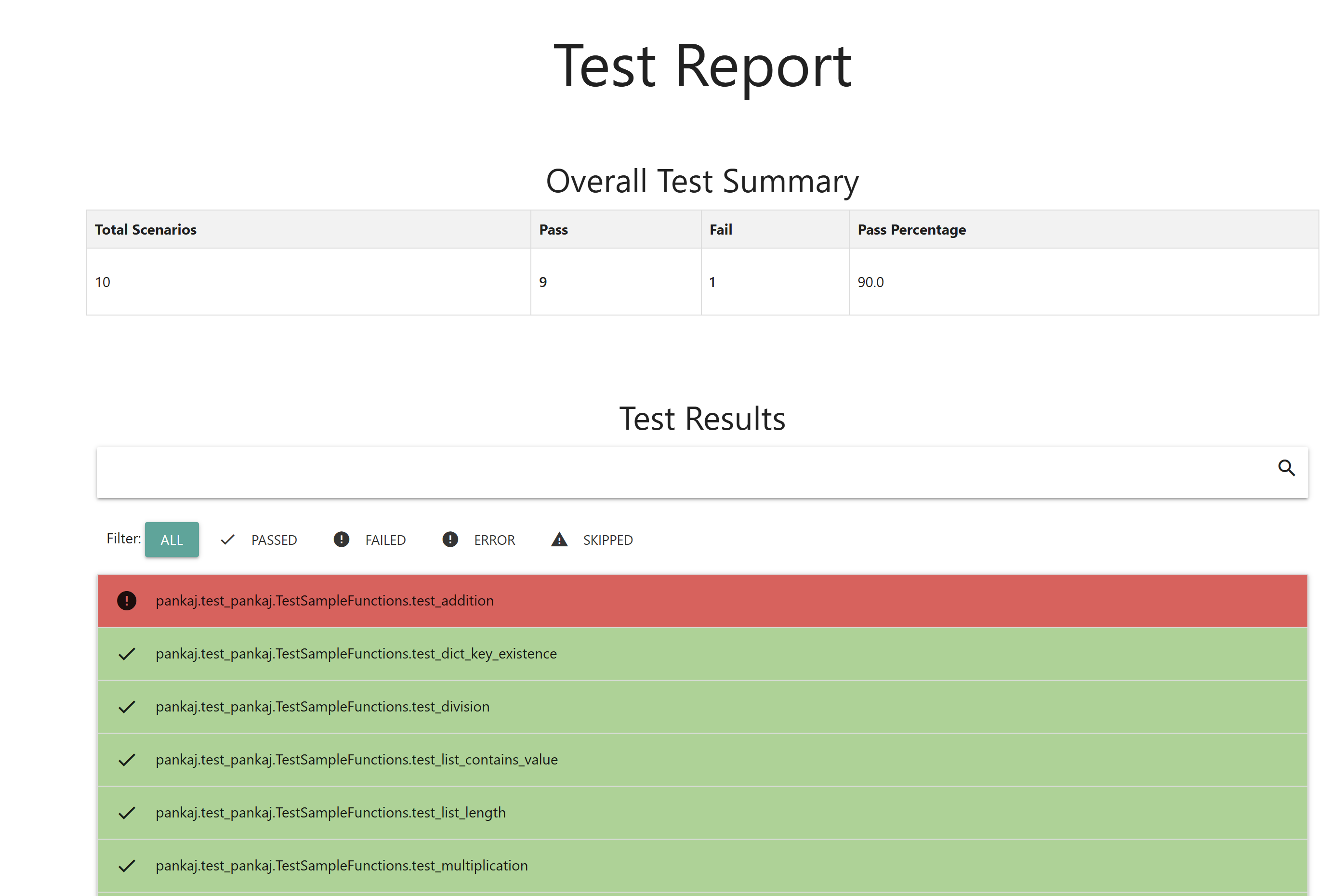
pyrept turns a test run into:
report.html: one self-contained page you can open offline, attach to a CI run or email. It has no CDN or external assets.report.json: the same data in machine-readable form, for dashboards, bots and pipelines.junit.xml(optional): JUnit XML, so GitLab, Jenkins, Azure DevOps and other CI servers can show results in their test tabs.- A Markdown summary (optional): for GitHub job summaries, pull request comments and chat.
It works the same way with pytest, unittest, nose2, behave, pytest-bdd and Playwright or Selenium browser tests. It also converts JUnit XML, .NET TRX, NUnit, xUnit.net, Robot Framework, TAP, Allure, Cucumber JSON, Playwright Test JSON and pytest-json-report files, so teams using Java, JavaScript, Go, .NET or Ruby get the same report.
Every report can compare itself with the previous run and highlight new failures, fixed tests, still-failing tests and slowdowns, which is usually the first thing you want to know after a red CI build. Across many runs, pyrept history shows trends, flaky tests and failure streaks.
Open the live demo report · demo history page · documentation
Why pyrept?
- One report shape across frameworks: pytest, unittest, nose2, behave, pytest-bdd and browser tests all produce the same HTML and JSON format.
- Works beyond Python: convert reports from Java, JavaScript, TypeScript, Go, .NET, Ruby and Robot Framework, and merge several of them into one.
- Regression-focused: see what changed since the last run, which failures share one root cause, and which tests are flaky across many runs.
- CI-native: JUnit XML, a GitHub Action with job summaries and pull request comments, quality gates and Slack or Teams notifications.
- Useful failure context: captured stdout, stderr and logs, failure screenshots, browser console output, Playwright traces and videos, tags, retries, durations and file locations.
- Nothing to host: one offline HTML file with search, filters, a clickable test map, keyboard navigation, dark mode and your own logo.
Contents
- Quick start · Installation · Choose your framework
- pytest · unittest · nose2 · behave · Converting other reports
- Compare with the previous run · History and flaky tests
- GitHub Action · Markdown summaries · Quality gates · Notifications
- JUnit XML output · Using pyrept in CI · Branding
- How outcomes are counted · Python API · JSON report format
- Troubleshooting · Upgrading · Development · License
Quick start
pip install pyrept
pytest --pyrept
Then open report.html in a browser. That is the whole setup for pytest. To also get JUnit XML for your CI server and a comparison with the last run:
pytest --pyrept --pyrept-junit=junit.xml --pyrept-baseline=report.json
For unittest, nose2, behave or reports from other languages, see Choose your framework.
Installation
pip install pyrept                 # pytest, unittest, pytest-bdd and the converters
pip install "pyrept[nose2]"        # adds nose2 for the nose2 plugin
pip install "pyrept[behave]"       # adds the behave formatter
pip install "pyrept[playwright]"   # adds pytest-playwright for browser screenshots, traces and videos
Requirements: Python 3.8 or newer. CI tests 3.8 through 3.14, plus the 3.15 pre-releases. The only runtime dependency is jinja2.
Choose your framework
| You use | Run this | Details |
|---|---|---|
| pytest (and pytest-bdd) | pytest --pyrept |
pytest |
| unittest | python -m pyrept.unittest_runner discover -s tests |
unittest |
| nose2 | nose2 --html-report |
nose2 |
| behave (Cucumber BDD) | behave -f pyrept.behave_formatter:PyreptFormatter -o /dev/null |
behave |
| Playwright / Selenium (Python) | pytest --pyrept |
Browser tests |
| Java, JavaScript, .NET, Go, Robot Framework, ... | pyrept convert --from junit results.xml |
Converting |
Every integration writes report.html and report.json to the current directory unless you choose other paths. Missing parent directories are created for you.
pytest
The plugin is installed with the package and stays off until you ask for a report, so it never changes a normal pytest run.
pytest --pyrept                                    # report.html + report.json
pytest --pyrept-html=reports/report.html --pyrept-json=reports/report.json
pytest --pyrept --pyrept-title="Nightly regression"
pytest --pyrept --pyrept-junit=junit.xml           # also write JUnit XML
pytest --pyrept --pyrept-baseline=report.json      # compare with the previous run
pytest --pyrept --pyrept-github-summary            # GitHub Actions job summary
| Option | Meaning |
|---|---|
--pyrept |
Turn reporting on with the default paths. |
--pyrept-html=PATH |
HTML report path. Turns reporting on by itself. |
--pyrept-json=PATH |
JSON report path. Turns reporting on by itself. |
--pyrept-junit=PATH |
Also write a JUnit XML report. Turns reporting on by itself. |
--pyrept-baseline=PATH |
Compare with an earlier report.json. Turns reporting on by itself. |
--pyrept-markdown=PATH |
Also write a Markdown summary. Turns reporting on by itself. |
--pyrept-github-summary |
Append the summary to the GitHub Actions job summary. Turns reporting on by itself. |
--pyrept-fail-under=PERCENT |
Fail the run when the pass rate is lower (quality gates). |
--pyrept-ignore-known-failures |
Succeed when every failing test was already failing in the baseline. |
--pyrept-title=TEXT |
Report title. The default is Test Report. |
--pyrept-no-screenshots |
Do not collect screenshots, browser console output or trace and video links. |
To generate reports on every run, put the settings in your pytest configuration:
# pytest.ini (or [tool.pytest.ini_options] in pyproject.toml)
[pytest]
pyrept = true
pyrept_html = reports/report.html
pyrept_json = reports/report.json
pyrept_junit = reports/junit.xml             # optional
pyrept_baseline = reports/report.json        # optional
pyrept_markdown = reports/summary.md         # optional
pyrept_github_summary = true                 # optional
pyrept_fail_under = 90                       # optional
pyrept_ignore_known_failures = true          # optional
In the ini file, pyrept = true is what turns reporting on. The other settings on their own do not, so you can keep them in the file and still use pytest --pyrept only when you want a report.
Paths given on the command line are relative to the directory you run pytest from. Paths in the ini file are relative to the ini file, so the report always lands in the same place.
What gets recorded:
- Descriptions come from test docstrings, and markers (such as
@pytest.mark.smoke) are shown as tags. - Duration and file:line are recorded for every test.
- Collection errors, such as an import error in a test module, are reported as errors. A broken module never produces a report that looks clean.
- Setup and teardown errors are reported as errors. A teardown failure gets its own
...::teardownentry. - For failing tests, captured stdout, stderr and logs are attached.
- pytest-xdist (
-n auto) works. Workers send their results to the main process, which writes a single report. - pytest-rerunfailures works. Reruns are not counted as extra tests. The final attempt is recorded with
retries, and it is markedflakyif it passed after a retry. - Subtests (built into pytest 9+, or the
pytest-subtestsplugin) are supported. Each failing subtest is listed under its own name, such astest_x (i=1). - pytest-bdd scenarios show the feature, the scenario and every step with its status, so you can see which step failed:
Feature: Checkout
Scenario: Pay with card
  Given a cart with 2 items  [passed]
  When I pay with a declined card  [failed]
  Then I see the confirmation page  [skipped]
Playwright and Selenium
When a test that uses a pytest-playwright page fixture, or a Selenium driver, selenium or browser fixture, fails, pyrept attaches:
- a full-page screenshot, taken while the browser is still open (click it to zoom);
- the browser console output and uncaught page errors (Playwright);
- links to the trace and video that pytest-playwright keeps with
--tracing retain-on-failureand--video retain-on-failure. Open traces at trace.playwright.dev.
pip install "pyrept[playwright]" && playwright install chromium
pytest --pyrept --tracing retain-on-failure --video retain-on-failure
Trace and video links are relative to the HTML report, so upload the report and test-results/ together. If the browser has already crashed, the test is still reported without these extras.
Plugin hooks
Add environment rows, attachments or anything else from conftest.py or your own pytest plugin:
# conftest.py
import os
from pyrept import make_attachment

def pytest_pyrept_environment(config):
    return {'Build': os.environ.get('BUILD_ID', 'local')}

def pytest_pyrept_attachments(item, report):
    if report.when == 'call' and report.failed:
        return [make_attachment('server.log', 'text/plain', text=open('server.log').read())]

def pytest_pyrept_context(config, context):
    context['test_report_title'] += ' (nightly)'
pytest_pyrept_attachments runs where the test runs, also in pytest-xdist workers, so it must return plain data.
unittest
This integration needs no dependencies beyond the standard library. It accepts all the usual python -m unittest arguments, plus its own:
python -m pyrept.unittest_runner discover -s tests
python -m pyrept.unittest_runner tests.test_login -v \
    --pyrept-html=reports/report.html --pyrept-json=reports/report.json --pyrept-title="Unit tests"
python -m pyrept.unittest_runner discover -s tests \
    --pyrept-junit=reports/junit.xml --pyrept-baseline=reports/report.json --pyrept-github-summary
| Option | Meaning |
|---|---|
--pyrept-html PATH, --pyrept-json PATH |
Output paths. The defaults are report.html and report.json. |
--pyrept-junit PATH |
Also write JUnit XML. |
--pyrept-baseline PATH |
Compare with an earlier report.json. |
--pyrept-markdown PATH, --pyrept-github-summary |
Markdown summary to a file, or to the GitHub job summary. |
--pyrept-fail-under PERCENT, --pyrept-ignore-known-failures |
Quality gates. |
--pyrept-title TEXT |
Report title. |
Both --option=value and --option value work.
From your own code:
import unittest
from pyrept.unittest_runner import PyreptTestRunner

suite = unittest.defaultTestLoader.discover('tests')
result = PyreptTestRunner(html_path='reports/report.html', json_path='reports/report.json',
                          junit_path='reports/junit.xml',          # optional
                          baseline_path='reports/report.json',     # optional
                          markdown_path='reports/summary.md',      # optional
                          title='Unit tests', verbosity=2).run(suite)
raise SystemExit(not result.wasSuccessful())
Durations, skip reasons, setUpClass and setUpModule errors, and failing subtests are all recorded. On Python 3.12+, unittest's own --durations N keeps working.
nose2
Install the extra (pip install "pyrept[nose2]") and enable the plugin in nose2.cfg (or unittest.cfg):
[unittest]
plugins = pyrept.html_report

[html-report]
always-on = True
html-report-path = test_results/report.html
json-report-path = test_results/report.json
junit-report-path = test_results/junit.xml          # optional
baseline-report-path = test_results/report.json     # optional
markdown-report-path = test_results/summary.md      # optional
github-summary = true                               # optional
fail-under = 90                                     # optional
ignore-known-failures = true                        # optional
Then run nose2. Without always-on, run nose2 --html-report instead.
The same names work as command-line flags, and command-line values override nose2.cfg:
nose2 --html-report --html-report-path=out/report.html --json-report-path=out/report.json \
      --junit-report-path=out/junit.xml --baseline-report-path=out/report.json \
      --markdown-report-path=out/summary.md --pyrept-github-summary --pyrept-fail-under=90
| Setting / option | Must end in | Meaning |
|---|---|---|
html-report-path / --html-report-path=PATH |
.html |
HTML report. The default is report.html. |
json-report-path / --json-report-path=PATH |
.json |
JSON report. The default is report.json. |
junit-report-path / --junit-report-path=PATH |
.xml |
Also write JUnit XML. |
baseline-report-path / --baseline-report-path=PATH |
.json |
Compare with an earlier report.json. |
markdown-report-path / --markdown-report-path=PATH |
.md |
Also write a Markdown summary. |
github-summary / --pyrept-github-summary |
Append the summary to the GitHub job summary. | |
fail-under / --pyrept-fail-under=PERCENT |
Fail the run when the pass rate is lower. | |
ignore-known-failures / --pyrept-ignore-known-failures |
Succeed when every failure was already failing in the baseline. | |
template (config only) |
A custom Jinja2 template for the HTML report. |
These options appear in nose2 --help.
behave (Cucumber BDD)
pip install "pyrept[behave]"
behave -f pyrept.behave_formatter:PyreptFormatter -o /dev/null \
       -D pyrept_html=reports/report.html -D pyrept_json=reports/report.json -D pyrept_title="BDD"
The settings are behave "userdata" (-D name=value on the command line, or [behave.userdata] in behave.ini): pyrept_html, pyrept_json, pyrept_title, pyrept_junit, pyrept_baseline, pyrept_markdown and pyrept_github_summary. behave decides its own exit status, so for quality gates run pyrept summary after it.
To set it up once, register the formatter in behave.ini:
[behave.formatters]
pyrept = pyrept.behave_formatter:PyreptFormatter

[behave.userdata]
pyrept_html = reports/report.html
pyrept_json = reports/report.json
behave -f pyrept -o /dev/null -f pretty # pyrept report + normal console output
behave pairs each
-owith the-fthat comes before it. Put-f pyrept -o /dev/nullfirst. If you write-f pretty -f pyrept -o /dev/null, the console output goes to/dev/nullinstead. On Windows, use-o NUL.
Each scenario, and each Scenario Outline example, is one test. Its tags and steps (including Background steps) form the description, and the first failing step's error becomes the traceback. Hook errors are reported as errors. Files you attach with context.attach(mime_type, data), such as screenshots, are embedded in the report.
Converting other reports
pyrept convert turns reports from other tools and languages into the same HTML and JSON report. The project you convert reports from does not need to be a Python project.
| Tool | --from |
Example |
|---|---|---|
| Maven (Surefire) / Gradle | junit |
pyrept convert --from junit target/surefire-reports/*.xml |
Jest (jest-junit) / Cypress (--reporter junit) |
junit |
pyrept convert --from junit reports/*.xml |
Go (gotestsum --junitfile) |
junit |
pyrept convert --from junit reports/go-junit.xml |
.NET (dotnet test --logger trx) |
trx |
pyrept convert --from trx TestResults/*.trx |
| NUnit 3 and 2 | nunit |
pyrept convert --from nunit TestResult.xml |
| xUnit.net v2 XML | xunit |
pyrept convert --from xunit results.xml |
| Robot Framework (3.x to 7.x) | robot |
pyrept convert --from robot output.xml |
TAP (node --test-reporter=tap, prove, bats, pg_prove) |
tap |
pyrept convert --from tap results.tap |
Allure (any allure-results directory) |
allure |
pyrept convert --from allure allure-results |
| Cucumber (cucumber-jvm, cucumber-js, cucumber-ruby, godog) | cucumber |
pyrept convert --from cucumber target/cucumber.json |
Playwright Test (JS/TS, --reporter=json) |
playwright |
pyrept convert --from playwright results.json |
| pytest-json-report | pytest-json |
pyrept convert --from pytest-json .report.json |
| pyrept JSON (merge shards) | pyrept |
pyrept convert --from pyrept shard-*/report.json |
More examples:
# Merge the results of parallel or sharded CI jobs into one report
pyrept convert --from junit shard-*/junit.xml --html reports/report.html --json reports/report.json

# Turn Robot Framework or TAP results into JUnit XML for your CI server, and fail the job on new failures only
pyrept convert --from robot output.xml --junit reports/junit.xml --baseline reports/report.json \
               --json reports/report.json --fail-on-failure --ignore-known-failures
| Option | Meaning |
|---|---|
--from FORMAT |
Input format (required), one of the formats above. |
--html PATH, --json PATH |
Output paths. The defaults are report.html and report.json. |
--junit PATH |
Also write JUnit XML. |
--baseline PATH |
Compare with an earlier report.json. |
--markdown PATH, --github-summary, --report-url URL |
Markdown summary. |
--title TEXT |
Report title. |
--fail-on-failure |
Exit with status 1 if any test failed or errored. |
--ignore-known-failures |
With --fail-on-failure: only fail on tests that did not fail in the baseline. |
--fail-under PERCENT |
Exit with status 1 when the pass rate is lower. |
- Several input files are merged into one report.
- Outcomes are mapped consistently: crashes, timeouts and broken tests are errors; ignored, inconclusive and TODO tests are skipped.
- Retries become
retriesandflaky(Surefire reruns, Playwright retries, Allure history). Screenshots are embedded; traces, videos and other files are linked; stdout and stderr are attached. - Tags come from JUnit properties, NUnit categories, xUnit.net traits, Robot Framework tags and Allure labels.
- Exit codes:
0means OK,1means a gate failed, and2means an input file is missing or is not a valid report of the chosen format.
You can also run the converter as python -m pyrept convert ....
Compare with the previous run
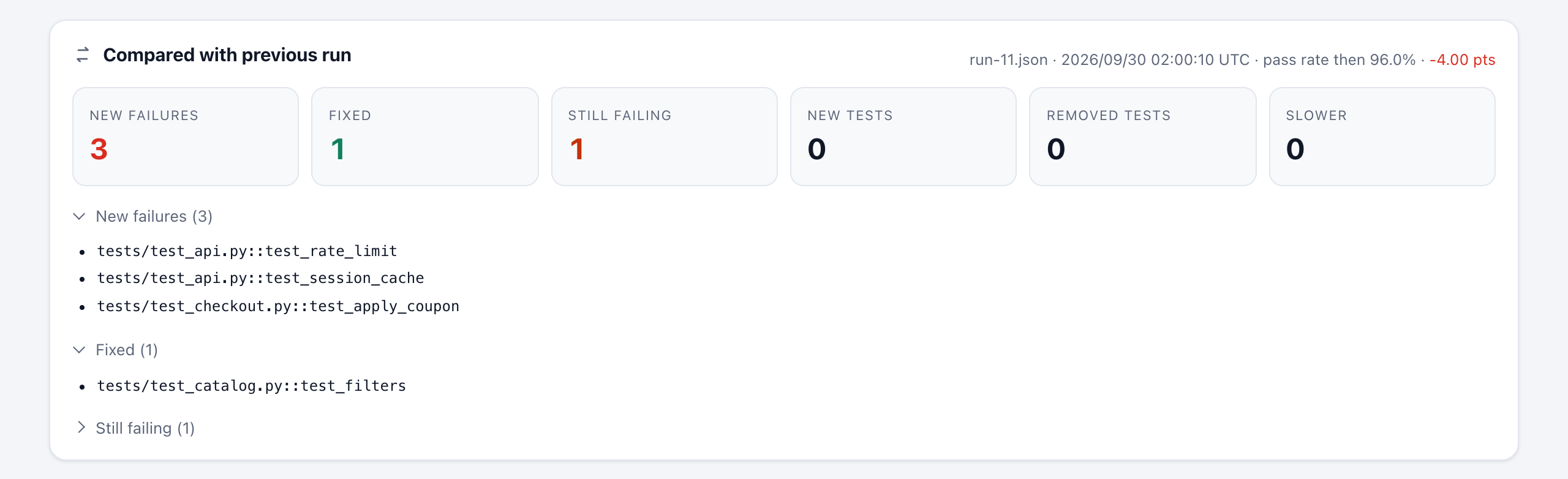
Give pyrept an earlier report.json as the baseline. The new report then opens with a Compared with previous run panel and marks each changed test:
Use the matching baseline option for your integration:
pytest --pyrept --pyrept-baseline=report.json
python -m pyrept.unittest_runner discover -s tests --pyrept-baseline=report.json
nose2 --html-report --baseline-report-path=report.json
behave -f pyrept.behave_formatter:PyreptFormatter -o /dev/null -D pyrept_baseline=report.json
pyrept convert --from junit target/surefire-reports/*.xml --baseline report.json
It also prints a one-line summary in the terminal:
pyrept: 2 new failures, 1 fixed, 3 still failing, 4 new, 1 removed, 1 slower (vs report.json)
| Label | Meaning |
|---|---|
| New failure | Failed or errored now, but passed or was skipped in the baseline (or did not exist yet). These are the ones to look at first. |
| Fixed | Failed or errored in the baseline, passes now. |
| Still failing | Failed or errored in both runs. |
| New | Not in the baseline (passing). A new test that fails is counted as a new failure. |
| Removed | In the baseline, but not in this run. |
| Slower | Takes at least 1.5× as long and at least 0.5 s more than in the baseline. The panel lists the 10 biggest slowdowns. |
The panel also shows how the pass rate moved, for example -3.20 pts. A New failures filter button lists only the new failures, and report.html#new-failures opens the report with that filter on.
Good to know:
- The baseline can be the file you are about to overwrite. pyrept reads it before writing, so
--pyrept-json=report.json --pyrept-baseline=report.jsonalways compares with the previous run. - A missing or unreadable baseline never fails the run. pyrept logs a warning and writes the report without a comparison, which is what happens on the very first CI run.
- Tests are matched by name. Compare reports from the same source. A pytest run names tests
tests/test_a.py::test_x, while the same tests imported from JUnit XML are namedtests.test_a.test_x, so they would show up as removed and new. - The JSON report gets a
comparisonsection with the same lists. It isnullwithout a baseline.
Every report also lists common failure causes: failures that share an error message, such as 40 tests failing with the same ConnectionError, are grouped, because they are usually one problem.
History and flaky tests
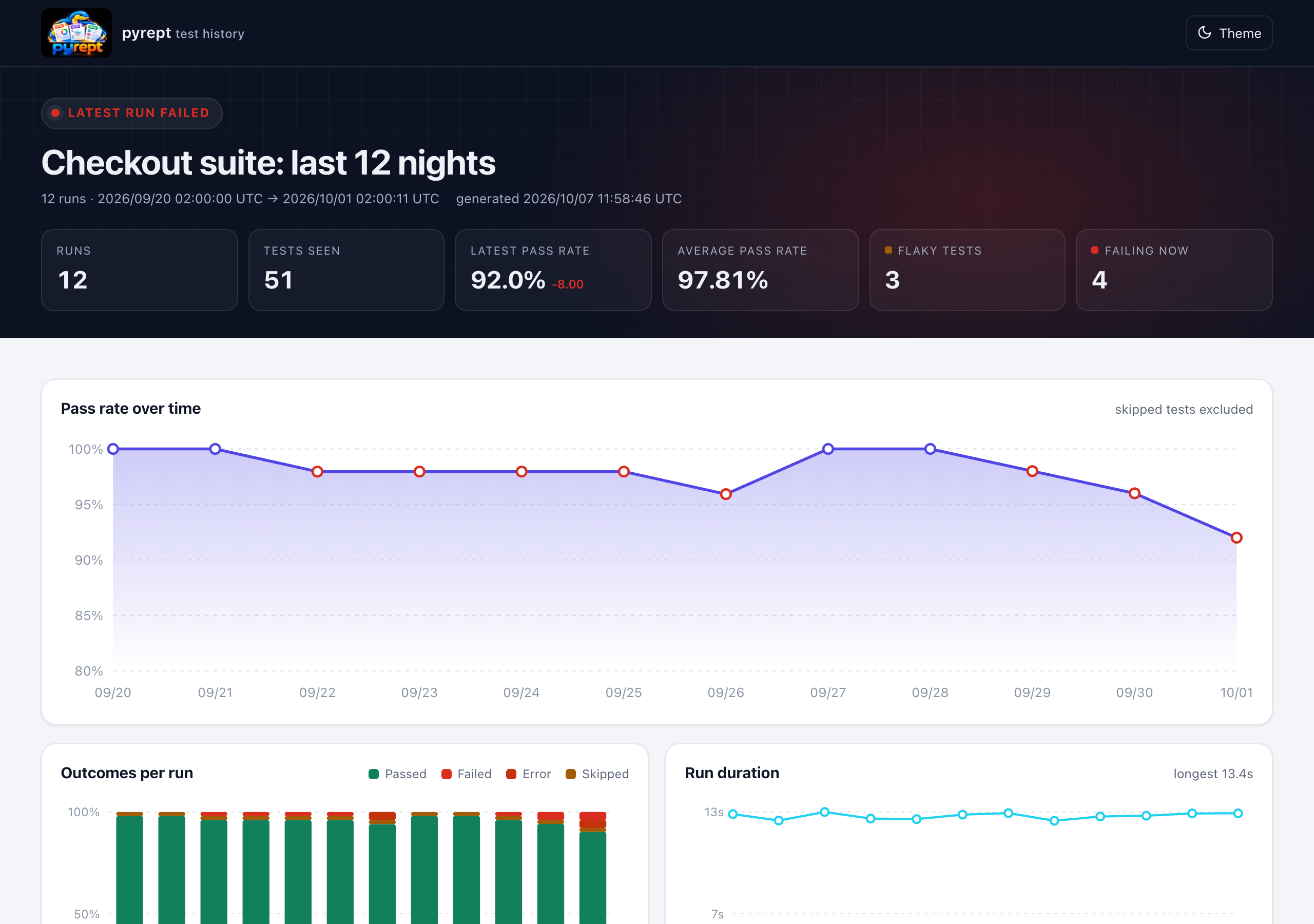
pyrept history reads the JSON reports of many runs and writes one page with pass-rate trends, outcomes and durations per run, flaky tests, failure streaks ("failing for 5 runs, since …"), the most failing tests and the slowest tests.
pyrept history history/ --html reports/history.html --json reports/history.json --limit 30
- Inputs are pyrept JSON reports or directories of them. Runs are ordered by their timestamp, and files that are not pyrept reports are skipped with a message.
- A test is flaky when it fails in two or more separate stretches with passing runs in between, or passed only after a retry. A test that broke once and was fixed is a regression, not flakiness.
--limit Nkeeps the newest N runs (default 50,0for all).
To keep one report per CI run, copy report.json into a cached directory, for example history/run-$GITHUB_RUN_NUMBER.json. The documentation has a complete GitHub Actions example.
GitHub Action
The pyrept action puts the result in the job summary and keeps one comment on the pull request up to date. It works with any language through convert-from.
permissions:
  contents: read
  pull-requests: write   # for the pull request comment

steps:
  - uses: actions/checkout@v4
  - uses: actions/setup-python@v5
    with:
      python-version: '3.13'
  - run: pip install pyrept && pytest --pyrept-json=reports/report.json --pyrept-html=reports/report.html
    continue-on-error: true            # let the action decide whether the job fails
  - uses: pankajnayak1994/pyrept@v1
    with:
      report: reports/report.json
      fail-on-failure: true
For other languages, convert their report in the same step:
  - run: mvn test
    continue-on-error: true
  - uses: pankajnayak1994/pyrept@v1
    with:
      convert-from: junit
      convert-inputs: target/surefire-reports/*.xml
      report: reports/report.json
      fail-on-failure: true
| Input | Default | Meaning |
|---|---|---|
report |
report.json |
The pyrept JSON report to summarise. |
convert-from, convert-inputs |
Convert another tool's report first; inputs are paths or glob patterns. | |
html, junit, baseline, title |
Options for convert-from. |
|
job-summary |
true |
Add the summary to the job summary. |
pr-comment |
true |
Comment on the pull request and update that comment on later runs. Comments from forks are skipped without failing the job. |
fail-on-failure, ignore-known-failures, fail-under |
Quality gates. | |
report-url |
Link to the published HTML report. | |
notify |
false |
Send the notifications configured in the environment. |
version |
latest | pyrept version to install. |
Outputs: total, passed, failed, errors, skipped, pass-rate and new-failures. @v1 always points to the newest 1.x release; pin an exact release such as @v1.3.0 if you prefer.
Markdown and GitHub job summaries
Every integration can write a Markdown summary: the counts, the comparison with the baseline, common failure causes, the first 20 failures with their (trimmed) errors and the slowest tests. GitHub renders it in job summaries and pull request comments.
pytest --pyrept --pyrept-markdown=reports/summary.md   # write a file
pytest --pyrept --pyrept-github-summary                # append to $GITHUB_STEP_SUMMARY

pyrept summary reports/report.json                     # print the summary of any pyrept report
pyrept summary reports/report.json --github-summary --fail-on-failure
Outside GitHub Actions, --pyrept-github-summary does nothing, so it is safe to keep in your configuration. The summary stays well below GitHub's 1 MiB limit however large the run is.
Quality gates
| Gate | pytest | unittest | nose2 | pyrept convert / summary |
|---|---|---|---|---|
| Fail below a pass rate | --pyrept-fail-under=95 |
--pyrept-fail-under 95 |
--pyrept-fail-under=95 |
--fail-under 95 |
| Only fail on new failures | --pyrept-ignore-known-failures |
--pyrept-ignore-known-failures |
--pyrept-ignore-known-failures |
--fail-on-failure --ignore-known-failures |
ignore-known-failures keeps a job with known-broken tests green until a test breaks that passed in the baseline. Combine it with a pass-rate floor so known failures cannot pile up:
pytest --pyrept-baseline=reports/report.json --pyrept-json=reports/report.json \
       --pyrept-ignore-known-failures --pyrept-fail-under=90
- Without a baseline, known failures are not ignored and the run fails as usual.
- With pytest, a run that another plugin also failed (for example pytest-cov's
--cov-fail-under) stays failed, and collection errors are never hidden. With nose2, do not combineignore-known-failureswith other plugins that fail the run. - When no tests were executed at all,
fail-underis not checked.
Notifications
Set environment variables in CI and every integration posts a one-line result after writing its report. Webhook URLs are secrets: pyrept never logs them, and a message that cannot be delivered never fails the run.
| Variable | Meaning |
|---|---|
PYREPT_SLACK_WEBHOOK_URL |
Slack incoming webhook. |
PYREPT_TEAMS_WEBHOOK_URL |
Microsoft Teams workflow webhook ("When a Teams webhook request is received"). |
PYREPT_WEBHOOK_URL |
Any endpoint; receives the summary as JSON (counts, comparison and failing tests). |
PYREPT_NOTIFY_ON |
always (default), failure or new-failures. |
PYREPT_REPORT_URL |
Link to the published HTML report, added to messages and Markdown summaries. |
❌ Nightly: 2 failed, 1 error of 412 tests (pass rate 99.27%, -0.49 pts) · 2 new failures, 0 fixed · Open the report
JUnit XML output
Most CI servers show test results natively when they are given JUnit XML. pyrept can write it next to the HTML and JSON reports from every runner and converter:
pytest --pyrept --pyrept-junit=reports/junit.xml
python -m pyrept.unittest_runner discover -s tests --pyrept-junit=reports/junit.xml
nose2 --html-report --junit-report-path=reports/junit.xml
behave -f pyrept.behave_formatter:PyreptFormatter -o /dev/null -D pyrept_junit=reports/junit.xml
pyrept convert --from robot output.xml --junit reports/junit.xml
Each test becomes a <testcase> with classname, name, time, file and line. Failures, errors and skips include their message and traceback. Text attachments, such as captured output, go into <system-out>, and tags, retries and flaky flags become <properties>. Characters that are not allowed in XML, such as ANSI color codes, are removed, so CI parsers never reject the file.
Using pyrept in CI
GitHub Actions: use the GitHub Action, and keep the previous report so every run is compared with the one before it on the same branch:
- name: Restore the previous report
  uses: actions/cache/restore@v4
  with:
    path: reports/report.json
    key: pyrept-${{ github.ref_name }}-${{ github.run_id }}
    restore-keys: pyrept-${{ github.ref_name }}-

- name: Run tests
  run: >
    pytest --pyrept-html=reports/report.html --pyrept-json=reports/report.json
    --pyrept-junit=reports/junit.xml --pyrept-baseline=reports/report.json --pyrept-github-summary

- name: Keep this report for the next run
  if: always()
  uses: actions/cache/save@v4
  with:
    path: reports/report.json
    key: pyrept-${{ github.ref_name }}-${{ github.run_id }}

- name: Upload test report
  if: always()                  # upload the report even when tests fail
  uses: actions/upload-artifact@v4
  with:
    name: test-report
    path: reports/
GitLab CI: the junit report makes results appear in the merge request and the pipeline's Tests tab:
test:
  script:
    - pytest --pyrept-html=reports/report.html --pyrept-json=reports/report.json --pyrept-junit=reports/junit.xml
  artifacts:
    when: always
    paths: [reports/]
    reports:
      junit: reports/junit.xml
Jenkins:
sh 'pytest --pyrept-html=reports/report.html --pyrept-json=reports/report.json --pyrept-junit=reports/junit.xml'
junit 'reports/junit.xml'
archiveArtifacts artifacts: 'reports/**', allowEmptyArchive: true
Links that open the report with a filter already applied: report.html#problems (failures and errors), report.html#new-failures (needs a baseline), #failed, #error, #skipped and #passed.
Branding
Reports show the pyrept logo in the header and as the browser tab icon. Use your own, or none:
export PYREPT_LOGO=branding/logo.svg       # image file (embedded, up to 1 MB) or https:// URL
export PYREPT_LOGO=none                    # no logo
export PYREPT_ACCENT_COLOR="#0f766e"       # hex colour
The logo and accent colour apply to every HTML report and history page. They are never stored in the JSON report.
How outcomes are counted
Every test ends up as exactly one of passed, failed, error or skipped, and every integration maps outcomes the same way:
| Situation | Reported as |
|---|---|
| Assertion failure | failed |
| Unexpected exception, setup or teardown failure, collection or import error, undefined BDD step, hook error, timeout | error |
| Skipped test | skipped, with the reason |
Expected failure (xfail, @expectedFailure, TAP # TODO) |
skipped, with "Expected failure" |
Unexpected success (@expectedFailure that passed, strict xfail that passed) |
failed |
| Failing subtest | its own failed or error entry |
| Test that passed after a rerun | passed, with retries and flaky |
Pass rate = passed ÷ (total − skipped). Skipped tests do not lower it.
Python API
You can use pyrept from your own runner or tooling:
from pyrept import ReportCollector, make_attachment

report = ReportCollector(title='Smoke tests', environment={'Build': '1.4.2', 'Branch': 'main'})
report.add('login works', 'passed', description='User can sign in', metadata={'duration': 0.42, 'tags': ['smoke']})
report.add('checkout', 'failed', traceback='Timeout after 30s',
           attachments=[make_attachment('screenshot', path='shot.png')])
report.add('search', 'skipped', traceback='Skipped: search service down')
context = report.write('reports/report.html', 'reports/report.json')
print(context['test_summary'])   # {'total': 3, 'passed': 1, 'failed': 1, 'error': 0, 'skipped': 1, 'percentage': 50.0}

# Optional: JUnit XML, a comparison with an earlier report and a Markdown summary
report.write('reports/report.html', 'reports/report.json', junit_path='reports/junit.xml',
             baseline_path='reports/previous.json', markdown_path='reports/summary.md')
add(name, outcome, description=None, traceback=None, metadata=None, attachments=None)takes an outcome ofpassed,failed,errororskipped. Any other value raisesValueError.make_attachment(name, content_type=None, data=None, path=None, text=None):datais raw bytes or base64 text.textis shown inline.pathlinks to a file. Images up to 5 MB are embedded so that the report stays self-contained.
write(html_path, json_path, template_path=..., junit_path=None, baseline_path=None, markdown_path=None, github_summary=False, report_url=None)writes the reports and returns the full context (the same data asreport.json).- The metadata keys that the report understands are
duration(seconds),location,tags,retries,flaky,projectandsuite. Other keys are kept in the JSON.
JSON report format
{
  "test_report_title": "Test Report",
  "test_summary": {"total": 3, "passed": 1, "failed": 1, "error": 0, "skipped": 1, "percentage": 50.0},
  "timestamp": "2026/10/06 17:03:54 UTC",
  "duration": 4.21,
  "environment": {"Python": "3.14.0", "Platform": "Linux-...", "Framework": "pytest 9.0.0"},
  "slowest_tests": [{"name": "tests/test_checkout.py::test_pay", "duration": 3.42}],
  "failure_groups": [{"message": "ConnectionError: redis down", "count": 2,
                      "tests": ["tests/test_api.py::test_a", "tests/test_api.py::test_b"]}],
  "comparison": {
    "baseline": {"source": "report.json", "timestamp": "2026/10/05 17:00:12 UTC", "percentage": 75.0, "total": 3},
    "percentage_delta": -25.0,
    "new_failures": ["tests/test_checkout.py::test_pay"],
    "fixed": [], "still_failing": [], "new_tests": [], "removed_tests": [],
    "slower": [{"name": "tests/test_checkout.py::test_pay", "before": 1.2, "after": 3.42, "ratio": 2.85}],
    "changes": {"tests/test_checkout.py::test_pay": "new-failure"}
  },
  "test_results": [
    {
      "name": "tests/test_checkout.py::test_pay",
      "result": "failed",
      "description": "Pays with a saved card.",
      "traceback": "AssertionError: ...",
      "metadata": {"duration": 3.42, "location": "tests/test_checkout.py:30", "tags": ["smoke"],
                   "attachments": [{"name": "Screenshot on failure", "content_type": "image/png", "data": "<base64>"}]}
    }
  ]
}
test_results lists errors first, then failed, skipped and passed tests, each group in alphabetical order. duration values are in seconds. comparison is null when no baseline was given. In changes, each test name maps to new-failure, fixed, still-failing or new. failure_groups lists error messages shared by at least two failing tests, the largest groups first.
Troubleshooting
| Problem | Fix |
|---|---|
pytest creates no report |
The plugin is off by default. Pass --pyrept (or any --pyrept-* path option), or set pyrept = true in the ini file. Settings in the ini file alone do not turn it on. |
| The report is in an unexpected folder | CLI paths are relative to the current directory, and ini paths are relative to the ini file. Use absolute paths to be sure. The terminal summary prints the final location. |
nose2 cannot load pyrept.html_report |
nose2 is an optional extra since 1.3: pip install "pyrept[nose2]". |
| The behave console output disappeared | Put -f pyrept -o /dev/null before -f pretty. See behave. |
| No screenshot for a failing browser test | The fixture must be named page (Playwright) or driver / selenium / browser (Selenium), and the browser must still be open when the test fails. |
| No trace or video link | Run pytest-playwright with --tracing retain-on-failure and/or --video retain-on-failure. |
pyrept convert exits with status 2 |
An input file is missing, or it does not match --from. Check the message on stderr. |
nose2 says Invalid html-report-path (or json/junit/baseline/markdown) |
The paths must end in .html, .json, .xml, .json and .md respectively. |
| The comparison shows every test as removed and new | The two reports name tests differently, because they come from different sources (for example pytest and JUnit XML). Compare reports produced the same way. |
| No comparison panel | The baseline file was missing or unreadable. Look for the pyrept: baseline ... not found warning. This is normal on the first run. |
--pyrept-ignore-known-failures did not make the run pass |
It needs a baseline, every failure must have been failing in it, and no other plugin may have failed the run. The terminal summary says which. |
| No job summary | --pyrept-github-summary only writes inside GitHub Actions, where $GITHUB_STEP_SUMMARY is set. |
| No pull request comment from the action | The workflow needs permissions: pull-requests: write; pull requests from forks get a read-only token. |
| The CI server rejects the JUnit file | Make sure you point it at the --pyrept-junit file, not report.json. |
| The HTML report is very large | Full-page screenshots are embedded. Use --pyrept-no-screenshots, or keep big files as linked path attachments. |
Upgrading from 1.2
- nose2 is now an optional extra. If you use the nose2 plugin, install
pyrept[nose2](or keepnose2in your own requirements). pytest, unittest and behave users no longer install nose2. - The HTML report has a new design. Custom templates (nose2's
templatesetting) keep working; they can now also{% include '_theme.css' %}. - The JSON report gains a
failure_groupskey. All other keys are unchanged.
Development
git clone https://github.com/pankajnayak1994/pyrept && cd pyrept
pip install -r requirements.txt -e .
pytest                       # whole suite (pytest, unittest, nose2, behave, pytest-bdd, converters, action)
coverage run -m pytest && coverage combine && coverage report
python docs/demo/make_demo.py site/demo        # demo reports (add --screenshots to refresh docs/images)
See CONTRIBUTING.md. Changes are listed in CHANGELOG.md.
Author
pyrept is developed and maintained by Pankaj Kumar Nayak (@pankajnayak1994). Issues, ideas and pull requests are welcome.
License
MIT © Pankaj Kumar Nayak
1 maintainer

Metadata
1 maintainer
Release files for pyrept 1.3.1
For a detailed explanation of source distributions (sdists) and built distributions (wheels), please see the package formats documentation.
Source distribution (sdist)
| File | Size | Uploaded | |
|---|---|---|---|
| pyrept-1.3.1.tar.gz | 341.6 kB | Details |
Built distribution (wheel)
| File | Interpreter | ABI | Platform | Reset |
|---|---|---|---|---|
| pyrept-1.3.1-py3-none-any.whl | Python 3 | none | any | Details |
Total release size: 449.1 kB
Release files / pyrept-1.3.1.tar.gz
| Download URL | pyrept-1.3.1.tar.gz |
|---|---|
| Size | 341.6 kB |
| Tags | Source |
|
SHA-256 checksum How to use checksums |
8d65014118646419076df3d38757ad639dd2f94af6727425bc91e3cd0191a419
|
|
BLAKE2b-256 checksum How to use checksums |
fad6ba69a08022d426c6d00074807b437f4c3209c0a9f64016a0325532affca9
|
| Upload date | |
|
Uploaded using Trusted Publishing? What is trusted publishing? |
Yes |
| Uploaded via |
twine/7.0.0 CPython/3.14.7
|
Release files / pyrept-1.3.1-py3-none-any.whl
| Download URL | pyrept-1.3.1-py3-none-any.whl |
|---|---|
| Size | 107.5 kB |
| Tags | Python 3 |
|
SHA-256 checksum How to use checksums |
12d5acbf95accdd1dd6eb4824ef1b6320060cd6fb015d0dfb10bbd9fc8a7996d
|
|
BLAKE2b-256 checksum How to use checksums |
c43112ece257dcd125787dbfb4a706486da4d6aa5a24b25066f1063372dcdac2
|
| Upload date | |
|
Uploaded using Trusted Publishing? What is trusted publishing? |
Yes |
| Uploaded via |
twine/7.0.0 CPython/3.14.7
|














