
Pyzed
English · Español
Modern, fast desktop GUIs in Python, drawn natively by Iced (Rust). Components inspired by the Zed editor, a visual designer in the spirit of Godot and Unreal, node-based shaders, animations, games and built-in AI agents. A modern alternative to tkinter, PyQt, Kivy and Flet.




📖 Documentation · ⬇️ Download Pyzed Design · 🧩 Component library · 📰 Changelog
What is Pyzed
- Native performance. Python describes the interface; layout, text and drawing are done by Iced 0.14 in
Rust (wgpu on the GPU, tiny-skia on the CPU as a fallback).
import pyzedtakes about 35 ms. - Simple. The Elm architecture: state,
updateandview. A button can call a method directly (on_press=self.save), andupdateaccepts coroutines, generators and streams. - More than 90 components ready to use: buttons, forms, virtual tables with hundreds of thousands of rows, file tree, tabs, command palette, code editor, terminal, custom window frame, charts… They all follow the current theme.
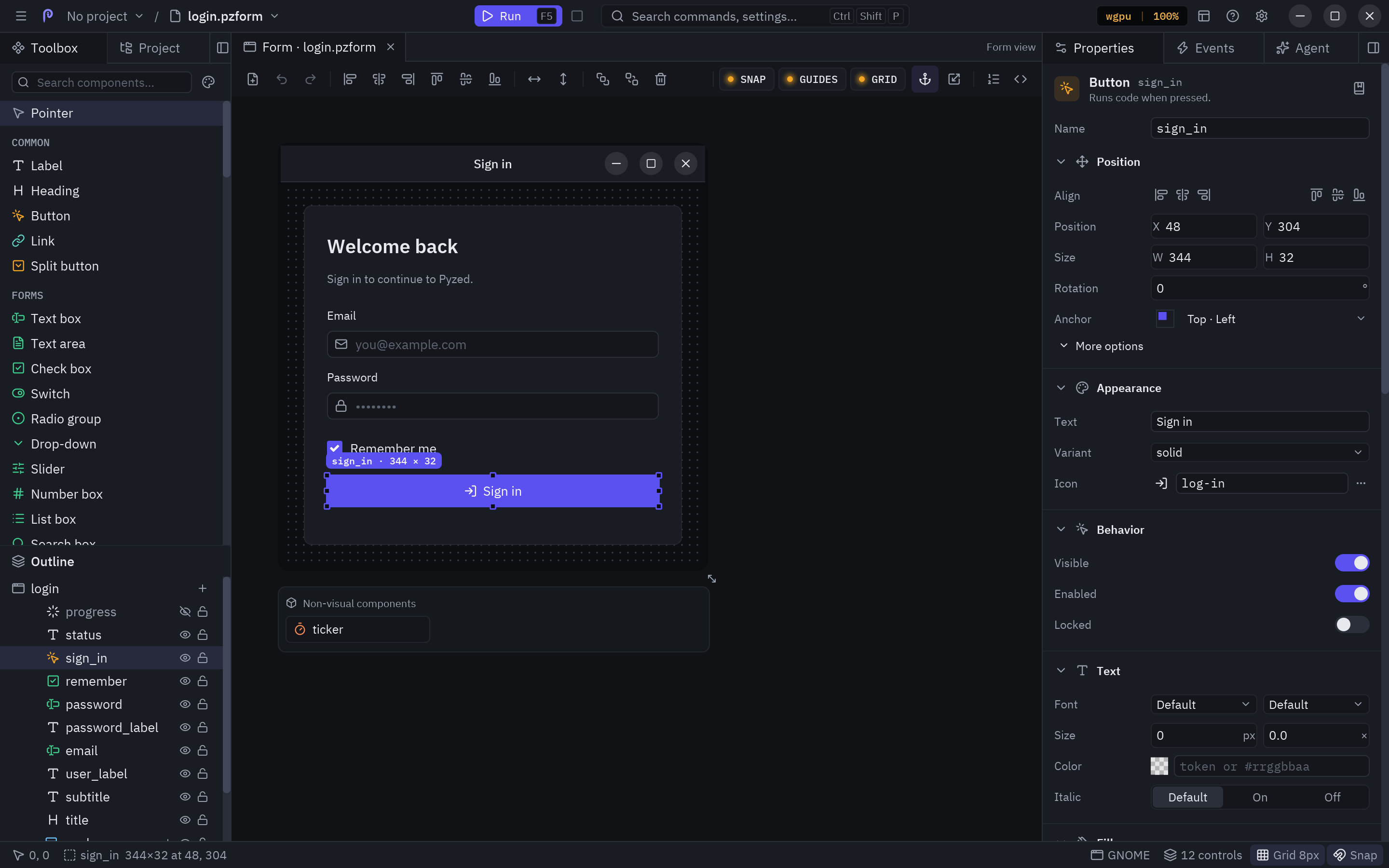
- Pyzed Design, a visual designer installed as an app: draw forms and components, write their code with completion and diagnostics, build node-based shaders and run it all with F5.
- Effects and animations: animate any property, transitions between windows, glow, bloom, blur, glass and
WGSL shaders with
pz.shader. - Games: a game loop (
pz.frames), held keys, sprites and particles withpyzed.game. - AI: an agent panel inside Pyzed Design (Claude, OpenAI, Gemini, Copilot, local models…),
pyzed.agentsfor your own apps and an MCP server so any agent can build apps with Pyzed. - Zed themes: One, Ayu and Gruvbox included, any Zed theme, generated themes and the system's light/dark mode.
- Cross-platform: Linux, macOS and Windows (x86-64 and ARM). IBM Plex fonts and about 2000 Lucide icons included.
- Headless screenshots:
app.screenshot("ui.png")renders without a GPU or a display, ideal for tests and docs.
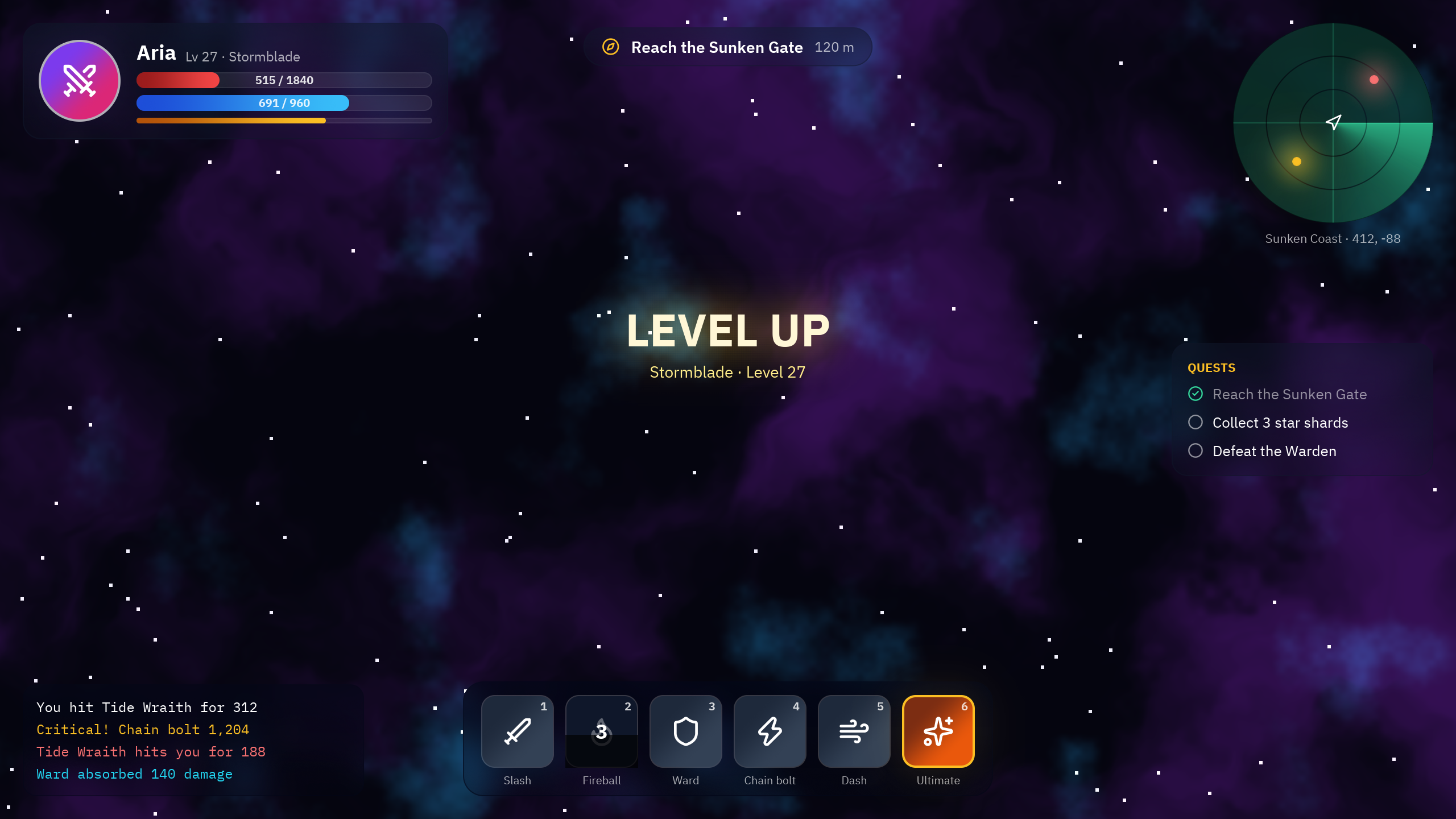
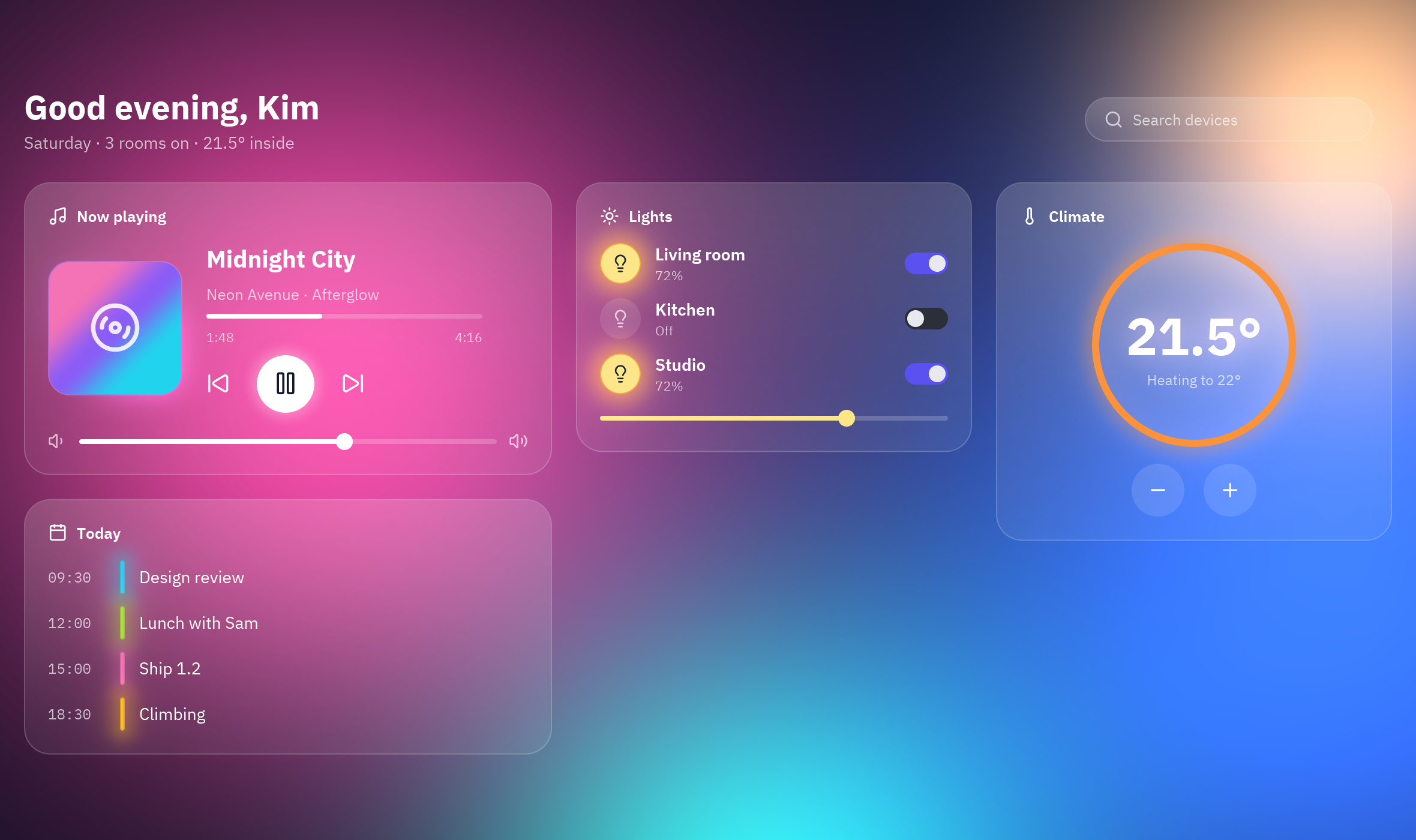
| Showcase: game HUD | Glass dashboard |
|---|---|
 |
 |
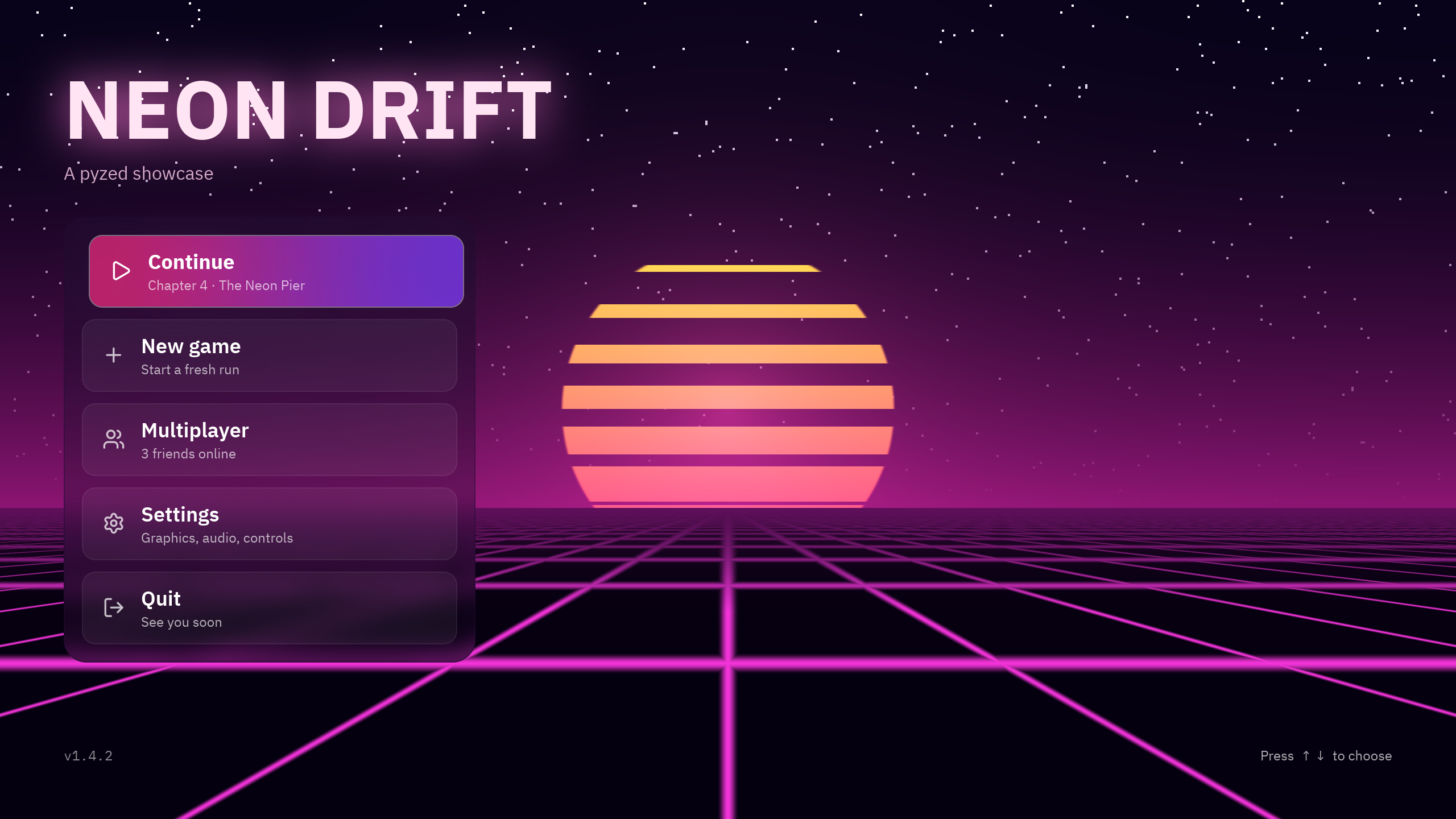
| Main menu with shaders | Neon Invaders |
 |
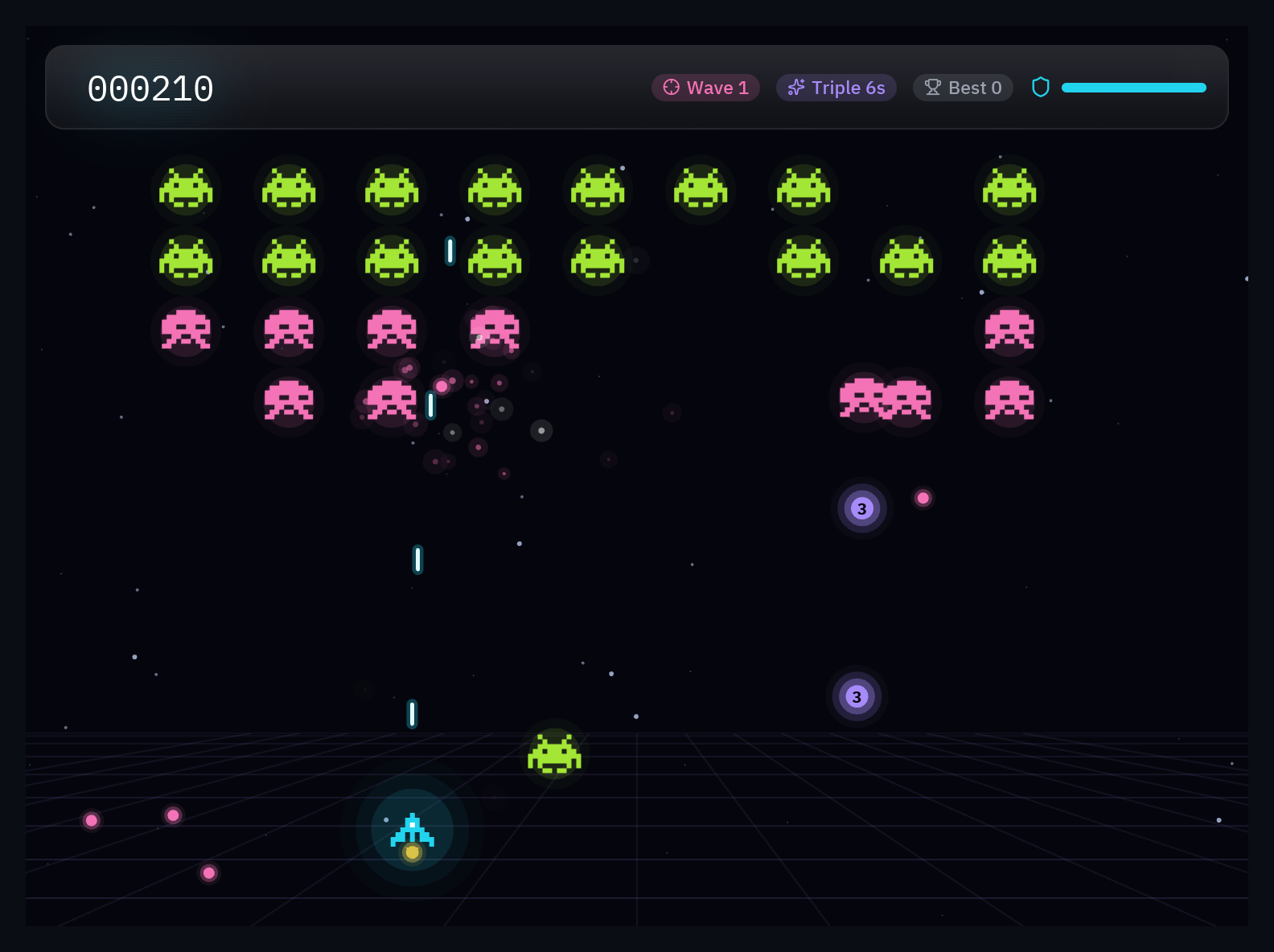 |
Installation
You need Python 3.10 or newer. There are wheels for Linux (glibc and musl), macOS and Windows, so Rust is not needed.
uv add pyzed-ui                  # in a uv project
pip install pyzed-ui             # inside an activated virtual environment
python3 -m pip install pyzed-ui  # with the system Python (on Windows: py -m pip install pyzed-ui)
Optional extras: pyzed-ui[mcp] (MCP server) and pyzed-ui[agents] (AI agents in your apps).
The package is pyzed-ui on PyPI and is imported as pyzed. It is not related to the pyzed module of the
Stereolabs ZED camera SDK.
Pyzed Design is installed separately as an app, with installers for Windows and macOS and a script for Linux, and it updates itself: see Download Pyzed Design.
Quick start
import pyzed as pz
from pyzed import ui


class Counter(pz.App):
    title = "Counter"
    size = (360, 220)

    def __init__(self):
        self.count = 0

    def update(self, message):          # messages can be any Python value
        if message == "increment":
            self.count += 1
        elif message == "decrement":
            self.count -= 1

    def view(self):
        return pz.center(
            pz.column([
                ui.heading(str(self.count)),
                pz.row([
                    ui.button("1", "decrement", icon="minus"),
                    ui.button("1", "increment", icon="plus", variant="solid"),
                    # ...or a callable, which is called directly
                    ui.icon_button("rotate-ccw", lambda: setattr(self, "count", 0), tooltip="Reset"),
                ], spacing=8),
            ], spacing=16, align="center"),
            bg=self.theme.editor,
        )


pz.run(Counter)
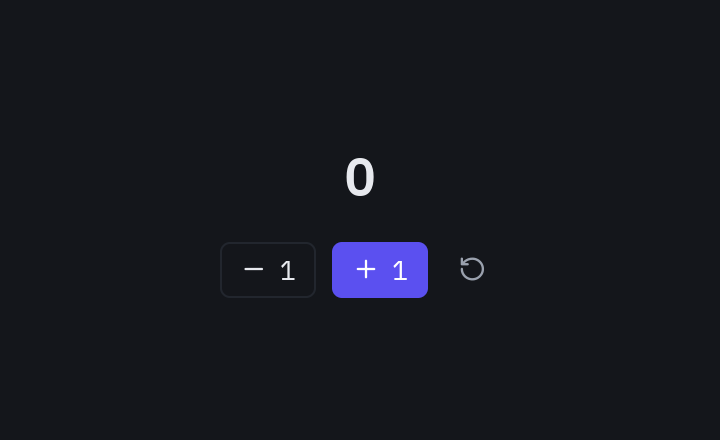
Continue with the quick start and the basic, intermediate and advanced tutorials.
A complete project
pyzed new my-app          # a uv project: UI in ui/, backend in src/, ruff, ty and git
cd my-app
uv run pyzed design       # opens Pyzed Design on the project
uv run pyzed dev main.py  # hot reload: the window updates on save and keeps its state
uv run pyzed build        # an executable for this platform
More in Create a project and Distribute.
Pyzed Design
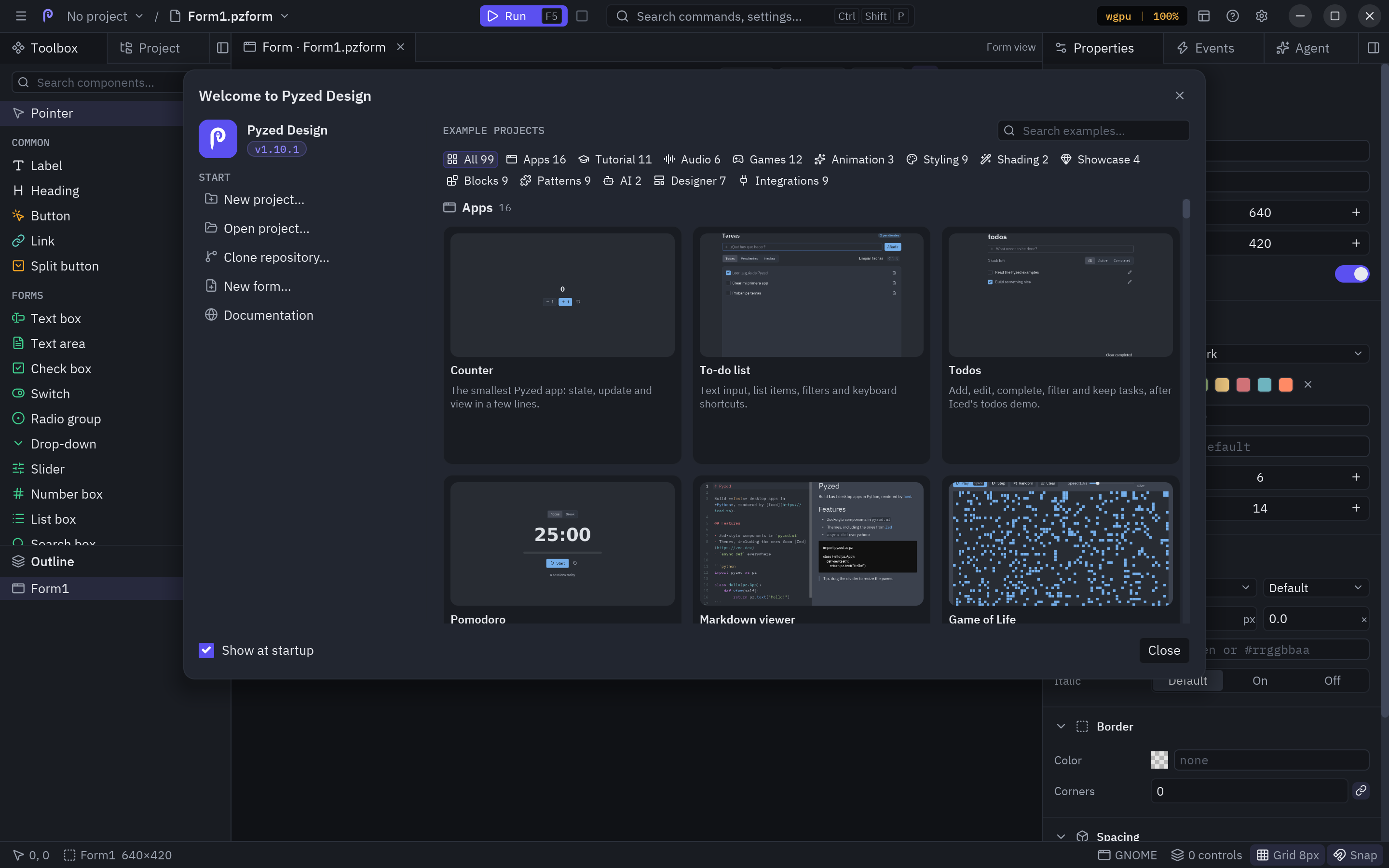
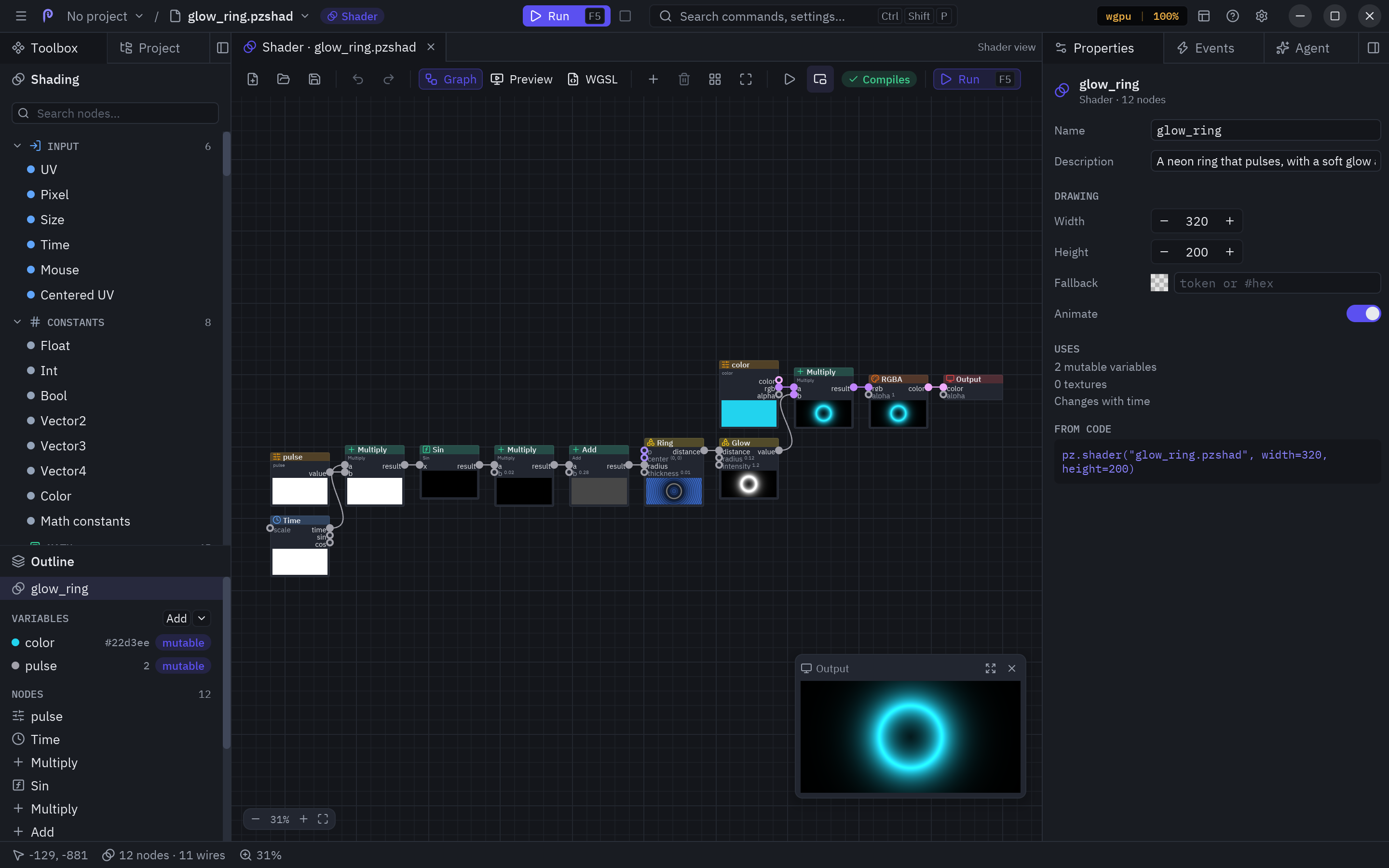
A visual designer made with Pyzed, with Zed's interface: drag components onto a grid with anchors, edit their properties and styles, double-click to write the code of each event and press F5 to run it.
| Welcome screen with sample projects | Node-based shaders, like in Godot |
|---|---|
 |
 |
- Form, component, shader and code views, with tabs that can be torn off into their own window.
- A Zed-grade code editor: completion with ty, diagnostics with ruff, multiple cursors, find and replace, folding, minimap, configurable shortcuts and IME.
- Project: a file tree with Zed's menu, file search, dependencies with uv and a terminal.
- Custom components with typed properties, inheritance, data binding and validation.
- A built-in AI agent that reads the project, creates forms and complete apps and drives the editor through Pyzed's MCP.
- It updates itself, like Zed, with a what's-new tab.
Full manual in Designer and Shading.
Components
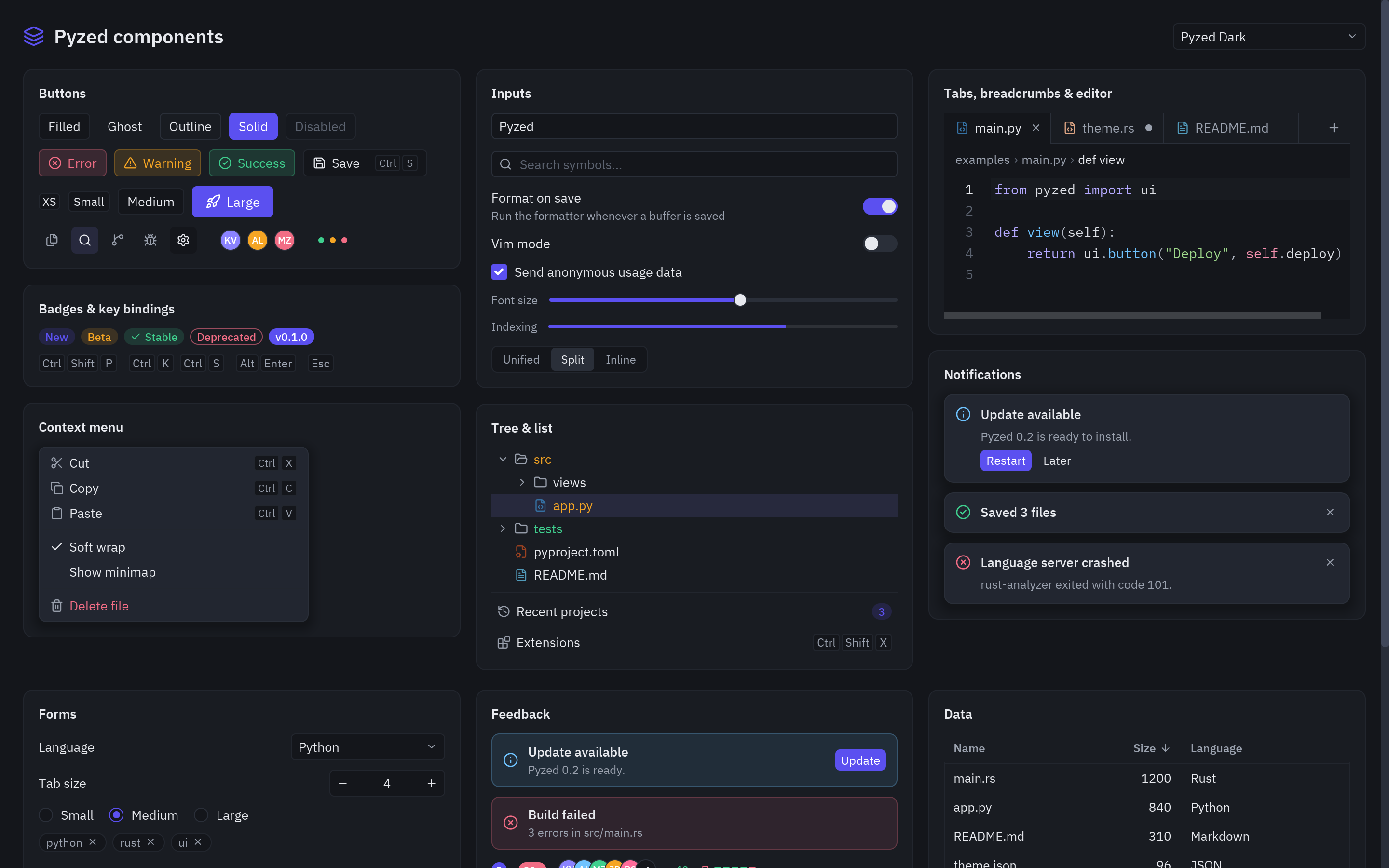
Every component has its own page with all its variants, examples and API in the library. There are also ready-to-copy blocks: sign-in screens, settings, dashboards…
Any widget has the usual events of a GUI builder (click, double_click, drag, key_down, resize…), and
custom components are classes with annotated props, state and events:
class Rating(pz.Component):
    value: int = 0
    events = {"change": "A star was picked"}

    def render(self):
        return pz.row([pz.text("★" if i <= self.value else "☆").on(click=lambda i=i: self.emit("change", i))
                       for i in range(1, 6)])
AI
-
Agent panel in Pyzed Design: sign in to Claude in the browser or with your subscription, or use OpenAI, Gemini, GitHub Copilot, Vertex AI, OpenRouter, Ollama and more. Attach images, connect external MCP servers or ACP agents (Gemini CLI, Codex…).
-
MCP server (
pyzed mcp): Claude, Cursor, VS Code and other agents look up the exact API, generate and check apps and see a screenshot of the result.claude mcp add pyzed -- uvx --from "pyzed-ui[mcp]" pyzed mcp
-
pyzed.agentsto add an agent with tools to your own apps.
See AI. For language models, the whole documentation is also available as llms.txt.
Integrations
Tutorials and runnable demos with FastAPI, SQLAlchemy, SQLModel, Django, httpx and Pydantic:
where each thing runs (UI thread, asyncio loop, worker threads) and how to show validation errors in forms. The
code is in examples/integrations.
Why Pyzed?
Comparisons with tkinter, Qt, Kivy, Flet, Dear PyGui and Toga, with
measured, reproducible benchmarks of startup, memory, updates
and installed size (benchmarks/).
Examples
| Folder or file | What it shows |
|---|---|
examples/counter.py, todo.py |
The basics: state, messages, forms and lists. |
examples/gallery.py |
Every component, interactive, with a theme picker. |
examples/zed_editor.py |
A complete code editor over a real folder. |
examples/showcase/ |
Game HUD, main menu, inventory, glass dashboard and shader gallery. |
examples/games/ |
Snake, Breakout and Neon Invaders. |
examples/integrations/ |
FastAPI, SQLAlchemy, SQLModel, Django, httpx, Pydantic and aiosqlite. |
examples/effects.py, animations.py |
Visual effects and animations. |
examples/window_frame.py |
A custom window frame with each platform's menus and buttons. |
examples/ai_chat.py |
A chat with an AI agent. |
examples/designer/ |
A Pyzed Design form (.pzform + .py). |
examples/tutorial/, hot_reload/ |
Step-by-step tutorial and hot reload. |
They all run with python examples/<file>.py (or uv run). More in
Examples.
How it works
Python                         Rust (pyzed._core, PyO3)                 Iced 0.14
App.view() ──► Widget tree ──► render.rs: Widget → iced::Element ──► layout + wgpu/tiny-skia
App.update() ◄── messages ◄────── app.rs: Message, Command → Task ◄──── events (mouse, keyboard)
Widgets are immutable Rust objects, so building the view from Python is cheap. The internal state of each editor lives in Rust and the GIL is released while the event loop runs. More in Architecture.
Developing Pyzed
git clone https://github.com/albakore/pyzed && cd pyzed
uv sync                     # builds the Rust core (1.88 or newer) and installs pyzed in editable mode
uv run pytest tests
uv run python examples/gallery.py
See CONTRIBUTING.md. Pyzed follows semantic versioning since 1.0; the policy and known limitations are in Stability.
License
MIT. The bundled fonts are IBM Plex (SIL Open Font License) and Lucide (ISC); their licenses are in
assets/fonts. The One, Ayu and Gruvbox themes come from the Zed repository (MIT); see
python/pyzed/zed_themes/LICENSE.
1 maintainer

Metadata
1 maintainer
Release files for pyzed-ui 1.12.0
For a detailed explanation of source distributions (sdists) and built distributions (wheels), please see the package formats documentation.
Built distributions (wheels)
| File | Reset | |||
|---|---|---|---|---|
| pyzed_ui-1.12.0-cp310-abi3-win_arm64.whl | CPython 3.10 | abi3 | Windows ARM64 | Details |
| pyzed_ui-1.12.0-cp310-abi3-win_amd64.whl | CPython 3.10 | abi3 | Windows x86-64 | Details |
| pyzed_ui-1.12.0-cp310-abi3-musllinux_1_2_x86_64.whl | CPython 3.10 | abi3 | Linux musl 1.2+ x86-64 | Details |
| pyzed_ui-1.12.0-cp310-abi3-musllinux_1_2_aarch64.whl | CPython 3.10 | abi3 | Linux musl 1.2+ ARM64 | Details |
| pyzed_ui-1.12.0-cp310-abi3-manylinux_2_28_x86_64.whl | CPython 3.10 | abi3 | Linux glibc 2.28+ x86-64 | Details |
| pyzed_ui-1.12.0-cp310-abi3-manylinux_2_28_aarch64.whl | CPython 3.10 | abi3 | Linux glibc 2.28+ ARM64 | Details |
| pyzed_ui-1.12.0-cp310-abi3-macosx_11_0_arm64.whl | CPython 3.10 | abi3 | macOS 11.0+ ARM64 | Details |
| pyzed_ui-1.12.0-cp310-abi3-macosx_10_12_x86_64.whl | CPython 3.10 | abi3 | macOS 10.12+ x86-64 | Details |
Total release size: 104.0 MB
Release files / pyzed_ui-1.12.0-cp310-abi3-win_arm64.whl
| Download URL | pyzed_ui-1.12.0-cp310-abi3-win_arm64.whl |
|---|---|
| Size | 11.6 MB |
| Tags | CPython 3.10 Windows ARM64 abi3 |
|
SHA-256 checksum How to use checksums |
3a5f23cdb67475fa17133fe29f5572dbf1ce13ef9a0eb956b86d5296864b055c
|
|
BLAKE2b-256 checksum How to use checksums |
15b70623a66226e3d574fe5fb89e7482efcc3cd72d95548f90a27c3507424204
|
| Upload date | |
|
Uploaded using Trusted Publishing? What is trusted publishing? |
Yes |
| Uploaded via |
twine/7.0.0 CPython/3.13.16
|
Provenance
Provenance describes where a file came from. On PyPI, provenance is shared via attestations, which provide a verifiable record of the build or publishing details. View details, limitations and caveats.


PyPI Publish Attestation
PyPI verified that this artifact, at this checksum, originated from the publisher listed below.
Signed by GitHub Actions, verified by PyPI on Oct 24, 2026.
Transparency logRelease files / pyzed_ui-1.12.0-cp310-abi3-win_amd64.whl
| Download URL | pyzed_ui-1.12.0-cp310-abi3-win_amd64.whl |
|---|---|
| Size | 12.3 MB |
| Tags | CPython 3.10 Windows x86-64 abi3 |
|
SHA-256 checksum How to use checksums |
3850a1f546b961a019ce80379fe48d7d046c537a718de7abc8204df6046d6e41
|
|
BLAKE2b-256 checksum How to use checksums |
1fe90d8fbb0652ac5b309d0ac85d5264b89485cf6eca12e409a03600f4504201
|
| Upload date | |
|
Uploaded using Trusted Publishing? What is trusted publishing? |
Yes |
| Uploaded via |
twine/7.0.0 CPython/3.13.16
|
Provenance
Provenance describes where a file came from. On PyPI, provenance is shared via attestations, which provide a verifiable record of the build or publishing details. View details, limitations and caveats.
PyPI Publish Attestation
PyPI verified that this artifact, at this checksum, originated from the publisher listed below.
Signed by GitHub Actions, verified by PyPI on Oct 24, 2026.
Transparency logRelease files / pyzed_ui-1.12.0-cp310-abi3-musllinux_1_2_x86_64.whl
| Download URL | pyzed_ui-1.12.0-cp310-abi3-musllinux_1_2_x86_64.whl |
|---|---|
| Size | 14.5 MB |
| Tags | CPython 3.10 Linux musl 1.2+ x86-64 abi3 |
|
SHA-256 checksum How to use checksums |
0abce73ad593e40bbf710e9e0c441324dadb88057f80ca852d49d7f95121bd79
|
|
BLAKE2b-256 checksum How to use checksums |
8f23e8808c92bcb78cff101f4cf4ce2bfa3898735045ef5dcc2e40db30b67342
|
| Upload date | |
|
Uploaded using Trusted Publishing? What is trusted publishing? |
Yes |
| Uploaded via |
twine/7.0.0 CPython/3.13.16
|
Provenance
Provenance describes where a file came from. On PyPI, provenance is shared via attestations, which provide a verifiable record of the build or publishing details. View details, limitations and caveats.
PyPI Publish Attestation
PyPI verified that this artifact, at this checksum, originated from the publisher listed below.
Signed by GitHub Actions, verified by PyPI on Oct 24, 2026.
Transparency logRelease files / pyzed_ui-1.12.0-cp310-abi3-musllinux_1_2_aarch64.whl
| Download URL | pyzed_ui-1.12.0-cp310-abi3-musllinux_1_2_aarch64.whl |
|---|---|
| Size | 13.8 MB |
| Tags | CPython 3.10 Linux musl 1.2+ ARM64 abi3 |
|
SHA-256 checksum How to use checksums |
f7888a4245eb8907b734fca1dae4d87c8a8398b04dd142634eb6b4ae209b7a97
|
|
BLAKE2b-256 checksum How to use checksums |
8716b93039032179417ac39129410a328c6fb7c86270c97142b27999b4d536ec
|
| Upload date | |
|
Uploaded using Trusted Publishing? What is trusted publishing? |
Yes |
| Uploaded via |
twine/7.0.0 CPython/3.13.16
|
Provenance
Provenance describes where a file came from. On PyPI, provenance is shared via attestations, which provide a verifiable record of the build or publishing details. View details, limitations and caveats.
PyPI Publish Attestation
PyPI verified that this artifact, at this checksum, originated from the publisher listed below.
Signed by GitHub Actions, verified by PyPI on Oct 24, 2026.
Transparency logRelease files / pyzed_ui-1.12.0-cp310-abi3-manylinux_2_28_x86_64.whl
| Download URL | pyzed_ui-1.12.0-cp310-abi3-manylinux_2_28_x86_64.whl |
|---|---|
| Size | 15.1 MB |
| Tags | CPython 3.10 Linux glibc 2.28+ x86-64 abi3 |
|
SHA-256 checksum How to use checksums |
348a1067504671e53e90f537d0b7296c3b9d512bf946402d74a0dec01daaad8b
|
|
BLAKE2b-256 checksum How to use checksums |
742e9a4691e6b7a8cdddac0e966e35e2ce4561fb931a2c33576e00d44a8610e1
|
| Upload date | |
|
Uploaded using Trusted Publishing? What is trusted publishing? |
Yes |
| Uploaded via |
twine/7.0.0 CPython/3.13.16
|
Provenance
Provenance describes where a file came from. On PyPI, provenance is shared via attestations, which provide a verifiable record of the build or publishing details. View details, limitations and caveats.
PyPI Publish Attestation
PyPI verified that this artifact, at this checksum, originated from the publisher listed below.
Signed by GitHub Actions, verified by PyPI on Oct 24, 2026.
Transparency logRelease files / pyzed_ui-1.12.0-cp310-abi3-manylinux_2_28_aarch64.whl
| Download URL | pyzed_ui-1.12.0-cp310-abi3-manylinux_2_28_aarch64.whl |
|---|---|
| Size | 14.4 MB |
| Tags | CPython 3.10 Linux glibc 2.28+ ARM64 abi3 |
|
SHA-256 checksum How to use checksums |
73237b50a4ab27f6b1443a9024b8bcf83f14a74b2b413a20406ee63c73e1a17b
|
|
BLAKE2b-256 checksum How to use checksums |
9fbc78888ce587381b154e8b577735e9d5fb222f75cf8c0cf899279822000c63
|
| Upload date | |
|
Uploaded using Trusted Publishing? What is trusted publishing? |
Yes |
| Uploaded via |
twine/7.0.0 CPython/3.13.16
|
Provenance
Provenance describes where a file came from. On PyPI, provenance is shared via attestations, which provide a verifiable record of the build or publishing details. View details, limitations and caveats.
PyPI Publish Attestation
PyPI verified that this artifact, at this checksum, originated from the publisher listed below.
Signed by GitHub Actions, verified by PyPI on Oct 24, 2026.
Transparency logRelease files / pyzed_ui-1.12.0-cp310-abi3-macosx_11_0_arm64.whl
| Download URL | pyzed_ui-1.12.0-cp310-abi3-macosx_11_0_arm64.whl |
|---|---|
| Size | 10.9 MB |
| Tags | CPython 3.10 abi3 macOS 11.0+ ARM64 |
|
SHA-256 checksum How to use checksums |
9cedb7244c8410a10552a0ddf2959e3e8a56f339d55c1253b15ffe61ecafe688
|
|
BLAKE2b-256 checksum How to use checksums |
4364e75f2e71a0c6687ba5e78d4c0013c4c13db8bc2a7a4c973bc983f9c2d9f8
|
| Upload date | |
|
Uploaded using Trusted Publishing? What is trusted publishing? |
Yes |
| Uploaded via |
twine/7.0.0 CPython/3.13.16
|
Provenance
Provenance describes where a file came from. On PyPI, provenance is shared via attestations, which provide a verifiable record of the build or publishing details. View details, limitations and caveats.
PyPI Publish Attestation
PyPI verified that this artifact, at this checksum, originated from the publisher listed below.
Signed by GitHub Actions, verified by PyPI on Oct 24, 2026.
Transparency logRelease files / pyzed_ui-1.12.0-cp310-abi3-macosx_10_12_x86_64.whl
| Download URL | pyzed_ui-1.12.0-cp310-abi3-macosx_10_12_x86_64.whl |
|---|---|
| Size | 11.5 MB |
| Tags | CPython 3.10 abi3 macOS 10.12+ x86-64 |
|
SHA-256 checksum How to use checksums |
a355c90fd14bb6675ea5f17aa47229f626b189e798d2340420d171cc7bf9ba4c
|
|
BLAKE2b-256 checksum How to use checksums |
ea3d7e75fe0a0872585ec19d2111cac140d6c107ff912fcc7f9ddf8c372c886d
|
| Upload date | |
|
Uploaded using Trusted Publishing? What is trusted publishing? |
Yes |
| Uploaded via |
twine/7.0.0 CPython/3.13.16
|
Provenance
Provenance describes where a file came from. On PyPI, provenance is shared via attestations, which provide a verifiable record of the build or publishing details. View details, limitations and caveats.
PyPI Publish Attestation
PyPI verified that this artifact, at this checksum, originated from the publisher listed below.
Signed by GitHub Actions, verified by PyPI on Oct 24, 2026.
Transparency logSecurity for pyzed-ui 1.12.0
Provenance
Provenance describes where a file came from. On PyPI, provenance is shared via attestations, which provide a verifiable record of the build or publishing details. View details, limitations and caveats.
Full provenance
All 8 files in this release have been uploaded with provenance metadata.
Attestation for pyzed_ui-1.12.0-cp310-abi3-win_arm64.whl
PyPI Publish Attestation
PyPI verified that this artifact, at this checksum, originated from the publisher listed below.
Signed by GitHub Actions, verified by PyPI on Oct 24, 2026.
Transparency logA note on package security
PyPI is a repository for distributing packages, not a service for auditing them. While third-party security researchers and our staff do their best to detect and remove malicious packages, PyPI cannot guarantee the quality, security or suitability of any given package.
To learn more about protecting yourself from malicious actors, visit our package security documentation.














