






Quiltwright -- holographic output for scientific visualization.
Eric G. Suchanek, PhD -- Flux-Frontiers
Quiltwright is the last stage of a scientific rendering pipeline -- any
pipeline that ends in a scene. It takes what you already have -- a PyVista or
VTK scene built in memory, a Blender file or an exported mesh, or a .pov
file written thirty years ago by someone who is no longer around to explain
it -- and puts it on holographic hardware in glasses-free depth. Nothing is
rewritten to get there: your scene file is never modified, the off-axis camera
is supplied per view, and each scene is rendered by the renderer it already
belongs to. Where that renderer is Blender's Cycles, the views are path-traced
on the GPU's ray-tracing cores if the hardware has them.
It is used that way by WaveRider for geometric ML manifolds and by pypdb2pov for molecular structures, but neither is a prerequisite. If you can render it, you can hang it in the air.
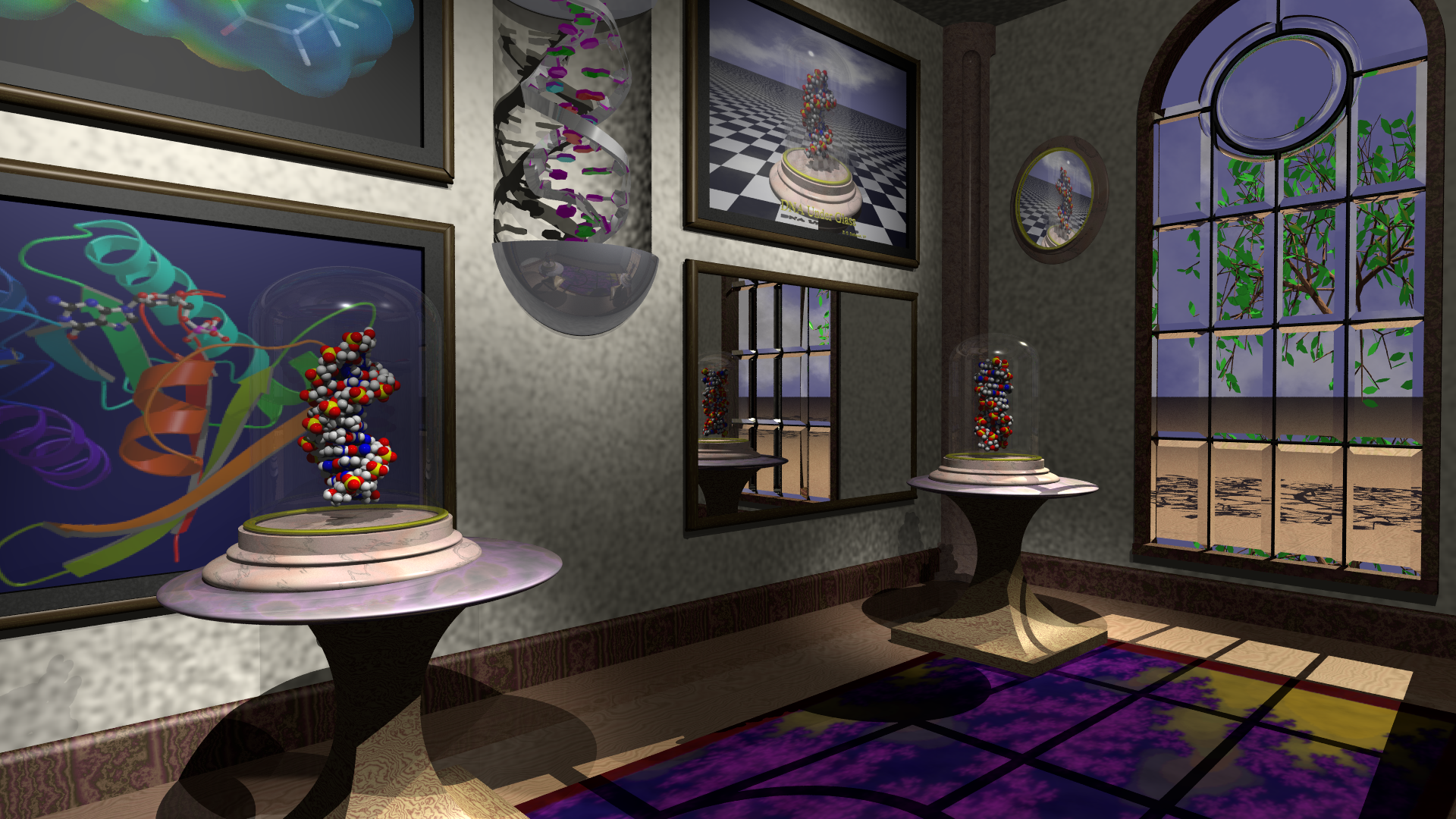
A career in structural biophysics, arranged as exhibits: B-DNA and Z-DNA under bell jars, Ras and my original DNA Under Glass on the walls. The molecular models were generated by pdb2pov in 1997; the room dates to 1995. Quiltwright ray-traces it into a 48-view light-field quilt for Looking Glass light-field panels, or into 2-D video for Hololuminescent displays. A third output -- a 23-view sweep for LitiHolo's desktop hologram printer -- is in development. About the image
Latest news
v0.10.0 (2026-08-30). The package stopped being one module with a
rendering backend attached. Quilt geometry, presets and the depth-budget
arithmetic now live in quiltwright.quilt, and the Bridge client in
quiltwright.bridge -- neither imports VTK, so a machine that only casts a
finished quilt no longer pays for PyVista. quiltwright.lfd is the PyVista
backend and re-exports every moved name, so existing imports are unchanged.
QuiltCamera and window_shear() state the off-axis shift once, and the
three backends convert it into their own units rather than each deriving it.
Two new commands take arbitrary input instead of working downstream of a
render: quiltwright mesh auto-frames any glTF, OBJ, STL, PLY, USD, FBX or
Alembic file into a quilt from its own bounding box, and quiltwright probe
promotes the plane sweep every near/far figure in this repo was measured with
into the package -- and now says when a sweep never closed, rather than
letting the end of its travel be copied into a scene as a measurement.
Full history: CHANGELOG.md and releases.
What it's for
     scene sources                  quiltwright                  outputs

  PyVista / VTK  -----+        +------------------+        +-->  LFD  light-field panels
   (WaveRider, TVB)   |        |  off-axis views  |        |          multi-view quilts
                      +------->|  depth budget    |------->+-->  HLD  hololuminescent
  POV-Ray  -----------+        |  quilt assembly  |        |          2-D video
   (pypdb2pov, PyMOL) |        |  view sweeps     |        +-->  LitiHolo  hogel sweeps
                      |        +------------------+                       (in development)
  Blender / meshes ---+
   (.blend, glTF, USD, OBJ)
Three backends, not three pipelines. render_quilt() sweeps any
PyVista/VTK scene held in memory. render_pov_quilt() ray-traces any POV-Ray
scene on disk, appending a camera per view and modifying nothing -- which is
what lets it render files written decades ago, by tools that no longer exist,
without altering them. render_cycles_quilt() path-traces .blend files and
mesh formats (glTF, USD, OBJ, STL, PLY, FBX, Alembic) through Blender's
Cycles, picking up GPU ray tracing where the hardware offers it -- Metal's
ray-tracing cores on Apple Silicon, OptiX/HIP/oneAPI elsewhere -- and loading
the scene once for the whole sweep rather than once per view. All converge at
a shared, renderer-agnostic assembler, so everything downstream remains
indifferent to which backend produced the views.
What feeds the backends is open. WaveRider's voxel and manifold visualizer and
pypdb2pov's PDB conversion are the two that drove the design, but
quiltwright.tvb_data pulls real brain geometry from
The Virtual Brain, PyVista's own example datasets work
as-is, quiltwright.povgen writes POV-Ray from analytic primitives, and a
plain .pov file off your disk needs no pipeline at all. The backends also
bridge: render_cycles_quilt_from_plotter() takes the same composed PyVista
plotter render_quilt() does and path-traces it instead -- scene exported to
glTF once, camera translated, scalar colors intact.
Two display technologies. Light-field displays (LFD -- Portrait, Go,
16"/27"/32"/65") are lenticular panels that consume quilts: N views of the
same scene tiled into one image, fused optically into real depth.
Hololuminescent displays (HLD -- 16"/27"/86") play ordinary 2-D video
behind a fixed holographic optic and require styling rather than parallax:
dark field, high contrast, generous safe margins. quiltwright.lfd targets the
first; quiltwright.hld the second.
The shared middle is what makes this a package rather than two scripts: quilt geometry and device presets, depth-budget arithmetic that decides whether a scene will fuse before you spend an hour rendering it, filename conventions the Looking Glass software parses, video encoding, and direct Bridge control.
A third output, under development. That middle layer also serves consumers
that are not panels at all: render_pov_views() writes the sweep as separate
frames, and sweep_spec() / LITIHOLO_SWEEP provide the single-row layout a
hologram printer's view count requires -- a structure a quilt grid cannot
express -- so one scene feeds a light-field panel and a hologram printer without
being rebuilt. Nothing has yet passed through a printer's software, so the
claim is a sweep matching LitiHolo's published specification rather than
verified compatibility;
docs/lfd.md
records what remains open.
The part that is easy to get wrong
Each view must use an off-axis (asymmetric-frustum) projection: the camera slides sideways while continuing to face the same direction, with the image plane sheared back onto the original view axis.
The intuitive alternative is to swivel each camera to keep the subject centered. This "toe-in" approach introduces vertical parallax and keystone distortion, so the display cannot fuse the views: you get ghosting instead of depth. It is the single most common way light-field renders go wrong, and it produces output that looks perfectly plausible in any individual frame. Quiltwright implements the off-axis projection correctly in both backends and provides the arithmetic to predict whether a scene will fuse.
Install
pip install quiltwright                 # core: quilt geometry + Bridge control
pip install "quiltwright[viz]"          # + PyVista/VTK rendering backend
pip install "quiltwright[video]"        # + a bundled ffmpeg for video encoding
pip install "quiltwright[molecules]"    # + PDB and mmCIF, via pypdb2pov
From a clone, with Poetry
Each extra above has a Poetry group of the same name, so the two produce the
same environment. Every group is optional -- a bare poetry install skips all
of them.
poetry install                          # core: quilt geometry + Bridge control
poetry install --with viz               # + PyVista/VTK rendering backend
poetry install --with video             # + a bundled ffmpeg for video encoding
poetry install --with molecules         # + PDB and mmCIF, via pypdb2pov
poetry install --with dev               # + pytest, ruff, ty, pre-commit
poetry install --with viz,video,dev     # groups combine
No space after the comma: Poetry reads the name following it as a positional argument and refuses the command.
There is one group with no pip equivalent, on purpose. kg installs the
pycodekg and dockg CLIs that index this repo for agents -- tooling this
repo runs rather than a feature of the package, so it stays out of the
published wheel metadata:
poetry install --with kg
poetry install --all-extras --with dev,kg    # everything
Prerequisites
Nothing above needs all of these -- pick the row for the backend you're
using. Each is an external binary, not a Python dependency, so pip install quiltwright never pulls any of them in on its own.
| Dependency | Needed for | Install |
|---|---|---|
| POV-Ray | the ray-traced backend (render_pov_quilt) |
brew install povray / apt install povray / dnf install povray |
| Blender (4.x+) | the Cycles backend (render_cycles_quilt) |
brew install --cask blender, or any blender.org install |
| PyMOL | secondary-structure cartoons (quiltwright cartoon, cartoon_inc/cartoon_obj) |
brew install pymol / conda install -c conda-forge pymol-open-source |
| ffmpeg | quilt/HLD video encoding | brew install ffmpeg, or skip it and use pip install "quiltwright[video]" for a bundled copy |
| Looking Glass Bridge (≥ 2.2) | casting to a physical panel (cast_quilt) |
lookingglassfactory.com/software/looking-glass-bridge |
For the complete stack -- every layer above in more depth, plus pypdb2pov -- see the installation guide.
Quick start
From a PyVista scene
import pyvista as pv
from quiltwright import QUILT_PRESETS, render_quilt, save_quilt

p = pv.Plotter(off_screen=True)
p.add_mesh(pv.ParametricTorus())

spec = QUILT_PRESETS["portrait"]
save_quilt(render_quilt(p, spec), "torus", spec)   # -> torus_qs8x6a0.75.png
From a POV-Ray scene
The scene file is never modified -- each view wraps it with #include and
appends one camera.
from quiltwright import QUILT_PRESETS, PovCamera, render_pov_quilt, save_quilt

camera = PovCamera(location=(15, 20, 6), look_at=(44, 19.2, 45.1), fov=53.13)
spec = QUILT_PRESETS["16-landscape"]
quilt = render_pov_quilt("pov-scenes/museum/museum.pov", spec, camera,
                         include_paths=["pov-scenes/myinclude", "pov-scenes"])
save_quilt(quilt, "museum", spec)
A 2026 cut of the museum, museum_2026.pov, is composed for the panel rather
than for paper: 16:9, the oval mirror where the Risedronate picture hung, and
both pedestals moved inward to flank the alcove. The 1999 original is
untouched beside it.
The museum scene above ships in pov-scenes/, and scripts/render_museum_hologram.py renders it end-to-end with a measured depth budget -- the worked case study in docs/povray.md, and the scene itself in docs/about-the-image.md.
Two more scene trees ship alongside it -- the bell-jar DNA still lifes the museum's pedestals were built from, and porin's beta-barrel over water. What is in each, and how to render them directly, is in pov-scenes/README.md.
From a Cycles scene
Same plotter, path-traced instead of rasterized -- with GPU hardware ray tracing where it's available (Metal on Apple Silicon; OptiX/HIP/oneAPI elsewhere, CPU as the fallback):
import pyvista as pv
from quiltwright import QUILT_PRESETS, render_cycles_quilt_from_plotter, save_quilt

p = pv.Plotter(off_screen=True)
p.add_mesh(pv.ParametricTorus())

spec = QUILT_PRESETS["portrait"]
quilt = render_cycles_quilt_from_plotter(p, spec, lighting="studio")
save_quilt(quilt, "torus_cycles", spec)
render_cycles_quilt_from_plotter reads the plotter -- never renders or
mutates it -- so it also works on machines with no OpenGL stack, where
render_quilt itself cannot run. It exports through glTF once and shares the
result across the whole view sweep, rather than re-parsing per view the way
the POV-Ray backend does. For a .blend file or a mesh already on disk
(glTF, OBJ, STL, PLY, USD, FBX, Alembic), skip the plotter and call
render_cycles_quilt directly with an explicit CyclesCamera:
from quiltwright import CyclesCamera, QUILT_PRESETS, render_cycles_quilt, save_quilt

camera = CyclesCamera(location=(0, -35, 8), look_at=(0, 0, 5), fov=14)
quilt = render_cycles_quilt("protein.glb", QUILT_PRESETS["portrait"], camera, samples=128)
save_quilt(quilt, "protein", spec)
Two worked examples ship in scripts/: render_dna_helix_hologram.py
compares this backend against POV-Ray on the same composed scene (a case where
POV-Ray's analytic primitives win outright), and render_cartoon_hologram.py
does the reverse comparison on a real PyMOL Richardson cartoon -- tens of
thousands of triangles, the case Cycles exists for. The mechanism, the
lighting rigs ("soft"/"studio"/"sky"/an HDRI path), and both worked
examples in full are in docs/cycles.md.
Send it to the display
from quiltwright import cast_quilt, pause_quilt, resume_quilt, stop_quilt

cast_quilt("museum_qs8x6a1.77778.png", spec)   # needs Looking Glass Bridge >= 2.2
save_quilt takes the array and cast_quilt takes a path, and mixing them up
only surfaces minutes into a ray-traced render. save_and_cast_quilt composes
the two in the right order, and returns a failed cast rather than raising, so a
Bridge that isn't running never costs you the render:
from quiltwright import save_and_cast_quilt

path, error = save_and_cast_quilt(quilt, "museum", spec)
Saved filenames carry the _qs<cols>x<rows>a<aspect> suffix that Looking Glass
Studio and Bridge parse, so playback settings are detected automatically.
Send it to a hologram printer (in development)
A printer wants the views as separate frames, not tiled, and LitiHolo's
published input specification asks for 23 of them per hogel -- a prime count, so
no columns × rows grid can express it. LITIHOLO_SWEEP is that single-row
spec, and the camera sweep behind it is the same off-axis geometry a quilt is
built from:
from quiltwright import LITIHOLO_SWEEP, format_depth_budget, render_pov_views

print(format_depth_budget(LITIHOLO_SWEEP, camera, {"near": 31, "far": 96}))

paths = render_pov_views("pov-scenes/museum/museum.pov", LITIHOLO_SWEEP,
                         camera, "sweep/",
                         include_paths=["pov-scenes/myinclude", "pov-scenes"])
# -> sweep/view000.png ... sweep/view022.png, view 0 leftmost
Print the budget first rather than after. 23 views over 45° is 2.05° between adjacent views against a Portrait quilt's 0.74° -- about 2.75× coarser sampling, so a sweep has less margin than a quilt, not more. The museum, framed as above, reports ~43 px of adjacent-view disparity at that cone: far past the ~8 px ghosting threshold, and exactly the sort of thing worth learning before the ray-tracer starts rather than after.
This path is POV-Ray only for now, and no file has been through the printer's software: what it emits is a sweep matching the published specification, which is a narrower claim than compatibility. The two open questions -- whether a hogel slicer expects off-axis frusta or a toe-in arc, and whether 2.05° is too coarse -- are written up in docs/lfd.md.
Driving it from the shell
Two things sit around the library: a Makefile for the bundled 1993-99
scenes, and a CLI for hardware and tooling -- cast, weave, wallpaper,
bridge -- plus mesh / cartoon / probe for arbitrary input. The
worked exhibits for the scenes this repo ships (museum, vitrine, still-life,
DNA helix, cartoon comparison) stay in scripts/; they are not unfinished
CLI. The full tour is docs/shell.md.
make gallery                    # every reference still -> gallery/
make quilts                     # every bundled quilt, measured budgets dialled in
make preview-museum             # quarter-size, for iterating on composition

quiltwright cast renders/quilts/bell-jar-holo_qs8x6a1.77778.png
quiltwright bridge status       # is Bridge actually able to draw?
quiltwright weave ... && quiltwright wallpaper ...   # the no-Bridge path
quiltwright cartoon 2omf.cif.gz ompf_cartoon.inc     # molecular ribbon, via PyMOL
quiltwright mesh model.glb                           # any mesh file, camera auto-framed
quiltwright probe scene.pov --eye 0 35 -95 --aim 0 18 0   # measure its depth range

python scripts/make_exhibit.py 7AHL --quilt          # fetch -> convert -> render

python scripts/render_dna_helix_hologram.py --backend cycles --still     # Cycles, one scene
python scripts/render_cartoon_hologram.py 2omf.cif.gz --backend povray --still   # ...and POV-Ray
Worth knowing before the details:
- Renders never take the whole machine.
RENDER_THREADSdefaults toncpu - 2; override it deliberately. - Preview first. A quarter-size quilt costs seconds per view and prints the same depth budget the full render will use.
- Every full quilt writes a provenance report to
renders/reports/-- scene hash, commit, camera, measured depths -- because the quilt itself is a gitignored 25-40 MB PNG that says nothing about where it came from. make_exhibit.pyfetches into$PDB(default~/pdb), and nothing already there is fetched twice.- When the glass stays black, run
bridge statusfirst. Bridge keeps answering HTTP after crashing internally, so a cast can report success against a daemon that will never draw.
The depth budget
Whether a hologram fuses comes down to adjacent-view disparity: how far a feature moves between neighboring views. Roughly 4-5 px is the practical ceiling; past ~8 px, hard edges ghost. Quiltwright gives you the arithmetic before the render:
from quiltwright import QUILT_PRESETS, focal_distance_for_range, view_disparity

focal = focal_distance_for_range(near=31, far=96)       # harmonic mean, not midpoint
view_disparity(QUILT_PRESETS["16-landscape"], fov=53.13,
               focal_distance=focal, depth=31)          # -> px between adjacent views
The results worth knowing before you frame a shot -- each derived and worked through in docs/povray.md:
- Content at the focal plane has zero disparity -- it is welded to the glass.
- The focal plane belongs at the harmonic mean of the measured depth range, not the midpoint; near content is the expensive side.
- A narrower field of view increases disparity. The widely repeated "use ~14 degree FOV" advice is specific to object-centric scenes; applied to an interior it makes ghosting worse.
- Interiors have a fourth trap no arithmetic warns about: the camera sweep physically travels sideways, and in a room that path can run through a wall. Measure the corridor -- sweep clearance.
- The depths themselves are measured, not guessed --
quiltwright probesweeps an opaque plane along the view axis and reports where content actually begins and ends.
Supported devices
QUILT_PRESETS carries the official quilt settings for Portrait, Go, and the
16"/27"/32"/65" panels in both orientations. The 16" Gen3 Landscape entry is
verified against what Bridge reports for real hardware.
from quiltwright import QUILT_PRESETS
QUILT_PRESETS["16-landscape"]      # 8x6 views, 7680x4320, aspect 1.7778
Documentation
| Document | Contents |
|---|---|
| docs/install.md | Installing the full stack: package extras, POV-Ray, ffmpeg, Bridge, pypdb2pov |
| docs/shell.md | Driving it from the shell: every make target, the parallelism model, run reports, and the CLI command by command |
| docs/architecture-plan.md | Module split: quiltwright.quilt / .bridge / .lfd, QuiltCamera, window_shear. Landed on develop |
| docs/lfd.md | Light-field output, Bridge/Studio setup, device presets, the PyVista path, view sweeps for hologram printers |
| docs/pyvista-datasets.md | PyVista dataset ideas for holograms: topography, the Allen mouse brain atlas, other strong-depth candidates |
| docs/tvb-data.md | Brain geometry from The Virtual Brain: cortical surfaces, connectomes, parcellations, downloaded on demand |
| docs/povray.md | The POV-Ray backend: off-axis camera derivation, depth budget, sweep clearance, a worked case study |
| docs/cycles.md | The Blender Cycles backend: hardware ray tracing (Metal/OptiX/HIP), mesh and .blend scenes, one process per sweep |
| docs/mesh-import.md | Any 3D object file (glTF/GLB, OBJ, FBX, USD, …) to a quilt in one command, with the camera auto-framed from the mesh's bounds |
| docs/povgen.md | Writing POV-Ray scenes from analytic primitives, so a scene composed in Python can be ray-traced rather than rasterized |
| docs/pov-workflow.md | The procedure: taking an archive scene from "won't parse" to a quilt that fuses, step by step |
| docs/pdb2pov.md | Rendering molecular structures as holograms with pypdb2pov, from the shell or in-process |
| docs/hld.md | Hololuminescent Displays, which play ordinary 2-D video rather than quilts |
| docs/about-the-image.md | The museum scene: what is on display, and the thirty-year pipeline behind it |
| docs/gallery.md | Every image in gallery/, which scene made it, and the aspect each must be rendered at |
Testing
poetry install --with viz,dev    # or: pip install -e ".[viz]" && pip install pytest
pytest
Rendering tests skip cleanly on machines with no OpenGL stack, the POV-Ray
tests skip when no povray binary is present, and the Cycles end-to-end tests
skip without a blender binary (or QW_BPY_PYTHON naming an interpreter with
the bpy wheel). Under a headless CI runner, use xvfb-run -a pytest to
exercise the OpenGL ones.
The pipelines this serves
- WaveRider -- manifold-aware
geometric ML. Its voxel and manifold visualizer builds the PyVista scenes
that
render_quilt()sweeps. - pypdb2pov -- PDB and mmCIF to POV-Ray, and the converter this pipeline actually calls. It reads mmCIF and compressed input, ships the atom textures inside the package, and imports, so a conversion and a quilt render fit in one script. Its scenes are byte-identical to those of pdb2pov, the 1993 C original that produced the molecular models in the image above and still builds from a fresh clone.
- proteusPy -- protein disulfide bond analysis and rendering.
Citation
If you use Quiltwright in your work, please cite it. Citation metadata is in CITATION.cff; GitHub's "Cite this repository" button generates BibTeX/APA from it, and the DOI badge above resolves to the archived release on Zenodo.
@software{suchanek_quiltwright,
  author  = {Suchanek, Eric G.},
  title   = {Quiltwright: Holographic Output for Looking Glass Displays},
  url     = {https://github.com/suchanek/quiltwright},
  doi     = {10.5281/zenodo.21798503},
  version = {0.10.0},
  year    = {2026}
}
License
BSD 3-Clause. See LICENSE.
1 maintainer

Download files
Download the file for your platform. If you're not sure which to choose, learn more about installing packages.
Source Distribution
Built Distribution
Filter files by name, interpreter, ABI, and platform.
If you're not sure about the file name format, learn more about wheel file names.
Copy a direct link to the current filters
File details
Details for the file quiltwright-0.10.0.tar.gz.
File metadata
- Download URL: quiltwright-0.10.0.tar.gz
- Upload date:
- Size: 145.4 kB
- Tags: Source
- Uploaded using Trusted Publishing? Yes
- Uploaded via:
twine/7.0.0 CPython/3.13.14
File hashes
| Algorithm | Hash digest | |
|---|---|---|
| SHA256 |
092180ae514a91304b7dae2f8556f7a8e6d5548ce9910a3228fbcf31a41ffe97
|
|
| MD5 |
1f079b30794a0e6103004e927dbc19c7
|
|
| BLAKE2b-256 |
d74cf019638bc4d139f34d9efbcc06d574c6d2f5e5e47f403f89799814c6e014
|
Provenance
The following attestation bundles were made for quiltwright-0.10.0.tar.gz:
Publisher:
release.yml on suchanek/quiltwright
-
Statement:
-
Statement type:
https://in-toto.io/Statement/v1 -
Predicate type:
https://docs.pypi.org/attestations/publish/v1 -
Subject name:
quiltwright-0.10.0.tar.gz -
Subject digest:
092180ae514a91304b7dae2f8556f7a8e6d5548ce9910a3228fbcf31a41ffe97 - Sigstore transparency entry: 2655163078
- Sigstore integration time:
-
Permalink:
suchanek/quiltwright@eb8cde6af183a0673d132b9f4c079c25908b6487 -
Branch / Tag:
refs/tags/v0.10.0 - Owner: https://github.com/suchanek
-
Access:
public
-
Token Issuer:
https://token.actions.githubusercontent.com -
Runner Environment:
github-hosted -
Publication workflow:
release.yml@eb8cde6af183a0673d132b9f4c079c25908b6487 -
Trigger Event:
push
-
Statement type:
File details
Details for the file quiltwright-0.10.0-py3-none-any.whl.
File metadata
- Download URL: quiltwright-0.10.0-py3-none-any.whl
- Upload date:
- Size: 152.9 kB
- Tags: Python 3
- Uploaded using Trusted Publishing? Yes
- Uploaded via:
twine/7.0.0 CPython/3.13.14
File hashes
| Algorithm | Hash digest | |
|---|---|---|
| SHA256 |
50093e7f8bbd9da4be7f267e1c4075103704b13bf3bbc39cc71d403e8db2e20f
|
|
| MD5 |
f1c19b566022efef2b262e1adfc1fecd
|
|
| BLAKE2b-256 |
574838abbfc6f1dcbd490ff10959f3305e0917f651445fa7958093b46accea2f
|
Provenance
The following attestation bundles were made for quiltwright-0.10.0-py3-none-any.whl:
Publisher:
release.yml on suchanek/quiltwright
-
Statement:
-
Statement type:
https://in-toto.io/Statement/v1 -
Predicate type:
https://docs.pypi.org/attestations/publish/v1 -
Subject name:
quiltwright-0.10.0-py3-none-any.whl -
Subject digest:
50093e7f8bbd9da4be7f267e1c4075103704b13bf3bbc39cc71d403e8db2e20f - Sigstore transparency entry: 2655163081
- Sigstore integration time:
-
Permalink:
suchanek/quiltwright@eb8cde6af183a0673d132b9f4c079c25908b6487 -
Branch / Tag:
refs/tags/v0.10.0 - Owner: https://github.com/suchanek
-
Access:
public
-
Token Issuer:
https://token.actions.githubusercontent.com -
Runner Environment:
github-hosted -
Publication workflow:
release.yml@eb8cde6af183a0673d132b9f4c079c25908b6487 -
Trigger Event:
push
-
Statement type:














