

RAGWire
Build production-ready RAG pipelines with document ingestion, metadata-aware retrieval, hybrid search, and Qdrant storage in a few lines of Python.







Table of Contents
- Why RAGWire?
- Try It In 60 Seconds
- Best For
- Supported Stack
- Project Status
- Features
- Architecture
- Installation
- Quick Start
- Configuration
- Embedding Providers
- Examples
- Production Notes
- Security & Privacy
- How RAGWire Fits
- Component Usage
- Package Structure
- Troubleshooting
- Contributing
Why RAGWire?
RAGWire gives you the building blocks for document-heavy RAG systems without forcing you into a full application framework. It keeps ingestion, metadata extraction, vector storage, and retrieval configurable, inspectable, and easy to wire into your own apps or agents.
- Ingest PDFs, DOCX, XLSX, PPTX, Markdown, and text files
- Extract structured metadata with your chosen LLM
- Store dense and optional sparse vectors in Qdrant
- Retrieve with metadata filters, MMR, or hybrid search
- Swap LLM and embedding providers through YAML config
- Re-run ingestion safely with SHA256 deduplication
Try It In 60 Seconds
pip install ragwire
Start Qdrant locally:
docker run -p 6333:6333 qdrant/qdrant
from ragwire import RAGWire

rag = RAGWire("config.yaml")

rag.ingest_directory("data/", recursive=True)

results = rag.retrieve("What was Apple's revenue in 2025?", top_k=5)
for doc in results:
    print(doc.page_content[:300])
    print(doc.metadata)
Example output:
Apple reported total net sales of ...
{'company_name': 'apple inc.', 'doc_type': '10-k', 'fiscal_year': [2025], 'file_name': 'Apple_10k_2025.pdf'}
Best For
- Financial document QA and SEC filing analysis
- Internal knowledge bases over PDFs and office documents
- Research document search with metadata filters
- Agentic RAG systems that need filter context
- Hybrid retrieval applications using Qdrant
Supported Stack
| Layer | Supported |
|---|---|
| Document loading | PDF, DOCX, XLSX, PPTX, TXT, MD via MarkItDown |
| Vector database | Qdrant |
| Embeddings | Ollama, OpenAI, OpenRouter, HuggingFace, Google, FastEmbed |
| LLM metadata extraction | Ollama, OpenAI, OpenRouter, Gemini, Groq, Anthropic |
| Retrieval | Similarity, MMR, hybrid dense+sparse search |
| Configuration | YAML + environment variables |
Project Status
RAGWire is in beta and designed for developers building production-style RAG systems. The core ingestion, metadata extraction, Qdrant storage, and retrieval workflows are usable today; APIs may evolve as the toolkit matures.
Features
- Document Loading — PDF, DOCX, XLSX, PPTX and more via MarkItDown
- LLM Metadata Extraction — extracts company, doc type, fiscal period using your LLM; fully customisable via YAML
- Smart Text Splitting — markdown-aware and recursive chunking strategies
- Multiple Embedding Providers — Ollama, OpenAI, OpenRouter, HuggingFace, Google, FastEmbed
- Qdrant Vector Store — dense, sparse, and hybrid search
- Advanced Retrieval — similarity, MMR, and hybrid search with metadata filtering
- SHA256 Deduplication — at both file and chunk level
- Directory Ingestion — ingest an entire folder with one call, with optional recursive scan
- Env Var Substitution — use
${VAR}inconfig.yamlfor secrets
Architecture
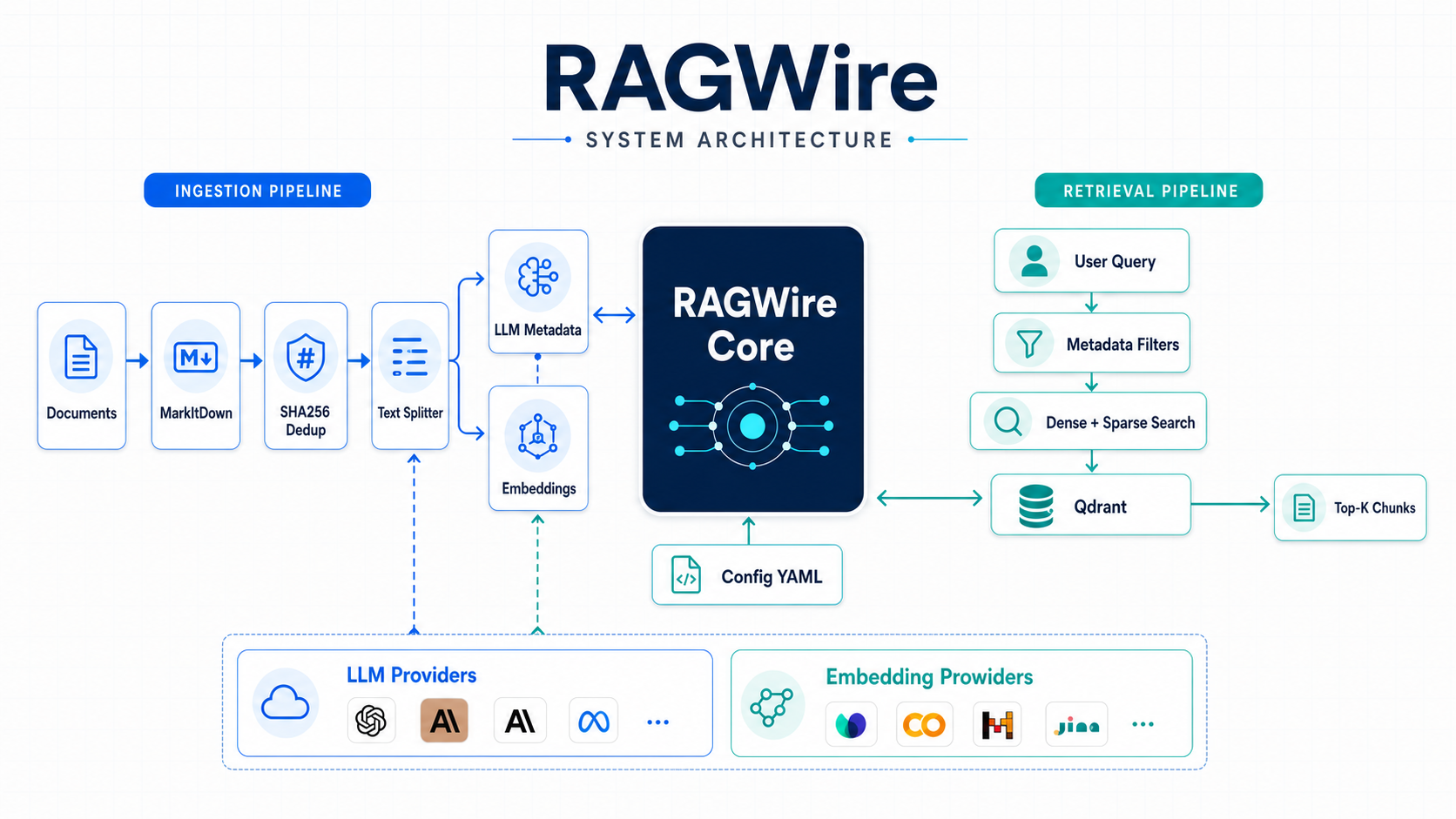
RAGWire is coordinated by the RAGWire core and configured through YAML. Documents move through conversion, deduplication, chunking, metadata extraction, embeddings, and Qdrant storage. Queries can use explicit or LLM-extracted metadata filters before dense, sparse, or hybrid retrieval returns the most relevant chunks.
Document Ingestion Flow
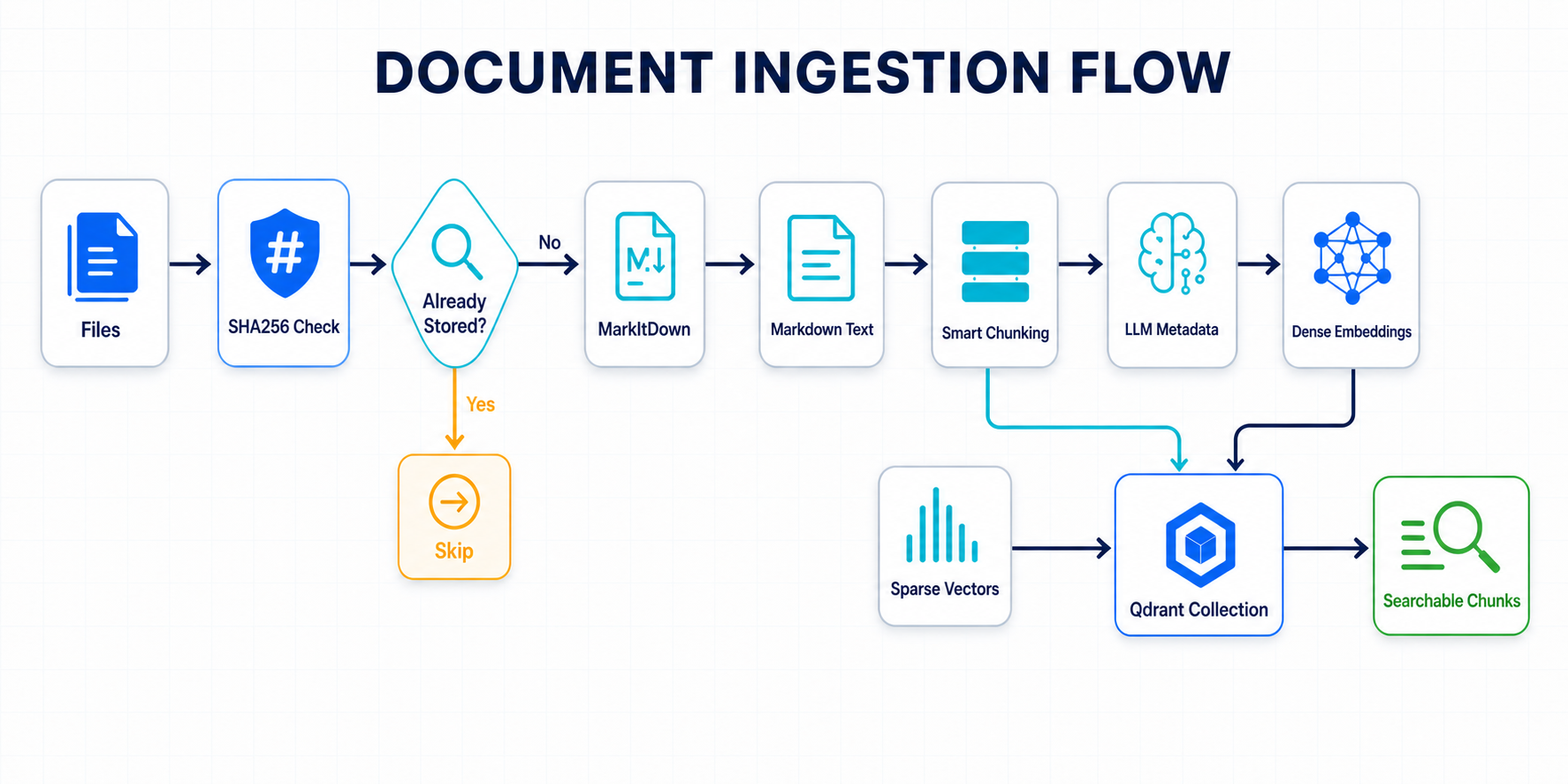
The ingestion path is safe to re-run: SHA256 file hashes skip previously stored documents. New files are converted to Markdown, split into overlapping chunks, enriched with structured LLM metadata, embedded, and stored in Qdrant with dense and optional sparse vectors.
Installation
pip install ragwire

# With Ollama support (local, no API key)
pip install "ragwire[ollama]"

# With OpenRouter support (LLM + embeddings; requires Python >= 3.10)
pip install "ragwire[openrouter]"

# With all providers
pip install "ragwire[all]"
Quick Start
from ragwire import RAGWire

rag = RAGWire("config.yaml")

# Ingest files — SHA256 deduplication, safe to re-run
stats = rag.ingest_documents(["data/Apple_10k_2025.pdf", "data/Microsoft_10k_2025.pdf"])
print(f"Processed: {stats['processed']}, Skipped: {stats['skipped']}, Chunks: {stats['chunks_created']}")

# Or ingest an entire directory
stats = rag.ingest_directory("data/", recursive=True)

# Basic retrieval — returns list of LangChain Document objects
results = rag.retrieve("What is the total revenue?", top_k=5)
for doc in results:
    print(doc.page_content[:300])
    print(doc.metadata["company_name"])   # str, lowercased — e.g. "apple"
    print(doc.metadata["fiscal_year"])    # list[int] — e.g. [2025]  ← NOT a plain int
    print(doc.metadata["file_name"])      # str — e.g. "Apple_10k_2025.pdf"

# Retrieval with explicit metadata filters
results = rag.retrieve(
    "What is the net income?",
    filters={"company_name": "apple", "fiscal_year": 2025}  # pass year as int
)

# OR logic within a field — matches any of the listed values
results = rag.retrieve("Compare revenue trends", filters={"fiscal_year": [2023, 2024, 2025]})

# Agent-controlled filtering (recommended for AI agents)
filters = rag.extract_filters("Apple's revenue in 2025")
# → {"company_name": "apple", "fiscal_year": 2025} or None
results = rag.retrieve("Apple's revenue in 2025", filters=filters)
Query & Retrieval Flow
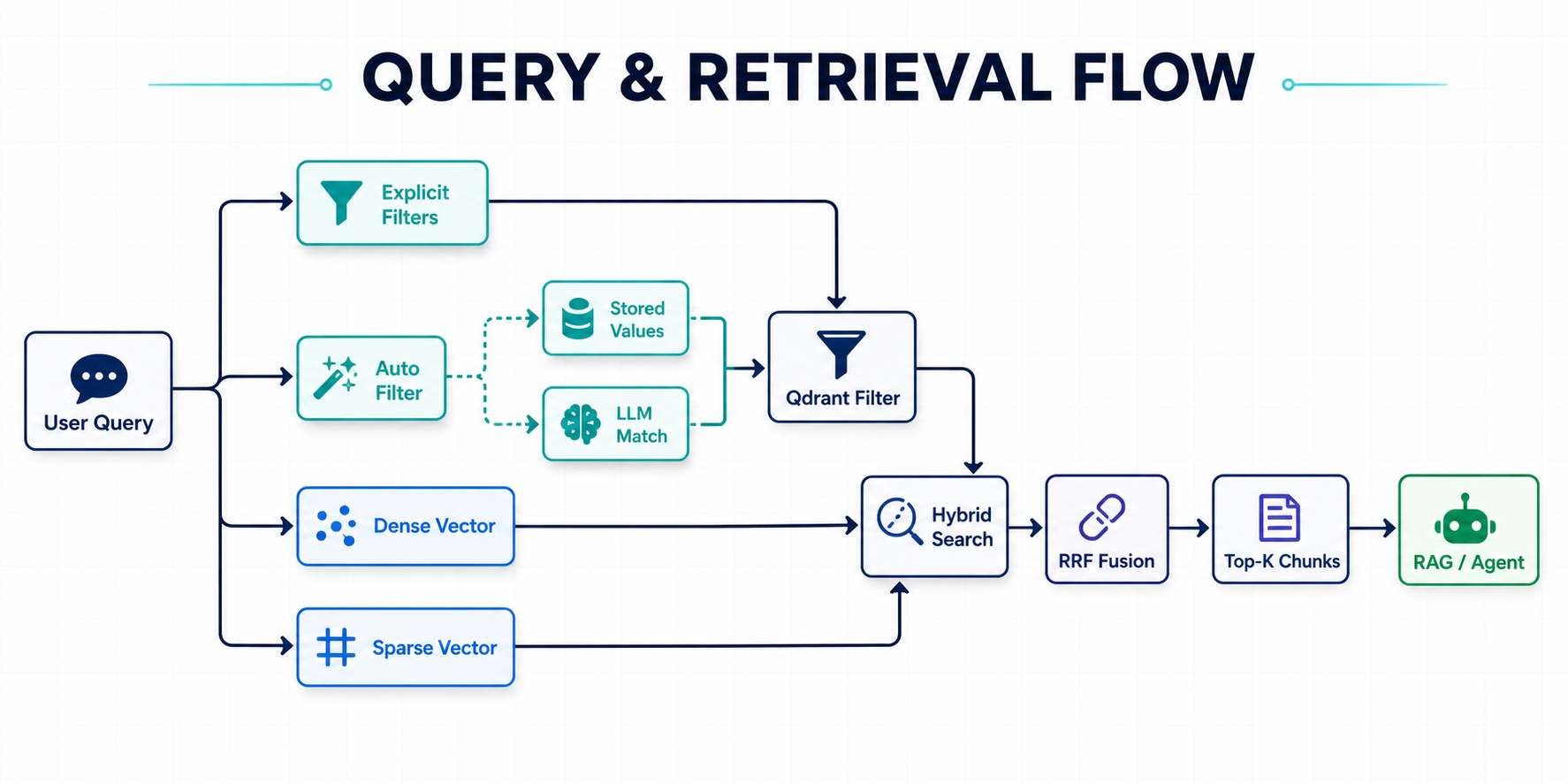
At query time, callers can pass filters directly or enable LLM-assisted filter extraction grounded in values already stored in Qdrant. The query is then resolved through similarity, MMR, or dense-plus-sparse hybrid search and returned as top-ranked LangChain Document chunks for a RAG application or agent.
Configuration
Create a minimal config.yaml:
embeddings:
  provider: "ollama"
  model: "qwen3-embedding:0.6b"
  base_url: "http://localhost:11434"

llm:
  provider: "ollama"
  model: "qwen3.5:9b"
  num_ctx: 16384

vectorstore:
  url: "http://localhost:6333"
  collection_name: "rag_documents"
  use_sparse: true

retriever:
  search_type: "hybrid"
  top_k: 5
Copy config.example.yaml to config.yaml for the full template. Secrets can be injected via environment variables:
vectorstore:
  url: "https://your-cluster.qdrant.io"
  api_key: "${QDRANT_API_KEY}"

llm:
  provider: "openai"
  model: "gpt-5.4-nano"
  api_key: "${OPENAI_API_KEY}"
Full example:
embeddings:
  provider: "ollama"
  model: "qwen3-embedding:0.6b"
  base_url: "http://localhost:11434"

llm:
  provider: "ollama"
  model: "qwen3.5:9b"
  num_ctx: 16384

vectorstore:
  url: "http://localhost:6333"
  collection_name: "my_docs"
  use_sparse: true

retriever:
  search_type: "hybrid"
  top_k: 5
  auto_filter: false   # set true to enable LLM-based filter extraction from every query
Embedding Providers
# Ollama (local)
embeddings:
  provider: "ollama"
  model: "qwen3-embedding:0.6b"

# OpenAI
embeddings:
  provider: "openai"
  model: "text-embedding-3-small"

# OpenRouter (free-tier models available)
embeddings:
  provider: "openrouter"
  model: "nvidia/llama-nemotron-embed-vl-1b-v2:free"
  api_key: "${OPENROUTER_API_KEY}"

# HuggingFace (local)
embeddings:
  provider: "huggingface"
  model_name: "sentence-transformers/all-MiniLM-L6-v2"

# Google
embeddings:
  provider: "google"
  model: "models/embedding-001"
Examples
Start with the basic examples, then move into app and agent tutorials:
| Example | Path |
|---|---|
| Basic ingestion and retrieval | examples/basic_usage.py |
| Custom metadata extraction | examples/custom_metadata_usage.py |
| RAG agent helper | examples/rag_agent.py |
| Tutorial series overview | examples/tutorials/00_series_overview.md |
| FastAPI production app | examples/tutorials/15_fastapi_production_app.md |
| LangGraph RAG pipeline | examples/tutorials/05_langgraph_rag_pipeline.md |
| Chainlit RAG chatbot | examples/tutorials/03_chainlit_rag_chatbot.md |
Production Notes
- Use Qdrant Cloud or a persistent local Qdrant volume for real projects.
- Keep
force_recreate: falseafter initial setup to avoid accidental collection resets. - Store API keys in environment variables and reference them as
${VAR}in YAML. - Tune
chunk_size,chunk_overlap,top_k, andsearch_typefor your document type. - Use metadata filters for high-precision retrieval over multi-company, multi-year, or multi-domain collections.
- Enable
use_sparse: truewithfastembedwhen keyword matching matters alongside semantic search.
Security & Privacy
RAGWire can run with local Ollama models for teams that do not want document text sent to hosted LLM providers. If you configure hosted LLM or embedding providers, the relevant document text or query text is sent to those providers for metadata extraction, embeddings, or filter extraction. Keep secrets out of source control by using environment variables in config.yaml.
How RAGWire Fits
RAGWire is a composable Python toolkit, not a hosted RAG platform and not a full application framework. Use it when you want direct control over document ingestion, metadata design, Qdrant storage, and retrieval behavior while still avoiding boilerplate.
Component Usage
from ragwire import (
    MarkItDownLoader,
    get_splitter,
    get_markdown_splitter,
    get_embedding,
    QdrantStore,
    MetadataExtractor,
    hybrid_search,
    mmr_search,
)

# Load a document
loader = MarkItDownLoader()
result = loader.load("document.pdf")

# Split text
splitter = get_markdown_splitter(chunk_size=10000, chunk_overlap=2000)
chunks = splitter.split_text(result["text_content"])

# Embeddings
embedding = get_embedding({"provider": "ollama", "model": "qwen3-embedding:0.6b"})

# Vector store
store = QdrantStore(config={"url": "http://localhost:6333"}, embedding=embedding)
store.set_collection("my_collection")
vectorstore = store.get_store()
Package Structure
ragwire/
├── core/          # Config loader + RAGWire orchestrator
├── loaders/       # MarkItDown document converter
├── processing/    # Text splitters + SHA256 hashing
├── metadata/      # Pydantic schema + LLM extractor
├── embeddings/    # Multi-provider embedding factory
├── vectorstores/  # Qdrant wrapper with hybrid search
├── retriever/     # Similarity, MMR, hybrid retrieval
└── utils/         # Logging
Troubleshooting
| Error | Fix |
|---|---|
| Qdrant connection refused | docker run -p 6333:6333 qdrant/qdrant |
markitdown[pdf] missing |
pip install "markitdown[pdf]" |
| Ollama model not found | ollama pull <model-name> |
fastembed missing |
pip install fastembed (needed for hybrid search) |
| Embedding dimension mismatch | Set force_recreate: true in config once, then back to false |
Contributing
Contributions are welcome. Please open an issue for bugs, feature requests, provider integrations, or documentation improvements before larger changes.
License
MIT © 2026 KGP Talkie Private Limited
Links



- 🌐 Website: kgptalkie.com
- 📖 Docs: laxmimerit.github.io/RAGWire
- 💻 GitHub: github.com/laxmimerit/ragwire
- 📧 Email: udemy@kgptalkie.com
1 maintainer

Download files
Download the file for your platform. If you're not sure which to choose, learn more about installing packages.
Source Distribution
Built Distribution
Filter files by name, interpreter, ABI, and platform.
If you're not sure about the file name format, learn more about wheel file names.
Copy a direct link to the current filters
File details
Details for the file ragwire-1.4.0.tar.gz.
File metadata
- Download URL: ragwire-1.4.0.tar.gz
- Upload date:
- Size: 3.7 MB
- Tags: Source
- Uploaded using Trusted Publishing? Yes
- Uploaded via:
twine/6.1.0 CPython/3.13.14
File hashes
| Algorithm | Hash digest | |
|---|---|---|
| SHA256 |
daa9b5fc5440150f78653101e69cd4fe0f31306b39b1574568483445c72cf011
|
|
| MD5 |
b6b25c6ac249ec7e1a691d2754032394
|
|
| BLAKE2b-256 |
f9a4770cd5891600806ad6298b9b37c7271947ec8f1272fb5e5daeb75ff25a57
|
Provenance
The following attestation bundles were made for ragwire-1.4.0.tar.gz:
Publisher:
publish.yml on laxmimerit/RAGWire
-
Statement:
-
Statement type:
https://in-toto.io/Statement/v1 -
Predicate type:
https://docs.pypi.org/attestations/publish/v1 -
Subject name:
ragwire-1.4.0.tar.gz -
Subject digest:
daa9b5fc5440150f78653101e69cd4fe0f31306b39b1574568483445c72cf011 - Sigstore transparency entry: 2242507296
- Sigstore integration time:
-
Permalink:
laxmimerit/RAGWire@2fc8e78c631996abc6823bf9cdaec225588e1d2e -
Branch / Tag:
refs/tags/v1.4.0 - Owner: https://github.com/laxmimerit
-
Access:
public
-
Token Issuer:
https://token.actions.githubusercontent.com -
Runner Environment:
github-hosted -
Publication workflow:
publish.yml@2fc8e78c631996abc6823bf9cdaec225588e1d2e -
Trigger Event:
release
-
Statement type:
File details
Details for the file ragwire-1.4.0-py3-none-any.whl.
File metadata
- Download URL: ragwire-1.4.0-py3-none-any.whl
- Upload date:
- Size: 3.6 MB
- Tags: Python 3
- Uploaded using Trusted Publishing? Yes
- Uploaded via:
twine/6.1.0 CPython/3.13.14
File hashes
| Algorithm | Hash digest | |
|---|---|---|
| SHA256 |
dc4ec69453b342170cc6c07c2034bf9f6582ecb5e30d12abd36238ccea65e9af
|
|
| MD5 |
19c4ba7c2954430be4e4f06cd6cc3217
|
|
| BLAKE2b-256 |
85a441656a734caea9189cee525d16951800404f405a91fc02482b08633fc32d
|
Provenance
The following attestation bundles were made for ragwire-1.4.0-py3-none-any.whl:
Publisher:
publish.yml on laxmimerit/RAGWire
-
Statement:
-
Statement type:
https://in-toto.io/Statement/v1 -
Predicate type:
https://docs.pypi.org/attestations/publish/v1 -
Subject name:
ragwire-1.4.0-py3-none-any.whl -
Subject digest:
dc4ec69453b342170cc6c07c2034bf9f6582ecb5e30d12abd36238ccea65e9af - Sigstore transparency entry: 2242507841
- Sigstore integration time:
-
Permalink:
laxmimerit/RAGWire@2fc8e78c631996abc6823bf9cdaec225588e1d2e -
Branch / Tag:
refs/tags/v1.4.0 - Owner: https://github.com/laxmimerit
-
Access:
public
-
Token Issuer:
https://token.actions.githubusercontent.com -
Runner Environment:
github-hosted -
Publication workflow:
publish.yml@2fc8e78c631996abc6823bf9cdaec225588e1d2e -
Trigger Event:
release
-
Statement type:














