
Rapid-MLX — AI inference for Apple Silicon. Drop-in OpenAI API, 2-4x faster than Ollama.
Verified details
These details have been verified by PyPIProject links
GitHub Statistics
Maintainers

Project description
The fastest local AI engine for Apple Silicon.
Drop-in OpenAI / Anthropic API · 2–4× faster than Ollama · Runs on any M-series Mac.










rapidmlx.com · Docs · Model mirror · Desktop app
Quick Start (60 seconds)
1. Install — pick one path (run only one of these):
One-liner — detects your RAM, picks a starter model (recommended):
curl -fsSL https://rapidmlx.com/install.sh | bash
or Homebrew — prebuilt bottle straight from homebrew-core:
brew install rapid-mlx
Both land the same rapid-mlx CLI. The curl installer additionally installs Python 3.10+ if missing, creates an isolated venv at ~/.rapid-mlx/, symlinks the rapid-mlx CLI into ~/.local/bin/, and prints a serve command sized to your Mac (8–23 GB → qwen3.5-4b-4bit; 24–47 GB → gpt-oss-20b-mxfp4-q8; 48–95 GB → qwen3.6-35b-8bit; 96 GB+ → gpt-oss-120b-mxfp4-q8).
Install security.
install.shis served over HTTPS (HSTS-preload) fromrapidmlx.comand is a byte-identical mirror ofinstall.shat the release commit — read it before running if you like. If you want a cryptographically verified installer rather than trusting the website pipe, don'tcurl | bashthe URL above: instead download the release'sinstall.shasset, verify it against the cosign-signedSHA256SUMS.txtshipped alongside it, and run that verified copy — full recipe in SECURITY.md. PyPI artifacts additionally carry Sigstore attestations (PEP 740). Two more low-trust paths:
- Pin to a commit hash —
curl -fsSL https://raw.githubusercontent.com/raullenchai/Rapid-MLX/<commit>/install.sh -o install.sh && shasum -a 256 install.sh && bash install.sh- Skip the shell script entirely — use Homebrew,
uv, orpipbelow.
See Alternative install methods for the non-curl paths.
2. Chat with a model right now:
rapid-mlx chat
Defaults to qwen3.5-4b-4bit. First run downloads the weights (~2.5 GB) with a progress bar and drops you into a REPL. Type /help for slash commands, /exit to quit.
3. Or serve it for use from other apps:
rapid-mlx serve qwen3.5-4b-4bit
Starts an OpenAI-compatible HTTP server bound to http://localhost:8000. Point any OpenAI SDK / client (Cursor, Aider, LangChain, OpenCode, PydanticAI, your own scripts) at http://localhost:8000/v1; Claude Code / Anthropic SDK uses http://localhost:8000 (the Anthropic messages route lives at /v1/messages under the same host).
curl http://localhost:8000/v1/chat/completions \
  -H "Content-Type: application/json" \
  -d '{"model":"default","messages":[{"role":"user","content":"Say hello"}]}'
from openai import OpenAI
client = OpenAI(base_url="http://localhost:8000/v1", api_key="not-needed")
print(client.chat.completions.create(
    model="default",
    messages=[{"role": "user", "content": "Say hello"}],
).choices[0].message.content)
4. Or wire up your coding agent — one command:
rapid-mlx launch claude-code
With a server running (step 3), this patches Claude Code's local config (~/.config/claude/settings.json) to route at http://localhost:8000 — no manual env vars, no editing JSON by hand. You get a fully local Claude Code: $0 per token, nothing leaves your Mac. Swap in cursor, cline, or continue-dev for the other IDE clients, or run rapid-mlx launch list to see what's detected on this machine.
Vision / audio / video / diffusion models? Base install is text-only (~460 MB). Vision, audio (TTS, STT, voice cloning), video generation, embeddings, and DFlash speculative decoding ship as opt-in extras. → Optional extras
Not into the terminal? Rapid-MLX Desktop bundles the same engine inside a one-click Mac app.
Video generation
Run text-to-video or image-to-video locally through the OpenAI-compatible
Videos API. Three backends ship — Wan 2.1 / 2.2, CogVideoX-Fun and
LTX-2.3 — across 8 registered checkpoints. wan2.2-ti2v-5b-q8 is the
recommended starting point: smallest of the Wan set, and TI2V means one
checkpoint does both text-to-video and image-to-video.
Requires Python 3.11+ (the video runtime does not support 3.10; core text and
audio still do) and ffmpeg for the final MP4 mux.
pip install 'rapid-mlx[video]'
brew install ffmpeg
rapid-mlx serve wan2.2-ti2v-5b-q8
Create and download a clip:
curl http://localhost:8000/v1/videos \
  -F model=wan2.2-ti2v-5b-q8 \
  -F 'prompt=A fox running through fresh snow, cinematic tracking shot' \
  -F seconds=1 \
  -F size=832x512

# Poll until GET /v1/videos/VIDEO_ID reports "status": "completed", then:
curl http://localhost:8000/v1/videos/VIDEO_ID/content -o output.mp4
The create call returns a job immediately. Poll GET /v1/videos/VIDEO_ID
until status is completed. Add -F input_reference=@start.png for
image-to-video.
Generation is serialized — one clip at a time — because two diffusion pipelines resident at once will exhaust unified memory. Expect minutes of compute per second of footage, not real time.
→ Every checkpoint, RAM requirement and tuning knob
Audio: speech, transcription, voice cloning
41 audio aliases behind the OpenAI-compatible /v1/audio/* endpoints — any
OpenAI SDK works unchanged.
pip install 'rapid-mlx[audio]'

# Text to speech
rapid-mlx serve kokoro
curl http://localhost:8000/v1/audio/speech \
  -H "Content-Type: application/json" \
  -d '{"model":"kokoro","input":"hello from rapid-mlx"}' --output hello.wav

# Transcription (Whisper / Parakeet / SenseVoice)
rapid-mlx serve whisper-large-v3-turbo
curl http://localhost:8000/v1/audio/transcriptions \
  -F file=@hello.wav -F model=whisper-large-v3-turbo
Beyond the basics, three things you may not expect to run locally:
- Zero-shot voice cloning from a reference clip.
indexttsis the only one that takes the clip alone;qwen3-tts-clone,f5-tts-zhandchatterboxall requireref_text(the clip's exact transcript) paired withref_audio, and the request is rejected before generation if it is missing. - Voice design —
qwen3-tts-voicedesignhas no named speakers at all. Describe the voice you want in natural language viainstructions(timbre, gender, age, accent, emotion, prosody) and it synthesises it. - Forced alignment —
qwen3-alignertakes audio plus the transcript you already have and returns per-character timings. It never guesses at the words, so it cannot mis-hear them; that is what karaoke captions and beat-synced editing need.
Also: word-level timestamps on transcription, and local text-to-music at
/v1/audio/music.
→ All 41 aliases across 12 families
Why Rapid-MLX
| Apple-Silicon-native | Pure MLX kernels — no llama.cpp fallback, no Metal shim. Continuous batching, prompt cache (radix + DeltaNet RNN snapshots), and a quantized live KV cache (int4/int8 on the continuous-batching cache + TurboQuant K8V4 codec) run at native MLX bandwidth on M1 → M4. |
| Drop-in OpenAI / Anthropic API | /v1/chat/completions, /v1/responses (Codex CLI), /v1/messages (Anthropic SDK / Claude Code), /v1/embeddings, /v1/audio/*, /v1/videos — same wire as ChatGPT / Claude, no client adapter. |
| First-class ecosystem coverage | 11 agent CLIs and 3 Python frameworks are wire-verified against real weights every release (4 are Tier-1, re-verified on current binaries) — Codex CLI, Claude Code, OpenCode, Qwen Code, OpenHands, Hermes Agent, Aider, Kilo Code, GitHub Copilot, Factory Droid, Moonshot Kimi Code + LangChain, PydanticAI, smolagents. |
Use Cases
| Chat in the terminal | rapid-mlx chat qwen3.5-9b-4bit |
Streaming REPL, /help for slash commands, --think / --no-think to control CoT. |
| OpenAI server for your apps | rapid-mlx serve qwen3.5-9b-4bit |
Point Cursor, Aider, LibreChat, Open WebUI, LangChain at http://localhost:8000/v1. |
| Agent backends | rapid-mlx serve qwen3.6-35b-8bit &rapid-mlx agents codex --setup && codex |
8 agents auto-configure via agents <name> --setup once the server is up (11 wire-verified total, 4 Tier-1) — see Agent support. |
| Benchmark your Mac | rapid-mlx bench qwen3.5-9b-4bit --submit |
Standardized B=1 bench, opens a PR to publish your row on rapidmlx.com. |
→ One-shot IDE setup with rapid-mlx launch <cursor|claude-code|cline|continue-dev>
Agent Support
All 11 agents below are wire-verified against real weights every release via their own integration-test cell. Of these, four are Tier-1 — Claude Code, Codex CLI, Hermes, and Aider — re-verified end-to-end against the current client binary every release, with one guardian per API wire (Anthropic /v1/messages, OpenAI /v1/responses, and /v1/chat/completions covered for both tool-calling depth and reach). The other seven are Tier-2: wire-verified in the matrix and configured on-demand. The first eight agents each ship a rapid-mlx agents <name> --setup config template (except Claude Code, which is one env-var); GitHub Copilot, Factory Droid, and Moonshot Kimi Code plug in through their own documented BYOK config (auth-gated, so the matrix cell is a wire smoke).
Tier-1 (4): Claude Code · Codex CLI · Hermes · Aider — last re-verified end-to-end 2026-07-28 on current binaries (claude 2.1.211, codex 0.145.0, hermes 0.9.0, aider 0.86.2) against rapid-mlx 0.11.1. Tier-2 (7): OpenCode · Qwen Code · OpenHands · Kilo Code · GitHub Copilot · Factory Droid · Moonshot Kimi Code.
| Agents (11) | Frameworks (3) |
|---|---|
| Codex CLI · Claude Code · OpenCode · Qwen Code · OpenHands · Hermes Agent · Aider · Kilo Code · GitHub Copilot · Factory Droid · Moonshot Kimi Code | LangChain (+ LangGraph) · PydanticAI · smolagents |
Also compatible with any OpenAI-compatible client via http://localhost:8000/v1 — Cursor, LibreChat, Open WebUI, and more plug in with a single URL change.
→ Full 11-agent + 3-framework matrix (test cells + xfail reasons) → Codex CLI · Claude Code · OpenCode · Qwen Code · OpenHands · Hermes · Aider · Kilo Code · Copilot · Droid · Kimi Code
Choose Your Model
The installer's RAM detector picks a sensible default. If you want to shop the full catalog: rapid-mlx models lists every alias, rapid-mlx info <alias> shows the per-alias profile (parser, MoE / hybrid flags, KV codec eligibility, speculative-decoding gates).
| RAM | Recommended | One-shot |
|---|---|---|
| 8–23 GB MacBook Air/Pro | qwen3.5-4b-4bit |
rapid-mlx serve qwen3.5-4b-4bit |
| 24–47 GB MacBook Pro / Mac Mini | gpt-oss-20b-mxfp4-q8 |
rapid-mlx serve gpt-oss-20b-mxfp4-q8 |
| 48–95 GB Mac Studio | qwen3.6-35b-8bit |
rapid-mlx serve qwen3.6-35b-8bit |
| 96 GB+ Mac Studio / Pro | gpt-oss-120b-mxfp4-q8 |
rapid-mlx serve gpt-oss-120b-mxfp4-q8 |
→ Full RAM tier map + serve flags per tier → Every alias, quant, and family (165 text + 41 audio + 8 video aliases, 214 total) · interactive at models.rapidmlx.com
Alternative install methods
The two paths above cover most users — reach for these only if you already manage Python yourself.
Homebrew — Mac-native, one command, prebuilt bottle from homebrew/core
brew install rapid-mlx
Ships in homebrew-core since 0.10.12 — no tap, no trust prompt. Upgrade with brew upgrade rapid-mlx. If you previously installed from the legacy raullenchai/rapid-mlx tap, switch once: brew uninstall rapid-mlx && brew untap raullenchai/rapid-mlx && brew install rapid-mlx.
uv — isolated tool install, auto-manages Python
uv tool install rapid-mlx@latest
Don't have uv yet? curl -LsSf https://astral.sh/uv/install.sh | sh. Upgrade with uv tool upgrade rapid-mlx.
pip — requires Python 3.10+ (macOS ships 3.9)
python3.12 -m pip install rapid-mlx
If pip install rapid-mlx says "no matching distribution", your Python is too old. brew install python@3.12 first. Upgrade with pip install -U rapid-mlx.
For image-input / VLM models (Qwen-VL, true multimodal), install the vision extra: pip install 'rapid-mlx[vision]' — see Optional extras.
Command Reference
rapid-mlx --help                    # top-level command list
rapid-mlx <subcommand> --help       # per-subcommand flags
Covers chat, serve, share, agents (setup / test), bench, models, pull, rm, ps, info, doctor, upgrade, telemetry, launch, and jlens.
→ Full CLI reference with every flag
Troubleshooting
Run the built-in self-check first:
rapid-mlx doctor
Top three things that go wrong:
- Much slower than expected. Qwen3.5 / 3.6 default to thinking-on — add
--no-thinkto skip chain-of-thought. → Slow tok/s - Out of memory. Model too big for your RAM — pick a smaller quant from Choose Your Model or the full tier map. → OOM guide
- Tool calls arriving as plain text. Auto-recovery handles most cases; if not, set
--tool-call-parserexplicitly for your model. → Tool-call recovery
→ All troubleshooting entries (OOM, empty responses, slow TTFT, port taken, shell completion, HF cache, and more)
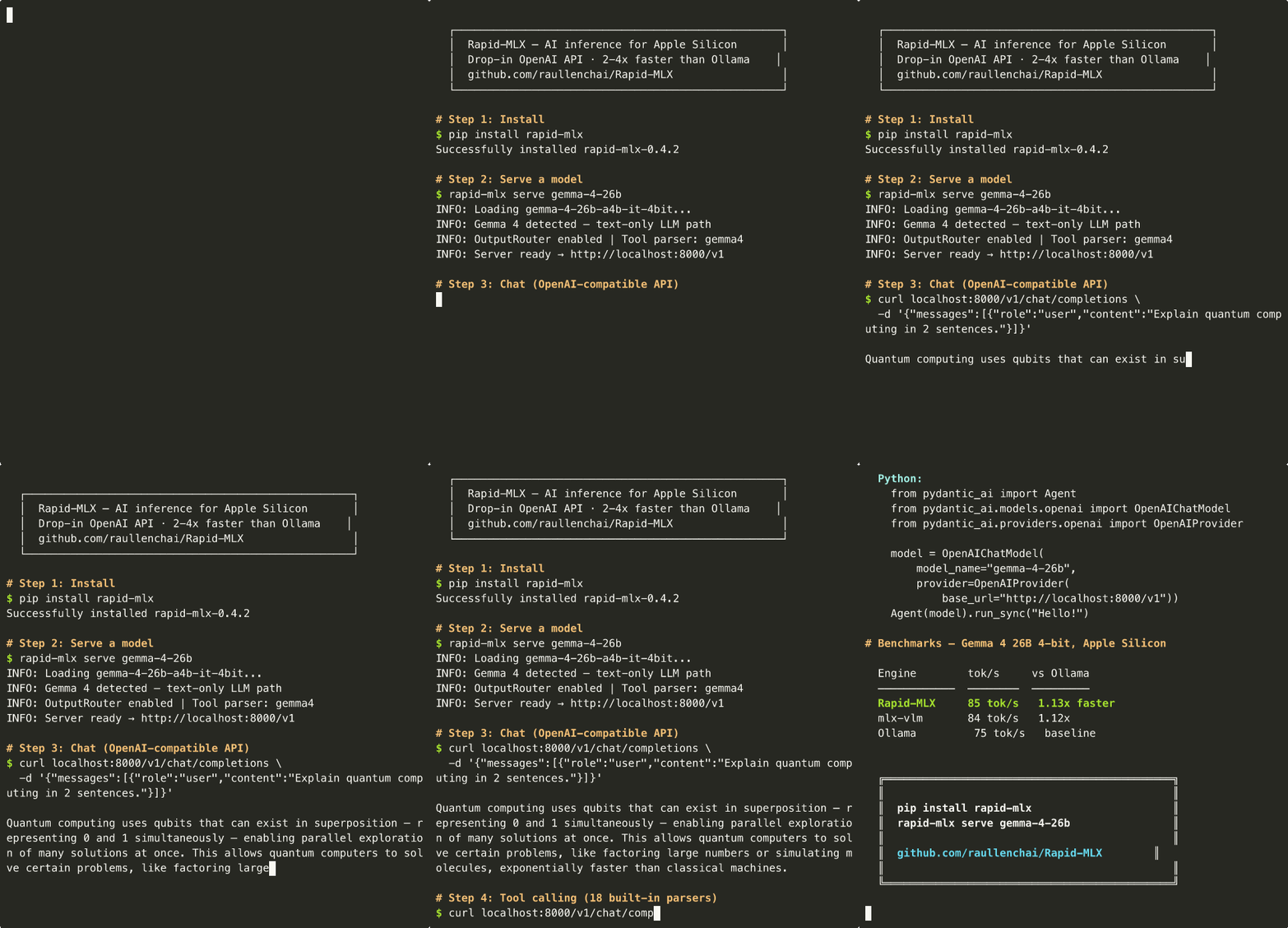
See it in action
Community & Contributing
- Report a bug or request a model: Issues
- Report a security issue: Private advisory — see SECURITY.md
- Ask a question or share a build: Discussions
- Contribute code, aliases, or docs: CONTRIBUTING.md
- Add your hardware to the public benchmark:
rapid-mlx bench <alias> --submitopens the PR for you
Rapid-MLX ships opt-in anonymous telemetry (off by default; explicit rapid-mlx telemetry enable required). No prompts, completions, paths, IPs, or API keys are ever collected. → What we do and don't collect
🚀 Contributors
Every avatar here shipped something in rapid-mlx — model support, tool-call parsers, fixes, docs, and benchmark submissions. Thank you.

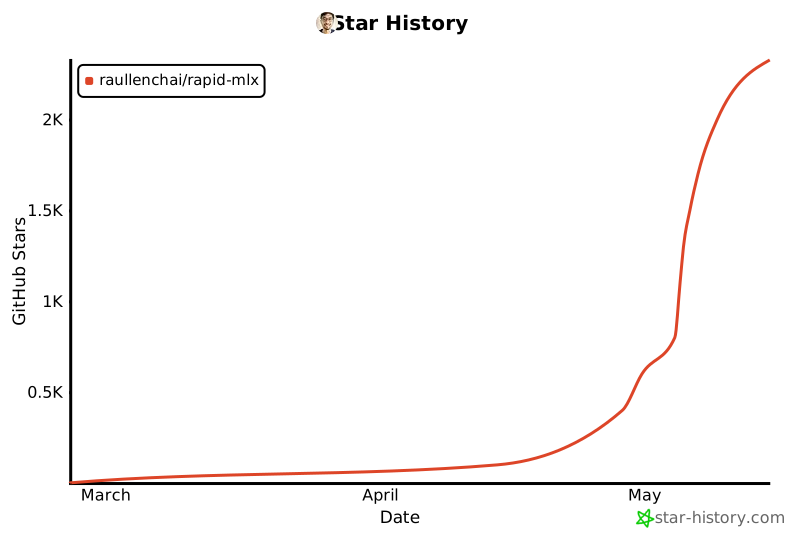
Star History
License
Apache 2.0 — see LICENSE.
Project details
Verified details
These details have been verified by PyPIProject links
GitHub Statistics
Maintainers
Release history Release notifications | RSS feed


Download files
Download the file for your platform. If you're not sure which to choose, learn more about installing packages.
Source Distribution
Built Distribution
Filter files by name, interpreter, ABI, and platform.
If you're not sure about the file name format, learn more about wheel file names.
Copy a direct link to the current filters
File details
Details for the file rapid_mlx-0.11.5.tar.gz.
File metadata
- Download URL: rapid_mlx-0.11.5.tar.gz
- Upload date:
- Size: 4.8 MB
- Tags: Source
- Uploaded using Trusted Publishing? Yes
- Uploaded via: twine/6.1.0 CPython/3.13.13
File hashes
| Algorithm | Hash digest | |
|---|---|---|
| SHA256 |
ab27d92d8b090f9227ca058558c72ba22ec539c926d51ecaf57664ce56b8f56b
|
|
| MD5 |
2611dd31ac36191fd833ca1f02deb24c
|
|
| BLAKE2b-256 |
d82cc7aa242bd954c0370e95053fe6d746b456d9296ac9dd5372642a9b51aa82
|
Provenance
The following attestation bundles were made for rapid_mlx-0.11.5.tar.gz:
Publisher:
publish.yml on raullenchai/Rapid-MLX
-
Statement:
-
Statement type:
https://in-toto.io/Statement/v1 -
Predicate type:
https://docs.pypi.org/attestations/publish/v1 -
Subject name:
rapid_mlx-0.11.5.tar.gz -
Subject digest:
ab27d92d8b090f9227ca058558c72ba22ec539c926d51ecaf57664ce56b8f56b - Sigstore transparency entry: 2310287206
- Sigstore integration time:
-
Permalink:
raullenchai/Rapid-MLX@f3bc1d78ba0e6e5d39291250ef5bdf12e6d2b560 -
Branch / Tag:
refs/tags/v0.11.5 - Owner: https://github.com/raullenchai
-
Access:
public
-
Token Issuer:
https://token.actions.githubusercontent.com -
Runner Environment:
github-hosted -
Publication workflow:
publish.yml@f3bc1d78ba0e6e5d39291250ef5bdf12e6d2b560 -
Trigger Event:
release
-
Statement type:
File details
Details for the file rapid_mlx-0.11.5-py3-none-any.whl.
File metadata
- Download URL: rapid_mlx-0.11.5-py3-none-any.whl
- Upload date:
- Size: 2.5 MB
- Tags: Python 3
- Uploaded using Trusted Publishing? Yes
- Uploaded via: twine/6.1.0 CPython/3.13.13
File hashes
| Algorithm | Hash digest | |
|---|---|---|
| SHA256 |
4ffcd57532d1a32ae331ddcaeca91d059bc6c858b23f5fe4fa13a701b9ce4f35
|
|
| MD5 |
2ca5489121df3eceb12edcb6b9cfe008
|
|
| BLAKE2b-256 |
86cb40384253fba4565367e83fee57001e301a66b02a42b5b0a6baf022665df4
|
Provenance
The following attestation bundles were made for rapid_mlx-0.11.5-py3-none-any.whl:
Publisher:
publish.yml on raullenchai/Rapid-MLX
-
Statement:
-
Statement type:
https://in-toto.io/Statement/v1 -
Predicate type:
https://docs.pypi.org/attestations/publish/v1 -
Subject name:
rapid_mlx-0.11.5-py3-none-any.whl -
Subject digest:
4ffcd57532d1a32ae331ddcaeca91d059bc6c858b23f5fe4fa13a701b9ce4f35 - Sigstore transparency entry: 2310287222
- Sigstore integration time:
-
Permalink:
raullenchai/Rapid-MLX@f3bc1d78ba0e6e5d39291250ef5bdf12e6d2b560 -
Branch / Tag:
refs/tags/v0.11.5 - Owner: https://github.com/raullenchai
-
Access:
public
-
Token Issuer:
https://token.actions.githubusercontent.com -
Runner Environment:
github-hosted -
Publication workflow:
publish.yml@f3bc1d78ba0e6e5d39291250ef5bdf12e6d2b560 -
Trigger Event:
release
-
Statement type:






