
Scanpath Studio






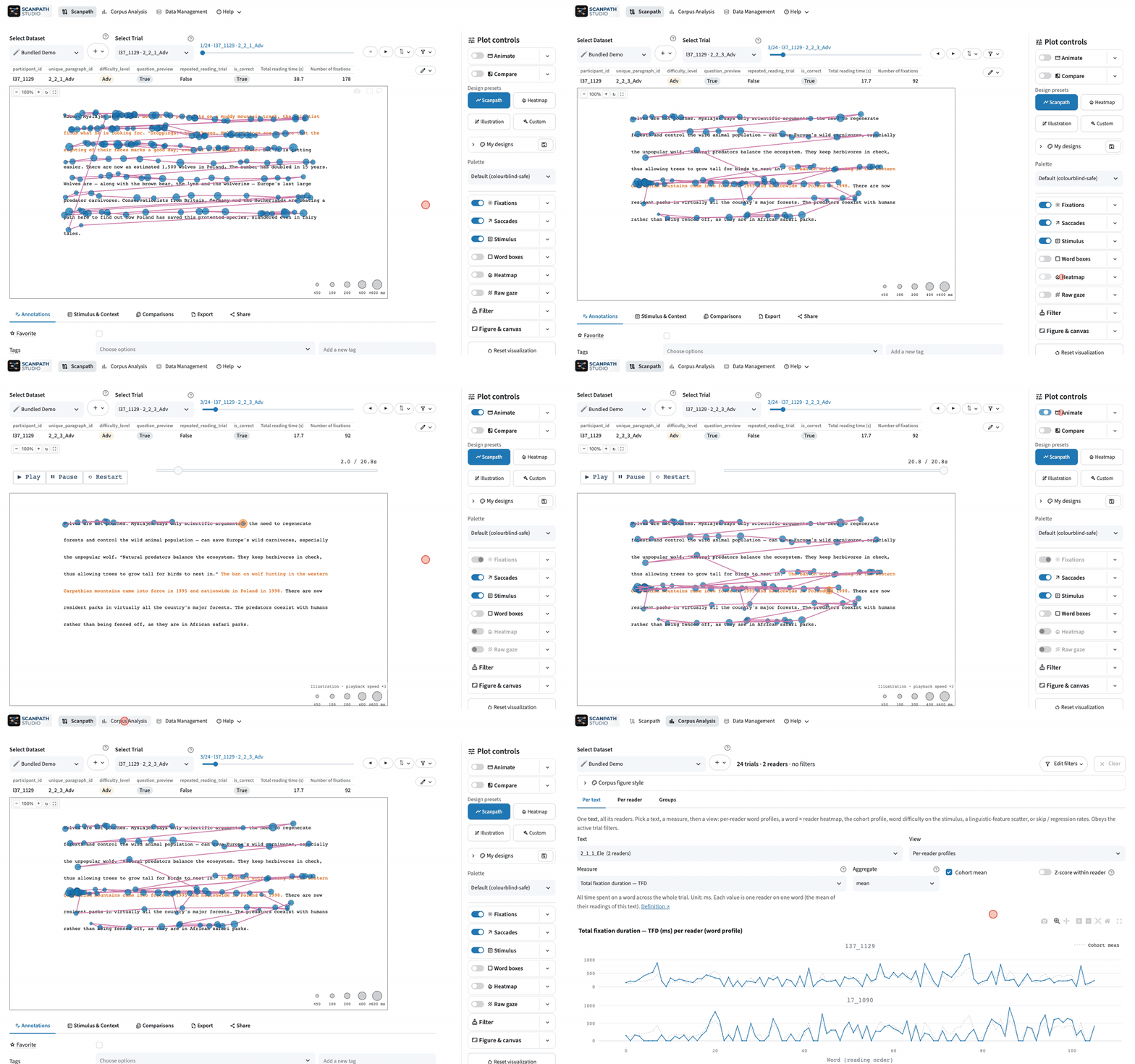
Scanpath Studio shows you how people read. Load eye-tracking data from reading studies and watch each trial unfold over the text, exactly where it sat on the screen — then compare participants, analyze a corpus, and export figures ready for a paper.
Install
-
As a desktop app — recommended, and the easiest way to work with your own data. It updates itself from the app's About menu: Windows macOS (Apple silicon) Linux
-
With pip (Python 3.11–3.14):
pip install scanpath-studio
scanpath-studio      # opens the app in your browser
-
In the browser, to try it on the bundled demo data: the live demo at https://scanpath-studio.streamlit.app.
The desktop and pip installs keep your data on your own machine, handle large datasets, and download the public corpora (PoTeC, OneStop) in one click. The hosted demo runs on Streamlit Community Cloud, with limited memory and no corpus downloads.
Your data
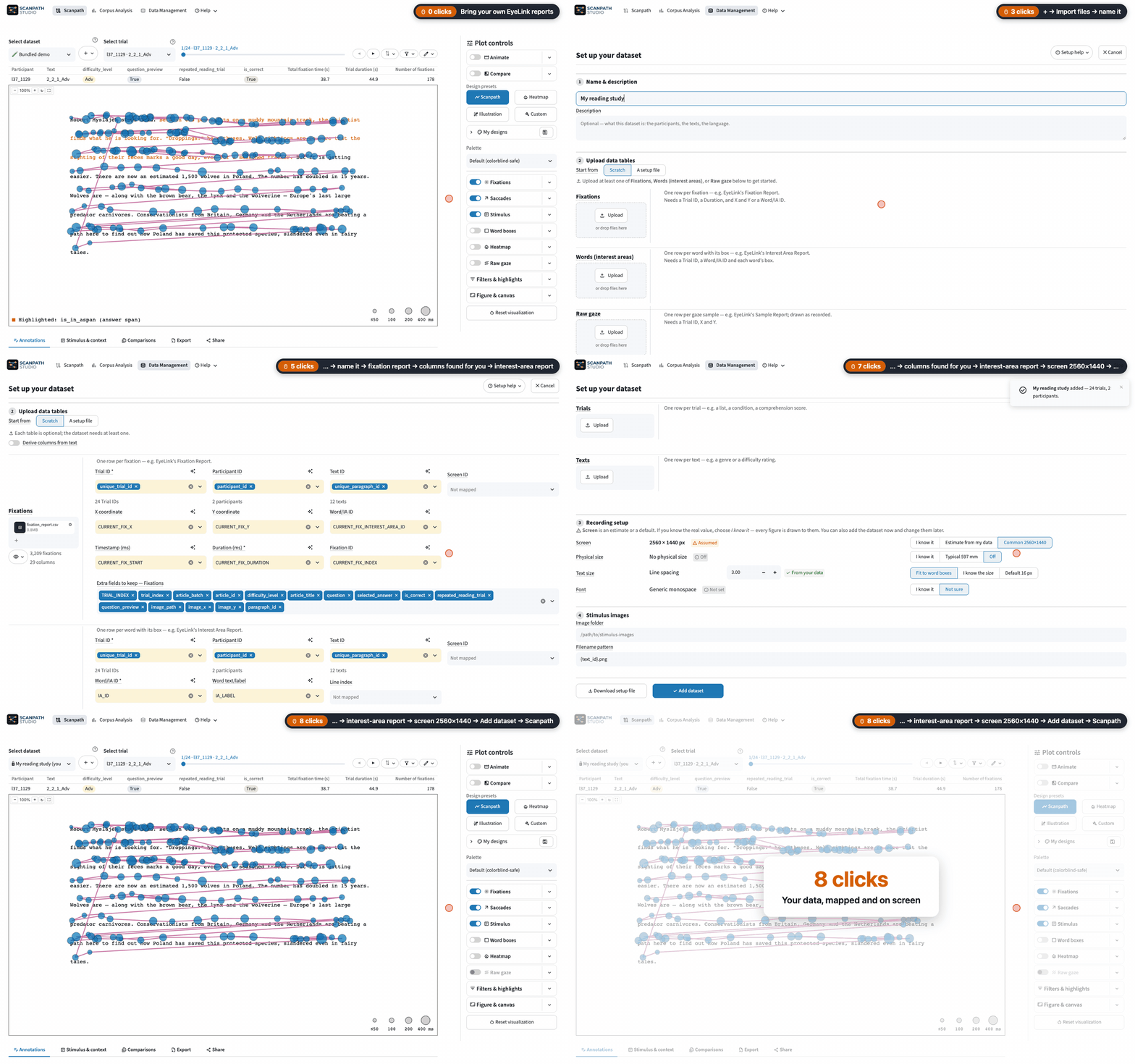
Bring any of these tables, in CSV, TSV, Parquet, Feather, Excel or a .zip of them:
| Table | What it holds |
|---|---|
| Fixations, e.g. EyeLink's Fixation Report | One row per fixation: trial ID, duration, and x/y or a word ID |
| Words (interest areas), e.g. EyeLink's Interest Area Report | One box per word, as shown on screen, with any reading measures and word features |
| Raw gaze | The gaze samples, drawn under the fixations — or on their own |
| Participants | Metadata, one row per participant: language, age, group… |
| Trials | Metadata, one row per trial or per reading: condition, question… |
| Texts | Metadata, one row per text: difficulty, genre… |
A dataset needs at least one of the first three. Metadata columns work like fields in your data: filters, chips, sorting and export. Columns are detected from common EyeLink, Tobii, Gazepoint, SMI and Pupil Labs names, and you can correct any guess. See Data management.
Add your own data: EyeLink's fixation and interest-area reports, their columns detected for you
What you can do
See the reading
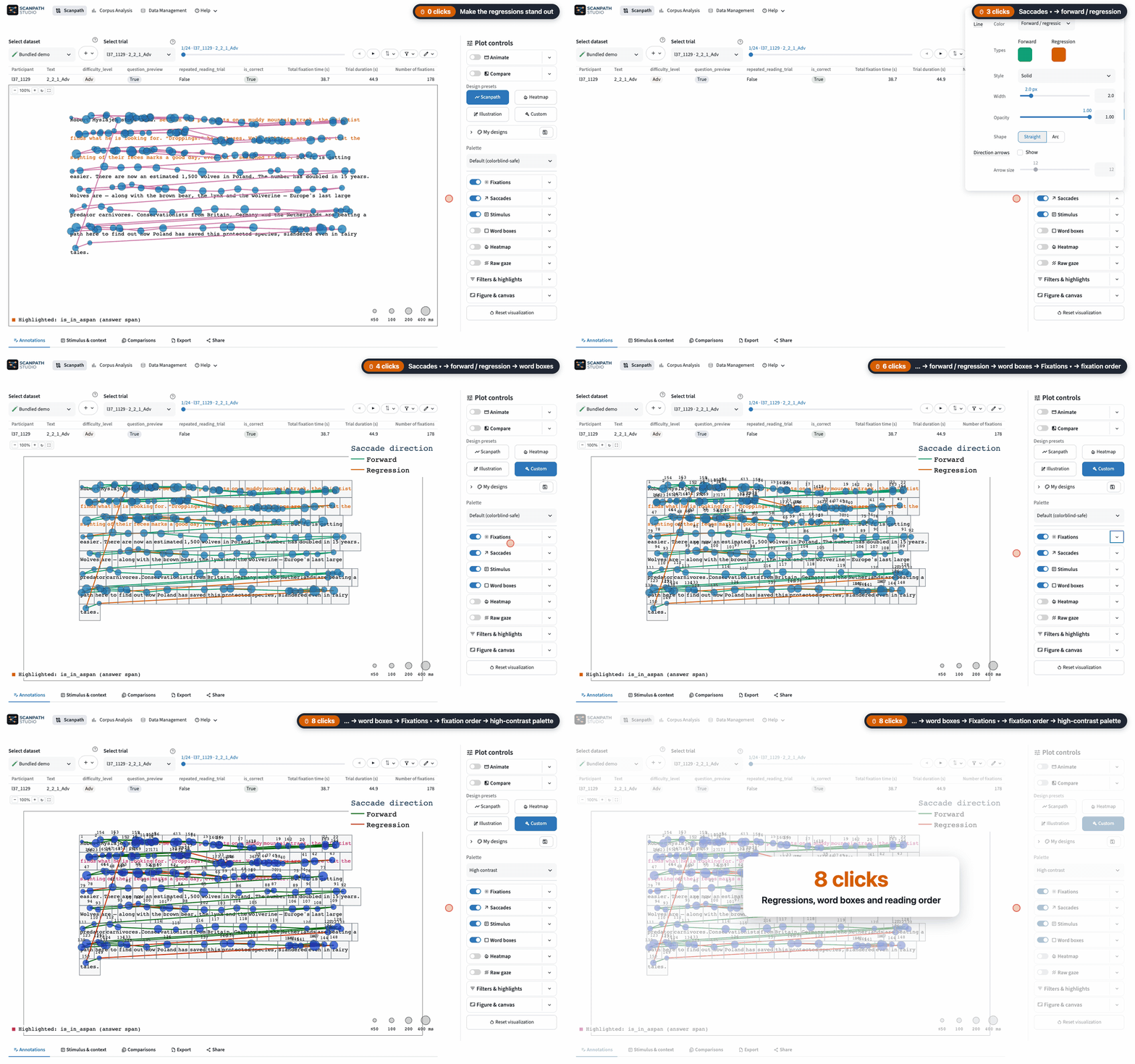
Fixations, saccades, heatmaps and raw gaze over the text at its true on-screen position, with fixations colored by any column.
Style the plot: regressions in their own color, word boxes, the reading order, a palette
Replay it
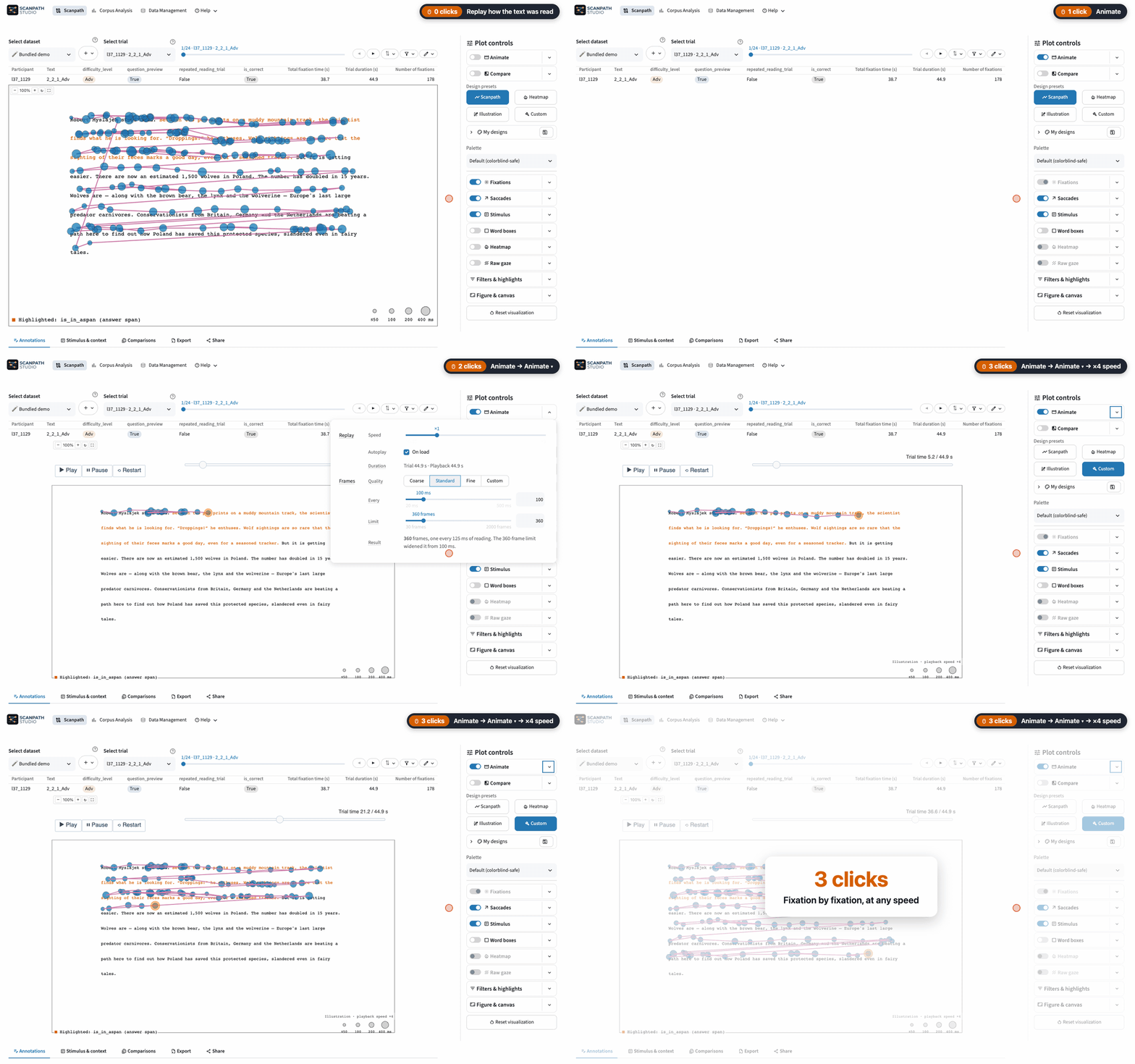
Play a trial back in real time or faster, and export it as HTML, GIF or MP4.
Replay the reading fixation by fixation, here at ×4
Compare participants
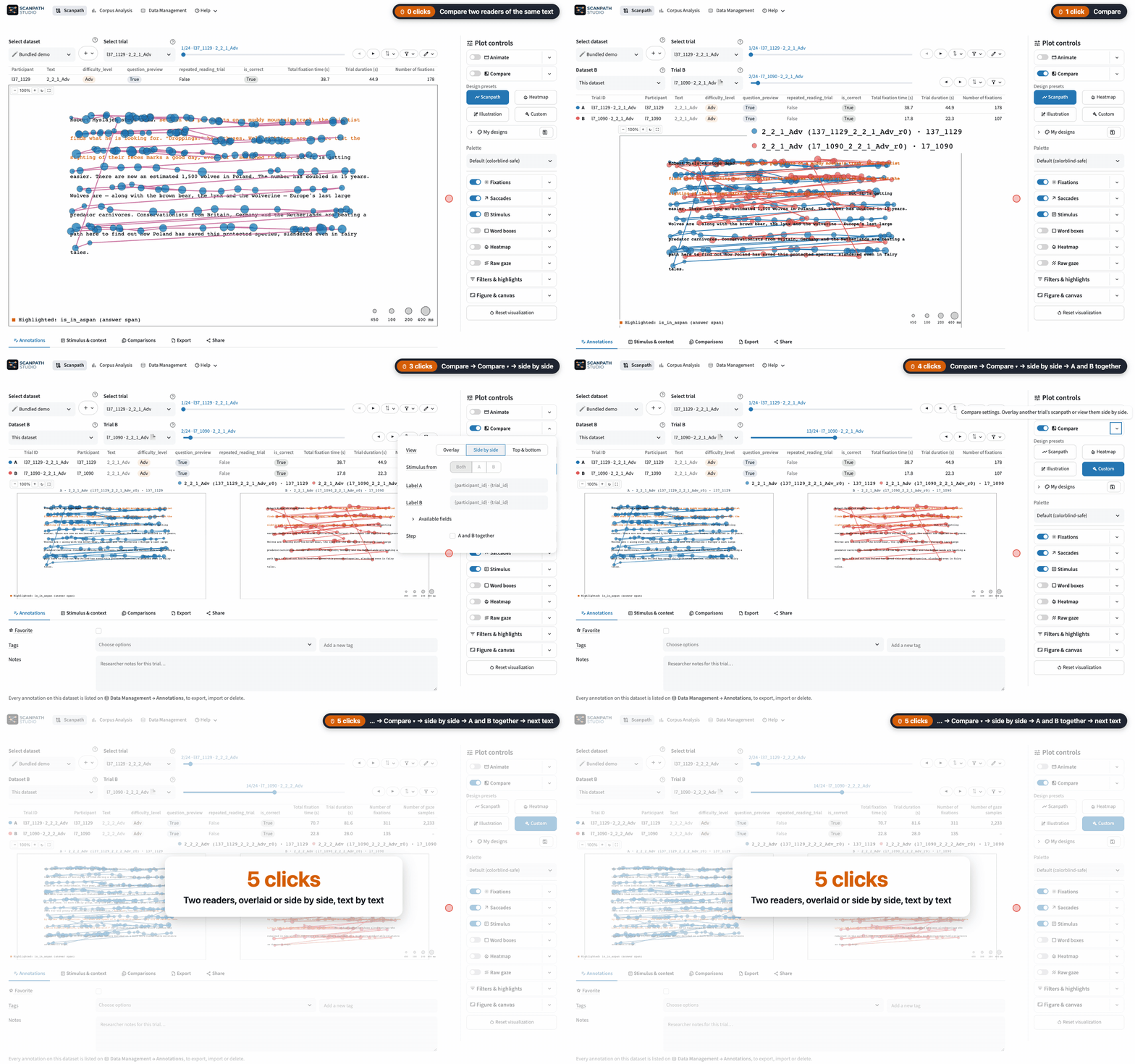
Overlay two trials or place them side by side — even from two different datasets.
Compare two readers of a text side by side, stepping through the texts together
Analyze a corpus
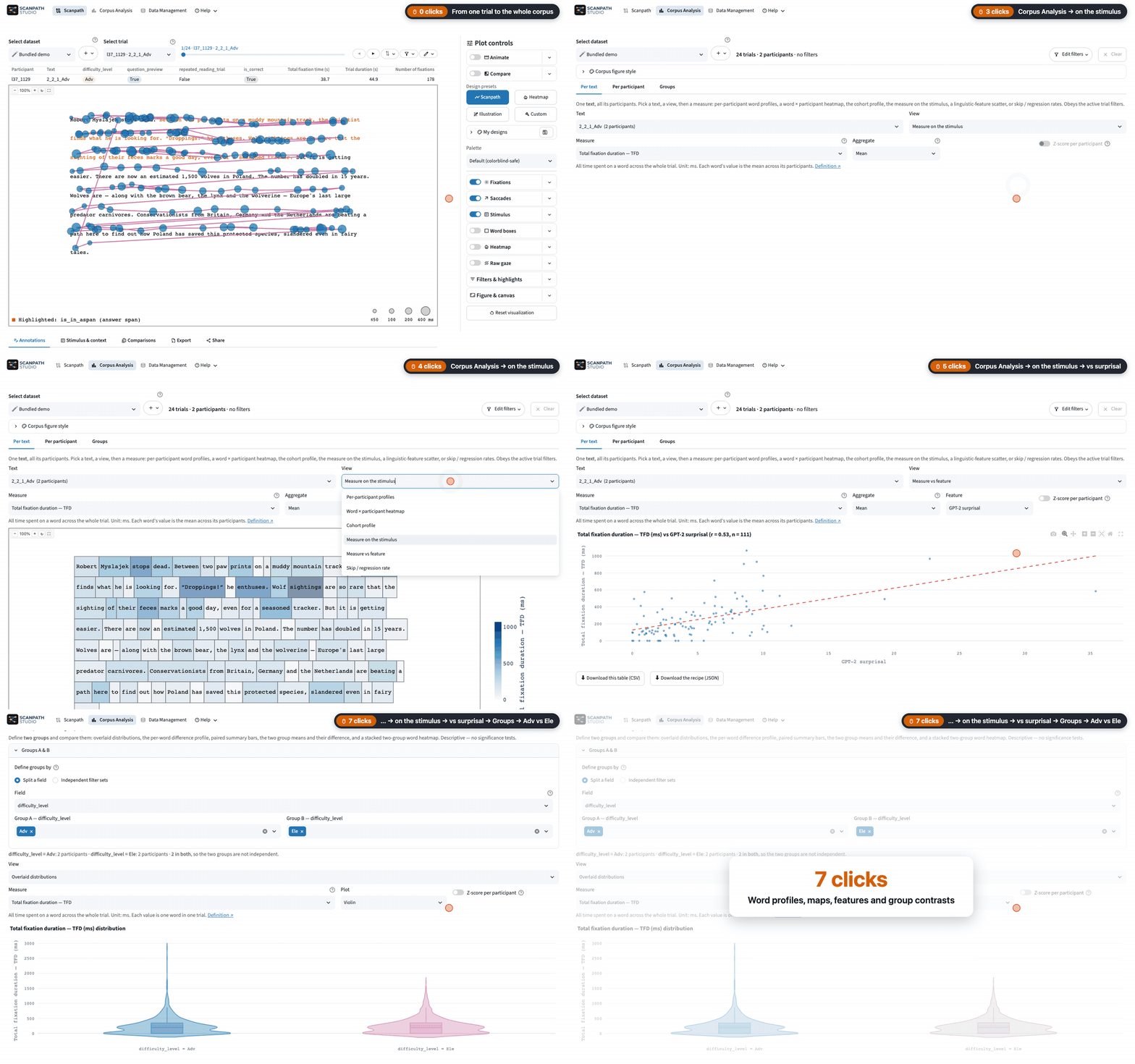
Per text, participant or group. Corpus Analysis uses the reading measures in your data (such as EyeLink's IA_* columns) and does not compute its own; each is defined in the computation register.
Corpus Analysis: a measure on the stimulus, against surprisal, and between two groups
Find and tag trials
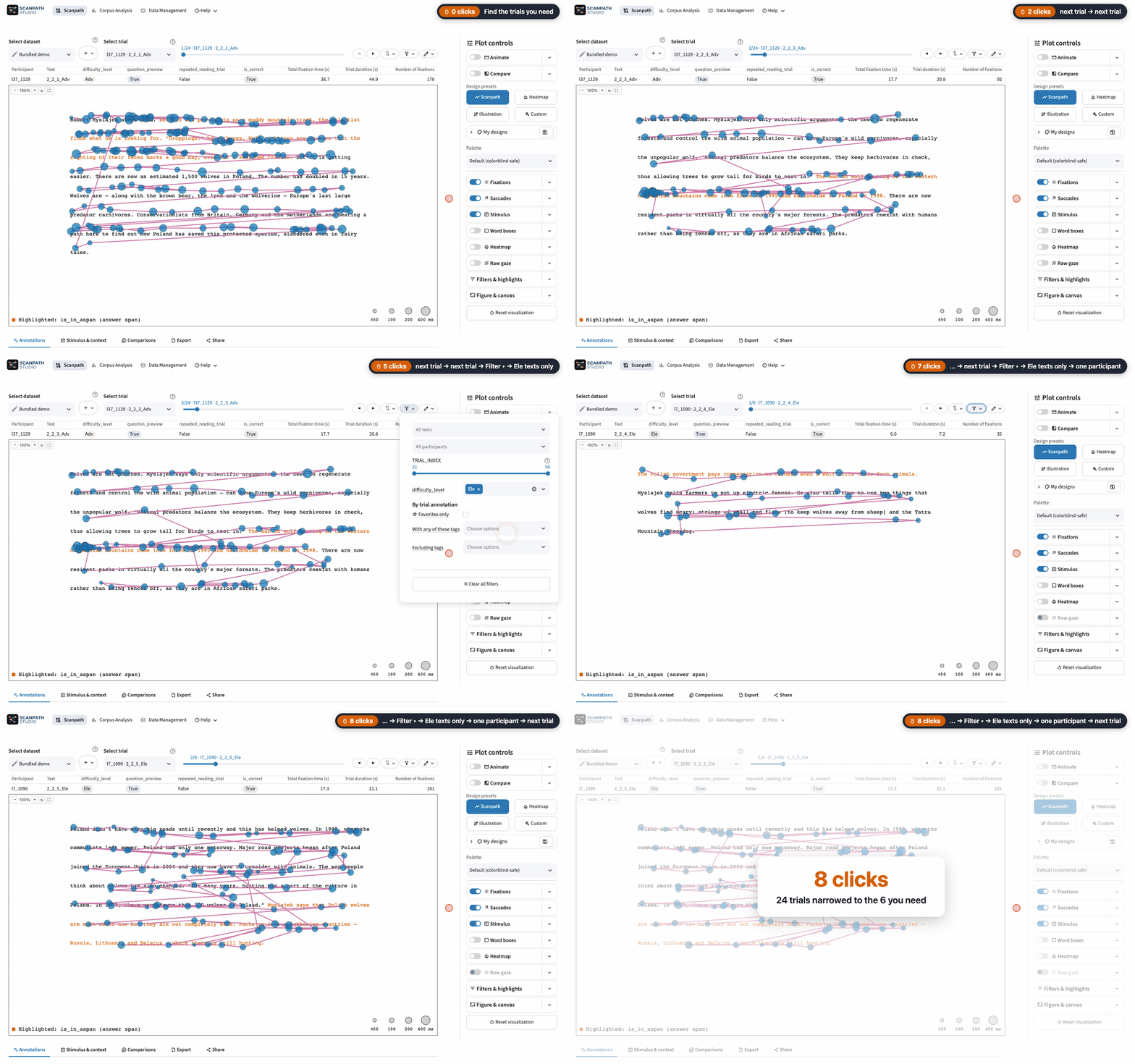
Narrow the trials by condition, participant or your own tags, and star the ones worth coming back to.
Find trials: narrow them by condition and participant, then step through what is left
Export and share
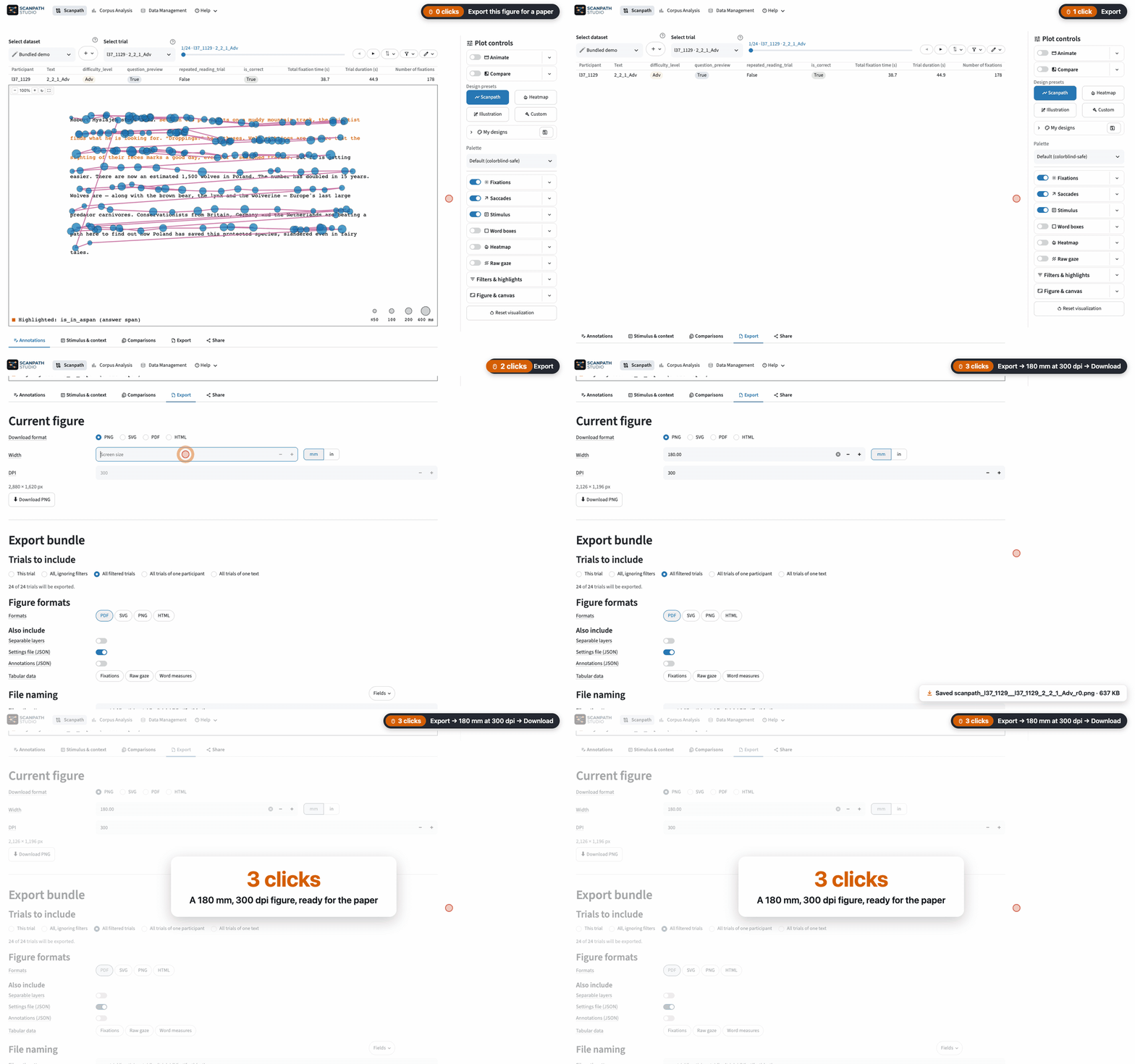
Export one figure or a zip for every trial, and share a link that reopens the exact view.
Export a figure for a paper, 180 mm wide at 300 dpi
More recordings are in the gallery. The app has three views: 🗺️ Scanpath for one trial at a time, 📊 Corpus Analysis for the whole dataset, and 🗂️ Data Management for loading and configuring datasets. The feature guides walk through each one.
Command line & Python API
Everything the app draws is also available headless — same pipeline, same figure. These run as-is on the bundled demo:
scanpath-studio render --sample --list-trials          # the demo's trials
scanpath-studio render --sample -o scanpath.html       # one trial, interactive HTML
scanpath-studio render --sample --animate -o replay.html
scanpath-studio render --sample -p l37_1129 -t l37_1129_2_1_1_Ele_r0 \
  --compare-with l7_1090:l7_1090_2_1_1_Ele_r0 -o compare.html
import scanpath_studio as sps

words, fixations = sps.load_sample_data()
print(sps.list_trials(words, fixations).head())
fig = sps.plot_scanpath(words, fixations, "l37_1129", "l37_1129_2_1_1_Ele_r0")
sps.save_figure(fig, "scanpath.html")
For your own files, pass --words ia.csv --fixations fix.csv to render, or use sps.load_scanpath_data("ia.csv", "fix.csv"); add raw gaze with --raw-gaze (sps.load_raw_gaze) and metadata with --participant-metadata, --trial-metadata and --text-metadata (sps.load_participant_metadata and its trial and text siblings). HTML output needs nothing else; PNG, SVG and PDF (and GIF/MP4 replays) go through Kaleido, which needs Chrome, Chromium or Edge, or run plotly_get_chrome -y once. The CLI reference and the Python API reference list every flag and parameter.
Where next
The full documentation is at https://lacclab.github.io/scanpath-studio/:
- Install: install, launch and a first trial
- Tutorials: task walk-throughs, from checking a pilot to a figure for a paper
- Feature guides: every view and control
- Data management: what the loader accepts and how to map it
- CLI and Python API: scripting and batch rendering
- Plot gallery: the figures it draws, each with the code that makes it
- Computation register: how each measure is derived
- FAQ
- Cite
Contributing
git clone https://github.com/lacclab/scanpath-studio.git
cd scanpath-studio
pip install -e ".[test,lint]"     # or: uv sync --extra test --extra lint
streamlit run streamlit_app.py --server.address 127.0.0.1
pytest -n auto
CONTRIBUTING.md covers setup, the checks that gate CI, and how work is tracked in GitHub Issues; AGENTS.md is the architectural map. To preview the docs site locally, run pip install -e ".[docs]" and then mkdocs serve.
Taking part means following the Code of Conduct.
Citation
A paper is in preparation. Until then, please cite the software by its DOI. In a methods section you could write:
Scanpaths were visualized with Scanpath Studio (Shubi et al., 2026).
Shubi, O., Gruteke Klein, K., Grossman, M., Lion, E., Jakobi, D. N., Reich, D. R., Jäger, L., & Berzak, Y. (2026). Scanpath Studio [Computer software]. Zenodo. https://doi.org/10.5281/zenodo.22933884
@software{shubi2026scanpathstudio,
  title     = {Scanpath Studio},
  author    = {Shubi, Omer and Gruteke Klein, Keren and Grossman, Maya
               and Lion, Ella and Jakobi, Deborah N. and Reich, David R.
               and J{\"a}ger, Lena and Berzak, Yevgeni},
  year      = {2026},
  publisher = {Zenodo},
  doi       = {10.5281/zenodo.22933884},
  url       = {https://doi.org/10.5281/zenodo.22933884},
}
Add the version you used (scanpath-studio version prints it), e.g. "(Version 0.38.0)".
If you use the bundled demo, a subset of OneStop Eye Movements, please also cite:
@article{berzak2025onestop,
  title     = {{OneStop}: A 360-Participant {E}nglish Eye Tracking Dataset
               with Different Reading Regimes},
  author    = {Berzak, Yevgeni and Malmaud, Jonathan and Shubi, Omer
               and Meiri, Yoav and Lion, Ella and Levy, Roger},
  journal   = {Scientific Data},
  year      = {2025},
  publisher = {Nature Publishing Group},
  doi       = {10.1038/s41597-025-06272-2},
  url       = {https://www.nature.com/articles/s41597-025-06272-2},
}
AI-assisted development
Scanpath Studio was developed with AI assistance. As with any research software, cross-check its results before relying on them in published work. Found a bug, or have a feature request? Open an issue.
1 maintainer

Metadata
1 maintainer
Release files for scanpath-studio 0.38.2
For a detailed explanation of source distributions (sdists) and built distributions (wheels), please see the package formats documentation.
Source distribution (sdist)
| File | Size | Uploaded | |
|---|---|---|---|
| scanpath_studio-0.38.2.tar.gz | 3.2 MB | Details |
Built distribution (wheel)
| File | Interpreter | ABI | Platform | Reset |
|---|---|---|---|---|
| scanpath_studio-0.38.2-py3-none-any.whl | Python 3 | none | any | Details |
Total release size: 6.4 MB
Release files / scanpath_studio-0.38.2.tar.gz
| Download URL | scanpath_studio-0.38.2.tar.gz |
|---|---|
| Size | 3.2 MB |
| Tags | Source |
|
SHA-256 checksum How to use checksums |
fa719a1eb0ca7e5c36aabbbea0cc02a42e2cf0e1345be37d9cbe8d7ba022b68e
|
|
BLAKE2b-256 checksum How to use checksums |
ec47091ddda29d3f28220b9e6449a97b6b6fd7b1eb12957467f52c074639b9e8
|
| Upload date | |
|
Uploaded using Trusted Publishing? What is trusted publishing? |
Yes |
| Uploaded via |
twine/7.0.0 CPython/3.13.14
|
Provenance
Provenance describes where a file came from. On PyPI, provenance is shared via attestations, which provide a verifiable record of the build or publishing details. View details, limitations and caveats.


PyPI Publish Attestation
PyPI verified that this artifact, at this checksum, originated from the publisher listed below.
Signed by GitHub Actions, verified by PyPI on Oct 15, 2026.
Transparency logRelease files / scanpath_studio-0.38.2-py3-none-any.whl
| Download URL | scanpath_studio-0.38.2-py3-none-any.whl |
|---|---|
| Size | 3.2 MB |
| Tags | Python 3 |
|
SHA-256 checksum How to use checksums |
9d66e3f2747868baa58d9ae7bf2b6441f118dbb106d49cc259387e8f215ae196
|
|
BLAKE2b-256 checksum How to use checksums |
67afd515af49cab9cc55b24669768fb5377fb490f7b303f57c30ea9114a8e8b3
|
| Upload date | |
|
Uploaded using Trusted Publishing? What is trusted publishing? |
Yes |
| Uploaded via |
twine/7.0.0 CPython/3.13.14
|
Provenance
Provenance describes where a file came from. On PyPI, provenance is shared via attestations, which provide a verifiable record of the build or publishing details. View details, limitations and caveats.
PyPI Publish Attestation
PyPI verified that this artifact, at this checksum, originated from the publisher listed below.
Signed by GitHub Actions, verified by PyPI on Oct 15, 2026.
Transparency log













